mirror HYUNDAI IONIQ 6 2023 Owners Manual
[x] Cancel search | Manufacturer: HYUNDAI, Model Year: 2023, Model line: IONIQ 6, Model: HYUNDAI IONIQ 6 2023Pages: 582, PDF Size: 10.77 MB
Page 76 of 582
Vehicle Information, Consumer Information, and Reporting Safety Defects
2-2
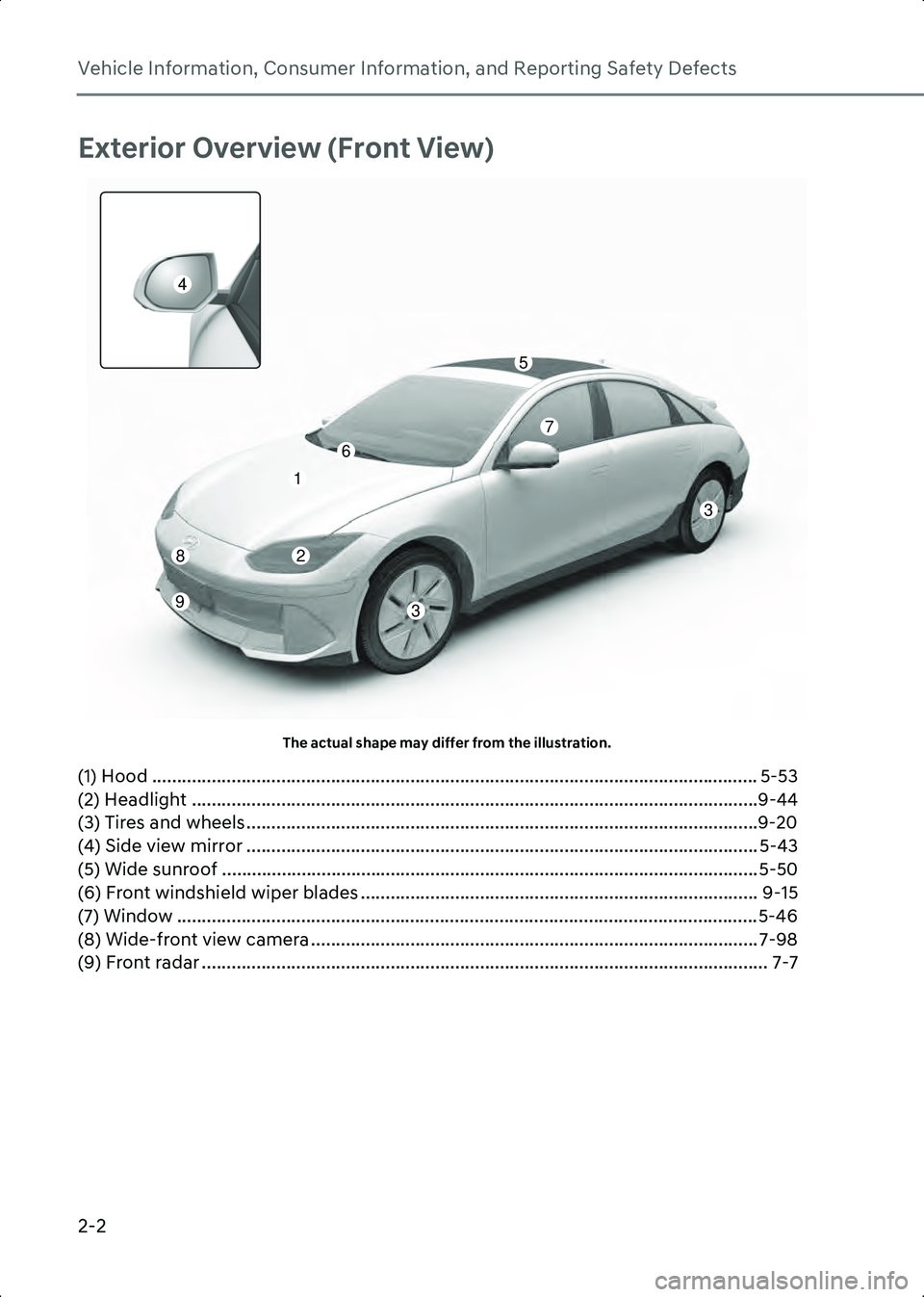
Exterior Overview (Front View)
A1000201The actual shape may differ from the illustration.
(1) Hood .......................................................................................................................... 5-53
(2) Headlight ..................................................................................................................9-44
(3) Tires and wheels .......................................................................................................9-20
(4) Side view mirror ....................................................................................................... 5-43
(5) Wide sunroof ............................................................................................................5-50
(6) Front windshield wiper blades ................................................................................ 9-15
(7) Window ..................................................................................................................... 5-46
(8) Wide-front view camera .......................................................................................... 7-98
(9) Front radar .................................................................................................................. 7-7
1
2
3
3
5
6
7
8
9
4
Hyundai_CE_en_US.book Page 2
Page 78 of 582
Vehicle Information, Consumer Information, and Reporting Safety Defects
2-4
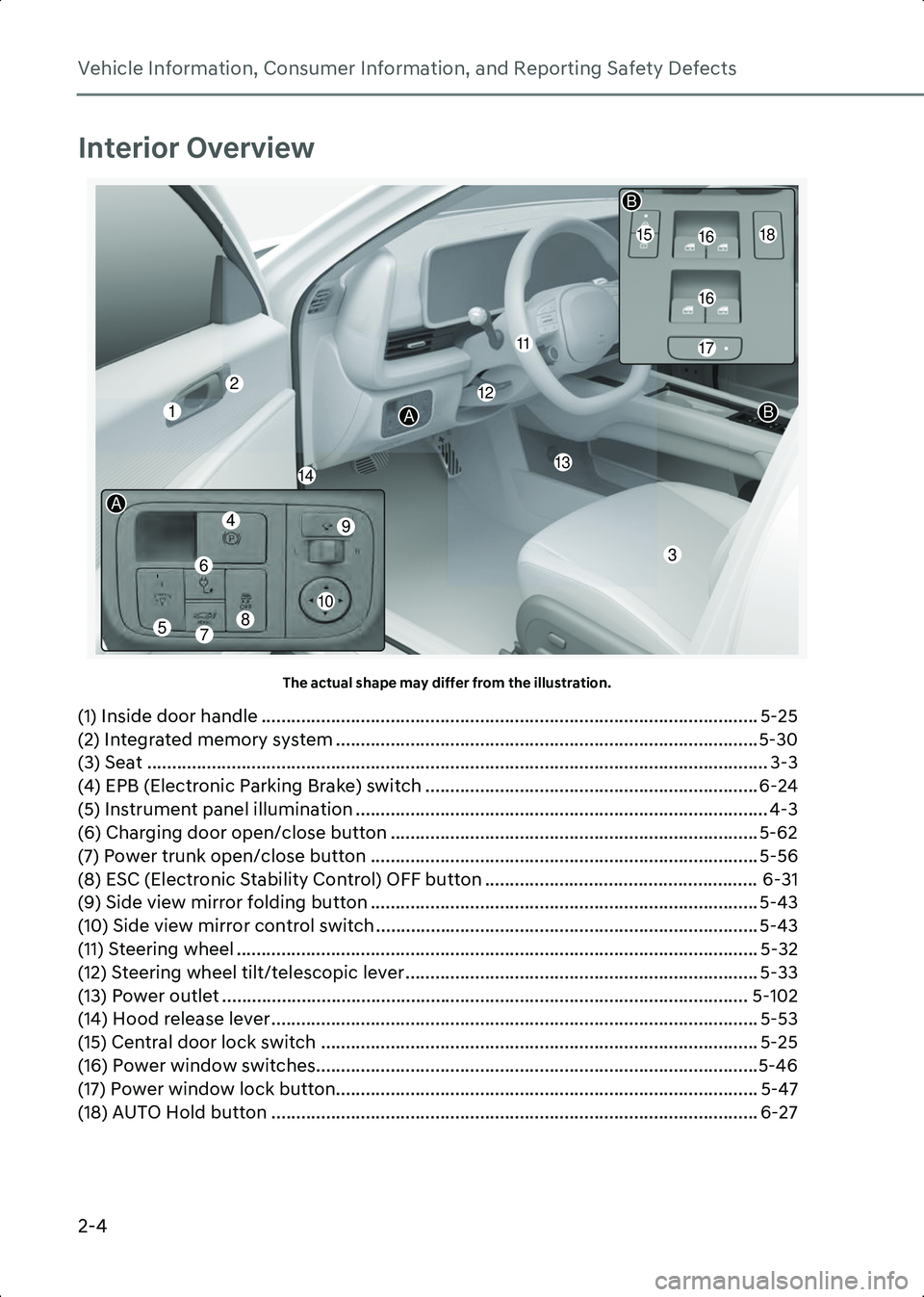
Interior Overview
A1000501The actual shape may differ from the illustration.
(1) Inside door handle .................................................................................................... 5-25
(2) Integrated memory system .....................................................................................5-30
(3) Seat ............................................................................................................................. 3-3
(4) EPB (Electronic Parking Brake) switch ................................................................... 6-24
(5) Instrument panel illumination ................................................................................... 4-3 (6) Charging door open/close button .......................................................................... 5-62
(7) Power trunk open/close button .............................................................................. 5-56
(8) ESC (Electronic Stability Control) OFF button ....................................................... 6-31
(9) Side view mirror folding button .............................................................................. 5-43
(10) Side view mirror control switch ............................................................................. 5-43
(11) Steering wheel ......................................................................................................... 5-32
(12) Steering wheel tilt/telescopic lever ....................................................................... 5-33
(13) Power outlet .......................................................................................................... 5-102 (14) Hood release lever .................................................................................................. 5-53
(15) Central door lock switch ........................................................................................ 5-25 (16) Power window switches.........................................................................................5-46
(17) Power window lock button..................................................................................... 5-47
(18) AUTO Hold button .................................................................................................. 6-27
112
1314
16
16
17
1518
11
2
3
B
B
A
10
7
6
49
8
A
5
Hyundai_CE_en_US.book Page 4
Page 85 of 582
2
2-11
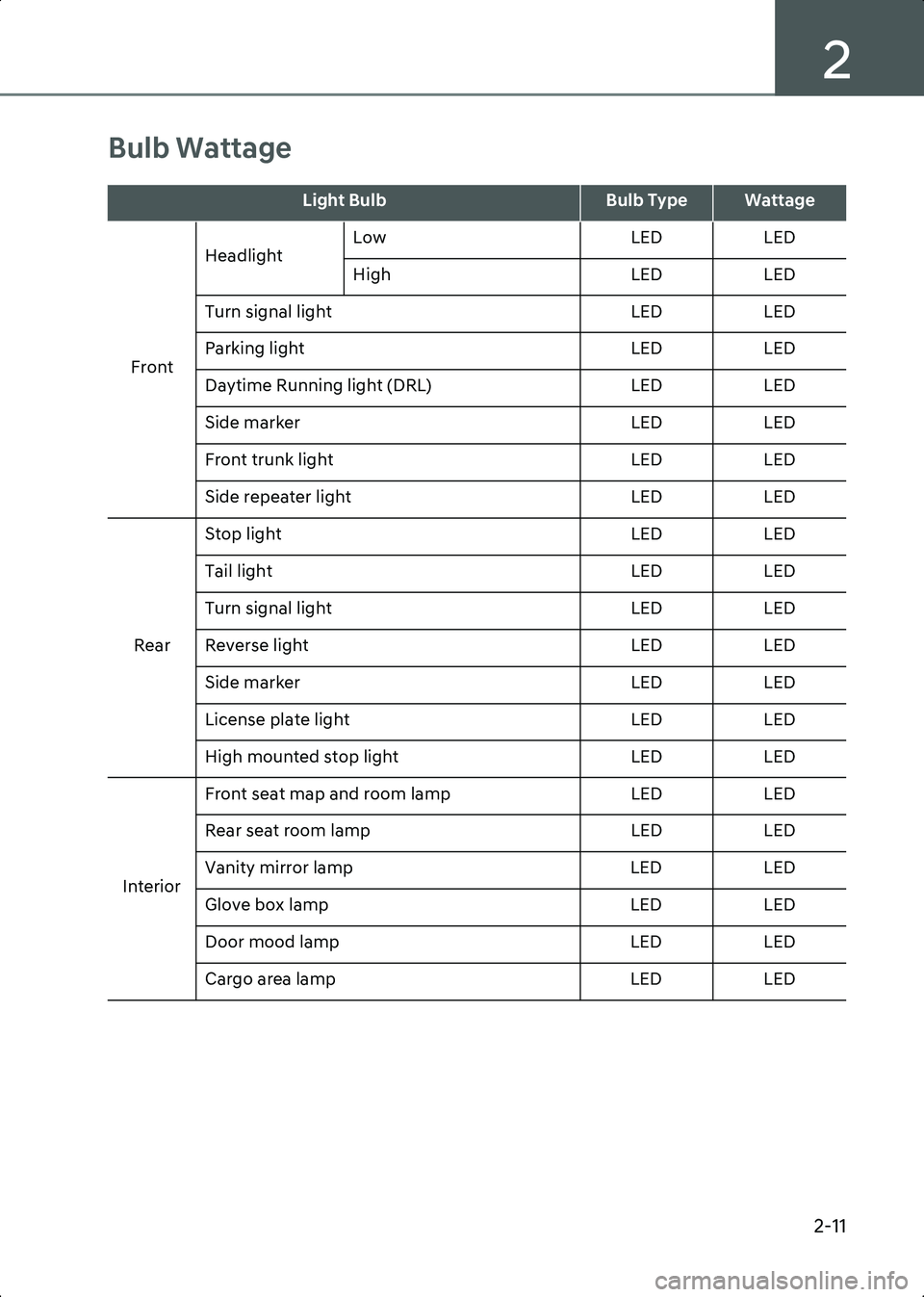
Bulb Wattage
Light BulbBulb TypeWattage
Front Headlight
Low
LEDLED
High LEDLED
Turn signal light LEDLED
Parking light LEDLED
Daytime Running light (DRL) LEDLED
Side marker LEDLED
Front trunk light LEDLED
Side repeater light LEDLED
Rear Stop light
LEDLED
Tail light LEDLED
Turn signal light LEDLED
Reverse light LEDLED
Side marker LEDLED
License plate light LEDLED
High mounted stop light LEDLED
Interior Front seat map and room lamp
LEDLED
Rear seat room lamp LEDLED
Vanity mirror lamp LEDLED
Glove box lamp LEDLED
Door mood lamp LEDLED
Cargo area lamp LEDLED
Hyundai_CE_en_US.book Page 11
Page 132 of 582
Seats & Safety System
3-38
ability to control the SRS deployment
based on whether or not the seat belts are
fastened, and how severe the impact is.
The advanced SRS offers the ability to
control the airbag inflation within two
levels. A first stage level is provided for
moderate-severity impacts. A second
stage level is provided for more severe
impacts.
According to the impact severity, and
seat belt usage, the SRS Control Module
(SRSCM) controls the airbag inflation.
Failure to properly wear seat belts can
increase the risk or severity of injury in an
accident.
WARNING To reduce the risk of serious injury or
death from inflating front airbags, take
the following precautions:
• Seat belts must be worn at all times to help keep occupants positioned
properly.
• Move your seat as far back as possible from front airbags, while still
maintaining control of the vehicle.
• Never lean against the door or center console.
• Do not allow the front passenger to place their feet or legs on the
dashboard.
• Never place any objects (such as dashboard cover, mobile phone holder,
cup holder, perfume or stickers) over or
near the airbag modules on the steering
wheel, instrument panel, windshield
glass, and the front passenger’s panel
above the glove box. Such objects may
cause harm if the vehicle is in a collision
severe enough to cause the airbags to
deploy.
• Do not attach any objects on the front windshield and inside mirror.
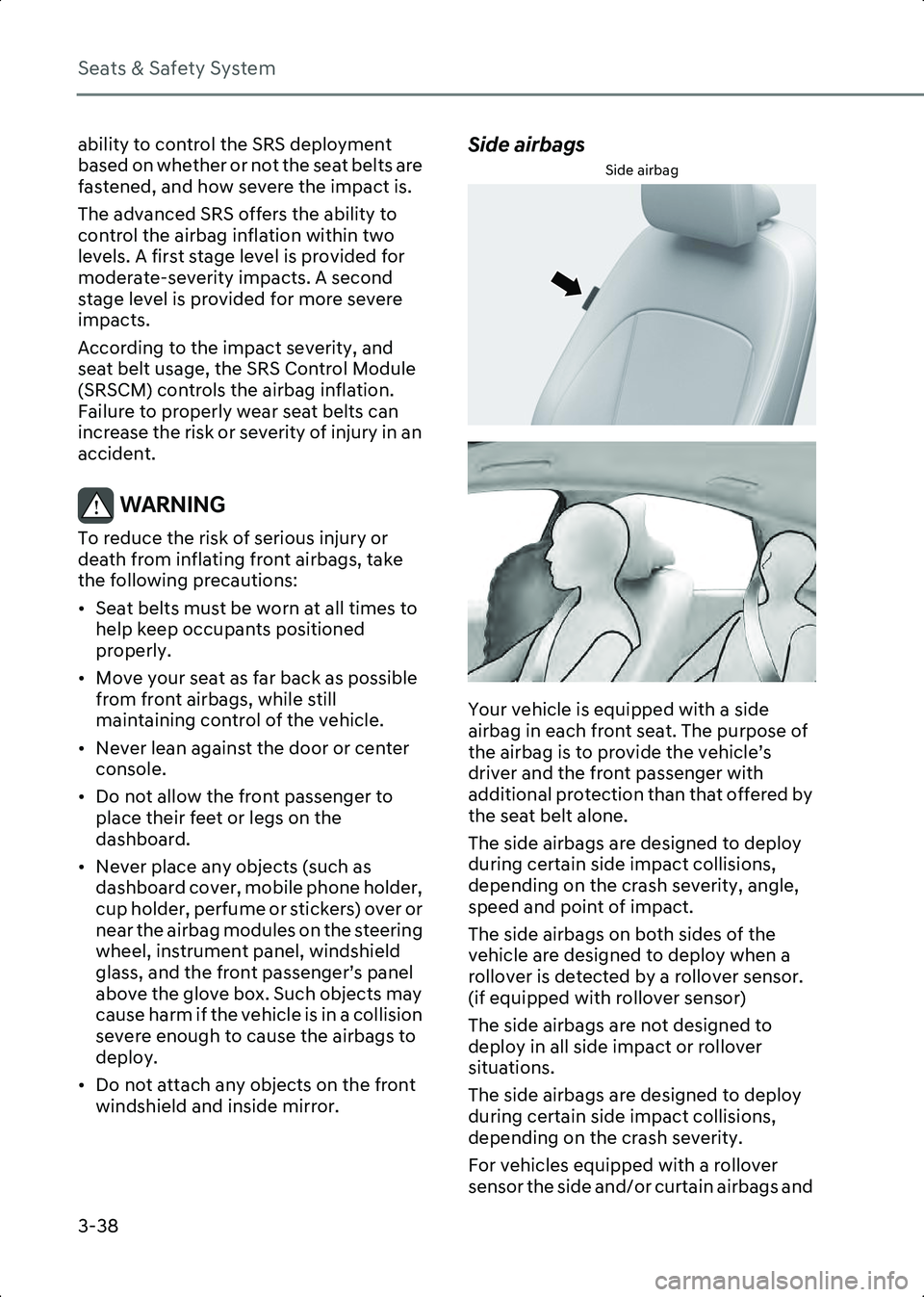
Side airbags
Side airbag
B3003202
B3003203
Your vehicle is equipped with a side
airbag in each front seat. The purpose of
the airbag is to provide the vehicle’s
driver and the front passenger with
additional protection than that offered by
the seat belt alone.
The side airbags are designed to deploy
during certain side impact collisions,
depending on the crash severity, angle,
speed and point of impact.
The side airbags on both sides of the
vehicle are designed to deploy when a
rollover is detected by a rollover sensor.
(if equipped with rollover sensor)
The side airbags are not designed to
deploy in all side impact or rollover
situations.
The side airbags are designed to deploy
during certain side impact collisions,
depending on the crash severity.
For vehicles equipped with a rollover
sensor the side and/or curtain airbags and
Hyundai_CE_en_US.book Page 38
Page 179 of 582
5
5. Convenience Features
Accessing Your Vehicle ................................................................................................... 5-5Smart Key ..................................................................................................................... 5-5
Immobilizer System ................................................................................................... 5-10
Hyundai Digital Key ........................................................................................................ 5-11 Digital Key Application ............................................................................................... 5-11
How To Save/Delete The Digital Key (Smartphone Key) ......................................... 5-11
When user changes smartphone or deletes digital key application .......................5-13
How to save/delete the digital key (Card Key) .........................................................5-13
Disabling digital key................................................................................................... 5-16
Personalized profile and vehicle settings................................................................. 5-16
Used Vehicle/Digital Key Maintenance .................................................................... 5-19
Limitations of the System.......................................................................................... 5-19
Door Locks ..................................................................................................................... 5-20 Operating Door Unlocks from Outside the Vehicle (Manual type) ........................ 5-20
Operating Door Unlocks from Outside the Vehicle (Electric type) ......................... 5-21
Operating Door Locks from Outside the Vehicle (Manual type) ............................ 5-22
Operating Door Locks from Outside the Vehicle (Electric type) ............................ 5-22
Operating Door Lock/Unlock from Inside the Vehicle ............................................ 5-25
Automatic Door Lock and Unlock Features ............................................................. 5-25
Child-Protector Rear Door Locks .............................................................................. 5-26
Theft-Alarm System ...................................................................................................... 5-27
Rear Occupant Alert (ROA) ........................................................................................... 5-28 System Setting ........................................................................................................... 5-28
System Operation ...................................................................................................... 5-28
Declaration of Conformity......................................................................................... 5-30
Integrated Memory System ..........................................................................................5-30 Storing Memory Positions ..........................................................................................5-31
Recalling Memory Positions.......................................................................................5-31
Resetting the System..................................................................................................5-31
Seat Easy Access ........................................................................................................ 5-32
Steering Wheel .............................................................................................................. 5-32 Motor Driven Power Steering (MDPS) ...................................................................... 5-32
Tilt/Telescopic Steering............................................................................................. 5-33
Horn ............................................................................................................................ 5-33
Heated Steering Wheel.............................................................................................. 5-34
Mirrors ............................................................................................................................ 5-35
Hyundai_CE_en_US.book Page 1
Page 180 of 582
5
Inside Rearview Mirror ...............................................................................................5-35
Side View Mirrors ...................................................................................................... 5-43
Reverse Parking Aid .................................................................................................. 5-45
Windows ........................................................................................................................ 5-46 Power Windows .......................................................................................................... 5-47
Wide Sunroof................................................................................................................. 5-50
Hood ...............................................................................................................................5-53 Opening the Hood ......................................................................................................5-53
Closing the Hood ........................................................................................................5-53
Front Trunk .................................................................................................................... 5-54 Opening the Front Trunk........................................................................................... 5-54
Power Trunk ...................................................................................................................5-55 Power Trunk Operating Conditions...........................................................................5-55
Operating the Power Trunk ...................................................................................... 5-56Resetting the Power Trunk ....................................................................................... 5-58
Emergency Trunk Safety Release............................................................................. 5-58
Smart Trunk ................................................................................................................... 5-60 Using Smart Trunk ..................................................................................................... 5-60
Deactivating smart trunk ........................................................................................... 5-61
Detecting area ............................................................................................................ 5-61
Electric Charging Door ................................................................................................. 5-62
Head-up Display ........................................................................................................... 5-63 Head-up Display Settings ......................................................................................... 5-63
Head-up Display Information ................................................................................... 5-63
Precautions while Using the Head-up Display ........................................................ 5-63
Over-The-Air Software Update .................................................................................... 5-65 Downloading Software ............................................................................................. 5-65
Approving Software Update ..................................................................................... 5-65
Preparing Software Update ...................................................................................... 5-65Updating Software .................................................................................................... 5-65
Lighting ...........................................................................................................................5-67 Exterior Lights ............................................................................................................. 5-67
Welcome system ........................................................................................................5-70
Interior Lights ................................................................................................................. 5-71 Interior Light AUTO cut .............................................................................................. 5-71
Hyundai_CE_en_US.book Page 2
Page 181 of 582
5
5. Convenience Features
Front lamps.................................................................................................................. 5-71
Rear lamps ................................................................................................................... 5-71
Vanity Mirror Lamp .................................................................................................... 5-72
Glove Box Lamp ......................................................................................................... 5-72
Mood Lamp ................................................................................................................ 5-72
Front Trunk Lamp....................................................................................................... 5-73
High Beam Assist (HBA) ................................................................................................ 5-74 High Beam Assist Settings ........................................................................................ 5-74
High Beam Assist Operation ..................................................................................... 5-74
High Beam Assist Malfunction and Limitations ....................................................... 5-75
Wipers and Washers ...................................................................................................... 5-77 Front Windshield Wipers ........................................................................................... 5-77
Front Windshield Washers ........................................................................................ 5-78
Automatic Climate Control System..............................................................................5-80 Climate........................................................................................................................ 5-82
Automatic Temperature Control Mode .................................................................... 5-82
Manual Temperature Control Mode ......................................................................... 5-83
System Operation ...................................................................................................... 5-91
System Maintenance ................................................................................................. 5-92
Windshield Defrosting and Defogging.........................................................................5-94 To Defog Inside Windshield ......................................................................................5-94To Defrost Outside Windshield .................................................................................5-94
Defogging Logic......................................................................................................... 5-95
Rear Window Defroster ............................................................................................. 5-95
Climate Control Additional Features ............................................................................5-96 A/C Automatic Drying................................................................................................5-96
Auto Defogging System ............................................................................................5-96
Auto Dehumidify ........................................................................................................ 5-97
Sunroof Inside Air recirculation ................................................................................5-98
Recirculating Air When Washer Fluid Is Used..........................................................5-98
Recirculation Mode Plus............................................................................................5-98
Automatic Controls Linked to Climate Control Settings (for driver’s seat) ...........5-99
Smart Ventilation .......................................................................................................5-99
Storage Compartment ................................................................................................ 5-100 Center Console Storage .......................................................................................... 5-100
Glove Box.................................................................................................................. 5-100
Hyundai_CE_en_US.book Page 3
Page 184 of 582
Convenience Features
5-6
smart key with you locks all doors and
let the door handle to retract back.
Information • The side view mirror will fold if ‘Enable on
Door Unlock’ is selected from the Settings
menu in the infotainment system. Select
Setup > Vehicle > Lights > Welcome
Mirror/Light > Enable on Door Unlock .
• The door handle touch sensor operates when the smart key is within 28-40 in.
(0.7-1 m) from the outside door handle.
• If you lock the doors using the door handle touch sensor, the doors are not locked under
the following circumstances:
- The smart key is in the vehicle.
- The Start/Stop button is from ACC or ON position.
- Any door is open (except for the trunk).
• If this occurs, a chime sounds for about 3 seconds. Check the vehicle before
attempting to lock the vehicle again.
WARNING Do not leave the smart key in your vehicle
with children that are unattended or
unsupervised.
Children could unintentionally press the
Start/Stop button or could operate the
power windows or other vehicle controls
or even cause the vehicle to move. This
may result in serious injury or death.
Information • To fold/unfold the side view mirror simultaneously when the door is
locked/unlocked, select Setup > Vehicle >
Lights > Welcome Mirror/Light >
Enable on Door Unlock in the
infotainment system.
• The door handle button will only operate when the smart key is within 28-40 in. (0.7-1 m) from the outside door handle.
Other people can also open the doors
without the smart key in possession.
• After unlocking the doors, the doors will lock automatically after 30 seconds unless a
door is opened.
The infotainment system may change after
software updates. For more information, refer
to the user’s manual provided in the
infotainment system and the quick reference
guide.
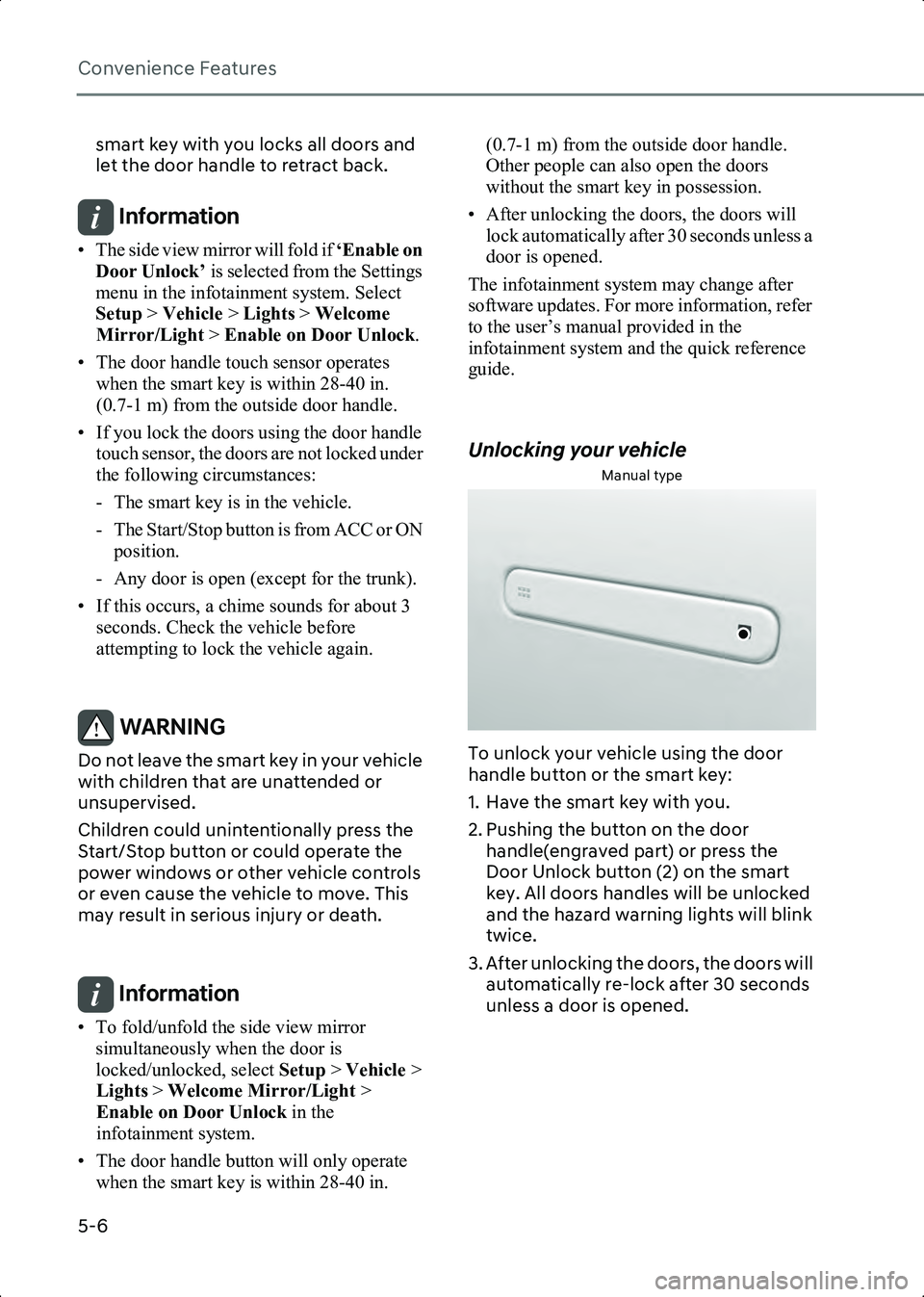
Unlocking your vehicle
Manual type
B5000204
To unlock your vehicle using the door
handle button or the smart key:
1. Have the smart key with you.
2. Pushing the button on the door handle(engraved part) or press the
Door Unlock button (2) on the smart
key. All doors handles will be unlocked
and the hazard warning lights will blink
twice.
3. After unlocking the doors, the doors will automatically re-lock after 30 seconds
unless a door is opened.
Hyundai_CE_en_US.book Page 6
Page 185 of 582
5
5-7
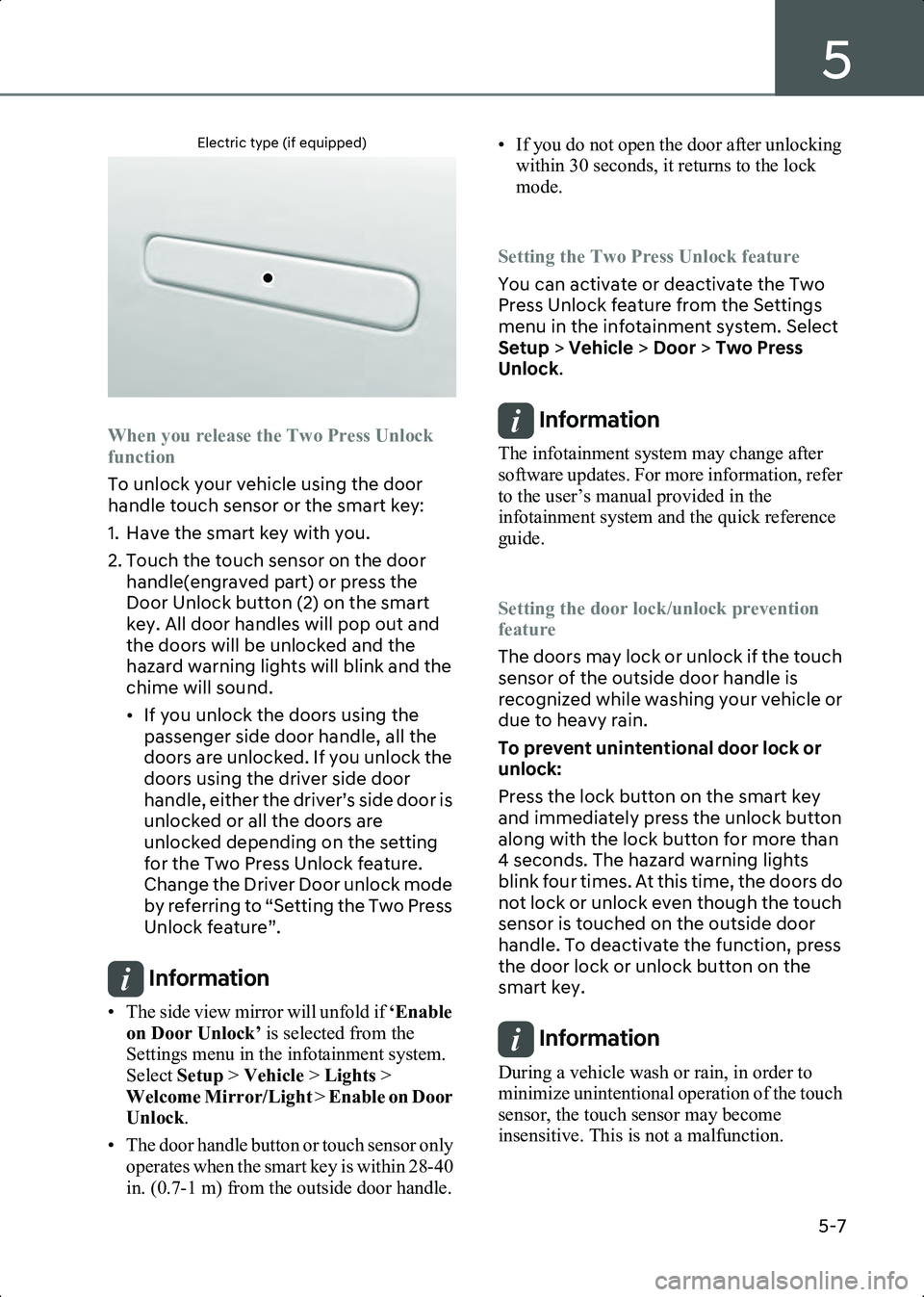
Electric type (if equipped)
B5002804
When you release the Two Press Unlock
function
To unlock your vehicle using the door
handle touch sensor or the smart key:
1. Have the smart key with you.
2. Touch the touch sensor on the door handle(engraved part) or press the
Door Unlock button (2) on the smart
key. All door handles will pop out and
the doors will be unlocked and the
hazard warning lights will blink and the
chime will sound.
• If you unlock the doors using the passenger side door handle, all the
doors are unlocked. If you unlock the
doors using the driver side door
handle, either the driver’s side door is
unlocked or all the doors are
unlocked depending on the setting
for the Two Press Unlock feature.
Change the Driver Door unlock mode
by referring to “Setting the Two Press
Unlock feature”.
Information • The side view mirror will unfold if ‘Enable
on Door Unlock’ is selected from the
Settings menu in the infotainment system.
Select Setup > Vehicle > Lights >
Welcome Mirror/Light > Enable on Door
Unlock .
• The door handle button or touch sensor only operates when the smart key is within 28-40
in. (0.7-1 m) from the outside door handle. • If you do not open the door after unlocking
within 30 seconds, it returns to the lock
mode.
Setting the Two Press Unlock feature
You can activate or deactivate the Two
Press Unlock feature from the Settings
menu in the infotainment system. Select
Setup > Vehicle > Door > Two Press
Unlock .
Information The infotainment system may change after
software updates. For more information, refer
to the user’s manual provided in the
infotainment system and the quick reference
guide.
Setting the door lock/unlock prevention
feature
The doors may lock or unlock if the touch
sensor of the outside door handle is
recognized while washing your vehicle or
due to heavy rain.
To prevent unintentional door lock or
unlock:
Press the lock button on the smart key
and immediately press the unlock button
along with the lock button for more than
4 seconds. The hazard warning lights
blink four times. At this time, the doors do
not lock or unlock even though the touch
sensor is touched on the outside door
handle. To deactivate the function, press
the door lock or unlock button on the
smart key.
Information During a vehicle wash or rain, in order to
minimize unintentional operation of the touch
sensor, the touch sensor may become
insensitive. This is not a malfunction.
Hyundai_CE_en_US.book Page 7
Page 196 of 582
Convenience Features
5-18
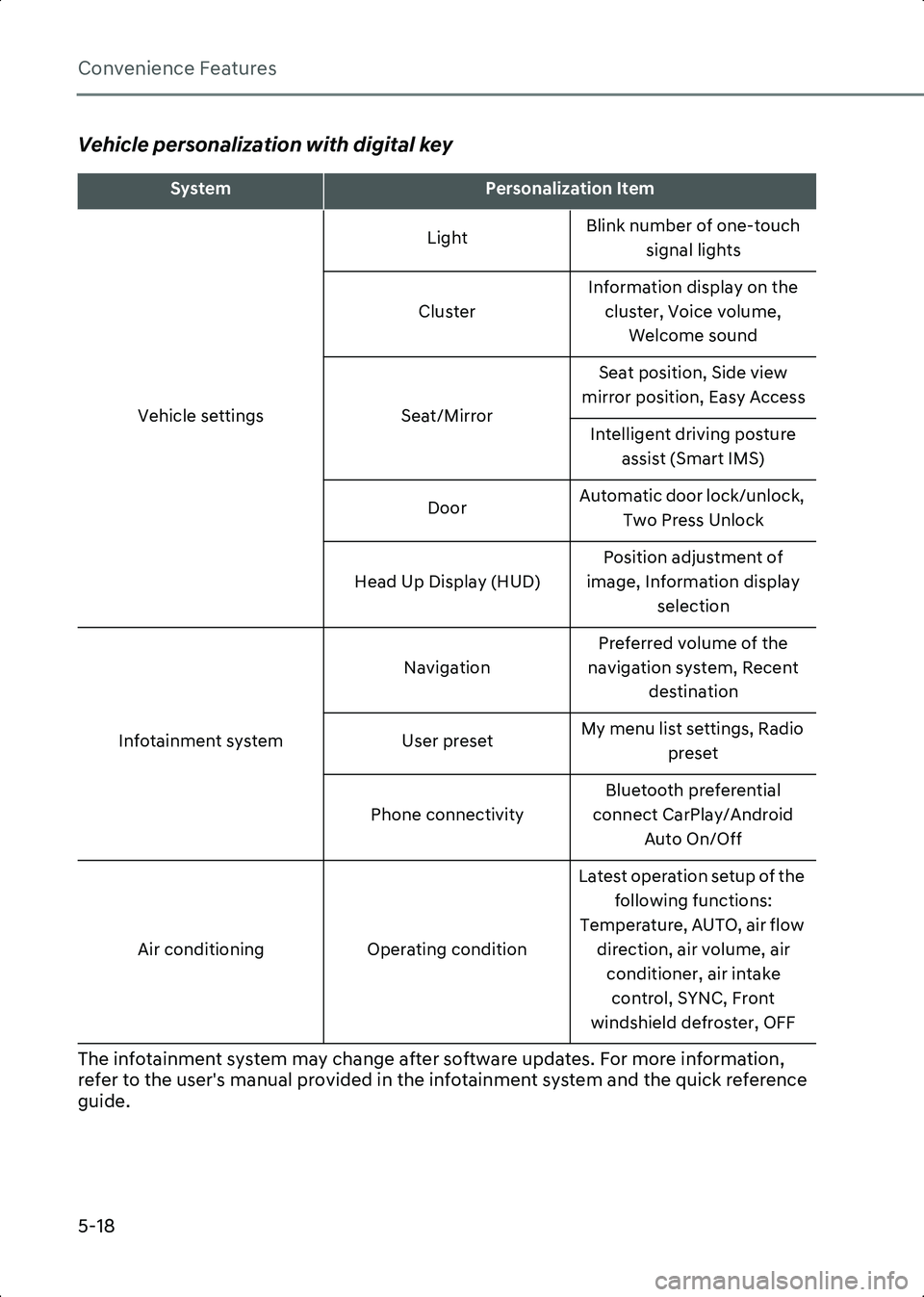
Vehicle personalization with digital key
The infotainment system may change after software updates. For more information,
refer to the user's manual provided in the infotainment system and the quick reference
guide.
SystemPersonalization Item
Vehicle settings Light
Blink number of one-touch
signal lights
Cluster Information display on the
cluster, Voice volume, Welcome sound
Seat/Mirror Seat position, Side view
mirror position, Easy Access
Intelligent driving posture assist (Smart IMS)
Door Automatic door lock/unlock,
Two Press Unlock
Head Up Display (HUD) Position adjustment of
image, Information display selection
Infotainment system Navigation
Preferred volume of the
navigation system, Recent destination
User preset My menu list settings, Radio
preset
Phone connectivity Bluetooth preferential
connect CarPlay/Android Auto On/Off
Air conditioning Operating conditionLatest operation setup of the
following functions:
Temperature, AUTO, air flow direction, air volume, air conditioner, air intake control, SYNC, Front
windshield defroster, OFF
Hyundai_CE_en_US.book Page 18