phone Hyundai Ioniq Electric 2018 Owner's Guide
[x] Cancel search | Manufacturer: HYUNDAI, Model Year: 2018, Model line: Ioniq Electric, Model: Hyundai Ioniq Electric 2018Pages: 541, PDF Size: 19.83 MB
Page 241 of 541
![Hyundai Ioniq Electric 2018 Owners Guide 4-24
Multimedia System
(4) Save: Save the selected file(s)
.
- Select the files you want to save, and select [Save]. This saves the
selected files to My Music.
- Saving is canceled if phone calls are](/img/35/14904/w960_14904-240.png "Hyundai Ioniq Electric 2018 Owners Guide 4-24
Multimedia System
(4) Save: Save the selected file(s)
.
- Select the files you want to save, and select [Save]. This saves the
selected files to My Music.
- Saving is canceled if phone calls are")
4-24
Multimedia System
(4) Save: Save the selected file(s)
.
- Select the files you want to save, and select [Save]. This saves the
selected files to My Music.
- Saving is canceled if phone calls are received or made while saving.
- If Siri is activated, phone calls are received or made while sav-
ing, saving will be canceled.
- Up to 6,000 files can be saved.
- The currently playing file on the USB device cannot be changed
while saving.
- My Music cannot be used while saving.
- Up to 700 MB can be saved.
Information: Detailed information on the currently playing song is dis-
played.
Sound Settings: Audio sound set- tings can be changed.Information
-
Using the iPod®Devices
• To use the audio system’s iPod
®con-
trol function, use the dedicated
cable provided with your iPod
®.
• Connecting the iPod
®to the vehicle
during play may result in a loud
noise that lasts about one to two sec-
onds. Connect the iPod
®to the vehi-
cle after stopping or pausing play.
• Connect the iPod
®with the vehicle in
the ACC ON state to begin charging.
• When connecting the iPod
®cable,
be sure to fully push the cable into
the port.
• When EQ effects are enabled simul- taneously on external devices, such
as iPod
®s and the audio system, the
EQ effects may overlap, causing
sound quality deterioration or dis-
tortion. Deactivate the EQ function
for all external devices, if possible.
• Noise may occur when your iPod
®
or the AUX port is connected.
Disconnect and store separately
when not in use. (Continued)(Continued)
• There may be noise if the audio sys-
tem is used with an iPod
®or AUX
external device connected to the
power jack. In these cases, discon-
nect the iPod
®or external device
from the power jack.
• Play may be interrupted, or device malfunctions may occur depending
on the characteristics of your
iPod
®/iPhone®.
• Play may fail if your iPhone
®is con-
nected through both Bluetooth®
Wireless Technology and USB. In
this case, select Dock connector or
Bluetooth
®Wireless Technology on
your iPhone®to change the sound
output settings.
• If your software version does not support the communication proto-
col or your iPod
®is not recognized
due to device failure, anomalies or
defects, iPod
®mode cannot be used.
• iPod
®nano (5th generation) devices
may not be recognized if the battery
is low. Charge sufficiently before use.
(Continued)
i
Page 242 of 541
4-25
Multimedia System
4
(Continued)
• The search and song play order inthe iPod
®device may be different
from the search order in the audio
system.
• If the iPod
®has failed due to an
internal defect, please reset the
iPod
®(consult your iPod®manual).
• Depending on the software version, the iPod
®may fail to sync with the
system. If the media is removed or
disconnected before recognition, the
previous mode may not be restored
(iPad
®cannot be charged).
• Cables other than the 1-meter cable provided with iPod
®/iPhone®prod-
ucts may not be recognized.
• When other music apps are used on your iPod
®, the system sync func-
tion may fail due to malfunction of
the iPod
®application.
iPod®
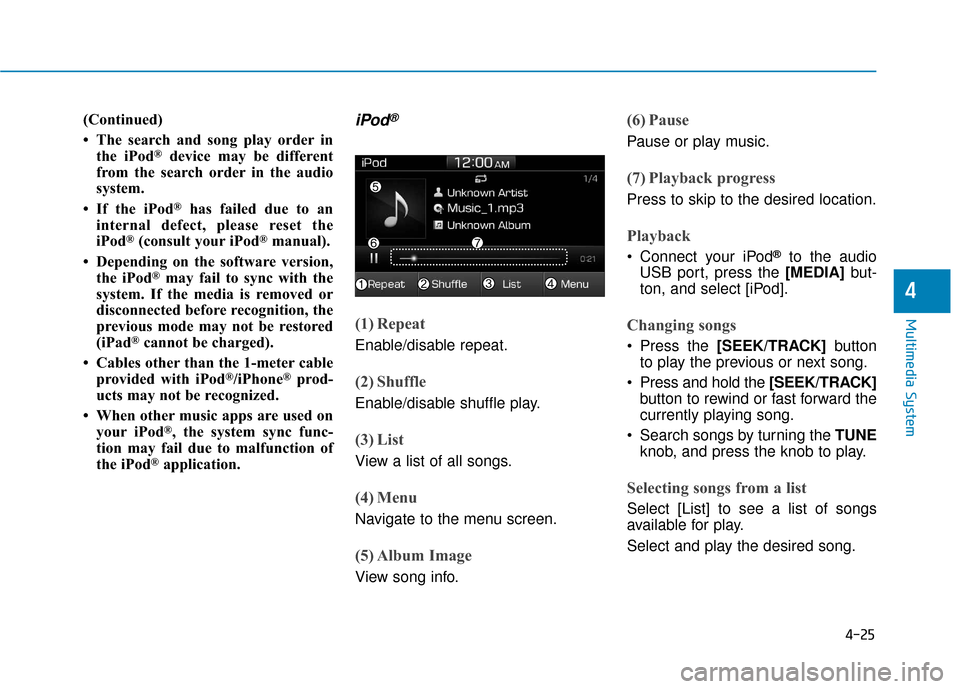
(1) Repeat
Enable/disable repeat.
(2) Shuffle
Enable/disable shuffle play.
(3) List
View a list of all songs.
(4) Menu
Navigate to the menu screen.
(5) Album Image
View song info.
(6) Pause
Pause or play music.
(7) Playback progress
Press to skip to the desired location.
Playback
Connect your iPod®to the audio
USB port, press the [MEDIA] but-
ton, and select [iPod].
Changing songs
Press the [SEEK/TRACK] button
to play the previous or next song.
Press and hold the [SEEK/TRACK] button to rewind or fast forward the
currently playing song.
Search songs by turning the TUNE knob, and press the knob to play.
Selecting songs from a list
Select [List] to see a list of songs
available for play.
Select and play the desired song.
Page 244 of 541
4-27
Multimedia System
4
Information
-
Using Bluetooth®Wireless
Technology Audio
• Bluetooth
®Wireless Technology
Audio mode can only be used if a
Bluetooth
®Wireless Technology
enabled phone is connected. Only
devices that support Bluetooth
®
Wireless Technology audio can be
used.
• If the Bluetooth
®Wireless
Technology-enabled phone is dis-
connected during play, the music
stops.
• When the TRACK UP/DOWN but- tons are used during Bluetooth
®
Wireless Technology audio stream-
ing, a popping noise or sound inter-
ruptions may occur, depending on
the cell phone device.
• Depending on the cell phone model, the audio streaming function may
not be supported.
(Continued)(Continued)
• If a phone call is made or received
when music is playing in Bluetooth
®
Wireless Technology Audio mode,
the call may mix with the music.
• When returning to Bluetooth
®
Wireless Technology Audio mode
after ending a call, play might not
resume automatically for some cell
phone models.
Bluetooth®Wireless Technology
Handsfree is a feature that
enables drivers to practice safe
driving. Connecting the car
audio system with a
Bluetooth®
Wireless Technology phone
allows the user to conveniently
make calls, receive calls, and
manage the phone book. Before
using the
Bluetooth®Wireless
Technology, carefully read the
contents of this user’s manual.
Excessive use or operations while driving may lead to negli-
gent driving practices and be
the cause of accidents.
Do not operate the device exces- sively while driving.
Viewing the screen for pro- longed periods of time is dan-
gerous and may lead to acci-
dents.
When driving, view the screen only for short periods of time.
NOTICEi
Page 245 of 541
4-28
Multimedia System
Bluetooth®Wireless Technology
(BT) Audio
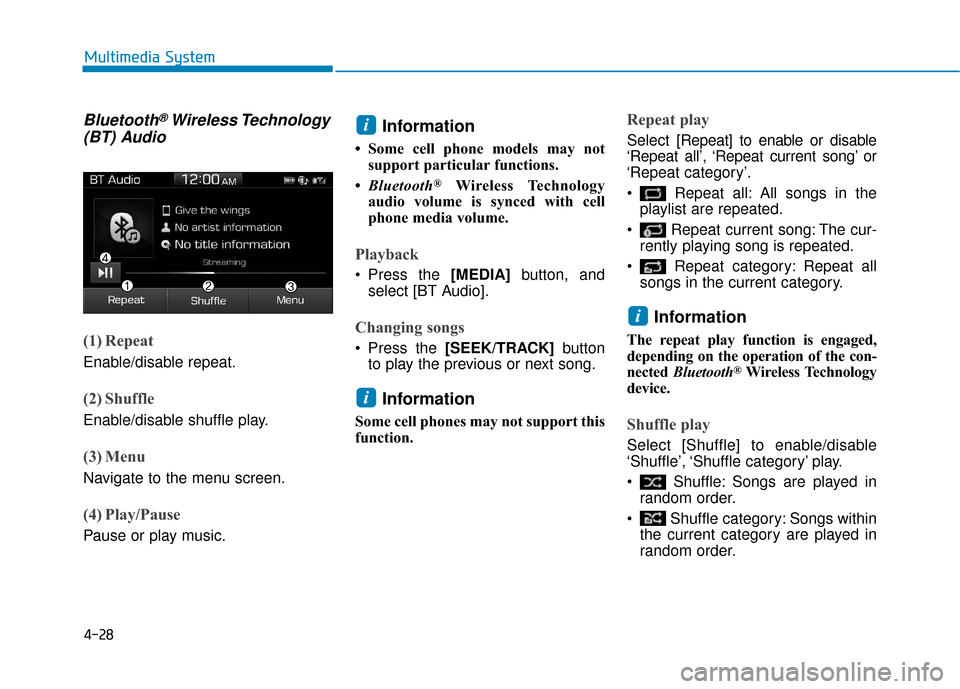
(1) Repeat
Enable/disable repeat.
(2) Shuffle
Enable/disable shuffle play.
(3) Menu
Navigate to the menu screen.
(4) Play/Pause
Pause or play music.
Information
• Some cell phone models may not
support particular functions.
• Bluetooth
®Wireless Technology
audio volume is synced with cell
phone media volume.
Playback
Press the [MEDIA] button, and
select [BT Audio].
Changing songs
Press the [SEEK/TRACK] button
to play the previous or next song.
Information
Some cell phones may not support this
function.
Repeat play
Select [Repeat] to enable or disable
‘Repeat all’, ‘Repeat current song’ or
‘Repeat category’.
Repeat all: All songs in the playlist are repeated.
Repeat current song: The cur- rently playing song is repeated.
Repeat category: Repeat all songs in the current category.
Information
The repeat play function is engaged,
depending on the operation of the con-
nected Bluetooth
®Wireless Technology
device.
Shuffle play
Select [Shuffle] to enable/disable
‘Shuffle’, ‘Shuffle category’ play.
Shuffle: Songs are played in random order.
Shuffle category: Songs within the current category are played in
random order.
i
i
i
Page 248 of 541
![Hyundai Ioniq Electric 2018 Owners Guide 4-31
Multimedia System
4
(4) Delete: Delete the selected file(s).
- Select the file to delete, thenselect [Delete] to delete it.
- If Siri is activated, phone calls are received or made during
delete,](/img/35/14904/w960_14904-247.png "Hyundai Ioniq Electric 2018 Owners Guide 4-31
Multimedia System
4
(4) Delete: Delete the selected file(s).
- Select the file to delete, thenselect [Delete] to delete it.
- If Siri is activated, phone calls are received or made during
delete,")
4-31
Multimedia System
4
(4) Delete: Delete the selected file(s).
- Select the file to delete, thenselect [Delete] to delete it.
- If Siri is activated, phone calls are received or made during
delete, delete will be canceled.
Add to Playlist: Frequently played songs can be paired in a [Playlist].
- Songs can be played from the[Playlist].
Information: Detailed info on the currently playing song is displayed.
Sound Settings: Audio sound set- tings can be changed.
Delete from Playlist
When a song in the playlist is play-
ing, select [Menu] and select [Delete
from Playlist].
Select the song to delete, then select
[Delete].
Pandora
(1) Thumbs Down
If you don’t like the song that is cur-
rently playing, press this button to
skip to the next song and to minimize
the number of songs from similar
genres.
Information
Pandora®limits the number of times
that you can skip to the next song.
(2) Thumbs Up
If you like the song that is currently
playing, press this button. Pandora®
will play more songs from the same
genre.
Information
The settings of this function cannot be
reset.
(3) Skip
Skip to the next song.
Information
Pandora®limits the number of times
that you can skip to the next song.
(4) Stations
Display the station list.
(5) Menu
Navigate to the menu screen.
(6) Album Image
View song info.
i
i
i
Page 249 of 541
4-32
Multimedia System
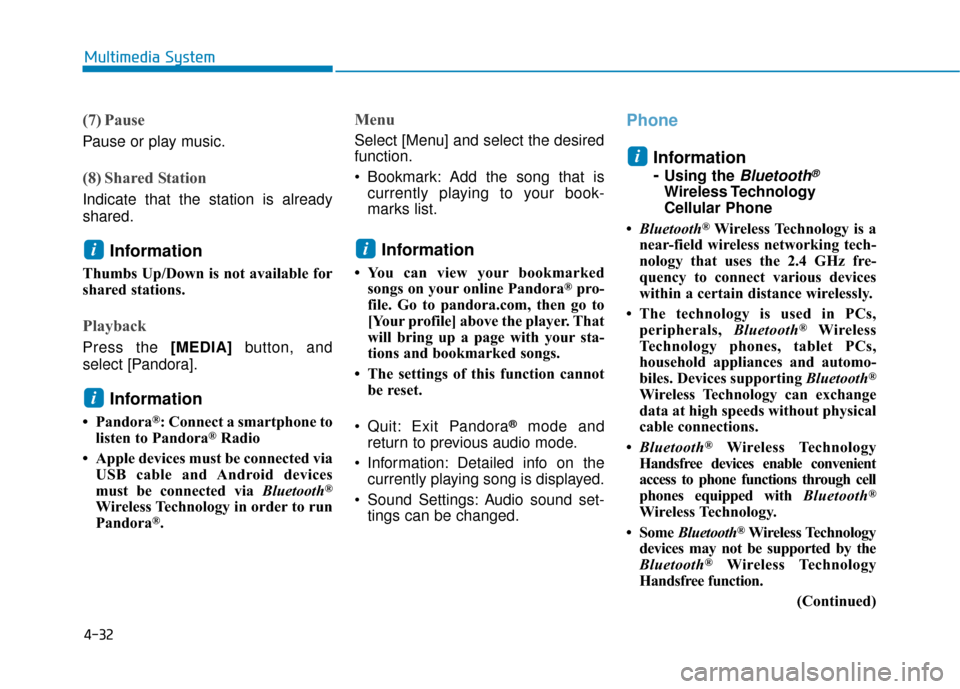
(7) Pause
Pause or play music.
(8) Shared Station
Indicate that the station is already
shared.
Information
Thumbs Up/Down is not available for
shared stations.
Playback
Press the [MEDIA]button, and
select [Pandora].
Information
• Pandora®: Connect a smartphone to
listen to Pandora®Radio
• Apple devices must be connected via USB cable and Android devices
must be connected via Bluetooth
®
Wireless Technology in order to run
Pandora®.
Menu
Select [Menu] and select the desired
function.
Bookmark: Add the song that iscurrently playing to your book-
marks list.
Information
• You can view your bookmarkedsongs on your online Pandora®pro-
file. Go to pandora.com, then go to
[Your profile] above the player. That
will bring up a page with your sta-
tions and bookmarked songs.
• The settings of this function cannot be reset.
Quit: Exit Pandora
®mode and
return to previous audio mode.
Information: Detailed info on the currently playing song is displayed.
Sound Settings: Audio sound set- tings can be changed.
Phone
Information
-
Using the Bluetooth®
Wireless Technology
Cellular Phone
• Bluetooth
®Wireless Technology is a
near-field wireless networking tech-
nology that uses the 2.4 GHz fre-
quency to connect various devices
within a certain distance wirelessly.
• The technology is used in PCs, peripherals, Bluetooth
®Wireless
Technology phones, tablet PCs,
household appliances and automo-
biles. Devices supporting Bluetooth
®
Wireless Technology can exchange
data at high speeds without physical
cable connections.
• Bluetooth
®Wireless Technology
Handsfree devices enable convenient
access to phone functions through cell
phones equipped with Bluetooth
®
Wireless Technology.
• Some Bluetooth
®Wireless Technology
devices may not be supported by the
Bluetooth
®Wireless Technology
Handsfree function.
(Continued)
i
i
i
i
Page 250 of 541
4-33
Multimedia System
4
(Continued)
• When Bluetooth
®Wireless
Technology is connected and calls
are attempted through a connected
cell phone from outside the vehicle,
the call is connected through the
Bluetooth
®Wireless Technology
Handsfree function of the vehicle.
• Please be sure to disconnect the Bluetooth
®Wireless Technology
Handsfree function through your
Bluetooth
®Wireless Technology
device or the audio screen.
• See https://www.hyundaiusa.com/ BlueTooth/ for a list of supported
Bluetooth devices.
Safety precautions
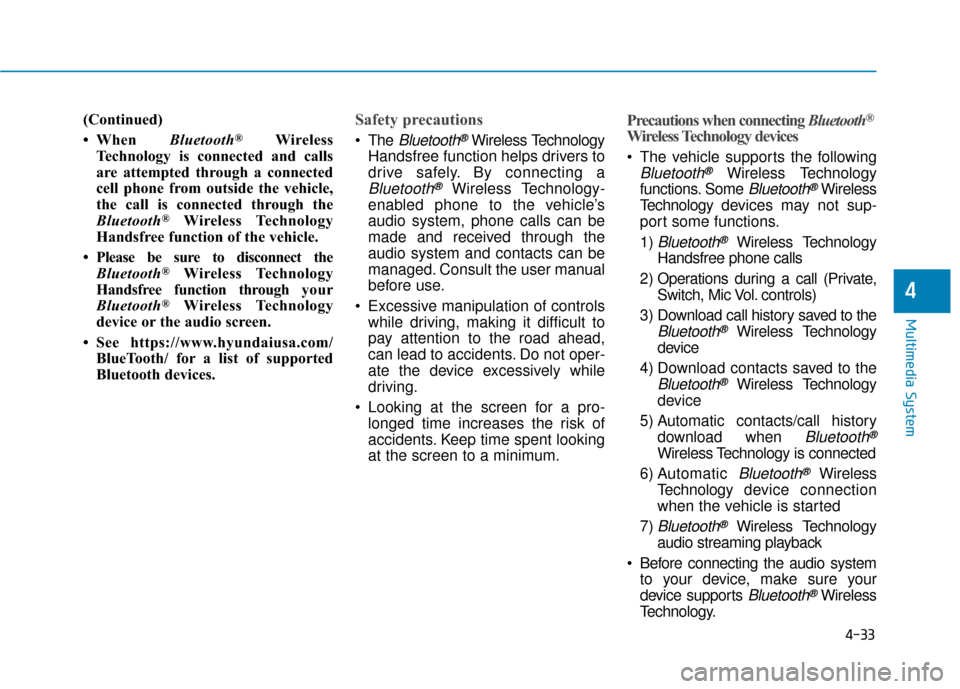
The Bluetooth®Wireless Technology
Handsfree function helps drivers to
drive safely. By connecting a
Bluetooth®Wireless Technology-
enabled phone to the vehicle’s
audio system, phone calls can be
made and received through the
audio system and contacts can be
managed. Consult the user manual
before use.
Excessive manipulation of controls while driving, making it difficult to
pay attention to the road ahead,
can lead to accidents. Do not oper-
ate the device excessively while
driving.
Looking at the screen for a pro- longed time increases the risk of
accidents. Keep time spent looking
at the screen to a minimum.
Precautions when connecting Bluetooth®
Wireless Technology devices
The vehicle supports the following
Bluetooth®Wireless Technology
functions. Some
Bluetooth®Wireless
Technology de vices may not sup-
port some functions.
1)
Bluetooth®Wireless Technology
Handsfree phone calls
2) Operations during a call (Private, Switch, Mic Vol. controls)
3) Download call history saved to the
Bluetooth®Wireless Technology
device
4) Download contacts saved to the
Bluetooth®Wireless Technology
device
5) Automatic contacts/call history download when
Bluetooth®
Wireless Technology is connected
6) Automatic
Bluetooth®Wireless
Technology de vice connection
when the vehicle is started
7)
Bluetooth®Wireless Technology
audio streaming playback
Before connecting the audio system to your device, make sure your
device supports
Bluetooth®Wireless
Technology.
Page 251 of 541
4-34
Multimedia System
Even if your device supports
Bluetooth®Wireless Technology, a
Bluetooth®Wireless Technology con-
nection cannot be established if
the device’s
Bluetooth®Wireless
Technology function is switched off.
Search and connect with the
Bluetooth®Wireless Technology
function enabled.
Pair or connect
Bluetooth®Wireless
Technology de vices to the audio
system with the vehicle at a stand-
still.
If a
Bluetooth®Wireless Technology
connection is lost due to abnormal
conditions while a
Bluetooth®
Wireless Technology de vice is con-
nected (communication range
exceeded, device power OFF,
communication errors, etc.), the
disconnected
Bluetooth®Wireless
Technology de vice is searched for
and automatically reconnected.
If you want to disable the
Bluetooth®
Wireless Technology device auto-
connect function, turn the
Bluetooth®
Wireless Technology function OFF on
your device. Consult the user manu-
als for individual devices to see
whether
Bluetooth®Wireless
Technology is supported. Handsfree call quality and volume
may vary depending on the type of
Bluetooth®Wireless Technology
device.
Some
Bluetooth®Wireless
Technology de vices are subject to
intermittent
Bluetooth®Wireless
Technology connection failures. In
this case, use the following
method.
1) Turn the
Bluetooth®Wireless
Technology function off on your
Bluetooth®Wireless Technology
device ➟Turn it on and try again.
2) Delete the paired device from both the audio system and
Bluetooth®Wireless Technology
device, then pair again.
3) Power down your
Bluetooth®
Wireless Technology de vice ➟
Turn it on and try again.
4) Completely remove the battery from your
Bluetooth®Wireless
Technology de vice; reinsert it,
reboot, and attempt connection.
5) Restart the vehicle and reat- tempt connection.
Pairing a Bluetooth®Wireless
Technology device
Information on pairing Bluetooth®
Wireless Technology devices
Pairing refers to the process of pair-
ing
Bluetooth®Wireless Technology
cell phones or devices with the sys-
tem prior to connection. This is a nec-
essary procedure for
Bluetooth®
Wireless Technology connection and
usage.
Up to five devices can be paired.
Pairing Bluetooth
®device is not
allowed while vehicle is moving.
Pairing the first Bluetooth®Wireless
Technology device
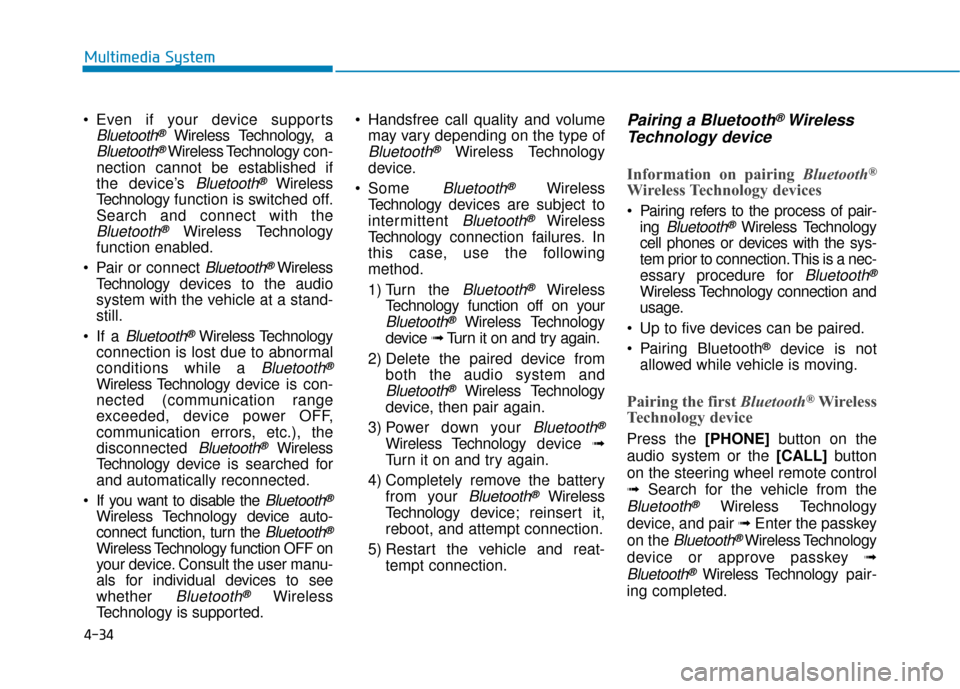
Press the [PHONE]button on the
audio system or the [CALL] button
on the steering wheel remote control
➟ Search for the vehicle from the
Bluetooth®Wireless Technology
device, and pair ➟ Enter the passkey
on the
Bluetooth®Wireless Technology
device or approve passkey ➟
Bluetooth®Wireless Technologypair-
ing completed.
Page 252 of 541
![Hyundai Ioniq Electric 2018 Owners Guide 4-35
Multimedia System
4
1. When the [PHONE]button on the
audio or the [CALL] button on the
steering wheel remote control is
pressed, the following screen is dis-
played. Devices can now be paired.
(1](/img/35/14904/w960_14904-251.png "Hyundai Ioniq Electric 2018 Owners Guide 4-35
Multimedia System
4
1. When the [PHONE]button on the
audio or the [CALL] button on the
steering wheel remote control is
pressed, the following screen is dis-
played. Devices can now be paired.
(1")
4-35
Multimedia System
4
1. When the [PHONE]button on the
audio or the [CALL] button on the
steering wheel remote control is
pressed, the following screen is dis-
played. Devices can now be paired.
(1) Vehicle Name: Searched name in
Bluetooth®Wireless Technology
device.
Information
The vehicle name in the image above
is an example. Refer to your device for
the actual name of your device.
2. Search for available
Bluetooth®
Wireless Technology de vices in the
Bluetooth®Wireless Technology
menu of your
Bluetooth®Wireless
Technology device (cell phone,
etc.). 3. Confirm that the vehicle name in your
Bluetooth®Wireless Technology
device matches the v ehicle name
shown on the audio screen, then
select it.
4. For devices that require passkey confirmation, the following screen
is shown on the audio system. A
6-digit passkey input screen is
shown in the
Bluetooth®Wireless
Technology de vice.
- After confirming that the 6-digit passkey on the audio screen and the
Bluetooth®Wireless Technology
device are identical, select [OK] in
your
Bluetooth®Wireless Technology
device.
Information
The 6-digit passkey in the image
above is an example. Refer to your
vehicle for the actual passkey.
Pairing a second Bluetooth®Wireless
Technology device
Press the [SETUP] button on the
audio system ➟ Select [Bluetooth] ➟
Select [Connections] ➟ Select [Add
New].
- The pairing procedure from this point is identical to [Pairing the first
Bluetooth device].
i
i
Page 253 of 541
4-36
Multimedia System
Information
•Bluetooth®Wireless Technology
standby mode lasts for three min-
utes. If a device is not paired within
three minutes, pairing is canceled.
Start over from the beginning.
• For most Bluetooth
®Wireless
Technology devices, a connection is
established automatically after pair-
ing. Some devices, however, require
separate confirmation when con-
necting after pairing. Be sure to
check your Bluetooth
®Wireless
Technology device after pairing to
confirm that it has connected.
Connecting Bluetooth®Wireless
Technology devices
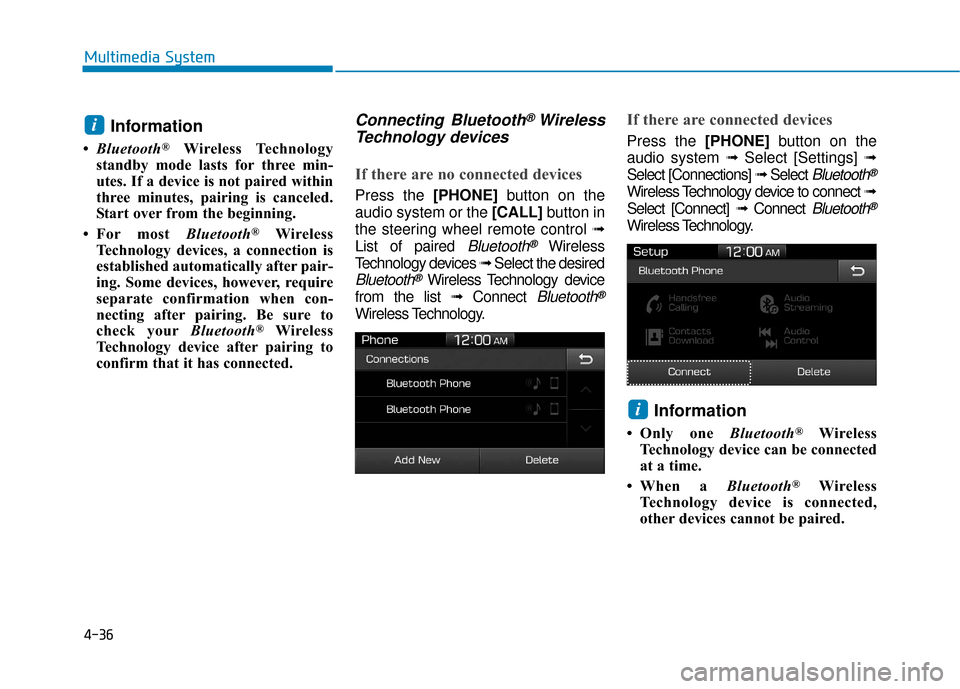
If there are no connected devices
Press the [PHONE]button on the
audio system or the [CALL] button in
the steering wheel remote control ➟
List of paired
Bluetooth®Wireless
Technology devices ➟Select the desired
Bluetooth®Wireless Technology device
from the list ➟ Connect
Bluetooth®
Wireless Technology.
If there are connected devices
Press the [PHONE]button on the
audio system ➟ Select [Settings] ➟
Select [Connections] ➟ Select
Bluetooth®
Wireless Technology device to connect ➟
Select [Connect] ➟ Connect
Bluetooth®
Wireless Technology.
Information
• Only one Bluetooth®Wireless
Technology device can be connected
at a time.
• When a Bluetooth
®Wireless
Technology device is connected,
other devices cannot be paired.
i
i