door lock Hyundai Ioniq Electric 2018 Workshop Manual
[x] Cancel search | Manufacturer: HYUNDAI, Model Year: 2018, Model line: Ioniq Electric, Model: Hyundai Ioniq Electric 2018Pages: 541, PDF Size: 19.83 MB
Page 502 of 541
H20
C
CH
H A
AR
RG
G I
IN
N G
G
E
E L
LE
E C
CT
T R
R I
IC
C
V
V E
EH
H I
IC
C L
LE
E
(
( N
N O
O R
RM
M A
AL
L
C
C H
H A
AR
RG
G E
E)
)
(
( C
C O
O N
NT
T.
.)
)
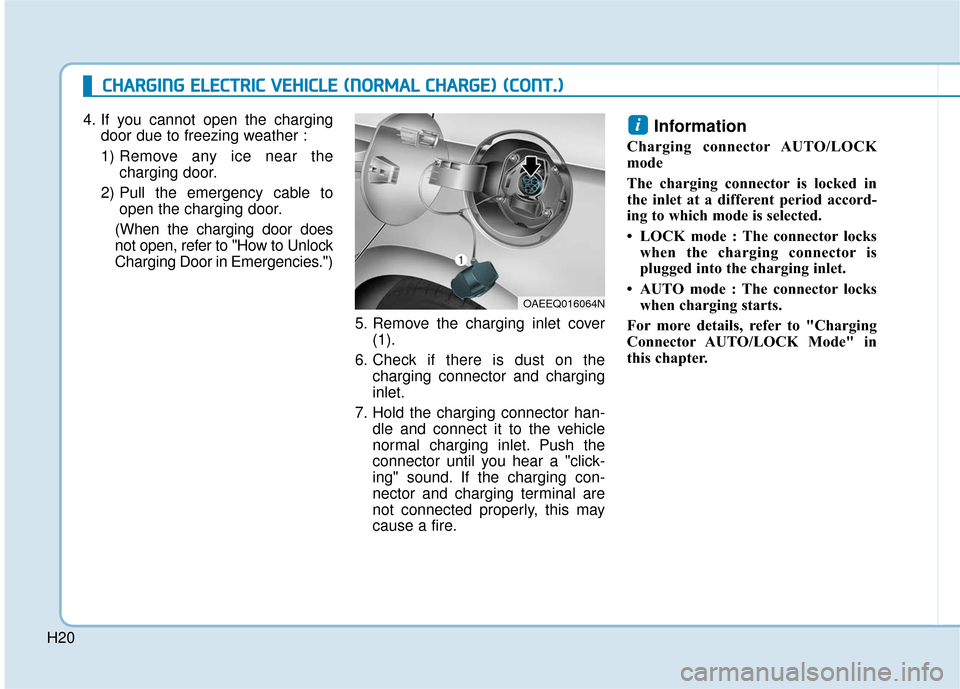
4. If you cannot open the charging
door due to freezing weather :
1) Remove any ice near the charging door.
2) Pull the emergency cable to open the charging door.
(When the charging door does
not open, refer to "How to Unlock
Charging Door in Emergencies.")
5. Remove the charging inlet cover(1).
6. Check if there is dust on the charging connector and charging
inlet.
7. Hold the charging connector han- dle and connect it to the vehicle
normal charging inlet. Push the
connector until you hear a "click-
ing" sound. If the charging con-
nector and charging terminal are
not connected properly, this may
cause a fire.Information
Charging connector AUTO/LOCK
mode
The charging connector is locked in
the inlet at a different period accord-
ing to which mode is selected.
• LOCK mode : The connector lockswhen the charging connector is
plugged into the charging inlet.
• AUTO mode : The connector locks when charging starts.
For more details, refer to "Charging
Connector AUTO/LOCK Mode" in
this chapter.
i
OAEEQ016064N
Page 504 of 541
H22
C
CH
H A
AR
RG
G I
IN
N G
G
E
E L
LE
E C
CT
T R
R I
IC
C
V
V E
EH
H I
IC
C L
LE
E
(
( N
N O
O R
RM
M A
AL
L
C
C H
H A
AR
RG
G E
E)
)
(
( C
C O
O N
NT
T.
.)
)
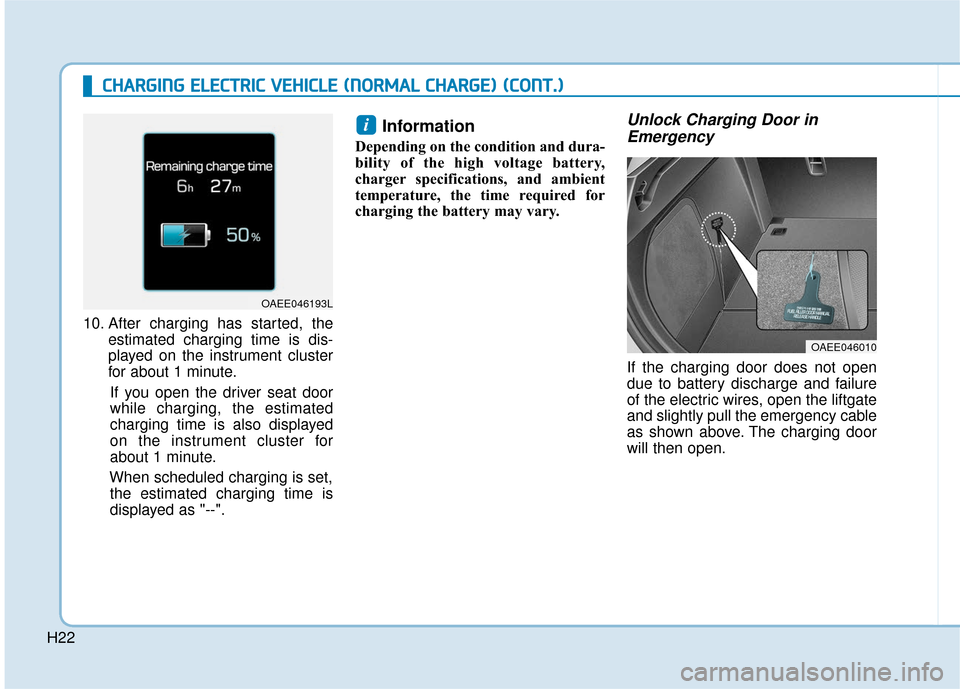
10. After charging has started, the
estimated charging time is dis-
played on the instrument cluster
for about 1 minute.
If you open the driver seat door
while charging, the estimated
charging time is also displayed
on the instrument cluster for
about 1 minute.
When scheduled charging is set, the estimated charging time is
displayed as "--".
Information
Depending on the condition and dura-
bility of the high voltage battery,
charger specifications, and ambient
temperature, the time required for
charging the battery may vary.
Unlock Charging Door in Emergency
If the charging door does not open
due to battery discharge and failure
of the electric wires, open the liftgate
and slightly pull the emergency cable
as shown above. The charging door
will then open.
i
OAEE046010
OAEE046193L
Page 506 of 541
H24
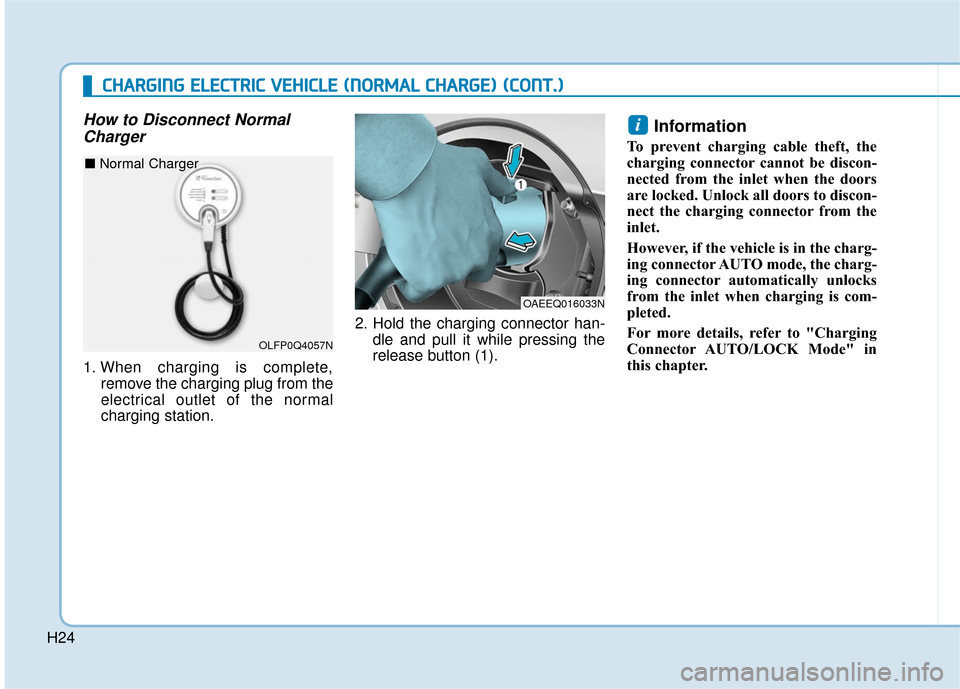
How to Disconnect NormalCharger
1. When charging is complete,
remove the charging plug from the
electrical outlet of the normal
charging station. 2. Hold the charging connector han-
dle and pull it while pressing the
release button (1).
Information
To prevent charging cable theft, the
charging connector cannot be discon-
nected from the inlet when the doors
are locked. Unlock all doors to discon-
nect the charging connector from the
inlet.
However, if the vehicle is in the charg-
ing connector AUTO mode, the charg-
ing connector automatically unlocks
from the inlet when charging is com-
pleted.
For more details, refer to "Charging
Connector AUTO/LOCK Mode" in
this chapter.
i
OAEEQ016033N
C
CH
H A
AR
RG
G I
IN
N G
G
E
E L
LE
E C
CT
T R
R I
IC
C
V
V E
EH
H I
IC
C L
LE
E
(
( N
N O
O R
RM
M A
AL
L
C
C H
H A
AR
RG
G E
E)
)
(
( C
C O
O N
NT
T.
.)
)
OLFP0Q4057N
■ Normal Charger
Page 507 of 541
H25
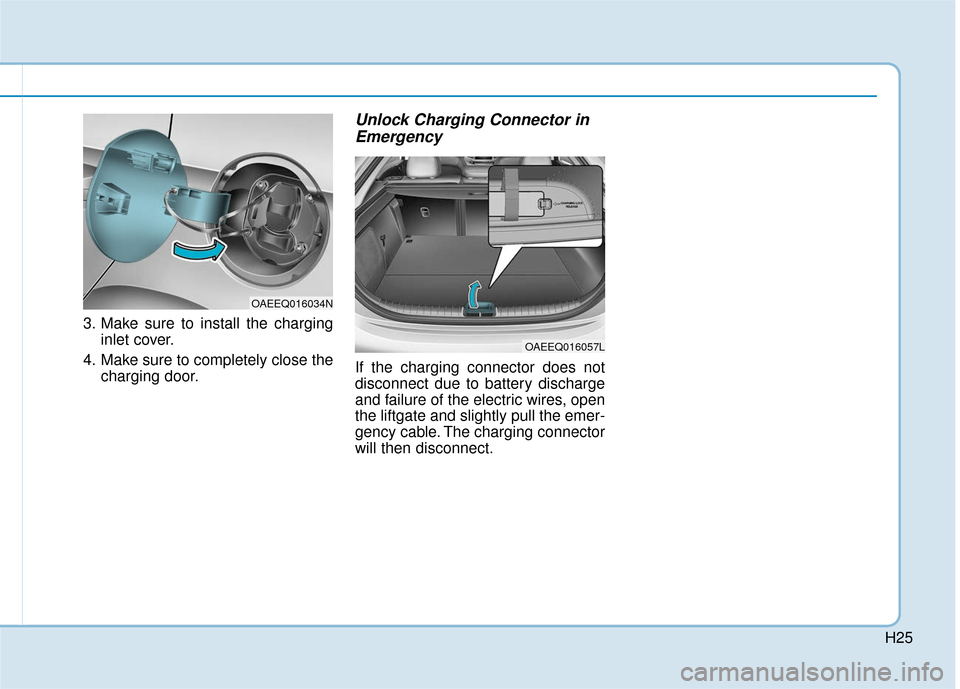
3. Make sure to install the charginginlet cover.
4. Make sure to completely close the charging door.
Unlock Charging Connector inEmergency
If the charging connector does not
disconnect due to battery discharge
and failure of the electric wires, open
the liftgate and slightly pull the emer-
gency cable. The charging connector
will then disconnect.
OAEEQ016034N
OAEEQ016057L
Page 509 of 541
H27
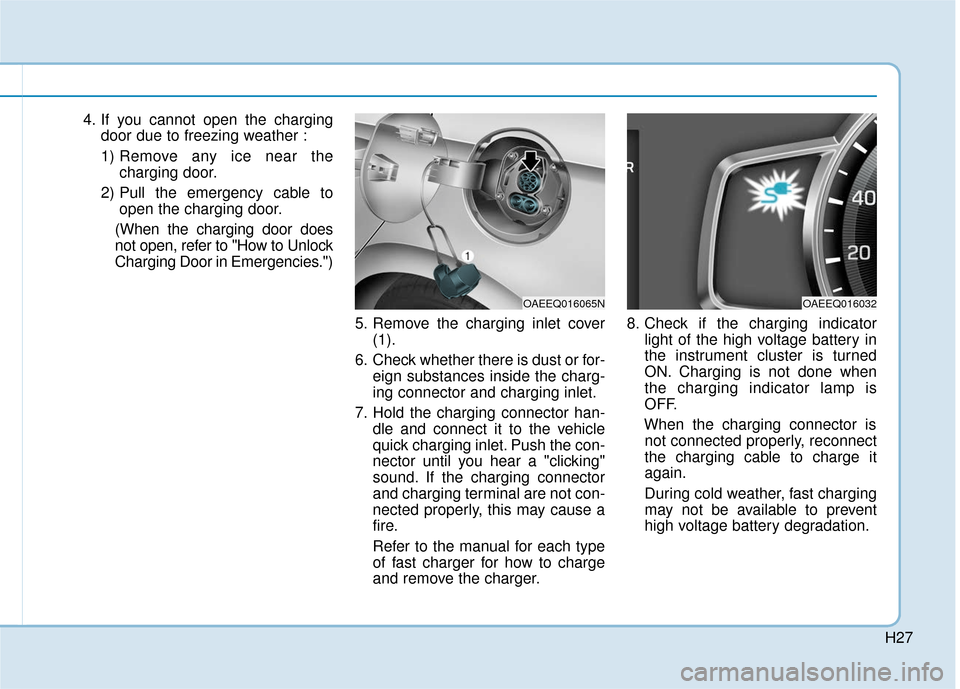
4. If you cannot open the chargingdoor due to freezing weather :
1) Remove any ice near the charging door.
2) Pull the emergency cable to open the charging door.
(When the charging door does
not open, refer to "How to Unlock
Charging Door in Emergencies.")
5. Remove the charging inlet cover(1).
6. Check whether there is dust or for- eign substances inside the charg-
ing connector and charging inlet.
7. Hold the charging connector han- dle and connect it to the vehicle
quick charging inlet. Push the con-
nector until you hear a "clicking"
sound. If the charging connector
and charging terminal are not con-
nected properly, this may cause a
fire.
Refer to the manual for each type
of fast charger for how to charge
and remove the charger. 8. Check if the charging indicator
light of the high voltage battery in
the instrument cluster is turned
ON. Charging is not done when
the charging indicator lamp is
OFF.
When the charging connector is not connected properly, reconnect
the charging cable to charge it
again.
During cold weather, fast charging
may not be available to prevent
high voltage battery degradation.
OAEEQ016065NOAEEQ016032
Page 510 of 541
H28
C
CH
H A
AR
RG
G I
IN
N G
G
E
E L
LE
E C
CT
T R
R I
IC
C
V
V E
EH
H I
IC
C L
LE
E
(
( F
F A
A S
ST
T
C
C H
H A
AR
RG
G E
E)
)
(
( C
C O
O N
NT
T.
.)
)
Information
• Even though charging is possible with the POWER button in the
ON/START position, for your safe-
ty, start charging when the POWER
button is in the OFF position and
the vehicle shifted to P (Park).
After charging has started, you can
use electrical components such as
the radio by pressing the POWER
button to ACC or ON position.
• During charging, the gear cannot be shifted from P (Park) to any other
gear.
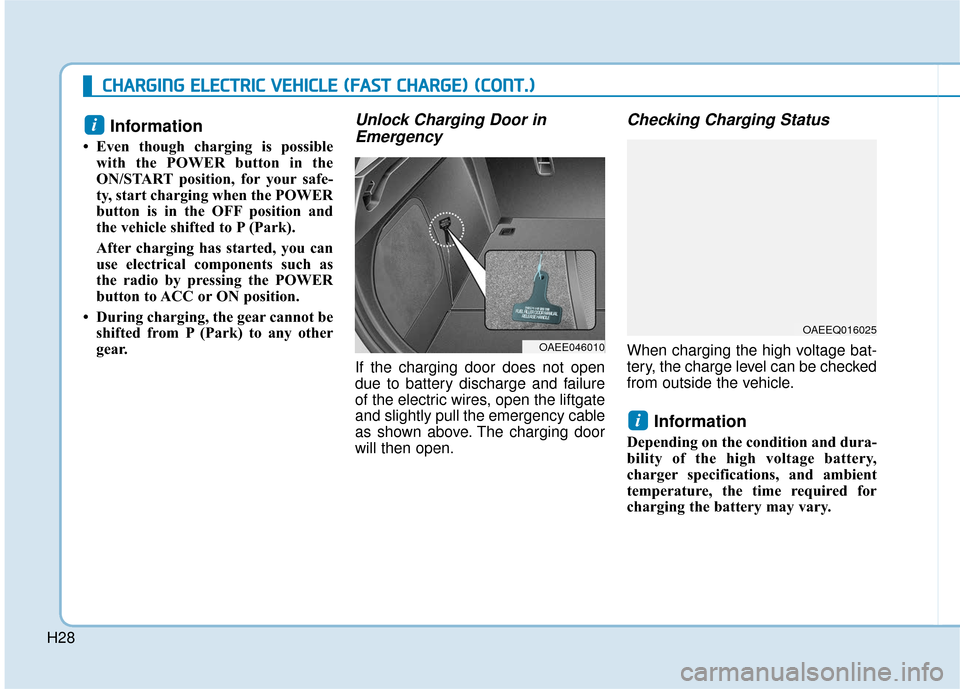
Unlock Charging Door inEmergency
If the charging door does not open
due to battery discharge and failure
of the electric wires, open the liftgate
and slightly pull the emergency cable
as shown above. The charging door
will then open.
Checking Charging Status
When charging the high voltage bat-
tery, the charge level can be checked
from outside the vehicle.
Information
Depending on the condition and dura-
bility of the high voltage battery,
charger specifications, and ambient
temperature, the time required for
charging the battery may vary.
i
i
OAEEQ016025
OAEE046010
Page 513 of 541
H31
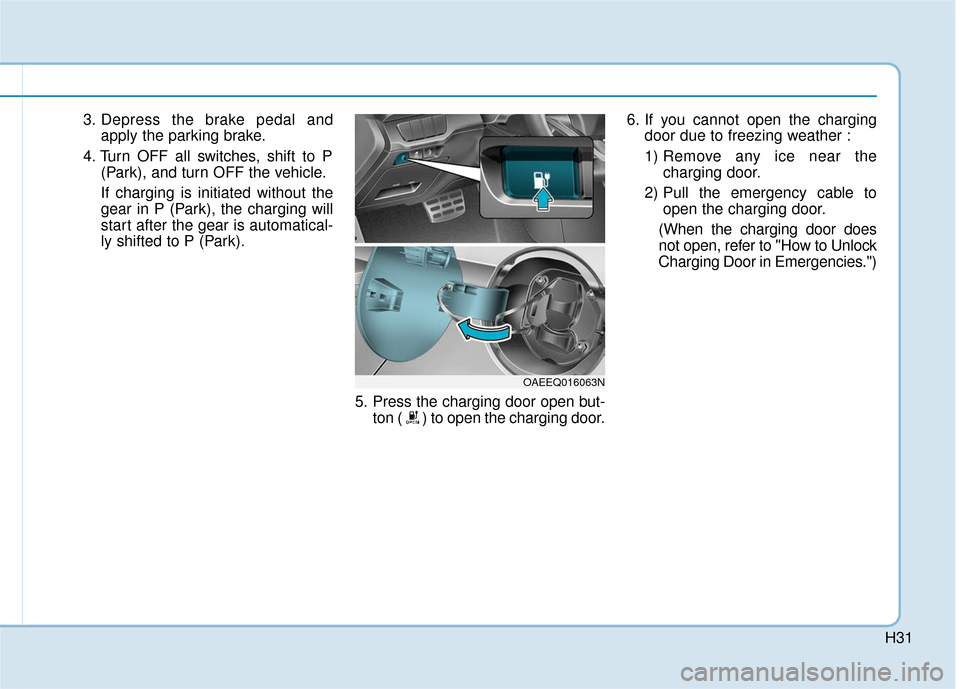
3. Depress the brake pedal andapply the parking brake.
4. Turn OFF all switches, shift to P (Park), and turn OFF the vehicle.
If charging is initiated without the
gear in P (Park), the charging will
start after the gear is automatical-
ly shifted to P (Park).
5. Press the charging door open but-ton ( ) to open the charging door. 6. If you cannot open the charging
door due to freezing weather :
1) Remove any ice near the charging door.
2) Pull the emergency cable to open the charging door.
(When the charging door does
not open, refer to "How to Unlock
Charging Door in Emergencies.")
OAEEQ016063N
Page 516 of 541
H34
C
CH
H A
AR
RG
G I
IN
N G
G
E
E L
LE
E C
CT
T R
R I
IC
C
V
V E
EH
H I
IC
C L
LE
E
(
( T
T R
R I
IC
C K
K L
LE
E
C
C H
H A
AR
RG
G E
E)
)
(
( C
C O
O N
NT
T.
.)
)
Information
Depending on the condition and dura-
bility of the high voltage battery,
charger specifications, and ambient
temperature, the time required for
charging the battery may vary.
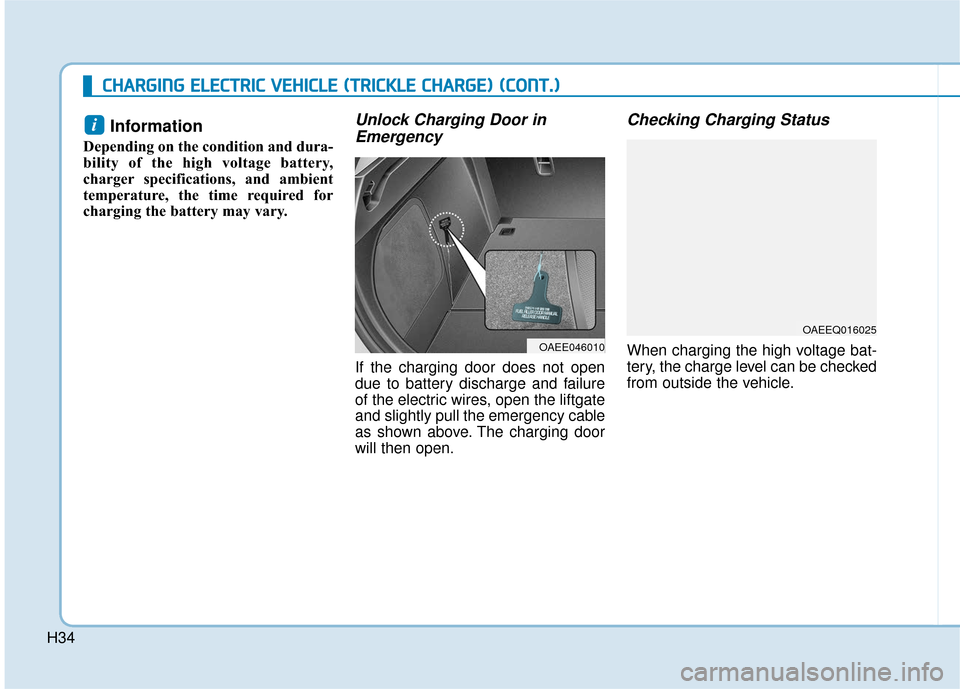
Unlock Charging Door in Emergency
If the charging door does not open
due to battery discharge and failure
of the electric wires, open the liftgate
and slightly pull the emergency cable
as shown above. The charging door
will then open.
Checking Charging Status
When charging the high voltage bat-
tery, the charge level can be checked
from outside the vehicle.
i
OAEE046010
OAEEQ016025
Page 521 of 541
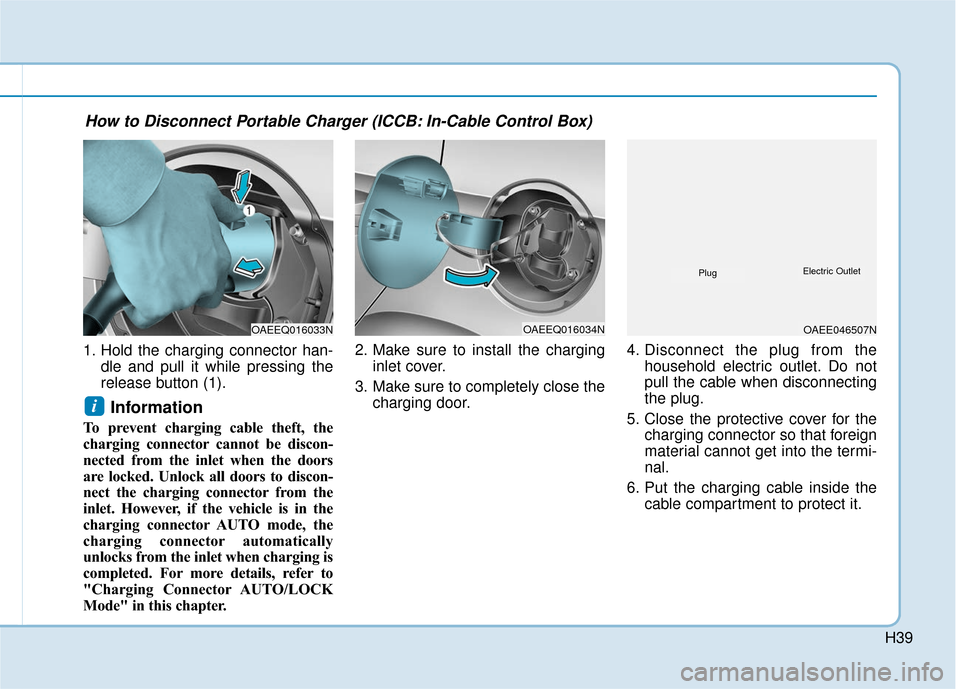
H39
1. Hold the charging connector han-dle and pull it while pressing the
release button (1).
Information
To prevent charging cable theft, the
charging connector cannot be discon-
nected from the inlet when the doors
are locked. Unlock all doors to discon-
nect the charging connector from the
inlet. However, if the vehicle is in the
charging connector AUTO mode, the
charging connector automatically
unlocks from the inlet when charging is
completed. For more details, refer to
"Charging Connector AUTO/LOCK
Mode" in this chapter. 2. Make sure to install the charging
inlet cover.
3. Make sure to completely close the charging door. 4. Disconnect the plug from the
household electric outlet. Do not
pull the cable when disconnecting
the plug.
5. Close the protective cover for the charging connector so that foreign
material cannot get into the termi-
nal.
6. Put the charging cable inside the cable compartment to protect it.
i
OAEEQ016033NOAEEQ016034NOAEE046507N
PlugElectric Outlet
How to Disconnect Portable Charger (ICCB: In-Cable Control Box)
Page 539 of 541
H57
If you cannot put out the fire
immediately, the high voltage
battery may explode. Evacuate
to a safe place and do not let
other people approach the site.
Contact the fire department and
notify them of an electric vehi-
cle fire.
If the vehicle is flooded with
water, immediately turn OFF
the vehicle and evacuate to a
safe place. Contact 911 or an
authorized HYUNDAI dealer.
WARNING
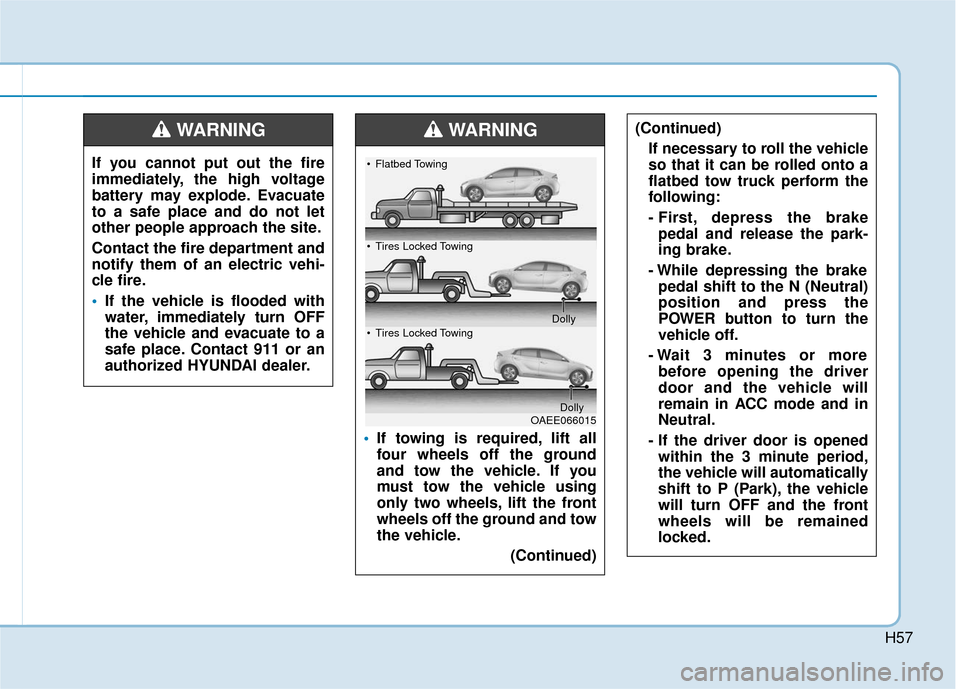
If towing is required, lift all
four wheels off the ground
and tow the vehicle. If you
must tow the vehicle using
only two wheels, lift the front
wheels off the ground and tow
the vehicle.
(Continued)
(Continued)
If necessary to roll the vehicle
so that it can be rolled onto a
flatbed tow truck perform the
following:
- First, depress the brakepedal and release the park-
ing brake.
- While depressing the brake pedal shift to the N (Neutral)
position and press the
POWER button to turn the
vehicle off.
- Wait 3 minutes or more before opening the driver
door and the vehicle will
remain in ACC mode and in
Neutral.
- If the driver door is opened within the 3 minute period,
the vehicle will automatically
shift to P (Park), the vehicle
will turn OFF and the front
wheels will be remained
locked.WARNING
OAEE066015
Flatbed Towing
Tires Locked Towing
Dolly
Tires Locked Towing
Dolly