charging cable Hyundai Ioniq Electric 2018 Owner's Manual
[x] Cancel search | Manufacturer: HYUNDAI, Model Year: 2018, Model line: Ioniq Electric, Model: Hyundai Ioniq Electric 2018Pages: 541, PDF Size: 19.83 MB
Page 135 of 541
3-50
Convenient features of your vehicle
Charging Door
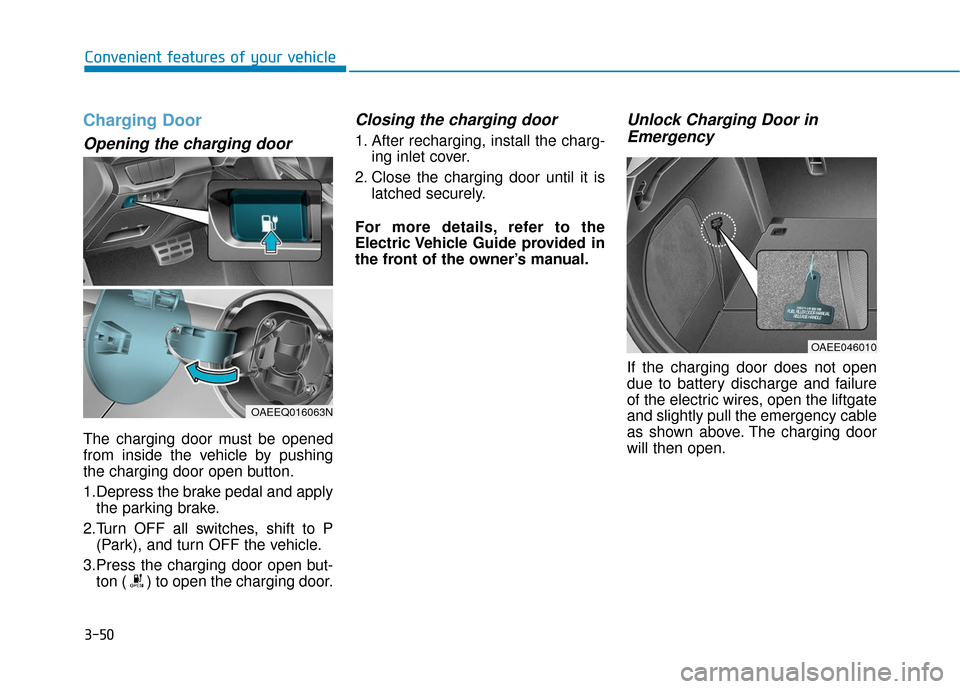
Opening the charging door
The charging door must be opened
from inside the vehicle by pushing
the charging door open button.
1.Depress the brake pedal and applythe parking brake.
2.Turn OFF all switches, shift to P (Park), and turn OFF the vehicle.
3.Press the charging door open but- ton ( ) to open the charging door.
Closing the charging door
1. After recharging, install the charg- ing inlet cover.
2. Close the charging door until it is latched securely.
For more details, refer to the
Electric Vehicle Guide provided in
the front of the owner’s manual.
Unlock Charging Door in Emergency
If the charging door does not open
due to battery discharge and failure
of the electric wires, open the liftgate
and slightly pull the emergency cable
as shown above. The charging door
will then open.
OAEE046010
OAEEQ016063N
Page 155 of 541
3-70
Convenient features of your vehicle
Press POWER button with key
This warning message is displayed if
you press the POWER button while
the warning message "Key not
detected" is displayed.
At this time, the immobilizer indicator
light blinks.
Check BRAKE SWITCH fuse
This warning message is displayed if
the brake switch fuse is disconnected.
You need to replace the fuse with a
new one before starting the vehicle.
If that is not possible, you can start the
vehicle by pressing the POWER but-
ton for 10 seconds in the ACC posi-
tion.
Shift to P to start vehicle
This warning message is displayed if
you try to start the vehicle without
shifting to the P (Park) position.
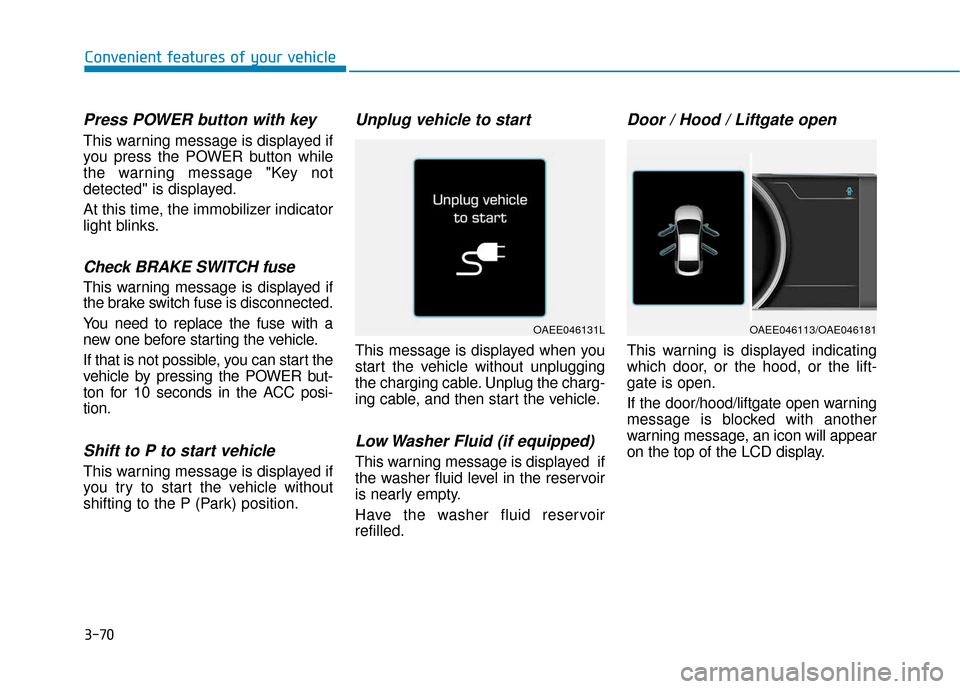
Unplug vehicle to start
This message is displayed when you
start the vehicle without unplugging
the charging cable. Unplug the charg-
ing cable, and then start the vehicle.
Low Washer Fluid (if equipped)
This warning message is displayed if
the washer fluid level in the reservoir
is nearly empty.
Have the washer fluid reservoir
refilled.
Door / Hood / Liftgate open
This warning is displayed indicating
which door, or the hood, or the lift-
gate is open.
If the door/hood/liftgate open warning
message is blocked with another
warning message, an icon will appear
on the top of the LCD display.
OAEE046131LOAEE046113/OAE046181
Page 159 of 541
3-74
Convenient features of your vehicle
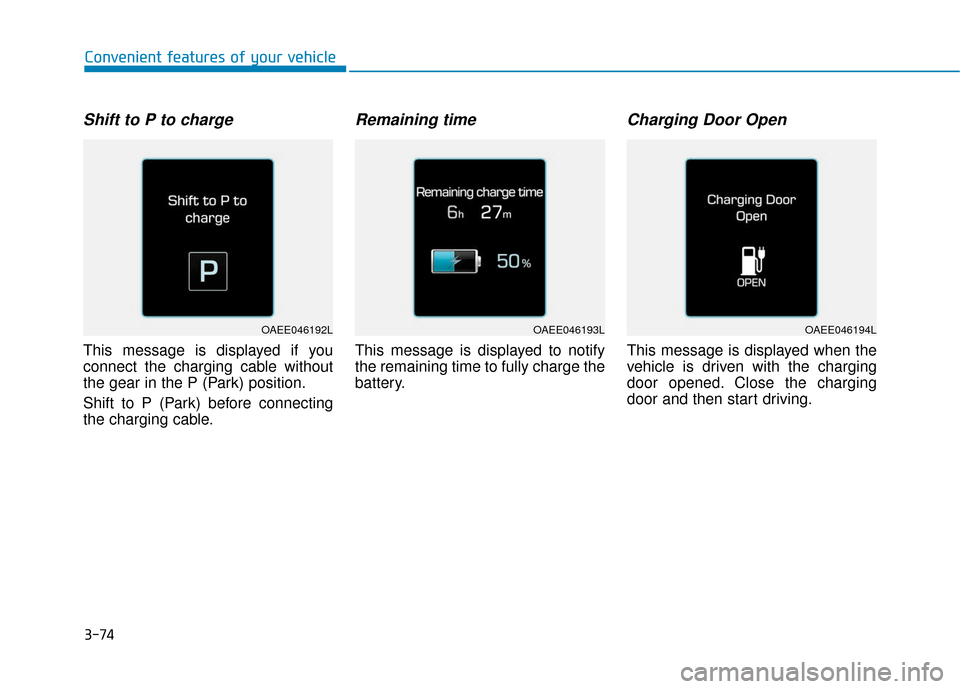
Shift to P to charge
This message is displayed if you
connect the charging cable without
the gear in the P (Park) position.
Shift to P (Park) before connecting
the charging cable.
Remaining time
This message is displayed to notify
the remaining time to fully charge the
battery.
Charging Door Open
This message is displayed when the
vehicle is driven with the charging
door opened. Close the charging
door and then start driving.
OAEE046192LOAEE046193LOAEE046194L
Page 238 of 541
4-21
Multimedia System
4
Information
-
Using the USB Devices
• Starting the vehicle while a USB device is connected can damage the
device. Please disconnect USB
devices before starting the vehicle.
• Starting the vehicle or stopping the engine while an external USB device
is connected can result in failure of
the external USB device to operate.
• Be cautious of static electricity when connecting/disconnecting external
USB devices.
• An encrypted MP3 player is not rec- ognized when connected as an exter-
nal device.
• External USB devices may not be recognized, depending on the state
of the external USB device.
• Only products with byte/sectors for- matted at 4 KB or lower are recog-
nized.
• Only USB devices in FAT12/16/32 format are recognized; NTFS and
ExFAT file systems are not recog-
nized.
(Continued)(Continued)
• Some USB devices are not recog-
nized due to compatibility issues.
• Do not touch the USB connections.
• Connecting and disconnecting USB devices rapidly over a short period
of time can cause equipment failure.
• Abnormal sounds may be audible when the USB device is disconnected.
• Turn the audio off before connecting or disconnecting external USB
devices.
• Recognition may take longer depending on the type, capacity or
file format of the external USB
device. This is not a product mal-
function.
• Use of USB devices for purposes other than playing music files is pro-
hibited.
• Image display and video playback are not supported.
(Continued)(Continued)
• Use of USB accessories, including
charge and heat though the USB I/F,
can lead to reduced product per-
formance or malfunctions. Do not
use USB devices or accessories for
these purposes.
• Use of aftermarket USB hubs and extension cables can result in the
vehicle’s audio system failing to rec-
ognize your USB device. Connect
the USB device directly to the multi-
media port of your vehicle.
• When using high-capacity USB devices with logical drive divisions,
only files saved on the highest level
logical drive can be played.
If applications are loaded on a USB
drive, file playback may fail.
• Some MP3 players, cell phones, dig- ital cameras, etc. (USB devices that
are not recognized as mobile stor-
age) may not operate normally
when connected.
• USB charging may not be supported by some mobile devices.
(Continued)
i
Page 241 of 541
![Hyundai Ioniq Electric 2018 Owners Manual 4-24
Multimedia System
(4) Save: Save the selected file(s)
.
- Select the files you want to save, and select [Save]. This saves the
selected files to My Music.
- Saving is canceled if phone calls are](/img/35/14904/w960_14904-240.png "Hyundai Ioniq Electric 2018 Owners Manual 4-24
Multimedia System
(4) Save: Save the selected file(s)
.
- Select the files you want to save, and select [Save]. This saves the
selected files to My Music.
- Saving is canceled if phone calls are")
4-24
Multimedia System
(4) Save: Save the selected file(s)
.
- Select the files you want to save, and select [Save]. This saves the
selected files to My Music.
- Saving is canceled if phone calls are received or made while saving.
- If Siri is activated, phone calls are received or made while sav-
ing, saving will be canceled.
- Up to 6,000 files can be saved.
- The currently playing file on the USB device cannot be changed
while saving.
- My Music cannot be used while saving.
- Up to 700 MB can be saved.
Information: Detailed information on the currently playing song is dis-
played.
Sound Settings: Audio sound set- tings can be changed.Information
-
Using the iPod®Devices
• To use the audio system’s iPod
®con-
trol function, use the dedicated
cable provided with your iPod
®.
• Connecting the iPod
®to the vehicle
during play may result in a loud
noise that lasts about one to two sec-
onds. Connect the iPod
®to the vehi-
cle after stopping or pausing play.
• Connect the iPod
®with the vehicle in
the ACC ON state to begin charging.
• When connecting the iPod
®cable,
be sure to fully push the cable into
the port.
• When EQ effects are enabled simul- taneously on external devices, such
as iPod
®s and the audio system, the
EQ effects may overlap, causing
sound quality deterioration or dis-
tortion. Deactivate the EQ function
for all external devices, if possible.
• Noise may occur when your iPod
®
or the AUX port is connected.
Disconnect and store separately
when not in use. (Continued)(Continued)
• There may be noise if the audio sys-
tem is used with an iPod
®or AUX
external device connected to the
power jack. In these cases, discon-
nect the iPod
®or external device
from the power jack.
• Play may be interrupted, or device malfunctions may occur depending
on the characteristics of your
iPod
®/iPhone®.
• Play may fail if your iPhone
®is con-
nected through both Bluetooth®
Wireless Technology and USB. In
this case, select Dock connector or
Bluetooth
®Wireless Technology on
your iPhone®to change the sound
output settings.
• If your software version does not support the communication proto-
col or your iPod
®is not recognized
due to device failure, anomalies or
defects, iPod
®mode cannot be used.
• iPod
®nano (5th generation) devices
may not be recognized if the battery
is low. Charge sufficiently before use.
(Continued)
i
Page 367 of 541
6-6
What to do in an emergency
7. Connect the other end of the sec- ond jumper cable to the black,
negative (-) chassis ground of
your vehicle (4).
Do not allow the jumper cables to
contact anything except the cor-
rect battery or jumper terminals or
the correct ground. Do not lean
over the battery when making
connections.
8. Start the engine of the assisting vehicle and let it run at approxi-
mately 2,000 rpm for a few min-
utes. Then start your vehicle.
9. After your vehicle starts allow it to operate at least 30 minutes with-
out shutting it down, this will help
charge back the 12V battery.
If your vehicle will not start after a
few attempts, it probably requires
servicing. In this event please seek
qualified assistance. If the cause of
your battery discharging is not
apparent, have your vehicle checked
by an authorized HYUNDAI dealer. Disconnect the jumper cables in the
exact reverse order you connected
them:
1. Disconnect the jumper cable from
the black, negative (-) chassis
ground of your vehicle (4).
2. Disconnect the other end of the jumper cable from the black, neg-
ative (-) battery/chassis ground of
the assisting vehicle (3).
3. Disconnect the second jumper cable from the red, positive (+)
battery/jumper terminal of the
assisting vehicle (2).
4. Disconnect the other end of the jumper cable from the red, positive
(+) jumper terminal of your vehicle
(1). 1. Pull off the road and stop as soon
as it is safe to do so.
2. Shift to P (Park) and set the park- ing brake. If the air conditioning is
on, turn it off.
3. If coolant is running out under the vehicle or steam is coming out
from the hood, stop the vehicle.
Do not open the hood until the
coolant has stopped running or
the steaming has stopped. If there
is no visible loss of coolant and no
steam, leave the vehicle running
and check to be sure the vehicle
cooling fan is operating. If the fan
is not running, turn the vehicle off.
I IF
F
T
T H
H E
E
V
V E
EH
H I
IC
C L
LE
E
O
O V
VE
ER
R H
H E
EA
A T
TS
S
Page 410 of 541
7-25
7
Maintenance
By jump starting
After a jump start from a good bat-
tery, drive the vehicle for 20-30 min-
utes before it is shutoff. The vehicle
may not restart if you shut it off
before the battery had a chance to
adequately recharge. See "Jump
Starting" in chapter 6 for more infor-
mation on jump starting procedures.
Information
An inappropriately disposedbattery can be harmful to
the environment and human
health.
Dispose the battery according to your
local law(s) or regulation.
Reset Features
Some items need to be reset after
the battery has been discharged or
the battery has been disconnected.
See chapter 3 for:
Power Windows
Trip Computer
Climate Control System
Clock
Audio System
Sunroof
Driver Position Memory System
i
(Continued)
Watch the battery during
charging, and stop or reduce
the charging rate if the battery
cells begin boiling violently.
The negative battery cable
must be removed first and
installed last when the battery
is disconnected. Disconnect
the battery charger in the fol-
lowing order:
(1) Turn off the battery charg- er main switch.
(2) Unhook the negative
clamp from the negative
battery terminal.
(3) Unhook the positive clamp from the positive battery
terminal.
Always use a genuine
HYUNDAI approved battery
when you replace the battery.
Page 483 of 541
E
El
le
e c
ct
tr
r i
ic
c
V
V e
eh
h i
ic
c l
le
e
S
S y
ys
st
te
e m
m
O
O v
ve
e r
rv
v i
ie
e w
w
Electric Vehicle ........................................................H3
Characteristics of Electric Vehicles ......................H3
Battery Information ................................................H3
Main Components of Electric Vehicle ..................H4
High Voltage Battery (lithium-ion polymer)........H5
High Voltage Battery Warmer System .................H6
EV Mode ...................................................................H7
Range ........................................................................\
.............H7
Nearby by stations .............................................................H8
Energy Information ............................................................H8
ECO Driving ........................................................................\
...H9
Charging and Climate Settings.........................................H9
EV Settings ........................................................................\
.H10
Charging Information ............................................H12
Charging Time Information ..................................H12
Charging Types ......................................................H13
Charging Status .....................................................H14
Charging Connector AUTO/LOCK Mode ............H15
When the Charging Connector is Locked ...................H15
Scheduled Charging...............................................H16
Charging Precautions............................................H17
Normal Charge .......................................................H19
How to Connect Normal Charger..................................H19
Unlock Charging Door in Emergency ..........................H22
Checking Charging Status ...............................................H23
How to Disconnect Normal Charger ............................H24
Unlock Charging Connector in Emergency ................H25
Fast Charge ............................................................H26
How to Connect Fast Charger .......................................H26
Unlock Charging Door in Emergency ..........................H28
Checking Charging Status ...............................................H28
How to Disconnect Fast Charger ..................................H29
Trickle Charge ........................................................H30
How to Connect Portable Charger
(ICCB: In-Cable Control Box) ..........................................H30
Unlock Charging Door in Emergency ..........................H34
Checking Charging Status ...............................................H34
Charging Status Indicator Lamp for
Portable Charger ...............................................................H36
Page 484 of 541
How to Disconnect Portable Charger
(ICCB: In-Cable Control Box) ..........................................H39
Unlock Charging Connector in Emergency ................H40
Precautions for Portable Charger
(ICCB: In-Cable Control Box) ..........................................H40
How to Start the Vehicle ......................................H41
How to Stop the Vehicle.......................................H41
Virtual Engine Sound System ..............................H42
Distance to Empty .................................................H42
When destination is not set ...........................................H43
When destination is set...................................................H43
Tips for Improving Distance to Empty ...............H44
ECO Guide ...............................................................H44
State of Charge (SOC) Gauge for
High Voltage Battery ............................................H45
Warning and Indicator Lights
(related to electric vehicle) .................................H45
Ready Indicator .................................................................H45
Service Warning Light .....................................................H46
Power Down Warning Light ...........................................H46
Charging Indicator Light..................................................H46
High Voltage Battery Level Warning Light .................H46
Regenerative Brake Warning Light ..............................H47
LCD Display Messages ..........................................H47
Shift to P to charge .........................................................H47
Remaining time ..................................................................H47 Charging Door Open ........................................................H48
Charger Error! / Quick Charger Error!........................H48
Stop vehicle and check brakes .....................................H48
Check brakes......................................................................H4\
9
Low Battery........................................................................\
H49
Charge immediately. Power limited ..............................H49
Low Battery. Charge immediately.................................H50
Low Battery Temp. Power limited.................................H50
Battery Overheated! Stop vehicle ................................H50
Power limited .....................................................................H51\
Stop vehicle and check power supply .........................H51
Check Virtual Engine Sound System............................H52
Check electric vehicle system .......................................H52
Energy Flow ...........................................................H52
Vehicle Stop........................................................................\
H53
EV Propulsion ....................................................................H53
Regeneration ......................................................................H5\
3
Aux. Battery Saver+ .............................................H54
Mode ........................................................................\
............H54
System Setting...................................................................H55
LCD Message .....................................................................H55\
If an Accident Occurs ...........................................H56
Other Precautions for Electric Vehicle ..............H58
Service Plug ...........................................................H59
Page 497 of 541
H15
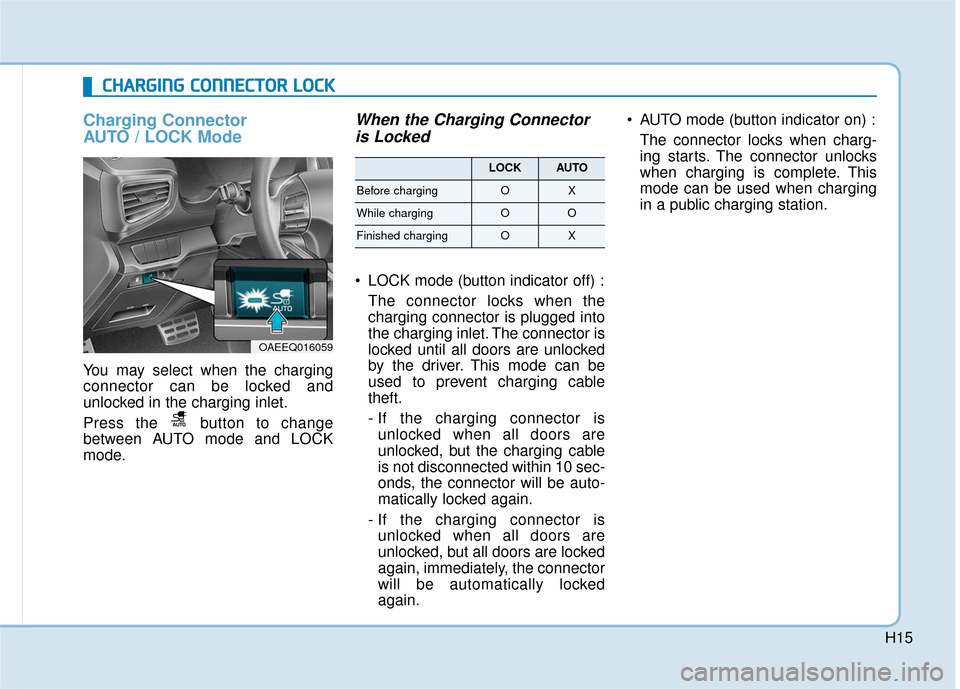
Charging Connector
AUTO / LOCK Mode
You may select when the charging
connector can be locked and
unlocked in the charging inlet.
Press the button to change
between AUTO mode and LOCK
mode.
When the Charging Connectoris Locked
LOCK mode (button indicator off) :
The connector locks when the
charging connector is plugged into
the charging inlet. The connector is
locked until all doors are unlocked
by the driver. This mode can be
used to prevent charging cable
theft.
- If the charging connector isunlocked when all doors are
unlocked, but the charging cable
is not disconnected within 10 sec-
onds, the connector will be auto-
matically locked again.
- If the charging connector is unlocked when all doors are
unlocked, but all doors are locked
again, immediately, the connector
will be automatically locked
again. AUTO mode (button indicator on) :
The connector locks when charg-
ing starts. The connector unlocks
when charging is complete. This
mode can be used when charging
in a public charging station.
C
CH
H A
AR
RG
G I
IN
N G
G
C
C O
O N
NN
NE
EC
CT
T O
O R
R
L
L O
O C
CK
K
OAEEQ016059
LOCKAUTO
Before chargingOX
While chargingOO
Finished chargingOX