air condition HYUNDAI IONIQ ELECTRIC 2022 Owner's Guide
[x] Cancel search | Manufacturer: HYUNDAI, Model Year: 2022, Model line: IONIQ ELECTRIC, Model: HYUNDAI IONIQ ELECTRIC 2022Pages: 546, PDF Size: 34.82 MB
Page 280 of 546
3-130
Convenient features of your vehicle
To prevent damage to the Power Outlets :
Use the power outlet only whenthe vehicle is in the ready ( )
mode and remove the accessory
plug after use. Using the acces-
sory plug for prolonged periods
of time with the vehicle off could
cause the battery to discharge.
Only use 12V electric acces- sories which are less than 180 W
(Watts) in electric capacity.
Adjust the air-conditioner or heater to the lowest operating
level when using the power outlet.
Close the cover when not in use.
Some electronic devices can cause electronic interference
when plugged into a vehicle’s
power outlet. These devices may
cause excessive audio staticand malfunctions in other elec-
tronic systems or devices used
in your vehicle.
(Continued)(Continued)
Push the plug in as far as it will
go. If good contact is not made,
the plug may overheat and the
fuse may open.
Plug in battery equipped electri- cal/electronic devices with
reverse current protection. The
current from the battery may
flow into the vehicle’s electri-
cal/electronic system and causesystem malfunction.
Wireless Cellular Phone
Charging System (if equipped)
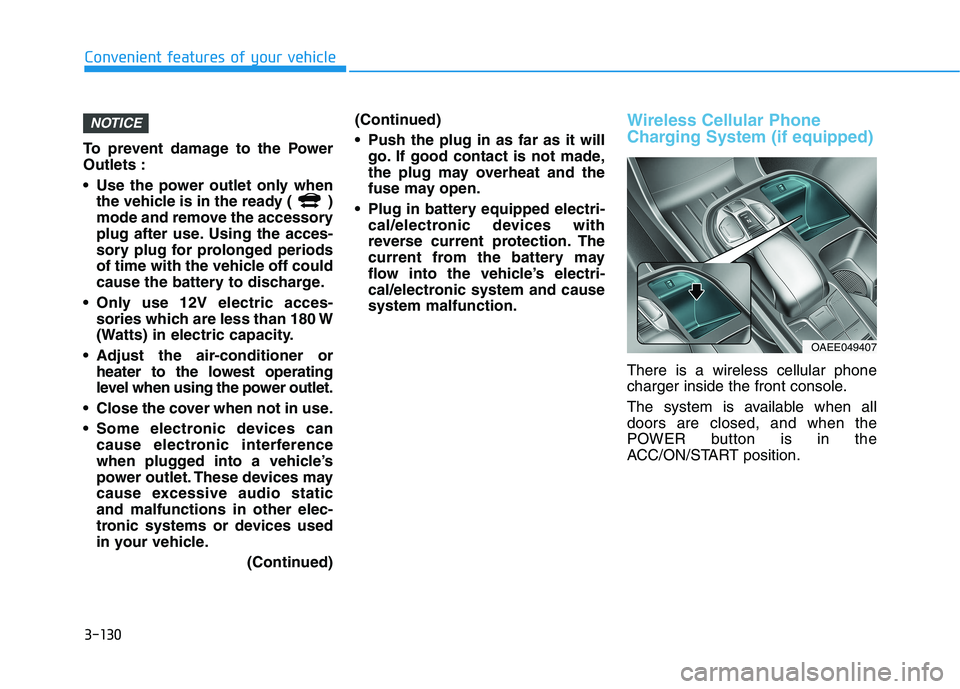
There is a wireless cellular phone
charger inside the front console.
The system is available when all doors are closed, and when the
POWER button is in the
ACC/ON/START position.
NOTICE
OAEE049407
Page 310 of 546
5-20
Resuming the Smart
Regeneration System
To re-activate the Smart
Regeneration System while driving,
pull and hold the right side paddle
shifter for more than 1 second again.
Note that the "AUTO" indicator in the
LCD display turns back on, signaling
that the Smart Regeneration System
is enabled again.
Disabling the Smart
Regeneration System
To turn off the system, shift to P (Park) and deselect 'User Settings
Convenience Smart Regeneration'
on the User Settings mode.
Vehicle-to-Vehicle Front
Recognition - Front RadarSensor
In order for the Smart Regeneration
System to operate properly, always
make sure the radar sensor cover is
clean and free of dirt, snow, and
debris. Dirt, snow, or foreign sub-
stances on the lens may adversely
affect the sensing performance of
the sensor. In this case, the system
operation may stop temporarily and
not operate normally.
Driving your vehicle
Do not apply license plate
frame or foreign objects such
as a bumper sticker or a
bumper guard near the radar
sensor. Doing so may adverse-
ly affect the sensing perform-
ance of the radar.
Always keep the radar sensor
and lens cover clean and free
of dirt and debris.
Use only a soft cloth to wash
the vehicle. Do not spray pres-
surized water directly on the
sensor or sensor cover.
Be careful not to apply unnec-
essary force on the radar sen-
sor or sensor cover. If the sen-
sor is forcibly moved out of
proper alignment, the Smart
Regeneration System may not
operate correctly. In this case,
a warning message may not
be displayed. Have the vehicle
inspected by an authorized
HYUNDAI dealer.
If the front bumper becomes
damaged in the area around
the radar sensor, the Smart
Regeneration System may not
operate properly. Have the
vehicle inspected by an
authorized HYUNDAI dealer.
Use only genuine HYUNDAI
parts to repair or replace a
damaged sensor or sensor
cover. Do not apply paint to
the sensor cover.
CAUTION
When the Smart Regeneration System is cancelled automati-
cally, adjust the vehicle speed
directly by depressing theaccelerator or brake pedal
according to the road conditionahead and driving condition.
WARNING
Page 316 of 546
5-26
Driving your vehicle
Do not continue depressing thebrake pedal if the " "indica-
tor is OFF. The battery may be
discharged.
Noise and vibration generated during braking is normal.
Under normal operation, electric brake pump noise and motor
vibration may occur temporarily
in below cases.
- When the pedal is depressedsuddenly.
- When the pedal is repeatedly depressed in short intervals.
- When the ABS function is acti- vated while braking.
Disc Brake Wear Indicator
When your brake pads are worn and
new pads are required, you will hear
a high pitched warning sound from
your front or rear brakes. You mayhear this sound come and go or it
may occur whenever you depress
the brake pedal.
Note that some driving conditions or
climates may cause a brake squeal
when you first apply (or lightly apply)
the brakes. This is normal and does
not indicate a problem with your
brakes.
To avoid costly brake repairs, do
not continue to drive with wornbrake pads.
Information
Always replace brake pads as com-
plete front or rear axle sets.
Electronic Parking Brake (EPB)
Applying the parking brake
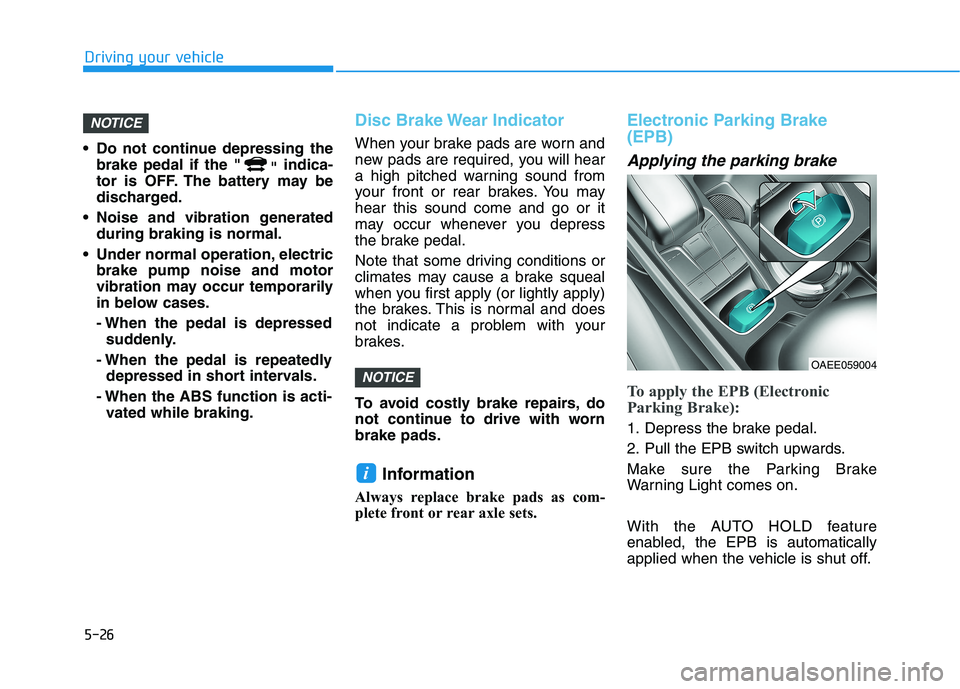
To apply the EPB (Electronic
Parking Brake):
1. Depress the brake pedal.
2. Pull the EPB switch upwards.
Make sure the Parking Brake
Warning Light comes on.
With the AUTO HOLD feature
enabled, the EPB is automatically
applied when the vehicle is shut off.
i
NOTICE
NOTICE
OAEE059004
Page 334 of 546
5-44
Driving your vehicle
Drive mode
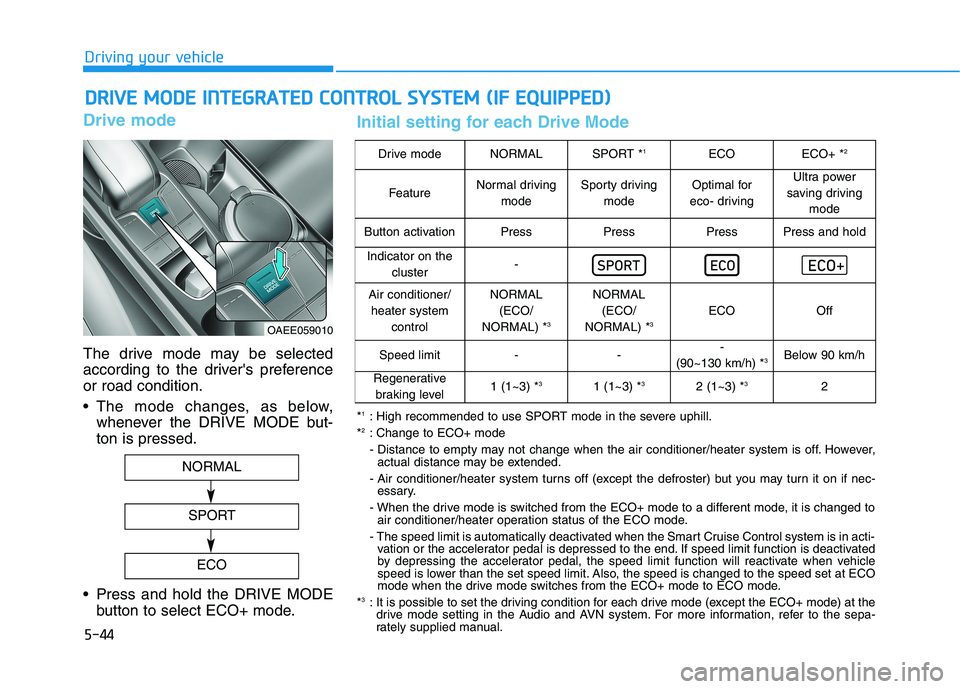
The drive mode may be selected
according to the driver's preferenceor road condition.
The mode changes, as below,whenever the DRIVE MODE but- ton is pressed.
Press and hold the DRIVE MODE button to select ECO+ mode.
DDRRIIVV EE MM OODDEE IINN TTEEGG RRAA TTEEDD CC OO NNTTRR OO LL SS YY SSTT EEMM (( IIFF EE QQ UUIIPP PPEEDD ))
OAEE059010
NORMAL
SPORT
ECO
Drive modeNORMALSPORT * 1ECOECO+ *2
FeatureNormal driving
modeSporty drivingmodeOptimal for
eco- drivingUltra power
saving driving mode
Button activationPressPressPressPress and hold
Indicator on the cluster-
Air conditioner/heater system controlNORMAL(ECO/
NORMAL) * 3NORMAL
(ECO/
NORMAL) * 3
ECOOff
Speed limit---
(90~130 km/h) * 3Below 90 km/h
Regenerative
braking level1 (1~3) * 31 (1~3) * 32 (1~3) *32
*1
: High recommended to use SPORT mode in the severe uphill.
* 2
: Change to ECO+ mode
- Distance to empty may not change when the air conditioner/heater system is off. However,
actual distance may be extended.
- Air conditioner/heater system turns off (except the defroster) but you may turn it on if nec- essary.
- When the drive mode is switched from the ECO+ mode to a different mode, it is changed to air conditioner/heater operation status of the ECO mode.
- The speed limit is automatically deactivated when the Smart Cruise Control system is in acti- vation or the accelerator pedal is depressed to the end. If speed limit function is deactivated
by depressing the accelerator pedal, the speed limit function will reactivate when vehicle
speed is lower than the set speed limit. Also, the speed is changed to the speed set at ECO
mode when the drive mode switches from the ECO+ mode to ECO mode.
* 3
: It is possible to set the driving condition for each drive mode (except the ECO+ mode) at the
drive mode setting in the Audio and AVN system. For more information, refer to the sepa-
rately supplied manual.
Initial setting for each Drive Mode
Page 349 of 546
5-59
Driving your vehicle
5
There is an item similar to a per-son's body structure
The pedestrian or cyclist is small
The pedestrian has impaired mobility
The sensor recognition is limited
The front radar sensor or front view camera is blocked with a foreign
object or debris
Inclement weather such as heavy rain or snow obscures the field of
view of the front radar sensor or
front view camera
When light coming from a street light or an oncoming vehicle is
reflected on a wet road surfacesuch as a puddle in the road
The field of view in front is obstructed by sun glare
The windshield glass is fogged up; a clear view of the road is obstruct-ed
The adverse road conditions cause excessive vehicle vibrations while
driving The sensor recognition changes
suddenly when passing over a
speed bump
You are on a roundabout
The pedestrian or cyclist suddenly interrupts in front of the vehicle
The cyclist in front is riding inter- sected with the driving direction
There is any other electromagnetic interference
The construction area, rail or other metal object is near the cyclist
The bicycle material is not reflected well on the front radar
In case of camera or radar sensor recognition is in a marginal state.
Use extreme caution when the
vehicle in front of you has
cargo that extends rearward
from the cab, or when the
vehicle in front of you has
higher ground clearance.
Forward Collision-Avoidance
Assist system may operate
when an object, which has
similar shape or characteris-
tic to a vehicle, pedestrian or
cyclist, is detected.
FCA system is designed to
detect and monitor the vehicleahead or detect a pedestrian
or cyclist (if equipped) in the
roadway through radar sig-nals and camera recognition. It is not designed to detect
bicycles, motorcycles, or
smaller wheeled objects such
as luggage bags, shopping
carts, or strollers.
(Continued)
WARNING
Page 350 of 546
5-60
Driving your vehicle
Information
In some instances, FCA system may be
cancelled when subjected to electro-
magnetic interference.
Information
This device complies with Industry
Canada RSS-210 standard.
Operation is subject to the following
three conditions:
1. This device may not cause harmful interference, and
2. This device must accept any inter- ference received, including interfer-
ence that may cause undesired
operation.
3. Changes or modifications not expressly approved by the party
responsible for compliance could
void the user's authority to operate
the device. Information
Radio frequency radiation exposure
information:
This equipment complies with RSS
radiation exposure limits set forth for
an uncontrolled environment.
This equipment should be installed
and operated with minimum distance
of 20 cm (8 in.) between the radiator
(antenna) and your body.
This transmitter must not be co-locat-
ed or operating in conjunction with
any other antenna or transmitter.i
i
i(Continued)
Never try to test the operation
of FCA system. Doing so may
cause severe injury or death.
If the front bumper, front
glass, front radar or front view
camera have been replaced or
repaired, we recommend that
you have your vehicle
inspected by an authorized
HYUNDAI dealer.
Page 418 of 546
5-128
Driving your vehicle
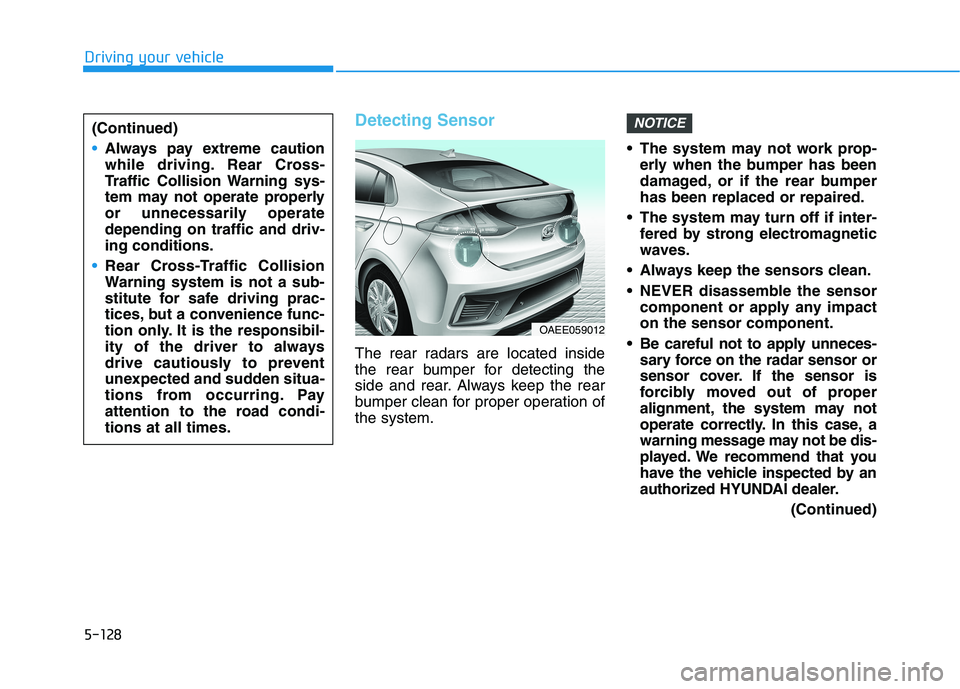
Detecting Sensor
The rear radars are located inside
the rear bumper for detecting the
side and rear. Always keep the rear
bumper clean for proper operation ofthe system. The system may not work prop-
erly when the bumper has been
damaged, or if the rear bumperhas been replaced or repaired.
The system may turn off if inter- fered by strong electromagnetic
waves.
Always keep the sensors clean.
NEVER disassemble the sensor component or apply any impact on the sensor component.
Be careful not to apply unneces- sary force on the radar sensor or
sensor cover. If the sensor is
forcibly moved out of proper
alignment, the system may not
operate correctly. In this case, a
warning message may not be dis-
played. We recommend that you
have the vehicle inspected by an
authorized HYUNDAI dealer.
(Continued)
NOTICE(Continued)
Always pay extreme caution
while driving. Rear Cross-
Traffic Collision Warning sys-
tem may not operate properly
or unnecessarily operatedepending on traffic and driv-ing conditions.
Rear Cross-Traffic Collision
Warning system is not a sub-
stitute for safe driving prac-
tices, but a convenience func-
tion only. It is the responsibil-
ity of the driver to always
drive cautiously to prevent
unexpected and sudden situa-
tions from occurring. Pay
attention to the road condi-tions at all times.
OAEE059012
Page 440 of 546
6-5
What to do in an emergency
6
InformationAn inappropriately disposedbattery can be harmful to the
environment and human
health. Dispose the battery
according to your local law(s)
or regulations.
To prevent damage to your vehi-
cle:
Only use a 12-volt power supply (battery or jumper system) to
jump start your vehicle.
Do not attempt to jump start your vehicle by push-starting.Jump starting procedure
1. Position the vehicles close enough that the jumper cables will reach,
but do not allow the vehicles totouch.
2. Avoid fans or any moving parts in the motor compartment at all
times, even when the vehicles are
turned off.
3. Turn off all electrical devices such as radios, lights, air conditioning,
etc. Put the vehicles in P (Park)
and set the parking brakes. Turn
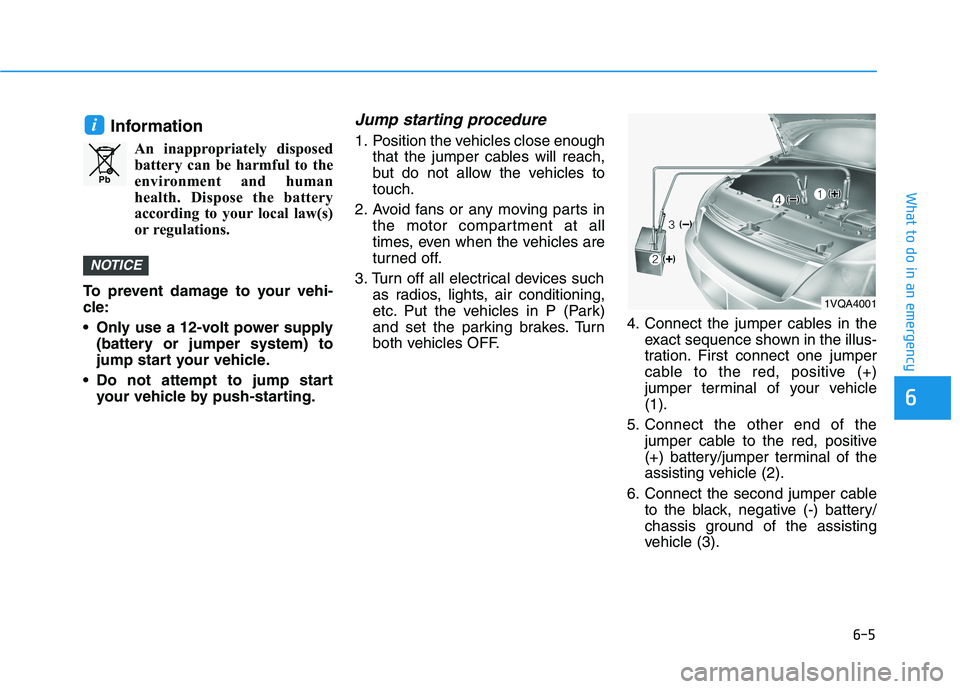
both vehicles OFF. 4. Connect the jumper cables in the
exact sequence shown in the illus-
tration. First connect one jumper
cable to the red, positive (+)
jumper terminal of your vehicle(1).
5. Connect the other end of the jumper cable to the red, positive
(+) battery/jumper terminal of the
assisting vehicle (2).
6. Connect the second jumper cable to the black, negative (-) battery/
chassis ground of the assisting
vehicle (3).
NOTICE
i
Pb
1VQA4001
Page 442 of 546
6-7
What to do in an emergency
6
1. Pull off the road and stop as soonas it is safe to do so.
2. Shift to P (Park) and set the park- ing brake. If the air conditioning is
on, turn it off.
3. If coolant is running out under the vehicle or steam is coming out
from the hood, stop the vehicle.Do not open the hood until the
coolant has stopped running or
the steaming has stopped. If there
is no visible loss of coolant and no
steam, leave the vehicle running
and check to be sure the vehicle
cooling fan is operating. If the fan
is not running, turn the vehicle off 4. Check for coolant leaking from the
radiator, hoses or under the vehi-
cle. (If the air conditioning had
been in use, it is normal for cold
water to be draining from it when
you stop.)
5. If coolant is leaking out, stop the vehicle immediately and call the
nearest authorized HYUNDAI
dealer for assistance.
6. If you cannot find the cause of the overheating, wait until the radiator
temperature has returned to nor-
mal. Then, if coolant has been lost,
call an authorized HYUNDAI deal-
er for assistance.
Serious loss of coolant indicatesthere is a leak in the cooling sys-tem and we recommend that the
system be checked by an author-
ized HYUNDAI dealer.
NOTICE
II FF TT HH EE VV EEHH IICC LLEE OO VVEERR HH EEAA TTSS
Page 465 of 546
7-6
Maintenance
Owner Maintenance Schedule
When you stop for fuel:
• Check coolant level in the coolantreservoir.
Check the windshield washer fluid level.
Check for low or under-inflated tires.
While operating your vehicle:
Check for vibrations in the steeringwheel. Notice if there is any
increased steering effort or loose-
ness in the steering wheel, or
change in its straight-ahead posi-tion.
Notice if your vehicle constantly turns slightly or "pulls" to one side
when traveling on smooth, levelroad.
When stopping, listen and check for unusual sounds, pulling to one
side, increased brake pedal travel
or "hard-to-push" brake pedal.
If any slipping or changes in the operation of your reduction gear
occurs, check the reduction gear
fluid level.
Check the reduction gear P (Park) function.
Check the parking brake.
Check for fluid leaks under your vehicle (water dripping from the air
conditioning system during or after
use is normal).
At least monthly:
Check coolant level in the coolantreservoir.
Check the operation of all exterior lights, including the brake lights,
turn signals and hazard warning
flashers.
Check the inflation pressures of all tires including the spare for tires
that are worn, show uneven wear,or are damaged.
Check for loose wheel lug nuts.
Be careful when checking your
coolant level when the parts in
the motor compartment are hot.
This may result in coolant being
blown out of the opening and
cause serious burns and otherinjuries.
WARNING