open bonnet Hyundai Ioniq Hybrid 2020 Owner's Manual - RHD (UK, Australia)
[x] Cancel search | Manufacturer: HYUNDAI, Model Year: 2020, Model line: Ioniq Hybrid, Model: Hyundai Ioniq Hybrid 2020Pages: 613, PDF Size: 58.64 MB
Page 15 of 613
H15
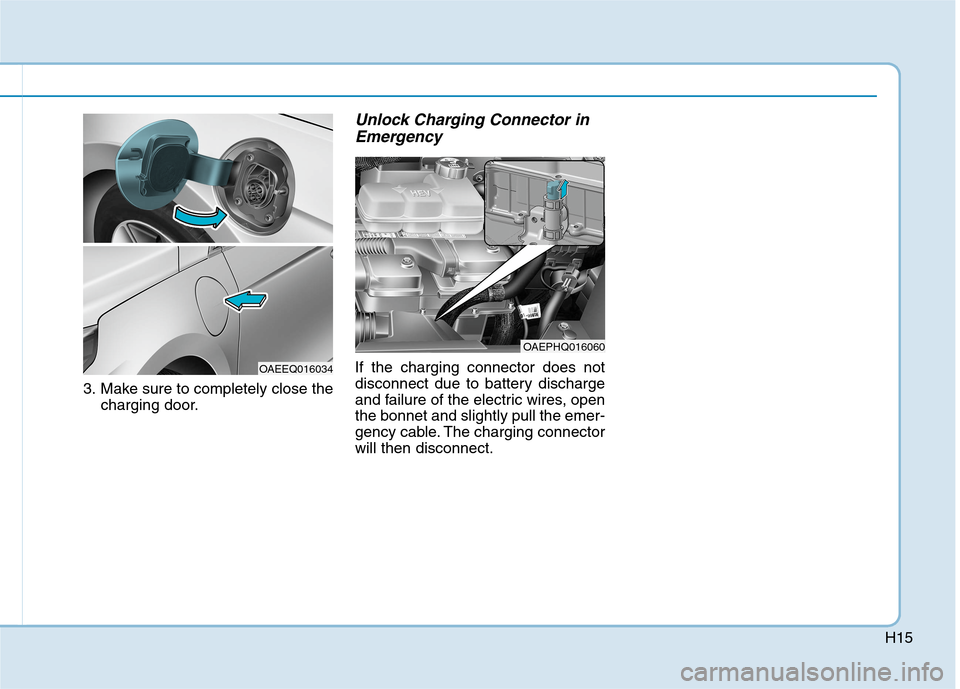
3. Make sure to completely close the
charging door.
Unlock Charging Connector in
Emergency
If the charging connector does not
disconnect due to battery discharge
and failure of the electric wires, open
the bonnet and slightly pull the emer-
gency cable. The charging connector
will then disconnect.
OAEPHQ016060
OAEEQ016034
Page 27 of 613
H27
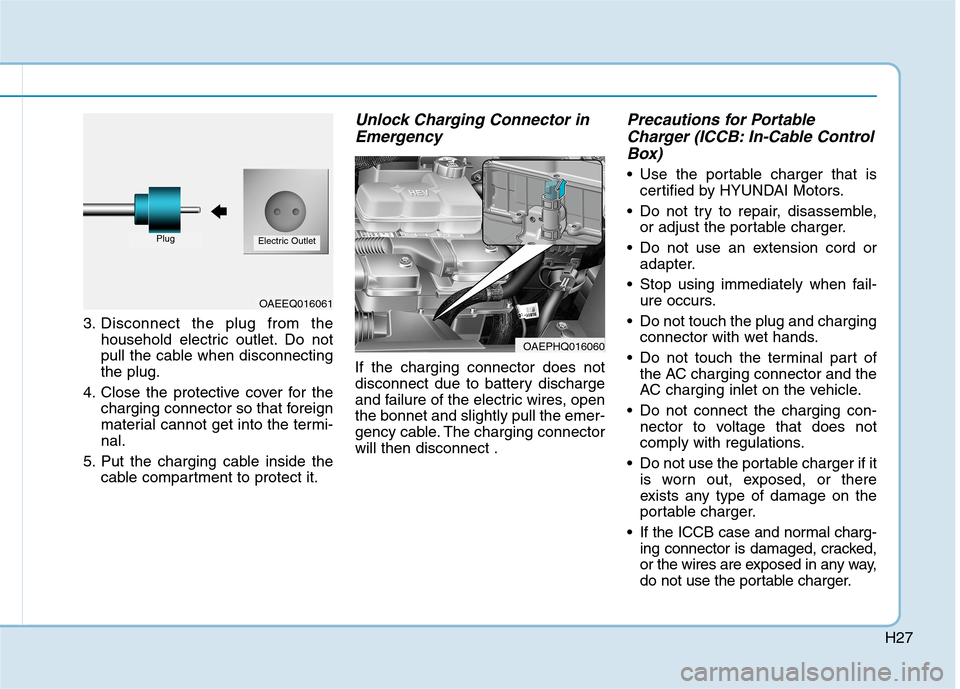
3. Disconnect the plug from the
household electric outlet. Do not
pull the cable when disconnecting
the plug.
4. Close the protective cover for the
charging connector so that foreign
material cannot get into the termi-
nal.
5. Put the charging cable inside the
cable compartment to protect it.
Unlock Charging Connector in
Emergency
If the charging connector does not
disconnect due to battery discharge
and failure of the electric wires, open
the bonnet and slightly pull the emer-
gency cable. The charging connector
will then disconnect .
Precautions for Portable
Charger (ICCB: In-Cable Control
Box)
Use the portable charger that is
certified by HYUNDAI Motors.
Do not try to repair, disassemble,
or adjust the portable charger.
Do not use an extension cord or
adapter.
Stop using immediately when fail-
ure occurs.
Do not touch the plug and charging
connector with wet hands.
Do not touch the terminal part of
the AC charging connector and the
AC charging inlet on the vehicle.
Do not connect the charging con-
nector to voltage that does not
comply with regulations.
Do not use the portable charger if it
is worn out, exposed, or there
exists any type of damage on the
portable charger.
If the ICCB case and normal charg-
ing connector is damaged, cracked,
or the wires are exposed in any way,
do not use the portable charger.
OAEEQ016061
PlugElectric Outlet
OAEPHQ016060
Page 72 of 613
1-4
Your vehicle at a glance
I IN
NT
TE
ER
RI
IO
OR
R
O
OV
VE
ER
RV
VI
IE
EW
W
-
-
H
HY
YB
BR
RI
ID
D
V
VE
EH
HI
IC
CL
LE
E
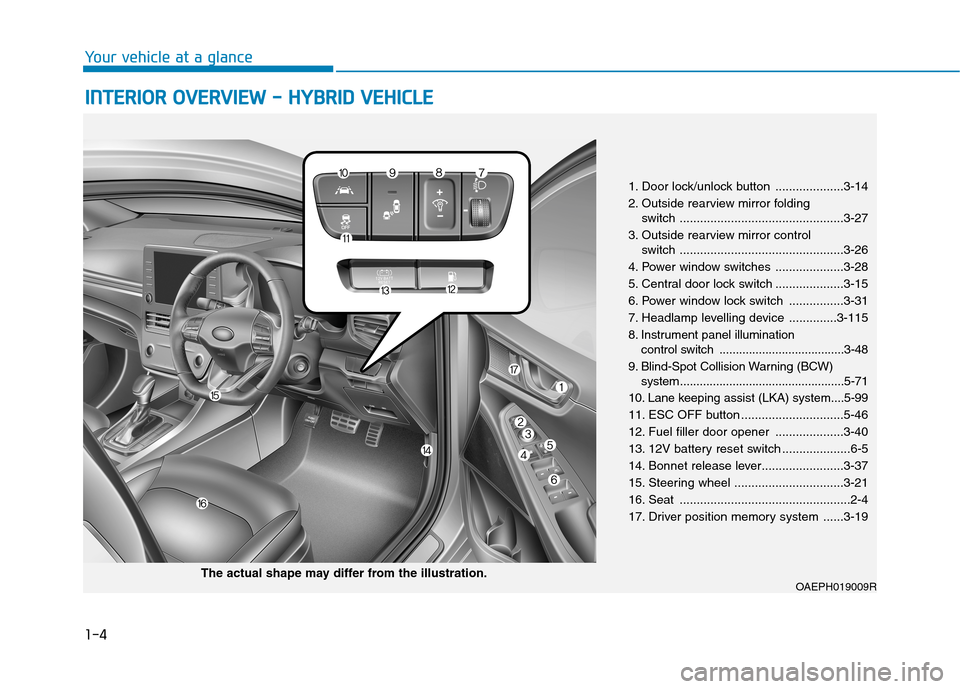
1. Door lock/unlock button ....................3-14
2. Outside rearview mirror folding
switch ................................................3-27
3. Outside rearview mirror control
switch ................................................3-26
4. Power window switches ....................3-28
5. Central door lock switch ....................3-15
6. Power window lock switch ................3-31
7. Headlamp levelling device ..............3-115
8. Instrument panel illumination
control switch ......................................3-48
9. Blind-Spot Collision Warning (BCW)
system ..................................................5-71
10. Lane keeping assist (LKA) system....5-99
11. ESC OFF button ..............................5-46
12. Fuel filler door opener ....................3-40
13. 12V battery reset switch ....................6-5
14. Bonnet release lever........................3-37
15. Steering wheel ................................3-21
16. Seat ..................................................2-4
17. Driver position memory system ......3-19
OAEPH019009RThe actual shape may differ from the illustration.
Page 78 of 613
1-10
Your vehicle at a glance
I IN
NT
TE
ER
RI
IO
OR
R
O
OV
VE
ER
RV
VI
IE
EW
W
-
-
P
PL
LU
UG
G-
-I
IN
N
H
HY
YB
BR
RI
ID
D
V
VE
EH
HI
IC
CL
LE
E
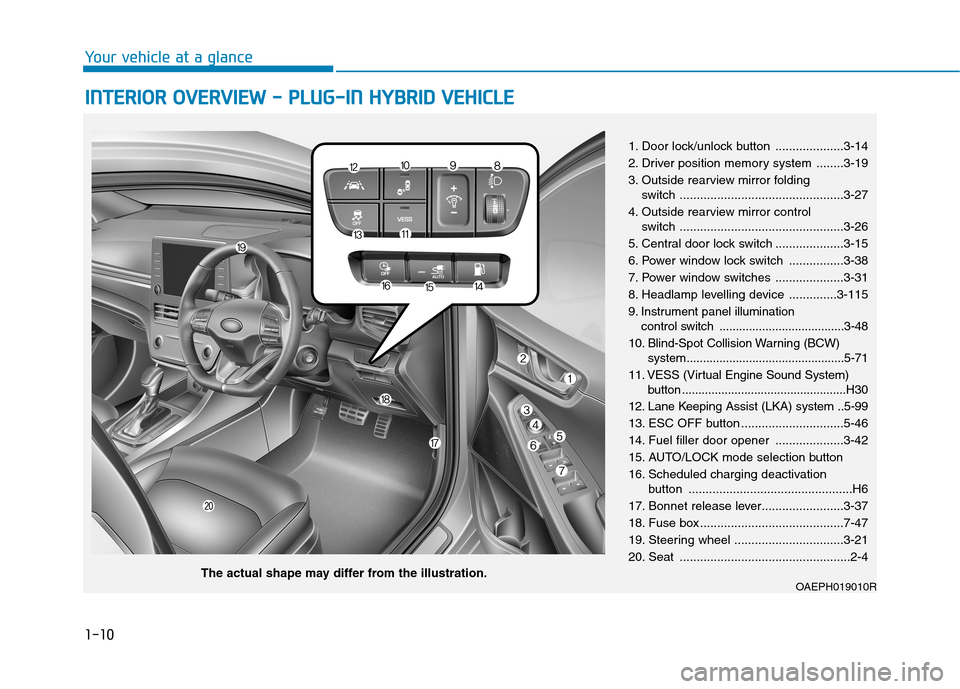
1. Door lock/unlock button ....................3-14
2. Driver position memory system ........3-19
3. Outside rearview mirror folding
switch ................................................3-27
4. Outside rearview mirror control
switch ................................................3-26
5. Central door lock switch ....................3-15
6. Power window lock switch ................3-38
7. Power window switches ....................3-31
8. Headlamp levelling device ..............3-115
9. Instrument panel illumination
control switch ......................................3-48
10. Blind-Spot Collision Warning (BCW)
system................................................5-71
11. VESS (Virtual Engine Sound System)
button ..................................................H30
12. Lane Keeping Assist (LKA) system ..5-99
13. ESC OFF button ..............................5-46
14. Fuel filler door opener ....................3-42
15. AUTO/LOCK mode selection button
16. Scheduled charging deactivation
button ................................................H6
17. Bonnet release lever........................3-37
18. Fuse box ..........................................7-47
19. Steering wheel ................................3-21
20. Seat ..................................................2-4
OAEPH019010RThe actual shape may differ from the illustration.
Page 148 of 613
Convenient features of your vehicle
Accessing your vehicle .........................................3-4
Remote key .........................................................................3-4
Smart key ............................................................................3-7
Immobiliser system .........................................................3-11
Door locks .............................................................3-12
Operating door locks from outside the vehicle ......3-12
Operating door locks from inside the vehicle .........3-14
Deadlocks ..........................................................................3-16
Auto door lock/unlock features..................................3-16
Child-protector rear door locks ..................................3-17
Theft-alarm system.............................................3-18
Driver position memory system .........................3-19
Storing memory positions .............................................3-19
Recalling memory positions..........................................3-20
Easy access function .....................................................3-20
Steering wheel......................................................3-21
Electric power steering (EPS) ......................................3-21
Tilt steering / Telescopic steering ..............................3-22
Heated steering wheel ...................................................3-22
Horn ....................................................................................3-23
Inside rearview mirror....................................................3-23
Mirrors ...................................................................3-23
Outside rearview mirror ................................................3-25
Windows ................................................................3-28
Power windows ................................................................3-28
Sunroof..................................................................3-33
Sunroof opening and closing .......................................3-34
Sliding the sunroof .........................................................3-34
Tilting the sunroof ..........................................................3-35
Sunshade ...........................................................................3-35
Resetting the sunroof ....................................................3-36
Exterior features .................................................3-37
Bonnet................................................................................3-37
Tailgate...............................................................................3-38
Fuel filler door (Hybrid vehicle) ..................................3-40
Fuel filler door (Plug-in hybrid vehicle) ...................3-42
Instrument cluster................................................3-46
Instrument cluster control ............................................3-48
Gauges and metres .........................................................3-49
Warning and indicator lights ........................................3-56
LCD display messages ....................................................3-69
3
Page 151 of 613
3-4
Convenient features of your vehicle
Remote key (if equipped)
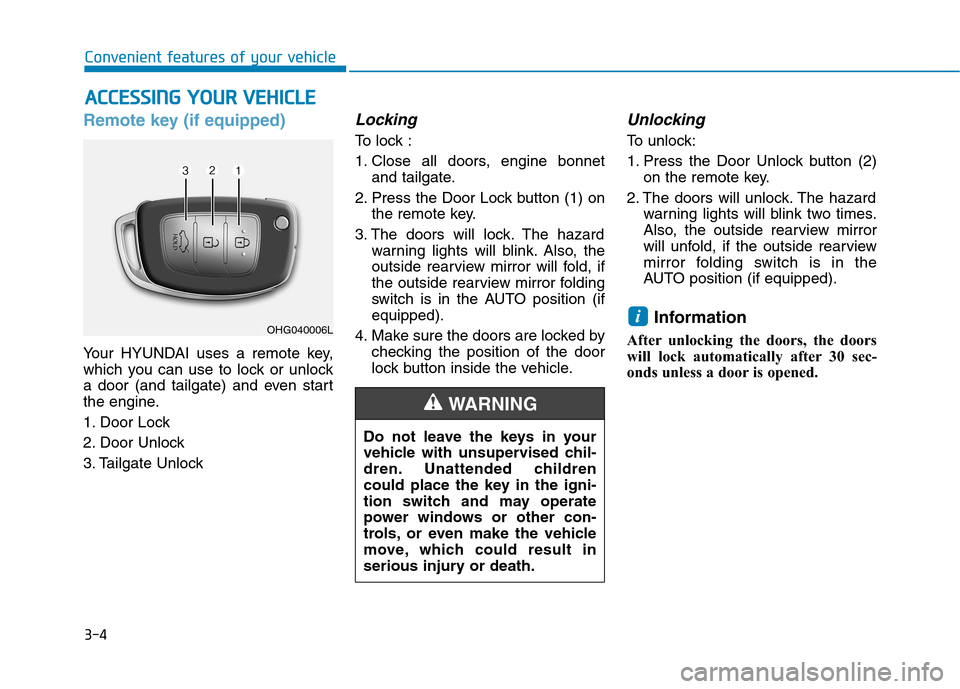
Your HYUNDAI uses a remote key,
which you can use to lock or unlock
a door (and tailgate) and even start
the engine.
1. Door Lock
2. Door Unlock
3. Tailgate Unlock
Locking
To lock :
1. Close all doors, engine bonnet
and tailgate.
2. Press the Door Lock button (1) on
the remote key.
3. The doors will lock. The hazard
warning lights will blink. Also, the
outside rearview mirror will fold, if
the outside rearview mirror folding
switch is in the AUTO position (if
equipped).
4. Make sure the doors are locked by
checking the position of the door
lock button inside the vehicle.
Unlocking
To unlock:
1. Press the Door Unlock button (2)
on the remote key.
2. The doors will unlock. The hazard
warning lights will blink two times.
Also, the outside rearview mirror
will unfold, if the outside rearview
mirror folding switch is in the
AUTO position (if equipped).
Information
After unlocking the doors, the doors
will lock automatically after 30 sec-
onds unless a door is opened.
i
A AC
CC
CE
ES
SS
SI
IN
NG
G
Y
YO
OU
UR
R
V
VE
EH
HI
IC
CL
LE
E
Do not leave the keys in your
vehicle with unsupervised chil-
dren. Unattended children
could place the key in the igni-
tion switch and may operate
power windows or other con-
trols, or even make the vehicle
move, which could result in
serious injury or death.
WARNING
OHG040006L
Page 165 of 613
3-18
Convenient features of your vehicle
This system helps to protect your
vehicle and valuables. The horn will
sound and the hazard warning lights
will blink continuously if any of the
following occur:
- A door is opened without using the
remote key or smart key.
- The tailgate is opened without
using the remote key or smart key.
- The engine bonnet is opened.
The alarm continues for 30 seconds,
then the system resets. To turn off
the alarm, unlock the doors with the
remote key or smart key.
The Theft Alarm System automati-
cally sets 30 seconds after you lock
the doors and the tailgate. For the
system to activate, you must lock the
doors and the tailgate from outside
the vehicle with the remote key or
smart key or by pressing the button
on the outside of the door handles
with the smart key in your posses-
sion.
The hazard warning lights will blink
once to indicate the system is
armed.Once the security system is set, open-
ing any door, the tailgate, or the bon-
net without using the remote key or
smart key will cause the alarm to acti-
vate.
The Theft Alarm System will not set if
the bonnet, the tailgate, or any door
is not fully closed. If the system will
not set, check the bonnet, the tail-
gate, or the doors are fully closed.
Do not attempt to alter this system or
add other devices to it.
Information
• Do not lock the doors until all pas-
sengers have left the vehicle. If the
remaining passenger leaves the
vehicle when the system is armed,
the alarm will be activated.
• If the vehicle is not disarmed with
the remote key or smart key, open
the doors by using the mechanical
key and place the ignition switch in
the ON position (for remote key) or
start the engine (for smart key) and
wait for 30 seconds.
• When the system is disarmed but a
door or tailgate is not opened within
30 seconds, the system will be
rearmed.
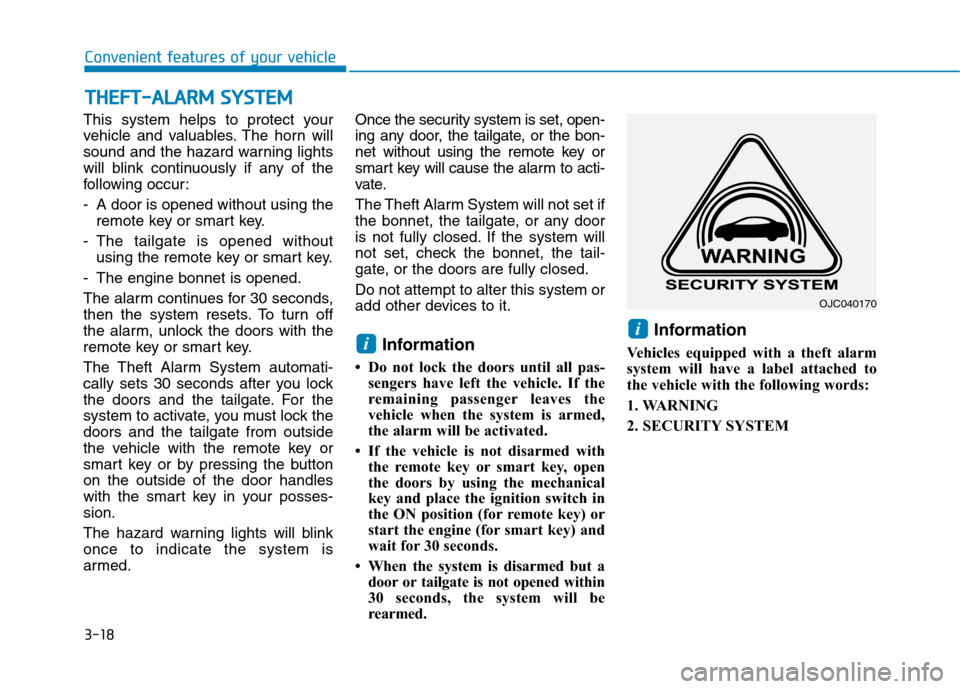
Information
Vehicles equipped with a theft alarm
system will have a label attached to
the vehicle with the following words:
1. WARNING
2. SECURITY SYSTEM
ii
T TH
HE
EF
FT
T-
-A
AL
LA
AR
RM
M
S
SY
YS
ST
TE
EM
M
OJC040170
Page 184 of 613
3-37
Convenient features of your vehicle
3
Bonnet
Opening the bonnet
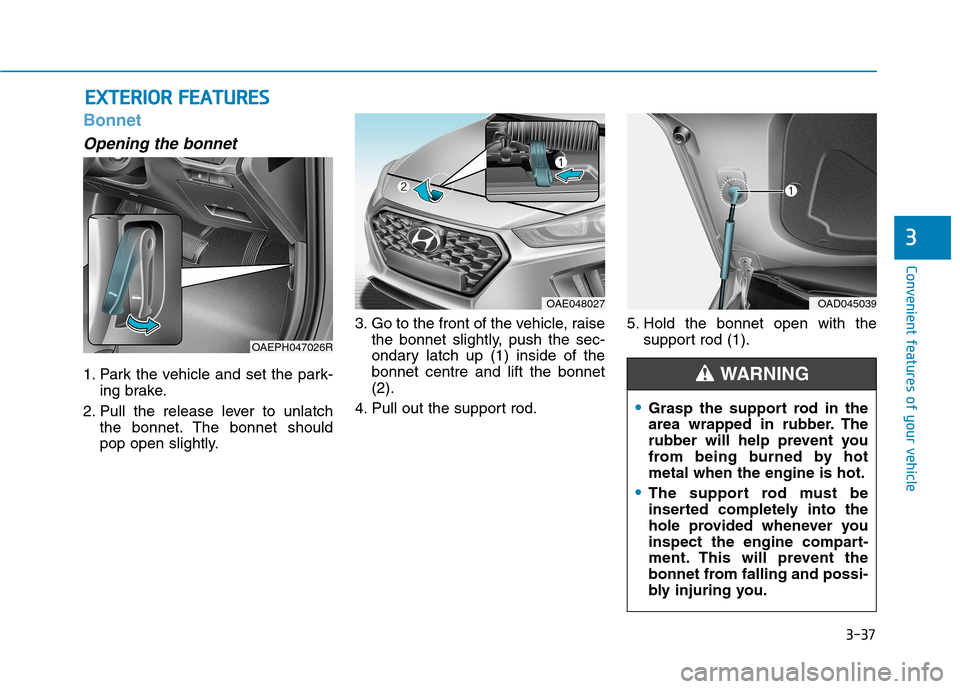
1. Park the vehicle and set the park-
ing brake.
2. Pull the release lever to unlatch
the bonnet. The bonnet should
pop open slightly.3. Go to the front of the vehicle, raise
the bonnet slightly, push the sec-
ondary latch up (1) inside of the
bonnet centre and lift the bonnet
(2).
4. Pull out the support rod.5. Hold the bonnet open with the
support rod (1).
E EX
XT
TE
ER
RI
IO
OR
R
F
FE
EA
AT
TU
UR
RE
ES
S
OAE048027
Grasp the support rod in the
area wrapped in rubber. The
rubber will help prevent you
from being burned by hot
metal when the engine is hot.
The support rod must be
inserted completely into the
hole provided whenever you
inspect the engine compart-
ment. This will prevent the
bonnet from falling and possi-
bly injuring you.
WARNING
OAD045039
OAEPH047026R
Page 185 of 613
3-38
Convenient features of your vehicle
Closing the bonnet
1. Before closing the bonnet, check
the following:
ment must be correctly installed.
bustible material must be removed
from the engine compartment.
2. Return the support rod to its clip to
prevent it from rattling.
3. Lower the bonnet halfway (lifted
approximately 30cm from the
closed position) and push down to
securely lock in place. Then double
check to be sure the bonnet is
secure.
If the bonnet can be raised slight-
ly it is not securely locked. Open it
again and close it with more force.
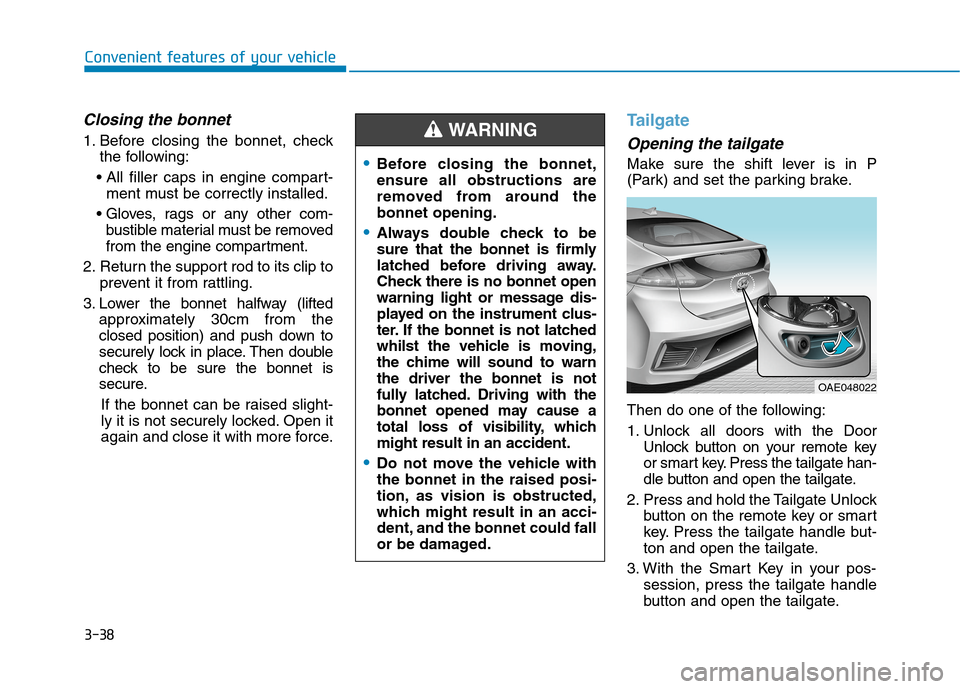
Tailgate
Opening the tailgate
Make sure the shift lever is in P
(Park) and set the parking brake.
Then do one of the following:
1. Unlock all doors with the Door
Unlock button on your remote key
or smart key. Press the tailgate han-
dle button and open the tailgate.
2. Press and hold the Tailgate Unlock
button on the remote key or smart
key. Press the tailgate handle but-
ton and open the tailgate.
3. With the Smart Key in your pos-
session, press the tailgate handle
button and open the tailgate.Before closing the bonnet,
ensure all obstructions are
removed from around the
bonnet opening.
Always double check to be
sure that the bonnet is firmly
latched before driving away.
Check there is no bonnet open
warning light or message dis-
played on the instrument clus-
ter. If the bonnet is not latched
whilst the vehicle is moving,
the chime will sound to warn
the driver the bonnet is not
fully latched. Driving with the
bonnet opened may cause a
total loss of visibility, which
might result in an accident.
Do not move the vehicle with
the bonnet in the raised posi-
tion, as vision is obstructed,
which might result in an acci-
dent, and the bonnet could fall
or be damaged.
WARNING
OAE048022
Page 218 of 613
3-71
Convenient features of your vehicle
3
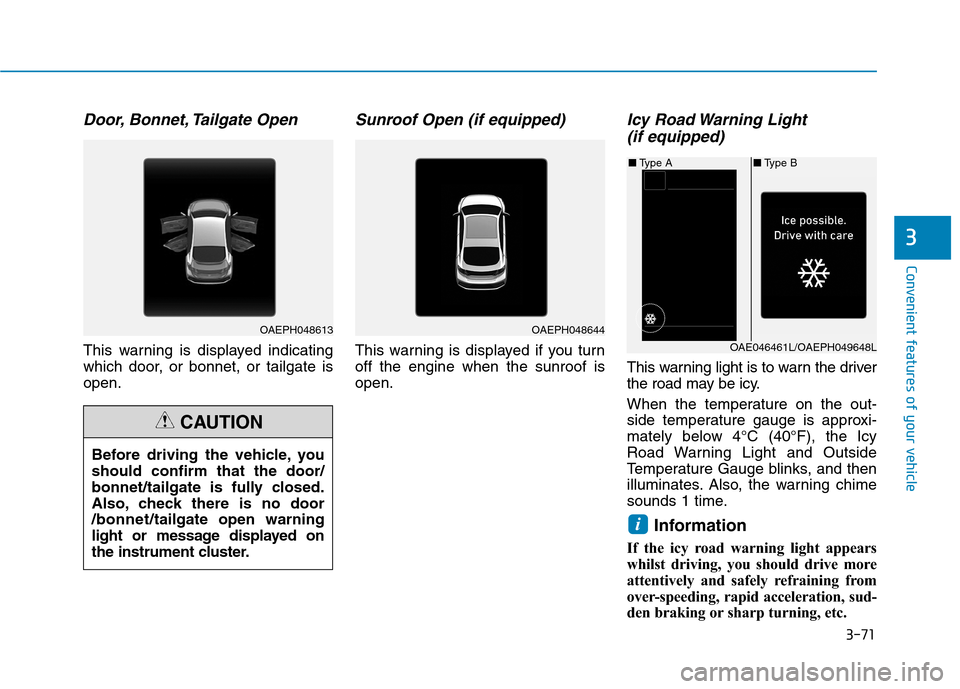
Door, Bonnet, Tailgate Open
This warning is displayed indicating
which door, or bonnet, or tailgate is
open.
Sunroof Open (if equipped)
This warning is displayed if you turn
off the engine when the sunroof is
open.
Icy Road Warning Light
(if equipped)
This warning light is to warn the driver
the road may be icy.
When the temperature on the out-
side temperature gauge is approxi-
mately below 4°C (40°F), the Icy
Road Warning Light and Outside
Temperature Gauge blinks, and then
illuminates. Also, the warning chime
sounds 1 time.
Information
If the icy road warning light appears
whilst driving, you should drive more
attentively and safely refraining from
over-speeding, rapid acceleration, sud-
den braking or sharp turning, etc.
i
Before driving the vehicle, you
should confirm that the door/
bonnet/tailgate is fully closed.
Also, check there is no door
/bonnet/tailgate open warning
light or message displayed on
the instrument cluster.
CAUTION
OAEPH048613OAEPH048644
■Type B ■Type A
OAE046461L/OAEPH049648L