tow Hyundai Ioniq Plug-in Hybrid 2019 - RHD (UK, Australia) Owner's Guide
[x] Cancel search | Manufacturer: HYUNDAI, Model Year: 2019, Model line: Ioniq Plug-in Hybrid, Model: Hyundai Ioniq Plug-in Hybrid 2019Pages: 599, PDF Size: 17.32 MB
Page 307 of 599
Audio : For detailed information,refer to “AUDIO” in this chapter.
AVN : Detailed information for the
Bluetooth® Wireless Technology
hands-free is described in the man-
ual supplied separately.
Audio / Video / Navigation sys-
tem (AVN) (if equipped)
Detailed information for the AVN sys-
tem is described in a separately sup-
plied manual.
How vehicle radio works
FM reception
AM and FM radio signals are broad-
cast from transmitter towers located
around your city. They are intercept-
ed by the radio antenna on your vehi-
cle. This signal is then received by
the radio and sent to your vehicle
speakers.
When a strong radio signal has
reached your vehicle, the precise
engineering of your audio system
ensures the best possible quality
reproduction. However, in some
cases the signal coming to your vehi-
cle may not be strong and clear. This can be due to factors, such as
the distance from the radio station,
closeness of other strong radio sta-
tions or the presence of buildings,
bridges or other large obstructions in
the area.
OJF045308L
4-5
Multimedia System
4
Page 346 of 599
5
Cruise control .......................................................5-77
Cruise Control operation ...............................................5-77
Smart Cruise Control system..............................5-83
Smart Cruise Control speed ..........................................5-85
Smart Cruise Control Vehicle-to-Vehicle
Distance ........................................................................\
.....5-89
Sensor to detect distance to the vehicle ahead .....5-92
To adjust the sensitivity of Smart Cruise Control ..5-94
To convert to Cruise Control mode ............................5-94
Limitations of the system .............................................5-95
Special driving conditions .................................5-100
Hazardous driving conditions ....................................5-100
Rocking the vehicle ......................................................5-100
Smooth cornering .........................................................5-101
Driving at night ..............................................................5-101
Driving in the rain .........................................................5-101
Driving in flooded areas..............................................5-102
Highway driving .............................................................5-102
Winter driving .....................................................5-103
Snow or icy conditions ................................................5-103
Winter Precautions .......................................................5-105
Trailer towing .....................................................5-108
If you decide to pull a trailer?...................................5-109
Trailer towing equipment ............................................5-111
Driving with a trailer ....................................................5-112
Maintenance when towing a trailer .........................5-116
Vehicle weight ....................................................5-117
Overloading ....................................................................5-11\
7
Page 351 of 599
5-7
Driving your vehicle
5
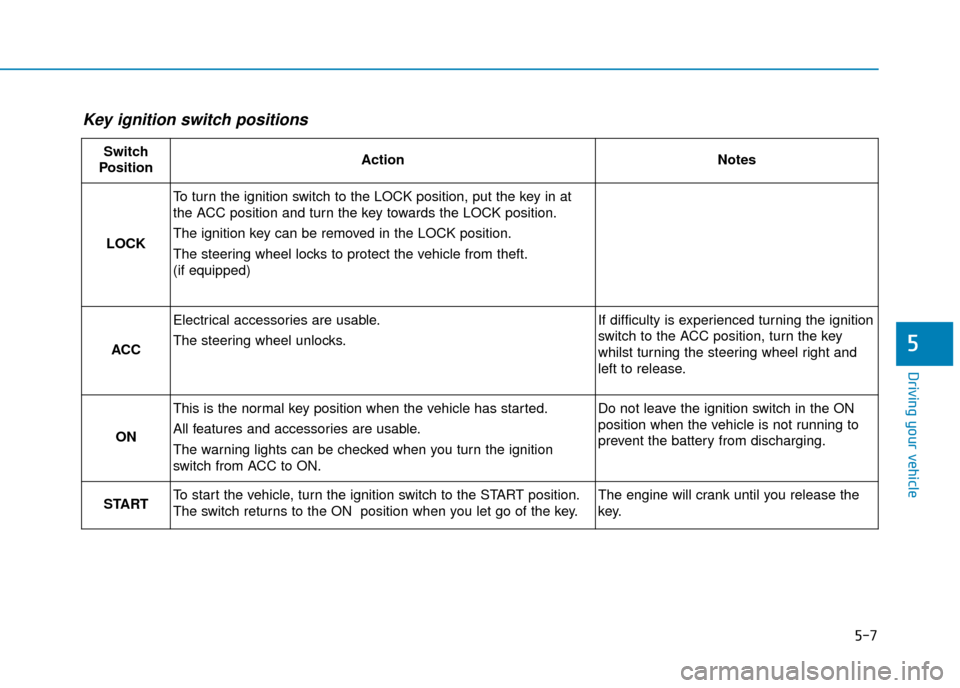
Key ignition switch positions
Switch
PositionActionNotes
LOCK
To turn the ignition switch to the LOCK position, put the key in at
the ACC position and turn the key towards the LOCK position.
The ignition key can be removed in the LOCK position.
The steering wheel locks to protect the vehicle from theft.
(if equipped)
ACC
Electrical accessories are usable.
The steering wheel unlocks.If difficulty is experienced turning the ignition
switch to the ACC position, turn the key
whilst turning the steering wheel right and
left to release.
ON
This is the normal key position when the vehicle has started.
All features and accessories are usable.
The warning lights can be checked when you turn the ignition
switch from ACC to ON.Do not leave the ignition switch in the ON
position when the vehicle is not running to
prevent the battery from discharging.
STARTTo start the vehicle, turn the ignition switch to the START position.
The switch returns to the ON position when you let go of the key.The engine will crank until you release the
key.
Page 352 of 599
5-8
Driving your vehicle
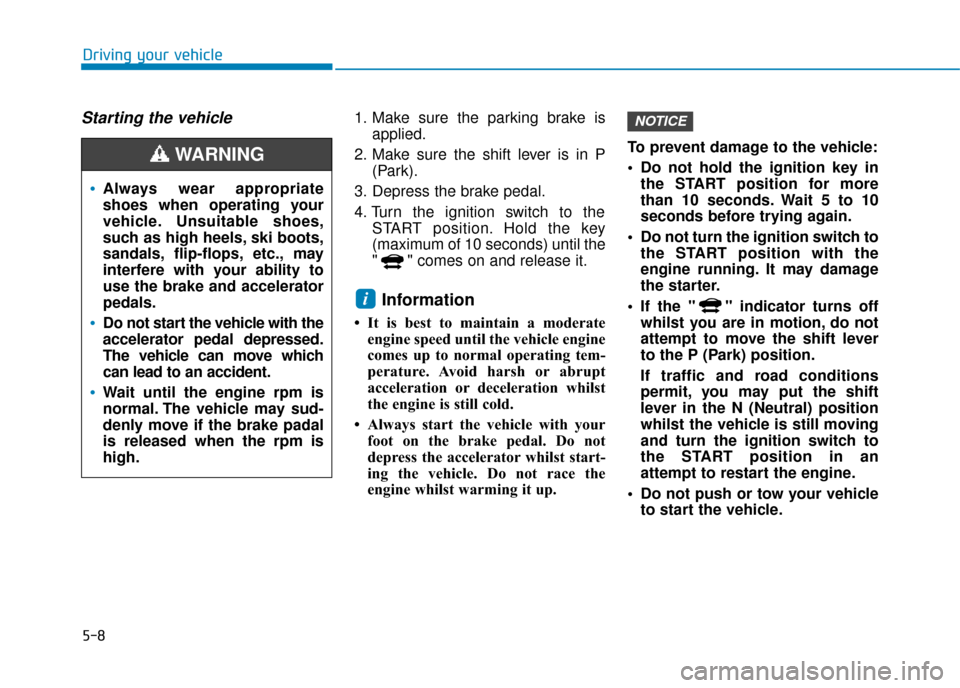
Starting the vehicle1. Make sure the parking brake isapplied.
2. Make sure the shift lever is in P (Park).
3. Depress the brake pedal.
4. Turn the ignition switch to the START position. Hold the key
(maximum of 10 seconds) until the
" " comes on and release it.
Information
• It is best to maintain a moderateengine speed until the vehicle engine
comes up to normal operating tem-
perature. Avoid harsh or abrupt
acceleration or deceleration whilst
the engine is still cold.
• Always start the vehicle with your foot on the brake pedal. Do not
depress the accelerator whilst start-
ing the vehicle. Do not race the
engine whilst warming it up. To prevent damage to the vehicle:
Do not hold the ignition key in
the START position for more
than 10 seconds. Wait 5 to 10
seconds before trying again.
Do not turn the ignition switch to the START position with the
engine running. It may damage
the starter.
If the " " indicator turns off whilst you are in motion, do not
attempt to move the shift lever
to the P (Park) position.
If traffic and road conditions
permit, you may put the shift
lever in the N (Neutral) position
whilst the vehicle is still moving
and turn the ignition switch to
the START position in an
attempt to restart the engine.
Do not push or tow your vehicle to start the vehicle.
NOTICE
i
Always wear appropriate
shoes when operating your
vehicle. Unsuitable shoes,
such as high heels, ski boots,
sandals, flip-flops, etc., may
interfere with your ability to
use the brake and accelerator
pedals.
Do not start the vehicle with the
accelerator pedal depressed.
The vehicle can move which
can lead to an accident.
Wait until the engine rpm is
normal. The vehicle may sud-
denly move if the brake padal
is released when the rpm is
high.
WARNING
Page 357 of 599
5-13
Driving your vehicle
5
Information
• Do not wait for the engine to warmup whilst the vehicle remains sta-
tionary.
Start driving at moderate engine
speeds. Steep accelerating and
decelerating should be avoided.
• Always start the vehicle with your foot on the brake pedal. Do not
depress the accelerator whilst start-
ing the vehicle. Do not race the
engine whilst warming it up.
• If ambient temperature is low, the " " indicator may remain illumi-
nated longer than the normal amount
of time. To prevent damage to the vehicle:
If the " " indicator turns off
whilst you are in motion, do not
attempt to move the shift lever
to the P (Park) position.
Do not push or tow your vehicle to start the vehicle. To prevent damage to the vehicle:
Do not press the Engine Start/Stop
button for more than 10 seconds
except when the stop lamp fuse is
blown.
When the stop lamp fuse is blown,
you cannot normally start the
hybrid system. Replace the fuse
with a new one. If you are not able
to replace the fuse, you can start
the vehicle by pressing and hold-
ing the Engine Start/Stop button
for 10 seconds with the Engine
Start/Stop button in the ACC posi-
tion.
For your safety always depress
the brake pedal before starting the
vehicle.
NOTICENOTICEi
Page 400 of 599
5-56
Driving your vehicle(Continued)
The brake control may be
insufficient, possibly causing
a collision, if a vehicle in front
abruptly stops. Always pay
extreme caution.
Occupants may get injured, if
the vehicle abruptly stops by
the activated FCA system. Pay
extreme caution.
The FCA is only a supplemen-
tal system for the driver's con-
venience. The driver should
hold the responsibility to con-
trol the vehicle operation. Do
not solely depend on the FCA
system. Rather, maintain a
safe braking distance, and, if
necessary, depress the brake
pedal to reduce the driving
speed.
In certain instances and
under certain driving condi-
tions, the FCA system may
unintentonally activate. This
initial warning message
appears on the LCD display
with a warning chime.
Also, in certain instances the
front radar sensor or camera
recognition system may not
detect the vehicle or pedestri-
an ahead. The FCA system
may not activate and the
warning message will not be
displayed.(Continued)
WARNING (Continued)
If there is a malfunction with the
FCA system, the Forward
Collision-avoidance Assist is
not applied even though the
braking system is operating
normally.
If the vehicle in front stops
suddenly, you may have less
control of the brake system.
Therefore, always keep a safe
distance between your vehicle
and the vehicle in front of you.
The FCA system may activate
during braking and the vehi-
cle may stop suddenly shift-
ing loose objects toward the
passengers. Always keep
loose objects secured.
The FCA system may not acti-
vate if the driver applies the
brake pedal to avoid a colli-
sion.(Continued)
Page 402 of 599
5-58
Driving your vehicle
The windscreen glass is fogged up; a clear view of the road is obstruct-
ed
The vehicle in front is driving errat- ically
The vehicle is on unpaved or uneven rough surfaces, or roads
with sudden gradient changes
The adverse road conditions cause excessive vehicle vibrations whilst
driving
The vehicle is moving under ground level or inside a building
The vehicle is driven near areas containing metal substances such
as a construction zone, railroad,
etc.
The vehicle in front is moving verti- cally to the driving direction
The vehicle in front is stopped ver- tically
The vehicle in front is driving towards your vehicle or reversing - Driving on a curve
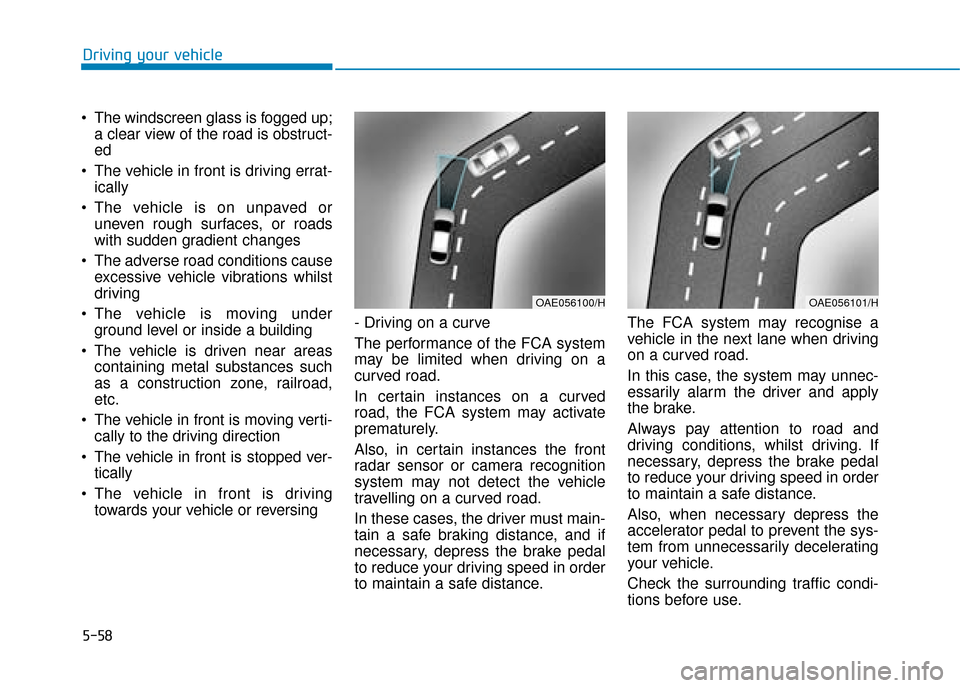
The performance of the FCA system
may be limited when driving on a
curved road.
In certain instances on a curved
road, the FCA system may activate
prematurely.
Also, in certain instances the front
radar sensor or camera recognition
system may not detect the vehicle
travelling on a curved road.
In these cases, the driver must main-
tain a safe braking distance, and if
necessary, depress the brake pedal
to reduce your driving speed in order
to maintain a safe distance. The FCA system may recognise a
vehicle in the next lane when driving
on a curved road.
In this case, the system may unnec-
essarily alarm the driver and apply
the brake.
Always pay attention to road and
driving conditions, whilst driving. If
necessary, depress the brake pedal
to reduce your driving speed in order
to maintain a safe distance.
Also, when necessary depress the
accelerator pedal to prevent the sys-
tem from unnecessarily decelerating
your vehicle.
Check the surrounding traffic condi-
tions before use.
OAE056100/HOAE056101/H
Page 405 of 599
5-61
Driving your vehicle
5
Information
In some instances, the FCA system
may be cancelled when subjected to
electromagnetic interference.
i
Do not use the Autonomous
Emergency Braking system
when towing a vehicle.
Application of the FCA sys-
tem whilst towing may
adversely affect the safety of
your vehicle or the towing
vehicle.
Use extreme caution when the
vehicle in front of you has
cargo that extends rearward
from the cab, or when the
vehicle in front of you has
higher ground clearance.
The FCA system is designed
to detect and monitor the
vehicle ahead or detect a
pedestrian in the roadway
through radar signals and
camera recognition. It is not
designed to detect bicycles,
motorcycles, or smaller
wheeled objects such as lug-
gage bags, shopping carts, or
strollers.(Continued)
(Continued)
Never try to test the operation
of the FCA system. Doing so
may cause severe injury or
death.
WARNING
When you replace the wind-
screen glass, bumper or
radar/camera, we recommend
that you take your vehicle to a
HYUNDAI authorised repairer
and have the system checked
for calibration.
WARNING
Page 407 of 599
5-63
Driving your vehicle
5
LKA operation
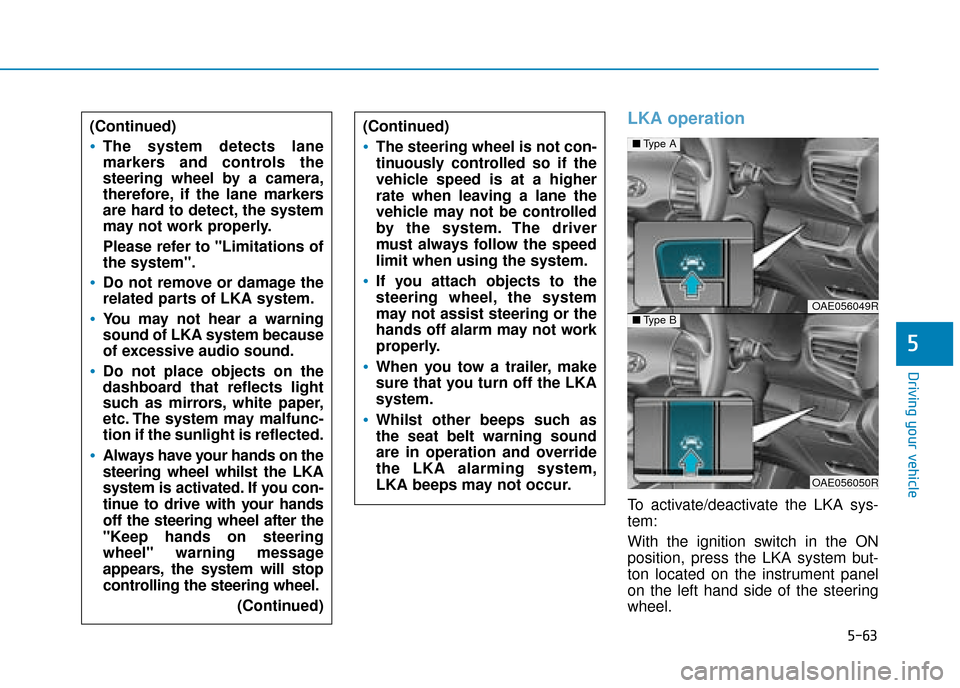
To activate/deactivate the LKA sys-
tem:
With the ignition switch in the ON
position, press the LKA system but-
ton located on the instrument panel
on the left hand side of the steering
wheel.
■Type A
OAE056049R■Type B
OAE056050R
(Continued)
The system detects lane
markers and controls the
steering wheel by a camera,
therefore, if the lane markers
are hard to detect, the system
may not work properly.
Please refer to "Limitations of
the system".
Do not remove or damage the
related parts of LKA system.
You may not hear a warning
sound of LKA system because
of excessive audio sound.
Do not place objects on the
dashboard that reflects light
such as mirrors, white paper,
etc. The system may malfunc-
tion if the sunlight is reflected.
Always have your hands on the
steering wheel whilst the LKA
system is activated. If you con-
tinue to drive with your hands
off the steering wheel after the
"Keep hands on steering
wheel" warning message
appears, the system will stop
controlling the steering wheel.
(Continued)
(Continued)
The steering wheel is not con-
tinuously controlled so if the
vehicle speed is at a higher
rate when leaving a lane the
vehicle may not be controlled
by the system. The driver
must always follow the speed
limit when using the system.
If you attach objects to the
steering wheel, the system
may not assist steering or the
hands off alarm may not work
properly.
When you tow a trailer, make
sure that you turn off the LKA
system.
Whilst other beeps such as
the seat belt warning sound
are in operation and override
the LKA alarming system,
LKA beeps may not occur.
Page 421 of 599
5-77
Driving your vehicle
5
Cruise Control operation
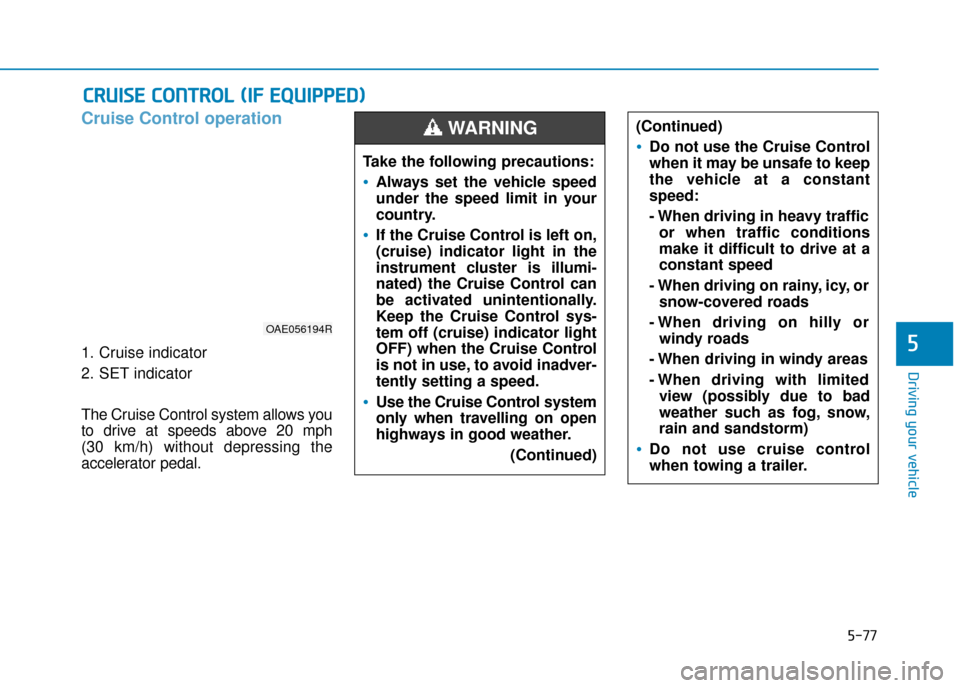
1. Cruise indicator
2. SET indicator
The Cruise Control system allows you
to drive at speeds above 20 mph
(30 km/h) without depressing the
accelerator pedal.
C CR
R U
U I
IS
S E
E
C
C O
O N
NT
TR
R O
O L
L
(
( I
IF
F
E
E Q
Q U
UI
IP
P P
PE
ED
D )
)
Take the following precautions:
Always set the vehicle speed
under the speed limit in your
country.
If the Cruise Control is left on,
(cruise) indicator light in the
instrument cluster is illumi-
nated) the Cruise Control can
be activated unintentionally.
Keep the Cruise Control sys-
tem off (cruise) indicator light
OFF) when the Cruise Control
is not in use, to avoid inadver-
tently setting a speed.
Use the Cruise Control system
only when travelling on open
highways in good weather.
(Continued)
(Continued)
Do not use the Cruise Control
when it may be unsafe to keep
the vehicle at a constant
speed:
- When driving in heavy trafficor when traffic conditions
make it difficult to drive at a
constant speed
- When driving on rainy, icy, or snow-covered roads
- When driving on hilly or windy roads
- When driving in windy areas
- When driving with limited view (possibly due to bad
weather such as fog, snow,
rain and sandstorm)
Do not use cruise control
when towing a trailer.
WARNING
OAE056194R