battery HYUNDAI IX20 2011 User Guide
[x] Cancel search | Manufacturer: HYUNDAI, Model Year: 2011, Model line: IX20, Model: HYUNDAI IX20 2011Pages: 420, PDF Size: 20.53 MB
Page 133 of 420
455
Features of your vehicle
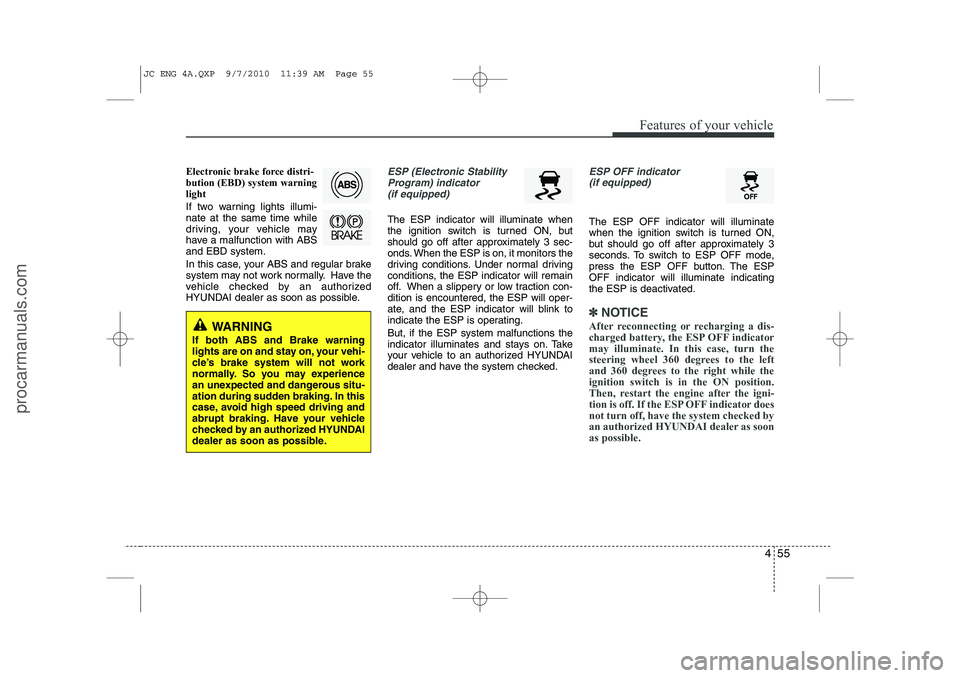
Electronic brake force distri- bution (EBD) system warninglight
If two warning lights illumi- nate at the same time while
driving, your vehicle may
have a malfunction with ABSand EBD system.
In this case, your ABS and regular brake
system may not work normally. Have the
vehicle checked by an authorized
HYUNDAI dealer as soon as possible.ESP (Electronic StabilityProgram) indicator (if equipped)
The ESP indicator will illuminate when
the ignition switch is turned ON, but
should go off after approximately 3 sec-
onds. When the ESP is on, it monitors the
driving conditions. Under normal driving
conditions, the ESP indicator will remain
off. When a slippery or low traction con-dition is encountered, the ESP will oper-
ate, and the ESP indicator will blink to
indicate the ESP is operating. But, if the ESP system malfunctions the
indicator illuminates and stays on. Take
your vehicle to an authorized HYUNDAI
dealer and have the system checked.
ESP OFF indicator (if equipped)
The ESP OFF indicator will illuminate
when the ignition switch is turned ON,
but should go off after approximately 3
seconds. To switch to ESP OFF mode,
press the ESP OFF button. The ESPOFF indicator will illuminate indicating
the ESP is deactivated.
✽✽ NOTICE
After reconnecting or recharging a dis-
charged battery, the ESP OFF indicatormay illuminate. In this case, turn the
steering wheel 360 degrees to the left
and 360 degrees to the right while theignition switch is in the ON position.
Then, restart the engine after the igni-
tion is off. If the ESP OFF indicator doesnot turn off, have the system checked by
an authorized HYUNDAI dealer as soonas possible.
WARNING
If both ABS and Brake warning
lights are on and stay on, your vehi-
cle’s brake system will not work
normally. So you may experience
an unexpected and dangerous situ-
ation during sudden braking. In this
case, avoid high speed driving and
abrupt braking. Have your vehicle
checked by an authorized HYUNDAI
dealer as soon as possible.
JC ENG 4A.QXP 9/7/2010 11:39 AM Page 55
procarmanuals.com
Page 135 of 420
457
Features of your vehicle
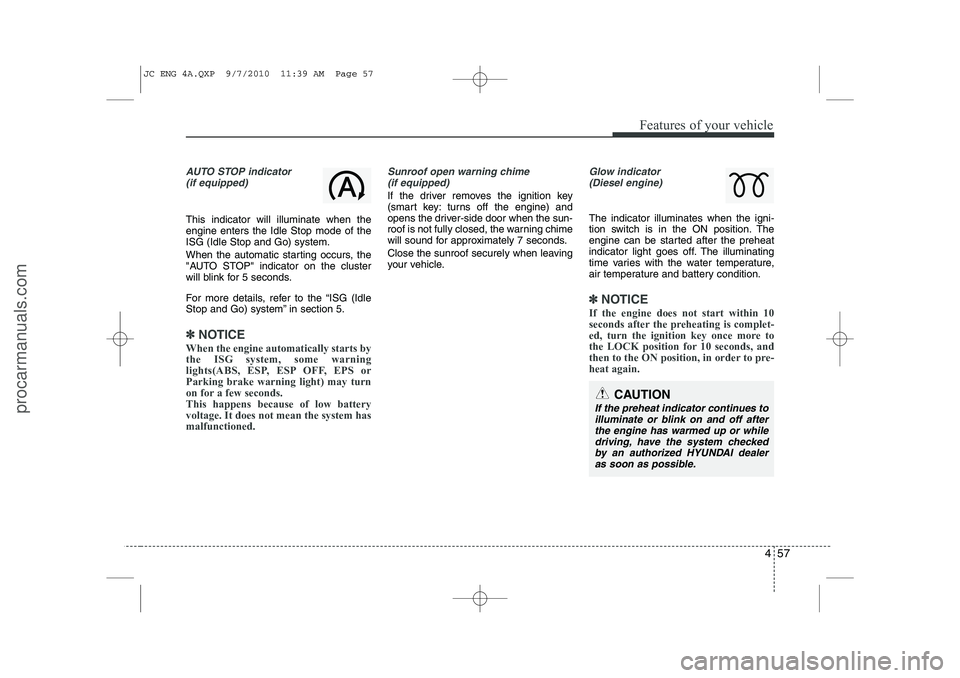
AUTO STOP indicator(if equipped)
This indicator will illuminate when the engine enters the Idle Stop mode of theISG (Idle Stop and Go) system.
When the automatic starting occurs, the
"AUTO STOP" indicator on the cluster
will blink for 5 seconds.
For more details, refer to the “ISG (Idle
Stop and Go) system” in section 5.
✽✽ NOTICE
When the engine automatically starts by
the ISG system, some warning
lights(ABS, ESP, ESP OFF, EPS orParking brake warning light) may turn
on for a few seconds. This happens because of low batteryvoltage. It does not mean the system hasmalfunctioned.
Sunroof open warning chime (if equipped)
If the driver removes the ignition key
(smart key: turns off the engine) and
opens the driver-side door when the sun-
roof is not fully closed, the warning chime
will sound for approximately 7 seconds.
Close the sunroof securely when leaving
your vehicle.
Glow indicator (Diesel engine)
The indicator illuminates when the igni-
tion switch is in the ON position. The
engine can be started after the preheat
indicator light goes off. The illuminating
time varies with the water temperature,
air temperature and battery condition.
✽✽ NOTICE
If the engine does not start within 10
seconds after the preheating is complet-
ed, turn the ignition key once more to
the LOCK position for 10 seconds, and
then to the ON position, in order to pre-heat again.
CAUTION
If the preheat indicator continues to illuminate or blink on and off after the engine has warmed up or whiledriving, have the system checked by an authorized HYUNDAI dealer
as soon as possible.
JC ENG 4A.QXP 9/7/2010 11:39 AM Page 57
procarmanuals.com
Page 138 of 420
Features of your vehicle
60
4
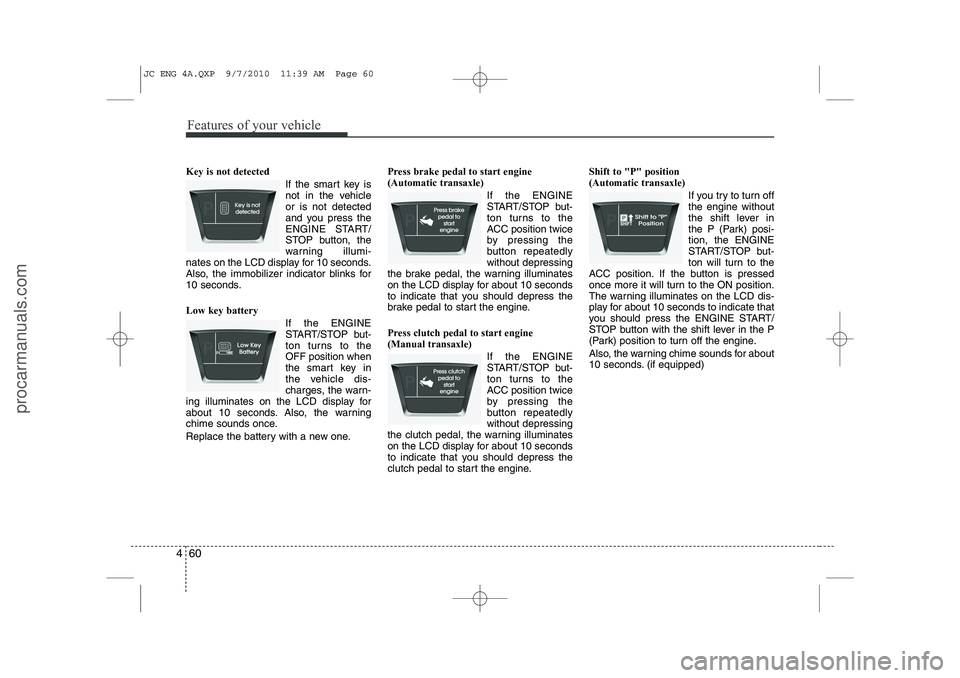
Key is not detected
If the smart key is
not in the vehicleor is not detected
and you press the
ENGINE START/
STOP button, the
warning illumi-
nates on the LCD display for 10 seconds.
Also, the immobilizer indicator blinks for
10 seconds. Low key battery
If the ENGINE
START/STOP but-
ton turns to theOFF position when
the smart key in
the vehicle dis-
charges, the warn-
ing illuminates on the LCD display for
about 10 seconds. Also, the warning
chime sounds once.
Replace the battery with a new one. Press brake pedal to start engine (Automatic transaxle)
If the ENGINE
START/STOP but-
ton turns to the
ACC position twice
by pressing the
button repeatedlywithout depressing
the brake pedal, the warning illuminates
on the LCD display for about 10 seconds
to indicate that you should depress the
brake pedal to start the engine.
Press clutch pedal to start engine (Manual transaxle)
If the ENGINE
START/STOP but-
ton turns to the
ACC position twice
by pressing the
button repeatedlywithout depressing
the clutch pedal, the warning illuminates
on the LCD display for about 10 seconds
to indicate that you should depress the
clutch pedal to start the engine. Shift to "P" position (Automatic transaxle)
If you try to turn offthe engine without
the shift lever in
the P (Park) posi-tion, the ENGINE
START/STOP but-
ton will turn to the
ACC position. If the button is pressed
once more it will turn to the ON position.
The warning illuminates on the LCD dis-
play for about 10 seconds to indicate that
you should press the ENGINE START/
STOP button with the shift lever in the P
(Park) position to turn off the engine.
Also, the warning chime sounds for about
10 seconds. (if equipped)
JC ENG 4A.QXP 9/7/2010 11:39 AM Page 60
procarmanuals.com
Page 147 of 420
469
Features of your vehicle
Battery saver function
The purpose of this feature is to pre-vent the battery from being dis-
charged. The system automatically
turns off the parking lights when the
driver removes the ignition key and
opens the driver-side door.
With this feature, the parking lights will turn off automatically if the driver parkson the side of road at night.
If necessary, to keep the lights on
when the ignition key is removed, per-
form the following:
1) Open the driver-side door.
2) Turn the parking lights OFF and ON again using the light switch on the
steering column. Headlight escort function (if equipped)
If you turn the ignition switch to the ACC or OFF position with the headlights ON,the headlights (and/or tail lights) remain
on for about 20 minutes. However, with
the engine off if the driver’s door isopened and closed, the headlights
(and/or tail lights) are turned off after 30
seconds. The headlights (and/or tail lights) can be
turned off by pressing the lock button on
the transmitter (or smart key) twice or
turning the light switch to the OFF or
Auto position.
However, if you turn the light switch to the
Auto position when it is dark outside, the
headlights will not be turned off. Smart conering light (if equipped)
While driving the corner, for your sight
and safety, the smart cornering light is
turns on automatically. The system will
operate automatically as follows:
When turning the headlight on
When the steering wheel angle is over
25~35 (it differs according to vehicle speed)
When the vehicle speed is over 3 km/h
When driving forward
LIGHTING
CAUTION
If the driver gets out of the vehicle
through other doors (except driver's door), the battery saver functiondoes not operate and the headlight escort function does not turn off
automatically. Therefore, It causesthe battery to be discharged. In this case, make sure to turn off the lampbefore getting out of the vehicle.
JC ENG 4A.QXP 9/7/2010 11:39 AM Page 69
procarmanuals.com
Page 149 of 420
471
Features of your vehicle
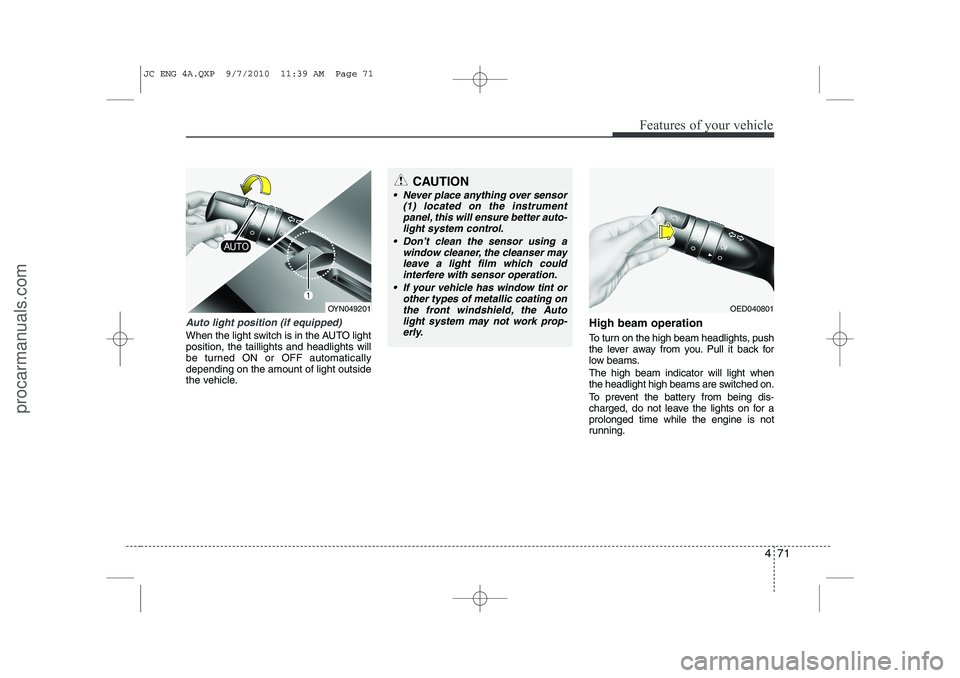
Auto light position (if equipped)
When the light switch is in the AUTO light position, the taillights and headlights will
be turned ON or OFF automaticallydepending on the amount of light outside
the vehicle.High beam operation
To turn on the high beam headlights, push
the lever away from you. Pull it back for
low beams. The high beam indicator will light when
the headlight high beams are switched on.
To prevent the battery from being dis-
charged, do not leave the lights on for aprolonged time while the engine is not
running.
OED040801
CAUTION
Never place anything over sensor
(1) located on the instrument
panel, this will ensure better auto- light system control.
Don’t clean the sensor using a window cleaner, the cleanser may
leave a light film which could interfere with sensor operation.
If your vehicle has window tint or other types of metallic coating onthe front windshield, the Auto
light system may not work prop- erly.
OYN049201
JC ENG 4A.QXP 9/7/2010 11:39 AM Page 71
procarmanuals.com
Page 157 of 420
479
Features of your vehicle
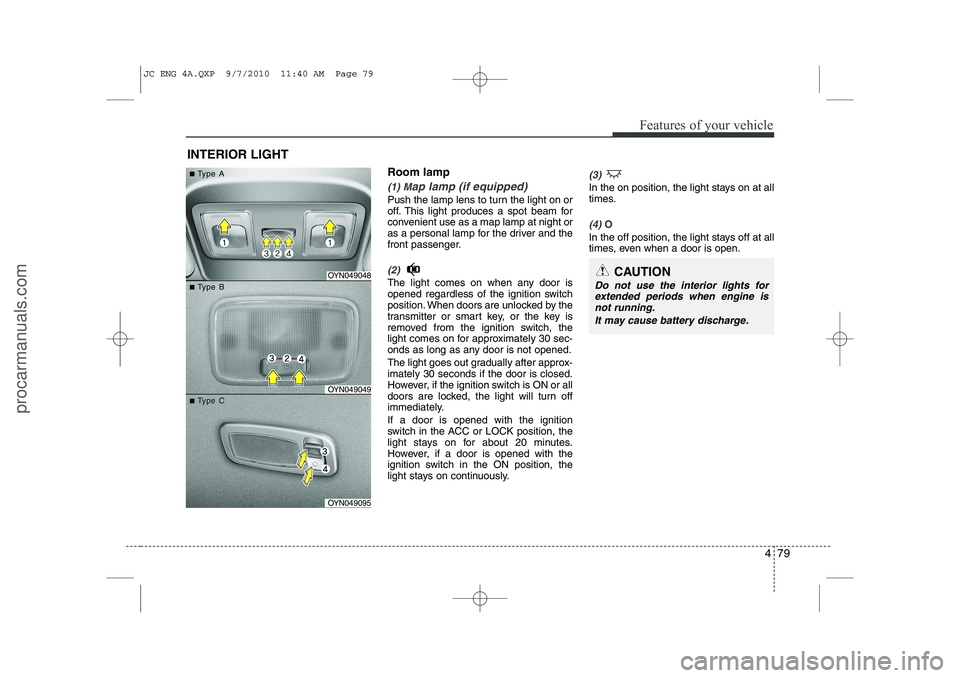
Room lamp
(1) Map lamp (if equipped)
Push the lamp lens to turn the light on or
off. This light produces a spot beam for
convenient use as a map lamp at night or
as a personal lamp for the driver and the
front passenger.
(2)
The light comes on when any door is
opened regardless of the ignition switch
position. When doors are unlocked by the
transmitter or smart key, or the key is
removed from the ignition switch, the
light comes on for approximately 30 sec-
onds as long as any door is not opened.
The light goes out gradually after approx- imately 30 seconds if the door is closed.
However, if the ignition switch is ON or all
doors are locked, the light will turn off
immediately. If a door is opened with the ignition
switch in the ACC or LOCK position, the
light stays on for about 20 minutes.
However, if a door is opened with the
ignition switch in the ON position, the
light stays on continuously.
(3)
In the on position, the light stays on at all
times.
(4) O
In the off position, the light stays off at all
times, even when a door is open.
INTERIOR LIGHT
CAUTION
Do not use the interior lights forextended periods when engine is not running.
It may cause battery discharge.OYN049048
OYN049049
OYN049095
■■TType Aype A
■■TType Bype B
■■TType Cype C
JC ENG 4A.QXP 9/7/2010 11:40 AM Page 79
procarmanuals.com
Page 172 of 420
Features of your vehicle
94
4
Temperature conversion
If the battery has been discharged or dis-
connected, the temperature mode dis-
play will reset to Centigrade.
This is normal condition. You can switch
the temperature mode between
Centigrade to Fahrenheit as follows:
While pressing the AUTO button, press
the OFF button for 3 seconds or more.
The display will change from Centigrade
to Fahrenheit, or from Fahrenheit to
Centigrade.
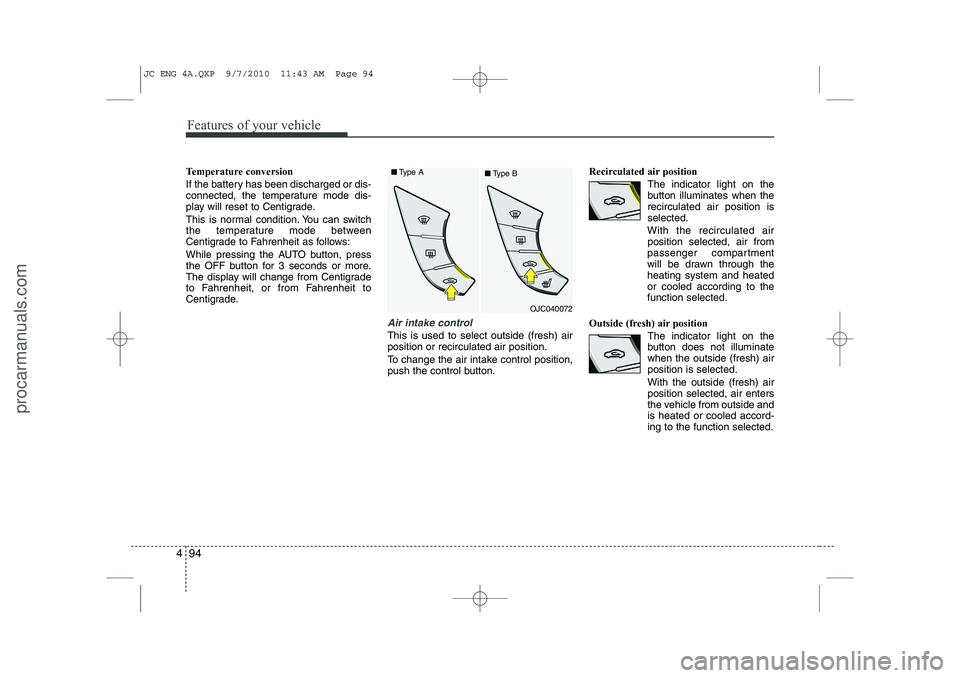
Air intake control
This is used to select outside (fresh) air position or recirculated air position.
To change the air intake control position,
push the control button. Recirculated air position
The indicator light on the
button illuminates when therecirculated air position isselected.
With the recirculated air position selected, air from
passenger compartment
will be drawn through theheating system and heatedor cooled according to thefunction selected.
Outside (fresh) air position The indicator light on the
button does not illuminatewhen the outside (fresh) airposition is selected. With the outside (fresh) air position selected, air enters
the vehicle from outside andis heated or cooled accord-ing to the function selected.
OJC040072
■
Type A
■Type B
JC ENG 4A.QXP 9/7/2010 11:43 AM Page 94
procarmanuals.com
Page 181 of 420
4 103
Features of your vehicle
INTERIOR FEATURES
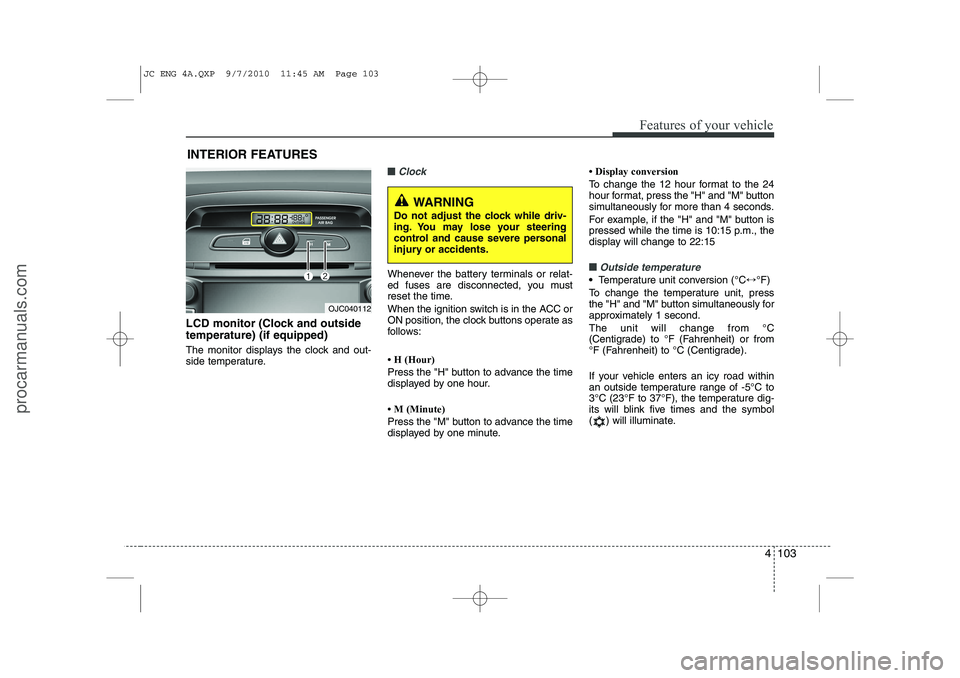
LCD monitor (Clock and outside temperature) (if equipped)
The monitor displays the clock and out-
side temperature.
■■Clock
Whenever the battery terminals or relat-
ed fuses are disconnected, you must
reset the time.
When the ignition switch is in the ACC or
ON position, the clock buttons operate as
follows:
Page 184 of 420
Features of your vehicle
106
4
✽✽
NOTICE
Close the vanity mirror cover securely
and return the sunvisor to its original
position after use.
❈ To learn how to use the vanity mirror
lamp, refer to "Interior light" in this sec- tion.
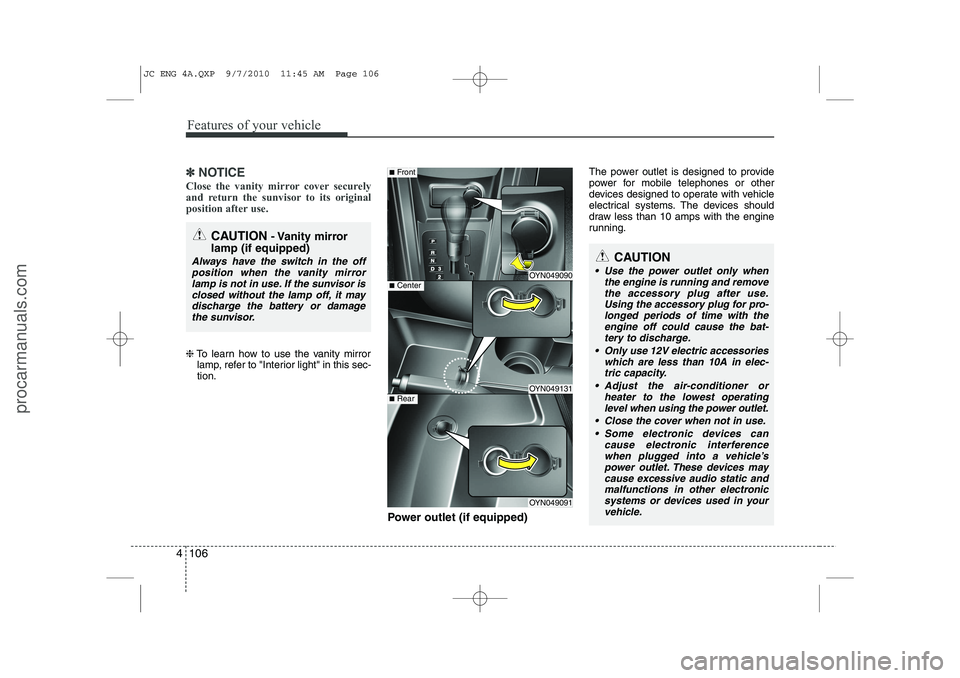
Power outlet (if equipped) The power outlet is designed to provide
power for mobile telephones or other
devices designed to operate with vehicle
electrical systems. The devices should
draw less than 10 amps with the engine
running.
CAUTION
- Vanity mirror
lamp (if equipped)
Always have the switch in the off position when the vanity mirror
lamp is not in use. If the sunvisor isclosed without the lamp off, it may discharge the battery or damagethe sunvisor.
OYN049090
OYN049131
OYN049091
■ Center
■Front
■Rear
CAUTION
Use the power outlet only when
the engine is running and remove
the accessory plug after use. Using the accessory plug for pro-longed periods of time with the engine off could cause the bat-
tery to discharge.
Only use 12V electric accessories which are less than 10A in elec-tric capacity.
Adjust the air-conditioner or heater to the lowest operatinglevel when using the power outlet.
Close the cover when not in use. Some electronic devices can cause electronic interference
when plugged into a vehicle’spower outlet. These devices maycause excessive audio static and malfunctions in other electronic
systems or devices used in your vehicle.
JC ENG 4A.QXP 9/7/2010 11:45 AM Page 106
procarmanuals.com
Page 195 of 420
4 117
Features of your vehicle
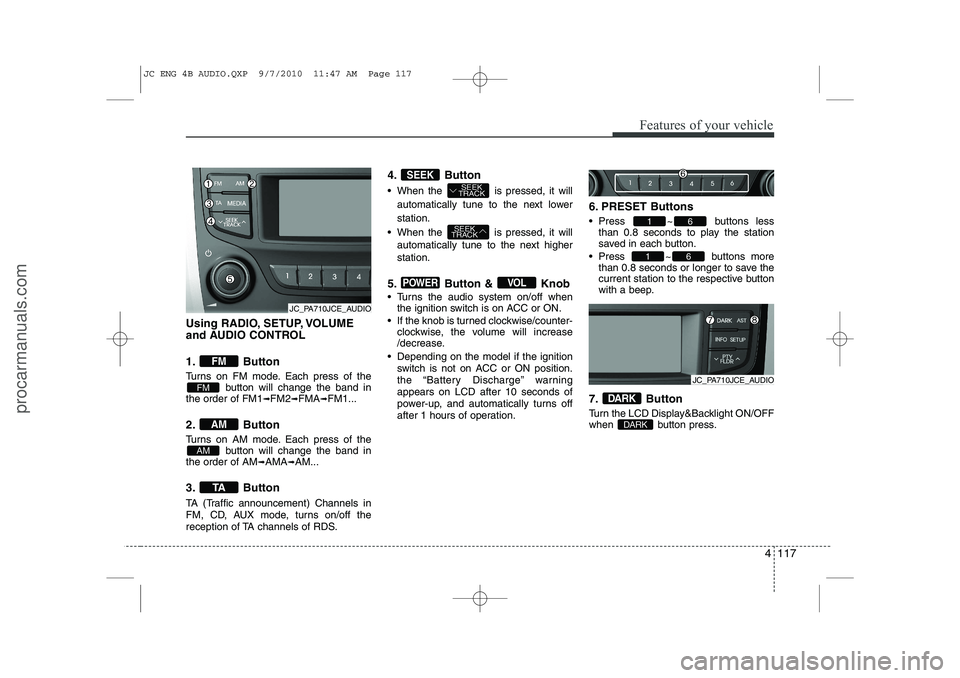
Using RADIO, SETUP, VOLUME
and AUDIO CONTROL
1. Button
Turns on FM mode. Each press of thebutton will change the band in
the order of FM1 ➟FM2 ➟FMA ➟FM1...
2. Button
Turns on AM mode. Each press of the button will change the band in
the order of AM ➟AMA ➟AM...
3. Button
TA (Traffic announcement) Channels in
FM, CD, AUX mode, turns on/off the
reception of TA channels of RDS. 4. Button
When the is pressed, it will
automatically tune to the next lower station.
When the is pressed, it will automatically tune to the next higher station.
5. Button & Knob
Turns the audio system on/off when the ignition switch is on ACC or ON.
If the knob is turned clockwise/counter- clockwise, the volume will increase
/decrease.
Depending on the model if the ignition switch is not on ACC or ON position.
the “Battery Discharge” warningappears on LCD after 10 seconds of
power-up, and automatically turns off
after 1 hours of operation. 6. PRESET Buttons
Press ~ buttons
less
than 0.8 seconds to play the station
saved in each button.
Press ~ buttons more
than 0.8 seconds or longer to save the
current station to the respective button
with a beep.
7. Button
Turn the LCD Display&Backlight ON/OFF
when button press.
DARK
DARK
61
61
VOLPOWER
SEEK
TRACK
SEEK
TRACKSEEK
TA
AM
AM
FM
FM
JC_PA710JCE_AUDIO
JC_PA710JCE_AUDIO
JC ENG 4B AUDIO.QXP 9/7/2010 11:47 AM Page 117
procarmanuals.com