ECO mode HYUNDAI IX20 2015 User Guide
[x] Cancel search | Manufacturer: HYUNDAI, Model Year: 2015, Model line: IX20, Model: HYUNDAI IX20 2015Pages: 385, PDF Size: 13.67 MB
Page 188 of 385
Features of your vehicle
112 4
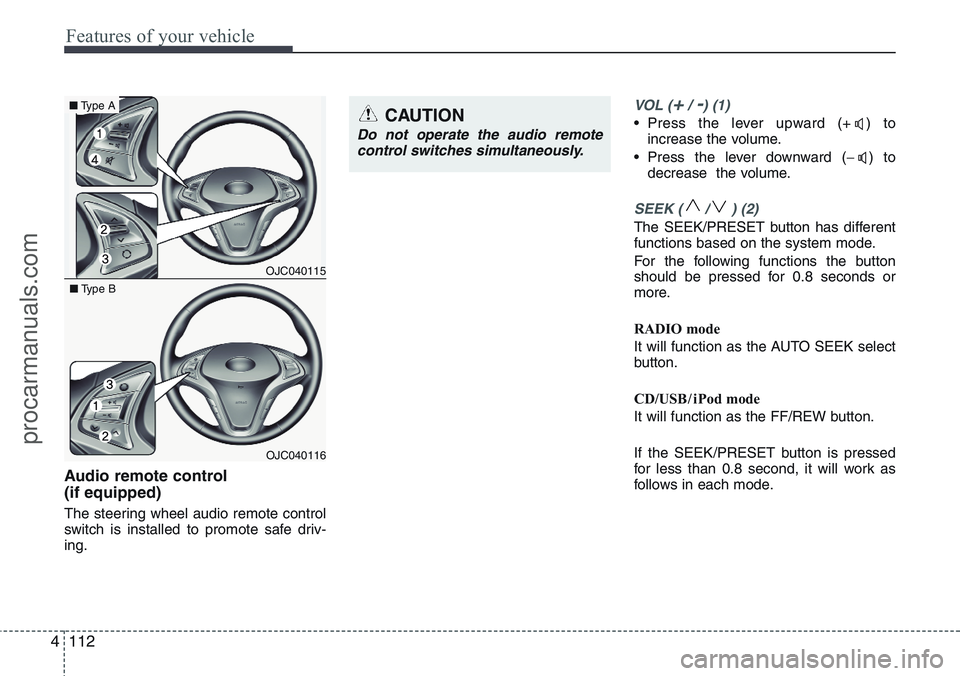
Audio remote control
(if equipped)
The steering wheel audio remote control
switch is installed to promote safe driv-
ing.
VOL (+/ -) (1)
• Press the lever upward (+ ) to
increase the volume.
• Press the lever downward (−) to
decrease the volume.
SEEK ( / ) (2)
The SEEK/PRESET button has different
functions based on the system mode.
For the following functions the button
should be pressed for 0.8 seconds or
more.
RADIO mode
It will function as the AUTO SEEK select
button.
CD/USB / i Pod mode
It will function as the FF/REW button.
If the SEEK/PRESET button is pressed
for less than 0.8 second, it will work as
follows in each mode.
CAUTION
Do not operate the audio remote
control switches simultaneously.
OJC040115
■Type A
OJC040116 ■Type B
procarmanuals.com
Page 193 of 385
4117
Features of your vehicle
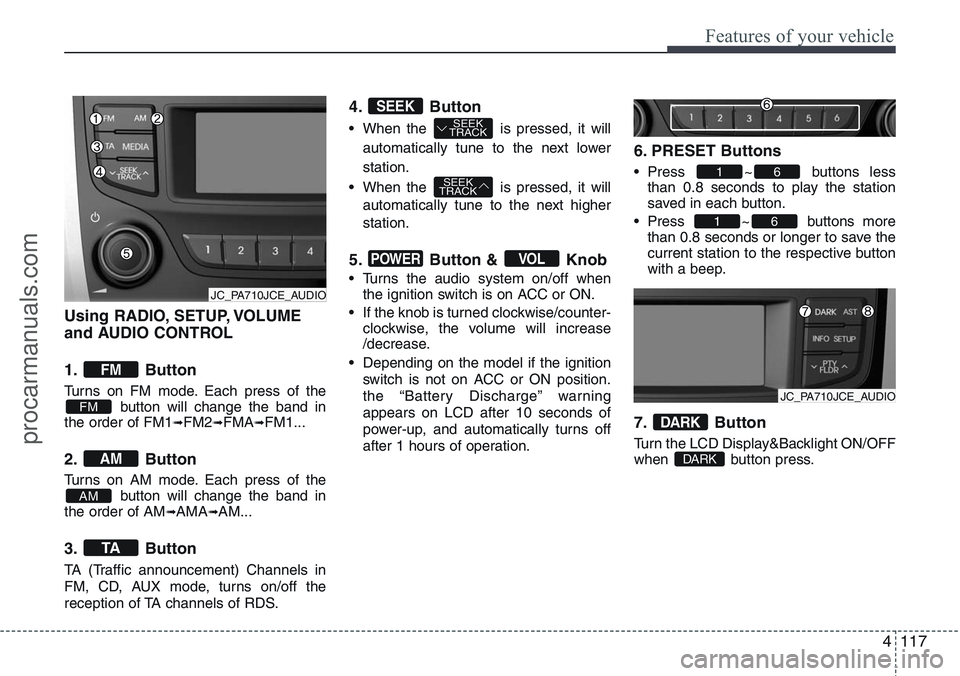
Using RADIO, SETUP, VOLUME
and AUDIO CONTROL
1. Button
Turns on FM mode. Each press of the
button will change the band in
the order of FM1
➟FM2➟FMA➟FM1...
2. Button
Turns on AM mode. Each press of the
button will change the band in
the order of AM
➟AMA➟AM...
3. Button
TA (Traffic announcement) Channels in
FM, CD, AUX mode, turns on/off the
reception of TA channels of RDS.
4. Button
• When the is pressed, it will
automatically tune to the next lower
station.
• When the is pressed, it will
automatically tune to the next higher
station.
5. Button & Knob
• Turns the audio system on/off when
the ignition switch is on ACC or ON.
• If the knob is turned clockwise/counter-
clockwise, the volume will increase
/decrease.
• Depending on the model if the ignition
switch is not on ACC or ON position.
the “Battery Discharge” warning
appears on LCD after 10 seconds of
power-up, and automatically turns off
after 1 hours of operation.
6. PRESET Buttons
• Press ~ buttons less
than 0.8 seconds to play the station
saved in each button.
• Press ~ buttons more
than 0.8 seconds or longer to save the
current station to the respective button
with a beep.
7. Button
Turn the LCD Display&Backlight ON/OFF
when button press.DARK
DARK
61
61
VOLPOWER
SEEK
TRACK
SEEK
TRACKSEEK
TA
AM
AM
FM
FM
JC_PA710JCE_AUDIO
JC_PA710JCE_AUDIO
procarmanuals.com
Page 194 of 385
Features of your vehicle
118 4
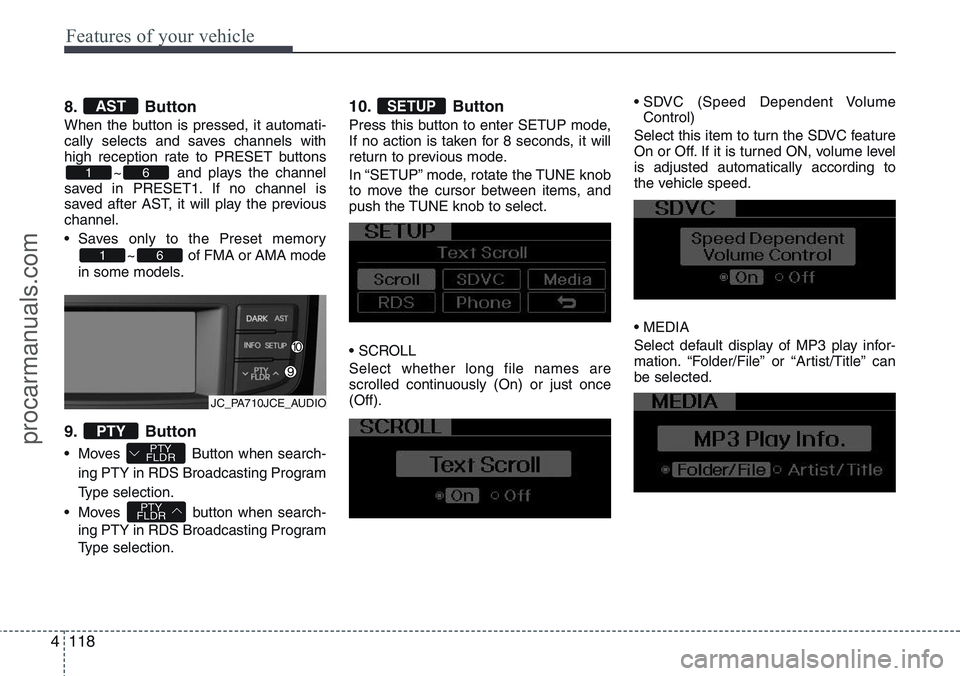
8. Button
When the button is pressed, it automati-
cally selects and saves channels with
high reception rate to PRESET buttons
~ and plays the channel
saved in PRESET1. If no channel is
saved after AST, it will play the previous
channel.
• Saves only to the Preset memory
~ of FMA or AMA mode
in some models.
9. Button
• Moves Button when search-
ing PTY in RDS Broadcasting Program
Type selection.
• Moves button when search-
ing PTY in RDS Broadcasting Program
Type selection.
10. Button
Press this button to enter SETUP mode,
If no action is taken for 8 seconds, it will
return to previous mode.
In “SETUP” mode, rotate the TUNE knob
to move the cursor between items, and
push the TUNE knob to select.
• SCROLL
Select whether long file names are
scrolled continuously (On) or just once
(Off).• SDVC (Speed Dependent Volume
Control)
Select this item to turn the SDVC feature
On or Off. If it is turned ON, volume level
is adjusted automatically according to
the vehicle speed.
• MEDIA
Select default display of MP3 play infor-
mation. “Folder/File” or “Artist/Title” can
be selected.
SETUP
PTY
FLDR
PTY
FLDRPTY
61
61
AST
JC_PA710JCE_AUDIO
procarmanuals.com
Page 197 of 385
4121
Features of your vehicle
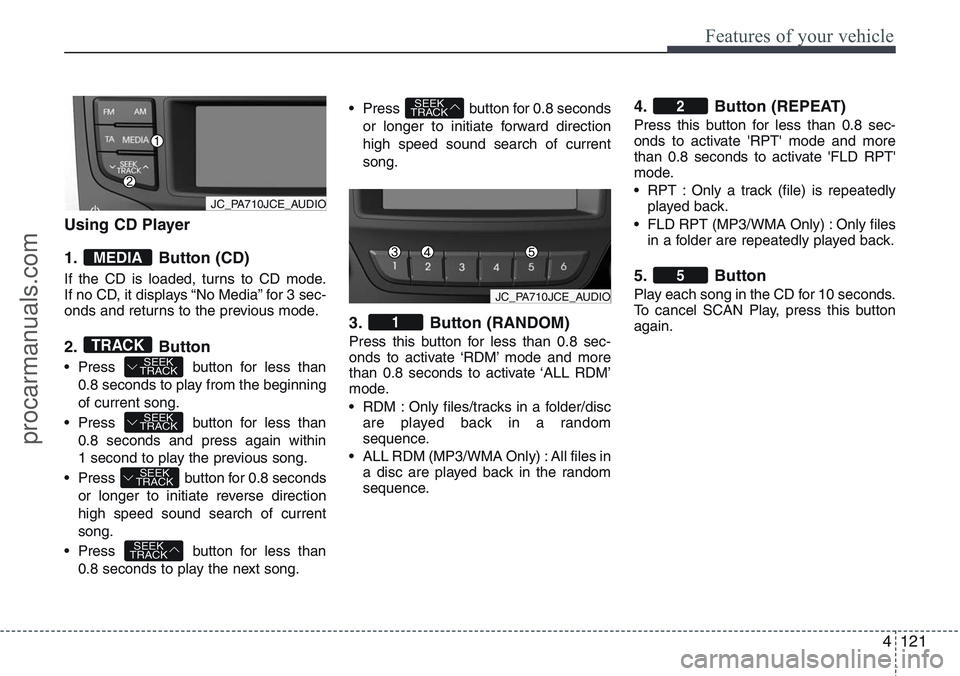
Using CD Player
1. Button (CD)
If the CD is loaded, turns to CD mode.
If no CD, it displays “No Media” for 3 sec-
onds and returns to the previous mode.
2. Button
• Press button for less than
0.8 seconds to play from the beginning
of current song.
• Press button for less than
0.8 seconds and press again within
1 second to play the previous song.
• Press button for 0.8 seconds
or longer to initiate reverse direction
high speed sound search of current
song.
• Press button for less than
0.8 seconds to play the next song.• Press button for 0.8 seconds
or longer to initiate forward direction
high speed sound search of current
song.
3. Button (RANDOM)
Press this button for less than 0.8 sec-
onds to activate ‘RDM’ mode and more
than 0.8 seconds to activate ‘ALL RDM’
mode.
• RDM : Only files/tracks in a folder/disc
are played back in a random
sequence.
• ALL RDM (MP3/WMA Only) : All files in
a disc are played back in the random
sequence.
4. Button (REPEAT)
Press this button for less than 0.8 sec-
onds to activate 'RPT' mode and more
than 0.8 seconds to activate 'FLD RPT'
mode.
• RPT : Only a track (file) is repeatedly
played back.
• FLD RPT (MP3/WMA Only) : Only files
in a folder are repeatedly played back.
5. Button
Play each song in the CD for 10 seconds.
To cancel SCAN Play, press this button
again.
5
2
1
SEEK
TRACK
SEEK
TRACK
SEEK
TRACK
SEEK
TRACK
SEEK
TRACKTRACK
MEDIA
JC_PA710JCE_AUDIO
JC_PA710JCE_AUDIO
procarmanuals.com
Page 198 of 385
Features of your vehicle
122 4
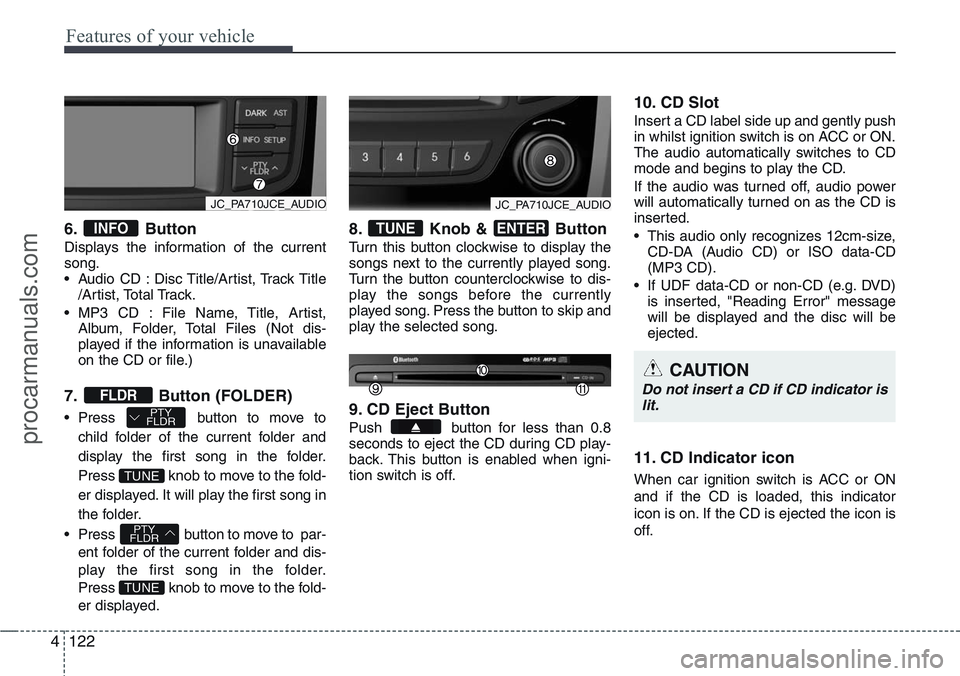
6. Button
Displays the information of the current
song.
• Audio CD : Disc Title/Artist, Track Title
/Artist, Total Track.
• MP3 CD : File Name, Title, Artist,
Album, Folder, Total Files (Not dis-
played if the information is unavailable
on the CD or file.)
7. Button (FOLDER)
• Press button to move to
child folder of the current folder and
display the first song in the folder.
Press knob to move to the fold-
er displayed. It will play the first song in
the folder.
• Press button to move to par-
ent folder of the current folder and dis-
play the first song in the folder.
Press knob to move to the fold-
er displayed.
8. Knob & Button
Turn this button clockwise to display the
songs next to the currently played song.
Turn the button counterclockwise to dis-
play the songs before the currently
played song. Press the button to skip and
play the selected song.
9. CD Eject Button
Push button for less than 0.8
seconds to eject the CD during CD play-
back. This button is enabled when igni-
tion switch is off.
10. CD Slot
Insert a CD label side up and gently push
in whilst ignition switch is on ACC or ON.
The audio automatically switches to CD
mode and begins to play the CD.
If the audio was turned off, audio power
will automatically turned on as the CD is
inserted.
• This audio only recognizes 12cm-size,
CD-DA (Audio CD) or ISO data-CD
(MP3 CD).
• If UDF data-CD or non-CD (e.g. DVD)
is inserted, "Reading Error" message
will be displayed and the disc will be
ejected.
11. CD Indicator icon
When car ignition switch is ACC or ON
and if the CD is loaded, this indicator
icon is on. If the CD is ejected the icon is
off.
ENTERTUNE
TUNE
PTY
FLDR
TUNE
PTY
FLDRFLDR
INFO
CAUTION
Do not insert a CD if CD indicator is
lit.
JC_PA710JCE_AUDIOJC_PA710JCE_AUDIO
procarmanuals.com
Page 200 of 385
Features of your vehicle
124 4
CAUTION IN USING USB
DEVICE
• To use an external USB device,
make sure the device is not con-
nected when starting up the vehi-
cle. Connect the device after
starting up.
• If you start the engine when the
USB device is connected, it may
damage the USB device. (USB
flashdrives are very sensitive to
electric shock.)
• If the engine is started up or
turned off whilst the external USB
device is connected, the external
USB device may not work.
• It may not play inauthentic MP3 or
WMA files.
1) It can only play MP3 files with
the compression rate between
8Kbps~320Kbps.
2) It can only play WMA music
files with the compression rate
between 8Kbps~320Kbps.
• Take precautions for static elec-
tricity when connecting or dis-
connecting the external USB
device.
(Continued)
(Continued)
• An encrypted MP3 PLAYER is not
recognizable.
• Depending on the condition of
the external USB device, the con-
nected external USB device can
be unrecognizable.
• When the formatted byte/sector
setting of External USB device is
not either 512BYTE or 2048BYTE,
then the device will not be recog-
nized.
• Use only a USB device formatted
to FAT 12/16/32.
• USB devices without USB I/F
authentication may not be recog-
nizable.
• Make sure the USB connection
terminal does not come in con-
tact with the human body or other
objects.
• If you repeatedly connect or dis-
connect the USB device in a short
period of time, it may break the
device.
• You may hear a strange noise
when connecting or disconnect-
ing a USB device.
(Continued)(Continued)
• If you disconnect the external
USB device during playback in
USB mode, the external USB
device can be damaged or may
malfunction. Therefore, discon-
nect the external USB device
when the audio is turned off or in
another mode. (e.g, Radio or CD)
• Depending on the type and
capacity of the external USB
device or the type of the files
stored in the device, there is a dif-
ference in the time taken for
recognition of the device.
• Do not use the USB device for
purposes other than playing
music files.
• Use of USB accessories such as
rechargers or heaters using USB
I/F may lower performance or
cause trouble.
• If you use devices such as a USB
hub purchased separately, the
vehicle’s audio system may not
recognize the USB device. In that
case, connect the USB device
directly to the multimedia termi-
nal of the vehicle.
(Continued)
procarmanuals.com
Page 202 of 385
Features of your vehicle
126 4
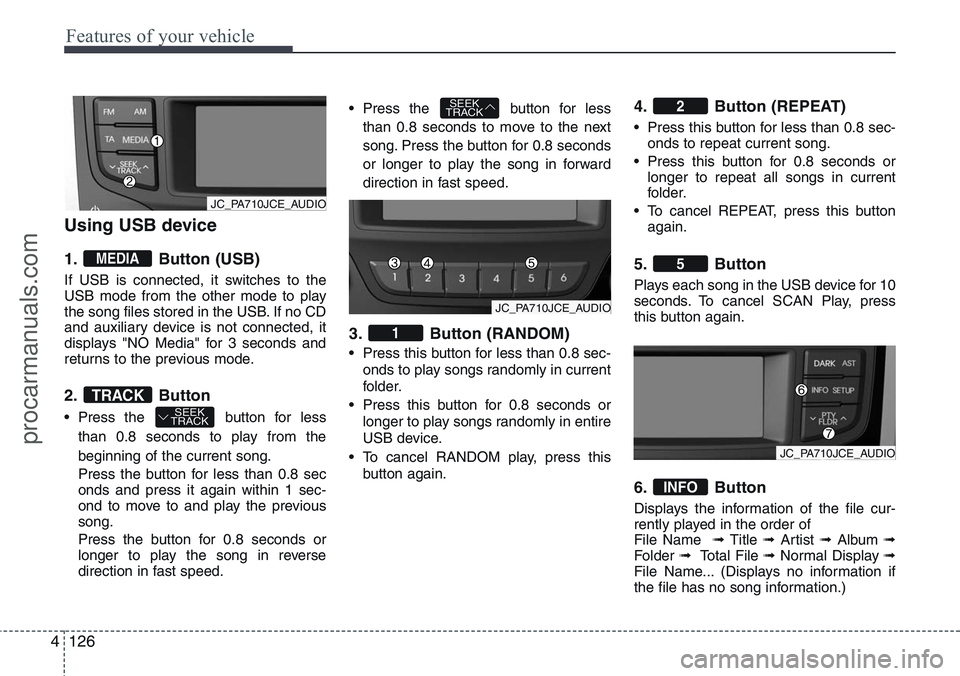
Using USB device
1. Button (USB)
If USB is connected, it switches to the
USB mode from the other mode to play
the song files stored in the USB. If no CD
and auxiliary device is not connected, it
displays "NO Media" for 3 seconds and
returns to the previous mode.
2. Button
• Press the button for less
than 0.8 seconds to play from the
beginning of the current song.
Press the button for less than 0.8 sec
onds and press it again within 1 sec-
ond to move to and play the previous
song.
Press the button for 0.8 seconds or
longer to play the song in reverse
direction in fast speed.• Press the button for less
than 0.8 seconds to move to the next
song. Press the button for 0.8 seconds
or longer to play the song in forward
direction in fast speed.
3. Button (RANDOM)
• Press this button for less than 0.8 sec-
onds to play songs randomly in current
folder.
• Press this button for 0.8 seconds or
longer to play songs randomly in entire
USB device.
• To cancel RANDOM play, press this
button again.
4. Button (REPEAT)
• Press this button for less than 0.8 sec-
onds to repeat current song.
• Press this button for 0.8 seconds or
longer to repeat all songs in current
folder.
• To cancel REPEAT, press this button
again.
5. Button
Plays each song in the USB device for 10
seconds. To cancel SCAN Play, press
this button again.
6. Button
Displays the information of the file cur-
rently played in the order of
File Name ➟ Title ➟ Artist ➟ Album ➟
Folder ➟ Total File ➟ Normal Display ➟
File Name... (Displays no information if
the file has no song information.)
INFO
5
2
1
SEEK
TRACK
SEEK
TRACKTRACK
MEDIA
JC_PA710JCE_AUDIO
JC_PA710JCE_AUDIO
JC_PA710JCE_AUDIO
procarmanuals.com
Page 205 of 385
4129
Features of your vehicle
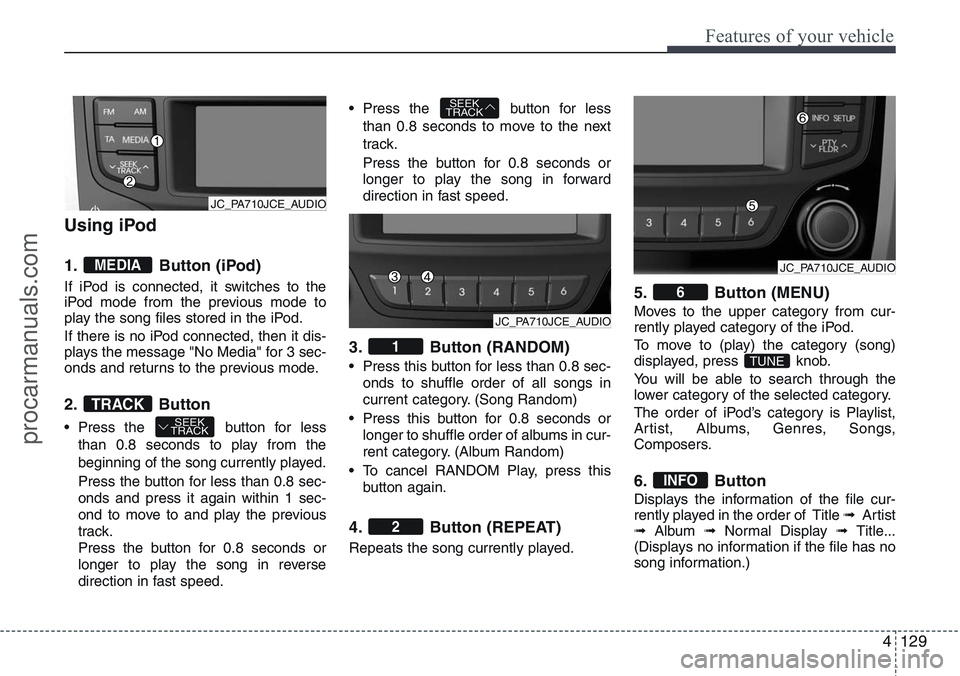
Using iPod
1. Button (iPod)
If iPod is connected, it switches to the
iPod mode from the previous mode to
play the song files stored in the iPod.
If there is no iPod connected, then it dis-
plays the message "No Media" for 3 sec-
onds and returns to the previous mode.
2. Button
• Press the button for less
than 0.8 seconds to play from the
beginning of the song currently played.
Press the button for less than 0.8 sec-
onds and press it again within 1 sec-
ond to move to and play the previous
track.
Press the button for 0.8 seconds or
longer to play the song in reverse
direction in fast speed.• Press the button for less
than 0.8 seconds to move to the next
track.
Press the button for 0.8 seconds or
longer to play the song in forward
direction in fast speed.
3. Button (RANDOM)
• Press this button for less than 0.8 sec-
onds to shuffle order of all songs in
current category. (Song Random)
• Press this button for 0.8 seconds or
longer to shuffle order of albums in cur-
rent category. (Album Random)
• To cancel RANDOM Play, press this
button again.
4. Button (REPEAT)
Repeats the song currently played.
5. Button (MENU)
Moves to the upper category from cur-
rently played category of the iPod.
To move to (play) the category (song)
displayed, press knob.
You will be able to search through the
lower category of the selected category.
The order of iPod’s category is Playlist,
Artist, Albums, Genres, Songs,
Composers.
6. Button
Displays the information of the file cur-
rently played in the order of Title ➟ Artist
➟Album ➟Normal Display ➟ Title...
(Displays no information if the file has no
song information.)
INFO
TUNE
6
2
1
SEEK
TRACK
SEEK
TRACKTRACK
MEDIA
JC_PA710JCE_AUDIO
JC_PA710JCE_AUDIO
JC_PA710JCE_AUDIO
procarmanuals.com
Page 209 of 385
4133
Features of your vehicle
✽NOTICE
• The phone must be paired to the sys-
tem before using Bluetooth®features.
• Only one selected (linked) mobile
phone can be used with the system at
a time.
• Some phones are not fully compatible
with this system.
• The Bluetooth
® word mark and logos
are registered trademarks owned by
Bluetooth
®SIG, Inc. and any use of
such marks by Hyundai is under
license. A Bluetooth enabled cell
phone is required to use Bluetooth
®
wireless technology.
■Bluetooth®Language Setting
The system language can be changed by
the following steps:
1. Power on the audio system with the
volume set to an audible level.
2. Press and hold button on the
steering wheel until the audio displays
“Please Wait”.
- The Bluetooth
®system will reply in
currently selected language that it is
changing to the next language.
- System language cycles between
FRENCH/ GERMAN/ UK ENGLISH
SPANISH/ DUTCH/ ITALIAN/
DANISH/ RUSSIAN/ POLISH/
SWEDISH.
3. When completed, the audio display
returns to normal.
4. Repeat steps 2 and 3 for the next lan-
guage selection.
NOTE:
The phone needs to be paired again
after changing system language.
- Avoid resting your thumb or finger
on the button as the language
could unintentionally change.
■Voice Recognition Activation
• The voice recognition engine contained
in the Bluetooth®System can be acti-
vated in the following conditions:
- Button Activation
The voice recognition system will be
active when the button is pressed
and after the sound of a Beep.
- Active Listening
The voice recognition system will be
active for a period of time when the
Voice Recognition system has asked
for a customer response.
• The system can recognize single digits
from zero to nine whilst number greater
than ten will not be recognized.
• If the command is not recognized, the
system will announce "Pardon" or No
input voice signal from microphone. (No
response)
• The system shall cancel voice recogni-
tion mode in following cases : When
pressing the button and saying
cancel following the beep. When not
making a call and pressing the
button. When voice recognition has
failed 3 consecutive times.
procarmanuals.com
Page 211 of 385
4135
Features of your vehicle
■Phone Setup
All Bluetooth®related operations can be
performed by voice command or by man-
ual operation.
- By Voice Command:
Press button on the steering wheel
to activate voice recognition.
- By Manual Operation:
1) Push the “SETUP” button to enter
SETUP mode.
2) Select “PHONE” item by rotating the
TUNE knob, then push the knob.3) Select desired item by rotating the
TUNE knob, then push the knob.
• Pairing phone
Before using Bluetooth
®features, the
phone must be paired (registered) to the
audio system. Up to 5 phones can be
paired with the system.
NOTE:
The pairing procedure of the phone
varies according to each phone
model. Before attempting to pair
phone, please see your phone’s
User’s Guide for instructions.
NOTE:
Once pairing with the phone is com-
pleted, there is no need to pair with
that phone again unless the phone is
deleted manually from the audio sys-
tem (refer “Deleting Phone” section)
or the vehicle’s information is
removed from the phone.
1. Press button.
2. Say “Set Up”.
- The system replies with available
commands.
- To skip the information message,
press again and then a beep is
heard.
3. Say “Pair Phone”
4. Proceed at next step.
5. Say the name of your phone when
prompted.
- Use any name to uniquely describe
your phone.
- Use Full name to voice tag.
- Not use to short name or similar to
voice command.
6. Bluetooth
®system will repeat the
name you stated.
7. Say “Yes” to confirm.
procarmanuals.com