reset HYUNDAI IX20 2016 User Guide
[x] Cancel search | Manufacturer: HYUNDAI, Model Year: 2016, Model line: IX20, Model: HYUNDAI IX20 2016Pages: 385, PDF Size: 13.67 MB
Page 189 of 385
4113
Features of your vehicle
RADIO mode
It will function as the PRESET STATION
buttons.
CD/USB / i Pod mode
It will function as the TRACK UP/DOWN
button.
MODE (3)
Press the button to select Radio or CD
(compact disc).
MUTE (4)
• Press the MUTE button to cancel the
sound.
• Press the MUTE button again to acti-
vate the sound.How vehicle audio works
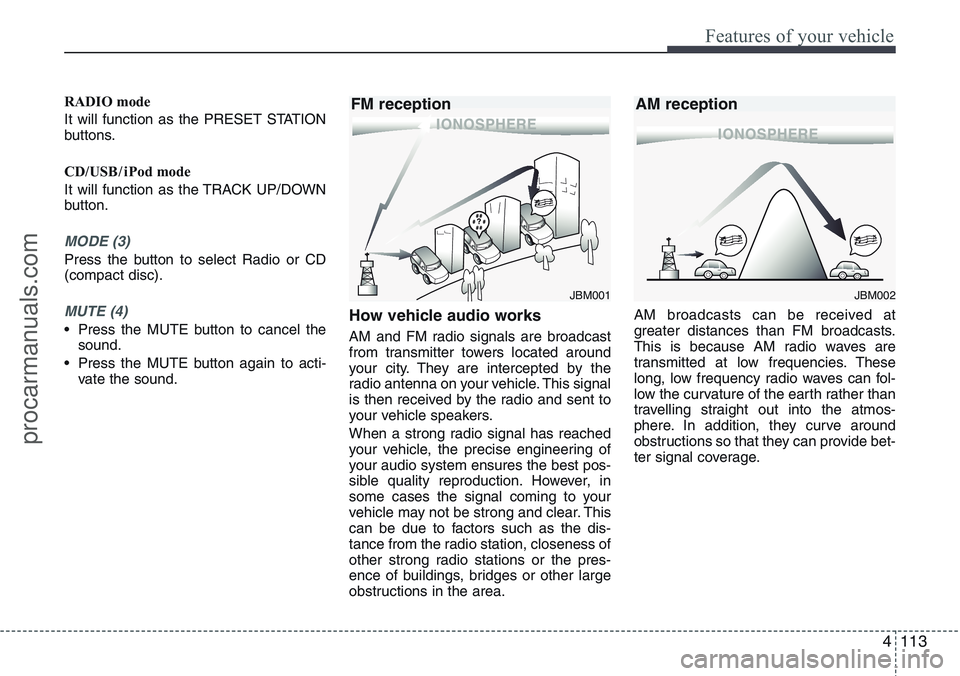
AM and FM radio signals are broadcast
from transmitter towers located around
your city. They are intercepted by the
radio antenna on your vehicle. This signal
is then received by the radio and sent to
your vehicle speakers.
When a strong radio signal has reached
your vehicle, the precise engineering of
your audio system ensures the best pos-
sible quality reproduction. However, in
some cases the signal coming to your
vehicle may not be strong and clear. This
can be due to factors such as the dis-
tance from the radio station, closeness of
other strong radio stations or the pres-
ence of buildings, bridges or other large
obstructions in the area.AM broadcasts can be received at
greater distances than FM broadcasts.
This is because AM radio waves are
transmitted at low frequencies. These
long, low frequency radio waves can fol-
low the curvature of the earth rather than
travelling straight out into the atmos-
phere. In addition, they curve around
obstructions so that they can provide bet-
ter signal coverage.
JBM002
AM reception
JBM001
FM reception
procarmanuals.com
Page 193 of 385
4117
Features of your vehicle
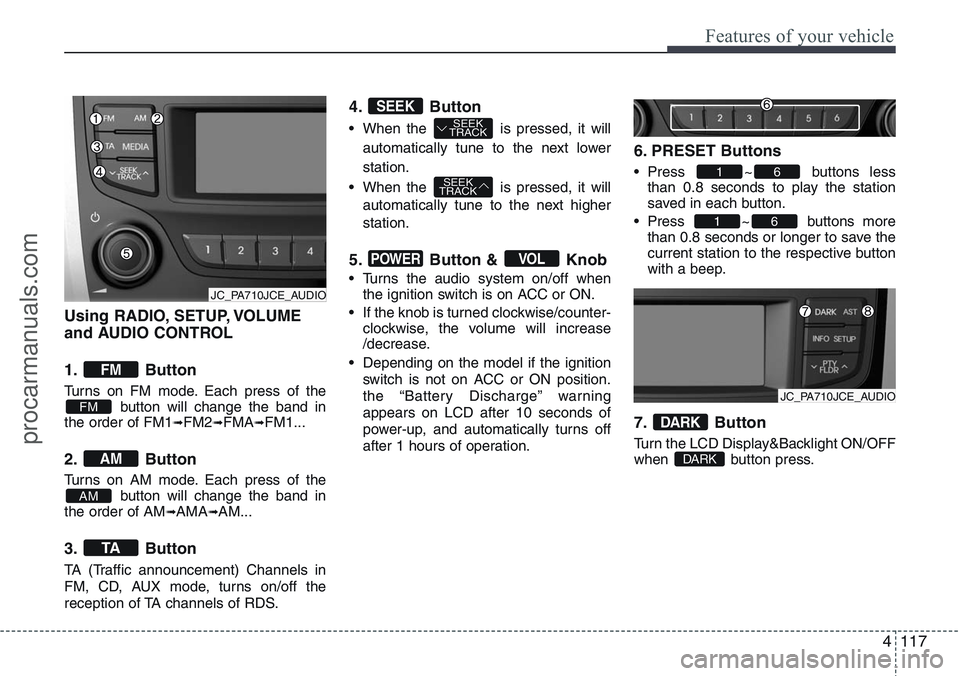
Using RADIO, SETUP, VOLUME
and AUDIO CONTROL
1. Button
Turns on FM mode. Each press of the
button will change the band in
the order of FM1
➟FM2➟FMA➟FM1...
2. Button
Turns on AM mode. Each press of the
button will change the band in
the order of AM
➟AMA➟AM...
3. Button
TA (Traffic announcement) Channels in
FM, CD, AUX mode, turns on/off the
reception of TA channels of RDS.
4. Button
• When the is pressed, it will
automatically tune to the next lower
station.
• When the is pressed, it will
automatically tune to the next higher
station.
5. Button & Knob
• Turns the audio system on/off when
the ignition switch is on ACC or ON.
• If the knob is turned clockwise/counter-
clockwise, the volume will increase
/decrease.
• Depending on the model if the ignition
switch is not on ACC or ON position.
the “Battery Discharge” warning
appears on LCD after 10 seconds of
power-up, and automatically turns off
after 1 hours of operation.
6. PRESET Buttons
• Press ~ buttons less
than 0.8 seconds to play the station
saved in each button.
• Press ~ buttons more
than 0.8 seconds or longer to save the
current station to the respective button
with a beep.
7. Button
Turn the LCD Display&Backlight ON/OFF
when button press.DARK
DARK
61
61
VOLPOWER
SEEK
TRACK
SEEK
TRACKSEEK
TA
AM
AM
FM
FM
JC_PA710JCE_AUDIO
JC_PA710JCE_AUDIO
procarmanuals.com
Page 194 of 385
Features of your vehicle
118 4
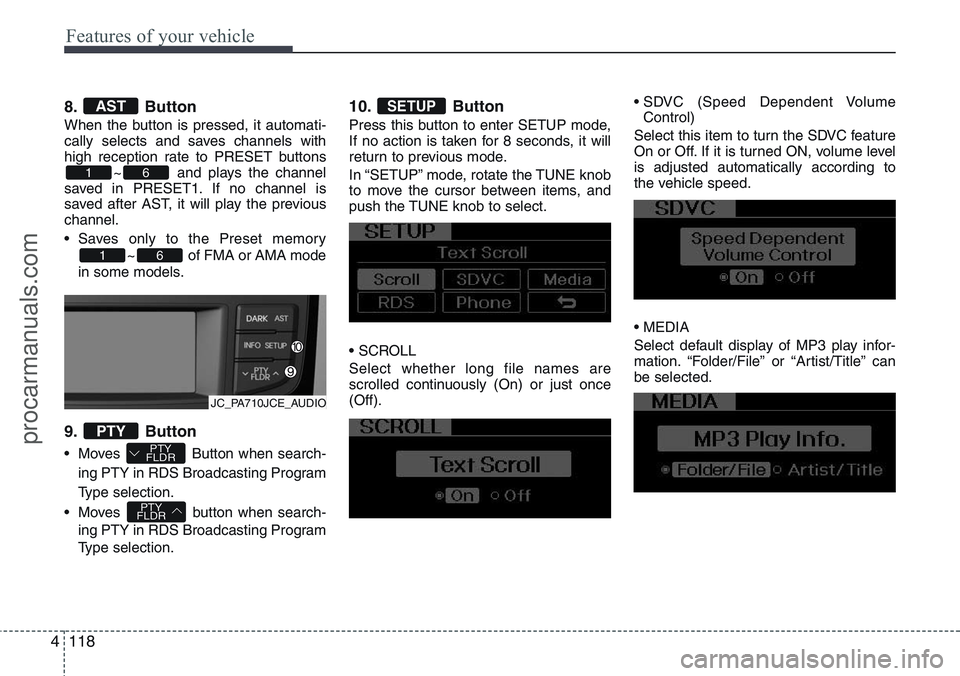
8. Button
When the button is pressed, it automati-
cally selects and saves channels with
high reception rate to PRESET buttons
~ and plays the channel
saved in PRESET1. If no channel is
saved after AST, it will play the previous
channel.
• Saves only to the Preset memory
~ of FMA or AMA mode
in some models.
9. Button
• Moves Button when search-
ing PTY in RDS Broadcasting Program
Type selection.
• Moves button when search-
ing PTY in RDS Broadcasting Program
Type selection.
10. Button
Press this button to enter SETUP mode,
If no action is taken for 8 seconds, it will
return to previous mode.
In “SETUP” mode, rotate the TUNE knob
to move the cursor between items, and
push the TUNE knob to select.
• SCROLL
Select whether long file names are
scrolled continuously (On) or just once
(Off).• SDVC (Speed Dependent Volume
Control)
Select this item to turn the SDVC feature
On or Off. If it is turned ON, volume level
is adjusted automatically according to
the vehicle speed.
• MEDIA
Select default display of MP3 play infor-
mation. “Folder/File” or “Artist/Title” can
be selected.
SETUP
PTY
FLDR
PTY
FLDRPTY
61
61
AST
JC_PA710JCE_AUDIO
procarmanuals.com
Page 204 of 385
Features of your vehicle
128 4
✽NOTICE FOR USING THE
iPod DEVICE
• Some iPod models might not support
the communication protocol and the
files will not be played.
Supported iPod models:
- iPod Mini
- iPod 4th (Photo) ~ 6th (Classic) gen-
eration
- iPod Nano 1st~4th generation
- iPod Touch 1st~2nd generation
• The order of search or playback of
songs in the iPod can be different
from the order searched in the audio
system.
• If the iPod disabled due to its own
malfunction, reset the iPod. (Reset:
Refer to iPod manual)
• An iPod may not operate normally on
low battery.
• Some iPod devices, such as the
iPhone, can be connected through the
Bluetooth
®interface. The device must
have audio Bluetooth®capability
(such as for stereo headphone
Bluetooth
®). The device can play, but
it will not be controlled by the audio
system.
CAUTION IN USING THE
iPod DEVICE
• The Hyundai iPod Power Cable is
needed in order to operate iPod
with the audio buttons on the
audio system. The USB cable pro-
vided by Apple may cause mal-
function and should not be used
for Hyundai vehicles.
❋The Hyundai iPod Power Cable
may be purchased through
your Hyundai Dealership.
Page 257 of 385
539
Driving your vehicle
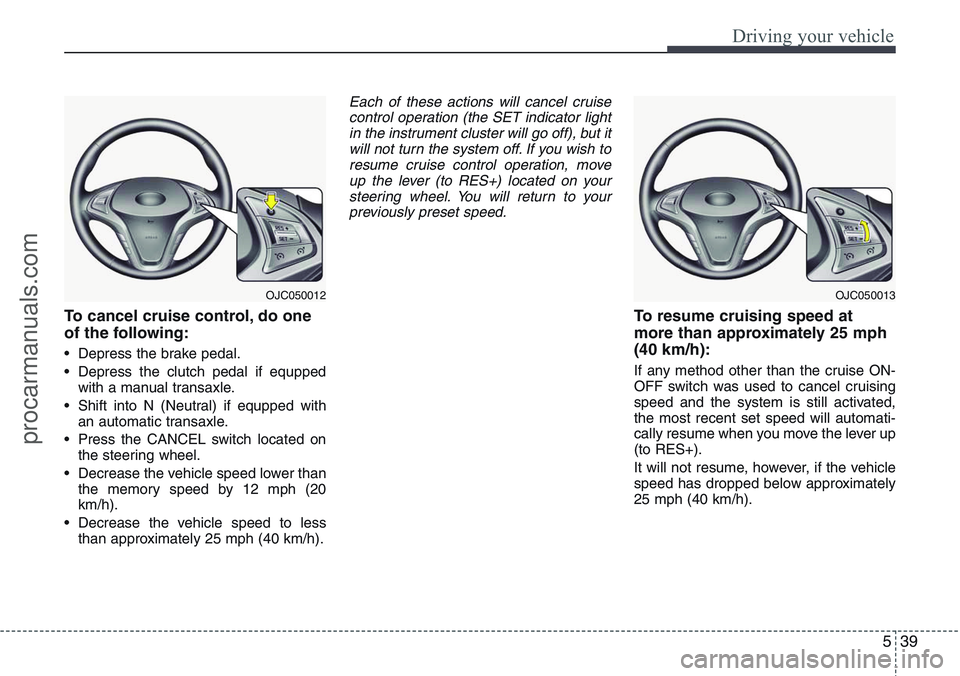
To cancel cruise control, do one
of the following:
• Depress the brake pedal.
• Depress the clutch pedal if equpped
with a manual transaxle.
• Shift into N (Neutral) if equpped with
an automatic transaxle.
• Press the CANCEL switch located on
the steering wheel.
• Decrease the vehicle speed lower than
the memory speed by 12 mph (20
km/h).
• Decrease the vehicle speed to less
than approximately 25 mph (40 km/h).
Each of these actions will cancel cruise
control operation (the SET indicator light
in the instrument cluster will go off), but it
will not turn the system off. If you wish to
resume cruise control operation, move
up the lever (to RES+) located on your
steering wheel. You will return to your
previously preset speed.
To resume cruising speed at
more than approximately 25 mph
(40 km/h):
If any method other than the cruise ON-
OFF switch was used to cancel cruising
speed and the system is still activated,
the most recent set speed will automati-
cally resume when you move the lever up
(to RES+).
It will not resume, however, if the vehicle
speed has dropped below approximately
25 mph (40 km/h).
OJC050012OJC050013
procarmanuals.com
Page 259 of 385
541
Driving your vehicle
You can set the speed limit when you do
not want to drive over a specific speed.
If you drive over the preset speed limit,
the warning system operates (set speed
limit will blink and chime will sound) until
the vehicle speed returns within the
speed limit.
✽NOTICE
Whilst speed limit control is in opera-
tion, the cruise control system cannot be
activated.
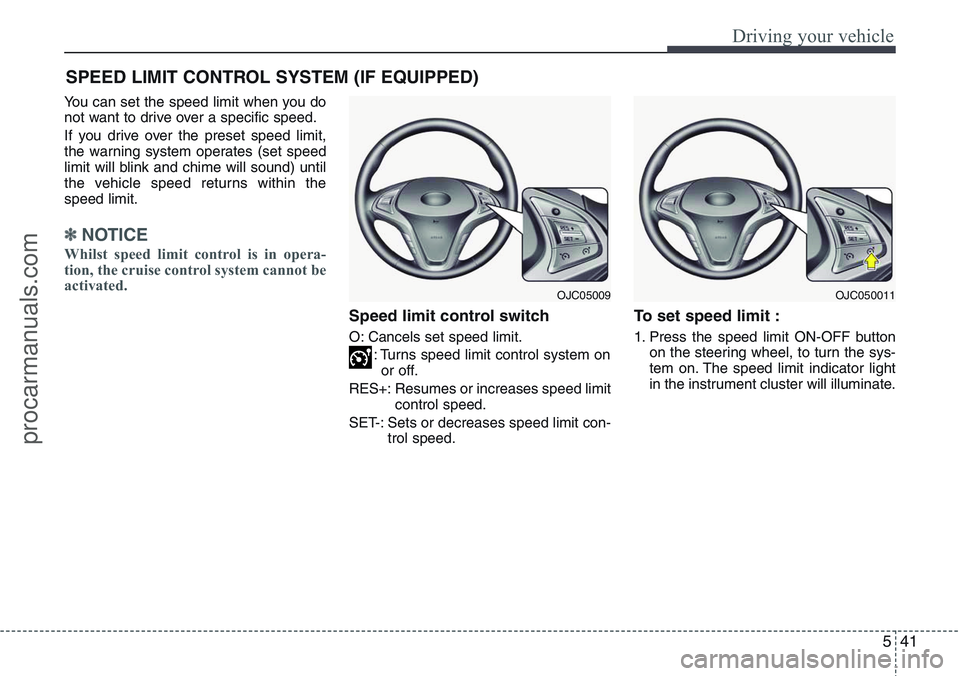
Speed limit control switch
O: Cancels set speed limit.
: Turns speed limit control system on
or off.
RES+: Resumes or increases speed limit
control speed.
SET-: Sets or decreases speed limit con-
trol speed.
To set speed limit :
1. Press the speed limit ON-OFF button
on the steering wheel, to turn the sys-
tem on. The speed limit indicator light
in the instrument cluster will illuminate.
SPEED LIMIT CONTROL SYSTEM (IF EQUIPPED)
OJC050011OJC05009
procarmanuals.com
Page 260 of 385
Driving your vehicle
42 5
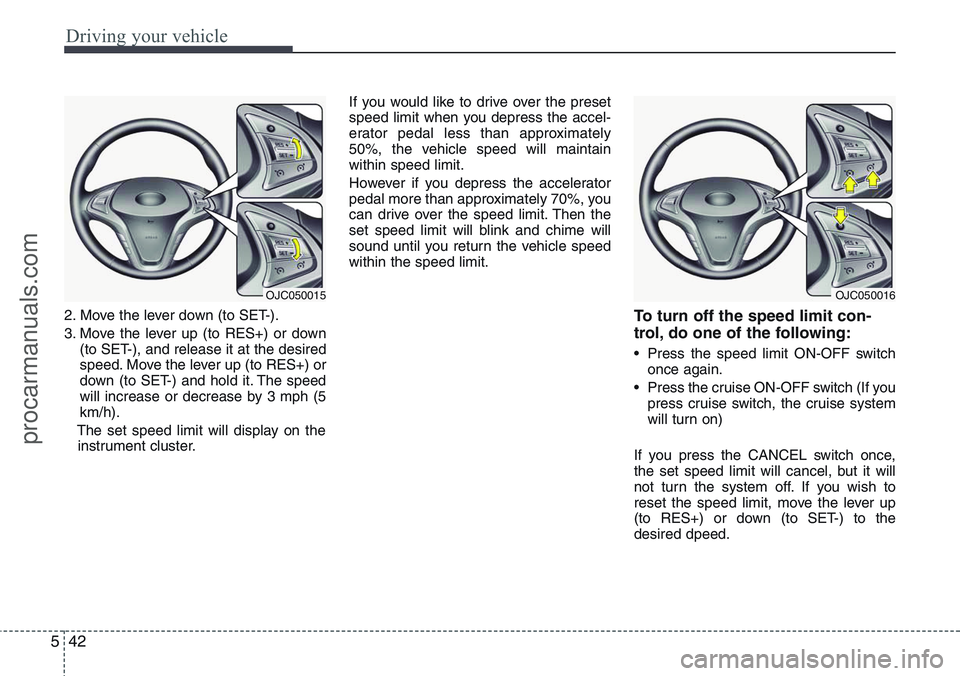
2. Move the lever down (to SET-).
3. Move the lever up (to RES+) or down
(to SET-), and release it at the desired
speed. Move the lever up (to RES+) or
down (to SET-) and hold it. The speed
will increase or decrease by 3 mph (5
km/h).
The set speed limit will display on the
instrument cluster.If you would like to drive over the preset
speed limit when you depress the accel-
erator pedal less than approximately
50%, the vehicle speed will maintain
within speed limit.
However if you depress the accelerator
pedal more than approximately 70%, you
can drive over the speed limit. Then the
set speed limit will blink and chime will
sound until you return the vehicle speed
within the speed limit.To turn off the speed limit con-
trol, do one of the following:
• Press the speed limit ON-OFF switch
once again.
• Press the cruise ON-OFF switch (If you
press cruise switch, the cruise system
will turn on)
If you press the CANCEL switch once,
the set speed limit will cancel, but it will
not turn the system off. If you wish to
reset the speed limit, move the lever up
(to RES+) or down (to SET-) to the
desired dpeed.
OJC050016OJC050015
procarmanuals.com
Page 338 of 385
727
Maintenance
Reset items
Items should be reset after the battery
has been discharged or the battery has
been disconnected.
• Auto up/down window (See section 4)
• Sunroof (See section 4)
• Trip computer (See section 4)
• Climate control system
(See section 4)
• Clock (See section 4)
• Audio (See section 4)WARNING
• Before performing maintenance
or recharging the battery, turn off
all accessories and stop the
engine.
• The negative battery cable must
be removed first and installed
last when the battery is discon-
nected.
WARNING- Recharging
battery
When recharging the battery,
observe the following precautions:
• The battery must be removed
from the vehicle and placed in an
area with good ventilation.
• Do not allow cigarettes, sparks,
or flame near the battery.
• Watch the battery during charg-
ing, and stop or reduce the charg-
ing rate if the battery cells begin
gassing (boiling) violently or if
the temperature of the electrolyte
of any cell exceeds 49°C (120°F).
• Wear eye protection when check-
ing the battery during charging.
• Disconnect the battery charger in
the following order.
1. Turn off the battery charger main
switch.
2. Unhook the negative clamp from
the negative battery terminal.
3. Unhook the positive clamp from
the positive battery terminal.
procarmanuals.com
Page 342 of 385
731
Maintenance
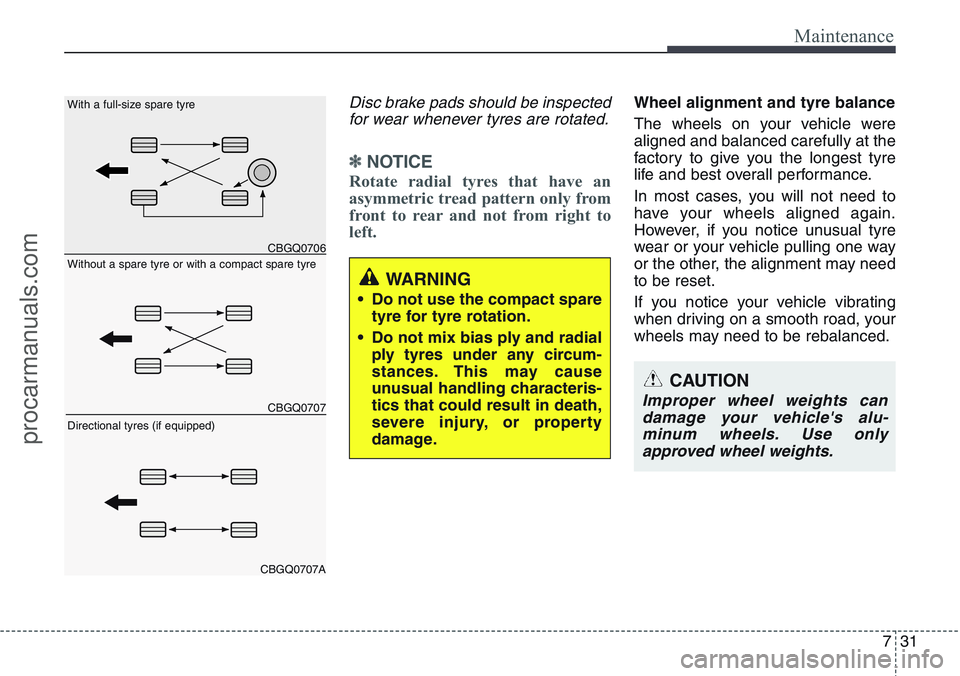
Disc brake pads should be inspected
for wear whenever tyres are rotated.
✽NOTICE
Rotate radial tyres that have an
asymmetric tread pattern only from
front to rear and not from right to
left.
Wheel alignment and tyre balance
The wheels on your vehicle were
aligned and balanced carefully at the
factory to give you the longest tyre
life and best overall performance.
In most cases, you will not need to
have your wheels aligned again.
However, if you notice unusual tyre
wear or your vehicle pulling one way
or the other, the alignment may need
to be reset.
If you notice your vehicle vibrating
when driving on a smooth road, your
wheels may need to be rebalanced.
WARNING
• Do not use the compact spare
tyre for tyre rotation.
• Do not mix bias ply and radial
ply tyres under any circum-
stances. This may cause
unusual handling characteris-
tics that could result in death,
severe injury, or property
damage.
CAUTION
Improper wheel weights can
damage your vehicle's alu-
minum wheels. Use only
approved wheel weights.
CBGQ0706
CBGQ0707
CBGQ0707A
Without a spare tyre or with a compact spare tyre With a full-size spare tyre
Directional tyres (if equipped)
procarmanuals.com
Page 351 of 385
Maintenance
40 7
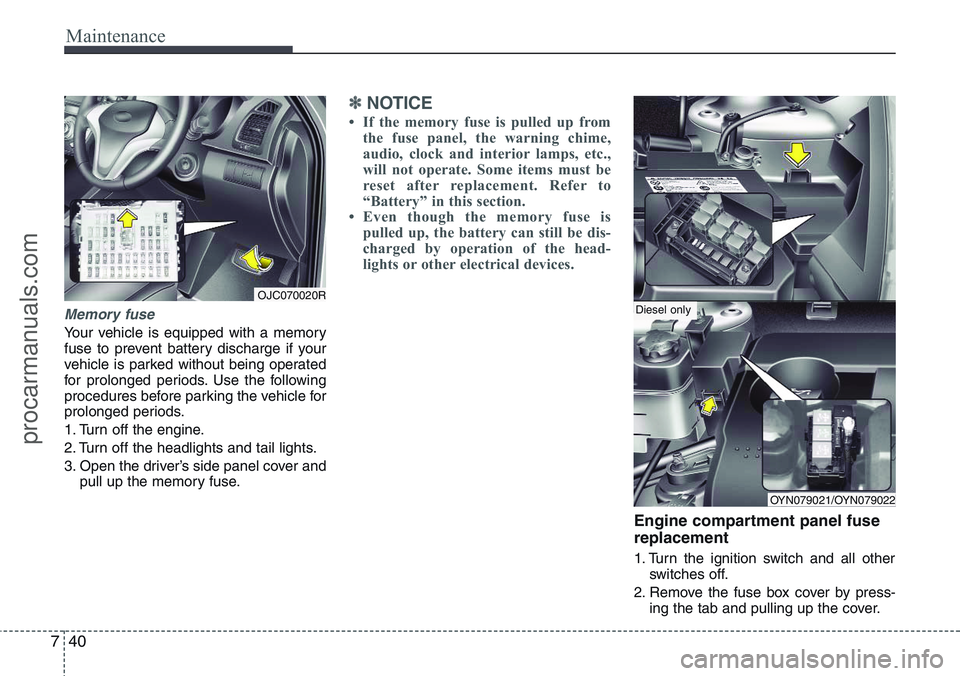
Memory fuse
Your vehicle is equipped with a memory
fuse to prevent battery discharge if your
vehicle is parked without being operated
for prolonged periods. Use the following
procedures before parking the vehicle for
prolonged periods.
1. Turn off the engine.
2. Turn off the headlights and tail lights.
3. Open the driver’s side panel cover and
pull up the memory fuse.
✽NOTICE
• If the memory fuse is pulled up from
the fuse panel, the warning chime,
audio, clock and interior lamps, etc.,
will not operate. Some items must be
reset after replacement. Refer to
“Battery” in this section.
• Even though the memory fuse is
pulled up, the battery can still be dis-
charged by operation of the head-
lights or other electrical devices.
Engine compartment panel fuse
replacement
1. Turn the ignition switch and all other
switches off.
2. Remove the fuse box cover by press-
ing the tab and pulling up the cover.
OJC070020R
OYN079021/OYN079022
Diesel only
procarmanuals.com