audio HYUNDAI IX20 2016 Owner's Guide
[x] Cancel search | Manufacturer: HYUNDAI, Model Year: 2016, Model line: IX20, Model: HYUNDAI IX20 2016Pages: 385, PDF Size: 13.67 MB
Page 216 of 385
Features of your vehicle
140 4
■Receiving a Phone Call
When receiving a phone call, a ringtone
is audible from speakers and the audio
system changes into telephone mode.
When receiving a phone call, “Incoming
call” message and incoming phone num-
ber (if available) are displayed on the
audio.
• To Answer a Call:
- Press button on the steering
wheel.
• To Reject a Call:
- Press button on the steering
wheel.
• To Adjust Ring Volume:
- Use VOLUME buttons on the steering
wheel.
• To Transfer a Call to the Phone (Secret
Call):
- Press button on the steering
wheel until the audio system transfers a
call to the phone.
■Talking on the Phone
When talking on the phone, “Active Call”
message and the other party’s phone
number (if available) are displayed on the
audio.
• To Mute the Microphone
- Press button on the steering
wheel.
• To Finish a Call
- Press button on the steering
wheel.
✽NOTICE
In the following situations, you or the
other party may have difficulty hearing
each other:
1. Speaking at the same time, your voice
may not reach each other parties.
(This is not a malfunction.) Speak
alternately with the other party on the
phone.
2. Keep the Bluetooth
®volume to a low
level. High-level volume may result in
distortion and echo.
3. When driving on a rough road.
4. When driving at high speeds.
5. When the window is open.
6. When the air conditioning vents are
facing the microphone.
7. When the sound of the air condition-
ing fan is loud.
■Bluetooth®Audio Music
Streaming
The audio system supports Bluetooth®
A2DP (Audio Advanced Distribution
Profile) and AVRCP (Audio Video
Remote Control Profile) technologies.
Both profiles provide steaming of music
via compatible “PAIRED” Bluetooth
®
Mobile phone.
To stream music from the Bluetooth®
mobile phone, play your music files on
your mobile phone according to your
mobile phone user’s manual and press
the button on the audio system
until “MP3 play” is displayed on the LCD.
The audio system head unit displays
‘MP3 MODE’.
CD/AUX
MUTE
procarmanuals.com
Page 217 of 385
4141
Features of your vehicle
NOTE:
• In addition to streaming MP3 files,
all music and sound files your
mobile phone supports can be
played by the audio system.
• Bluetooth
®compatible mobile
phones must include A2DP and
AVRCP capabilities.
• Some A2DP and AVRCP compatible
Bluetooth
®mobile phones may not
play music through the audio sys-
tem initially. These mobile phones
may need to have the Bluetooth
®
streaming enabled, for example;
i.e : Menu
➟Filemanager➟Music➟Option➟Play via Bluetooth
• Please refer to User’s Guide for your
mobile phone for more information.
To cancel Bluetooth
®mobile phone
music streaming, stop music play-
back on the mobile phone or
change the audio mode to AM/FM,
CD, iPod, ect.
procarmanuals.com
Page 338 of 385
727
Maintenance
Reset items
Items should be reset after the battery
has been discharged or the battery has
been disconnected.
• Auto up/down window (See section 4)
• Sunroof (See section 4)
• Trip computer (See section 4)
• Climate control system
(See section 4)
• Clock (See section 4)
• Audio (See section 4)WARNING
• Before performing maintenance
or recharging the battery, turn off
all accessories and stop the
engine.
• The negative battery cable must
be removed first and installed
last when the battery is discon-
nected.
WARNING- Recharging
battery
When recharging the battery,
observe the following precautions:
• The battery must be removed
from the vehicle and placed in an
area with good ventilation.
• Do not allow cigarettes, sparks,
or flame near the battery.
• Watch the battery during charg-
ing, and stop or reduce the charg-
ing rate if the battery cells begin
gassing (boiling) violently or if
the temperature of the electrolyte
of any cell exceeds 49°C (120°F).
• Wear eye protection when check-
ing the battery during charging.
• Disconnect the battery charger in
the following order.
1. Turn off the battery charger main
switch.
2. Unhook the negative clamp from
the negative battery terminal.
3. Unhook the positive clamp from
the positive battery terminal.
procarmanuals.com
Page 351 of 385
Maintenance
40 7
Memory fuse
Your vehicle is equipped with a memory
fuse to prevent battery discharge if your
vehicle is parked without being operated
for prolonged periods. Use the following
procedures before parking the vehicle for
prolonged periods.
1. Turn off the engine.
2. Turn off the headlights and tail lights.
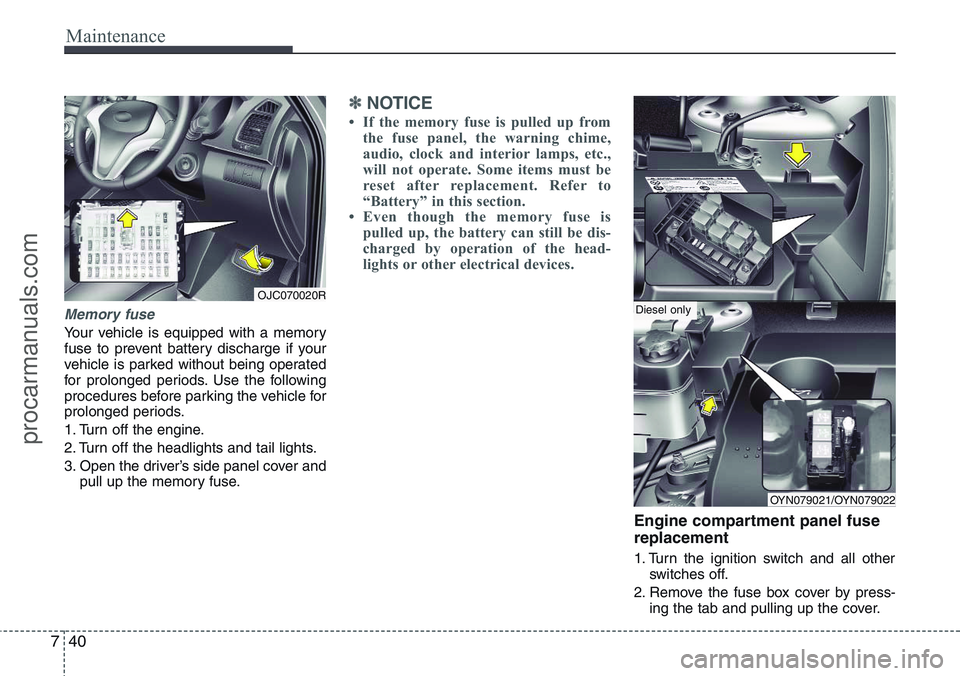
3. Open the driver’s side panel cover and
pull up the memory fuse.
✽NOTICE
• If the memory fuse is pulled up from
the fuse panel, the warning chime,
audio, clock and interior lamps, etc.,
will not operate. Some items must be
reset after replacement. Refer to
“Battery” in this section.
• Even though the memory fuse is
pulled up, the battery can still be dis-
charged by operation of the head-
lights or other electrical devices.
Engine compartment panel fuse
replacement
1. Turn the ignition switch and all other
switches off.
2. Remove the fuse box cover by press-
ing the tab and pulling up the cover.
OJC070020R
OYN079021/OYN079022
Diesel only
procarmanuals.com
Page 355 of 385
Maintenance
44 7
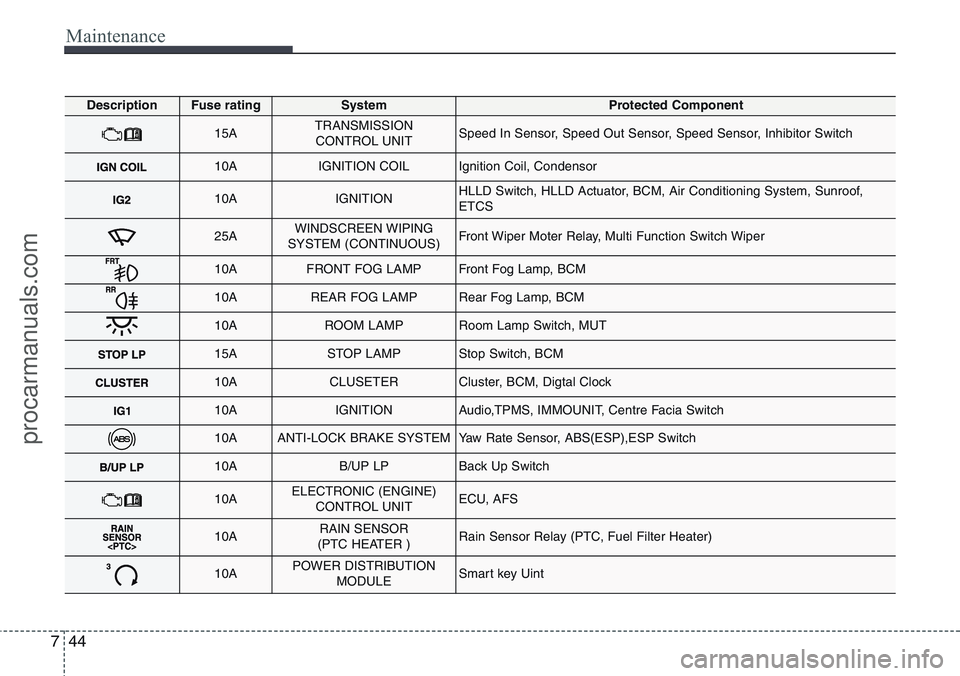
DescriptionFuse ratingSystemProtected Component
15ATRANSMISSION
CONTROL UNITSpeed In Sensor, Speed Out Sensor, Speed Sensor, Inhibitor Switch
10AIGNITION COILIgnition Coil, Condensor
10AIGNITIONHLLD Switch, HLLD Actuator, BCM, Air Conditioning System, Sunroof,
ETCS
25AWINDSCREEN WIPING
SYSTEM (CONTINUOUS)Front Wiper Moter Relay, Multi Function Switch Wiper
10AFRONT FOG LAMPFront Fog Lamp, BCM
10AREAR FOG LAMPRear Fog Lamp, BCM
10AROOM LAMPRoom Lamp Switch, MUT
15ASTOP LAMPStop Switch, BCM
10ACLUSETERCluster, BCM, Digtal Clock
10AIGNITIONAudio,TPMS, IMMOUNIT, Centre Facia Switch
10AANTI-LOCK BRAKE SYSTEMYaw Rate Sensor, ABS(ESP),ESP Switch
10AB/UP LPBack Up Switch
10AELECTRONIC (ENGINE)
CONTROL UNITECU, AFS
10ARAIN SENSOR
(PTC HEATER )Rain Sensor Relay (PTC, Fuel Filter Heater)
10APOWER DISTRIBUTION
MODULESmart key Uint
procarmanuals.com
Page 356 of 385
745
Maintenance
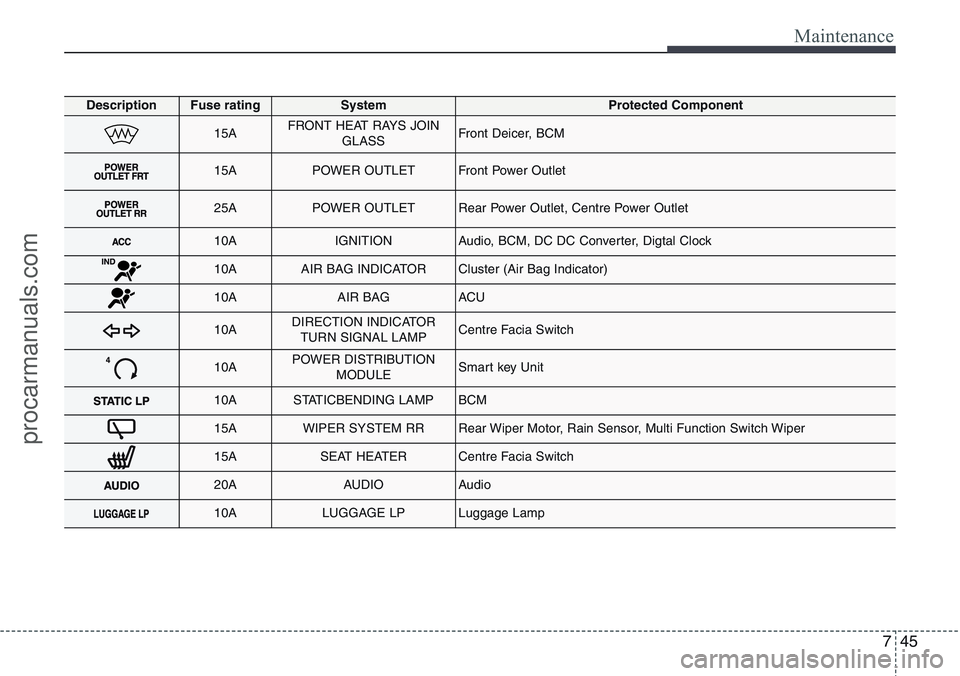
DescriptionFuse ratingSystemProtected Component
15AFRONT HEAT RAYS JOIN
GLASSFront Deicer, BCM
15APOWER OUTLETFront Power Outlet
25APOWER OUTLETRear Power Outlet, Centre Power Outlet
10AIGNITIONAudio, BCM, DC DC Converter, Digtal Clock
10AAIR BAG INDICATORCluster (Air Bag Indicator)
10AAIR BAG ACU
10ADIRECTION INDICATOR
TURN SIGNAL LAMPCentre Facia Switch
10APOWER DISTRIBUTION
MODULESmart key Unit
10ASTATICBENDING LAMPBCM
15AWIPER SYSTEM RRRear Wiper Motor, Rain Sensor, Multi Function Switch Wiper
15ASEAT HEATERCentre Facia Switch
20AAUDIOAudio
10ALUGGAGE LPLuggage Lamp
procarmanuals.com