phone HYUNDAI IX35 2011 Owner's Manual
[x] Cancel search | Manufacturer: HYUNDAI, Model Year: 2011, Model line: IX35, Model: HYUNDAI IX35 2011Pages: 560, PDF Size: 28.31 MB
Page 480 of 560
Features of your vehicle
68
4
The sensing distance whilst the rear
parking assist system is in operation is
approximately 47 in. (120 cm).
When more than two objects are sensed at the same time, the closest
one will be recognized first.
Types of warning sound
When an object is 47 in. to 32 in. (120cm to 81 cm) from the rear bumper:
Buzzer beeps intermittently.
When an object is 31 in. to 16 in. (80 cm to 41 cm) from the rear bumper:
Buzzer beeps more frequently.
When an object is within 15 in. (40 cm) of the rear bumper:
Buzzer sounds continuously.
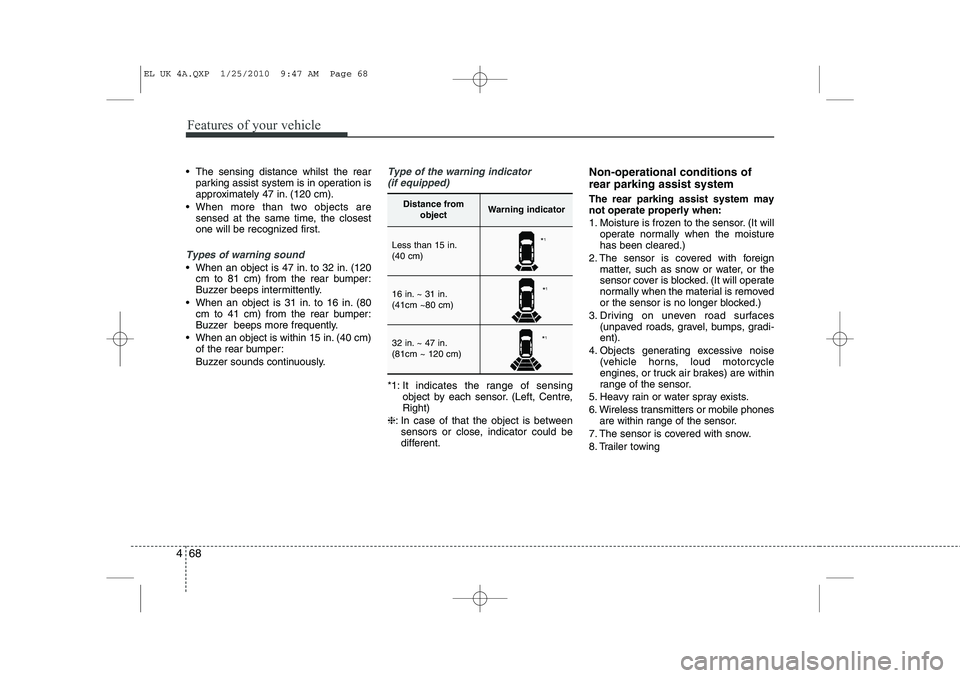
Type of the warning indicator
(if equipped)
*1: It indicates the range of sensing object by each sensor. (Left, Centre, Right)
❈ : In case of that the object is between
sensors or close, indicator could be
different. Non-operational conditions of rear parking assist system The rear parking assist system may not operate properly when:
1. Moisture is frozen to the sensor. (It will
operate normally when the moisture has been cleared.)
2. The sensor is covered with foreign matter, such as snow or water, or the
sensor cover is blocked. (It will operate
normally when the material is removed
or the sensor is no longer blocked.)
3. Driving on uneven road surfaces (unpaved roads, gravel, bumps, gradi-ent).
4. Objects generating excessive noise (vehicle horns, loud motorcycle
engines, or truck air brakes) are within
range of the sensor.
5. Heavy rain or water spray exists.
6. Wireless transmitters or mobile phones are within range of the sensor.
7. The sensor is covered with snow.
8. Trailer towing
Distance from objectWarning indicator
Less than 15 in. (40 cm)
16 in. ~ 31 in. (41cm ~80 cm)
32 in. ~ 47 in. (81cm ~ 120 cm)
*1
* 1
* 1
EL UK 4A.QXP 1/25/2010 9:47 AM Page 68
Page 522 of 560
Features of your vehicle
110
4
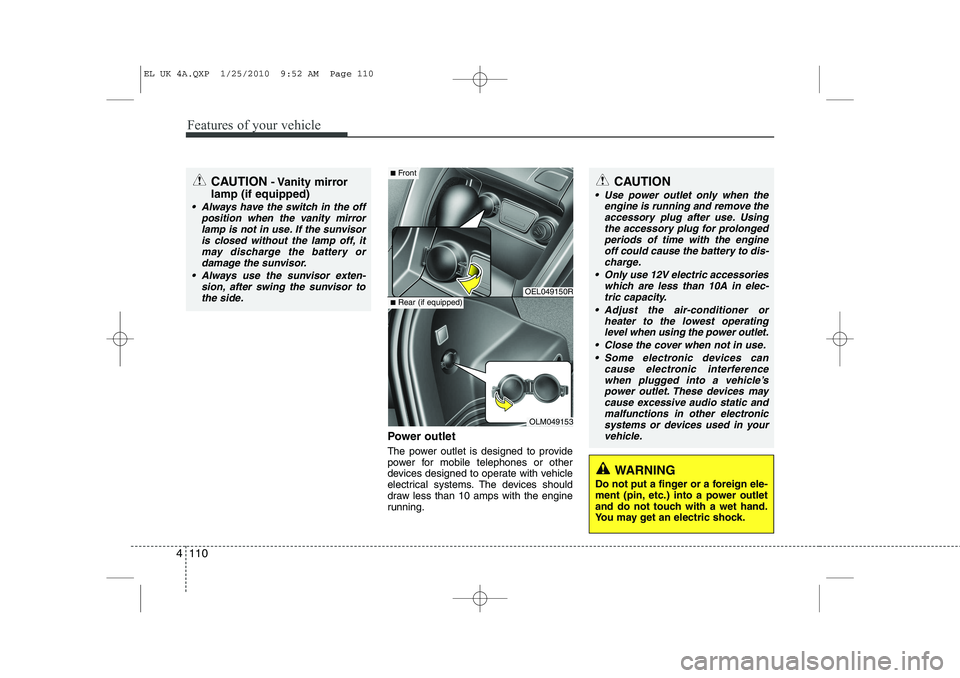
Power outlet
The power outlet is designed to provide
power for mobile telephones or other
devices designed to operate with vehicle
electrical systems. The devices should
draw less than 10 amps with the engine
running.
CAUTION - Vanity mirror
lamp (if equipped)
Always have the switch in the off position when the vanity mirror
lamp is not in use. If the sunvisoris closed without the lamp off, itmay discharge the battery or damage the sunvisor.
Always use the sunvisor exten- sion, after swing the sunvisor tothe side.
OEL049150R
OLM049153
■ Front
■Rear (if equipped)
CAUTION
Use power outlet only when the
engine is running and remove the
accessory plug after use. Using the accessory plug for prolongedperiods of time with the engineoff could cause the battery to dis-
charge.
Only use 12V electric accessories which are less than 10A in elec-tric capacity.
Adjust the air-conditioner or heater to the lowest operatinglevel when using the power outlet.
Close the cover when not in use. Some electronic devices can cause electronic interference
when plugged into a vehicle’s power outlet. These devices maycause excessive audio static and malfunctions in other electronic
systems or devices used in yourvehicle.
WARNING
Do not put a finger or a foreign ele-
ment (pin, etc.) into a power outlet
and do not touch with a wet hand.
You may get an electric shock.
EL UK 4A.QXP 1/25/2010 9:52 AM Page 110
Page 531 of 560
4 119
Features of your vehicle
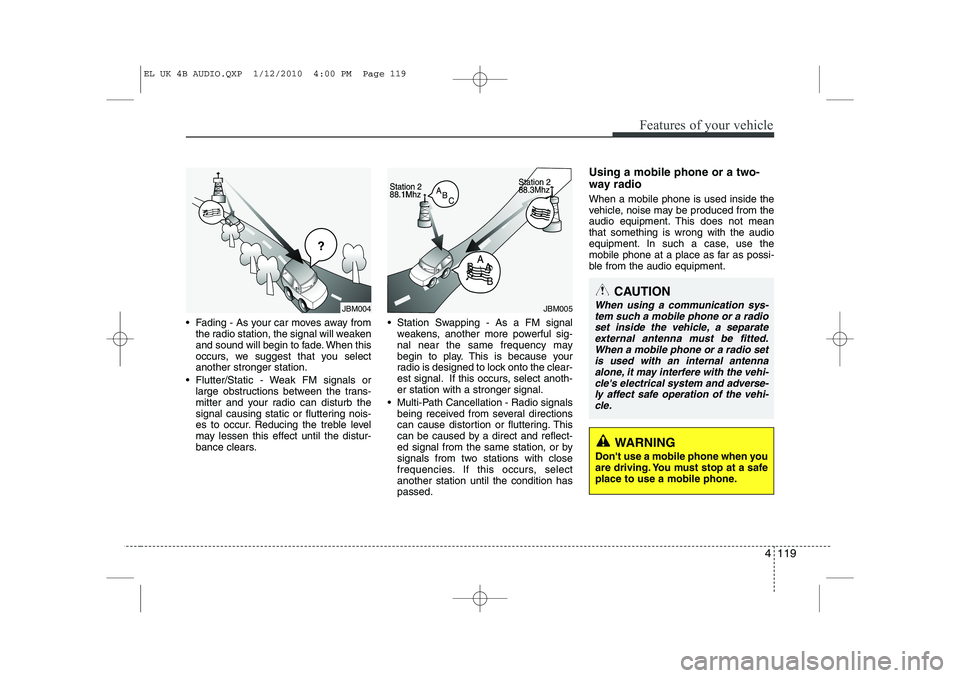
Fading - As your car moves away fromthe radio station, the signal will weaken
and sound will begin to fade. When this
occurs, we suggest that you selectanother stronger station.
Flutter/Static - Weak FM signals or large obstructions between the trans-
mitter and your radio can disturb the
signal causing static or fluttering nois-
es to occur. Reducing the treble level
may lessen this effect until the distur-
bance clears. Station Swapping - As a FM signal
weakens, another more powerful sig-
nal near the same frequency may
begin to play. This is because your
radio is designed to lock onto the clear-
est signal. If this occurs, select anoth-er station with a stronger signal.
Multi-Path Cancellation - Radio signals being received from several directions
can cause distortion or fluttering. This
can be caused by a direct and reflect-
ed signal from the same station, or by
signals from two stations with close
frequencies. If this occurs, selectanother station until the condition haspassed. Using a mobile phone or a two-
way radio When a mobile phone is used inside the
vehicle, noise may be produced from the
audio equipment. This does not meanthat something is wrong with the audio
equipment. In such a case, use the
mobile phone at a place as far as possi-
ble from the audio equipment.
JBM004JBM005
CAUTION
When using a communication sys-
tem such a mobile phone or a radio
set inside the vehicle, a separateexternal antenna must be fitted. When a mobile phone or a radio set
is used with an internal antenna alone, it may interfere with the vehi-cle's electrical system and adverse- ly affect safe operation of the vehi-
cle.
WARNING
Don't use a mobile phone when you
are driving. You must stop at a safe
place to use a mobile phone.
EL UK 4B AUDIO.QXP 1/12/2010 4:00 PM Page 119
Page 536 of 560
Features of your vehicle
124
4
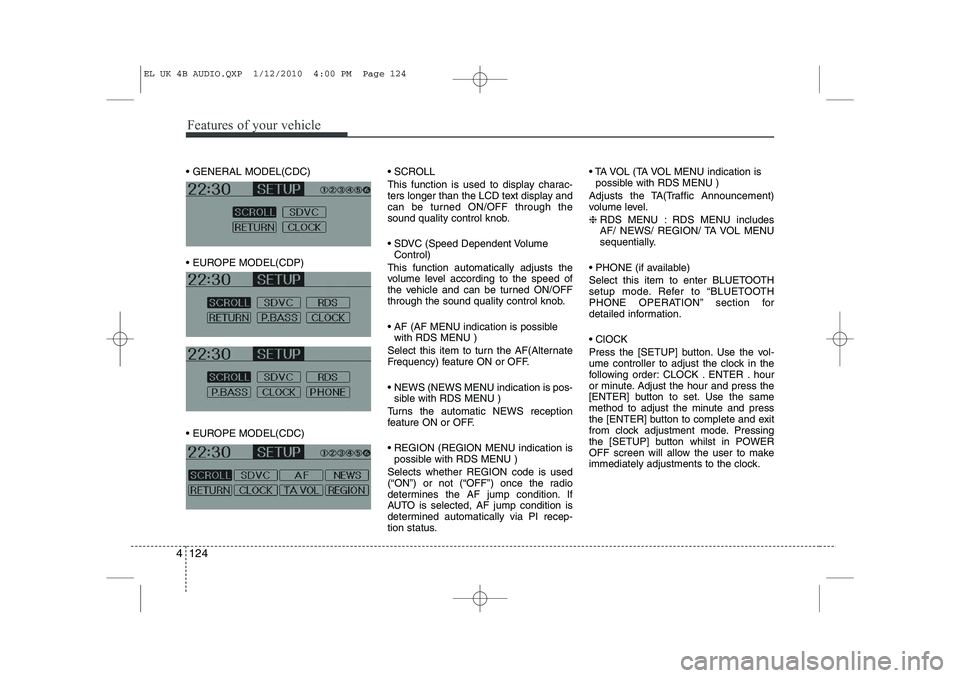
GENERAL MODEL(CDC)
EUROPE MODEL(CDP)
EUROPE MODEL(CDC) SCROLL
This function is used to display charac-
ters longer than the LCD text display and
can be turned ON/OFF through the
sound quality control knob.
SDVC (Speed Dependent Volume
Control)
This function automatically adjusts the
volume level according to the speed of
the vehicle and can be turned ON/OFF
through the sound quality control knob.
AF (AF MENU indication is possible with RDS MENU )
Select this item to turn the AF(Alternate
Frequency) feature ON or OFF.
NEWS (NEWS MENU indication is pos- sible with RDS MENU )
Turns the automatic NEWS reception
feature ON or OFF.
REGION (REGION MENU indication is possible with RDS MENU )
Selects whether REGION code is used
(“ON”) or not (“OFF”) once the radio
determines the AF jump condition. If
AUTO is selected, AF jump condition is
determined automatically via PI recep-
tion status. TA VOL (TA VOL MENU indication is
possible with RDS MENU )
Adjusts the TA(Traffic Announcement)
volume level. ❈ RDS MENU : RDS MENU includes
AF/ NEWS/ REGION/ TA VOL MENU
sequentially.
PHONE (if available)
Select this item to enter BLUETOOTH
setup mode. Refer to “BLUETOOTH
PHONE OPERATION” section for
detailed information. ClOCK
Press the [SETUP] button. Use the vol-
ume controller to adjust the clock in the
following order: CLOCK . ENTER . hour
or minute. Adjust the hour and press the
[ENTER] button to set. Use the same
method to adjust the minute and press
the [ENTER] button to complete and exit
from clock adjustment mode. Pressing
the [SETUP] button whilst in POWER
OFF screen will allow the user to make
immediately adjustments to the clock.
EL UK 4B AUDIO.QXP 1/12/2010 4:00 PM Page 124
Page 543 of 560
4 131
Features of your vehicle
(Continued) If USB device is divided by logical drives, only the music files on thehighest-priority drive are recog-nized by car audio.
Devices such as MP3 Player/ Mobile phone/Digital camerathose are not recognizable bystandard USB I/F can be unrecog-
nizable.
USB devices other than standard- ized goods (METAL COVER TYPEUSB) can be unrecognizable.
USB flash memory reader (such as CF, SD, microSD, etc.) or exter-nal-HDD type devices can be unrecognizable.
Music files protected by DRM (DIGITAL RIGHTS MANAGE-
MENT) are not recognizable.
The data in the USB memory may lost whilst using this AUDIO, It isrecommended to back up impor- tant data on a personal.
(Continued)(Continued) Please avoid using USB memory products which can be used askey chains or mobile phoneaccessories as they could cause
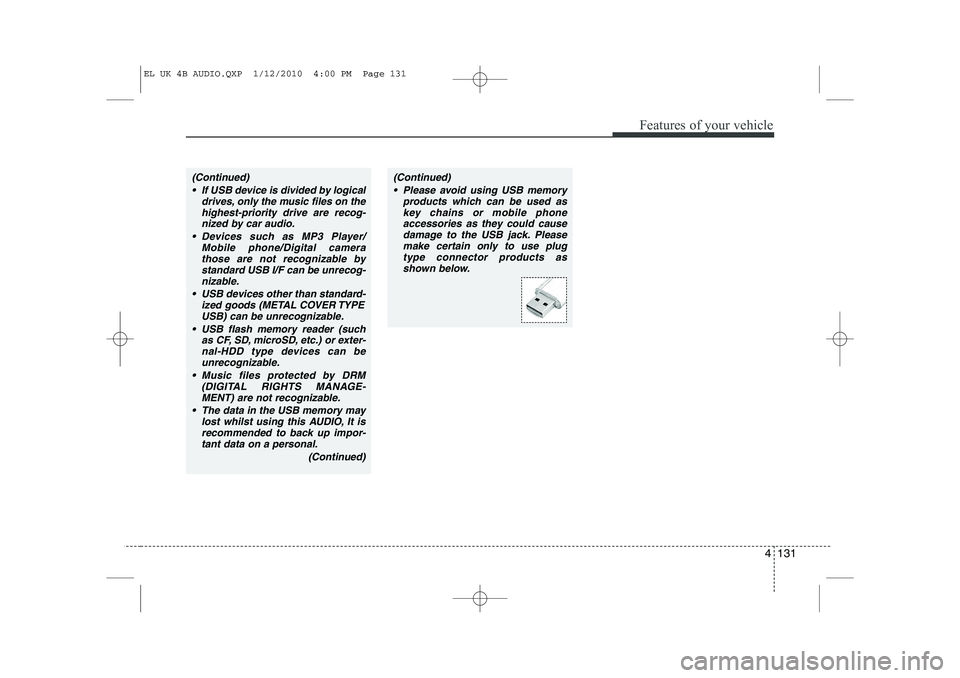
damage to the USB jack. Pleasemake certain only to use plug type connector products as
shown below.
EL UK 4B AUDIO.QXP 1/12/2010 4:00 PM Page 131
Page 551 of 560
4 139
Features of your vehicle
BLUETOOTH PHONE OPERATION ❈There will be no Bluetooth function if
the Bluetooth feature is not supported.
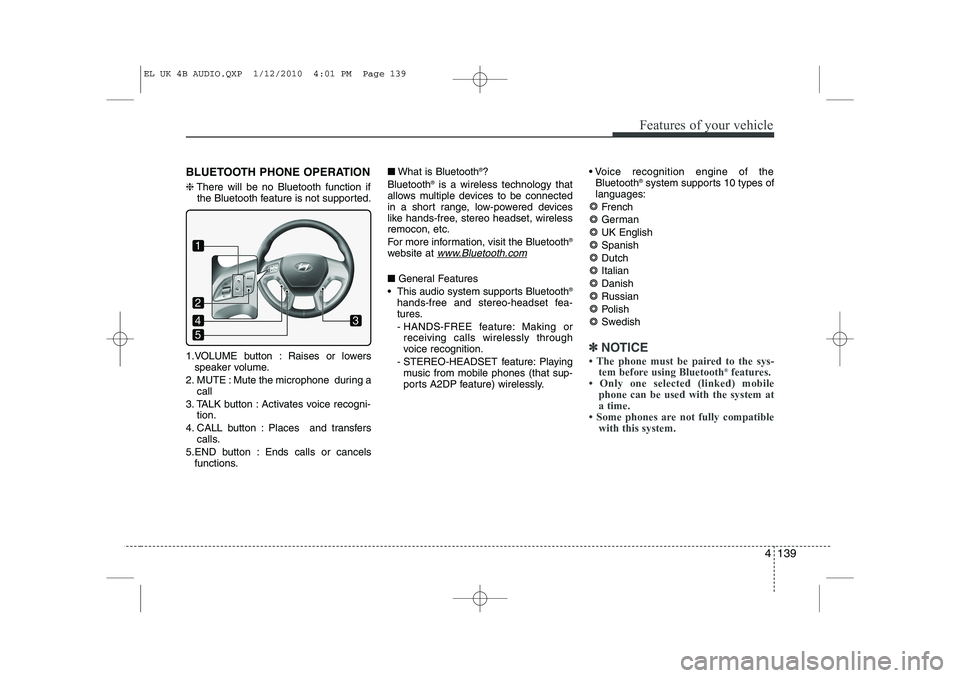
1.VOLUME button : Raises or lowers speaker volume.
2. MUTE : Mute the microphone during a call
3. TALK button : Activates voice recogni- tion.
4. CALL button : Places and transfers calls.
5.END button : Ends calls or cancels functions. ■
What is Bluetooth ®
?
Bluetooth ®
is a wireless technology that
allows multiple devices to be connected
in a short range, low-powered devices
like hands-free, stereo headset, wirelessremocon, etc.
For more information, visit the Bluetooth ®
website at
www.Bluetooth.com
■ General Features
This audio system supports Bluetooth ®
hands-free and stereo-headset fea-
tures.
- HANDS-FREE feature: Making or receiving calls wirelessly through
voice recognition.
- STEREO-HEADSET feature: Playing music from mobile phones (that sup-
ports A2DP feature) wirelessly. Voice recognition engine of the
Bluetooth ®
system supports 10 types of
languages:
French
GermanUK EnglishSpanishDutch
ItalianDanishRussian
Polish
Swedish
✽✽ NOTICE
Page 552 of 560
Features of your vehicle
140
4
CAUTION IN USING
BLUETOOTH ®
MOBILE
PHONE
Do not use a mobile phone or per- form Bluetooth ®
settings (e.g.
pairing a phone) whilst driving.
Some Bluetooth ®
-enabled phones
may not be recognized by the system or fully compatible withthe system.
Before using Bluetooth ®
related
features of the audio system, refer your phone’s User’s Manual for phone-side Bluetooth ®
opera-
tions.
The phone must be paired to the audio system to use Bluetooth ®
related features.
You will not be able to use hands- free feature when your phone(inthe car) is outside of the mobileservice area(e.g. in a tunnel, in a
underground, in a mountainous area, etc.)
If the mobile phone signal is poor or the vehicles interior noise istoo loud, it may be difficult to hear
the other person¡¯s voice during a call.
(Continued)
(continue) Do not place the phone near or inside metallic objects.
Communications with Bluetooth ®
system or mobile service stations can be disturbed.
Whilst a phone is connected through Bluetooth ®
your phone
may discharge quicker than usual for additional Bluetooth ®
-related
operations.
Some mobile phones or other devices may cause interferencenoise or malfunction to audio
system. In this case, store thedevice in a different location may resolve the situation.
EL UK 4B AUDIO.QXP 1/12/2010 4:01 PM Page 140
Page 553 of 560
4 141
Features of your vehicle
■■Voice Recognition Activation
The voice recognition engine con- tained in the Bluetooth System can be
activated in the following conditions:
- Button Activation
The voice recognition system will beactive when the button is pressed and after the sound of a
Beep.
- Active Listening The voice recognition system will beactive for a period of time when the
Voice Recognition system has asked
for a customer response.
The system can recognize single dig- itsfrom zero to nine whilst number
greater than ten will not be recognized.
If the command is not recognized, the system will announce "Pardon" or No
input voice signal from microphone.(No response)
The system shall cancel voice recogni- tion mode in following cases : When
pressing the button and saying
cancel following the beep. When not
making a call and pressing the but-
ton. When voice recognition has failed
3 consecutive times. At any time if you say “help”, the sys-
tem will announce what commands are
available.
■
■ Menu tree
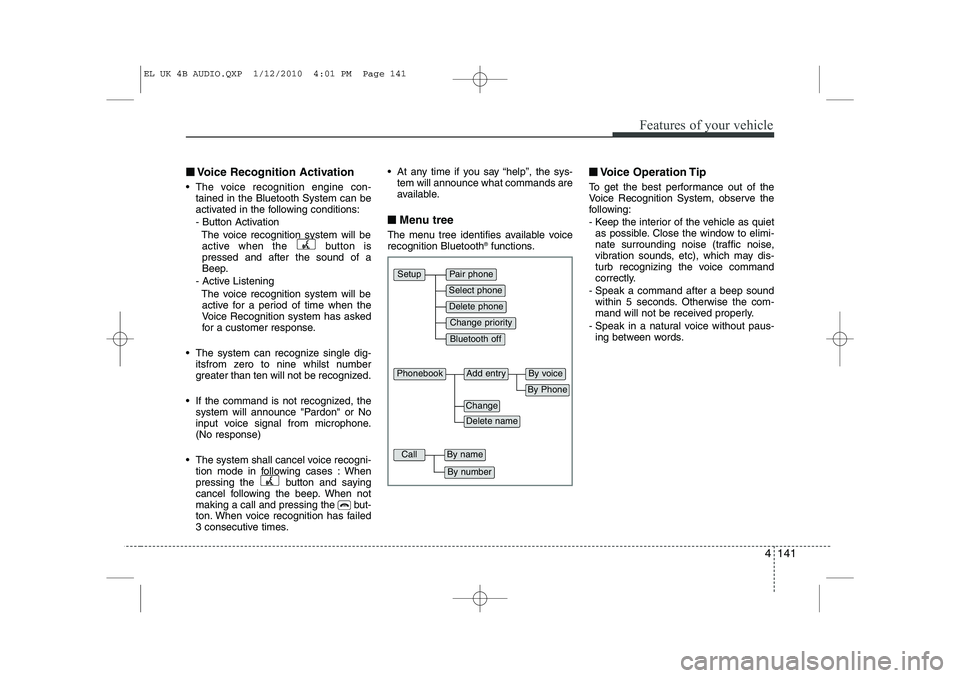
The menu tree identifies available voice recognition Bluetooth ®
functions. ■
■
Voice Operation Tip
To get the best performance out of the
Voice Recognition System, observe the
following:
- Keep the interior of the vehicle as quiet as possible. Close the window to elimi-
nate surrounding noise (traffic noise,
vibration sounds, etc), which may dis-
turb recognizing the voice command
correctly.
- Speak a command after a beep sound within 5 seconds. Otherwise the com-
mand will not be received properly.
- Speak in a natural voice without paus- ing between words.
Pair phone
Select phone
Change priority
Delete phone
Bluetooth off
Setup
Add entryPhonebook
Change
Delete name
By Phone
By voice
CallBy name
By number
EL UK 4B AUDIO.QXP 1/12/2010 4:01 PM Page 141
Page 554 of 560
Features of your vehicle
142
4
■■
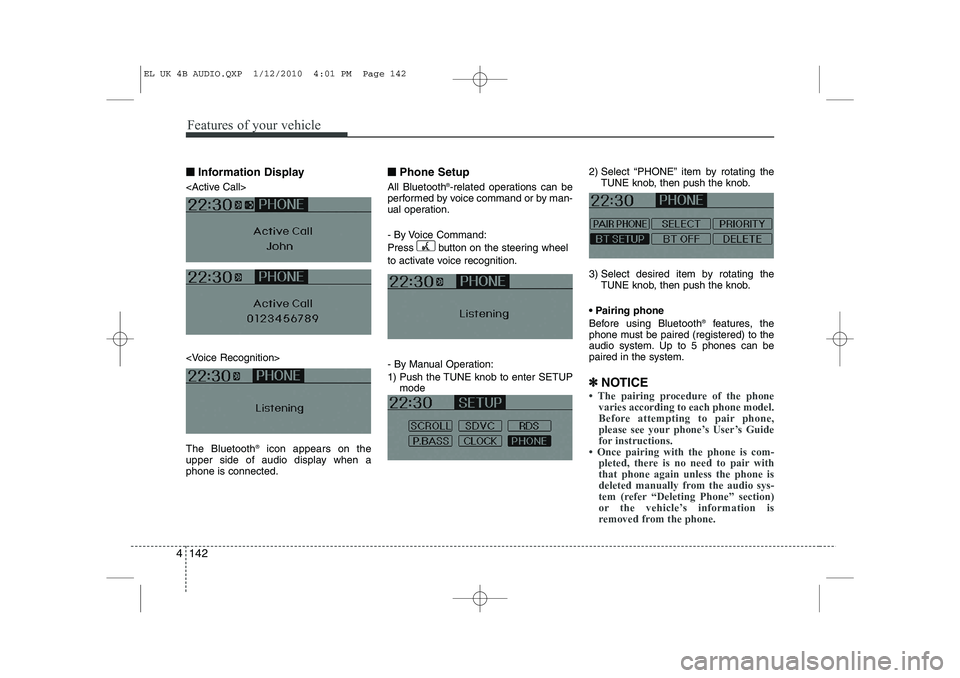
Information Display
icon appears on the
upper side of audio display when a phone is connected. ■■
Phone Setup
All Bluetooth ®
-related operations can be
performed by voice command or by man-
ual operation.
- By Voice Command:
Press button on the steering wheel
to activate voice recognition.
- By Manual Operation:
1) Push the TUNE knob to enter SETUP mode 2) Select “PHONE” item by rotating the
TUNE knob, then push the knob.
3) Select desired item by rotating the TUNE knob, then push the knob.
Pairing phone
Before using Bluetooth ®
features, the
phone must be paired (registered) to the
audio system. Up to 5 phones can bepaired in the system.
✽
✽ NOTICE
Page 555 of 560
4 143
Features of your vehicle
1. Press button.
2. Say “Set Up”.- The system replies with availablecommands.
- To skip the information message, press again and then a beep is heard.
3. Say “Pair Phone”
4. Proceed at Next step.
5. Say the name of your phone when prompted.
- Use any name to uniquely describe
your phone.
- Use Full name to voice tag.
- Not use to short name or similar to voice command.
6. Bluetooth ®
system will repeat the name
you stated.
7. Say "Yes" to confirm.
8. The audio displays “searching ---- passkey: 0000” and asks you to initiate
pairing procedure from the phone.
9. Search the Bluetooth ®
system on your
phone .Your phone should display your
[vehicle model name] on theBluetooth ®
device list. Then attempt
pairing on your phone
10. After Pairing is completed, your phone will start to transfer phone/contact list to the audio system. - This process may take from a few
minutes to over 10 minutes depend-
ing on the phone model and number
of entries in the phone/contact list.
11. By manual operation: - Select “PAIR” in PHONE menu,then proceed from step 5
✽
✽ NOTICE