clock HYUNDAI IX35 2012 Owner's Manual
[x] Cancel search | Manufacturer: HYUNDAI, Model Year: 2012, Model line: IX35, Model: HYUNDAI IX35 2012Pages: 560, PDF Size: 28.31 MB
Page 374 of 560
Maintenance
54
7
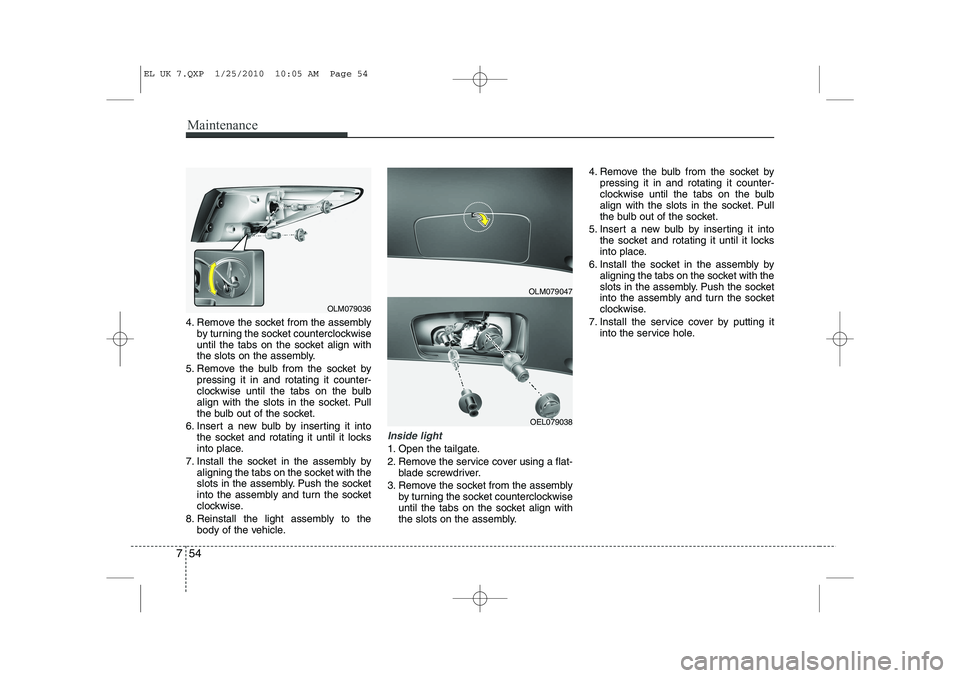
4. Remove the socket from the assembly
by turning the socket counterclockwise
until the tabs on the socket align with
the slots on the assembly.
5. Remove the bulb from the socket by pressing it in and rotating it counter-
clockwise until the tabs on the bulb
align with the slots in the socket. Pull
the bulb out of the socket.
6. Insert a new bulb by inserting it into the socket and rotating it until it locks
into place.
7. Install the socket in the assembly by aligning the tabs on the socket with the
slots in the assembly. Push the socket
into the assembly and turn the socket
clockwise.
8. Reinstall the light assembly to the body of the vehicle.
Inside light
1. Open the tailgate.
2. Remove the service cover using a flat-blade screwdriver.
3. Remove the socket from the assembly by turning the socket counterclockwise
until the tabs on the socket align with
the slots on the assembly. 4. Remove the bulb from the socket by
pressing it in and rotating it counter-
clockwise until the tabs on the bulb
align with the slots in the socket. Pull
the bulb out of the socket.
5. Insert a new bulb by inserting it into the socket and rotating it until it locks
into place.
6. Install the socket in the assembly by aligning the tabs on the socket with the
slots in the assembly. Push the socket
into the assembly and turn the socket
clockwise.
7. Install the service cover by putting it into the service hole.
OLM079047
OEL079038
OLM079036
EL UK 7.QXP 1/25/2010 10:05 AM Page 54
Page 375 of 560
755
Maintenance
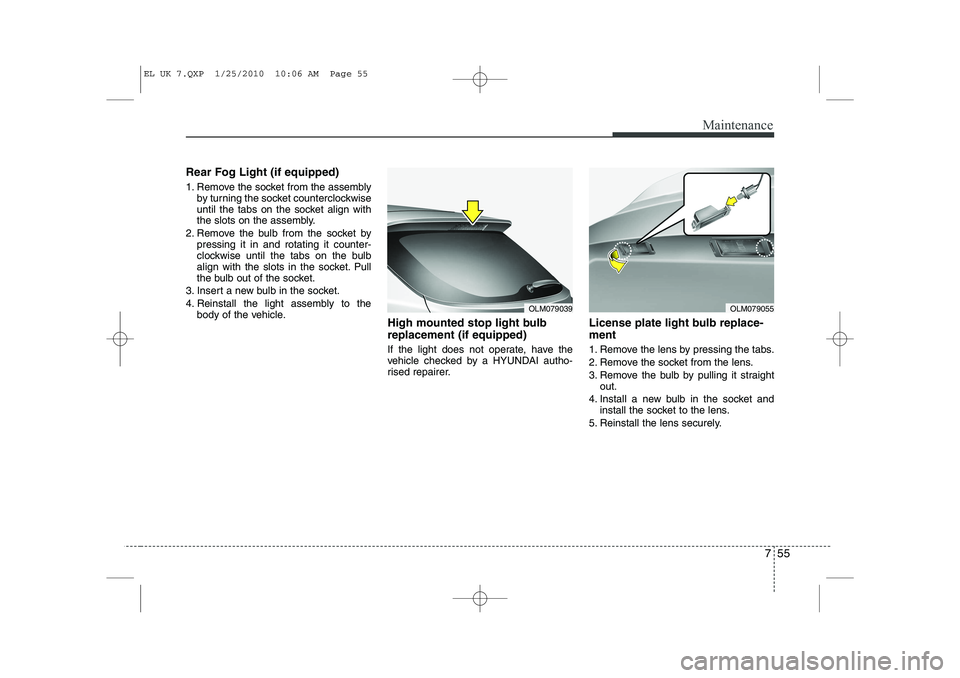
Rear Fog Light (if equipped)
1. Remove the socket from the assemblyby turning the socket counterclockwise
until the tabs on the socket align with
the slots on the assembly.
2. Remove the bulb from the socket by pressing it in and rotating it counter-
clockwise until the tabs on the bulb
align with the slots in the socket. Pull
the bulb out of the socket.
3. Insert a new bulb in the socket.
4. Reinstall the light assembly to the body of the vehicle. High mounted stop light bulb replacement (if equipped)
If the light does not operate, have the
vehicle checked by a HYUNDAI autho-
rised repairer. License plate light bulb replace- ment
1. Remove the lens by pressing the tabs.
2. Remove the socket from the lens.
3. Remove the bulb by pulling it straight
out.
4. Install a new bulb in the socket and install the socket to the lens.
5. Reinstall the lens securely.
OLM079039OLM079055
EL UK 7.QXP 1/25/2010 10:06 AM Page 55
Page 404 of 560
I3
Index
Interior light bulb replacement··································7-56
License plate light bulb replacement ························7-55
Position light bulb replacement ································7-52
Rear combination light bulb replacement ·················7-53
Rear fog light bulb replacement································7-55Side repeater light bulb replacement·························7-52
Turn signal light bulb replacement ···························7-51
Bulb wattage ·····································································8-2
Button start/stop, see engine start/stop button ··················5-8
Capacities (Lubricants) ·····················································8-4 Care Exterior care ······························································7-57
Interior care ·······························································7-62
Tyre care····································································7-29
Cargo security screen····················································4-113
Central door lock switch ·················································4-14
Centre console storage ··················································4-106
Changing tyres ································································6-14Chains Tyre chains ································································5-55
Checking tyre inflation pressure ·····································7-31
Child restraint system ·····················································3-29 Tether anchor system ················································3-33
ISOFIX system ·························································3-35
Child-protector rear door lock ·······································4-16 Cigarette lighter ····························································4-108
Climate control air filter ·················································7-21
Climate control system (Automatic) ·····························4-96
Air conditioning ·····················································4-102Automatic heating and air conditioning ···················4-97
Manual heating and air conditioning ·······················4-98
Climate control system (Manual) ··································4-87 Air conditioning ·······················································4-92
Climate control air filter ··········································4-94
Heating and air conditioning·····································4-88
Clock (Digital) ······························································4-111
Combined instrument, see instrument cluster ················4-42Compass mirror, see the Electric chromic mirror (ECM) with compass ······································4-36
Cool box········································································4-107Coolant ···········································································7-13
Cooling fluid, see engine coolant ··································7-13
Crankcase emission control system ·······························7-63
Cruise control system ····················································5-43
Cup holder ···································································4-109
Curtain air bag ·······························································3-54
C
EL UK INDEX.QXP 1/12/2010 3:27 PM Page 3
Page 405 of 560
Index
4
I
Dashboard, see instrument cluster ·································4-42 Dashboard illumination, see instrument
panel illumination ·······················································4-43
Daytime running light ·····················································4-76
Defogging (Windscreen) ·············································4-103
Defroster ·········································································4-85 Outside mirror defroster ············································4-86
Rear window defroster ··············································4-85
Wiper deicer ······························································4-86
Defrosting (Windscreen) ·············································4-103
Digital clock ·································································4-111Dimensions ······································································8-2
Displays, see instrument cluster ····································4-42Display illumination, see instrument panel illumination ·······················································4-43
Door locks ·······································································4-13 Central door lock switch ··········································4-14
Child-protector rear door lock ·································4-16
Downhill brake control (DBC) ······································5-39
Drinks holders, see cup holders ···································4-109
Driver's air bag ·······························································3-47
Driving at night ······························································5-51
Driving in flooded areas ················································5-52
Driving in the rain ·························································5-52 Economical operation ····················································5-48
ECO ON/OFF mode ·······················································4-49
Electric chromic mirror (ECM) ·····································4-35
Electric chromic mirror (ECM) with compass ··············4-36
Electric power steering ··················································4-33
Emergency starting ··························································6-5
Jump starting ······························································6-5
Push starting ·······························································6-6
Emergency Stop Signal (ESS) ········································5-42Emergency tailgate safety release ··································4-18
Emergency towing ·························································6-26
Emergency whilst driving ················································6-3
Emission control system ················································7-63 Crankcase emission control system ·························7-63
Evaporative emission control system ······················7-63
Exhaust emission control system ·····························7-64
Engine compartment ················································2-6, 7-2
Engine coolant ·······························································7-13
Engine number ·································································8-8
Engine oil ·······································································7-12
Engine overheats ······························································6-7
Engine start/stop button ···················································5-8
Engine temperature gauge ·············································4-44
Engine will not start ·························································6-4
Evaporative emission control system ····························7-63
Exhaust emission control system ···································7-64
ED
EL UK INDEX.QXP 1/12/2010 3:27 PM Page 4
Page 407 of 560
Index
6
I
Ignition key interlock system ········································5-21
ISOFIX system ······························································3-35
Immobiliser system ··························································4-3
Indicators and warnings ·················································4-49Indicator symbols on the instrument cluster ····················1-6
Instrument cluster ··························································4-42
ECO ON/OFF mode··················································4-49
Engine temperature gauge ········································4-44
Fuel gauge ································································4-45
Instrument panel illumination ··································4-43Odometer ··································································4-46
Outside thermometer ·················································4-45Speedometer ·····························································4-43Tachometer ·······························································4-43
Tripmeter ···································································4-47
Trip computer ···························································4-46
Warning and indicators ············································4-49
Instrument panel illumination ········································4-43
Instrument panel overview ··············································2-3
Interior care ····································································7-62
Interior features ····························································4-108 Ashtray ···································································4-108
Cigarette lighter ······················································4-108
Cargo security screen ·············································4-113
Cup holder ······························································4-109
Digital clock ···························································4-111 Aux, USB and iPod ················································4-111
Floor mat anchor(s) ················································4-112
Luggage net (holder) ··············································4-112
Power outlet ···························································4-110Sunvisor ··································································4-109
Interior light ···································································4-82 Glove box lamp ·························································4-84
Luggage room lamp ··················································4-83
Map lamp ··································································4-82
Room lamp ································································4-83
Vanity mirror lamp····················································4-83
Interior light bulb replacement ······································7-56
Interior overview ·····························································2-2
Interlock system ·····························································5-21
Jack and tools ·································································6-13
Jump starting ····································································6-5
Key positions ···································································5-4 Keys ·················································································4-2
K
J
I
EL UK INDEX.QXP 1/12/2010 3:27 PM Page 6
Page 438 of 560
Features of your vehicle
26
4
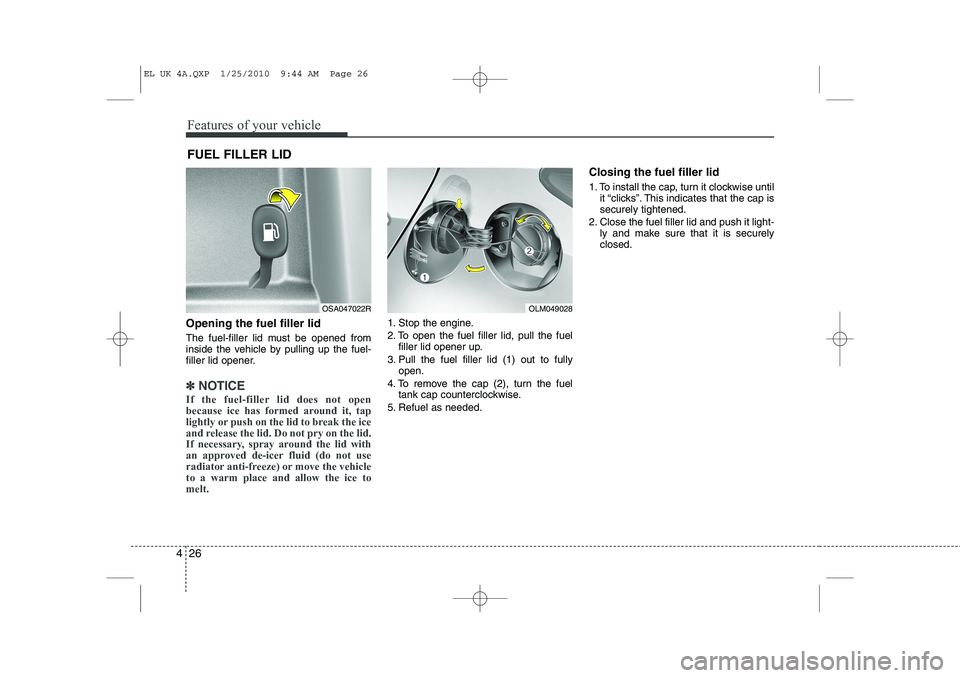
Opening the fuel filler lid
The fuel-filler lid must be opened from
inside the vehicle by pulling up the fuel-
filler lid opener.
✽✽
NOTICE
If the fuel-filler lid does not open
because ice has formed around it, tap
lightly or push on the lid to break the ice
and release the lid. Do not pry on the lid.
If necessary, spray around the lid with
an approved de-icer fluid (do not use
radiator anti-freeze) or move the vehicleto a warm place and allow the ice tomelt.
1. Stop the engine.
2. To open the fuel filler lid, pull the fuel filler lid opener up.
3. Pull the fuel filler lid (1) out to fully open.
4. To remove the cap (2), turn the fuel tank cap counterclockwise.
5. Refuel as needed. Closing the fuel filler lid
1. To install the cap, turn it clockwise until
it “clicks”. This indicates that the cap is securely tightened.
2. Close the fuel filler lid and push it light- ly and make sure that it is securelyclosed.
FUEL FILLER LID
OSA047022ROLM049028
EL UK 4A.QXP 1/25/2010 9:44 AM Page 26
Page 523 of 560
4 111
Features of your vehicle
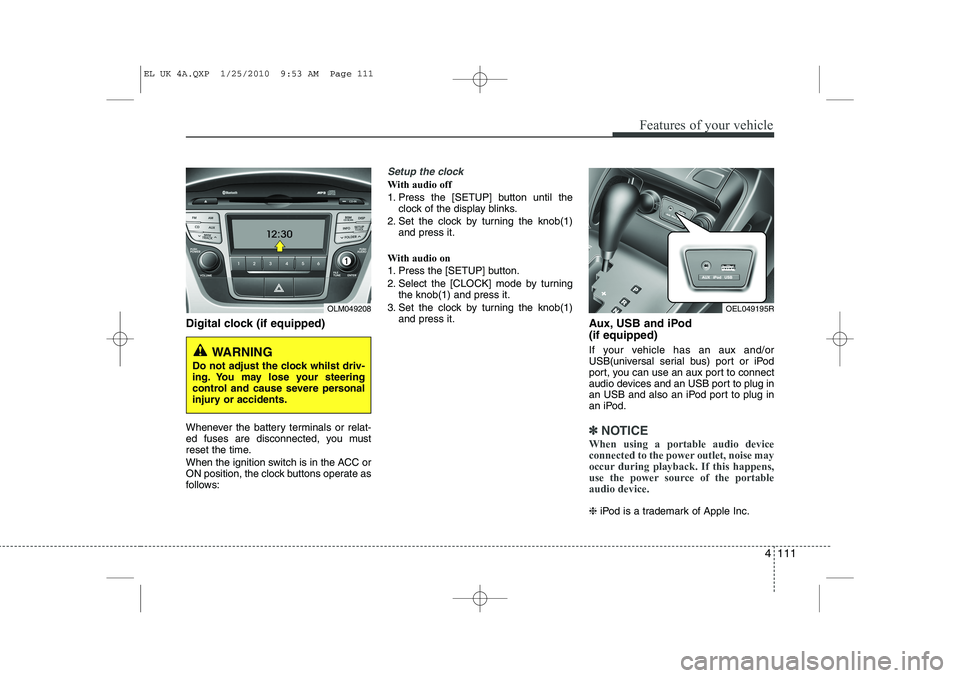
Digital clock (if equipped)
Whenever the battery terminals or relat-
ed fuses are disconnected, you must
reset the time.
When the ignition switch is in the ACC or
ON position, the clock buttons operate as
follows:
Setup the clock
With audio off
1. Press the [SETUP] button until theclock of the display blinks.
2. Set the clock by turning the knob(1) and press it.
With audio on
1. Press the [SETUP] button.
2. Select the [CLOCK] mode by turning the knob(1) and press it.
3. Set the clock by turning the knob(1) and press it. Aux, USB and iPod (if equipped)
If your vehicle has an aux and/or
USB(universal serial bus) port or iPod
port, you can use an aux port to connect
audio devices and an USB port to plug in
an USB and also an iPod port to plug in
an iPod.
✽✽NOTICE
When using a portable audio device
connected to the power outlet, noise may
occur during playback. If this happens,
use the power source of the portableaudio device.
❈ iPod is a trademark of Apple Inc.
OLM049208
WARNING
Do not adjust the clock whilst driv-
ing. You may lose your steering
control and cause severe personal
injury or accidents.
OEL049195R
EL UK 4A.QXP 1/25/2010 9:53 AM Page 111
Page 528 of 560
Features of your vehicle
116
4
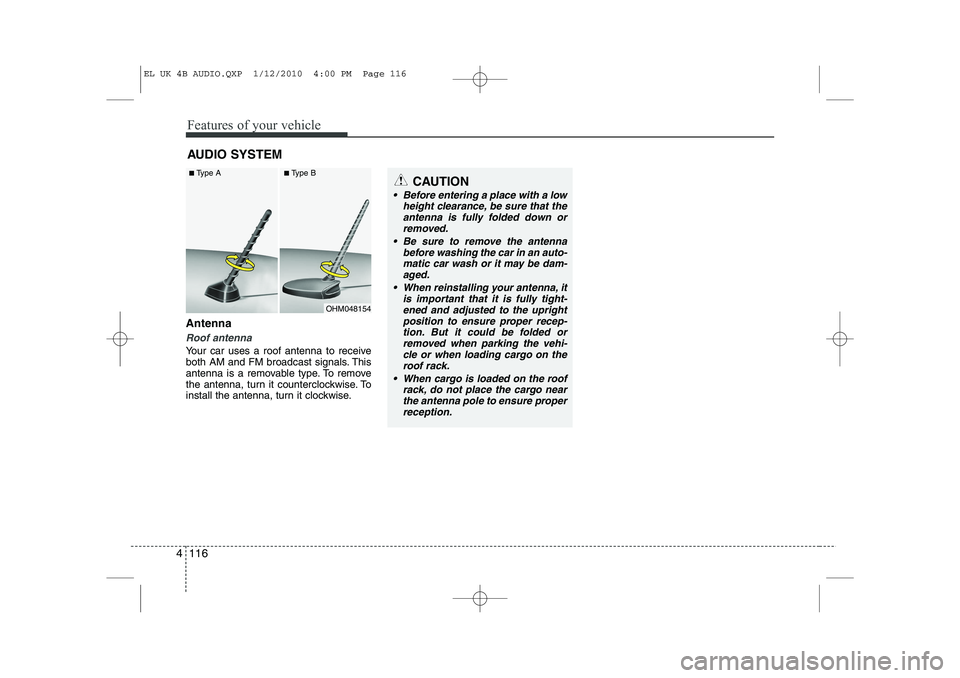
Antenna
Roof antenna
Your car uses a roof antenna to receive
both AM and FM broadcast signals. This
antenna is a removable type. To remove
the antenna, turn it counterclockwise. To
install the antenna, turn it clockwise. AUDIO SYSTEM
CAUTION
• Before entering a place with a low
height clearance, be sure that the
antenna is fully folded down or removed.
Be sure to remove the antenna before washing the car in an auto-
matic car wash or it may be dam- aged.
When reinstalling your antenna, it is important that it is fully tight-ened and adjusted to the upright
position to ensure proper recep- tion. But it could be folded orremoved when parking the vehi-
cle or when loading cargo on theroof rack.
When cargo is loaded on the roof rack, do not place the cargo nearthe antenna pole to ensure proper
reception.
OHM048154
■
Type A ■Type B
EL UK 4B AUDIO.QXP 1/12/2010 4:00 PM Page 116
Page 535 of 560
4 123
Features of your vehicle
1. Power ON/OFF Button &Volume Control Button
Turns on/off the set when the IGNITION
SWITCH is on ACC or ON. If the button
is turned to the right, it increases the vol-
ume and left,decreases the volume.
Press this button to turn the audio sys- tem ON or OFF. (EUROPE MODEL
ONLY)
Depending on the model if the ignition switch is not on ACC or ON position.
the “Battery Discharge” warningappears on LCD after 10 seconds of
power-up, and automatically turns off
after 1 hours of operation.
Adjusts the volume of the car audio system. Rotate clockwise to increase
the volume or counterclockwise to
decrease.
2. FM Selection Button
Turns to FM mode and toggles FM1and
FM2 when the button is pressed each
time. ❈ May change in order of FM1 ➟FM2 ➟
FMA in some models. 3. AM Selection Button
Pressing the [AM] button selects the AM
band. AM Mode is displayed on the LCD. ❈
May change in order of AM ➟AMA in
some models.
4. Automatic Channel Selection Button
When the [SEEK ] button is pressed, it increases the band frequency to auto-
matically select channel. Stops at the
previous frequency if no channel is
found.
5. Preset Button
Push [1]~[6] buttons less than 0.8 sec-
ond to play the channel saved in each
button. Push Preset button for 0.8 sec-
ond or longer to save current channel to
the respective button with a beep. 6. AST(AUTO STORE Button)
When the button is pressed, it automati-
cally selects and saves channels with
high reception rate to PRESET buttons
[1]~[6] and plays the channel saved in
PRESET1. If no channel is saved after
AST, it will play the previous channel.
Saves only to the Preset memory
(1)~(6) of FMA or AMA mode in some
models.
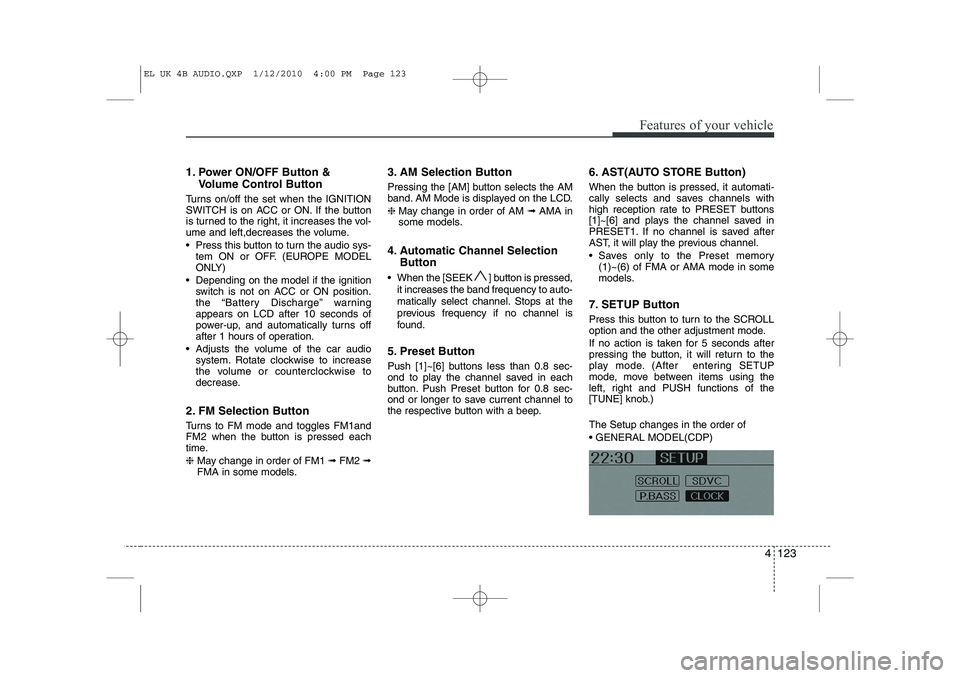
7. SETUP Button
Press this button to turn to the SCROLL
option and the other adjustment mode.
If no action is taken for 5 seconds after
pressing the button, it will return to the
play mode. (After entering SETUP
mode, move between items using the
left, right and PUSH functions of the
[TUNE] knob.) The Setup changes in the order of GENERAL MODEL(CDP)
EL UK 4B AUDIO.QXP 1/12/2010 4:00 PM Page 123
Page 536 of 560
Features of your vehicle
124
4
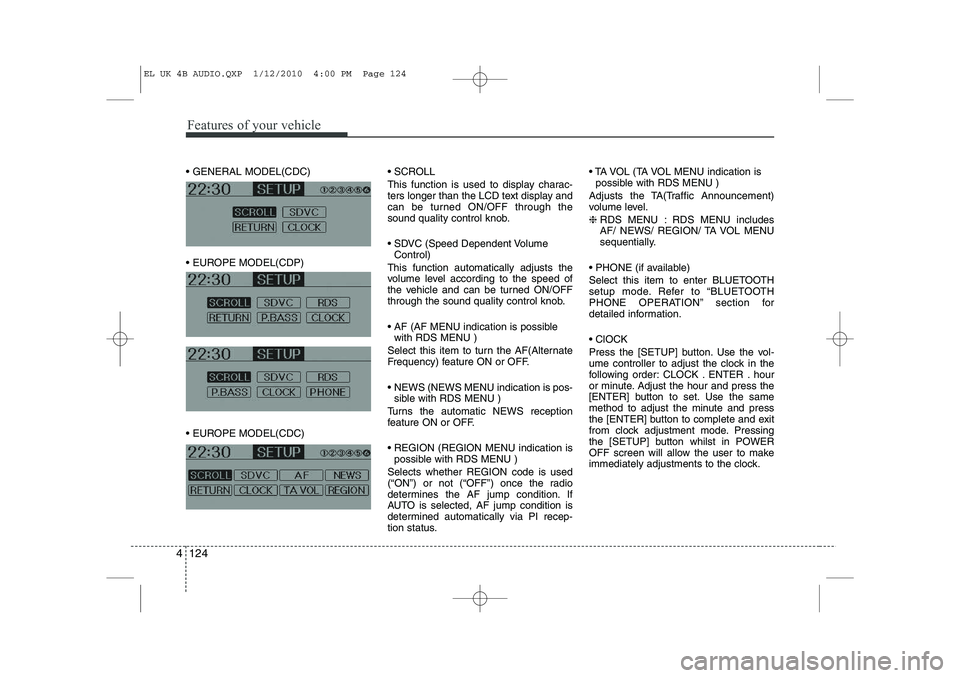
GENERAL MODEL(CDC)
EUROPE MODEL(CDP)
EUROPE MODEL(CDC) SCROLL
This function is used to display charac-
ters longer than the LCD text display and
can be turned ON/OFF through the
sound quality control knob.
SDVC (Speed Dependent Volume
Control)
This function automatically adjusts the
volume level according to the speed of
the vehicle and can be turned ON/OFF
through the sound quality control knob.
AF (AF MENU indication is possible with RDS MENU )
Select this item to turn the AF(Alternate
Frequency) feature ON or OFF.
NEWS (NEWS MENU indication is pos- sible with RDS MENU )
Turns the automatic NEWS reception
feature ON or OFF.
REGION (REGION MENU indication is possible with RDS MENU )
Selects whether REGION code is used
(“ON”) or not (“OFF”) once the radio
determines the AF jump condition. If
AUTO is selected, AF jump condition is
determined automatically via PI recep-
tion status. TA VOL (TA VOL MENU indication is
possible with RDS MENU )
Adjusts the TA(Traffic Announcement)
volume level. ❈ RDS MENU : RDS MENU includes
AF/ NEWS/ REGION/ TA VOL MENU
sequentially.
PHONE (if available)
Select this item to enter BLUETOOTH
setup mode. Refer to “BLUETOOTH
PHONE OPERATION” section for
detailed information. ClOCK
Press the [SETUP] button. Use the vol-
ume controller to adjust the clock in the
following order: CLOCK . ENTER . hour
or minute. Adjust the hour and press the
[ENTER] button to set. Use the same
method to adjust the minute and press
the [ENTER] button to complete and exit
from clock adjustment mode. Pressing
the [SETUP] button whilst in POWER
OFF screen will allow the user to make
immediately adjustments to the clock.
EL UK 4B AUDIO.QXP 1/12/2010 4:00 PM Page 124