change time HYUNDAI IX35 2014 User Guide
[x] Cancel search | Manufacturer: HYUNDAI, Model Year: 2014, Model line: IX35, Model: HYUNDAI IX35 2014Pages: 1534, PDF Size: 39.76 MB
Page 253 of 1534
Driving your vehicle
48
5
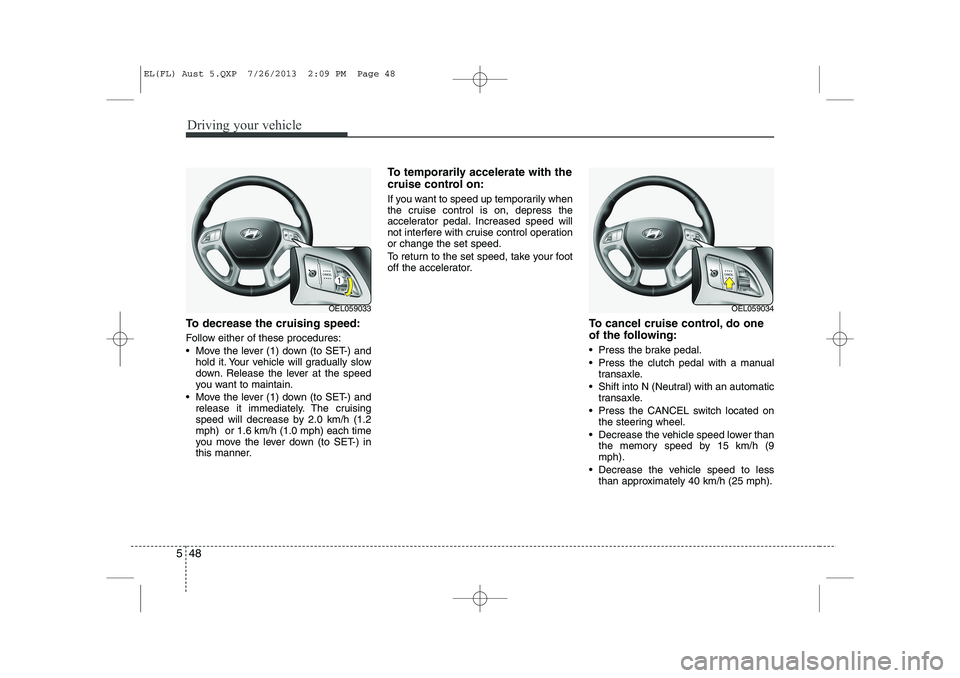
To decrease the cruising speed:
Follow either of these procedures:
Move the lever (1) down (to SET-) and
hold it. Your vehicle will gradually slow
down. Release the lever at the speed
you want to maintain.
Move the lever (1) down (to SET-) and release it immediately. The cruising
speed will decrease by 2.0 km/h (1.2mph) or 1.6 km/h (1.0 mph) each time
you move the lever down (to SET-) in
this manner. To temporarily accelerate with the
cruise control on:
If you want to speed up temporarily when
the cruise control is on, depress the
accelerator pedal. Increased speed will
not interfere with cruise control operationor change the set speed.
To return to the set speed, take your foot
off the accelerator.
To cancel cruise control, do one
of the following:
Press the brake pedal.
Press the clutch pedal with a manualtransaxle.
Shift into N (Neutral) with an automatic transaxle.
Press the CANCEL switch located on the steering wheel.
Decrease the vehicle speed lower than the memory speed by 15 km/h (9 mph).
Decrease the vehicle speed to less than approximately 40 km/h (25 mph).
OEL059033OEL059034
EL(FL) Aust 5.QXP 7/26/2013 2:09 PM Page 48
Page 264 of 1534
559
Driving your vehicle
Use high quality ethylene glycol coolant
Your vehicle is delivered with high quality
ethylene glycol coolant in the cooling
system. It is the only type of coolant that
should be used because it helps prevent
corrosion in the cooling system, lubri-
cates the water pump and prevents
freezing. Be sure to replace or replenish
your coolant in accordance with themaintenance schedule in section 7.
Before winter, have your coolant tested toassure that its freezing point is sufficient
for the temperatures anticipated during
the winter.
Check battery and cables
Winter puts additional burdens on the
battery system. Visually inspect the bat-
tery and cables as described in section
7. We recommend that the system be
checked by an authorised HYUNDAI
dealer.Change to "winter weight" oil if
necessary In some climates it is recommended that
a lower viscosity "winter weight" oil be
used during cold weather. See section 8
for recommendations. If you aren't sure
what weight oil you should use, we rec-
ommend that you consult an authorised
HYUNDAI dealer.
Check spark plugs and ignition system
Inspect your spark plugs as described in
section 7 and replace them if necessary.
Also check all ignition wiring and compo-
nents to be sure they are not cracked,
worn or damaged in any way.
CAUTION
Chains that are the wrong size or
improperly installed can damage
your vehicle's brake lines, sus-pension, body and wheels.
Stop driving and retighten the chains any time you hear them
hitting the vehicle.
WARNING - Tyre chains
The use of chains may adversely affect vehicle handling.
Do not exceed 30 km/h (20 mph) or the chain manufacturer’s rec-
ommended speed limit, whichev-
er is lower.
Drive carefully and avoid bumps, holes, sharp turns, and other
road hazards, which may cause
the vehicle to bounce.
Avoid sharp turns or locked- wheel braking.
EL(FL) Aust 5.QXP 7/26/2013 2:10 PM Page 59
Page 266 of 1534
561
Driving your vehicle
If you are considering towing with your
vehicle, you should first check with your
country's Department of Motor Vehicles
to determine their legal requirements.
Since laws vary the requirements for tow-
ing trailers, cars, or other types of vehi-
cles or apparatus may differ. We recom-
mend that you ask an authorised
HYUNDAI dealer.Your vehicle can tow a trailer. To identify
what the vehicle trailering capacity is for
your vehicle, you should read the infor-
mation in “Weight of the trailer” thatappears later in this section.
Remember that trailering is different than
just driving your vehicle by itself.
Trailering means changes in handling,
durability, and fuel economy. Successful,
safe trailering requires correct equip-
ment, and it has to be used properly.
This section contains many time-tested,
important trailering tips and safety rules.
Many of these are important for your
safety and that of your passengers.
Please read this section carefully before
you pull a trailer. Load-pulling components such as the
engine, transaxle, wheel assemblies, and
tyres are forced to work harder against
the load of the added weight. The engine
is required to operate at relatively higher
speeds and under greater loads. This
additional burden generates extra heat.
The trailer also adds considerably to
wind resistance, increasing the pulling
requirements.
TRAILER TOWING
CAUTION
Pulling a trailer improperly can
damage your vehicle and result in costly repairs not covered by your warranty. To pull a trailer correctly,
follow the advice in this section.WARNING - Towing a trail-
er
If you don't use the correct equip-
ment and/or drive improperly, you
can lose control when you pull a
trailer. For example, if the trailer is
too heavy, the brakes may not work
well - or even at all. You and your
passengers could be seriously or
fatally injured. Pull a trailer only if
you have followed all the steps inthis section.
WARNING - Weight limits
Before towing, make sure the total
trailer weight, GCW (gross combi-
nation weight), GVW (gross vehicle
weight), GAW (gross axle weight )and trailer tongue load are all with-in the limits.
EL(FL) Aust 5.QXP 7/26/2013 2:10 PM Page 61
Page 269 of 1534
Driving your vehicle
64
5
Following distance
Stay at least twice as far behind the vehi-
cle ahead as you would when driving
your vehicle without a trailer. This can
help you avoid situations that require
heavy braking and sudden turns.
Passing
You’ll need more passing distance up
ahead when you’re towing a trailer. And,
because of the increased vehicle length,
you’ll need to go much farther beyond the
passed vehicle before you can return to
your lane.
Backing up
Hold the bottom of the steering wheel
with one hand. Then, to move the trailer
to the left, just move your hand to the left.
To move the trailer to the right, move your
hand to the right. Always back up slowly
and, if possible, have someone guide
you.
Making turns
When you’re turning with a trailer, make
wider turns than normal. Do this so your
trailer won’t strike soft shoulders, kerbs,
road signs, trees, or other objects. Avoid
jerky or sudden manoeuvres. Signal well
in advance.
Turn signals when towing a trailer
When you tow a trailer, your vehicle has
to have a different turn signal flasher and
extra wiring. The green arrows on your
instrument panel will flash whenever you
signal a turn or lane change. Properly
connected, the trailer lights will also flash
to alert other drivers you’re about to turn,
change lanes, or stop.
When towing a trailer, the green arrows
on your instrument panel will flash for
turns even if the bulbs on the trailer are
burned out. Thus, you may think drivers
behind you are seeing your signals
when, in fact, they are not. It’s important
to check occasionally to be sure the trail-
er bulbs are still working. You must also
check the lights every time you discon-
nect and then reconnect the wires.
Do not connect a trailer lighting system
directly to your vehicle’s lighting system.
Use only an approved trailer wiring har-
ness.
An authorised HYUNDAI dealer can
assist you in installing the wiring har-
ness.WARNING
Failure to use an approved trailer wiring harness could result in dam-
age to the vehicle electrical system
and/or personal injury.
EL(FL) Aust 5.QXP 7/26/2013 2:10 PM Page 64
Page 304 of 1534
Maintenance
10
7
NORMAL MAINTENANCE SCHEDULE
The following maintenance services must be performed to ensure good emission control and performance. Keep receipts for all
vehicle emission services to protect your warranty. Where both mileage and time are shown, the frequency of service is deter-
mined by whichever occurs first. * 1
: Check the engine oil level and leak every 500 km or before
starting a long trip.
* 2
: The engine oil level should be checked regularly and main-
tained properly. Operating with an insufficient amount oil
can damage the engine, and such damage is not covered
by warranty.
* 3
: Inspect and if necessary correct or replace. Inspect drive
belt tensioner, idler and alternator, pulley and if necessary
correct or replace.
* 4
: The fuel filter is considered to be maintenance free but peri-
odic inspection is recommended for this maintenance
schedule depends on fuel quality. If there are some impor-
tant matters like fuel flow restriction, surging, loss of power,
hard starting problem etc, replace the fuel filter immediately
regardless of maintenance schedule. We recommend that
you consult an authorised HYUNDAI dealer for details.
* 5
: This maintenance schedule depends on fuel quality. It is
applicable only when using a qualified fuel <"EN590 or
equivalent">. If the diesel fuel specifications don't meet the
EN590, it must be replaced more frequently. HYUNDAI rec-
ommends "every 7,500km inspection, every 15,000kmreplacement". If there are some important safety matters like fuel flow
restriction, surging, loss of power, hard starting problemetc., replace the fuel filter immediately regardless of main-
tenance schedule. We recommend that you consult an
authorised HYUNDAI dealer for details.
* 6
: Manual transaxle fluid, transfer case oil and rear differential
oil should be changed anytime they have been submerged
in water.
* 7
: When adding coolant, use only deionized water or soft
water for your vehicle and never mix hard water in the
coolant filled at the factory. An improper coolant mixture can
result in serious malfunction or engine damage.
* 8
: For your convenience, it can be replaced prior to it's interval
when you do maintenance of other items.
* 9
: If good quality petrols meet Europe Fuel standards (EN228)
or equivalents including fuel additives is not available, one
bottle of additive is recommended. Additives are available
from your authorised HYUNDAI dealer along with informa-
tion on how to use them. Do not mix other additives.
EL(FL) Aust 7.QXP 7/26/2013 2:22 PM Page 10
Page 391 of 1534
OOWW NNEERR ''SS MM AANN UUAA LL
Operation MaintenanceSpecifications
All information in this Owner's Manual is current at the time of publication.
However, in line with the Hyundai policy of continual product improvement,
the right to amend or change specifications without prior notice or obliga-
tion to incorporate such amendments or changes into vehicles already pro-
duced, is reserved.
This manual applies to all models of this vehicle and includes descriptions
and explanations of optional as well as standard equipment. As a result,
you may find material in this manual that does not apply to your specific
vehicle.
EL(FL) Aust FOREWORD.QXP 7/26/2013 1:59 PM Page 1
Page 430 of 1534
35
Safety features of your vehicle
Front seat
Manual adjustment
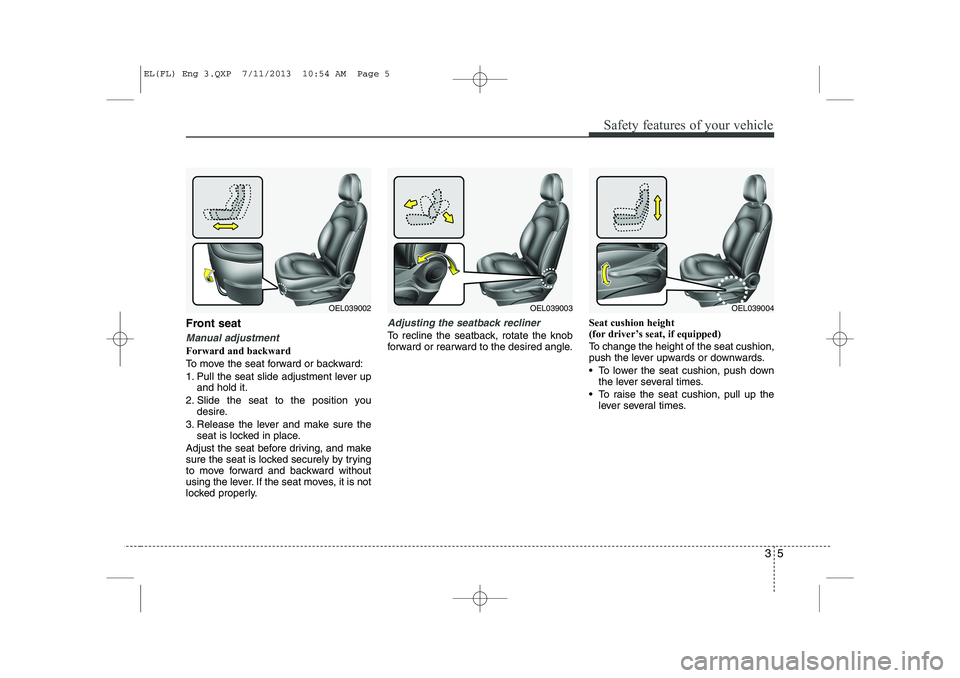
Forward and backward
To move the seat forward or backward:
1. Pull the seat slide adjustment lever upand hold it.
2. Slide the seat to the position you desire.
3. Release the lever and make sure the seat is locked in place.
Adjust the seat before driving, and make
sure the seat is locked securely by trying
to move forward and backward without
using the lever. If the seat moves, it is not
locked properly.
Adjusting the seatback recliner
To recline the seatback, rotate the knob
forward or rearward to the desired angle. Seat cushion height
(for driver’s seat, if equipped)
To change the height of the seat cushion,
push the lever upwards or downwards.
To lower the seat cushion, push down
the lever several times.
To raise the seat cushion, pull up the lever several times.
OEL039002OEL039003OEL039004
EL(FL) Eng 3.QXP 7/11/2013 10:54 AM Page 5
Page 541 of 1534
451
Features of your vehicle
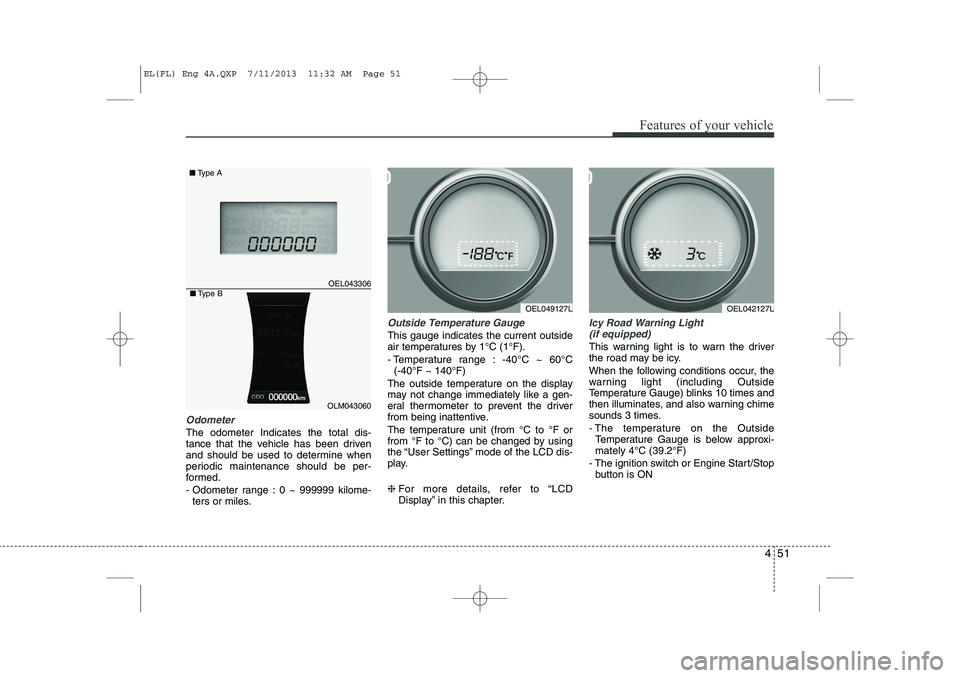
Odometer
The odometer Indicates the total dis-
tance that the vehicle has been driven
and should be used to determine when
periodic maintenance should be per-
formed.
- Odometer range : 0 ~ 999999 kilome-ters or miles.
Outside Temperature Gauge
This gauge indicates the current outside
air temperatures by 1°C (1°F).
- Temperature range : -40°C ~ 60°C (-40°F ~ 140°F)
The outside temperature on the display
may not change immediately like a gen-
eral thermometer to prevent the driver
from being inattentive.
The temperature unit (from °C to °F or
from °F to °C) can be changed by using
the “User Settings” mode of the LCD dis-
play. ❈ For more details, refer to “LCD
Display” in this chapter.
Icy Road Warning Light
(if equipped)
This warning light is to warn the driver
the road may be icy.
When the following conditions occur, the
warning light (including Outside
Temperature Gauge) blinks 10 times and
then illuminates, and also warning chime
sounds 3 times.
- The temperature on the Outside Temperature Gauge is below approxi- mately 4°C (39.2°F)
- The ignition switch or Engine Start/Stop button is ON
OEL049127L
OEL043306
■ Type A
OEL042127L
OLM043060
■Type B
EL(FL) Eng 4A.QXP 7/11/2013 11:32 AM Page 51
Page 545 of 1534
455
Features of your vehicle
Information Mode
Service Interval
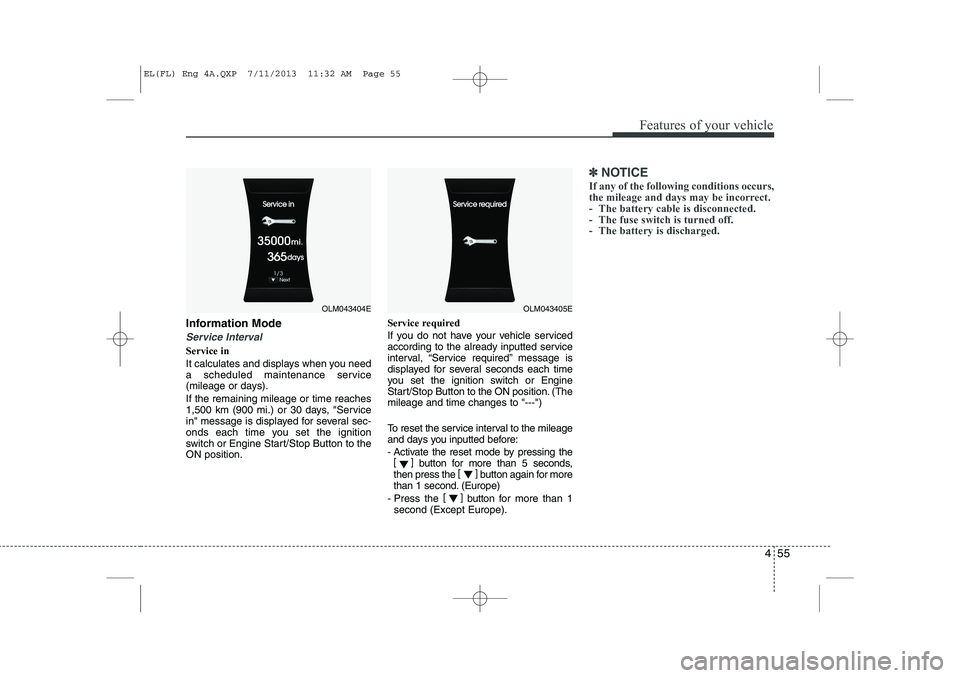
Service in
It calculates and displays when you need
a scheduled maintenance service
(mileage or days). If the remaining mileage or time reaches
1,500 km (900 mi.) or 30 days, "Service
in" message is displayed for several sec-
onds each time you set the ignition
switch or Engine Start/Stop Button to theON position.Service required
If you do not have your vehicle serviced
according to the already inputted service
interval, “Service required” message is
displayed for several seconds each time
you set the ignition switch or Engine
Start/Stop Button to the ON position. (Themileage and time changes to "---")
To reset the service interval to the mileage
and days you inputted before:
- Activate the reset mode by pressing the
[] button for more than 5 seconds,
then press the []
button again for more
than 1 second. (Europe)
- Press the []
button for more than 1
second (Except Europe).
✽✽ NOTICE
If any of the following conditions occurs,
the mileage and days may be incorrect.
- The battery cable is disconnected.
- The fuse switch is turned off.
- The battery is discharged.
OLM043404EOLM043405E
EL(FL) Eng 4A.QXP 7/11/2013 11:32 AM Page 55
Page 548 of 1534
Features of your vehicle
58
4
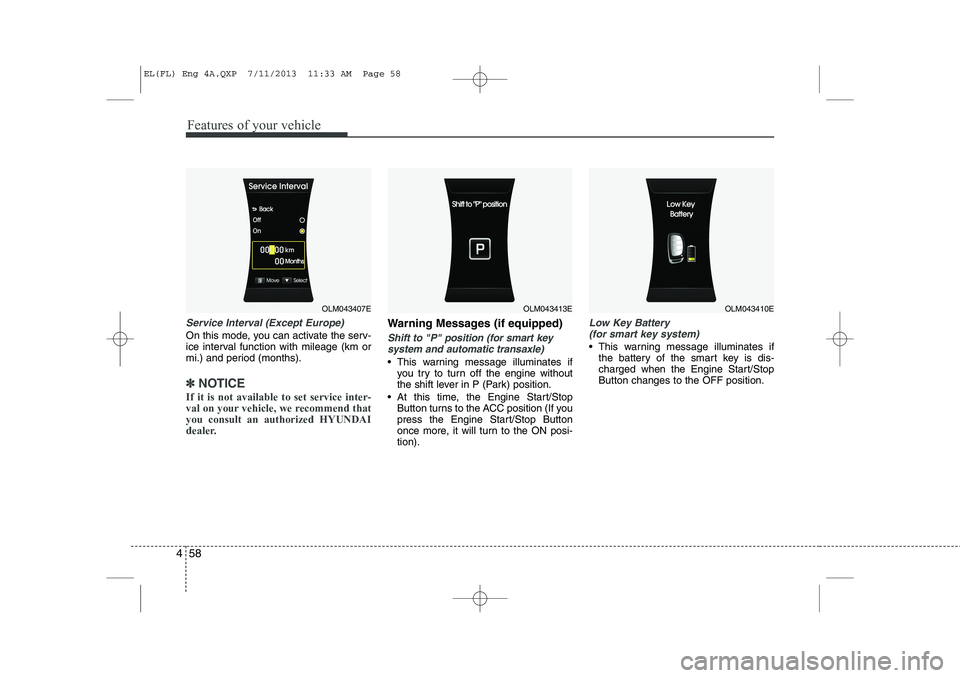
Service Interval (Except Europe)
On this mode, you can activate the serv-
ice interval function with mileage (km or
mi.) and period (months).
✽✽
NOTICE
If it is not available to set service inter-
val on your vehicle, we recommend thatyou consult an authorized HYUNDAI
dealer.
Warning Messages (if equipped)
Shift to "P" position (for smart key system and automatic transaxle)
This warning message illuminates if you try to turn off the engine without
the shift lever in P (Park) position.
At this time, the Engine Start/Stop Button turns to the ACC position (If you
press the Engine Start/Stop Button
once more, it will turn to the ON posi-tion).
Low Key Battery
(for smart key system)
This warning message illuminates if the battery of the smart key is dis-
charged when the Engine Start/StopButton changes to the OFF position.
OLM043407EOLM043413EOLM043410E
EL(FL) Eng 4A.QXP 7/11/2013 11:33 AM Page 58