buttons HYUNDAI IX35 2014 Owner's Manual
[x] Cancel search | Manufacturer: HYUNDAI, Model Year: 2014, Model line: IX35, Model: HYUNDAI IX35 2014Pages: 1534, PDF Size: 39.76 MB
Page 746 of 1534
![HYUNDAI IX35 2014 Owners Manual Features of your vehicle
256
4
Voice Recognition Setting
Press the key Select
[Sound] Select [Volume Dialogue]
Use the , buttons to adjust the
Volume Dialog.
Touch Screen Beep
Press the key Sel](/img/35/56237/w960_56237-745.png "HYUNDAI IX35 2014 Owners Manual Features of your vehicle
256
4
Voice Recognition Setting
Press the key Select
[Sound] Select [Volume Dialogue]
Use the , buttons to adjust the
Volume Dialog.
Touch Screen Beep
Press the key Sel")
Features of your vehicle
256
4
Voice Recognition Setting
Press the key Select
[Sound] Select [Volume Dialogue]
Use the , buttons to adjust the
Volume Dialog.
Touch Screen Beep
Press the key Select
[Sound] Select [Touch Screen Beep]
This feature is used to turn the touch
screen beep on/off. Clock/Day Setting
Setting
Press the key Select
[Clock/Day] Select [Clock Settings]
Use the , buttons to set the Hour,
Minutes and AM/PM setting.
✽✽
NOTICE
Press and hold the key (over 0.8 seconds) to display the Clock/ Day
screen.
CLOCK
SETUP
SETUP SETUP
EL(FL) Eng 4B AUDIO.QXP 7/11/2013 11:21 AM Page 256
Page 747 of 1534
![HYUNDAI IX35 2014 Owners Manual 4 257
Features of your vehicle
Day Setting
Press the key Select
[Clock/Day] Select [Day Settings]
Use the , buttons to set the Day,
Month and Year setting.
Time Format
Press the key Select
[Cl](/img/35/56237/w960_56237-746.png "HYUNDAI IX35 2014 Owners Manual 4 257
Features of your vehicle
Day Setting
Press the key Select
[Clock/Day] Select [Day Settings]
Use the , buttons to set the Day,
Month and Year setting.
Time Format
Press the key Select
[Cl")
4 257
Features of your vehicle
Day Setting
Press the key Select
[Clock/Day] Select [Day Settings]
Use the , buttons to set the Day,
Month and Year setting.
Time Format
Press the key Select
[Clock/Day] Select [Time Format]
This feature is used to change the clock
format between 12hr or 24hr.
Clock Display
Press the key Select
[Clock/Day] Select [Clock Display
(Power off)]
This feature is used to display a clock on the screen when the audio system is
turned off.SETUP SETUP SETUP
EL(FL) Eng 4B AUDIO.QXP 7/11/2013 11:21 AM Page 257
Page 751 of 1534
![HYUNDAI IX35 2014 Owners Manual 4 261
Features of your vehicle
Audio Streaming
Press the key Select
[Phone] Select [Audio Streaming]
When Audio Streaming is turned on, you
can play music files saved in your
Bluetooth®Wireless T](/img/35/56237/w960_56237-750.png "HYUNDAI IX35 2014 Owners Manual 4 261
Features of your vehicle
Audio Streaming
Press the key Select
[Phone] Select [Audio Streaming]
When Audio Streaming is turned on, you
can play music files saved in your
Bluetooth®Wireless T")
4 261
Features of your vehicle
Audio Streaming
Press the key Select
[Phone] Select [Audio Streaming]
When Audio Streaming is turned on, you
can play music files saved in your
Bluetooth®Wireless Technology device
through the audio system.
Outgoing Volume
Press the key Select
[Phone] Select [Outgoing Volume]
Use the , buttons to adjust the
outgoing volume level.
Turning Bluetooth System Off
Press the key Select
[Phone] Select [Bluetooth System Off] Once
Bluetooth®Wireless Technology is
turned off, Bluetooth®Wireless
Technology related features will not be
supported within the audio system.
✽✽ NOTICE
To turn Bluetooth ®
Wireless Technology
back on, go to [Phone] and
press “Yes”.
SETUP
SETUP
SETUP SETUP
CAUTION
Bluetooth ®
Wireless Technology
audio streaming may not be support-
ed in some Bluetooth ®
Wireless
Technology phones.
EL(FL) Eng 4B AUDIO.QXP 7/11/2013 11:21 AM Page 261
Page 1081 of 1534
Features of your vehicle
10
4
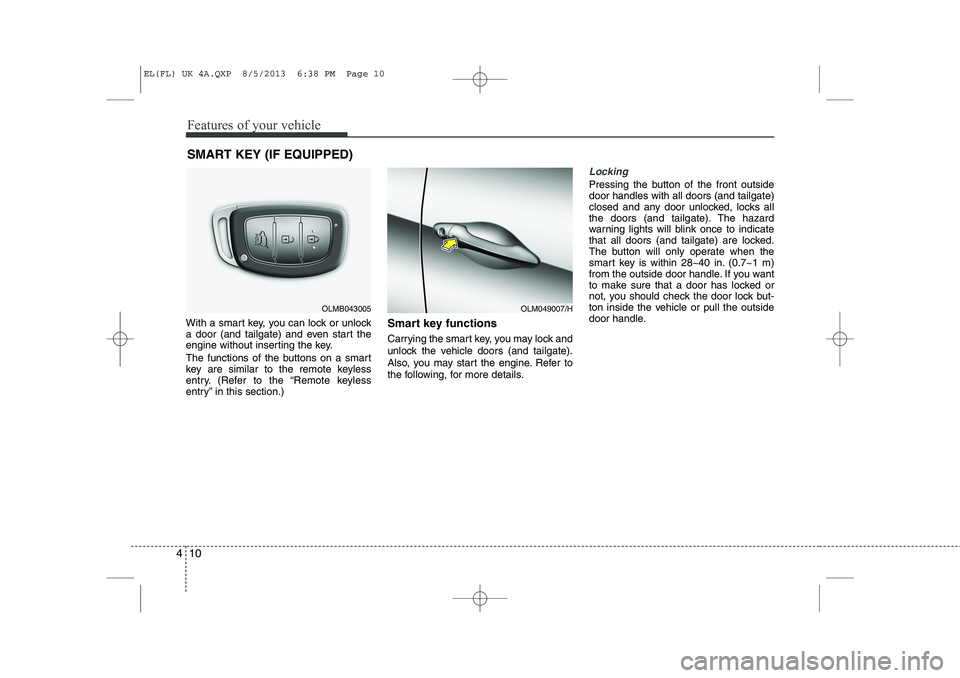
With a smart key, you can lock or unlock
a door (and tailgate) and even start the
engine without inserting the key.
The functions of the buttons on a smart
key are similar to the remote keyless
entry. (Refer to the “Remote keyless
entry” in this section.) Smart key functions
Carrying the smart key, you may lock and
unlock the vehicle doors (and tailgate).
Also, you may start the engine. Refer to
the following, for more details.
Locking
Pressing the button of the front outside door handles with all doors (and tailgate)
closed and any door unlocked, locks all
the doors (and tailgate). The hazard
warning lights will blink once to indicate
that all doors (and tailgate) are locked.
The button will only operate when the
smart key is within 28~40 in. (0.7~1 m)
from the outside door handle. If you want
to make sure that a door has locked or
not, you should check the door lock but-
ton inside the vehicle or pull the outside
door handle.
SMART KEY (IF EQUIPPED)
OLM049007/HOLMB043005
EL(FL) UK 4A.QXP 8/5/2013 6:38 PM Page 10
Page 1118 of 1534
447
Features of your vehicle
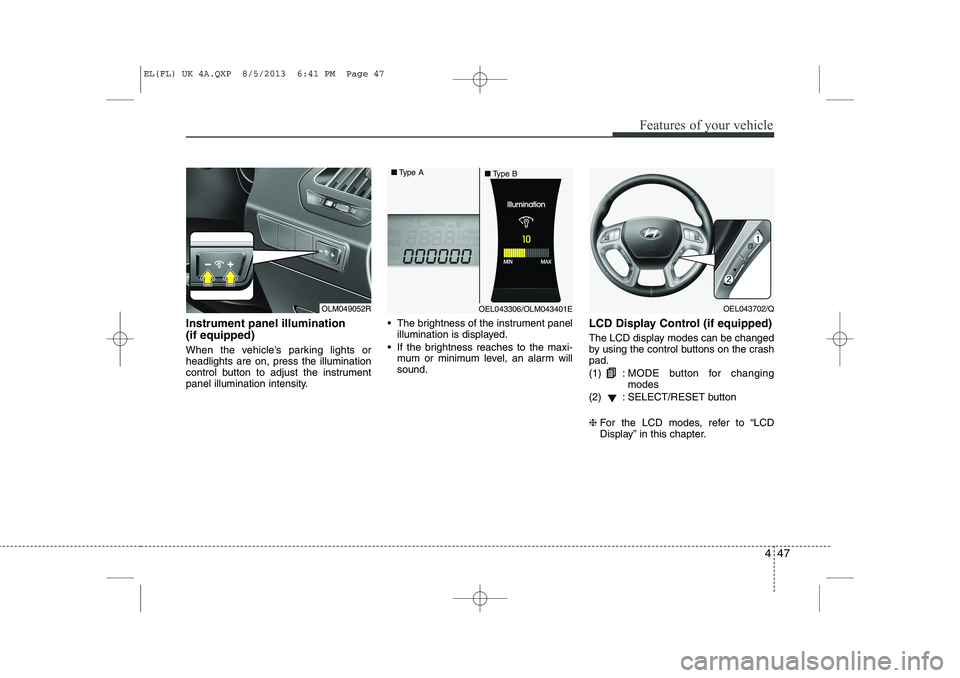
Instrument panel illumination (if equipped)
When the vehicle’s parking lights or headlights are on, press the illumination
control button to adjust the instrument
panel illumination intensity. The brightness of the instrument panel
illumination is displayed.
If the brightness reaches to the maxi- mum or minimum level, an alarm willsound. LCD Display Control (if equipped)
The LCD display modes can be changed
by using the control buttons on the crashpad. (1) :
MODE button for changing modes
(2) : SELECT/RESET button ❈ For the LCD modes, refer to “LCD
Display” in this chapter.
OLM049052ROEL043306/OLM043401E
■
Type A
■Type BOEL043702/Q
EL(FL) UK 4A.QXP 8/5/2013 6:41 PM Page 47
Page 1132 of 1534
461
Features of your vehicle
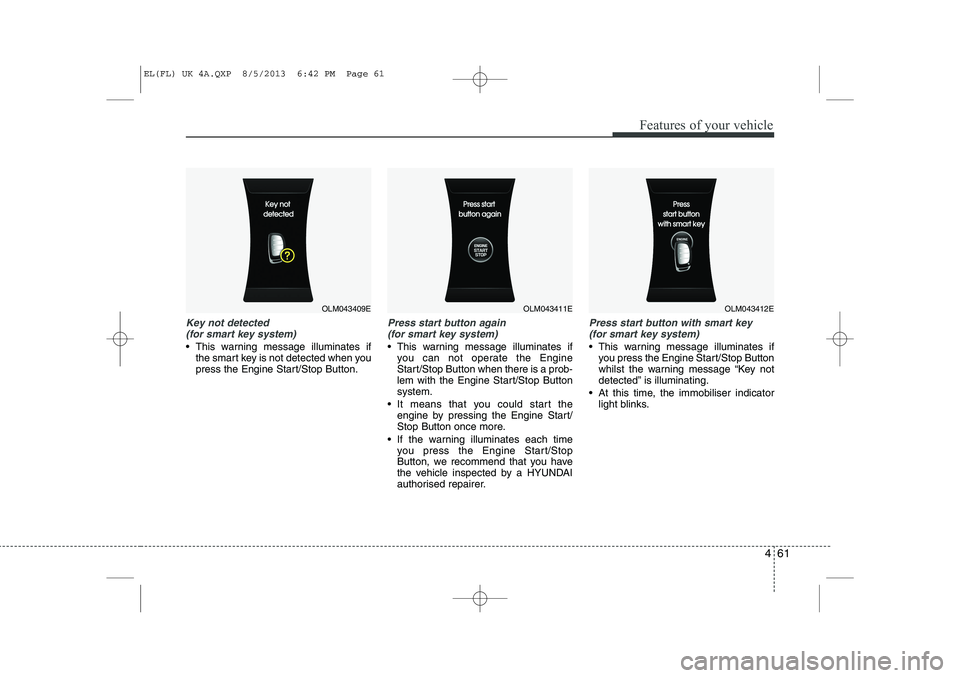
Key not detected (for smart key system)
This warning message illuminates if the smart key is not detected when you
press the Engine Start/Stop Button.
Press start button again
(for smart key system)
This warning message illuminates if you can not operate the Engine
Start/Stop Button when there is a prob-
lem with the Engine Start/Stop Buttonsystem.
It means that you could start the engine by pressing the Engine Start/
Stop Button once more.
If the warning illuminates each time you press the Engine Start/Stop
Button, we recommend that you have
the vehicle inspected by a HYUNDAI
authorised repairer.
Press start button with smart key
(for smart key system)
This warning message illuminates if you press the Engine Start/Stop Button
whilst the warning message “Key not
detected” is illuminating.
At this time, the immobiliser indicator light blinks.
OLM043409EOLM043411EOLM043412E
EL(FL) UK 4A.QXP 8/5/2013 6:42 PM Page 61
Page 1188 of 1534
4 117
Features of your vehicle
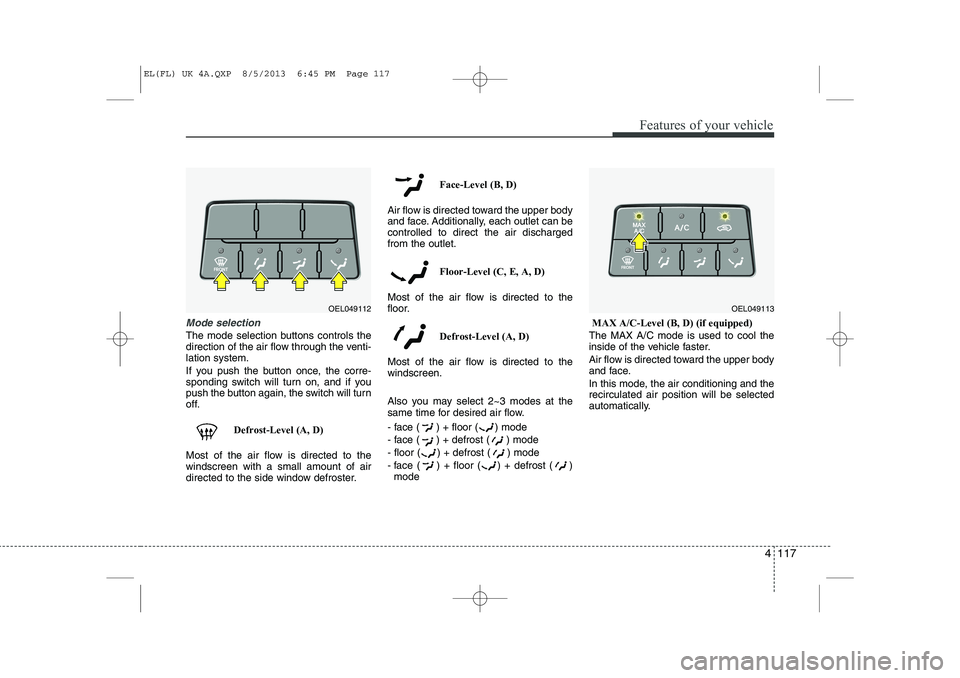
Mode selection
The mode selection buttons controls the
direction of the air flow through the venti-lation system.
If you push the button once, the corre-
sponding switch will turn on, and if you
push the button again, the switch will turn
off.Defrost-Level (A, D)
Most of the air flow is directed to thewindscreen with a small amount of air
directed to the side window defroster. Face-Level (B, D)
Air flow is directed toward the upper body
and face. Additionally, each outlet can becontrolled to direct the air dischargedfrom the outlet.
Floor-Level (C, E, A, D)
Most of the air flow is directed to the
floor.
Defrost-Level (A, D)
Most of the air flow is directed to thewindscreen.
Also you may select 2~3 modes at the
same time for desired air flow.
- face ( ) + floor ( ) mode
- face ( ) + defrost ( ) mode
- floor ( ) + defrost ( ) mode
- face ( ) + floor ( ) + defrost ( ) mode MAX A/C-Level (B, D) (if equipped)
The MAX A/C mode is used to cool the
inside of the vehicle faster.
Air flow is directed toward the upper body
and face.
In this mode, the air conditioning and the recirculated air position will be selected
automatically.
OEL049112OEL049113
EL(FL) UK 4A.QXP 8/5/2013 6:45 PM Page 117
Page 1197 of 1534
Features of your vehicle
126
4
Manual heating and air condition- ing The heating and cooling system can be
controlled manually by pressing buttons
or turning knob(s) other than the AUTO
button. In this case, the system workssequentially according to the order of
buttons or knob(s) selected.
1. Start the engine.
2. Set the mode to the desired position.
For improving the effectiveness of heating and cooling;- Heating: - Cooling:
3. Set the temperature control to the desired position.
4. Set the air intake control to the outside (fresh) air position.
5. Set the fan speed control to the desired speed.
6. If air conditioning is desired, turn the air conditioning system on.
Press the AUTO button in order to con-
vert to full automatic control of the sys-tem.
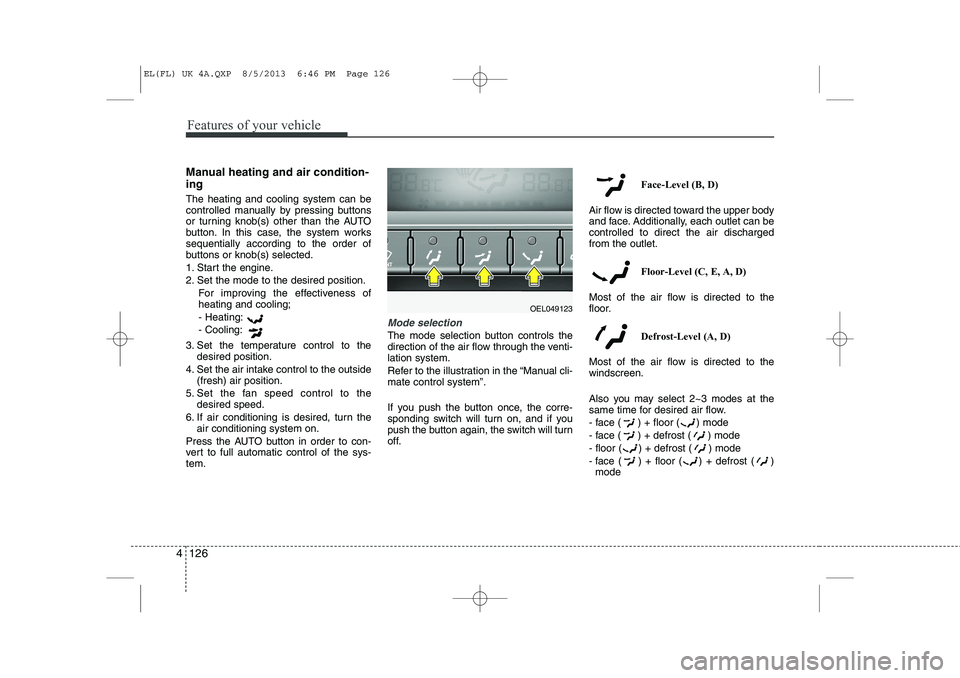
Mode selection
The mode selection button controls the
direction of the air flow through the venti-lation system.
Refer to the illustration in the “Manual cli- mate control system”.
If you push the button once, the corre-
sponding switch will turn on, and if you
push the button again, the switch will turn
off. Face-Level (B, D)
Air flow is directed toward the upper body
and face. Additionally, each outlet can becontrolled to direct the air dischargedfrom the outlet.
Floor-Level (C, E, A, D)
Most of the air flow is directed to the
floor.
Defrost-Level (A, D)
Most of the air flow is directed to thewindscreen.
Also you may select 2~3 modes at the
same time for desired air flow.
- face ( ) + floor ( ) mode
- face ( ) + defrost ( ) mode
- floor ( ) + defrost ( ) mode
- face ( ) + floor ( ) + defrost ( ) mode
OEL049123
EL(FL) UK 4A.QXP 8/5/2013 6:46 PM Page 126
Page 1201 of 1534
Features of your vehicle
130
4
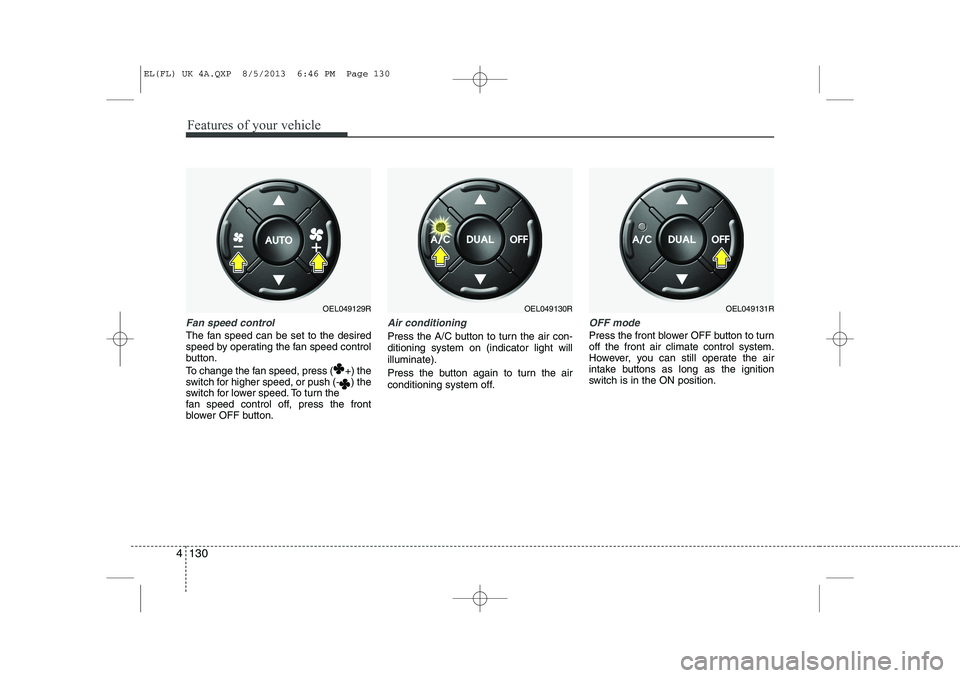
Fan speed control
The fan speed can be set to the desired
speed by operating the fan speed control
button.
To change the fan speed, press ( +) the
switch for higher speed, or push (- ) the
switch for lower speed. To turn the
fan speed control off, press the front
blower OFF button.
Air conditioning
Press the A/C button to turn the air con- ditioning system on (indicator light willilluminate).
Press the button again to turn the air
conditioning system off.
OFF mode
Press the front blower OFF button to turn off the front air climate control system.
However, you can still operate the air
intake buttons as long as the ignition
switch is in the ON position.
OEL049129ROEL049130ROEL049131R
EL(FL) UK 4A.QXP 8/5/2013 6:46 PM Page 130
Page 1211 of 1534
Features of your vehicle
140
4
Digital clock (if equipped)
Whenever the battery terminals or relat-
ed fuses are disconnected, you must
reset the time.
When the ignition switch is in the ACC or
ON position, the clock buttons operate as
follows:
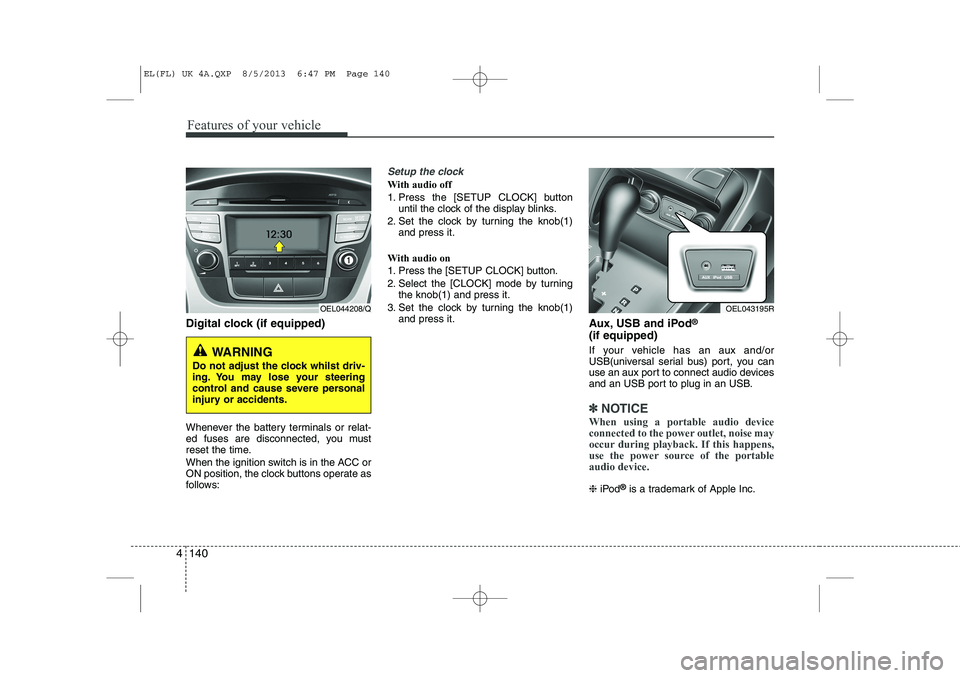
Setup the clock
With audio off
1. Press the [SETUP CLOCK] button
until the clock of the display blinks.
2. Set the clock by turning the knob(1) and press it.
With audio on
1. Press the [SETUP CLOCK] button.
2. Select the [CLOCK] mode by turning the knob(1) and press it.
3. Set the clock by turning the knob(1) and press it. Aux, USB and iPod®
(if equipped)
If your vehicle has an aux and/or
USB(universal serial bus) port, you can
use an aux port to connect audio devices
and an USB port to plug in an USB.
✽✽ NOTICE
When using a portable audio device
connected to the power outlet, noise may
occur during playback. If this happens,
use the power source of the portableaudio device.
❈ iPod ®
is a trademark of Apple Inc.
WARNING
Do not adjust the clock whilst driv-
ing. You may lose your steering
control and cause severe personal
injury or accidents.
OEL044208/QOEL043195R
EL(FL) UK 4A.QXP 8/5/2013 6:47 PM Page 140