fuel HYUNDAI IX35 2015 Owner's Manual
[x] Cancel search | Manufacturer: HYUNDAI, Model Year: 2015, Model line: IX35, Model: HYUNDAI IX35 2015Pages: 550, PDF Size: 9.92 MB
Page 139 of 550
Features of your vehicle54
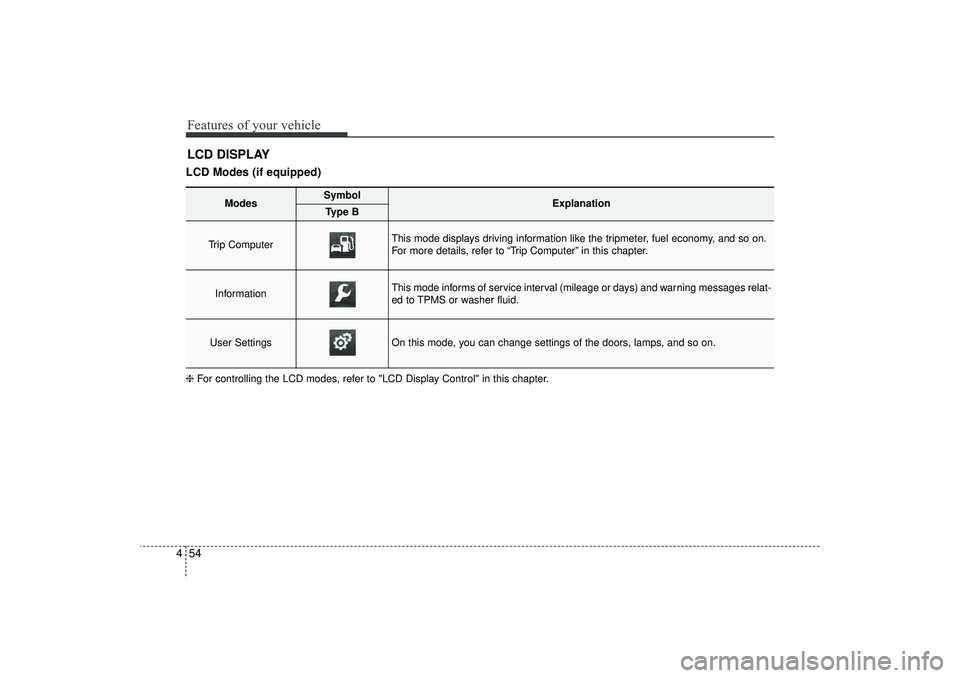
4LCD DISPLAYLCD Modes (if equipped)❈ For controlling the LCD modes, refer to "LCD Display Control" in this chapter.
Modes
Symbol
Explanation
Type B
Trip Computer
This mode displays driving information like the tripmeter, fuel economy, and so on.
For more details, refer to “Trip Computer” in this chapter.
Information
This mode informs of service interval (mileage or days) and warning messages relat-
ed to TPMS or washer fluid.
User Settings
On this mode, you can change settings of the doors, lamps, and so on.
EL(FL) UK 4A.QXP 2/9/2015 9:04 PM Page 54
Page 142 of 550
457
Features of your vehicle
Horn Feedback (if equipped)
If this item is checked, the horn feedback
operation will be activated.
After locking the door by pressing the
lock button on the transmitter, if you
press the lock button again within 4 sec-
onds, the warning sound will operate
once to indicate that all doors are locked.
LampHead Lamp Delay (if equipped)
If this item is checked, the headlamp
delay and headlamp welcome function
will be activated.SettingsLanguage (if equipped)
Choose the language you prefer within
the LCD display.
SPAS Voice (if equipped)
Adjust the volume of SPAS voice infor-
mation.
Temperature Unit
Convert the temperature unit from °C to
°F or from °F to °C.AVG Fuel Eco Reset
Auto Reset:
The average fuel economy will reset
automatically when refuelling.
Manual Reset: The average fuel economy will not
reset automatically whenever refu-
elling.
For more details, refer to “Trip Computer”
in this chapter.
EL(FL) UK 4A.QXP 2/9/2015 9:04 PM Page 57
Page 149 of 550
Features of your vehicle64
4OverviewDescriptionThe trip computer is a microcomputer-
controlled driver information system that
displays information related to driving.
✽ ✽
NOTICESome driving information stored in the
trip computer (for example Average
Vehicle Speed) resets if the battery is
disconnected.
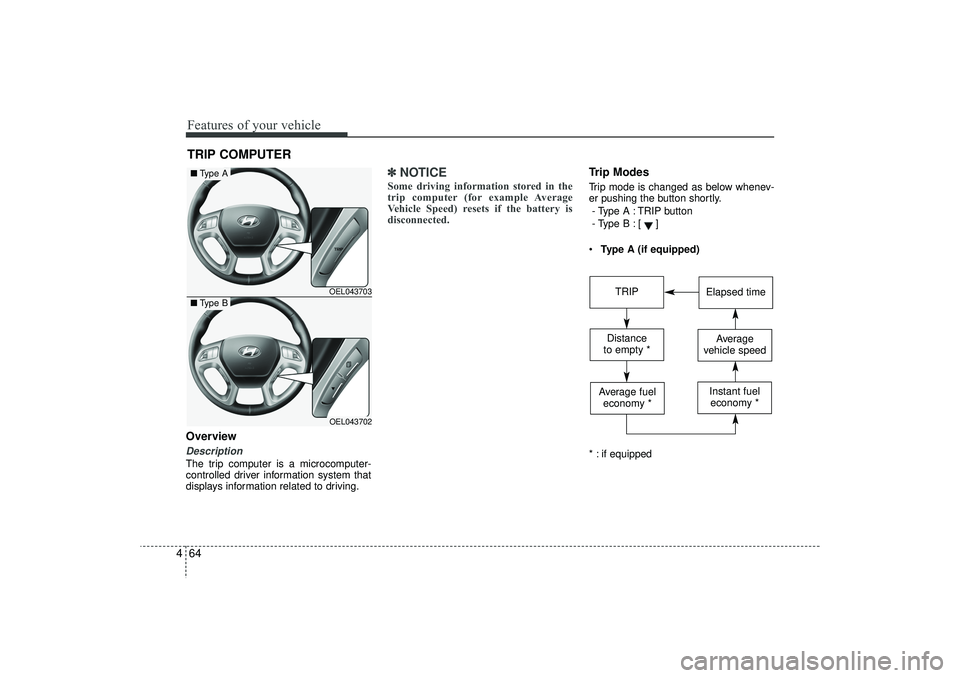
Trip ModesTrip mode is changed as below whenev-
er pushing the button shortly.
- Type A : TRIP button
- Type B :
[]
Type A (if equipped)
* : if equipped
TRIP COMPUTER
OEL043703OEL043702
■ Type A■Type B
TRIP
Elapsed time
Distance
to empty *
Average
vehicle speed
Average fuel economy *
Instant fueleconomy *
EL(FL) UK 4A.QXP 2/9/2015 9:05 PM Page 64
Page 150 of 550
465
Features of your vehicle
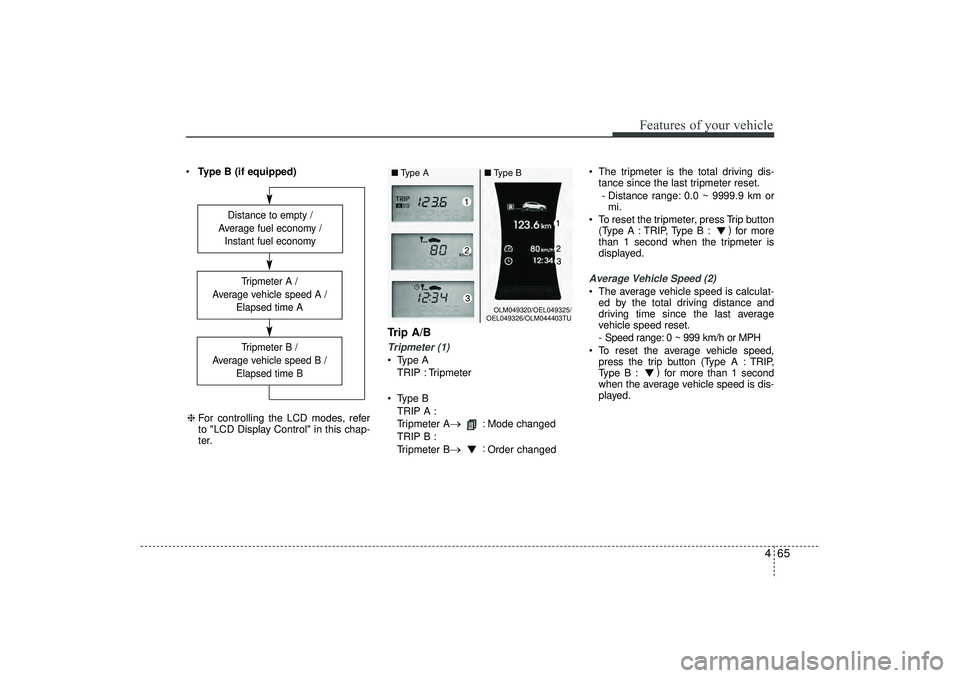
Type B (if equipped)
Trip A/BTripmeter (1) Type A
TRIP : Tripmeter
Type B TRIP A :
Tripmeter A
→
: Mode changed
TRIP B :
Tripmeter B
→
: Order changed The tripmeter is the total driving dis-
tance since the last tripmeter reset.
- Distance range: 0.0 ~ 9999.9 km or mi.
To reset the tripmeter, press Trip button (Type A : TRIP, Type B : )
for more
than 1 second when the tripmeter is
displayed.
Average Vehicle Speed (2) The average vehicle speed is calculat- ed by the total driving distance and
driving time since the last average
vehicle speed reset.
- Speed range: 0 ~ 999 km/h or MPH
To reset the average vehicle speed, press the trip button (Type A : TRIP,
Type B : )
for more than 1 second
when the average vehicle speed is dis-
played.
Distance to empty /
Average fuel economy / Instant fuel economy
Tripmeter B /
Average vehicle speed B / Elapsed time BTripmeter A /
Average vehicle speed A / Elapsed time A
❈For controlling the LCD modes, refer
to "LCD Display Control" in this chap-
ter.
OLM049320/OEL049325/
OEL049326/OLM044403TU
■ Type A ■Type B
EL(FL) UK 4A.QXP 2/9/2015 9:05 PM Page 65
Page 151 of 550
Features of your vehicle66
4✽
✽
NOTICE• The average vehicle speed is not dis-
played if the driving distance is less
than 300 meters (0.186 miles) or the
driving time is less than 10 seconds
since the ignition switch or Engine
Start/Stop button is turned to ON.
• Even if the vehicle is not in motion, the average vehicle speed keeps going
whilst the engine is running.Elapsed Time (3) The elapsed time is the total driving
time since the last elapsed time reset.
- Time range (hh:mm): 00:00 ~ 99:59
To reset the elapsed time, press the trip button (Type A : TRIP, Type B : )
for more than 1 second when the
elapsed time is displayed.✽ ✽ NOTICEEven if the vehicle is not in motion, the
elapsed time keeps going whilst the
engine is running.
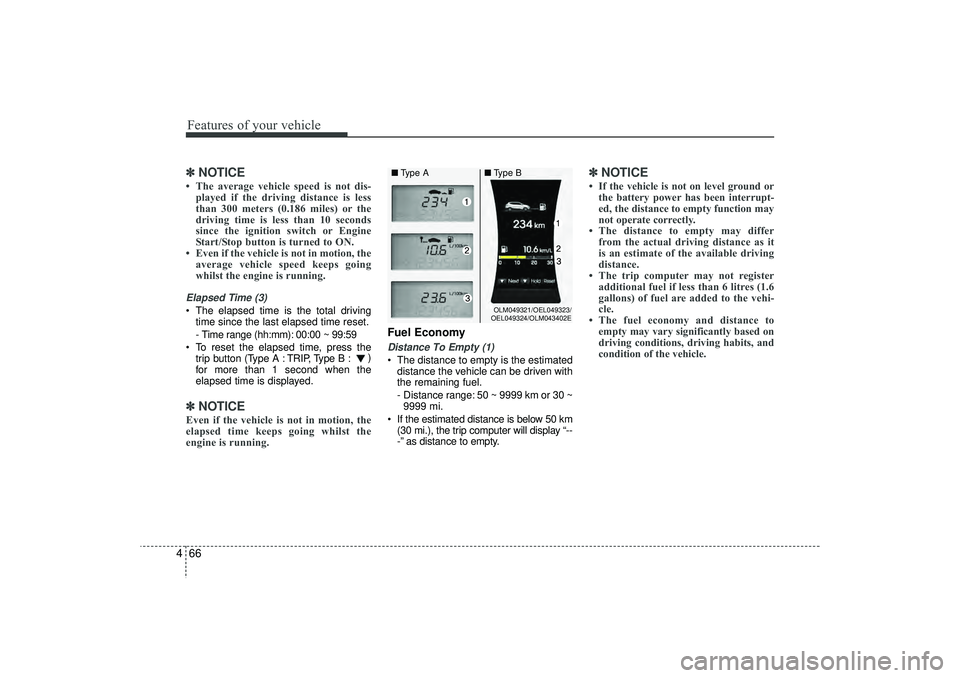
Fuel EconomyDistance To Empty (1) The distance to empty is the estimated
distance the vehicle can be driven with
the remaining fuel.
- Distance range: 50 ~ 9999 km or 30 ~9999 mi.
If the estimated distance is below 50 km (30 mi.), the trip computer will display “--
-” as distance to empty.
✽ ✽ NOTICE• If the vehicle is not on level ground or
the battery power has been interrupt-
ed, the distance to empty function may
not operate correctly.
• The distance to empty may differ from the actual driving distance as it
is an estimate of the available driving
distance.
• The trip computer may not register additional fuel if less than 6 litres (1.6
gallons) of fuel are added to the vehi-
cle.
• The fuel economy and distance to empty may vary significantly based on
driving conditions, driving habits, and
condition of the vehicle.
OLM049321/OEL049323/
OEL049324/OLM043402E
■ Type A ■Type B
EL(FL) UK 4A.QXP 2/9/2015 9:05 PM Page 66
Page 152 of 550
467
Features of your vehicle
Average Fuel Economy (2) The average fuel economy is calculat-ed by the total driving distance and fuel
consumption since the last average fuel
economy reset.
- Fuel economy range: 0.0 ~ 99.9L/100km or MPG
The average fuel economy can be reset both manually and automatically.
Manual reset
To clear the average fuel economy manu-
ally, press the trip b utton (Type A : TRIP,
Type B : )
for more than 1 second
when the average fuel economy is dis-
played. Automatic reset
The average fuel economy will be
cleared to zero (---) when the vehicle
speed exceeds 1 km/h after refuelling
more than 6 litres (1.6 gallons).
✽ ✽
NOTICEThe average fuel economy is not dis-
played for more accurate calculation if
the vehicle does not drive more than 10
seconds or 50 meters (0.03 miles) since
the ignition switch or Engine Start/Stop
button is turned to ON.
Instant Fuel Economy (3) This mode displays the instant fuel
economy during the last few seconds
when the vehicle speed is more than
10 km/h (6.2 MPH).
- Fuel economy range:
Type A : 0 ~ 99.9 L/100 km or MPG
Type B : 0 ~ 30 L/100 km or 0 ~ 50
MPG
EL(FL) UK 4A.QXP 2/9/2015 9:05 PM Page 67
Page 153 of 550
Features of your vehicle68
4Warnings and indicatorsAll warning lights are checked by turning
the ignition switch ON (do not start the
engine). If any light does not illuminate,
we recommend that the system be
checked by a HYUNDAI authorised
repairer.
After starting the engine, check to make
sure that all warning lights are off. If any
are still on, this indicates a situation that
needs attention. When releasing the
parking brake, the brake system warning
light should go off. The fuel warning light
will stay on if the fuel level is low.
ECO Indicator Light
(if equipped)This indicator light illuminates:
When you activate the active ECO sys-
tem by pressing the ACTIVE ECO button.
For more details, refer to “Active ECO
System” in chapter 5.
Air bag warning light (if equipped)This warning light will illuminate for
approximately 6 seconds each time you
turn the ignition switch to the ON posi-
tion.
This light also comes on when the SRS
is not working properly. If the AIR BAG
warning light does not come on, or con-
tinuously remains on after operating for
about 6 seconds when you turned the
ignition switch to the ON position or start-
ed the engine, or if it comes on whilst
driving, we recommend that the system
be inspected by a HYUNDAI authorised
repairer.
ECO
EL(FL) UK 4A.QXP 2/9/2015 9:05 PM Page 68
Page 160 of 550
475
Features of your vehicle
Immobiliser indicator (if equipped)Without smart key system
This indicator illuminates when the
immobiliser key is inserted and turned to
the ON position to start the engine.
At this time, you can start the engine. The
indicator goes out after the engine is run-
ning.
If this indicator blinks when the ignition
switch is in the ON position before start-
ing the engine, we recommend that the
system be checked by a HYUNDAI
authorised repairer. With smart key system
If any of the following occurs in a vehicle
equipped with the smart key, the immo-
biliser indicator illuminates, blinks or
goes off.
When the battery of the smart key is
weak.
- At this time, you can not start theengine. However, you can start the
engine if you press the Engine
Start/Stop Button with the smart key.
(For more details, refer to “Starting
the Engine” in section 5).
If the indicator illuminates only for 2 seconds and goes out when the
ENGINE START/STOP button is
turned to ON position with the smart
key in the vehicle, we recommend that
the system be checked by a HYUNDAI
authorised repairer.
When the battery is weak, if the ENGINE START/STOP button is
pressed, the indicator will blink and you
are not able to start the engine.
However, you are able to start the
engine by pressing the engine
start/stop button with the smart key.
Also, if the smart key system related
parts have a problem, the indicator will
blink.
Low fuel level warning This warning light indicates the fuel tank
is nearly empty. When it comes on, you
should add fuel as soon as possible.
Driving with the fuel level warning light on
or with the fuel level below “E” can cause
the engine to misfire and damage the
catalytic converter.
EL(FL) UK 4A.QXP 2/9/2015 9:05 PM Page 75
Page 161 of 550
Features of your vehicle76
4
CAUTION -
Diesel engine
If the Emission Control System
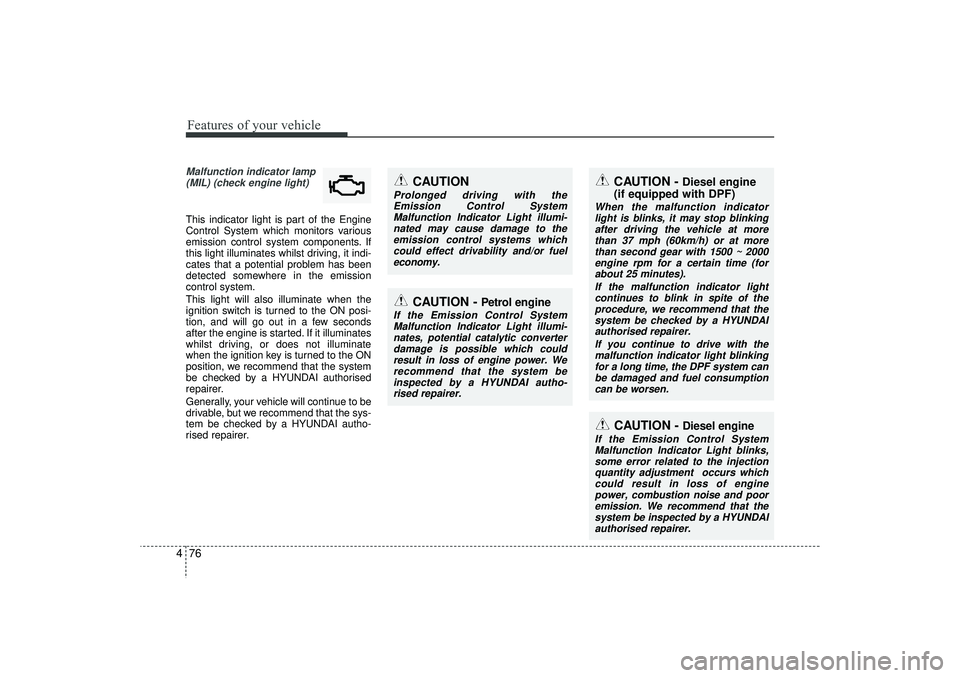
Malfunction Indicator Light blinks,some error related to the injectionquantity adjustment occurs whichcould result in loss of engine power, combustion noise and pooremission. We recommend that thesystem be inspected by a HYUNDAIauthorised repairer.
Malfunction indicator lamp (MIL) (check engine light) This indicator light is part of the Engine
Control System which monitors various
emission control system components. If
this light illuminates whilst driving, it indi-
cates that a potential problem has been
detected somewhere in the emission
control system.
This light will also illuminate when the
ignition switch is turned to the ON posi-
tion, and will go out in a few seconds
after the engine is started. If it illuminates
whilst driving, or does not illuminate
when the ignition key is turned to the ON
position, we recommend that the system
be checked by a HYUNDAI authorised
repairer.
Generally, your vehicle will continue to be
drivable, but we recommend that the sys-
tem be checked by a HYUNDAI autho-
rised repairer.
CAUTION -
Diesel engine
(if equipped with DPF)
When the malfunction indicator
light is blinks, it may stop blinkingafter driving the vehicle at more than 37 mph (60km/h) or at morethan second gear with 1500 ~ 2000engine rpm for a certain time (for about 25 minutes).
If the malfunction indicator lightcontinues to blink in spite of the procedure, we recommend that thesystem be checked by a HYUNDAI authorised repairer.
If you continue to drive with themalfunction indicator light blinkingfor a long time, the DPF system can be damaged and fuel consumptioncan be worsen.
CAUTION
Prolonged driving with the Emission Control SystemMalfunction Indicator Light illumi-nated may cause damage to the emission control systems whichcould effect drivability and/or fueleconomy.
CAUTION -
Petrol engine
If the Emission Control SystemMalfunction Indicator Light illumi- nates, potential catalytic converterdamage is possible which could result in loss of engine power. Werecommend that the system be inspected by a HYUNDAI autho-rised repairer.
EL(FL) UK 4A.QXP 2/9/2015 9:05 PM Page 76
Page 164 of 550
479
Features of your vehicle
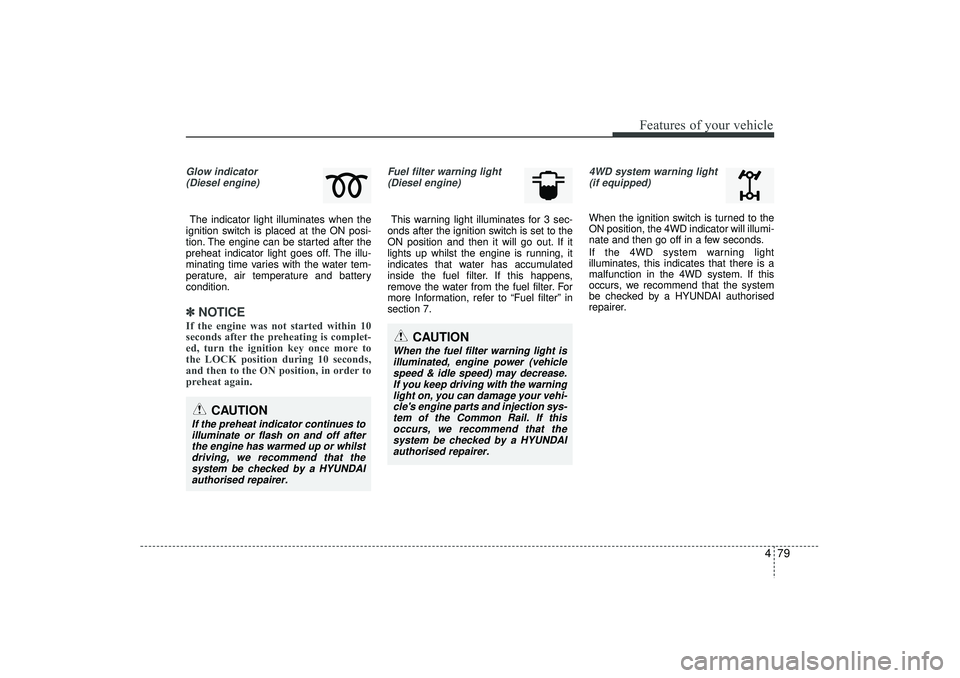
Glow indicator(Diesel engine)The indicator light illuminates when the
ignition switch is placed at the ON posi-
tion. The engine can be started after the
preheat indicator light goes off. The illu-
minating time varies with the water tem-
perature, air temperature and battery
condition.✽ ✽ NOTICEIf the engine was not started within 10
seconds after the preheating is complet-
ed, turn the ignition key once more to
the LOCK position during 10 seconds,
and then to the ON position, in order to
preheat again.
Fuel filter warning light
(Diesel engine)This warning light illuminates for 3 sec-
onds after the ignition switch is set to the
ON position and then it will go out. If it
lights up whilst the engine is running, it
indicates that water has accumulated
inside the fuel filter. If this happens,
remove the water from the fuel filter. For
more Information, refer to “Fuel filter” in
section 7.
4WD system warning light (if equipped) When the ignition switch is turned to the
ON position, the 4WD indicator will illumi-
nate and then go off in a few seconds.
If the 4WD system warning light
illuminates, this indicates that there is a
malfunction in the 4WD system. If this
occurs, we recommend that the system
be checked by a HYUNDAI authorised
repairer.
CAUTION
When the fuel filter warning light isilluminated, engine power (vehicle speed & idle speed) may decrease.If you keep driving with the warning light on, you can damage your vehi-cle's engine parts and injection sys- tem of the Common Rail. If thisoccurs, we recommend that the system be checked by a HYUNDAIauthorised repairer.
CAUTION
If the preheat indicator continues toilluminate or flash on and off after the engine has warmed up or whilstdriving, we recommend that thesystem be checked by a HYUNDAI authorised repairer.
EL(FL) UK 4A.QXP 2/9/2015 9:05 PM Page 79