audio HYUNDAI IX35 2015 Workshop Manual
[x] Cancel search | Manufacturer: HYUNDAI, Model Year: 2015, Model line: IX35, Model: HYUNDAI IX35 2015Pages: 550, PDF Size: 9.92 MB
Page 276 of 550

4 191
Features of your vehicle
APPENDIX
NameDescription
AST (A.store) Automatically selects and saves
channels
SDVC Speed Dependent VolumeControl
EL(FL) UK 4B AUDIO.QXP 3/13/2015 4:19 PM Page 191
Page 277 of 550
Features of your vehicle192
4
■
■
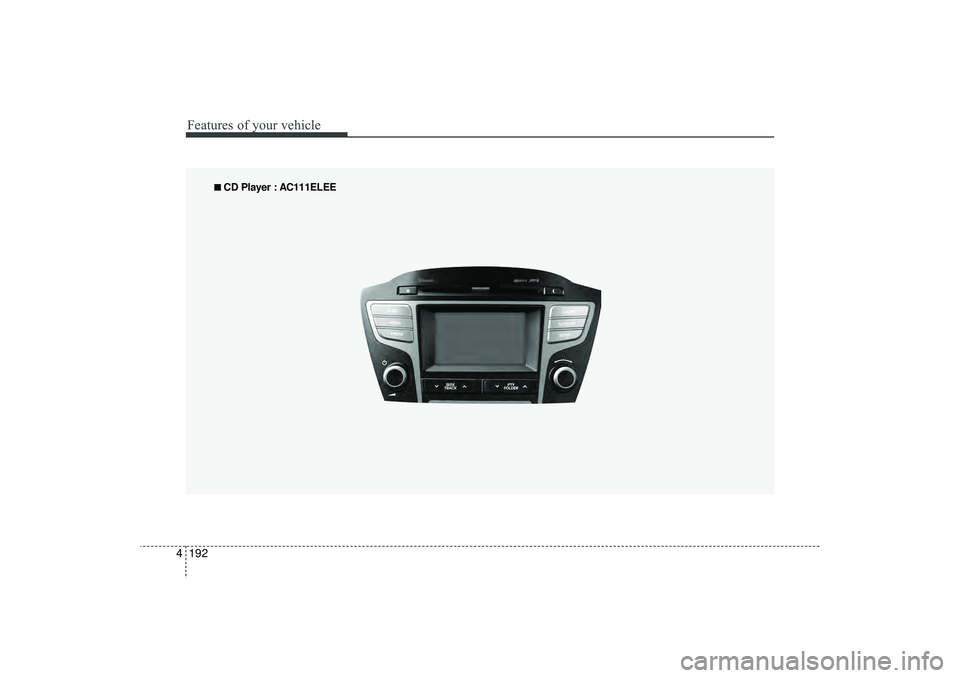
CD Player : AC111ELEE
EL(FL) UK 4B AUDIO.QXP 3/13/2015 4:19 PM Page 192
Page 278 of 550
4 193
Features of your vehicle
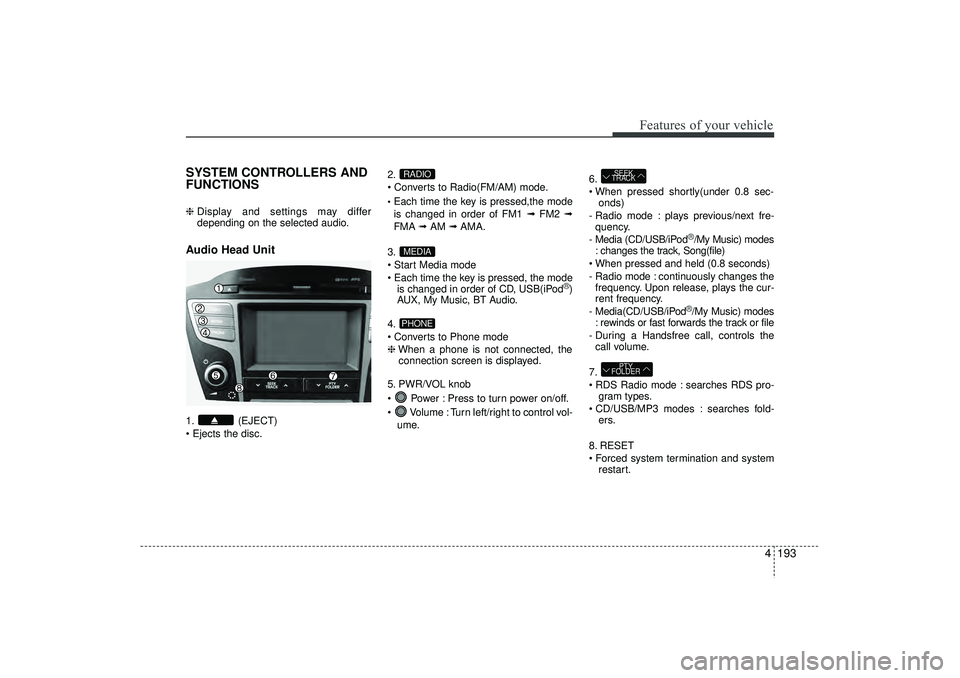
SYSTEM CONTROLLERS AND
FUNCTIONS ❈ Display and settings may differ
depending on the selected audio.Audio Head Unit 1. (EJECT)
Ejects the disc. 2.
Converts to Radio(FM/AM) mode.
Each time the key is pressed,the mode
is changed in order of FM1 ➟
FM2 ➟
FMA ➟AM ➟AMA.
3.
Start Media mode
Each time the key is pressed, the mode is changed in order of CD, USB(iPod
®)
AUX, My Music, BT Audio.
4.
Converts to Phone mode
❈ When a phone is not connected, the
connection screen is displayed.
5. PWR/VOL knob
Power : Press to turn power on/off.
Volume : Turn left/right to control vol- ume. 6.
When pressed shortly(under 0.8 sec-
onds)
- Radio mode : plays previous/next fre- quency.
- Media (CD/USB/iPod
®/My Music) modes
: changes the track, Song(file)
When pressed and held (0.8 seconds)
- Radio mode : continuously changes the frequency. Upon release, plays the cur-
rent frequency.
- Media(CD/USB/iPod®/My Music) modes
: rewinds or fast forwards the track or file
- During a Handsfree call, controls the call volume.
7.
RDS Radio mode : searches RDS pro- gram types.
CD/USB/MP3 modes : searches fold- ers.
8. RESET
Forced system termination and system restart.
PTY
FOLDERSEEK
TRACK
PHONEMEDIARADIO
EL(FL) UK 4B AUDIO.QXP 3/13/2015 4:19 PM Page 193
Page 279 of 550
Features of your vehicle194
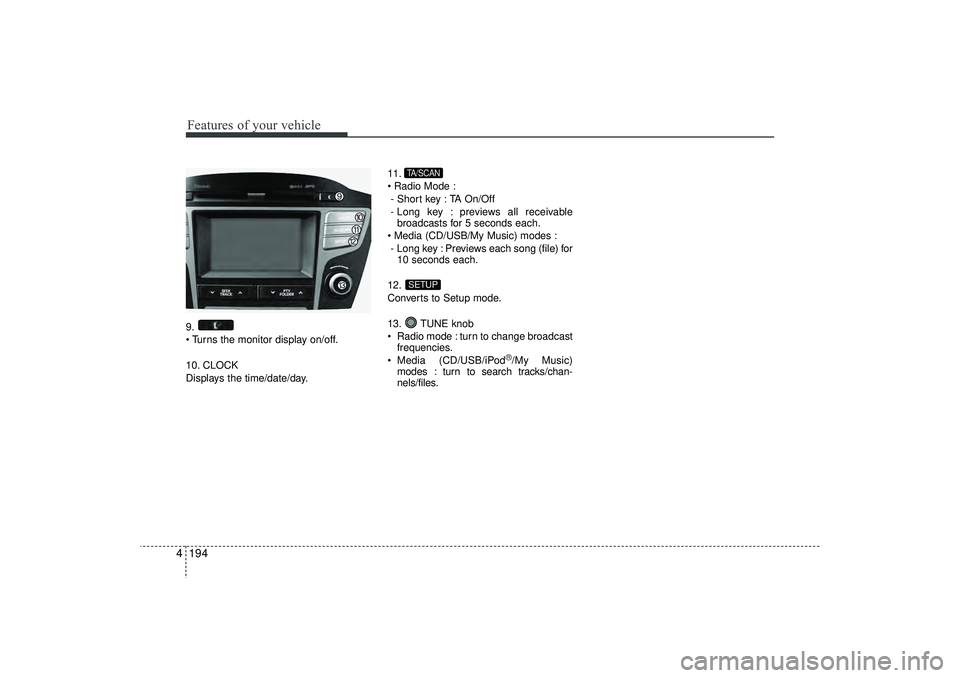
49.
Turns the monitor display on/off.
10. CLOCK
Displays the time/date/day. 11.
Radio Mode :
- Short key : TA On/Off
- Long key : previews all receivable broadcasts for 5 seconds each.
Media (CD/USB/My Music) modes : - Long key : Previews each song (file) for 10 seconds each.
12.
Converts to Setup mode.
13. TUNE knob
Radio mode : turn to change broadcast frequencies.
Media (CD/USB/iPod
®/My Music)
modes : turn to search tracks/chan-
nels/files.
SETUPTA/SCAN
EL(FL) UK 4B AUDIO.QXP 3/13/2015 4:19 PM Page 194
Page 280 of 550
![HYUNDAI IX35 2015 Workshop Manual 4 195
Features of your vehicle
Radio Mode Basic Mode Screen1. Mode Display
Displays currently operating mode2. Frequency
Displays the current frequency
3. Preset
Displays current preset number [1] ~ [](/img/35/56236/w960_56236-279.png "HYUNDAI IX35 2015 Workshop Manual 4 195
Features of your vehicle
Radio Mode Basic Mode Screen1. Mode Display
Displays currently operating mode2. Frequency
Displays the current frequency
3. Preset
Displays current preset number [1] ~ [")
4 195
Features of your vehicle
Radio Mode Basic Mode Screen1. Mode Display
Displays currently operating mode2. Frequency
Displays the current frequency
3. Preset
Displays current preset number [1] ~ [6]
4. Preset Display
Displays saved presets
5. Autostore
Automatically saves frequencies with
superior reception to Preset buttons
6. RDS Menu
Displays the RDS Menu
7. RDS Info
Displays RDS broadcast information
Switching to Radio ModePressing the key will change the
operating mode in order of FM1➟FM2
➟FMA
➟AM
➟AMA.
If [Pop-up Mode] is turned on within [Display], then pressing the
key will display the Radio Pop-
up Mode screen.
Turn the TUNE knob to move the
focus. Press the knob to select.
RADIOSETUP
RADIO
EL(FL) UK 4B AUDIO.QXP 3/13/2015 4:19 PM Page 195
Page 281 of 550
Features of your vehicle196
4Searching Radio FrequenciesUsing SeekPress the key to play the pre-
vious/next frequency.Using TUNETurn the TUNE knob to select the
desired frequency.
FM : Increases/decreased by 50kHz
AM : Increases/decreased by 9kHz
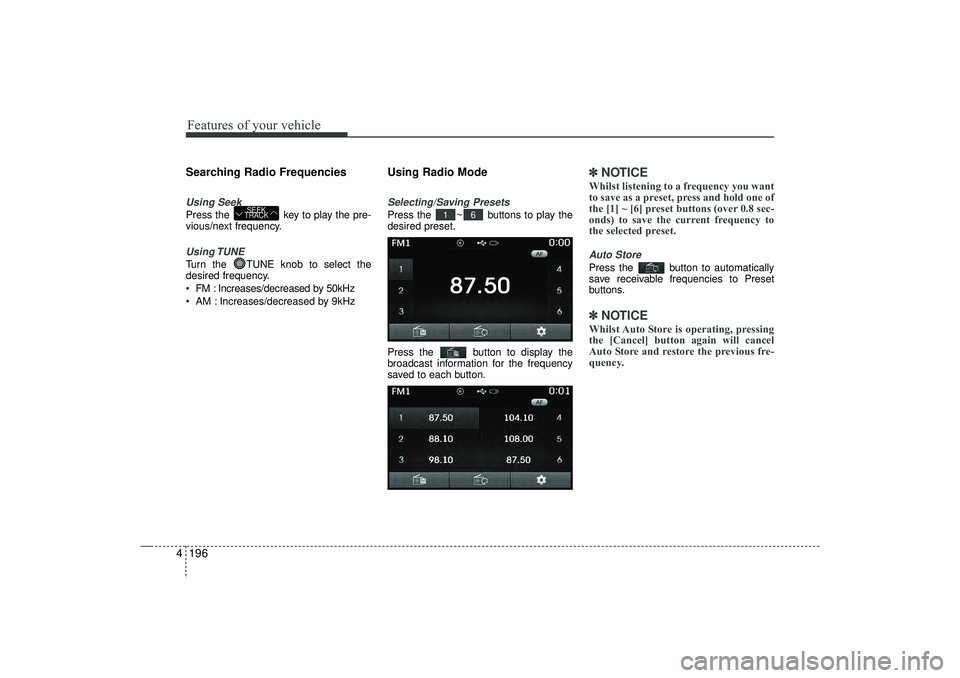
Using Radio ModeSelecting/Saving PresetsPress the ~ buttons to play the
desired preset.
Press the button to display the
broadcast information for the frequency
saved to each button.
✽ ✽
NOTICE Whilst listening to a frequency you want
to save as a preset, press and hold one of
the [1] ~ [6] preset buttons (over 0.8 sec-
onds) to save the current frequency to
the selected preset.Auto StorePress the button to automatically
save receivable frequencies to Preset
buttons.✽ ✽NOTICE Whilst Auto Store is operating, pressing
the [Cancel] button again will cancel
Auto Store and restore the previous fre-
quency.
6
1
SEEK
TRACK
EL(FL) UK 4B AUDIO.QXP 3/13/2015 4:19 PM Page 196
Page 282 of 550
4 197
Features of your vehicle
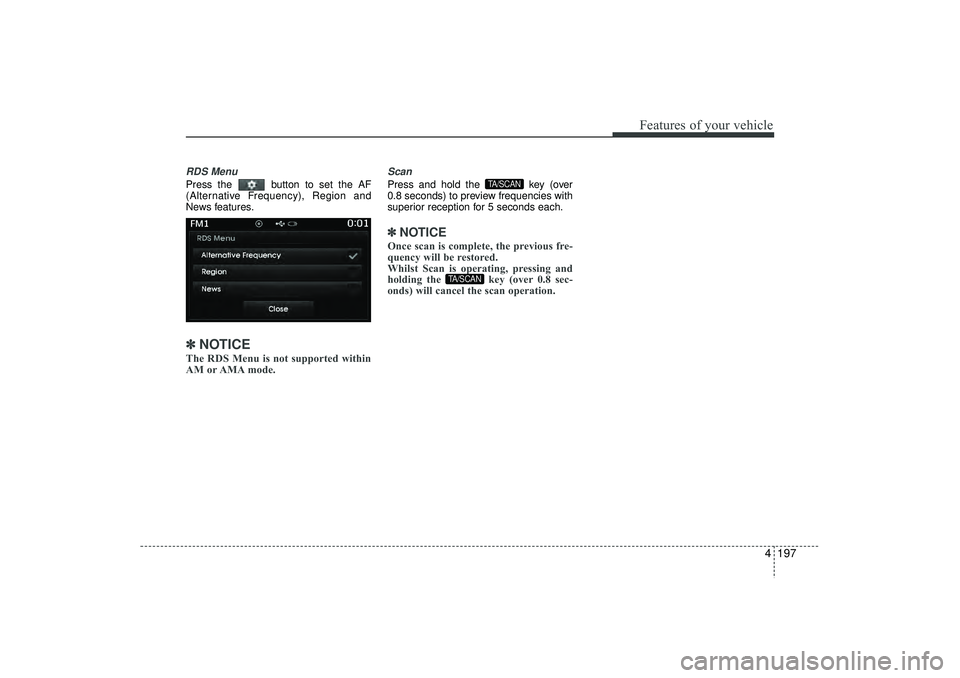
RDS MenuPress the button to set the AF
(Alternative Frequency), Region and
News features.✽ ✽NOTICE The RDS Menu is not supported within
AM or AMA mode.
ScanPress and hold the key (over
0.8 seconds) to preview frequencies with
superior reception for 5 seconds each.✽ ✽NOTICE Once scan is complete, the previous fre-
quency will be restored.
Whilst Scan is operating, pressing and
holding the key (over 0.8 sec-
onds) will cancel the scan operation.
TA/SCAN
TA/SCAN
EL(FL) UK 4B AUDIO.QXP 3/13/2015 4:19 PM Page 197
Page 283 of 550
Features of your vehicle198
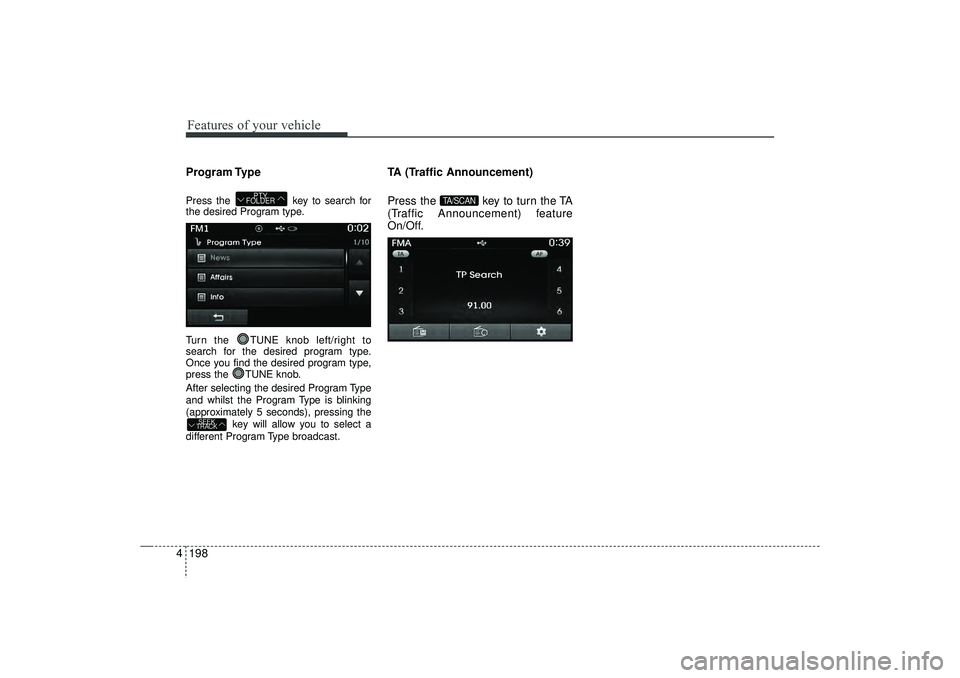
4Program TypePress the key to search for
the desired Program type.
Turn the TUNE knob left/right to
search for the desired program type.
Once you find the desired program type,
press the TUNE knob.
After selecting the desired Program Type
and whilst the Program Type is blinking
(approximately 5 seconds), pressing the
key will allow you to select a
different Program Type broadcast.
TA (Traffic Announcement)
Press the key to turn the TA
(Traffic Announcement) feature
On/Off.
TA/SCAN
SEEK
TRACK
PTY
FOLDER
EL(FL) UK 4B AUDIO.QXP 3/13/2015 4:19 PM Page 198
Page 284 of 550
4 199
Features of your vehicle
✽
✽NOTICE -
USING THE DISCS
• This device has been manufactured to
be compatible with software bearing
the following logo marks.
• Do not clean discs with chemical solu- tions, such as record sprays, antistatic
sprays, antistatic liquids, benzene, or
thinners.
• After using a disc, put the disc back in its original case to prevent disc
scratches.
• Hold discs by their edges or within the centre hole to prevent damages to disc
surfaces.
• Do not introduce foreign substances into the disc insert/eject slot.
Introducing foreign substances could
damage the device interior.
• Do not insert two discs simultaneous- ly.
• When using CD-R/CD-RW discs, dif- ferences in disc reading and playing
times may occur depending on the
disc manufacturer, production
method and the recording method as
used by the user. (Continued)(Continued)
• Clean fingerprints and dust off the
disc surface (coated side) with a soft
cloth.
• The use of CD-R/CD-RW discs attached with labels may result in disc
slot jams or difficulties in disc
removal. Such discs may also result in
noise whilst playing.
• Some CD-R/CD-RW discs may not properly operate depending on the
disc manufacturer, production
method and the record method as
used by the user. If problems persist,
trying using a different CD as contin-
ued use may result in malfunctions.
• The performance of this product may differ depending on the CD-RW Drive
Software.
• Copy-protected CDs such as S-type CDs may not function in the device.
DATA discs cannot be played.
(However, such discs may still operate
but will do so abnormally.) (Continued)(Continued)
• Do not use abnormally shaped discs
(8cm, heart-shaped, octagon-shaped)
as such discs could lead to malfunc-
tions.
• If the disc is straddled on the disc slot without removal for 10 seconds, the
disc will automatically be re-inserted
into the disc player.
• Only genuine audio CDs are support- ed. Other discs may result in recogni-
tion failure (e.g. copy CD-R, CDs with
labels)
EL(FL) UK 4B AUDIO.QXP 3/13/2015 4:19 PM Page 199
Page 285 of 550
Features of your vehicle200
4MP3 File Information
Supported Audio Formats
ISO 9660 Level 1ISO 9660 Level 2Romeo / Juliet (128 characters)MPEG1 Audio Layer3MPEG2 Audio Layer3MPEG2.5 Audio Layer3
Windows Media Audio Ver 7.X& 8.X
❈ File formats that do not comply with
the above formats may not be proper-
ly recognized or play without properly
displaying file names or other informa-
tion.
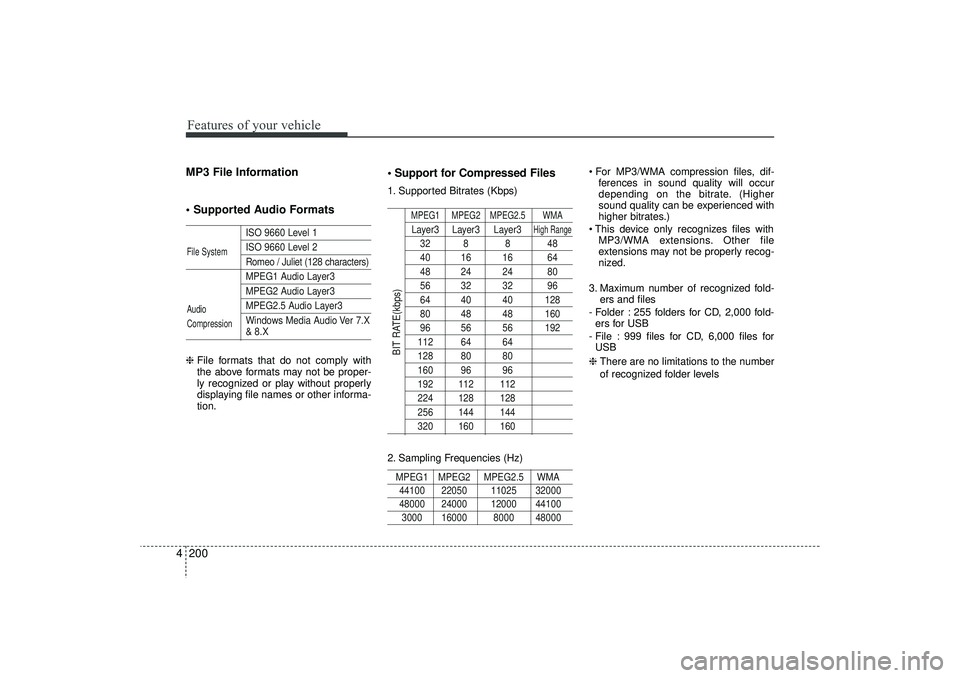
Support for Compressed Files1. Supported Bitrates (Kbps)
MPEG1 MPEG2 MPEG2.5 WMALayer3 Layer3 Layer3
High Range
32 8 8 4840 16 16 6448 24 24 8056 32 32 9664 40 40 12880 48 48 16096 56 56 192112 64 64128 80 80160 96 96192 112 112224 128 128256 144 144320 160 160
2. Sampling Frequencies (Hz)MPEG1 MPEG2 MPEG2.5 WMA44100 22050 11025 32000 48000 24000 12000 441003000 16000 8000 48000
For MP3/WMA compression files, dif-
ferences in sound quality will occur
depending on the bitrate. (Higher
sound quality can be experienced with
higher bitrates.)
This device only recognizes files with MP3/WMA extensions. Other file
extensions may not be properly recog-
nized.
3. Maximum number of recognized fold- ers and files
- Folder : 255 folders for CD, 2,000 fold- ers for USB
- File : 999 files for CD, 6,000 files for USB
❈ There are no limitations to the number
of recognized folder levels
File System
Audio
Compression
BIT RATE(kbps)
EL(FL) UK 4B AUDIO.QXP 3/13/2015 4:19 PM Page 200