sensor HYUNDAI IX35 2016 Owner's Manual
[x] Cancel search | Manufacturer: HYUNDAI, Model Year: 2016, Model line: IX35, Model: HYUNDAI IX35 2016Pages: 550, PDF Size: 11.23 MB
Page 176 of 550
491
Features of your vehicle
Operation wayBefore operating the smart parking assist
system, confirm the condition that is pos-
sible to use. For safety, always operate it
by applying the brake pedal under any
condition, for example before each step,
whilst pressing the ON/OFF button of this
system or shifting the lever, etc.
When vehicle is parked by using the
smart parking assist system, general
steps are followings
1. The smart parking assist system select
2. Parking mode select
3. Parking space search : Direct way driv-ing
4. Search complete : Automatic search by sensor
However, before parking, real parking
environment confirmations are needed
for driver. 5. Steering wheel support (Rear Parking
type)
(1) Operate shift lever by display in cluster
(2) Always drive slowly with applying to brake
6. Smart parking assist system complete
7. If required, move vehicle to manual operation
According to parking space, select
mode, and surrounding environment, the
sequence of display or situation could be
changed. Refer to next operation way.
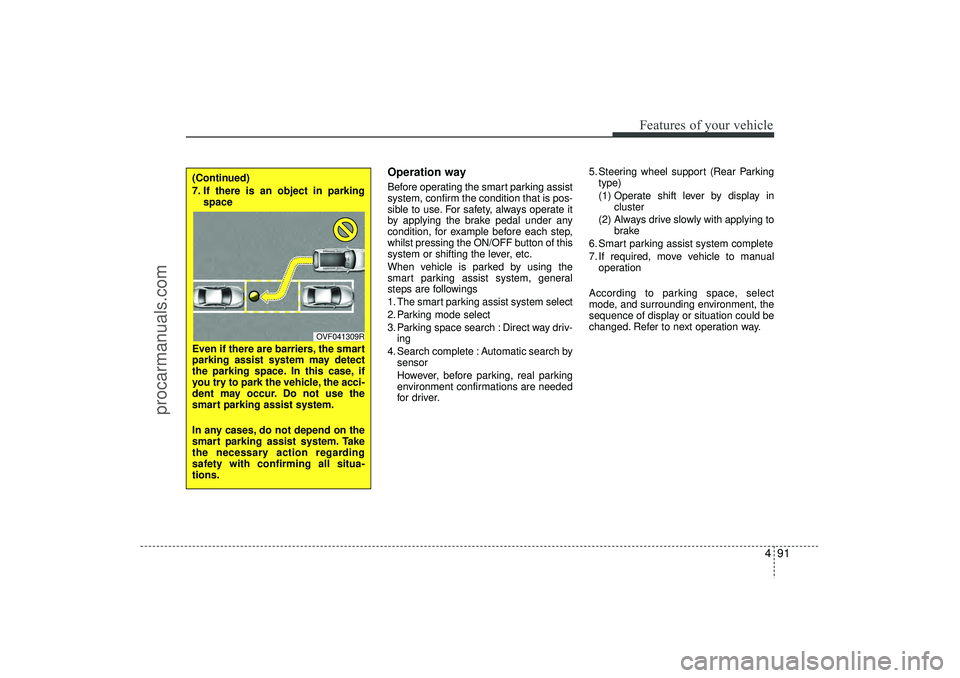
(Continued)
7. If there is an object in parking space
Even if there are barriers, the smart
parking assist system may detect
the parking space. In this case, if
you try to park the vehicle, the acci-
dent may occur. Do not use the
smart parking assist system.
In any cases, do not depend on the
smart parking assist system. Take
the necessary action regarding
safety with confirming all situa-
tions.
OVF041309R
EL(FL) UK 4A.QXP 2/9/2015 9:05 PM Page 91
procarmanuals.com
Page 177 of 550
Features of your vehicle92
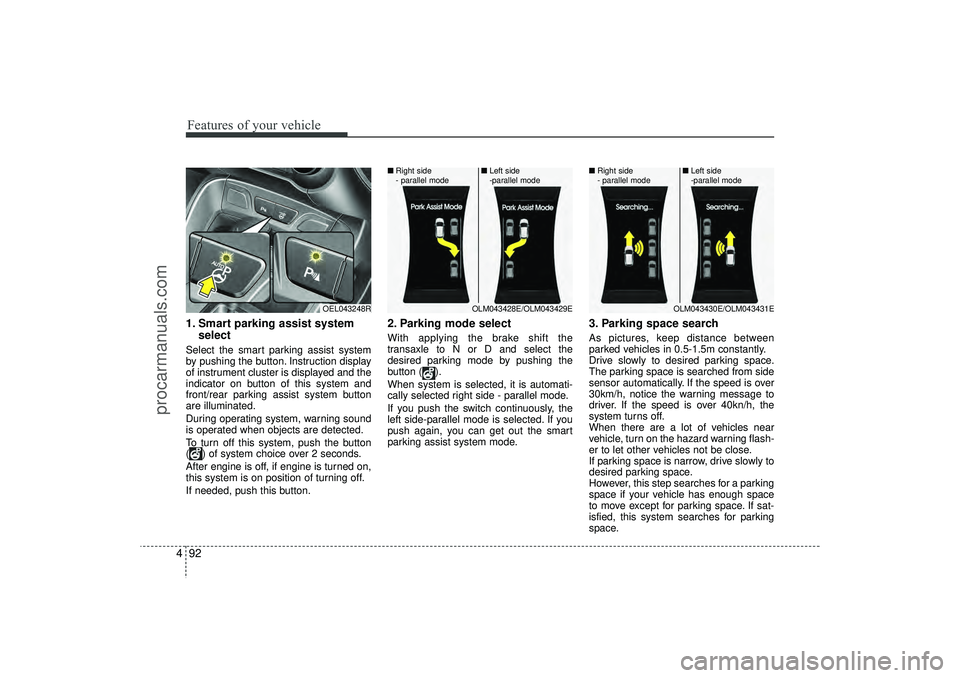
41. Smart parking assist system
selectSelect the smart parking assist system
by pushing the button. Instruction display
of instrument cluster is displayed and the
indicator on button of this system and
front/rear parking assist system button
are illuminated.
During operating system, warning sound
is operated when objects are detected.
To turn off this system, push the button
( ) of system choice over 2 seconds.
After engine is off, if engine is turned on,
this system is on position of turning off.
If needed, push this button.
2. Parking mode selectWith applying the brake shift the
transaxle to N or D and select the
desired parking mode by pushing the
button ( ).
When system is selected, it is automati-
cally selected right side - parallel mode.
If you push the switch continuously, the
left side-parallel mode is selected. If you
push again, you can get out the smart
parking assist system mode.
3. Parking space searchAs pictures, keep distance between
parked vehicles in 0.5-1.5m constantly.
Drive slowly to desired parking space.
The parking space is searched from side
sensor automatically. If the speed is over
30km/h, notice the warning message to
driver. If the speed is over 40kn/h, the
system turns off.
When there are a lot of vehicles near
vehicle, turn on the hazard warning flash-
er to let other vehicles not be close.
If parking space is narrow, drive slowly to
desired parking space.
However, this step searches for a parking
space if your vehicle has enough space
to move except for parking space. If sat-
isfied, this system searches for parking
space.
OEL043248R
OLM043428E/OLM043429E
■
Right side
- parallel mode ■
Left side
-parallel mode
OLM043430E/OLM043431E
■
Right side
- parallel mode ■
Left side
-parallel mode
EL(FL) UK 4A.QXP 2/9/2015 9:06 PM Page 92
procarmanuals.com
Page 178 of 550
493
Features of your vehicle
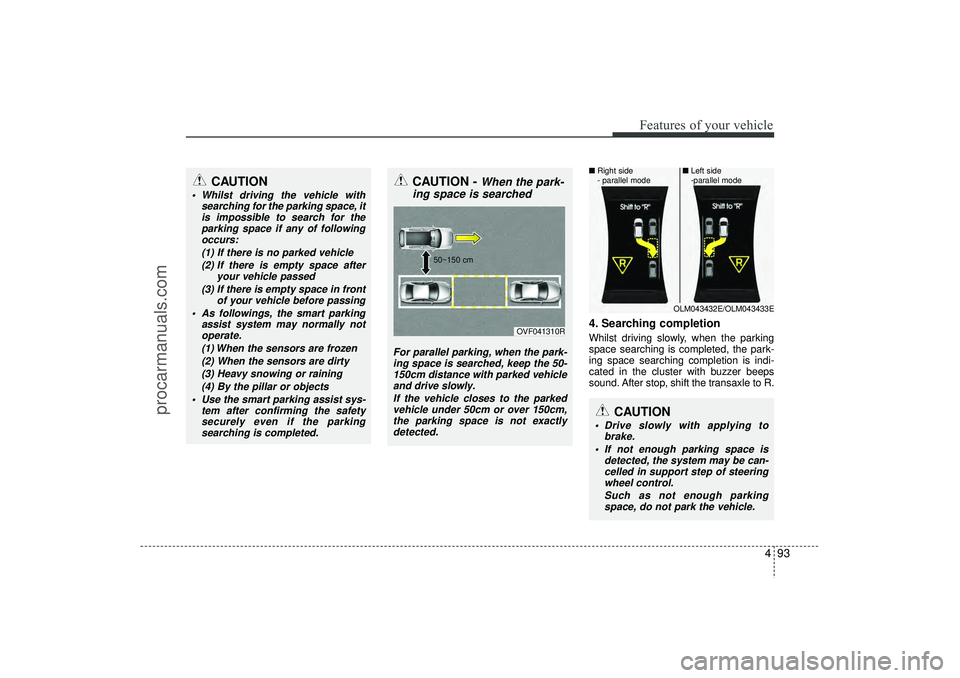
4. Searching completionWhilst driving slowly, when the parking
space searching is completed, the park-
ing space searching completion is indi-
cated in the cluster with buzzer beeps
sound. After stop, shift the transaxle to R.
CAUTION
Whilst driving the vehicle withsearching for the parking space, itis impossible to search for theparking space if any of followingoccurs:
(1) If there is no parked vehicle(2) If there is empty space after your vehicle passed
(3) If there is empty space in front of your vehicle before passing
As followings, the smart parking assist system may normally notoperate.
(1) When the sensors are frozen(2) When the sensors are dirty(3) Heavy snowing or raining (4) By the pillar or objects
Use the smart parking assist sys- tem after confirming the safetysecurely even if the parking searching is completed.
CAUTION -
When the park-
ing space is searched
For parallel parking, when the park-
ing space is searched, keep the 50- 150cm distance with parked vehicleand drive slowly.
If the vehicle closes to the parkedvehicle under 50cm or over 150cm,the parking space is not exactly detected.
OVF041310R
50~150 cm
CAUTION
Drive slowly with applying to
brake.
If not enough parking space is detected, the system may be can-celled in support step of steering wheel control.
Such as not enough parkingspace, do not park the vehicle.
OLM043432E/OLM043433E
■
Right side
- parallel mode ■
Left side
-parallel mode
EL(FL) UK 4A.QXP 2/9/2015 9:06 PM Page 93
procarmanuals.com
Page 186 of 550
4 101
Features of your vehicle
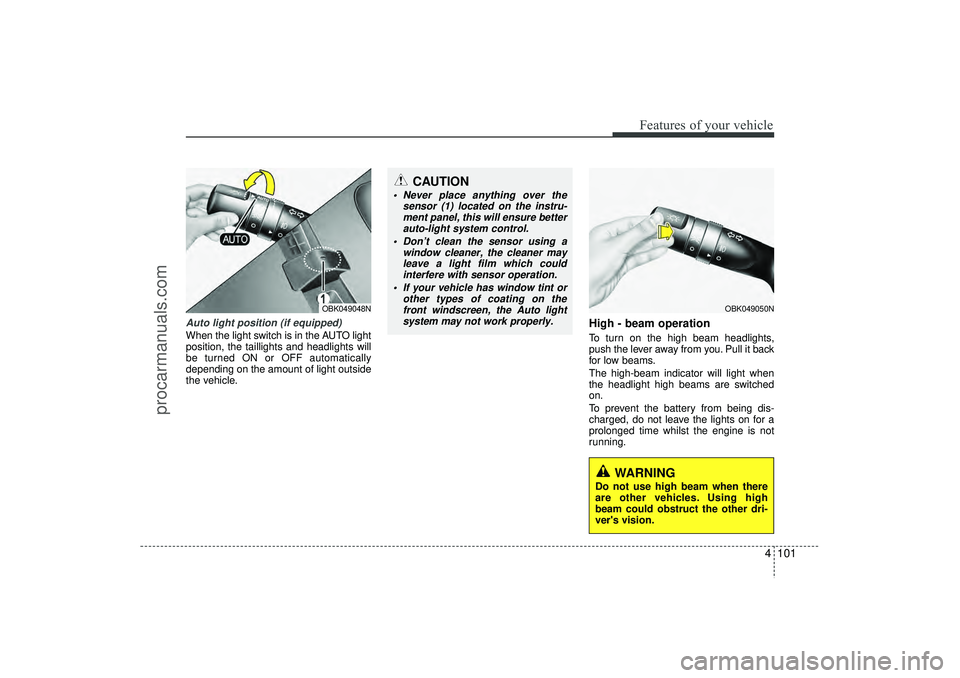
Auto light position (if equipped)When the light switch is in the AUTO light
position, the taillights and headlights will
be turned ON or OFF automatically
depending on the amount of light outside
the vehicle.
High - beam operation To turn on the high beam headlights,
push the lever away from you. Pull it back
for low beams.
The high-beam indicator will light when
the headlight high beams are switched
on.
To prevent the battery from being dis-
charged, do not leave the lights on for a
prolonged time whilst the engine is not
running.
OBK049050N
CAUTION
Never place anything over thesensor (1) located on the instru-ment panel, this will ensure better auto-light system control.
Don’t clean the sensor using a window cleaner, the cleaner mayleave a light film which could interfere with sensor operation.
If your vehicle has window tint or other types of coating on thefront windscreen, the Auto lightsystem may not work properly.
OBK049048N
WARNING
Do not use high beam when there
are other vehicles. Using high
beam could obstruct the other dri-
ver's vision.
EL(FL) UK 4A.QXP 2/9/2015 9:06 PM Page 101
procarmanuals.com
Page 192 of 550
4 107
Features of your vehicle
Windscreen wipers Operates as follows when the ignition
switch is turned ON.: For a single wiping cycle, move thelever to this position and release it.
The wipers will operate continuous-
ly if the lever is held in this position.
O : Wiper is not in operation
--- : Wiper operates intermittently at the same wiping intervals. Use this mode
in light rain or mist. To vary the speed
setting, turn the speed control knob.
1 : Normal wiper speed
2 : Fast wiper speed✽ ✽ NOTICEIf there is heavy accumulation of snow
or ice on the windscreen, defrost the
windscreen for about 10 minutes, or
until the snow and/or ice is removed
before using the windscreen wipers to
ensure proper operation.
If you do not remove the snow and/or ice
before using the wiper and washer, it
may damage the wiper and washer sys-
tem.
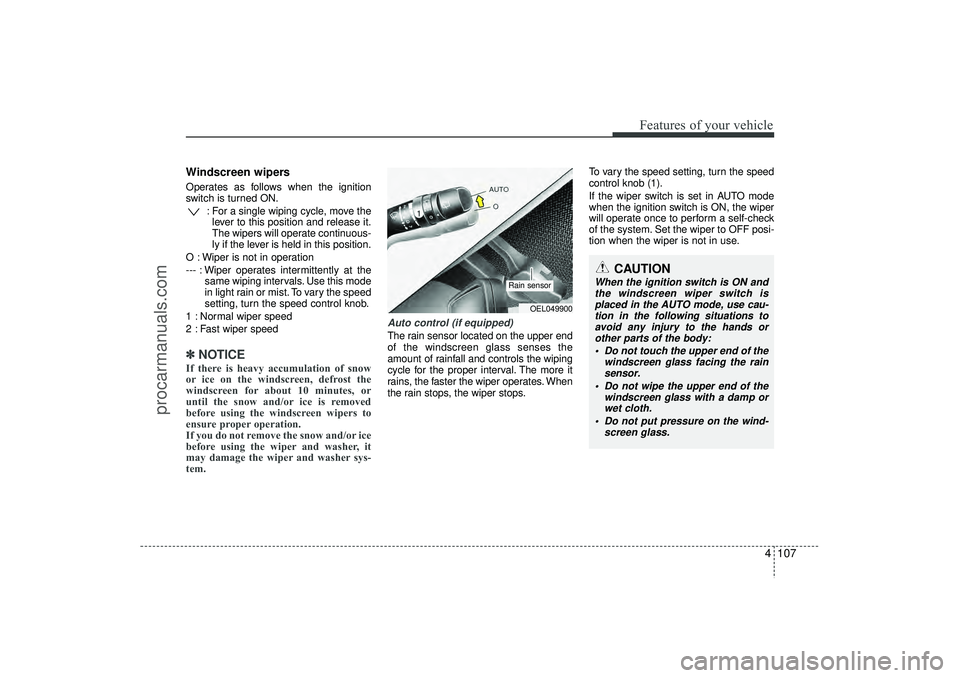
Auto control (if equipped)The rain sensor located on the upper end
of the windscreen glass senses the
amount of rainfall and controls the wiping
cycle for the proper interval. The more it
rains, the faster the wiper operates. When
the rain stops, the wiper stops. To vary the speed setting, turn the speed
control knob (1).
If the wiper switch is set in AUTO mode
when the ignition switch is ON, the wiper
will operate once to perform a self-check
of the system. Set the wiper to OFF posi-
tion when the wiper is not in use.
CAUTION
When the ignition switch is ON and
the windscreen wiper switch is placed in the AUTO mode, use cau-tion in the following situations to avoid any injury to the hands orother parts of the body:
Do not touch the upper end of the windscreen glass facing the rainsensor.
Do not wipe the upper end of the windscreen glass with a damp orwet cloth.
Do not put pressure on the wind- screen glass.
OEL049900
Rain sensor
EL(FL) UK 4A.QXP 2/9/2015 9:06 PM Page 107
procarmanuals.com
Page 193 of 550
Features of your vehicle108
4
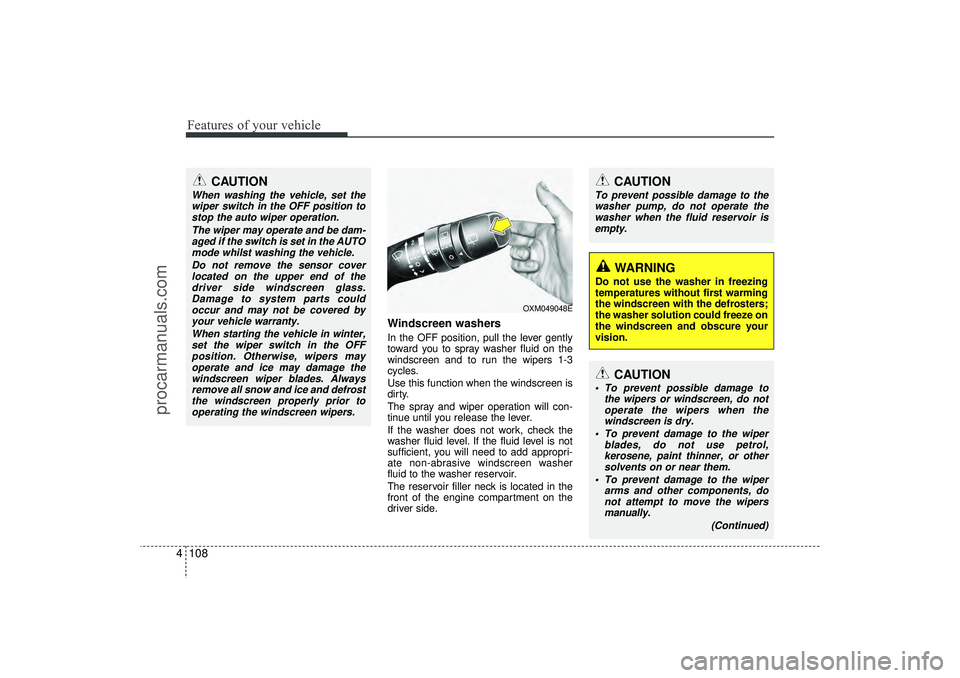
Windscreen washers In the OFF position, pull the lever gently
toward you to spray washer fluid on the
windscreen and to run the wipers 1-3
cycles.
Use this function when the windscreen is
dirty.
The spray and wiper operation will con-
tinue until you release the lever.
If the washer does not work, check the
washer fluid level. If the fluid level is not
sufficient, you will need to add appropri-
ate non-abrasive windscreen washer
fluid to the washer reservoir.
The reservoir filler neck is located in the
front of the engine compartment on the
driver side.
CAUTION
To prevent possible damage to the
washer pump, do not operate the washer when the fluid reservoir isempty.
WARNING
Do not use the washer in freezing
temperatures without first warming
the windscreen with the defrosters;
the washer solution could freeze on
the windscreen and obscure your
vision.
CAUTION
When washing the vehicle, set thewiper switch in the OFF position to stop the auto wiper operation.
The wiper may operate and be dam-aged if the switch is set in the AUTOmode whilst washing the vehicle.
Do not remove the sensor coverlocated on the upper end of thedriver side windscreen glass. Damage to system parts couldoccur and may not be covered byyour vehicle warranty.
When starting the vehicle in winter,set the wiper switch in the OFFposition. Otherwise, wipers mayoperate and ice may damage thewindscreen wiper blades. Always remove all snow and ice and defrostthe windscreen properly prior tooperating the windscreen wipers.
OXM049048E
CAUTION
To prevent possible damage to the wipers or windscreen, do notoperate the wipers when thewindscreen is dry.
To prevent damage to the wiper blades, do not use petrol,kerosene, paint thinner, or othersolvents on or near them.
To prevent damage to the wiper arms and other components, donot attempt to move the wipersmanually.
(Continued)
EL(FL) UK 4A.QXP 2/9/2015 9:06 PM Page 108
procarmanuals.com
Page 210 of 550
4 125
Features of your vehicle
Automatic heating and air condi-
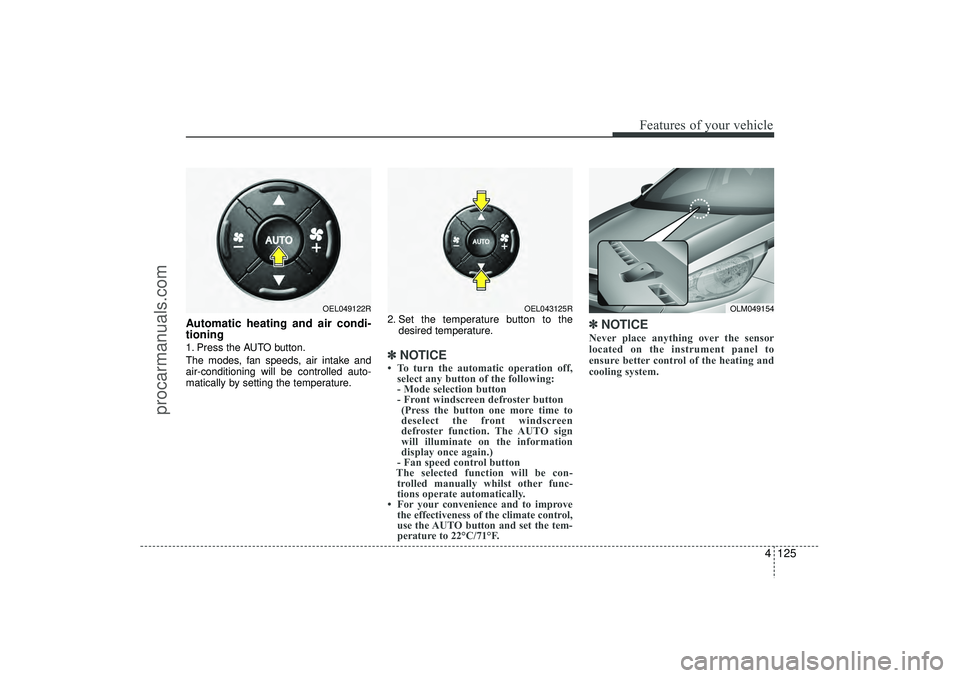
tioning1. Press the AUTO button.
The modes, fan speeds, air intake and
air-conditioning will be controlled auto-
matically by setting the temperature.2. Set the temperature button to the
desired temperature.
✽ ✽NOTICE• To turn the automatic operation off,
select any button of the following:
- Mode selection button
- Front windscreen defroster button (Press the button one more time to
deselect the front windscreen
defroster function. The AUTO sign
will illuminate on the information
display once again.)
- Fan speed control button
The selected function will be con- trolled manually whilst other func-
tions operate automatically.
• For your convenience and to improve the effectiveness of the climate control,
use the AUTO button and set the tem-
perature to 22°C/71°F.
✽ ✽ NOTICENever place anything over the sensor
located on the instrument panel to
ensure better control of the heating and
cooling system.
OLM049154
OEL049122R
OEL043125R
EL(FL) UK 4A.QXP 2/9/2015 9:08 PM Page 125
procarmanuals.com
Page 366 of 550
Driving your vehicle18
5ISG system malfunctionThe system may not operate when:- The ISG related sensors or system
error occurs.
The yellow AUTO STOP indicator ( )
on the instrument cluster will stay on
after blinking for 5 seconds and the light
on the ISG OFF button will illuminate.
✽ ✽ NOTICE • If the ISG OFF button light is not
turned off by pressing the ISG OFF
button again or if the ISG system con-
tinuously does not work correctly, we
recommend that you contact a
HYUNDAI authorised repairer.
• When the ISG OFF button light comes on, it may stop illuminating after driv-
ing your vehicle at approximately 80
km/h for a maximum of two hours
and setting the fan speed control knob
below the 2nd position. If the ISG
OFF button light continues to be illu-
minated in spite of the procedure, we
recommend that you contact a
HYUNDAI authorised repairer.
WARNING
When the engine is in Idle Stop
mode, it's possible to restart the
engine without the driver taking
any action.
Before leaving the car or doing any-
thing in the engine room area, stop
the engine by turning the ignition
switch to the LOCK(OFF) position
or removing the ignition key.
EL(FL) UK 5.QXP 12/16/2014 8:08 PM Page 18
procarmanuals.com
Page 428 of 550
What to do in an emergency66Jump starting procedure
1. Make sure the booster battery is 12-voltand that its negative terminal is grounded.
2. If the booster battery is in another vehicle, do not allow the vehicles to touch.
3. Turn off all unnecessary electrical loads.4. Connect the jumper cables in the exact sequence shown in the illustration. First
connect one end of a jumper cable to
the positive terminal of the discharged
battery (1), then connect the other end
to the positive terminal on the booster
battery (2). Proceed to connect one end
of the other jumper cable to the negative
terminal of the booster battery (3), then
the other end to a solid, stationary,
metallic point (for example, the engine
lifting bracket) away from the battery (4).
Do not connect it to or near any part that
moves when the engine is cranked.
Do not allow the jumper cables to con-
tact anything except the correct battery
terminals or the correct ground. Do not
lean over the battery when making con-
nections. 5. Start the engine of the vehicle with the
booster battery and let it run at 2,000
rpm, then start the engine of the vehi-
cle with the discharged battery.
If the cause of your battery discharging isnot apparent, we recommend that the system be checked by a HYUNDAIauthorised repairer.Push-starting Your manual transaxle-equipped vehicle
should not be push-started because it
might damage the emission control sys-
tem.
Vehicles equipped with automatic
transaxle cannot be push-started.
Follow the directions in this section for
jump-starting.
WARNING
Never tow a vehicle to start it
because the sudden surge forward
when the engine starts could cause
a collision with the tow vehicle.
CAUTION
- Battery cables
Do not connect the jumper cablefrom the negative terminal of thebooster battery to the negative ter-minal of the discharged battery.This can cause the discharged bat-tery to overheat and crack, releas-ing battery acid.
CAUTION
-AGM battery
(if equipped)
AAbsorbent Glass Matt (AGM)
batteries are maintenance-freeand we recommend that the sys-tem be serviced by a HYUNDAIauthorised repairer. For chargingyour AGM battery, use only fully automatic battery chargers thatare specially developed for AGM batteries.
When replacing the AGM battery, we recommend that you use partsfor replacement from a HYUNDAIauthorised repairer.
Do not open or remove the cap on top of the battery. This may causeleaks of internal electrolyte thatcould result in severe injury.
If the AGM battery is reconnected or replaced, ISG function will notoperate immediately.
If you want to use the ISG func-tion, the battery sensor needs to be calibrated for approximately 4hours with the ignition off.
EL(FL) UK 6.QXP 12/16/2014 8:12 PM Page 6
procarmanuals.com
Page 433 of 550
611
What to do in an emergency
Changing a tyre with TPMS
If you have a flat tyre, the Low Tyre
Pressure will come on. We recom-
mend that the flat tyre be checked by
a HYUNDAI authorised repairer.Each wheel is equipped with a tyre
pressure sensor mounted inside the
tyre behind the valve stem. You must
use TPMS specific wheels. It is rec-
ommended that you have your tyres
serviced by a HYUNDAI authorised
repairer.
Even if you replace the low pressure
tyre with the spare tyre, the Low Tyre
Pressure Telltale will blink or remain
on until the low pressure tyre is
repaired and placed on the vehicle.
After you replace the low pressure
tyre with the spare tyre, the Low Tyre
Pressure Telltale may blink or illumi-
nate after a few minutes because the
TPMS sensor mounted on the spare
wheel is not initiated.
Once the low pressure tyre is rein-
flated to the recommended pressure
and installed on the vehicle or we
recommend that the TPMS sensor
mounted on the replaced spare
wheel be initiated by a HYUNDAI
authorised repairer, the TPMS mal-
function indicator and the low tyre
pressure telltale will extinguish within
a few minutes of driving.If the indicator is not extinguished
after a few minutes of driving, We
recommend that the system be
checked by a HYUNDAI authorised
repairer.
CAUTION
If original mounted tyre is
replaced with the spare tyre, theTPMS sensor on the replacedspare wheel should be initiatedand we recommend that theTPMS sensor on the originalmounted wheel be deactivatedby a HYUNDAI dealer. If theTPMS sensor on the originalmounted wheel located in thespare tyre carrier still activates,the tyre pressure monitoringsystem may not operate proper-ly. We recommend that the sys-tem be serviced by a HYUNDAIauthorised repairer.
CAUTION
We recommend that you use apuncture-repairing agentapproved by HYUNDAI.
The sealant on the tyre pressuresensor and wheel shall be elim-inated when you replace thetyre with a new one.
EL(FL) UK 6.QXP 12/16/2014 8:12 PM Page 11
procarmanuals.com