display HYUNDAI IX35 2016 Owners Manual
[x] Cancel search | Manufacturer: HYUNDAI, Model Year: 2016, Model line: IX35, Model: HYUNDAI IX35 2016Pages: 550, PDF Size: 9.92 MB
Page 343 of 550
Features of your vehicle258
4Bluetooth
®
Wireless Technology
Setting
The
Bluetooth
®word mark and logos are
registered trademarks owned by
Bluetooth SIG, Inc. and any use of such
marks is under license. Other trademarks
and trade names are those of their
respective owners. A
Bluetooth
®enabled
cell phone is required to use
Bluetooth
®
wireless technology
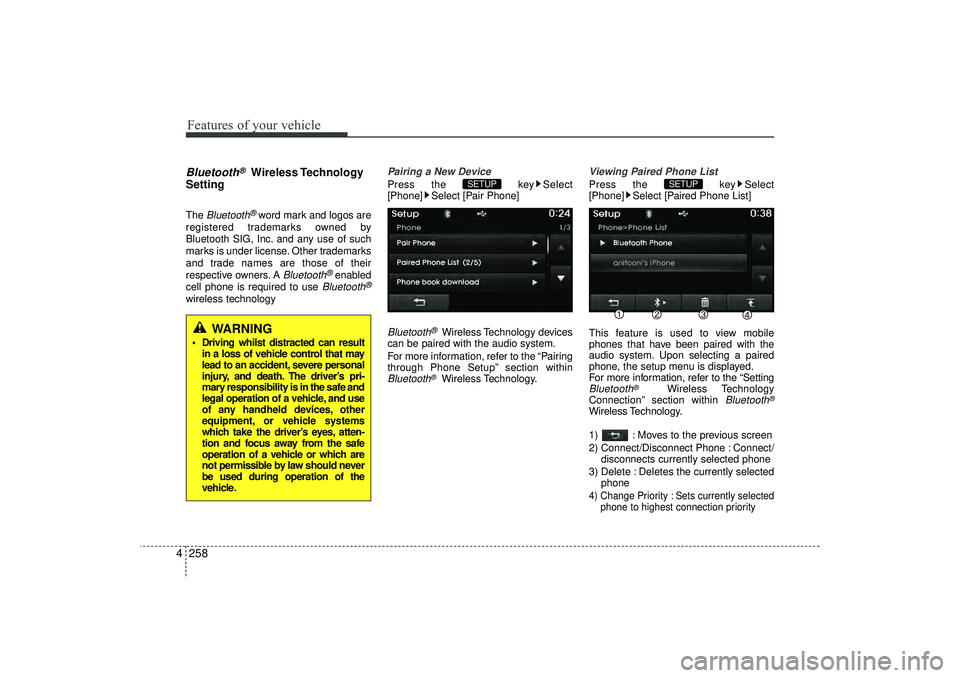
Pairing a New DevicePress the key Select
[Phone] Select [Pair Phone]Bluetooth
®Wireless Technology devices
can be paired with the audio system.
For more information, refer to the “Pairing
through Phone Setup” section within
Bluetooth
®Wireless Technology.
Viewing Paired Phone ListPress the key Select
[Phone] Select [Paired Phone List]
This feature is used to view mobile
phones that have been paired with the
audio system. Upon selecting a paired
phone, the setup menu is displayed.
For more information, refer to the “SettingBluetooth
®
Wireless Technology
Connection” section within
Bluetooth
®
Wireless Technology.
1) : Moves to the previous screen
2) Connect/Disconnect Phone : Connect/ disconnects currently selected phone
3) Delete : Deletes the currently selected phone4) Change Priority : Sets currently selected phone to highest connection priority
SETUP
SETUP
WARNING
Driving whilst distracted can resultin a loss of vehicle control that may
lead to an accident, severe personal
injury, and death. The driver’s pri-
mary responsibility is in the safe and
legal operation of a vehicle, and use
of any handheld devices, other
equipment, or vehicle systems
which take the driver’s eyes, atten-
tion and focus away from the safe
operation of a vehicle or which are
not permissible by law should never
be used during operation of the
vehicle.
EL(FL) UK 4B AUDIO.QXP 3/13/2015 4:19 PM Page 258
Page 344 of 550
4 259
Features of your vehicle
✽
✽NOTICE BEFORE DOWN-
LOADING PHONE BOOKS • Only phone books within connected
phones can be downloaded. Also
check to see that your mobile phone
supports the download feature.
• To learn more about whether your mobile phone supports phone book
downloads, refer to your mobile
phone user’s manual.
• The Phone book for only the connect- ed phone can be downloaded. Before
downloading, check to see whether
your phone supports the download
feature.
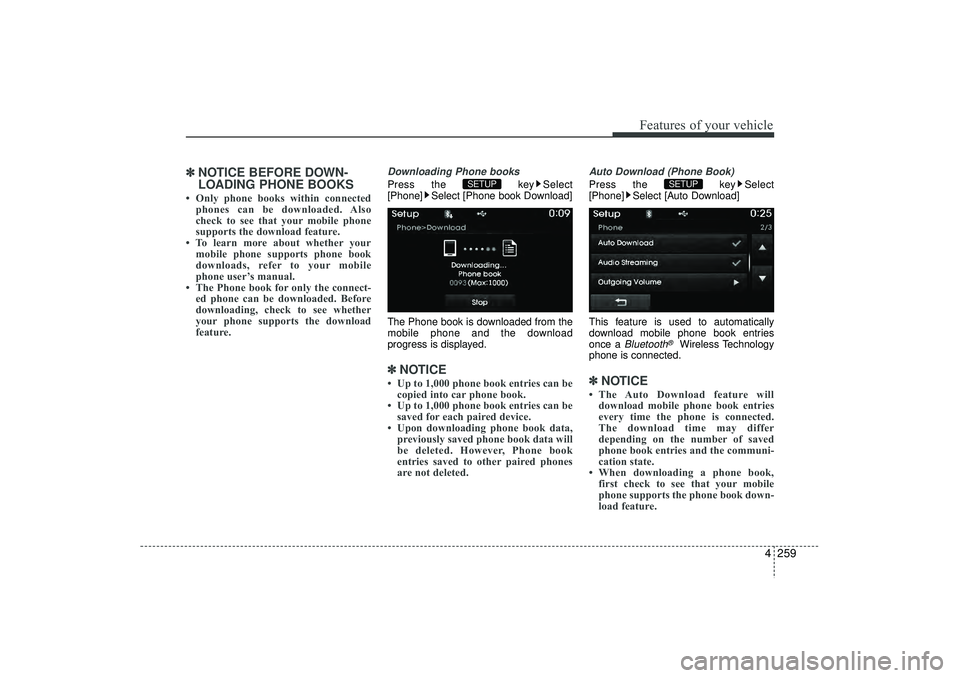
Downloading Phone booksPress the key Select
[Phone] Select [Phone book Download]
The Phone book is downloaded from the
mobile phone and the download
progress is displayed.✽ ✽ NOTICE • Up to 1,000 phone book entries can be
copied into car phone book.
• Up to 1,000 phone book entries can be saved for each paired device.
• Upon downloading phone book data, previously saved phone book data will
be deleted. However, Phone book
entries saved to other paired phones
are not deleted.
Auto Download (Phone Book)Press the key Select
[Phone] Select [Auto Download]
This feature is used to automatically
download mobile phone book entries
once a
Bluetooth
®
Wireless Technology
phone is connected.
✽ ✽ NOTICE • The Auto Download feature will
download mobile phone book entries
every time the phone is connected.
The download time may differ
depending on the number of saved
phone book entries and the communi-
cation state.
• When downloading a phone book, first check to see that your mobile
phone supports the phone book down-
load feature.
SETUP
SETUP
EL(FL) UK 4B AUDIO.QXP 3/13/2015 4:19 PM Page 259
Page 346 of 550
![HYUNDAI IX35 2016 Owners Manual 4 261
Features of your vehicle
System SettingMemory InformationPress the key Select [System]
Select [Memory Information]This feature displays information related
to system memory.
1) Using : Displays](/img/35/56235/w960_56235-345.png "HYUNDAI IX35 2016 Owners Manual 4 261
Features of your vehicle
System SettingMemory InformationPress the key Select [System]
Select [Memory Information]This feature displays information related
to system memory.
1) Using : Displays")
4 261
Features of your vehicle
System SettingMemory InformationPress the key Select [System]
Select [Memory Information]This feature displays information related
to system memory.
1) Using : Displays capacity currently inuse
2) Capacity : Displays total capacity
Voice Recognition Mode SettingPress the key Select
[System] Select [Voice Recognition
System]
This feature is used to select the desired
prompt feedback option from Normal and
Expert.
1) Normal : When using voice recogni- tion, provides detailed guidance
prompts
2) Expert : When using voice recognition, omits some guidance prompts✽ ✽NOTICE Voice Recognition is depend on the
Audio System.
LanguagePress the key Select
[System] Select [Language]
This feature is used to change the sys-
tem and voice recognition language.
If the language is changed, the system
will restart and apply the selected lan-
guage.
❈ Language support by region
SETUP
SETUP
SETUP
EL(FL) UK 4B AUDIO.QXP 3/13/2015 4:19 PM Page 261
Page 363 of 550
515
Driving your vehicle
ISG (IDLE STOP AND GO) SYSTEM (IF EQUIPPED)Your vehicle may be equipped with the
ISG system, which reduces fuel con-
sumption by automatically shutting down
the engine, when the vehicle is at a
standstill. (For example : red light, stop
sign and traffic jam)
The engine starts automatically as soon
as the starting conditions are met.
The ISG system is ON whenever the
engine is running.✽ ✽NOTICE When the engine automatically starts by
the ISG system, some warning lights
(ABS, ESC, ESC OFF, EPS or Parking
brake warning light) may turn on for a
few seconds.
This happens because of low battery
voltage. It does not mean the system is
malfunctioning.
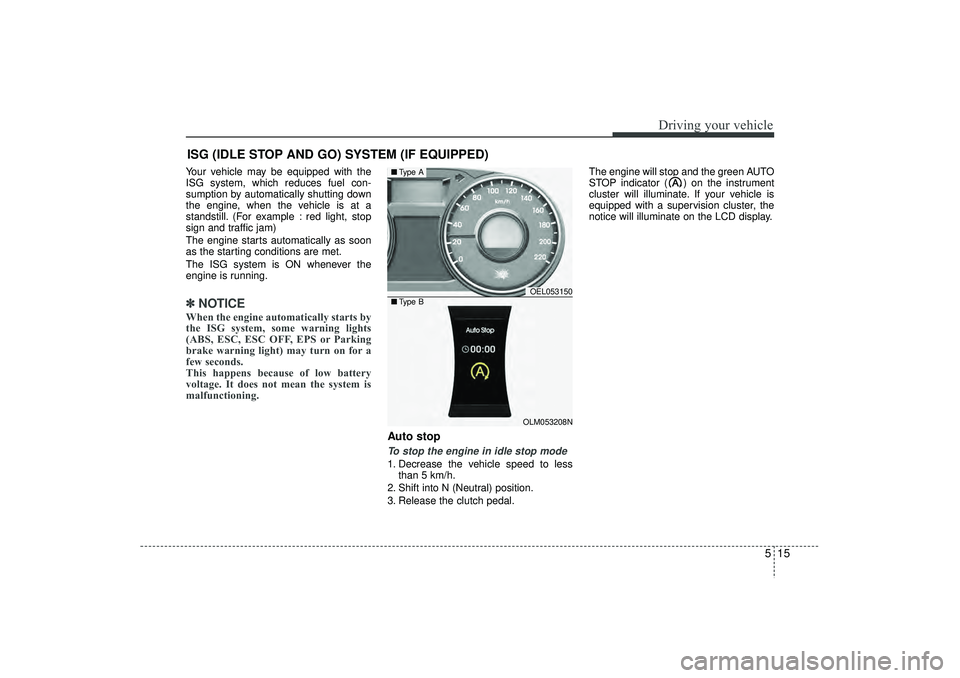
Auto stopTo stop the engine in idle stop mode1. Decrease the vehicle speed to less
than 5 km/h.
2. Shift into N (Neutral) position.
3. Release the clutch pedal. The engine will stop and the green AUTO
STOP indicator ( ) on the instrument
cluster will illuminate. If your vehicle is
equipped with a supervision cluster, the
notice will illuminate on the LCD display.
OEL053150OLM053208N
■
Type A■Type B
EL(FL) UK 5.QXP 12/16/2014 8:08 PM Page 15
Page 364 of 550
Driving your vehicle16
5✽
✽
NOTICE • You must reach a speed of at least 10
km/h since last idle stop.
• If you unfasten the seat belt or open the driver’s door (engine bonnet) in
auto stop mode, the light on the ISG
OFF button will illuminate and ISG
system is deactivated. If your vehicle
is equipped with a supervision cluster,
the notice will illuminate on the LCD
display.
Turn the ignition switch to the START
position to start the engine manually.
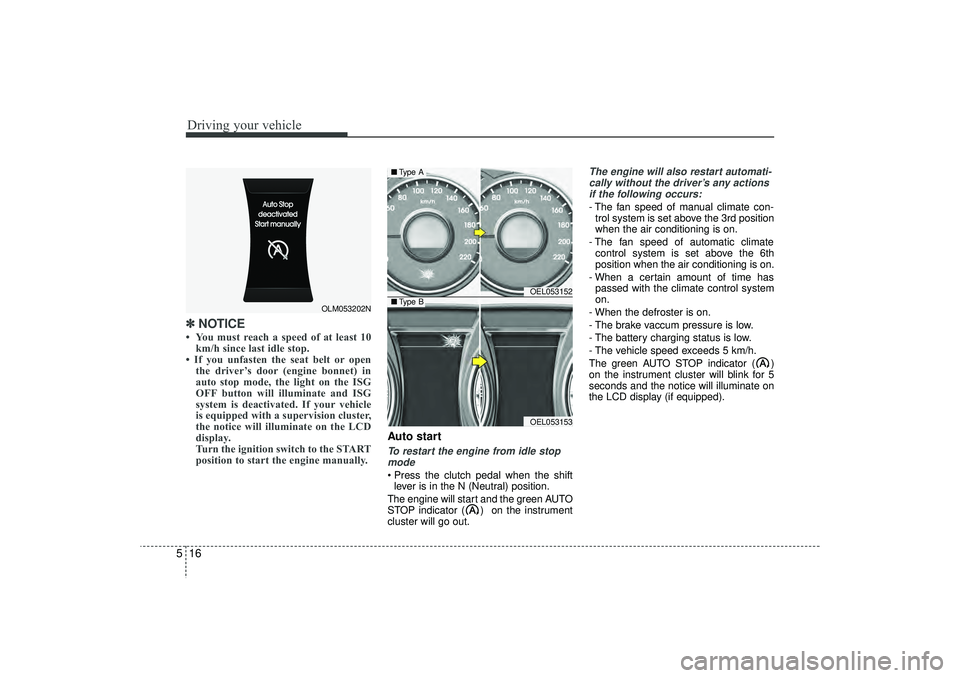
Auto startTo restart the engine from idle stop
mode Press the clutch pedal when the shift lever is in the N (Neutral) position.
The engine will start and the green AUTO
STOP indicator ( ) on the instrument
cluster will go out.
The engine will also restart automati- cally without the driver’s any actionsif the following occurs:- The fan speed of manual climate con- trol system is set above the 3rd position
when the air conditioning is on.
- The fan speed of automatic climate control system is set above the 6th
position when the air conditioning is on.
- When a certain amount of time has passed with the climate control system
on.
- When the defroster is on.
- The brake vaccum pressure is low.
- The battery charging status is low.
- The vehicle speed exceeds 5 km/h.
The green AUTO STOP indicator ( )
on the instrument cluster will blink for 5
seconds and the notice will illuminate on
the LCD display (if equipped).
OLM053202N
OEL053152OEL053153
■ Type A■Type B
EL(FL) UK 5.QXP 12/16/2014 8:08 PM Page 16
Page 365 of 550
517
Driving your vehicle
Condition of ISG system opera-
tionThe ISG system will operate underthe following condition:- The driver’s seat belt is fastened.
- The driver’s door and bonnet are closed.
- The brake vaccum pressure is ade- quate.
- The battery is sufficiently charged.
- The outside temperature is between 2°C to 35°C.
- The engine coolant temperature is not too low.
✽ ✽ NOTICE • If the ISG system does not meet that
operation condition, the ISG system is
deactivated. The light on the ISG OFF
button will illuminate and the notice
will illuminate on the LCD display (if
equipped).
• If the light or notice is come on con- tinuously, please check the operation
condition.
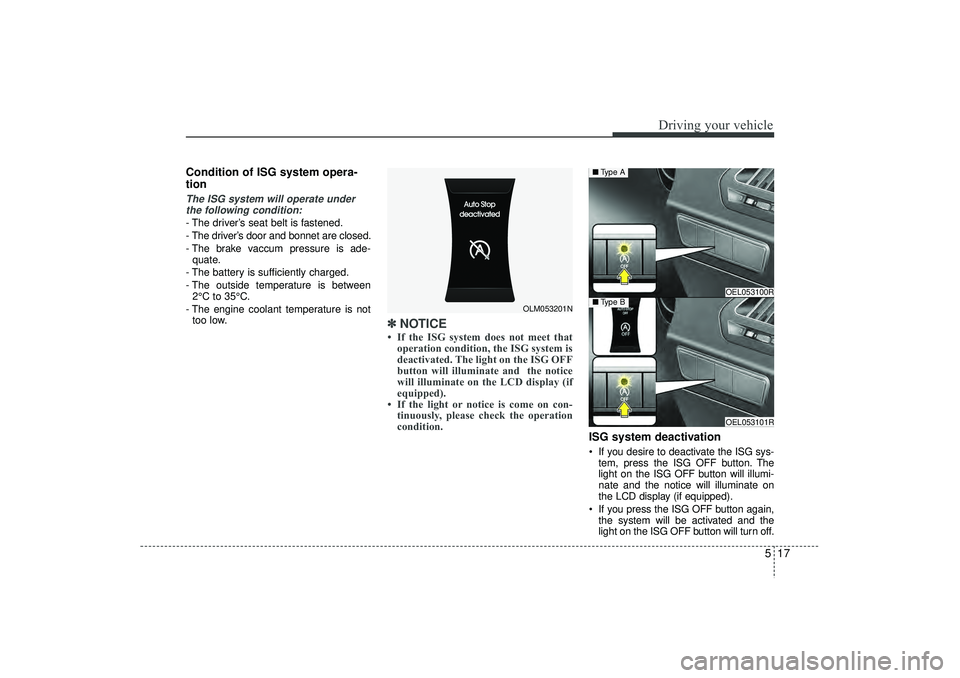
ISG system deactivation If you desire to deactivate the ISG sys-
tem, press the ISG OFF button. The
light on the ISG OFF button will illumi-
nate and the notice will illuminate on
the LCD display (if equipped).
If you press the ISG OFF button again, the system will be activated and the
light on the ISG OFF button will turn off.
OLM053201N
OEL053100ROEL053101R
■ Type B■Type A
EL(FL) UK 5.QXP 12/16/2014 8:08 PM Page 17
Page 371 of 550
523
Driving your vehicle
Automatic transaxle operationThe highly efficient automatic transaxle
has 6 forward speeds and one reverse
speed. The individual speeds are select-
ed automatically, depending on the posi-
tion of the shift lever.✽ ✽NOTICEThe first few shifts on a new vehicle, if
the battery has been disconnected, may
be somewhat abrupt. This is a normal
condition, and the shifting sequence will
adjust after shifts are cycled a few times
by the TCM (Transaxle Control
Module) or PCM (Powertrain Control
Module).
For smooth operation, depress the brake
pedal when shifting from N (Neutral) to a forward or reverse gear.
Transaxle ranges
The indicator lights in the instrument
cluster displays the shift lever position
when the ignition switch is in the ON
position.
P (Park)
Always come to a complete stop before
shifting into P (Park). This position locks
the transaxle and prevents the front
wheels from rotating.
WARNING
- Automatictransaxle
Always check the surrounding
areas near your vehicle for peo-
ple, especially children, before
shifting a vehicle into D (Drive) or
R (Reverse).
Before leaving the driver’s seat, always make sure the shift lever
is in the P (Park) position; then
set the parking brake fully and
shut the engine off. Unexpected
and sudden vehicle movement
can occur if these precautions
are not followed in the order iden-
tified.
Do not use the engine brake (shifting from a high gear to
lower gear) rapidly on slippery
roads. The vehicle may slip caus-
ing an accident.
CAUTION
To avoid damage to your transaxle, do not accelerate theengine in R (Reverse) or any for- ward gear position with thebrakes on.
When stopped on an upgrade, do not hold the vehicle stationarywith engine power. Use the serv-ice brake or the parking brake.
Do not shift from N (Neutral) or P (Park) into D (Drive), or R(Reverse) when the engine is above idle speed.
EL(FL) UK 5.QXP 12/16/2014 8:09 PM Page 23
Page 451 of 550
629
What to do in an emergency
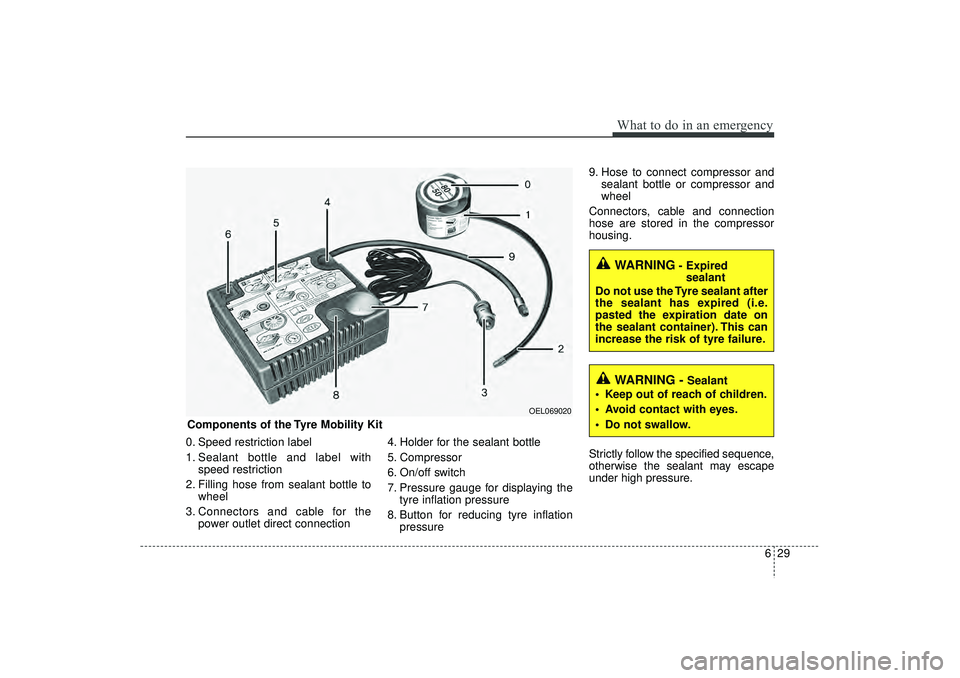
0. Speed restriction label
1. Sealant bottle and label withspeed restriction
2. Filling hose from sealant bottle to wheel
3. Connectors and cable for the power outlet direct connection 4. Holder for the sealant bottle
5. Compressor
6. On/off switch
7. Pressure gauge for displaying the
tyre inflation pressure
8. Button for reducing tyre inflation pressure 9. Hose to connect compressor and
sealant bottle or compressor and
wheel
Connectors, cable and connection
hose are stored in the compressor
housing.
Strictly follow the specified sequence,
otherwise the sealant may escape
under high pressure.
WARNING
- Expired sealant
Do not use the Tyre sealant after
the sealant has expired (i.e.
pasted the expiration date on
the sealant container). This can
increase the risk of tyre failure.
WARNING -
Sealant
Keep out of reach of children.
Avoid contact with eyes.
Do not swallow.
Components of the Tyre Mobility Kit
OEL069020
EL(FL) UK 6.QXP 12/16/2014 8:13 PM Page 29
Page 501 of 550
741
Maintenance
3. Checking tyre life (TIN : Tyre Identification Number) Any tyres that are over 6 years,
based on the manufacturing date,
tyre strength and performance,
decline with age naturally (even
unused spare tyres). Therefore, the
tyres (including the spare tyre)
should be replaced by new ones. You
can find the manufacturing date on
the tyre sidewall (possibly on the
inside of the wheel), displaying the
DOT Code. The DOT Code is a
series of numbers on a tyre consist-
ing of numbers and English letters.
The manufacturing date is designat-
ed by the last four digits (characters)
of the DOT code.DOT : XXXX XXXX OOOOThe front part of the DOT means a
plant code number, tyre size and
tread pattern and the last four num-
bers indicate week and year manu-
factured.
For example:
DOT XXXX XXXX 1615 represents
that the tyre was produced in the
16th week of 2015.
4. Tyre ply composition and materialThe number of layers or plies of rub-
ber-coated fabric are in the tyre. Tyre
manufacturers also must indicate the
materials in the tyre, which include
steel, nylon, polyester, and others.
The letter "R" means radial ply con-
struction; the letter "D" means diago-
nal or bias ply construction; and the
letter "B" means belted-bias ply con-
struction.
5. Maximum permissible inflationpressureThis number is the greatest amount
of air pressure that should be put in
the tyre. Do not exceed the maximum
permissible inflation pressure. Refer
to the Tyre and Loading Information
label for recommended inflation
pressure.6. Maximum load ratingThis number indicates the maximum
load in kilograms and pounds that
can be carried by the tyre. When
replacing the tyres on the vehicle,
always use a tyre that has the same
load rating as the factory installed
tyre.7. Uniform tyre quality grading Quality grades can be found where
applicable on the tyre sidewall
between tread shoulder and maxi-
mum section width.
For example:
TREADWEAR 200
TRACTION AA
TEMPERATURE A
WARNING - Tyre age
Tyres degrade over time, even
when they are not being used.
Regardless of the remaining
tread, it is recommended that
tyres generally be replaced
after six (6) years of normal
service. Heat caused by hot cli-
mates or frequent high loading
conditions can accelerate the
aging process. Failure to follow
this Warning can result in sud-
den tyre failure, which could
lead to a loss of control and an
accident involving serious
injury or death.
EL(FL) UK 7.QXP 3/4/2015 9:05 PM Page 41