AUX HYUNDAI IX35 2016 User Guide
[x] Cancel search | Manufacturer: HYUNDAI, Model Year: 2016, Model line: IX35, Model: HYUNDAI IX35 2016Pages: 550, PDF Size: 9.92 MB
Page 278 of 550
4 193
Features of your vehicle
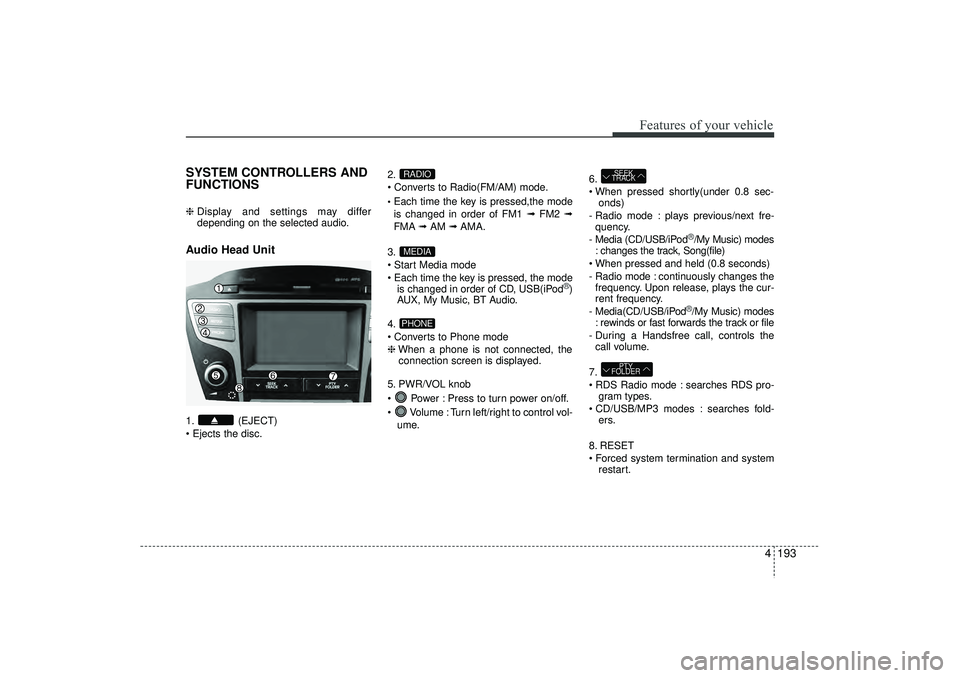
SYSTEM CONTROLLERS AND
FUNCTIONS ❈ Display and settings may differ
depending on the selected audio.Audio Head Unit 1. (EJECT)
Ejects the disc. 2.
Converts to Radio(FM/AM) mode.
Each time the key is pressed,the mode
is changed in order of FM1 ➟
FM2 ➟
FMA ➟AM ➟AMA.
3.
Start Media mode
Each time the key is pressed, the mode is changed in order of CD, USB(iPod
®)
AUX, My Music, BT Audio.
4.
Converts to Phone mode
❈ When a phone is not connected, the
connection screen is displayed.
5. PWR/VOL knob
Power : Press to turn power on/off.
Volume : Turn left/right to control vol- ume. 6.
When pressed shortly(under 0.8 sec-
onds)
- Radio mode : plays previous/next fre- quency.
- Media (CD/USB/iPod
®/My Music) modes
: changes the track, Song(file)
When pressed and held (0.8 seconds)
- Radio mode : continuously changes the frequency. Upon release, plays the cur-
rent frequency.
- Media(CD/USB/iPod®/My Music) modes
: rewinds or fast forwards the track or file
- During a Handsfree call, controls the call volume.
7.
RDS Radio mode : searches RDS pro- gram types.
CD/USB/MP3 modes : searches fold- ers.
8. RESET
Forced system termination and system restart.
PTY
FOLDERSEEK
TRACK
PHONEMEDIARADIO
EL(FL) UK 4B AUDIO.QXP 3/13/2015 4:19 PM Page 193
Page 287 of 550
Features of your vehicle202
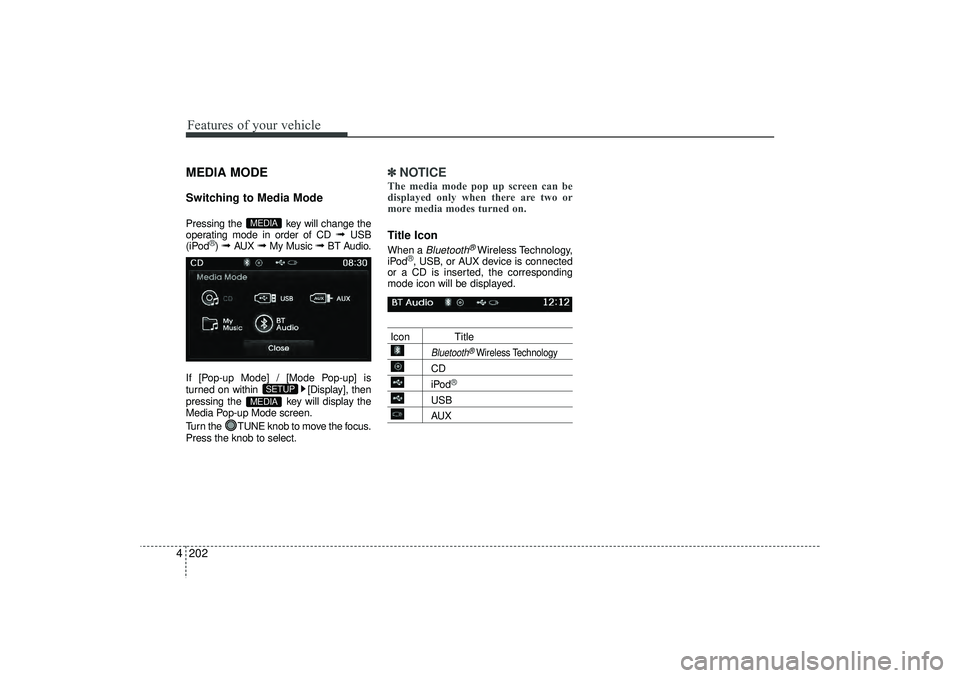
4MEDIA MODESwitching to Media ModePressing the key will change the
operating mode in order of CD
➟
USB
(iPod
®) ➟
AUX
➟
My Music
➟
BT Audio.
If [Pop-up Mode] / [Mode Pop-up] is
turned on within [Display], then
pressing the key will display the
Media Pop-up Mode screen.
Turn the TUNE knob to move the focus.
Press the knob to select.
✽ ✽ NOTICE The media mode pop up screen can be
displayed only when there are two or
more media modes turned on.Title Icon When a
Bluetooth
®Wireless Technology,
iPod
®, USB, or AUX device is connected
or a CD is inserted, the corresponding
mode icon will be displayed.
Icon Title
Bluetooth
®Wireless Technology
CDiPod
®
USBAUX
MEDIA
SETUP
MEDIA
EL(FL) UK 4B AUDIO.QXP 3/13/2015 4:19 PM Page 202
Page 298 of 550
4 213
Features of your vehicle
(Continued)
• Charging through the USB may notwork for some mobile devices.
• The device may not support normal operation when using a USB memory
type besides (Metal Cover Type) USB
Memory.
• The device may not support normal operation when using formats such as
HDD Type, CF, or SD Memory.
• The device will not support files locked by DRM (Digital Rights
Management.)
• USB memory sticks used by connect- ing an Adaptor (SD Type or CF Type)
may not be properly recognized.
• The device may not operate properly when using USB HDDs or USBs sub-
ject to connection failures caused by
vehicle vibrations. (e.g. i-stick type) (Continued)(Continued)
• Avoid use of USB memo-
ry products that can also
be used as key chains or
mobile phone accessories.
Use of such products may
cause damage to the USB jack.
• Connecting an MP3 device or phone through various channels, such as
AUX/BT or Audio/USB mode may
result in pop noises or abnormal oper-
ation.
EL(FL) UK 4B AUDIO.QXP 3/13/2015 4:19 PM Page 213
Page 304 of 550
4 219
Features of your vehicle
✽
✽NOTICE - USING THE iPod
®
DEVICE
• iPod
®
is a registered trademark of
Apple Inc.
• In order to use the iPod
®whilst oper-
ating the keys, you must use a dedi-
cated iPod
®cable. (the cable that is
supplied when purchasing
iPod
®/iPhone
®products)
• If the iPod
®is connected to the vehicle
whilst it is playing, a high pitch sound
could occur for approximately 1-2 sec-
onds immediately after connecting. If
possible, connect the iPod
®
to the
vehicle with the iPod
®
stopped/paused.
• During ACC ON state, connecting the iPod
®
through the iPod
®
cable will
charge the iPod
®
through the car
audio system.
• When connecting with the iPod
®
cable, make sure to fully insert the
jack to prevent communication inter-
ference. (Continued)(Continued)
• When the EQ features of an external
device, such as the iPod
®, and the audio
system are both active, EQ effects could
overlap and cause sound deterioration
and distortion. Whenever possible, turn
off the EQ feature within the external
device upon use by connecting with the
audio system.
• Noise may occur when an iPod
®
or
AUX device is connected. When such
devices are not being used, disconnect
the device for storage.
• When the iPod
®or AUX device power
is connected to the power jack, playing
the external device may result in noise.
In such cases, disconnect the power con-
nection before use.
• Skipping or improper operation may occur depending on the characteristics of
your iPod
®/iPhone
®device.
• If your iPhone is connected to both the Bluetooth
®
Wireless Technology and
USB, the sound may not be properly
played. In your
iPhone
®, select the
Dock connector or Bluetooth®Wireless
Technology to change the sound out-
put (source). (Continued)(Continued)
• iPod
®mode cannot be operated when
the iPod®cannot be recognized due to
the playing of versions that do not
support communication protocols,
cases of iPod
®abnormalities and
defects.
• For fifth generation iPod
®
Nano
devices, the iPod
®may not be recog-
nized when the battery level is low.
Please charge the iPod
®for use.
• Search/play orders shown within the iPod
®
device may differ with the
orders shown within the audio system.
• If the iPod
®malfunctions due to an
iPod
®device defect, reset the iPod
®
and try again. (To learn more, refer to
your iPod
®manual)
• Some iPod®s may not sync with the
System depending on its version. If
the Media is removed before the
Media is recognized, then the system
may not properly restore the previ-
ously operated mode. (iPad charging
is not supported.)
EL(FL) UK 4B AUDIO.QXP 3/13/2015 4:19 PM Page 219
Page 309 of 550
![HYUNDAI IX35 2016 User Guide Features of your vehicle224
4AUX MODE Using AUX ModePress the key Select [AUX]
An external device can be connected to
play music.Connecting an External DeviceExternal audio players (Camcorders, car
V](/img/35/56235/w960_56235-308.png "HYUNDAI IX35 2016 User Guide Features of your vehicle224
4AUX MODE Using AUX ModePress the key Select [AUX]
An external device can be connected to
play music.Connecting an External DeviceExternal audio players (Camcorders, car
V")
Features of your vehicle224
4AUX MODE Using AUX ModePress the key Select [AUX]
An external device can be connected to
play music.Connecting an External DeviceExternal audio players (Camcorders, car
VCR, etc.) can be played through a ded-
icated cable.
✽ ✽
NOTICE • If an external device connector is con-
nected with the AUX terminal, then
AUX mode will automatically operate.
Once the connector is disconnected,
the previous mode will be restored.
• AUX mode can be used only when an external audio player (camcorder, car
VCR, etc.) has been connected.
• The AUX volume can be controlled separately from other audio modes.
• Connecting a connector jack to the AUX terminal without an external
device will convert the system to AUX
mode, but only output noise. When an
external device is not being used, also
remove the connector jack.
• When the external device power is connected to the power jack, playing
the external device may output noise.
In such cases, disconnect the power
connection before use.
• Fully insert the AUX cable to the AUX jack upon use.
MEDIA
EL(FL) UK 4B AUDIO.QXP 3/13/2015 4:19 PM Page 224
Page 331 of 550
Features of your vehicle246
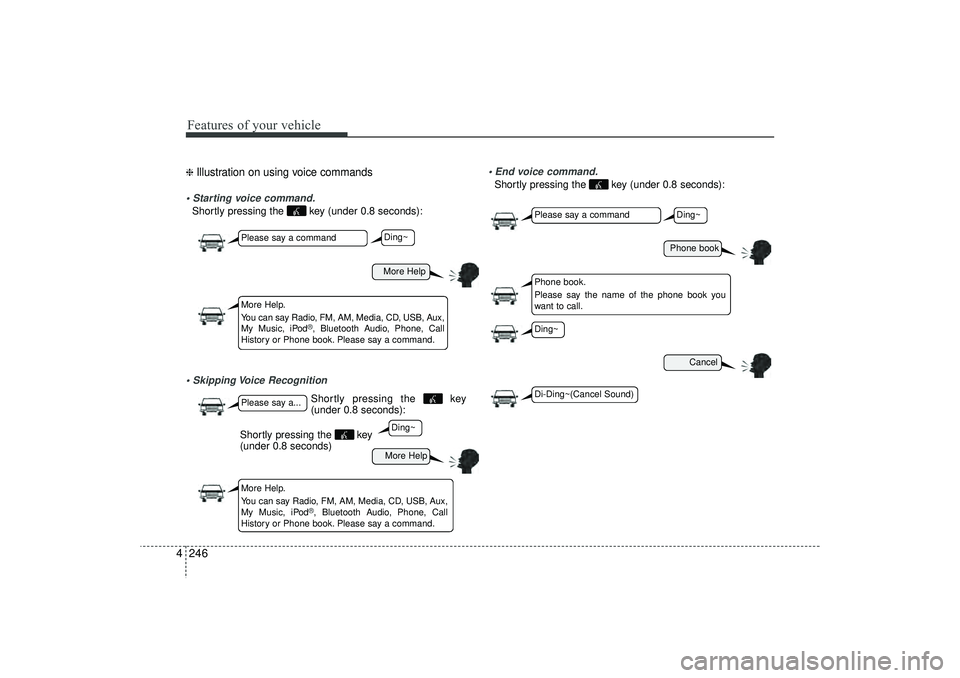
4❈ Illustration on using voice commands Starting voice command.Shortly pressing the key (under 0.8 seconds): Skipping Voice Recognition End voice command.
Shortly pressing the key (under 0.8 seconds):
More HelpMore Help
Please say a commandPlease say a...More Help.
You can say Radio, FM, AM, Media, CD, USB, Aux,
My Music, iPod
®, Bluetooth Audio, Phone, Call
History or Phone book. Please say a command.
More Help.
You can say Radio, FM, AM, Media, CD, USB, Aux,
My Music, iPod
®, Bluetooth Audio, Phone, Call
History or Phone book. Please say a command.
Ding~Ding~
Shortly pressing the key
(under 0.8 seconds)
Phone book
Cancel
Please say a commandPhone book.
Please say the name of the phone book you
want to call.
Ding~
Di-Ding~(Cancel Sound)Ding~
Shortly pressing the key
(under 0.8 seconds):
EL(FL) UK 4B AUDIO.QXP 3/13/2015 4:19 PM Page 246
Page 333 of 550
Features of your vehicle248
4
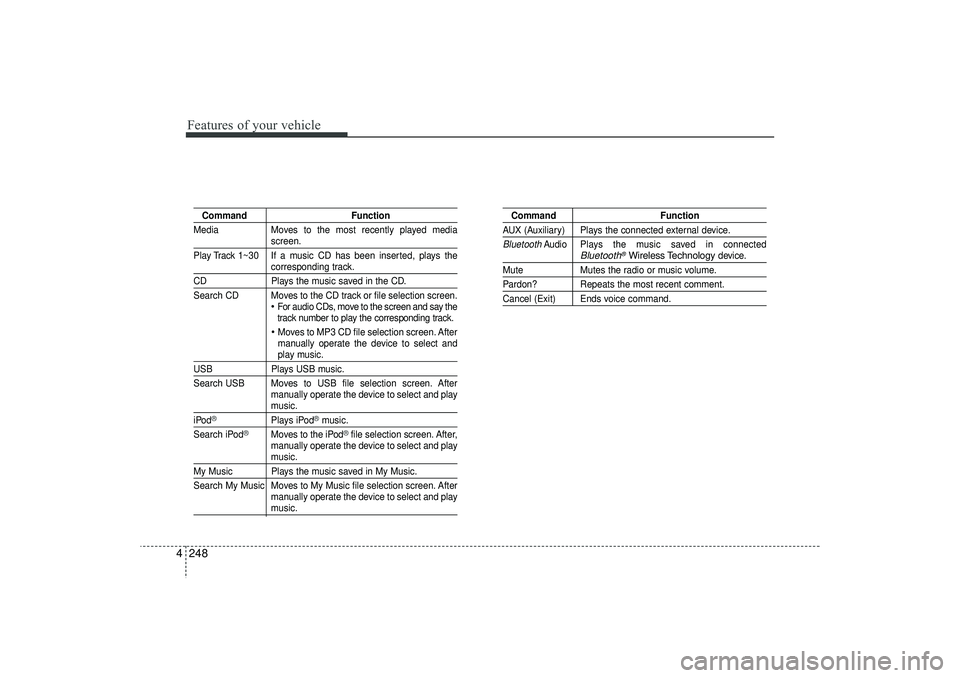
Command Function
Media Moves to the most recently played media
screen.
Play Track 1~30 If a music CD has been inserted, plays thecorresponding track.
CD Plays the music saved in the CD.
Search CD Moves to the CD track or file selection screen.
For audio CDs, move to the screen and say the
track number to play the corresponding track. Moves to MP3 CD file selection screen. After
manually operate the device to select andplay music.
USB Plays USB music.
Search USB Moves to USB file selection screen. After manually operate the device to select and play
music.
iPod
®
Plays iPod
®music.
Search iPod
®
Moves to the iPod
®file selection screen. After,
manually operate the device to select and play
music.
My Music Plays the music saved in My Music.
Search My Music Moves to My Music file selection screen. After manually operate the device to select and play
music.
Command FunctionAUX (Auxiliary) Plays the connected external device.Bluetooth
Audio Plays the music saved in connected
Bluetooth
®Wireless Technology
device.
Mute Mutes the radio or music volume.Pardon? Repeats the most recent comment.Cancel (Exit) Ends voice command.
EL(FL) UK 4B AUDIO.QXP 3/13/2015 4:19 PM Page 248
Page 348 of 550
4 263
Features of your vehicle
APPENDIX
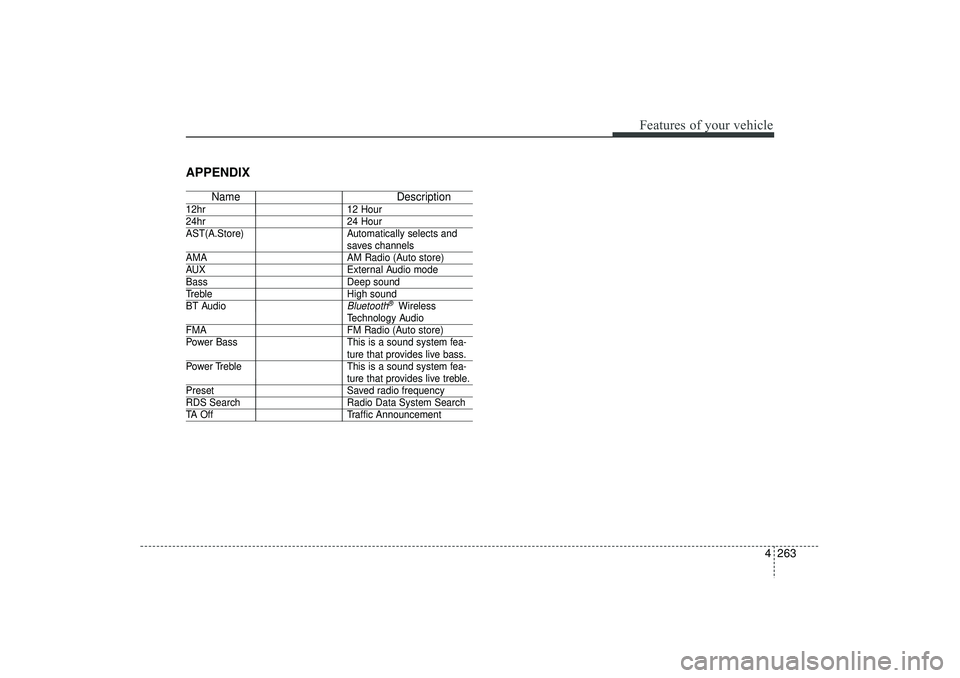
NameDescription
12hr12 Hour24hr24 Hour
AST(A.Store) Automatically selects and
saves channels
AMA AM Radio (Auto store)AUXExternal Audio modeBassDeep soundTrebleHigh sound
BT Audio
Bluetooth
®Wireless
Technology Audio
FMA FM Radio (Auto store)
Power Bass This is a sound system fea-
ture that provides live bass.
Power Treble This is a sound system fea-ture that provides live treble.
Preset Saved radio frequencyRDS SearchRadio Data System SearchTA OffTraffic Announcement
EL(FL) UK 4B AUDIO.QXP 3/13/2015 4:19 PM Page 263