clock setting Hyundai Kona 2018 Owner's Manual - RHD (UK, Australia)
[x] Cancel search | Manufacturer: HYUNDAI, Model Year: 2018, Model line: Kona, Model: Hyundai Kona 2018Pages: 497, PDF Size: 11.7 MB
Page 213 of 497
![Hyundai Kona 2018 Owners Manual - RHD (UK, Australia) 3-135
Convenient features of your vehicle
3
Clock
Vehicles with Audio system
Select the [SETUP/CLOCK ]button on
the audio system ➟Select [Date/Time].
• Set time: Set the time displayed on
the audi](/img/35/16232/w960_16232-212.png "Hyundai Kona 2018 Owners Manual - RHD (UK, Australia) 3-135
Convenient features of your vehicle
3
Clock
Vehicles with Audio system
Select the [SETUP/CLOCK ]button on
the audio system ➟Select [Date/Time].
• Set time: Set the time displayed on
the audi")
3-135
Convenient features of your vehicle
3
Clock
Vehicles with Audio system
Select the [SETUP/CLOCK ]button on
the audio system ➟Select [Date/Time].
• Set time: Set the time displayed on
the audio screen.
• Time format: Choose between 12- hour and 24-hour time formats.
Vehicles with Navigation system
Select the Settings menu on the
Navigation system ➟Select
[Date/Time].
• GPS time: Displays time according to the received GNSS time.
• 24-hour: Switches to 12 hour or 24 hour.
For more details, please refer to
the separate manual that was sup-
plied with your vehicle.
Clothes hanger (if equipped)
These hangers are not designed to
hold large or heavy items. Do not hang other objects such
as hangers or hard objects
except clothes. Also, do not put
heavy, sharp or breakable
objects in the clothes pockets.
In an accident or when the cur-
tain air bag is inflated, it may
cause vehicle damage or per-
sonal injury.
WARNING
OOS047066
Do not adjust the clock whilst
driving. You may lose your steer-
ing control and cause severe
personal injury or accidents.
WARNING
OOS047065
Page 225 of 497
4-9
Multimedia System
4
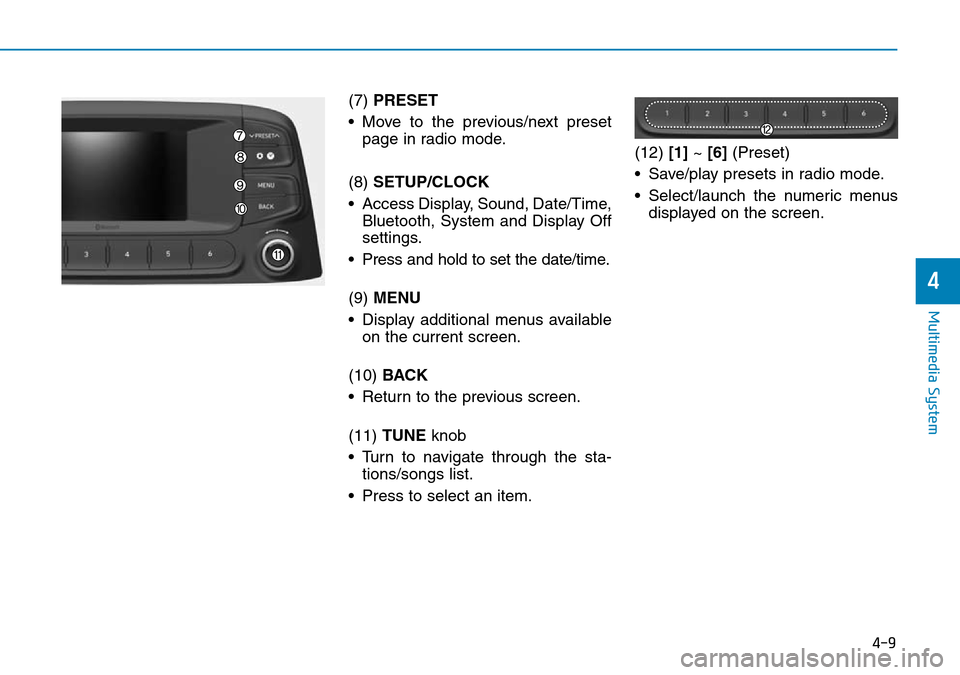
(7) PRESET
• Move to the previous/next preset page in radio mode.
(8) SETUP/CLOCK
• Access Display, Sound, Date/Time, Bluetooth, System and Display Off
settings.
• Press and hold to set the date/time.
(9) MENU
• Display additional menus available on the current screen.
(10) BACK
• Return to the previous screen.
(11) TUNE knob
• Turn to navigate through the sta- tions/songs list.
• Press to select an item. (12)
[1]~ [6] (Preset)
• Save/play presets in radio mode.
• Select/launch the numeric menus displayed on the screen.
Page 247 of 497
![Hyundai Kona 2018 Owners Manual - RHD (UK, Australia) 4-31
Multimedia System
4
Setup
Access Display, Sound, Date/Time,
Bluetooth, System and Display Off
settings.
Press the [SETUP/CLOCK]button
on the audio system.
Display
Press the [SETUP/CLOCK] button](/img/35/16232/w960_16232-246.png "Hyundai Kona 2018 Owners Manual - RHD (UK, Australia) 4-31
Multimedia System
4
Setup
Access Display, Sound, Date/Time,
Bluetooth, System and Display Off
settings.
Press the [SETUP/CLOCK]button
on the audio system.
Display
Press the [SETUP/CLOCK] button")
4-31
Multimedia System
4
Setup
Access Display, Sound, Date/Time,
Bluetooth, System and Display Off
settings.
Press the [SETUP/CLOCK]button
on the audio system.
Display
Press the [SETUP/CLOCK] button
on the audio system ➟Select
[Display].
• Dimming mode: Brightness is auto- matically adjusted according to the
headlight use.
• Brightness: The brightness of the audio screen can be changed.
• Screensaver: Set the information displayed when the audio system
is switched off or the screen is
turned off.
Sound
Press the [SETUP/CLOCK] button
on the audio system ➟Select
[Sound].
• Position: Sound balance and fader can be adjusted.
• Equaliser: Sound tone colour can be adjusted.
• Speed dependent volume control: Automatically adjust volume based
on vehicle speed.
• Rear parking sensors prioritised: Automatically lower audio volume
whilst reversing.
Date/Time
Press the [SETUP/CLOCK] button
on the audio system ➟Select
[Date/Time].
• Set time: Set the time displayed on the audio screen.
• Time format: Choose betw een 12-
hour and 24-hour time formats.
• Set date: Set the date displayed on the audio screen.
Page 248 of 497
![Hyundai Kona 2018 Owners Manual - RHD (UK, Australia) 4-32
Multimedia System
Bluetooth
Press the [SETUP/CLOCK]button
➟ Select [Bluetooth].
• Connections: Control pairing, dele- tion, connection and disconnection
of Bluetooth
®devices.
• Auto conne](/img/35/16232/w960_16232-247.png "Hyundai Kona 2018 Owners Manual - RHD (UK, Australia) 4-32
Multimedia System
Bluetooth
Press the [SETUP/CLOCK]button
➟ Select [Bluetooth].
• Connections: Control pairing, dele- tion, connection and disconnection
of Bluetooth
®devices.
• Auto conne")
4-32
Multimedia System
Bluetooth
Press the [SETUP/CLOCK]button
➟ Select [Bluetooth].
• Connections: Control pairing, dele- tion, connection and disconnection
of Bluetooth
®devices.
• Auto connection priority: Set the connection priority of Bluetooth
®
devices when the vehicle is started.
• Update contacts: Contacts can be
downloaded from connected
Bluetooth
®devices.
• Bluetooth voice guidance: Play or mute voice prompts for Bluetooth
®
device pairing, connection and
errors.
Information
• When paired devices are deleted,the call history and contacts of the
device saved to the audio system are
deleted.
• For Bluetooth
®connections with
low connection priority, some time
may be required for the connection
to be established.
• Contacts can be downloaded only from the currently connected
Bluetooth
®device.
• If no Bluetooth
®device is connected,
the Download Contacts button is
disabled.
• If the language setting is Slovakian or Hungarian, Bluetooth voice guid-
ance is not supported.
System
Press the [SETUP/CLOCK] button
on the audio system ➟Select
[System].
• Language: Change the user lan- guage.
• Default: Reset the audio system.
Information
The system resets to the default val-
ues, and all saved data and settings
are lost.
Display Off
To prevent glare, the screen can be
turned off with the audio system in
operation.
Press the [SETUP/CLOCK] button
on the audio system ➟Select
[Display Off].
Information
Use ‘Screensaver’ to set the informa-
tion to be displayed when the screen is
turned off.
i
i
i