ECO mode Hyundai Kona 2018 User Guide
[x] Cancel search | Manufacturer: HYUNDAI, Model Year: 2018, Model line: Kona, Model: Hyundai Kona 2018Pages: 523, PDF Size: 33.6 MB
Page 154 of 523
3-71
Convenient features of your vehicle
3
7. Service Interval
To activate or deactivate the service
interval function.
If the service interval menu is acti-
vated, you may adjust the time and
distance.Information
To use the service interval menu, con-
sult an authorized HYUNDAI dealer.
If the service interval is activated and the time and distance is adjusted,
messages are displayed in the fol-
lowing situations each time the vehi-
cle is turned on.
- Service in : Displayed to inform the driver theremaining mileage and days to
service. - Service required
: Displayed when the mileage anddays to service has been reachedor passed.
Information
If any of the following conditions
occur, the mileage and number of days
to service may be incorrect.
- The battery cable is disconnected.
- The fuse switch is turned off.
- The battery is discharged.
8. Other Features
- Off: The average fuel economy will not reset automatically whenever refueling.
- After Ignition: When the engine has been OFF for 4 hours or longer the
average fuel economy will reset
automatically.
- After Refueling: The average fuel economy will reset automaticallyafter adding 6 liters (1.6 gallons) of
fuel or more and after driving speed
exceeds 1 km/h (1 mph).
For more information, refer to
"Trip Computer" in this chapter.
To select the fuel economy unit.(km/L, L/100, MPG)
To select the temperature unit.
(°C,°F)
To select the tire pressure unit.
(psi, kPa, bar)
9. Language
Choose the language.
10. Reset
You can reset the menus in the User
Settings Mode. All menus in the User
Settings Mode are reset to factory
settings, except language and serv-
ice interval.
i
i
Page 155 of 523
3-72
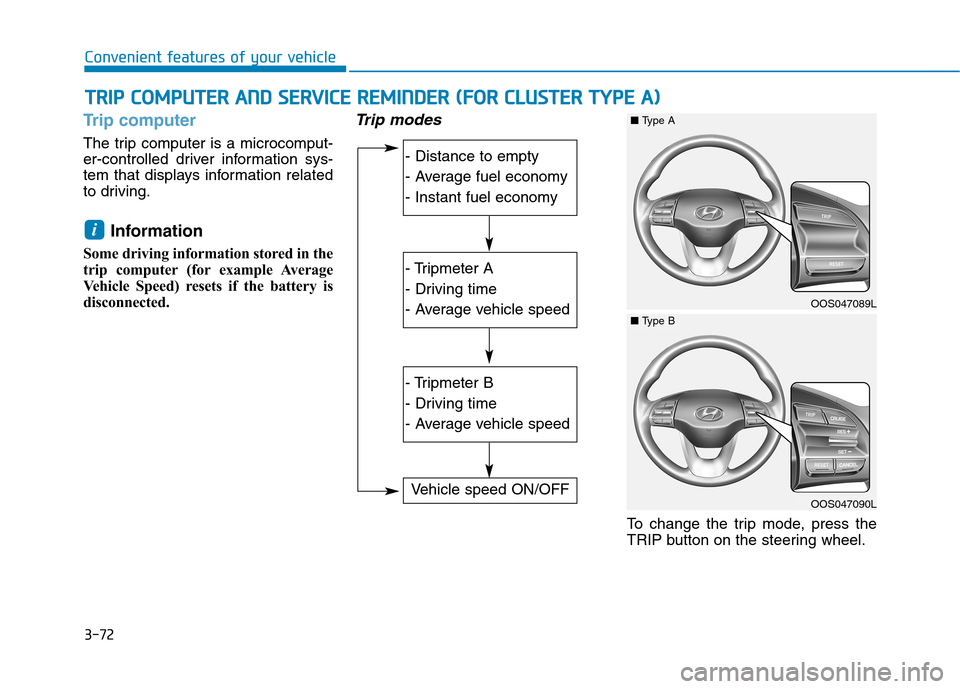
Trip computer
The trip computer is a microcomput-
er-controlled driver information sys-
tem that displays information related
to driving.Information
Some driving information stored in the
trip computer (for example Average
Vehicle Speed) resets if the battery is
disconnected.
Trip modes
To change the trip mode, press the
TRIP button on the steering wheel.
i
TT RR IIPP CC OO MM PPUU TTEERR AA NN DD SS EE RR VV IICC EE RR EEMM IINN DDEERR (( FF OO RR CC LLUU SSTT EERR TT YY PPEE AA ))
Convenient features of your vehicle
- Distance to empty
- Average fuel economy
- Instant fuel economy
- Tripmeter A
- Driving time
- Average vehicle speed
- Tripmeter B
- Driving time
- Average vehicle speed
Vehicle speed ON/OFF
OOS047089L
■Type A
OOS047090L
■Type B
Page 156 of 523
3-73
Convenient features of your vehicle
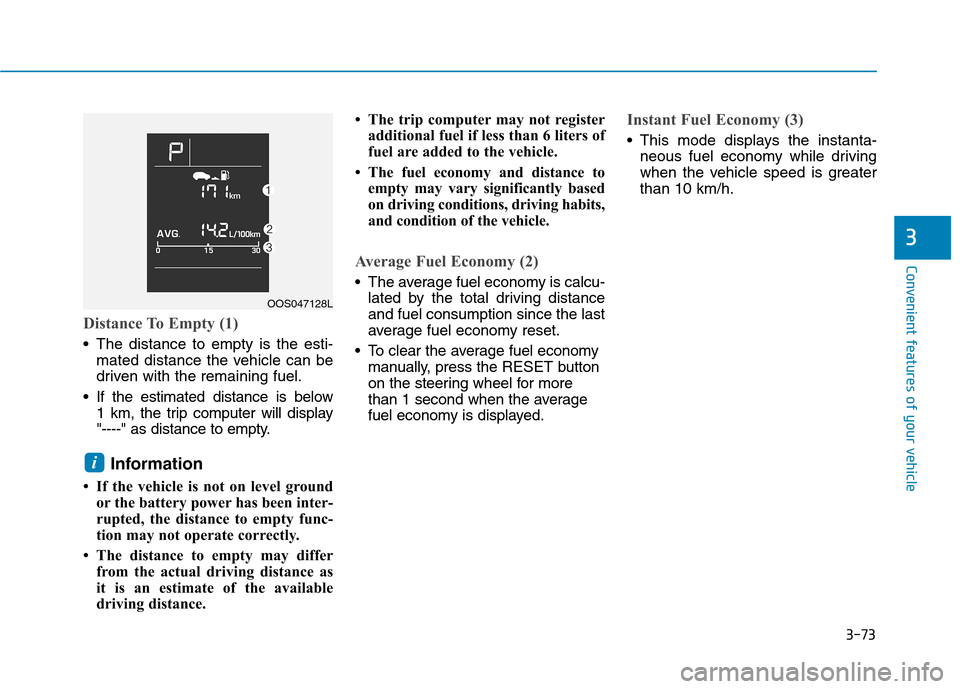
Distance To Empty (1)
The distance to empty is the esti-mated distance the vehicle can be
driven with the remaining fuel.
If the estimated distance is below 1 km, the trip computer will display
"----" as distance to empty.
Information
If the vehicle is not on level ground or the battery power has been inter-
rupted, the distance to empty func-
tion may not operate correctly.
The distance to empty may differ from the actual driving distance as
it is an estimate of the available
driving distance. The trip computer may not register
additional fuel if less than 6 liters of
fuel are added to the vehicle.
The fuel economy and distance to empty may vary significantly based
on driving conditions, driving habits,
and condition of the vehicle.
Average Fuel Economy (2)
The average fuel economy is calcu-lated by the total driving distance and fuel consumption since the last
average fuel economy reset.
To clear the average fuel economy manually, press the RESET button
on the steering wheel for more
than 1 second when the average
fuel economy is displayed.
Instant Fuel Economy (3)
This mode displays the instanta- neous fuel economy while driving
when the vehicle speed is greaterthan 10 km/h.
i
3
OOS047128L
Page 160 of 523
3-77
Convenient features of your vehicle
3
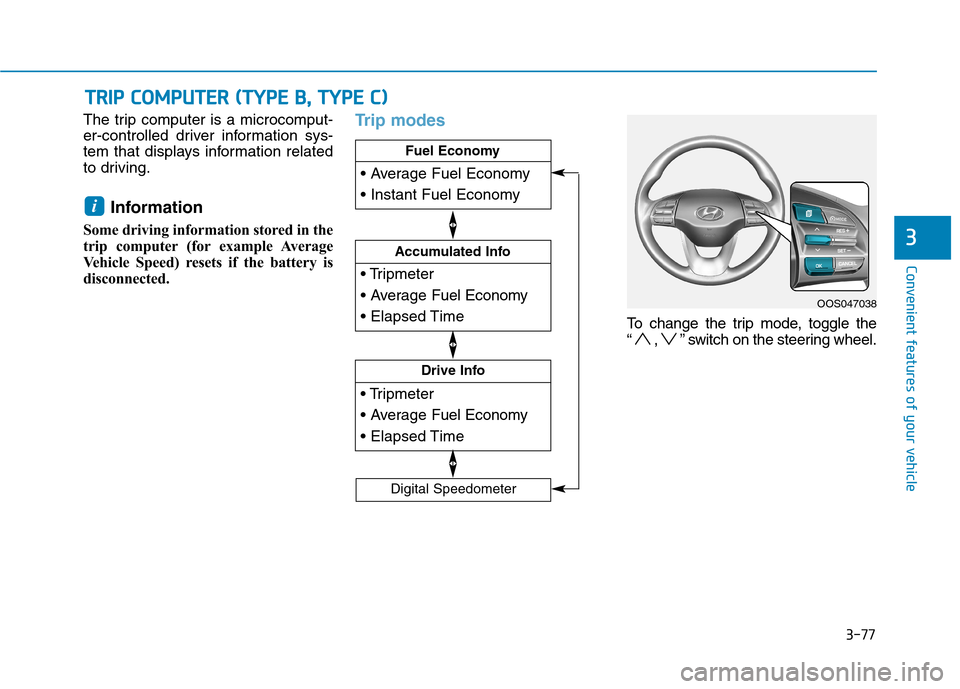
The trip computer is a microcomput-
er-controlled driver information sys-
tem that displays information related
to driving.Information
Some driving information stored in the
trip computer (for example Average
Vehicle Speed) resets if the battery is
disconnected.Trip modes
To change the trip mode, toggle the
“ , ” switch on the steering wheel.
i
TT RR IIPP CC OO MM PPUU TTEERR (( TT YY PPEE BB ,, TT YY PPEE CC ))
Drive Info
Accumulated Info
Fuel Economy
Digital Speedometer
OOS047038
Page 161 of 523
3-78
Convenient features of your vehicle
Fuel economy
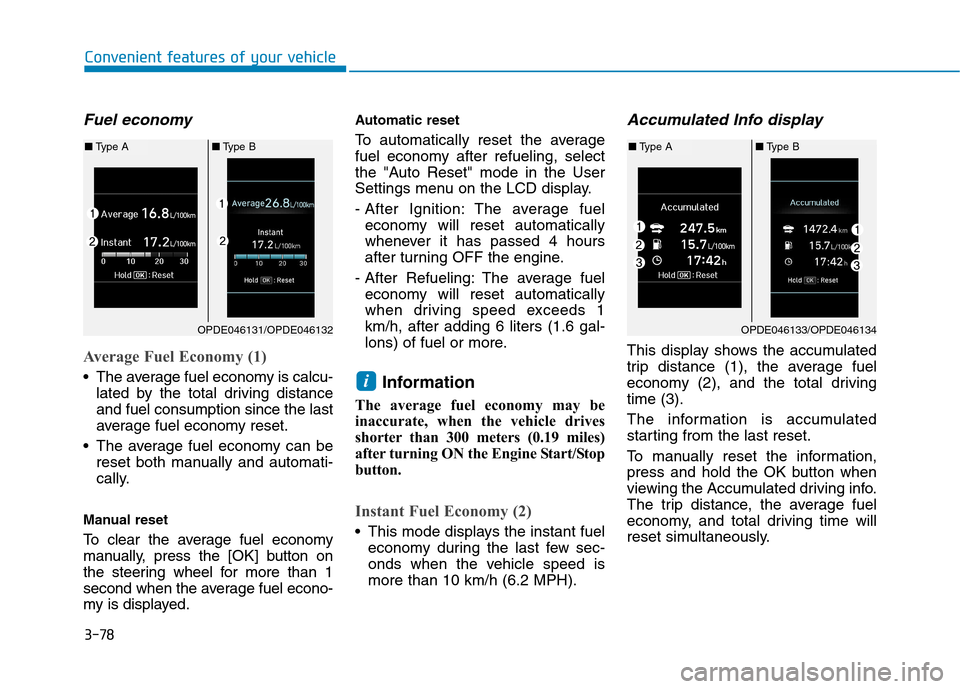
Average Fuel Economy (1)
The average fuel economy is calcu-lated by the total driving distance and fuel consumption since the last
average fuel economy reset.
The average fuel economy can be reset both manually and automati-
cally.
Manual reset
To clear the average fuel economy
manually, press the [OK] button on
the steering wheel for more than 1
second when the average fuel econo-
my is displayed. Automatic reset
To automatically reset the average
fuel economy after refueling, select
the "Auto Reset" mode in the User
Settings menu on the LCD display.
- After Ignition: The average fuel
economy will reset automatically
whenever it has passed 4 hours
after turning OFF the engine.
- After Refueling: The average fuel economy will reset automatically
when driving speed exceeds 1km/h, after adding 6 liters (1.6 gal-
lons) of fuel or more.
Information
The average fuel economy may be
inaccurate, when the vehicle drives
shorter than 300 meters (0.19 miles)
after turning ON the Engine Start/Stop
button.
Instant Fuel Economy (2)
This mode displays the instant fuel economy during the last few sec-
onds when the vehicle speed ismore than 10 km/h (6.2 MPH).
Accumulated Info display
This display shows the accumulated
trip distance (1), the average fuel
economy (2), and the total drivingtime (3).
The information is accumulated
starting from the last reset.
To manually reset the information,
press and hold the OK button when
viewing the Accumulated driving info.
The trip distance, the average fuel
economy, and total driving time will
reset simultaneously.
i
OPDE046131/OPDE046132
■Type A ■Type B
OPDE046133/OPDE046134
■Type A ■Type B
Page 173 of 523
3-90
Convenient features of your vehicle
Battery saver function
The purpose of this feature is to pre-
vent the battery from being dis-
charged. The system automatically
turns off the position lamp when the
driver turns the engine off and opens
the driver-side door.
With this feature, the position lamps
will turn off automatically if the driver
parks on the side of road at night.
If necessary, to keep the lamps on
when the engine is turned off, perform
the following:
1) Open the driver-side door.
2) Turn the position lamps OFF andON again using the light switch on
the steering column.
Headlamp delay function
(if equipped)
If you place the ignition switch to the
ACC or OFF position with the head-lamps ON, the headlamps (and/or
position lamps) remain on for about 5
minutes. However, with the engine off if
the driver’s door is opened and closed,the headlamps (and/or position lamps)
are turned off after 15 seconds. The headlamps (and/or position
lamps) can be turned off by pressing
the lock button on the remote key or
smart key twice or turning the light
switch to the OFF or AUTO position.
However, if you turn the light switch
to the AUTO position when it is dark
outside, the headlamps will not be
turned off.
You can activate or deactivate the
Headlamp Delay function from theUser Settings mode on the LCD dis-
play. For more details, refer to
"LCD Display" in this chapter. If the driver gets out of the vehicle
through other doors (except dri-
ver's door), the battery saver func-tion does not operate and the
headlamp delay function does not
turn off automatically. Therefore, It
causes the battery to be dis-
charged. In this case, make sure to
turn off the lamp before getting out
of the vehicle.
NOTICE
Page 205 of 523
3-122
Convenient features of your vehicle
Air conditioning system operation
tips
If the vehicle has been parked indirect sunlight during hot weather,
open the windows for a short time
to let the hot air inside the vehicle
escape.
achieved, switch back from therecirculated air to the fresh outsideair position.
To help reduce moisture inside of the windows on rainy or humid
days, decrease the humidity inside
the vehicle by operating the air con-
ditioning system with the windowsand sunroof closed.
Use the air conditioning system every month for a few minutes to
ensure maximum system perform-
ance.
excessively, the difference between
the temperature of the outside airand that of the windshield could
cause the outer surface of the wind-
shield to fog up, causing loss of vis-
ibility. In this case, set the mode
selection button to the position
and set the fan speed control knob
to the lowest speed setting.
System maintenance
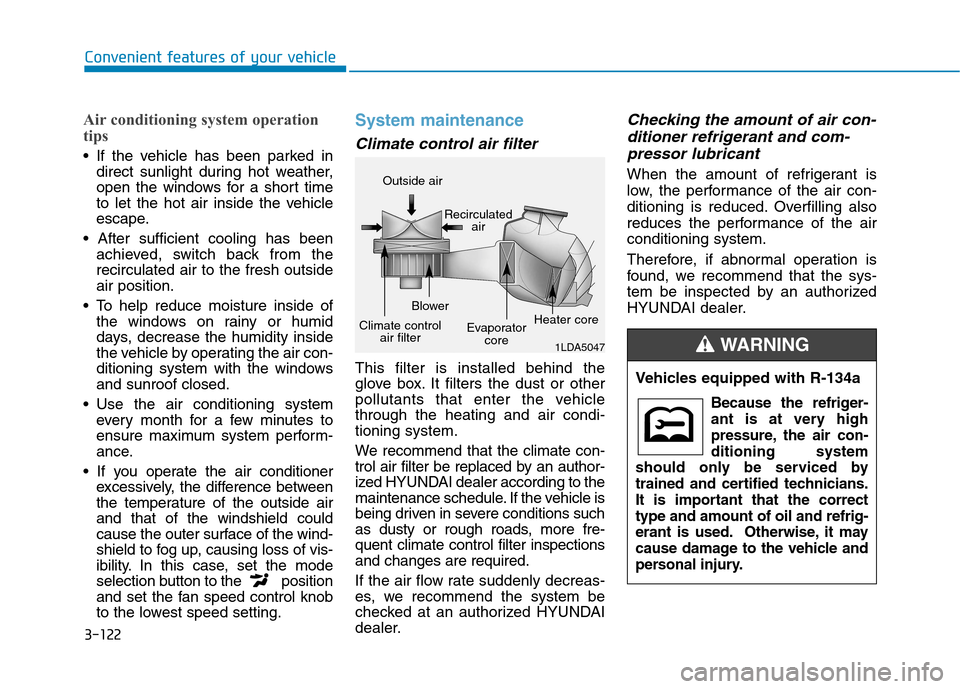
Climate control air filter
This filter is installed behind the
glove box. It filters the dust or other
pollutants that enter the vehiclethrough the heating and air condi-tioning system.
We recommend that the climate con-
trol air filter be replaced by an author-
ized HYUNDAI dealer according to the
maintenance schedule. If the vehicle is
being driven in severe conditions such
as dusty or rough roads, more fre-quent climate control filter inspectionsand changes are required.
If the air flow rate suddenly decreas-
es, we recommend the system be
checked at an authorized HYUNDAI
dealer.
Checking the amount of air con-
ditioner refrigerant and com-
pressor lubricant
When the amount of refrigerant is
low, the performance of the air con-
ditioning is reduced. Overfilling also
reduces the performance of the airconditioning system.
Therefore, if abnormal operation is
found, we recommend that the sys-
tem be inspected by an authorized
HYUNDAI dealer.
1LDA5047
Outside air
Recirculatedair
Climate control air filter Blower
Evaporatorcore Heater core
Vehicles equipped with R-134a
Because the refriger-
ant is at very high
pressure, the air con-ditioning system
should only be serviced by
trained and certified technicians.
It is important that the correcttype and amount of oil and refrig-
erant is used. Otherwise, it may
cause damage to the vehicle and
personal injury.
WARNING
Page 207 of 523
3-124
WWIINN DDSSHH IIEE LLDD DD EEFFRR OO SSTT IINN GG AA NN DD DD EEFFOO GGGGIINN GG
Convenient features of your vehicle
For maximum windshield defrost-
ing, set the temperature control
knob to the highest temperature
setting and the fan control knob to
the highest fan speed. Select the
front defrost button on the climate
control display. After the engine
warm-up period, warm air will bedirected to the front windshield.
If warm air to the floor is desired while defrosting or defogging, set themode to the floor-defrost position.
Before driving, clear all snow and ice from the windshield, rear win-
dow, outside rear view mirrors, and
all side windows.
Clear all snow and ice from the hood and air inlet in the cowl grill to
improve heater and defroster effi-ciency and to reduce the probability
of fogging up inside of the wind-shield.
Information
If the engine temperature is still cold
after starting, then a brief engine warm
up period may be required for the
vented air flow to become warm or hot.Manual climate control system
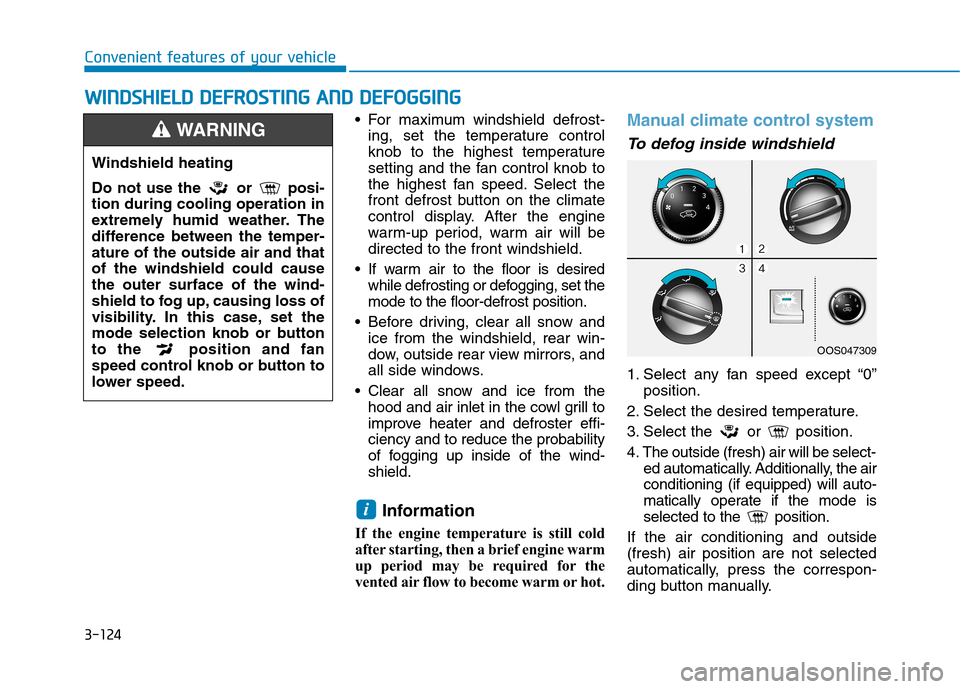
To defog inside windshield
1. Select any fan speed except “0” position.
2. Select the desired temperature.
3. Select the or position.
4. The outside (fresh) air will be select- ed automatically. Additionally, the air conditioning (if equipped) will auto-
matically operate if the mode is
selected to the position.
If the air conditioning and outside(fresh) air position are not selected
automatically, press the correspon-
ding button manually.
i
Windshield heating
Do not use the or posi- tion during cooling operation in
extremely humid weather. The
difference between the temper-ature of the outside air and thatof the windshield could causethe outer surface of the wind-
shield to fog up, causing loss of
visibility. In this case, set the
mode selection knob or button
to the position and fan
speed control knob or button to
lower speed.
WARNING
OOS047309
Page 210 of 523
3-127
Convenient features of your vehicle
Cluster ionizer (if equipped)
When the ignition switch is in the ON
position, the clean air function turns
on automatically.
Also, the clean air function turns off
automatically, when the ignition
switch is in the OFF position.
Automatic ventilation (if equipped)
To increase cabin air quality and reduce windscreen misting, air recir-
culation mode switches off automati-
cally after about 5 to 30 minutes,
depending on outside temperature,
and the air intake will change to out-
side (fresh) mode.
To cancel or set the automatic venti-
lation feature, select Face level modeand press the air recirculation
mode button for 3 seconds.
When the automatic ventilation is set, the air recirculation indicator will
blink 6 times. When canceled, the
indicator will blink 3 times.
Sunroof inside air recirculation (if equipped)
When the heater or air conditioning system is on with the sunroof opened,the outside (fresh) air position will be
automatically selected. At this time, if
you press the recirculated air position
button, the recirculated air position
will be selected but will change backto the outside (fresh) air position after
3 minutes. When the sunroof is closed, the air
intake position will return to the orig-
inal position that was selected.
CC LLIIMM AATTEE CC OO NNTTRR OO LL AA DDDDIITT IIOO NNAALL FF EE AA TTUU RREESS
3
Page 224 of 523
4-3
Multimedia System
4
Steering wheel audio controls (if equipped)
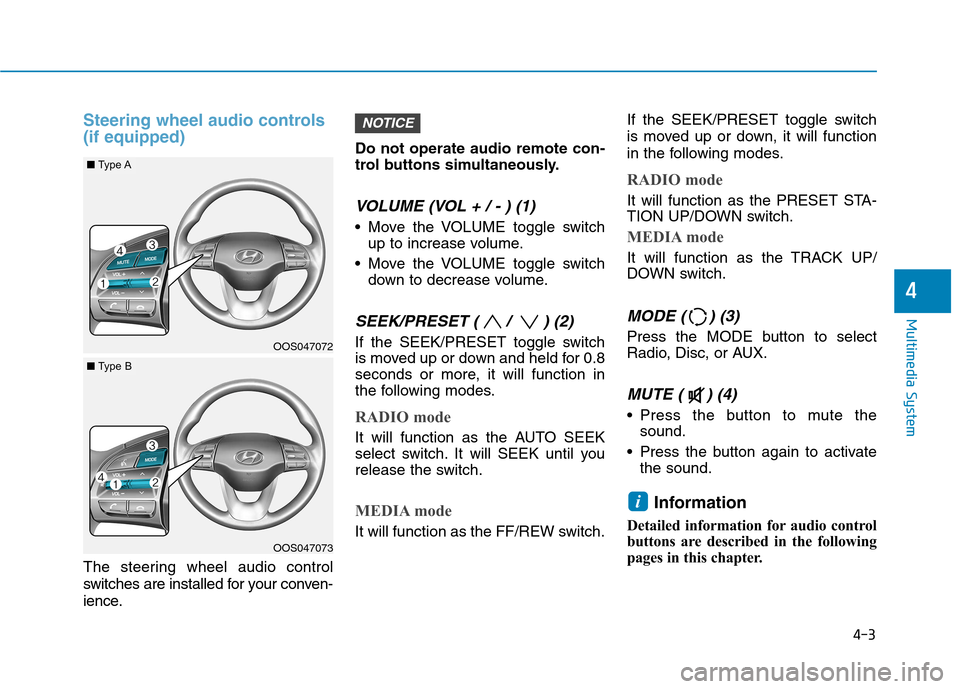
The steering wheel audio control
switches are installed for your conven-
ience.Do not operate audio remote con-
trol buttons simultaneously.
VOLUME (VOL + / - ) (1)
Move the VOLUME toggle switch
up to increase volume.
Move the VOLUME toggle switch down to decrease volume.
SEEK/PRESET ( / ) (2)
If the SEEK/PRESET toggle switch
is moved up or down and held for 0.8
seconds or more, it will function in
the following modes.
RADIO mode
It will function as the AUTO SEEK
select switch. It will SEEK until you
release the switch.
MEDIA mode
It will function as the FF/REW switch. If the SEEK/PRESET toggle switch
is moved up or down, it will function
in the following modes.
RADIO mode
It will function as the PRESET STA-
TION UP/DOWN switch.
MEDIA mode
It will function as the TRACK UP/
DOWN switch.
MODE ( ) (3)
Press the MODE button to select
Radio, Disc, or AUX.
MUTE ( ) (4)
Press the button to mute the
sound.
Press the button again to activate the sound.
Information
Detailed information for audio control
buttons are described in the following
pages in this chapter.
i
NOTICE
OOS047072
OOS047073
■ Type A
■Type B