trailer Hyundai Kona 2018 Owner's Manual
[x] Cancel search | Manufacturer: HYUNDAI, Model Year: 2018, Model line: Kona, Model: Hyundai Kona 2018Pages: 523, PDF Size: 33.6 MB
Page 9 of 523
This vehicle should not be modi-fied. Modification of your vehicle
could affect its performance, safety
or durability and may even violate
governmental safety and emis-
sions regulations.
In addition, damage or perform-
ance problems resulting from any
modification may not be covered
under warranty.
If you use unauthorized electronic devices, it may cause the vehicle to
operate abnormally, wire damage,
battery discharge and fire. For your
safety, do not use unauthorized
electronic devices. By following a few simple precautions
for the first 1,000 km (600 miles) you
may add to the performance, econo-
my and life of your vehicle.
Do not race the engine.
While driving, keep your engine
speed (rpm, or revolutions per
minute) between 2,000 rpm and
4,000 rpm.
Do not maintain a single speed for long periods of time, either fast or
slow. Varying engine speed is need-
ed to properly break-in the engine.
Avoid hard stops, except in emer- gencies, to allow the brakes to seat
properly.
Don't tow a trailer during the first 2,000 km (1,200 miles) of operation. HYUNDAI promotes an environmen-
tally sound treatment for end of life
vehicles and offers to take back your
HYUNDAI end of life vehicles inaccordance with the European Union
(EU) End of Life Vehicles Directive.
You can get detailed information
from your national HYUNDAI home-
page.
F9
Introduction
V
V EEHH IICC LLEE BB RREEAA KK--IINN
P
P RR OO CCEE SSSS
V
V
EEHH IICC LLEE MM OODDIIFF IICC AA TTIIOO NNSS RREETT UU RRNN IINN GG UU SSEE DD VV EEHH IICC LLEE SS
(
( FF OO RR EE UU RROO PPEE))
Page 256 of 523
5
Lane Keeping Assist (LKA) system ...................5-76LKA operation ..................................................................5-77
Warning light and message ..........................................5-81
Limitations of the System .............................................5-82
LKA system function change .......................................5-83
Driver attention warning (DAW) system ..........5-84 System setting and activation......................................5-84
Resetting the system .....................................................5-85
System standby ...............................................................5-86
System malfunction ........................................................5-86
Speed limit control system .................................5-88 Speed Limit Control operation .....................................5-88
Cruise control .......................................................5-90 Cruise Control operation ...............................................5-90
Special driving conditions ...................................5-96 Hazardous driving conditions.......................................5-96
Rocking the vehicle ........................................................5-96
Smooth cornering ...........................................................5-97
Driving at night ................................................................5-97
Driving in the rain ...........................................................5-97
Driving in flooded areas ................................................5-98
Highway driving ...............................................................5-98
Reducing the risk of a rollover ...................................5-99 Winter driving .....................................................5-100
Snow or icy conditions ................................................5-100
Winter Precautions .......................................................5-102
Trailer towing (for europe) ..............................5-104 If you decide to pull a trailer?...................................5-105
Trailer towing equipment ............................................5-108
Driving with a trailer ....................................................5-109
Maintenance when towing a trailer .........................5-112
Vehicle weight ....................................................5-113 Overloading ....................................................................5-113
Page 315 of 523

5-61
Driving your vehicle
5
- A trailer or carrier is installed. Touse the BCW system, remove the
trailer or carrier from your vehicle.
If any of these conditions occur, the
light on the BCW switch and the sys-
tem will turn off automatically.
When the BCW canceled warning
message is displayed in the cluster,
check to make sure that the rear
bumper is free from any dirt or snowin the areas where the sensor is
located. Remove any dirt, snow, or
foreign material that could interfere
with the radar sensors.
After any dirt or debris is removed,
the BCW system should operate nor-
mally after about 10 minutes of driv-
ing the vehicle.
If the system still does not operate
normally have your vehicle inspected
by an authorized HYUNDAI dealer.
Information
Turn off the system by pressing the
BCW switch and deselecting Rear
Cross-Traffic Collision warning
(RCCW) from the User Settings mode
on the cluster, when using a trailer or
carrier behind your vehicle.
Check Blind-Spot Collision
Warning (BCW) system
If there is a problem with the BCW
system, a warning message will
appear and the light on the switch
will turn off. The system will turn off
automatically. We recommend that
you have your vehicle inspected by
an authorized HYUNDAI dealer.
Limitations of the system
The driver must be cautious in the
below situations, because the sys-
tem may not detect other vehicles or
objects in certain circumstances.
When a trailer or carrier is installed.
The vehicle drives in inclement weather such as heavy rain or
snow.
The sensor is polluted with rain, snow, mud, etc.
The rear bumper where the sensor is located is covered with a foreign
object such as a bumper sticker, a
bumper guard, a bike rack, etc.
The rear bumper is damaged, or the sensor is out of the original
default position.
The vehicle height gets lower or higher due to heavy loading in the
luggage compartment, abnormal
tire pressure, etc.
When the temperature near the rear bumper area is high or low.
i
■Type A■Type B
OOS057078L/OOS057079L
Page 316 of 523
5-62
Driving your vehicle
When the sensors are blocked byother vehicles, walls or parking-lot
pillars.
The vehicle drives on a curved road or through a tollgate.
The vehicle is driven near areas containing metal substances such
as a construction zone, railroad,etc.
There is a fixed object near the vehicle, such as a guardrail, per-son, animal, etc.
While going down or up a steep road where the height of the lane is
different.
When driving through a narrow road with many trees or bushes.
When driving on wet surfaces.
When driving through a large area with few vehicles or structures
around, such as a desert, ruralarea, etc.
A big vehicle is near such as a bus or truck.
When other vehicles are close to your vehicle.
When the other vehicle approach- es very close. When the detected vehicle also
moves back, as your vehicle drives
back.
While changing lanes.
If the vehicle has started at the same time as the vehicle next to
you and has accelerated.
When the other vehicle passes at a very fast speed.
When the vehicle in the next lane moves two lanes away from you
OR when the vehicle two lanes
away moves to the next lane to
you.
The vehicle is turning left or right at a crossroads.
A motorcycle or bicycle is near.
A flat trailer is near.
If there are small objects in the detecting area such as a shopping
cart, a baby stroller or pedestrian.
If there is a low height vehicle such as a sports car.The BCW indicator on the outer
side view mirror may not illuminate
properly when:
The outside rearview mirror hous-ing is damaged.
The mirror is covered with dirt, snow, or debris.
The window is covered with dirt, snow, or debris.
The window is tinted.
Page 325 of 523
5-71
Driving your vehicle
5
Detecting vehicles
The sensor may be limited when:
The radar sensor or camera isblocked with a foreign object or
debris
The camera lens is contaminated due to tinted, filmed or coated
windshield, damaged glass, or
stuck of foreign matter (sticker,
bug, etc.) on the glass
Inclement weather such as heavy rain or snow obscures the field of
view of the radar sensor or camera
There is interference by electro- magnetic waves
There is severe irregular reflection from the radar sensor
The radar/camera sensor recogni- tion is limited
The vehicle in front is too small to be detected (for example a motor-
cycle or a bicycle, etc.)
The vehicle in front is an oversize vehicle or trailer that is too big to
be detected by the camera recog-
nition system (for example a tractor
trailer, etc.) The driver's field of view is not well
illuminated (either too dark or too
much reflection or too much back-
light that obscures the field of view)
The vehicle in front does not have their rear lights properly turned ON.
The outside brightness changes suddenly, for example when enter-
ing or exiting a tunnel
When light coming from a street light or an oncoming vehicle is
reflected on a wet road surfacesuch as a puddle in the road
The field of view in front is obstruct- ed by sun glare
The windshield glass is fogged up; a clear view of the road is obstruct-ed
The vehicle in front is driving errati- cally
The vehicle is on unpaved or uneven rough surfaces, or road
with sudden gradient changes.
The vehicle is driven near areas containing metal substances as a
construction zone, railroad, etc.
The vehicle drives inside a building, such as a basement parking lot The adverse road conditions cause
excessive vehicle vibrations while
driving
The sensor recognition changes suddenly when passing over a
speed bump
The vehicle in front is moving verti- cally to the driving direction
The vehicle in front is stopped ver- tically
The vehicle in front is driving towards your vehicle or reversing
You are on roundabouts and the vehicle in front circles
Page 331 of 523
5-77
Driving your vehicle
5
LKA operation
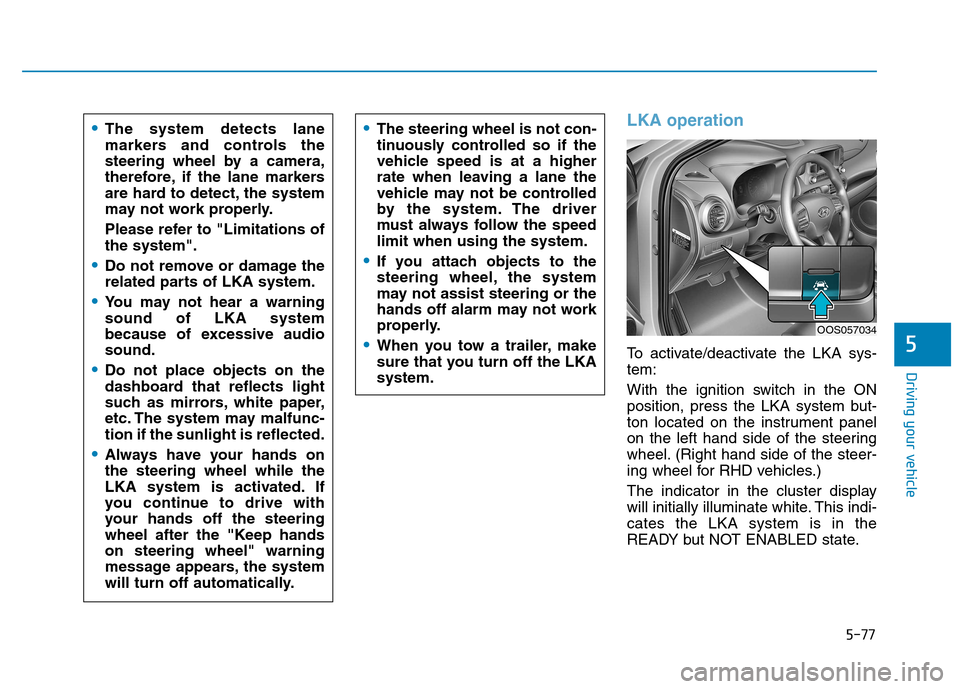
To activate/deactivate the LKA sys- tem:
With the ignition switch in the ON
position, press the LKA system but-
ton located on the instrument panel
on the left hand side of the steering
wheel. (Right hand side of the steer-
ing wheel for RHD vehicles.)
The indicator in the cluster display
will initially illuminate white. This indi-cates the LKA system is in the
READY but NOT ENABLED state.
The system detects lane
markers and controls the
steering wheel by a camera,
therefore, if the lane markers
are hard to detect, the system
may not work properly.
Please refer to "Limitations of the system".
Do not remove or damage the
related parts of LKA system.
You may not hear a warning sound of LKA system
because of excessive audiosound.
Do not place objects on the
dashboard that reflects light
such as mirrors, white paper,
etc. The system may malfunc-tion if the sunlight is reflected.
Always have your hands on the steering wheel while the
LKA system is activated. If
you continue to drive with
your hands off the steering
wheel after the "Keep handson steering wheel" warning
message appears, the system
will turn off automatically.
The steering wheel is not con-
tinuously controlled so if the
vehicle speed is at a higher
rate when leaving a lane the
vehicle may not be controlled
by the system. The driver
must always follow the speedlimit when using the system.
If you attach objects to the
steering wheel, the system
may not assist steering or the
hands off alarm may not work
properly.
When you tow a trailer, make
sure that you turn off the LKAsystem.
OOS057034
Page 344 of 523
5-90
Driving your vehicle
Cruise Control operation
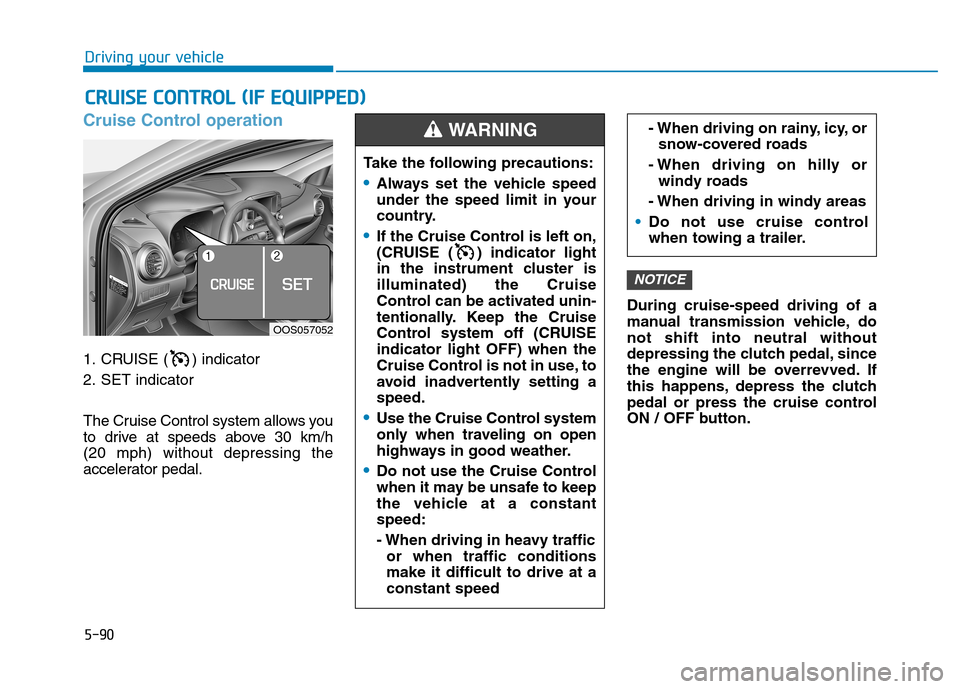
1. CRUISE ( ) indicator
2. SET indicator
The Cruise Control system allows you
to drive at speeds above 30 km/h (20 mph) without depressing the
accelerator pedal.During cruise-speed driving of a
manual transmission vehicle, donot shift into neutral without
depressing the clutch pedal, since
the engine will be overrevved. If
this happens, depress the clutch
pedal or press the cruise control
ON / OFF button.
NOTICE
CC
RR UU IISS EE CC OO NNTTRR OO LL (( IIFF EE QQ UUIIPP PP EEDD ))
Take the following precautions:
Always set the vehicle speed
under the speed limit in your
country.
If the Cruise Control is left on,
(CRUISE ( ) indicator light
in the instrument cluster isilluminated) the Cruise
Control can be activated unin-
tentionally. Keep the Cruise
Control system off (CRUISEindicator light OFF) when the
Cruise Control is not in use, to
avoid inadvertently setting aspeed.
Use the Cruise Control system
only when traveling on open
highways in good weather.
Do not use the Cruise Control
when it may be unsafe to keep
the vehicle at a constantspeed:
- When driving in heavy traffic
or when traffic conditions make it difficult to drive at aconstant speed
- When driving on rainy, icy, orsnow-covered roads
- When driving on hilly or windy roads
- When driving in windy areas
Do not use cruise control
when towing a trailer.
WARNING
OOS057052
Page 358 of 523
5-104
Driving your vehicle
If you are considering to tow with
your vehicle, you should first your
country's legal requirements. As laws
vary the requirements for towing trail-
ers, cars, or other types of vehicles
or apparatus may differ. Ask an
authorized HYUNDAI dealer for fur-
ther details before towing.
Remember that trailering is different
than just driving your vehicle by itself.
Trailering means changes in han-
dling, durability, and fuel economy.
Successful, safe trailering requirescorrect equipment, and it has to be
used properly. Damage to your vehi-
cle caused by improper trailer towing
is not covered by your vehicle manu-
facturer’s warranty.This section contains many time-
tested, important trailering tips and
safety rules. Many of these are
important for your safety and that of
your passengers. Please read this
section carefully before you pull a
trailer.
TT
RR AA IILL EE RR TT OO WW IINN GG (( FF OO RR EE UU RROO PPEE))
Take the following precautions:
If you don't use the correct
equipment and/or drive improp-
erly, you can lose control of the
vehicle when you are pulling a
trailer. For example, if the trailer
is too heavy, the braking per-
formance may be reduced. You
and your passengers could be
seriously or fatally injured. Pull
a trailer only if you have fol-
lowed all the steps in this sec-tion.
Before towing, make sure the
total trailer weight, GCW
(Gross Combination Weight),
GVW (Gross Vehicle Weight),
GAW (Gross Axle Weight) andtrailer tongue load are all with-in the limits.
When you tow a trailer, make sure to turn off the ISG sys-tem.
WARNING
Page 359 of 523
5-105
Driving your vehicle
5
Information - For Europe
The technically permissible maxi- mum load on the rear axle(s) may be
exceeded by not more than 15 %
and the technically permissible
maximum laden mass of the vehicle
may be exceeded by not more than
10% or 100 kg (220.4 lbs), whichev-
er value is lower. In this case, do not
exceed 100 km/h (62.1 mph) for
vehicle of category M1 or 80 km/h
(49.7 mph) for vehicle of category
N1.
When a vehicle of category M1 is towing a trailer, the additional load
imposed at the trailer coupling
device may cause the tire maximum
load ratings to be exceeded, but not
by more than 15%. In this case, do
not exceed 100 km/h (62.1 mph) and
increase the tire inflation pressure
by at least 0.2 bar.If you decide to pull a trailer?
Here are some important points if
you decide to pull a trailer:
Consider using a sway control. Youcan ask a trailer hitch dealer about
sway control.
Do not do any towing with your vehicle during its first 2,000 km
(1,200 miles) in order to allow the
engine to properly break in. Failure
to heed this caution may result in
serious engine or transmission
damage.
When towing a trailer, be sure to consult an authorized HYUNDAI
dealer for further information onadditional requirements such as a
towing kit, etc.
Always drive your vehicle at a mod- erate speed (less than 100 km/h
(60 mph)) or posted towing speedlimit. On a long uphill grade, do not
exceed 70 km/h (45 mph) or the
posted towing speed limit,
whichever is lower.
Carefully observe the weight and load limits provided in the following
pages.
i
Page 360 of 523
5-106
Driving your vehicle
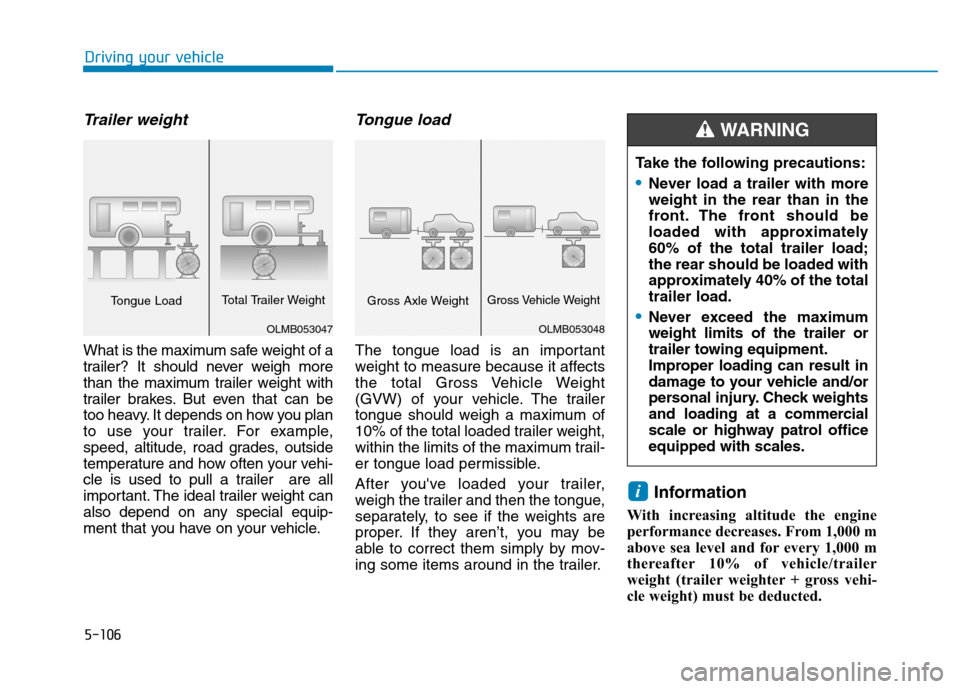
Trailer weight
What is the maximum safe weight of a
trailer? It should never weigh more
than the maximum trailer weight with
trailer brakes. But even that can be
too heavy. It depends on how you plan
to use your trailer. For example,
speed, altitude, road grades, outside
temperature and how often your vehi-
cle is used to pull a trailer are all
important. The ideal trailer weight can
also depend on any special equip-
ment that you have on your vehicle.
Tongue load
The tongue load is an important
weight to measure because it affects
the total Gross Vehicle Weight
(GVW) of your vehicle. The trailer
tongue should weigh a maximum of
10% of the total loaded trailer weight,
within the limits of the maximum trail-
er tongue load permissible.
After you've loaded your trailer,
weigh the trailer and then the tongue,
separately, to see if the weights are
proper. If they aren’t, you may be
able to correct them simply by mov-
ing some items around in the trailer.Information
With increasing altitude the engine
performance decreases. From 1,000 m
above sea level and for every 1,000 m
thereafter 10% of vehicle/trailer
weight (trailer weighter + gross vehi-
cle weight) must be deducted.
i
Take the following precautions:
Never load a trailer with more weight in the rear than in the
front. The front should be
loaded with approximately60% of the total trailer load;the rear should be loaded with
approximately 40% of the totaltrailer load.
Never exceed the maximum weight limits of the trailer or
trailer towing equipment.
Improper loading can result in
damage to your vehicle and/or
personal injury. Check weights
and loading at a commercial
scale or highway patrol officeequipped with scales.
WARNING
OLMB053048
Gross Axle WeightGross Vehicle Weight
OLMB053047
Tongue Load Total Trailer Weight