change time Hyundai Kona 2018 User Guide
[x] Cancel search | Manufacturer: HYUNDAI, Model Year: 2018, Model line: Kona, Model: Hyundai Kona 2018Pages: 523, PDF Size: 33.6 MB
Page 205 of 523
3-122
Convenient features of your vehicle
Air conditioning system operation
tips
If the vehicle has been parked indirect sunlight during hot weather,
open the windows for a short time
to let the hot air inside the vehicle
escape.
achieved, switch back from therecirculated air to the fresh outsideair position.
To help reduce moisture inside of the windows on rainy or humid
days, decrease the humidity inside
the vehicle by operating the air con-
ditioning system with the windowsand sunroof closed.
Use the air conditioning system every month for a few minutes to
ensure maximum system perform-
ance.
excessively, the difference between
the temperature of the outside airand that of the windshield could
cause the outer surface of the wind-
shield to fog up, causing loss of vis-
ibility. In this case, set the mode
selection button to the position
and set the fan speed control knob
to the lowest speed setting.
System maintenance
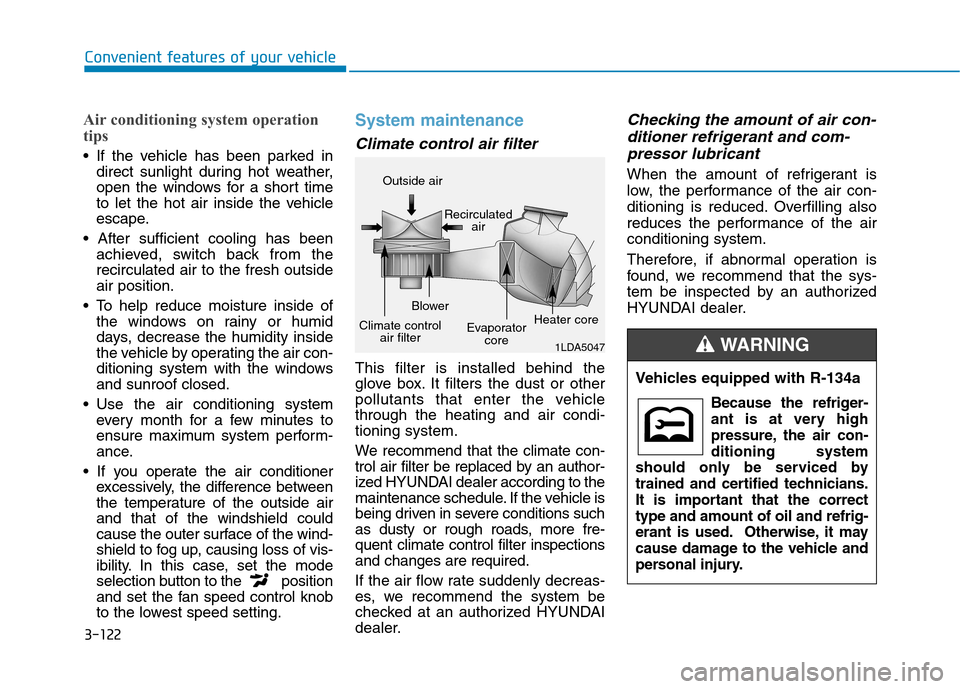
Climate control air filter
This filter is installed behind the
glove box. It filters the dust or other
pollutants that enter the vehiclethrough the heating and air condi-tioning system.
We recommend that the climate con-
trol air filter be replaced by an author-
ized HYUNDAI dealer according to the
maintenance schedule. If the vehicle is
being driven in severe conditions such
as dusty or rough roads, more fre-quent climate control filter inspectionsand changes are required.
If the air flow rate suddenly decreas-
es, we recommend the system be
checked at an authorized HYUNDAI
dealer.
Checking the amount of air con-
ditioner refrigerant and com-
pressor lubricant
When the amount of refrigerant is
low, the performance of the air con-
ditioning is reduced. Overfilling also
reduces the performance of the airconditioning system.
Therefore, if abnormal operation is
found, we recommend that the sys-
tem be inspected by an authorized
HYUNDAI dealer.
1LDA5047
Outside air
Recirculatedair
Climate control air filter Blower
Evaporatorcore Heater core
Vehicles equipped with R-134a
Because the refriger-
ant is at very high
pressure, the air con-ditioning system
should only be serviced by
trained and certified technicians.
It is important that the correcttype and amount of oil and refrig-
erant is used. Otherwise, it may
cause damage to the vehicle and
personal injury.
WARNING
Page 210 of 523
3-127
Convenient features of your vehicle
Cluster ionizer (if equipped)
When the ignition switch is in the ON
position, the clean air function turns
on automatically.
Also, the clean air function turns off
automatically, when the ignition
switch is in the OFF position.
Automatic ventilation (if equipped)
To increase cabin air quality and reduce windscreen misting, air recir-
culation mode switches off automati-
cally after about 5 to 30 minutes,
depending on outside temperature,
and the air intake will change to out-
side (fresh) mode.
To cancel or set the automatic venti-
lation feature, select Face level modeand press the air recirculation
mode button for 3 seconds.
When the automatic ventilation is set, the air recirculation indicator will
blink 6 times. When canceled, the
indicator will blink 3 times.
Sunroof inside air recirculation (if equipped)
When the heater or air conditioning system is on with the sunroof opened,the outside (fresh) air position will be
automatically selected. At this time, if
you press the recirculated air position
button, the recirculated air position
will be selected but will change backto the outside (fresh) air position after
3 minutes. When the sunroof is closed, the air
intake position will return to the orig-
inal position that was selected.
CC LLIIMM AATTEE CC OO NNTTRR OO LL AA DDDDIITT IIOO NNAALL FF EE AA TTUU RREESS
3
Page 229 of 523
4-8
Multimedia System
Feature of Your Audio
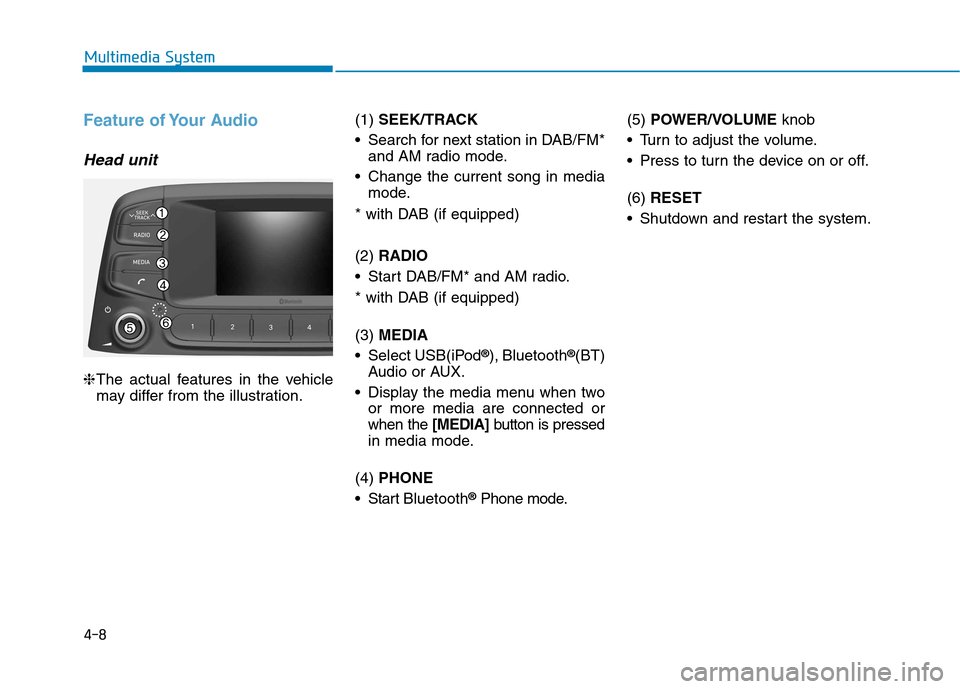
Head unit
❈The actual features in the vehicle
may differ from the illustration. (1)
SEEK/TRACK
Search for next station in DAB/FM* and AM radio mode.
Change the current song in media mode.
* with DAB (if equipped) (2) RADIO
Start DAB/FM* and AM radio.
* with DAB (if equipped) (3) MEDIA
Select USB(iPod ®
), Bluetooth ®
(BT)
Audio or AUX.
Display the media menu when two or more media are connected or when the [MEDIA]button is pressed
in media mode.
(4) PHONE
Start Bluetooth ®
Phone mode. (5)
POWER/VOLUME knob
Turn to adjust the volume.
Press to turn the device on or off. (6) RESET
Shutdown and restart the system.
Page 231 of 523
4-10
Multimedia System
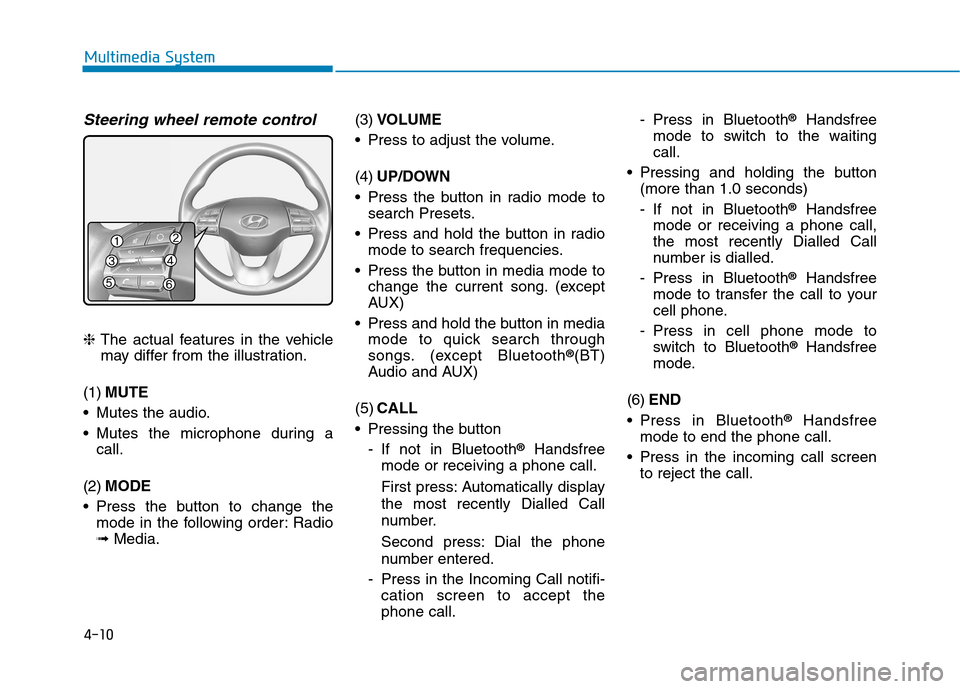
Steering wheel remote control
❈The actual features in the vehicle
may differ from the illustration.
(1) MUTE
Mutes the audio.
Mutes the microphone during a call.
(2) MODE
Press the button to change the mode in the following order: Radio ➟ Media. (3)
VOLUME
Press to adjust the volume. (4) UP/DOWN
Press the button in radio mode to search Presets.
Press and hold the button in radio mode to search frequencies.
Press the button in media mode to change the current song. (except
AUX)
Press and hold the button in media mode to quick search through
songs. (except Bluetooth ®
(BT)
Audio and AUX)
(5) CALL
Pressing the button
- If not in Bluetooth ®
Handsfree
mode or receiving a phone call.
First press: Automatically display
the most recently Dialled Call
number.
Second press: Dial the phone
number entered.
- Press in the Incoming Call notifi- cation screen to accept the phone call. - Press in Bluetooth
®
Handsfree
mode to switch to the waitingcall.
Pressing and holding the button (more than 1.0 seconds)
- If not in Bluetooth ®
Handsfree
mode or receiving a phone call,
the most recently Dialled Call
number is dialled.
- Press in Bluetooth ®
Handsfree
mode to transfer the call to your
cell phone.
- Press in cell phone mode to switch to Bluetooth ®
Handsfree
mode.
(6) END
Press in Bluetooth ®
Handsfree
mode to end the phone call.
Press in the incoming call screen to reject the call.
Page 234 of 523
![Hyundai Kona 2018 User Guide 4-13
Multimedia System
4
Radio
FM/AM (with RDS (if equipped))
Switching between FM and AM
Press the [RADIO]button on the
audio system to switch between FM and AM.
Searching stations
Press the [SEEK/](/img/35/16231/w960_16231-233.png "Hyundai Kona 2018 User Guide 4-13
Multimedia System
4
Radio
FM/AM (with RDS (if equipped))
Switching between FM and AM
Press the [RADIO]button on the
audio system to switch between FM and AM.
Searching stations
Press the [SEEK/")
4-13
Multimedia System
4
Radio
FM/AM (with RDS (if equipped))
Switching between FM and AM
Press the [RADIO]button on the
audio system to switch between FM and AM.
Searching stations
Press the [SEEK/TRACK] button to
search stations.
Presets
Save up to 36 frequently used sta-
tions.
1. Press and hold the desired slot from 1 through 36. This saves the current station in the selected slot.
If the slot is empty, simply press-
ing saves the station to the slot.
2. To save in slots numbered 7 or higher, press the [PRESET]but-
ton to move to the previous/next
page and save.
To listen to a preset station, pressthe desired station in the list.
Menu
Press the [MENU]button, and select
the desired function.
List: A list of all available stations in the current location of the vehicle is
displayed. Press the desired sta-tion.
Traffic Announcement (TA): Enable or disable Traffic Announcements.
Scan: All available stations are played for five seconds each.
Sound Settings: Audio sound set- tings can be changed.
DAB/FM (with DAB)
Switching between DAB/FM and AM
Press the [RADIO]button on the
audio system to switch between
DAB/FM and AM.
Searching stations
Press the [SEEK/TRACK] button to
search stations.
Page 235 of 523
4-14
Multimedia System
Presets
Save up to 36 frequently used sta-
tions.
1. Press and hold the desired slotfrom 1 through 36. This saves the current station in the selected slot.
If the slot is empty, simply press-
ing saves the station to the slot.
2. To save in slots numbered 7 or higher, press the [PRESET]but-
ton to move to the previous/next
page and save.
To listen to a preset station, pressthe desired station in the list.
Menu
Press the [MENU]button, and select
the desired function.
List: A list of all available stations in the current location of the vehicle is
displayed. Press the desired sta-tion.
Traffic Announcement (TA): Enable or disable Traffic Announcements.
Region : Enable or disable auto- matic switching between regional
stations.
Sound Settings: Audio sound set- tings can be changed.
Scan: All available stations are played for five seconds each.
Manual tune FM : Search for fre- quencies manually.
Media
Information - Using MP3
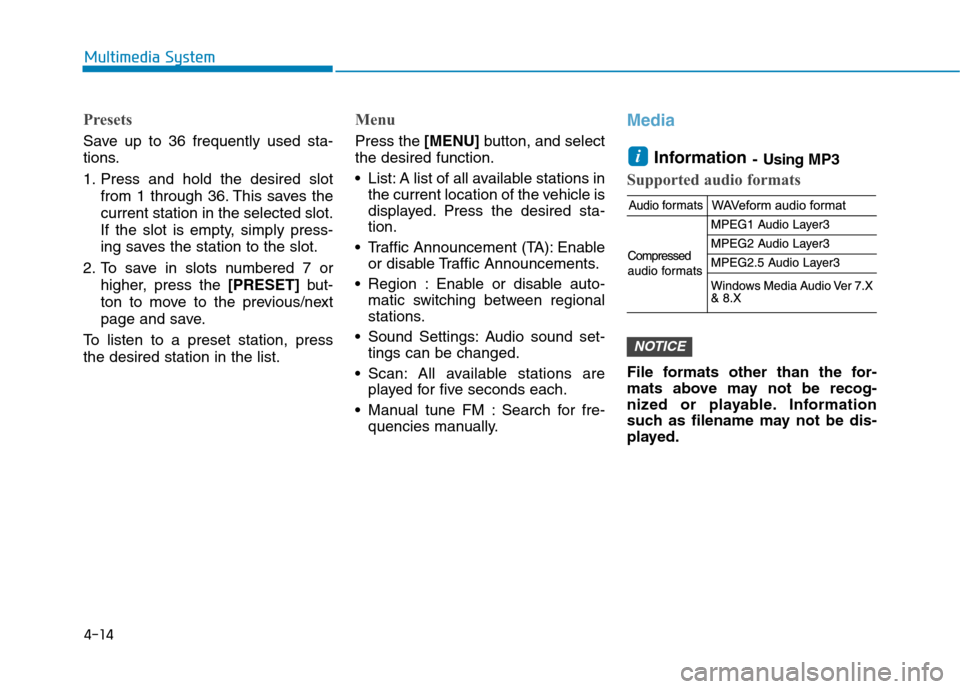
Supported audio formats
File formats other than the for-
mats above may not be recog-
nized or playable. Information
such as filename may not be dis-
played.
NOTICE
i
Page 239 of 523
![Hyundai Kona 2018 User Guide 4-18
Multimedia System
Repeat play
Select [Repeat] to enable or disable
‘Repeat all’, ‘Repeat current song’,
‘Repeat folder’ or ‘Repeat category’
play.
Repeat all: Repeat all songs.](/img/35/16231/w960_16231-238.png "Hyundai Kona 2018 User Guide 4-18
Multimedia System
Repeat play
Select [Repeat] to enable or disable
‘Repeat all’, ‘Repeat current song’,
‘Repeat folder’ or ‘Repeat category’
play.
Repeat all: Repeat all songs.")
4-18
Multimedia System
Repeat play
Select [Repeat] to enable or disable
‘Repeat all’, ‘Repeat current song’,
‘Repeat folder’ or ‘Repeat category’
play.
Repeat all: Repeat all songs.
Repeat current song: The cur-rently playing song is repeated.
Repeat folder: All songs in the current folder are repeated.
Repeat category: Repeat all songs in the current category.
Information
The repeat folder function is available
only when songs are playing from the
[File] category under [List].
Shuffle play
Select [Shuffle] to enable or disable
‘Shuffle’, ‘Shuffle folder’ or ‘Shuffle
category’ play.
Shuffle: Songs are played in random order.
Shuffle folder: Songs within the current folder are played in ran-
dom order.
Shuffle category: Songs within the current category are played in
random order.
Menu
Press the [MENU]button, and select
the desired function.
Information: Detailed information on the song that is currently play-
ing is displayed.
Sound Settings: Audio sound set- tings can be changed. Information
- Using the iPod
®
Devices
To use the audio system’s iPod ®
con-
trol function, use the dedicated
cable provided with your iPod ®
.
Connecting the iPod ®
to the vehicle
during play may result in a loud
noise that lasts about one to two sec-
onds. Connect the iPod ®
to the vehi-
cle after stopping or pausing play.
Connect the iPod ®
with the vehicle
in the ACC ON state to begin charg-
ing.
When connecting the iPod ®
cable,
be sure to fully push the cable into
the port.
When EQ effects are enabled simul- taneously on external devices, such
as iPod ®
s and the audio system, the
EQ effects may overlap, causing
sound quality deterioration or dis-
tortion. Deactivate the EQ function
for all external devices, if possible.
Noise may occur when your iPod ®
or the AUX port is connected.
Disconnect and store separately
when not in use.
i
i
Page 240 of 523
4-19
Multimedia System
4
There may be noise if the audio sys-tem is used with an iPod ®
or AUX
external device connected to the
power jack. In these cases, discon-
nect the iPod ®
or external device
from the power jack.
Play may be interrupted, or device malfunctions may occur depending
on the characteristics of your
iPod ®
/iPhone ®
.
Play may fail if your iPhone ®
is con-
nected through both Bluetooth ®
and
USB. In this case, select Dock con-
nector or Bluetooth ®
on your
iPhone ®
to change the sound output
settings.
If your software version does not support the communication proto-
col or your iPod ®
is not recognized
due to device failure, anomalies or
defects, iPod ®
mode cannot be used.
iPod ®
nano (5th generation) devices
may not be recognized if the battery
is low. Charge sufficiently before
use.
The search and song play order in the iPod ®
device may be different
from the search order in the audio
system. If the iPod
®
has failed due to an
internal defect, please reset the
iPod ®
(consult your iPod ®
manual).
Depending on the software version, the iPod ®
may fail to sync with the
system. If the media is removed or
disconnected before recognition, the
previous mode may not be restored
(iPad ®
cannot be charged).
Cables other than the 1-meter cable provided with iPod ®
/iPhone ®
prod-
ucts may not be recognized.
When other music apps are used on your iPod ®
, the system sync func-
tion may fail due to malfunction of
the iPod ®
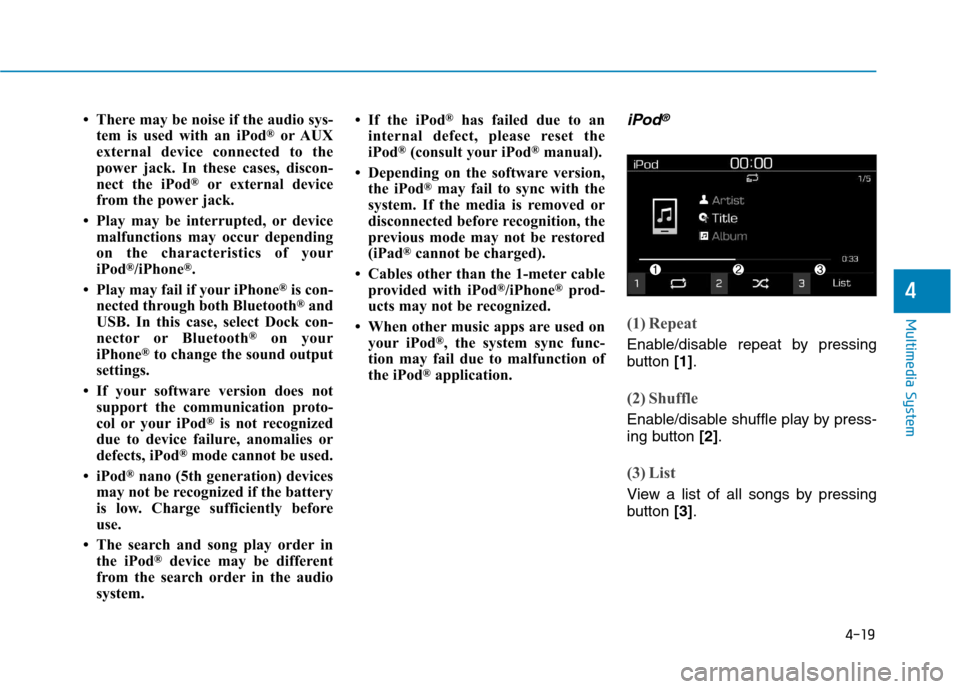
application.iPod®
(1) Repeat
Enable/disable repeat by pressing
button [1].
(2) Shuffle
Enable/disable shuffle play by press-
ing button [2].
(3) List
View a list of all songs by pressing
button [3].
Page 241 of 523
![Hyundai Kona 2018 User Guide 4-20
Multimedia System
Playback
Connect your iPod®
to the audio
USB port, press the [MEDIA]button,
and select [iPod].
Changing songs
Press the [SEEK/TRACK] button to
play the previous or next song.](/img/35/16231/w960_16231-240.png "Hyundai Kona 2018 User Guide 4-20
Multimedia System
Playback
Connect your iPod®
to the audio
USB port, press the [MEDIA]button,
and select [iPod].
Changing songs
Press the [SEEK/TRACK] button to
play the previous or next song.")
4-20
Multimedia System
Playback
Connect your iPod®
to the audio
USB port, press the [MEDIA]button,
and select [iPod].
Changing songs
Press the [SEEK/TRACK] button to
play the previous or next song. Press and hold the [SEEK/TRACK]
button to rewind or fast forward the
currently playing song.
Search songs by turning the TUNE
knob, and press the knob to play.
Selecting songs from a list
Select [List] to see a list of songs
available for play.
Select and play the desired song.
Repeat play
Select [Repeat] to enable or disable
‘Repeat category’, ‘Repeat current
song’ play.
Repeat category: Repeat all songs in the current category.
Repeat current song: The cur- rently playing song is repeated.
Shuffle play
Select [Shuffle] to enable or disable
‘Shuffle category’ play.
Shuffle category: Songs withinthe current category are played in
random order.
Menu
Press the [MENU]button, and select
the desired function.
Information: Detailed info on the currently playing song is displayed.
Sound Settings: Audio sound set- tings can be changed.
When other music programs are
running
When songs saved on your iPod ®
are playing through a separate music
app, the above screen is displayed.
(1) Play/Pause: Pause or play music by pressing button [1].
(2) iPod files: Play music files saved on your iPod ®
by pressing button
[2] .
(3) Sound Settings: Audio sound set- tings can be changed by pressing
button [3].
Page 243 of 523
![Hyundai Kona 2018 User Guide 4-22
Multimedia System
Bluetooth®(BT) Audio
(1) Repeat
Enable/disable repeat by pressing
button [1].
(2) Shuffle
Enable/disable shuffle play by press-
ing button [2].
(3) Play/Pause
Pause or play](/img/35/16231/w960_16231-242.png "Hyundai Kona 2018 User Guide 4-22
Multimedia System
Bluetooth®(BT) Audio
(1) Repeat
Enable/disable repeat by pressing
button [1].
(2) Shuffle
Enable/disable shuffle play by press-
ing button [2].
(3) Play/Pause
Pause or play")
4-22
Multimedia System
Bluetooth®(BT) Audio
(1) Repeat
Enable/disable repeat by pressing
button [1].
(2) Shuffle
Enable/disable shuffle play by press-
ing button [2].
(3) Play/Pause
Pause or play music by pressing but- ton [3].
Information
Some cell phones may not support this
function.
Playback
Press the [MEDIA]button, and
select [BT Audio].
Changing songs
Press the [SEEK/TRACK] button to
play the previous or next song.
Information
Some cell phones may not support this
function.
Repeat play
Select [Repeat] to enable or disable
‘Repeat all’, ‘Repeat current song’ or
‘Repeat category’ play.
Repeat all: Repeat all songs.
Repeat current song: The cur- rently playing song is repeated.
Repeat category: Repeat all songs in the current category.
Information
The repeat play function is engaged,
depending on the operation of the con-
nected Bluetooth ®
device.
Shuffle play
Select [Shuffle] to enable or disable
‘Shuffle’, ‘Shuffle category’ play.
Shuffle: Songs are played in
random order.
Shuffle category: Songs within the current category are played in
random order.
Information
The shuffle function is engaged,
depending on the operation of the con-
nected Bluetooth ®
device.
Menu
Press the [MENU]button, and select
the desired function.
Connections: The currently con- nected Bluetooth ®
device can be
changed.
Sound Settings: Audio sound set- tings can be changed.
i
i
i
i