head light Hyundai Kona 2018 User Guide
[x] Cancel search | Manufacturer: HYUNDAI, Model Year: 2018, Model line: Kona, Model: Hyundai Kona 2018Pages: 523, PDF Size: 33.6 MB
Page 137 of 523
3-54
Convenient features of your vehicle
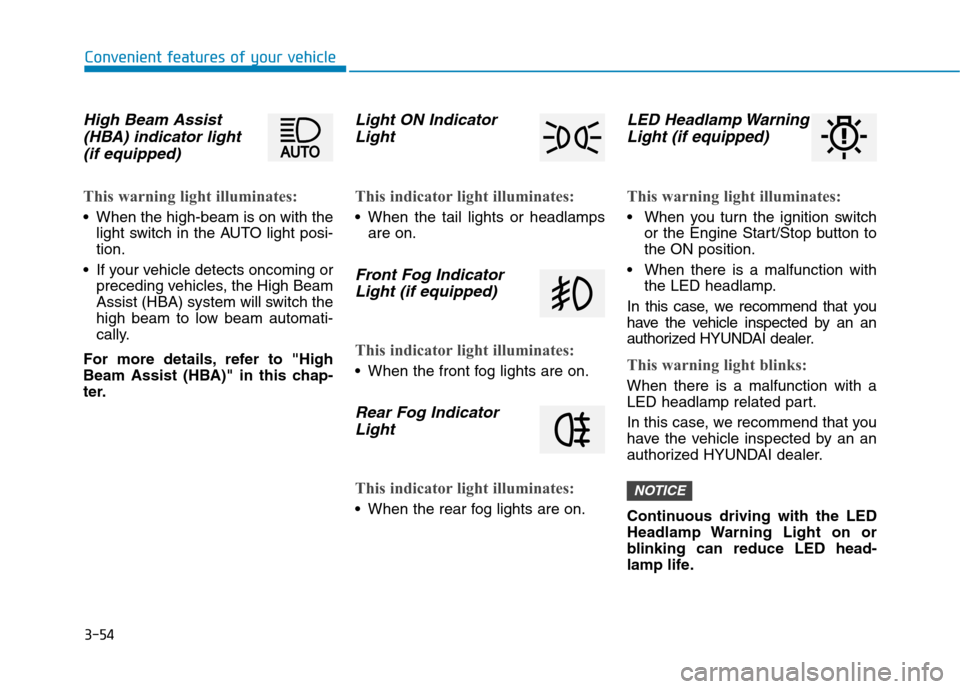
High Beam Assist(HBA) indicator light
(if equipped)
This warning light illuminates:
When the high-beam is on with the light switch in the AUTO light posi- tion.
If your vehicle detects oncoming or preceding vehicles, the High Beam
Assist (HBA) system will switch the
high beam to low beam automati-
cally.
For more details, refer to "High
Beam Assist (HBA)" in this chap-
ter.
Light ON Indicator Light
This indicator light illuminates:
When the tail lights or headlamps are on.
Front Fog Indicator
Light (if equipped)
This indicator light illuminates:
When the front fog lights are on.
Rear Fog IndicatorLight
This indicator light illuminates:
When the rear fog lights are on.
LED Headlamp WarningLight (if equipped)
This warning light illuminates:
When you turn the ignition switch or the Engine Start/Stop button to the ON position.
When there is a malfunction with the LED headlamp.
In this case, we recommend that you
have the vehicle inspected by an an
authorized HYUNDAI dealer.
This warning light blinks:
When there is a malfunction with a
LED headlamp related part.
In this case, we recommend that you
have the vehicle inspected by an an
authorized HYUNDAI dealer.
Continuous driving with the LED
Headlamp Warning Light on or
blinking can reduce LED head-
lamp life.
NOTICE
Page 145 of 523
3-62
Convenient features of your vehicle
Heated Steering Wheel turnedoff (if equipped)
This message is displayed if you turn
off the heated steering wheel.
For more details, refer to “Heated
Steering Wheel” in this chapter.
Low washer fluid (if equipped)
This warning message is displayed
if the washer fluid level in the reser-
voir is nearly empty.
Have the washer fluid reservoir refilled.
Low fuel
This warning message is displayed ifthe fuel tank is almost out of fuel.
When this message is displayed, the
low fuel level warning light in thecluster will come on.
It is recommended to look for the nearest fueling station and refuel as
soon as possible.
Add fuel as soon as possible.
Engine has overheated (if equipped)
This warning message is displayed
when the engine coolant tempera-
ture is above 120°C (248°F). This
means that the engine is overheated
and may be damaged.
If your vehicle is overheated, refer
to “Overheating” in chapter 6.
Check headlight (if equipped)
This warning message is displayed if
the headlamps are not operating
properly. A headlamp bulb may needto be replaced.
Information
Make sure to replace the burned out
bulb with a new one of the same wattage
rating.
Check High Beam Assist (HBA) system (if equipped)
This warning message is displayed if
there is a problem with the High
Beam Assist (HBA) System. We rec-
ommend that you have the vehicle
inspected by an authorized
HYUNDAI dealer.
For more information, refer to
“High Beam Assist (HBA) System”
in chapter 3.
i
Page 151 of 523
3-68
Convenient features of your vehicle
User settings mode
In this mode, you can change the
settings of the instrument cluster,
doors, lamps, etc.
1. Head-up display (if equipped)
2. Driver Assistance
3. Door
4. Lights
5. Sound
6. Convenience
7. Service interval
8. Other Features
9. Languages
10. Reset
The information provided may dif-
fer depending on which functions
are applicable to your vehicle.
1. Head Up display (if equipped)
Display Height- Adjust the height of the HUDimage on the display.
Rotation - Adjust the angle of the image. Brightness
- Adjust the intensity of the HUDillumination.
Content Select - Tu r n b y Tu r n
- Traffic information
- Cruise control
- Lane keeping assist (LKA) sys-tem
- Blind-spot Collision Warning (BCW) system
Speedometer Size - Choose the speedometer fontsize of the HUD. (Large, Medium, Small)
Speedometer Color - Choose the speedometer fontcolor of the HUD. (White, Orange,Green) 2. Driver Assistance
Driver Attention Warning (DAW)
system
- Off/Normal Sensitivity/ High Sensitivity
To adjust the sensitivity of the Driver
Attention Warning (DAW).
For more information, refer to the
"Driver Attention Warning (DAW)
system " in chapter 5.
Lane Safety - Lane Departure Warning - Standard LKA
- Active LKA
To adjust the Lane Keeping Assist (LKA) function.
For more information, refer to the
"Lane Keeping Assist (LKA) sys-
tem " in chapter 5.
Forward Collision-Avoidance Assist
To activate or deactivate the Forward
Collision-Avoidance Assist (FCA).
For more information, refer to the
"Forward Collision-Avoidance
Assist (FCA) system" in chapter 5.
Page 153 of 523
3-70
Convenient features of your vehicle
4. Lights
- Off: The one touch turn signal func-tion will be deactivated.
- 3, 5, 7 Flashes: The turn signal indi- cator will blink 3, 5, or 7 times when
the turn signal lever is moved slightly.
For more information, refer to
"Light" in this chapter.
To activate or deactivate the head-
lamp delay function.
For more information, refer to
"Light" in this chapter 5. Sound
- Softer/Louder
To adjust the Park Assist System
volume.
To activate or deactivate the wel- come sound.
6. Convenience
Welcome mirror
To activate or deactivate the wel- come mirror function. When all the doors (and tailgate) are
closed and locked, the outside mirror
will unfold if any of the below is per-
formed.
- When the door unlock button is pressed on the remote key or
smart key.
- When the button of the outside door handle is pressed with the
smart key in possession.
To activate or deactivate the Wiper/
Light mode.
When activated, the LCD display
shows the selected Wiper/Light
mode whenever you changed the
mode.
Auto Rear Wiper (reverse)
To activate or deactivate the rear
wiper while the vehicle is in reversewith the front wiper ON.
Gear Position Pop-up
To activate or deactivate the gear
position pop-up.
When activated, the gear position
will be displayed on the LCD display.
(if equipped with dual clutch trans-mission)
Icy Road Warning
To activate or deactivate the Icy
Road Warning function.
Page 163 of 523
3-80
HHEEAA DD UU PP DD IISS PP LLAA YY (( HH UU DD)) (( IIFF EE QQ UUIIPP PPEEDD ))
Convenient features of your vehicle
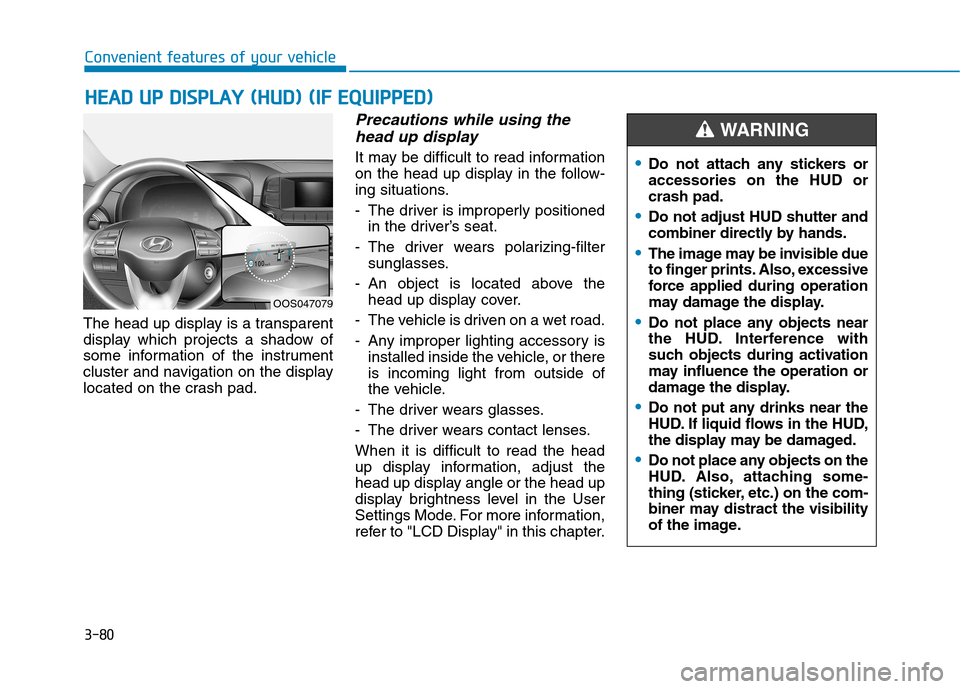
The head up display is a transparent
display which projects a shadow of
some information of the instrument
cluster and navigation on the display
located on the crash pad.
Precautions while using the
head up display
It may be difficult to read information
on the head up display in the follow-
ing situations.
- The driver is improperly positioned in the driver’s seat.
- The driver wears polarizing-filter sunglasses.
- An object is located above the head up display cover.
- The vehicle is driven on a wet road.
- Any improper lighting accessory is installed inside the vehicle, or there is incoming light from outside of
the vehicle.
- The driver wears glasses.
- The driver wears contact lenses.When it is difficult to read the head
up display information, adjust the
head up display angle or the head up
display brightness level in the User
Settings Mode. For more information,
refer to "LCD Display" in this chapter.
OOS047079
Do not attach any stickers or accessories on the HUD orcrash pad.
Do not adjust HUD shutter and
combiner directly by hands.
The image may be invisible due
to finger prints. Also, excessive
force applied during operation
may damage the display.
Do not place any objects near
the HUD. Interference with
such objects during activation
may influence the operation or
damage the display.
Do not put any drinks near the
HUD. If liquid flows in the HUD,
the display may be damaged.
Do not place any objects on the
HUD. Also, attaching some-
thing (sticker, etc.) on the com-
biner may distract the visibility
of the image.
WARNING
Page 165 of 523
3-82
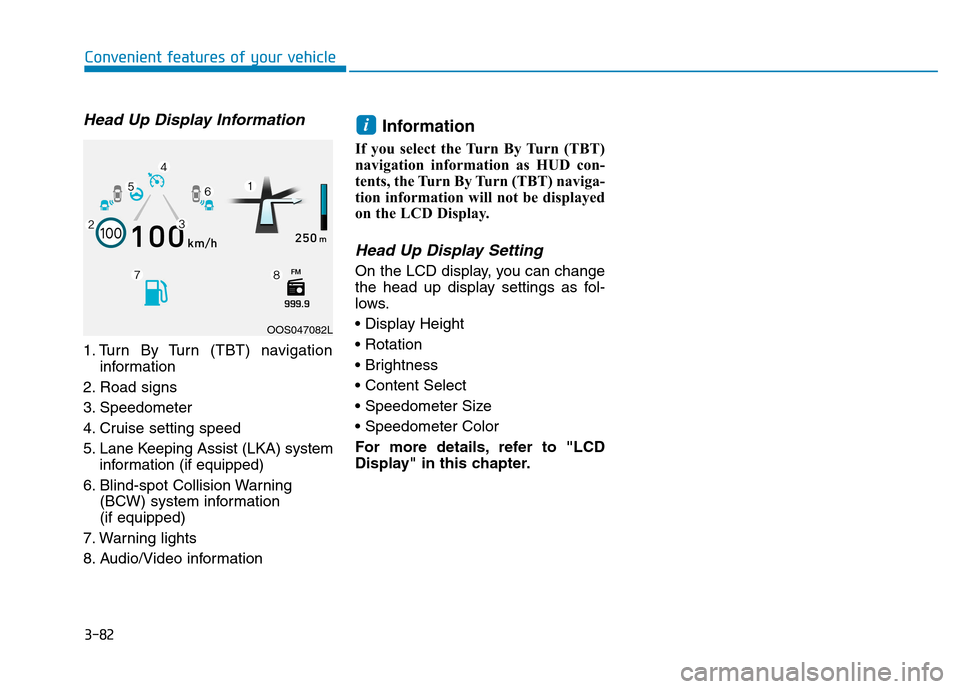
Head Up Display Information
1. Turn By Turn (TBT) navigationinformation
2. Road signs
3. Speedometer
4. Cruise setting speed
5. Lane Keeping Assist (LKA) system information (if equipped)
6. Blind-spot Collision Warning (BCW) system information (if equipped)
7. Warning lights
8. Audio/Video information Information
If you select the Turn By Turn (TBT)
navigation information as HUD con-
tents, the Turn By Turn (TBT) naviga-
tion information will not be displayed
on the LCD Display.
Head Up Display Setting
On the LCD display, you can change
the head up display settings as fol-
lows.
For more details, refer to "LCD
Display" in this chapter.
i
Convenient features of your vehicle
OOS047082L
Page 166 of 523
3-83
Convenient features of your vehicle
3
Exterior lights
Lighting control
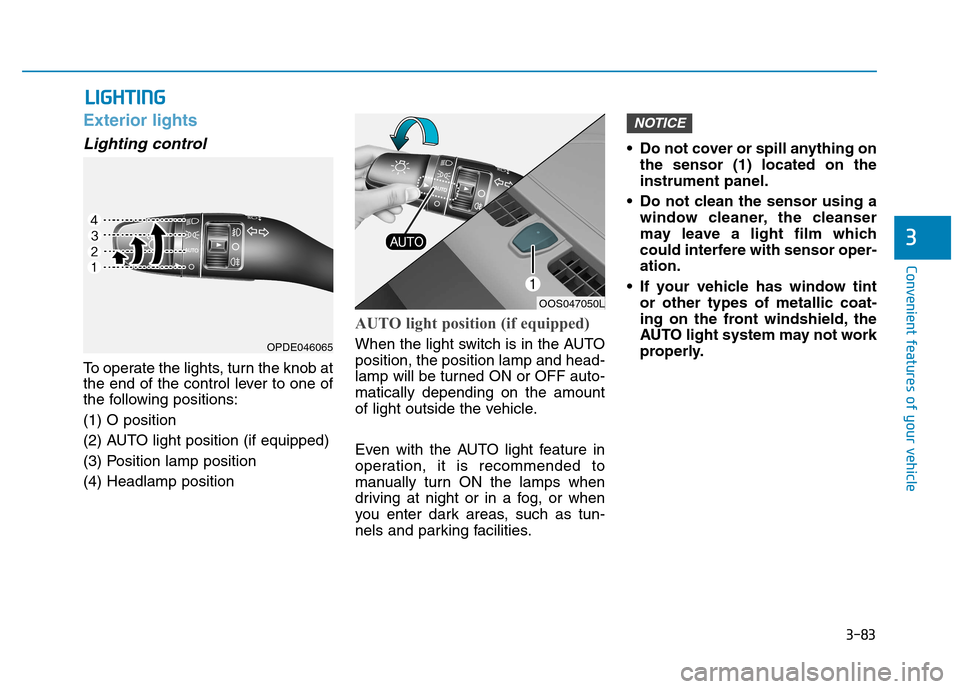
To operate the lights, turn the knob at
the end of the control lever to one of
the following positions: (1) O position
(2) AUTO light position (if equipped)
(3) Position lamp position(4) Headlamp position
AUTO light position (if equipped)
When the light switch is in the AUTO position, the position lamp and head-
lamp will be turned ON or OFF auto-matically depending on the amount
of light outside the vehicle.
Even with the AUTO light feature in
operation, it is recommended to
manually turn ON the lamps when
driving at night or in a fog, or when
you enter dark areas, such as tun-
nels and parking facilities.• Do not cover or spill anything on
the sensor (1) located on theinstrument panel.
Do not clean the sensor using a window cleaner, the cleanser
may leave a light film which
could interfere with sensor oper-ation.
If your vehicle has window tint or other types of metallic coat-
ing on the front windshield, the
AUTO light system may not work
properly.
NOTICE
LLIIGG HH TTIINN GG
OOS047050L
OPDE046065
Page 167 of 523
3-84
Convenient features of your vehicle
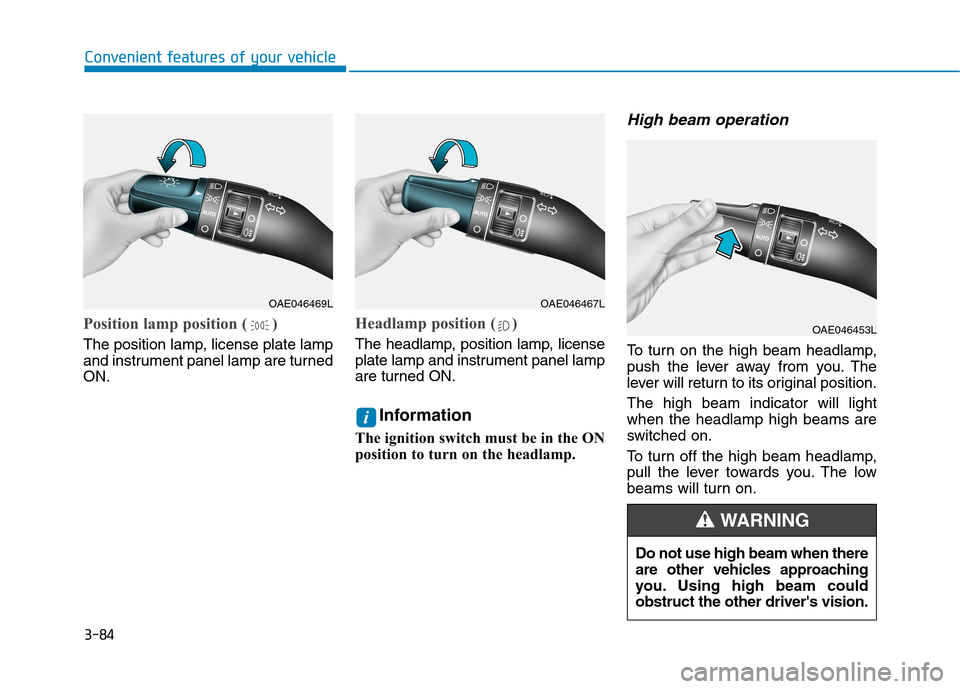
Position lamp position ( )
The position lamp, license plate lamp
and instrument panel lamp are turnedON.
Headlamp position ( )
The headlamp, position lamp, license
plate lamp and instrument panel lamp
are turned ON.Information
The ignition switch must be in the ON
position to turn on the headlamp.
High beam operation
To turn on the high beam headlamp,
push the lever away from you. The
lever will return to its original position. The high beam indicator will light when the headlamp high beams are
switched on.
To turn off the high beam headlamp,
pull the lever towards you. The low
beams will turn on.
i
OAE046469LOAE046467L
OAE046453L
Do not use high beam when there
are other vehicles approaching
you. Using high beam couldobstruct the other driver's vision.
WARNING
Page 168 of 523
3-85
Convenient features of your vehicle
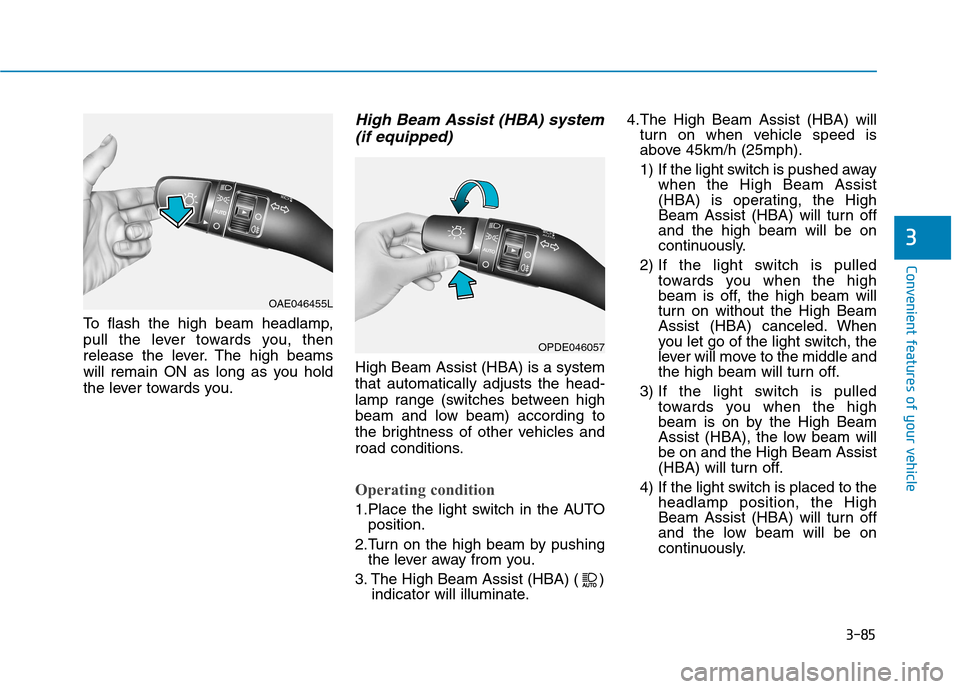
To flash the high beam headlamp,
pull the lever towards you, then
release the lever. The high beams
will remain ON as long as you hold
the lever towards you.
High Beam Assist (HBA) system(if equipped)
High Beam Assist (HBA) is a systemthat automatically adjusts the head-
lamp range (switches between high
beam and low beam) according to
the brightness of other vehicles and
road conditions.
Operating condition
1.Place the light switch in the AUTO position.
2.Turn on the high beam by pushing the lever away from you.
3. The High Beam Assist (HBA) ( ) indicator will illuminate. 4.The High Beam Assist (HBA) will
turn on when vehicle speed is
above 45km/h (25mph).
1) If the light switch is pushed away when the High Beam Assist
(HBA) is operating, the High
Beam Assist (HBA) will turn offand the high beam will be on
continuously.
2) If the light switch is pulled towards you when the high
beam is off, the high beam will
turn on without the High Beam
Assist (HBA) canceled. When
you let go of the light switch, the
lever will move to the middle and
the high beam will turn off.
3) If the light switch is pulled towards you when the high
beam is on by the High Beam
Assist (HBA), the low beam willbe on and the High Beam Assist
(HBA) will turn off.
4) If the light switch is placed to the headlamp position, the High
Beam Assist (HBA) will turn off
and the low beam will be on
continuously.
3
OAE046455L
OPDE046057
Page 169 of 523
3-86
When the High Beam Assist (HBA) is
operating, the high beam switches to
low beam in the below conditions.
- When the headlamp of an on-com-
ing vehicle is detected.
- When the tail lamp of a vehicle in front is detected.
- When headlamp/tail lamp of bicy- cle/motorcycle is detected.
- When the surrounding is bright enough high beams are not needed.
- When streetlights or other lights are detected.
- When the light switch is not in the AUTO position.
- When the High Beam Assist (HBA) is off.
- When vehicle speed is below 35 km/h (22mph).
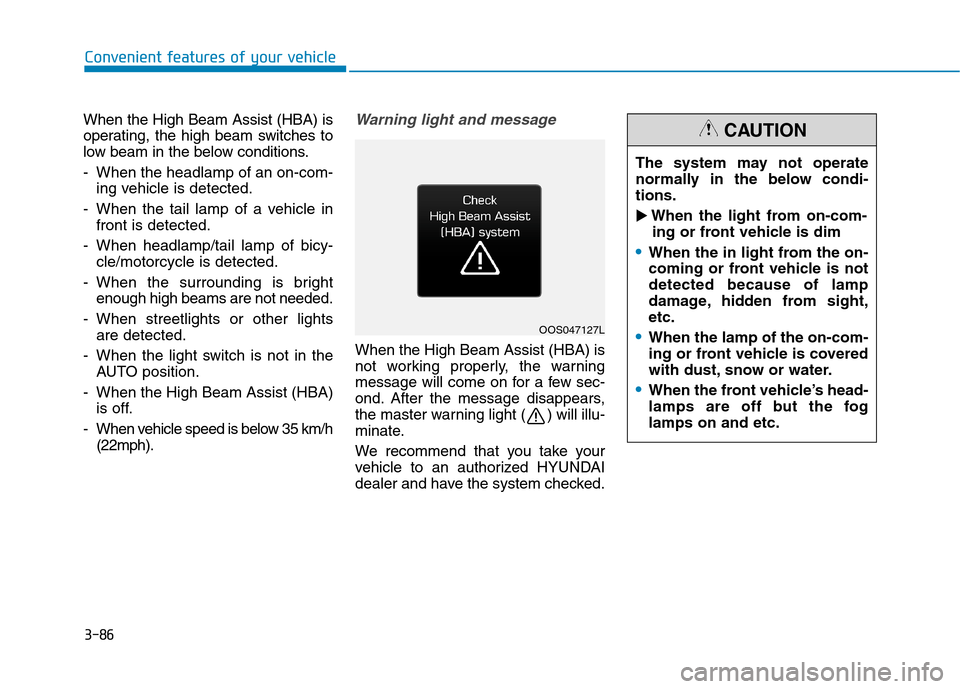
Warning light and message
When the High Beam Assist (HBA) is
not working properly, the warning
message will come on for a few sec-
ond. After the message disappears,
the master warning light ( ) will illu-
minate.
We recommend that you take your
vehicle to an authorized HYUNDAI
dealer and have the system checked.
Convenient features of your vehicle
OOS047127L The system may not operate
normally in the below condi-tions.
When the light from on-com-
ing or front vehicle is dim
When the in light from the on-
coming or front vehicle is notdetected because of lamp
damage, hidden from sight,etc.
When the lamp of the on-com-
ing or front vehicle is covered
with dust, snow or water.
When the front vehicle’s head-
lamps are off but the foglamps on and etc.
CAUTION