headlamp Hyundai Kona 2018 User Guide
[x] Cancel search | Manufacturer: HYUNDAI, Model Year: 2018, Model line: Kona, Model: Hyundai Kona 2018Pages: 523, PDF Size: 33.6 MB
Page 172 of 523
3-89
Convenient features of your vehicle
3
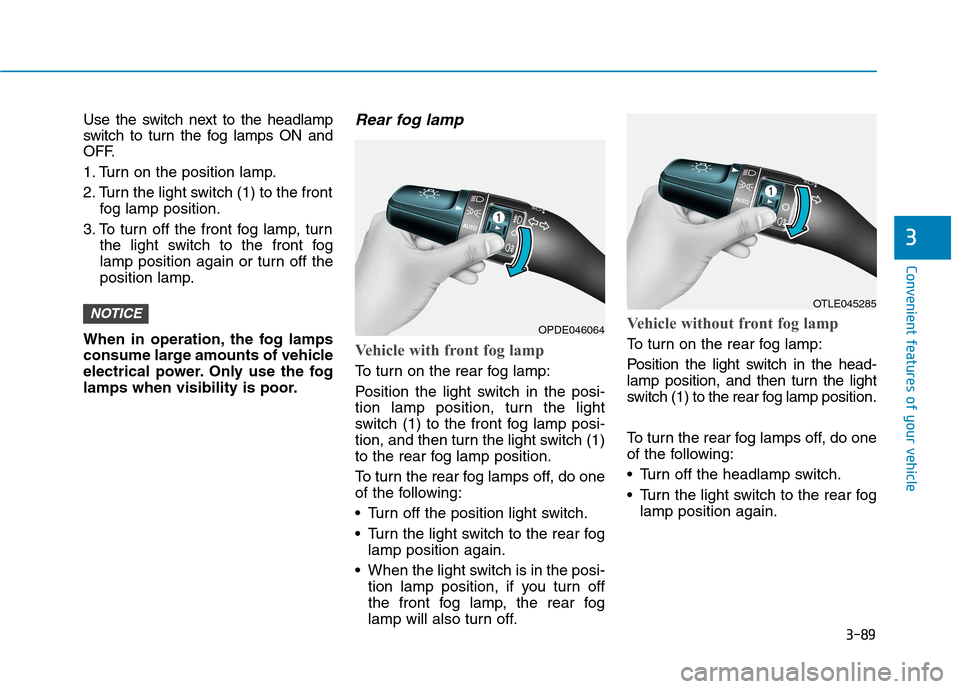
Use the switch next to the headlamp
switch to turn the fog lamps ON and
OFF.
1. Turn on the position lamp.
2. Turn the light switch (1) to the frontfog lamp position.
3. To turn off the front fog lamp, turn the light switch to the front fog
lamp position again or turn off the
position lamp.
When in operation, the fog lamps
consume large amounts of vehicle
electrical power. Only use the fog
lamps when visibility is poor.Rear fog lamp
Vehicle with front fog lamp
To turn on the rear fog lamp:
Position the light switch in the posi-
tion lamp position, turn the light
switch (1) to the front fog lamp posi-
tion, and then turn the light switch (1)
to the rear fog lamp position.
To turn the rear fog lamps off, do one
of the following:
• Turn off the position light switch.
Turn the light switch to the rear fog lamp position again.
When the light switch is in the posi- tion lamp position, if you turn off
the front fog lamp, the rear fog
lamp will also turn off.
Vehicle without front fog lamp
To turn on the rear fog lamp:
Position the light switch in the head-
lamp position, and then turn the light
switch (1) to the rear fog lamp position.
To turn the rear fog lamps off, do one
of the following:
Turn off the headlamp switch.
Turn the light switch to the rear foglamp position again.
NOTICEOTLE045285
OPDE046064
Page 173 of 523
3-90
Convenient features of your vehicle
Battery saver function
The purpose of this feature is to pre-
vent the battery from being dis-
charged. The system automatically
turns off the position lamp when the
driver turns the engine off and opens
the driver-side door.
With this feature, the position lamps
will turn off automatically if the driver
parks on the side of road at night.
If necessary, to keep the lamps on
when the engine is turned off, perform
the following:
1) Open the driver-side door.
2) Turn the position lamps OFF andON again using the light switch on
the steering column.
Headlamp delay function
(if equipped)
If you place the ignition switch to the
ACC or OFF position with the head-lamps ON, the headlamps (and/or
position lamps) remain on for about 5
minutes. However, with the engine off if
the driver’s door is opened and closed,the headlamps (and/or position lamps)
are turned off after 15 seconds. The headlamps (and/or position
lamps) can be turned off by pressing
the lock button on the remote key or
smart key twice or turning the light
switch to the OFF or AUTO position.
However, if you turn the light switch
to the AUTO position when it is dark
outside, the headlamps will not be
turned off.
You can activate or deactivate the
Headlamp Delay function from theUser Settings mode on the LCD dis-
play. For more details, refer to
"LCD Display" in this chapter. If the driver gets out of the vehicle
through other doors (except dri-
ver's door), the battery saver func-tion does not operate and the
headlamp delay function does not
turn off automatically. Therefore, It
causes the battery to be dis-
charged. In this case, make sure to
turn off the lamp before getting out
of the vehicle.
NOTICE
Page 174 of 523
3-91
Convenient features of your vehicle
3
Daytime running light (DRL) (if equipped)
The Daytime Running Lights (DRL)
can make it easier for others to see
the front of your vehicle during the
day, especially after dawn and beforesunset.
The DRL system will turn the dedi- cated lamp OFF when:
1. The headlamps or front fog lights are in the ON position.
2. The position light switch is in the ON position.
3. The engine is turned off.
Headlamp leveling device (if equipped)
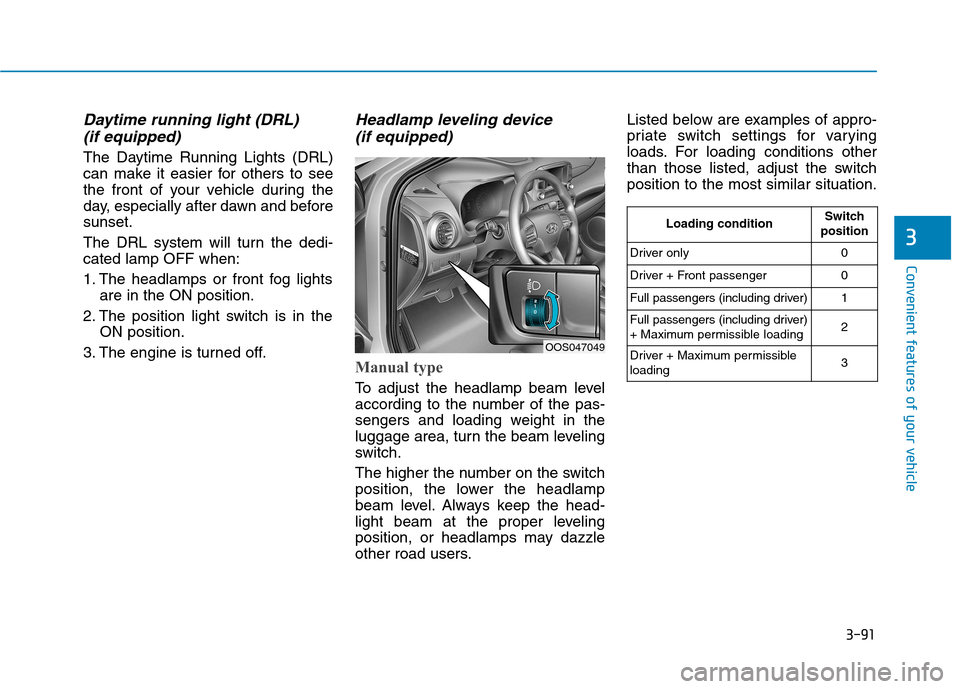
Manual type
To adjust the headlamp beam level
according to the number of the pas-
sengers and loading weight in the
luggage area, turn the beam leveling
switch.
The higher the number on the switch
position, the lower the headlamp
beam level. Always keep the head-
light beam at the proper leveling
position, or headlamps may dazzle
other road users. Listed below are examples of appro-
priate switch settings for varying
loads. For loading conditions other
than those listed, adjust the switchposition to the most similar situation.
OOS047049
Loading conditionSwitch
position
Driver only0
Driver + Front passenger0
Full passengers (including driver)1
Full passengers (including driver)
+ Maximum permissible loading2
Driver + Maximum permissible loading 3
Page 180 of 523
3-97
Convenient features of your vehicle
3
Windshield washers
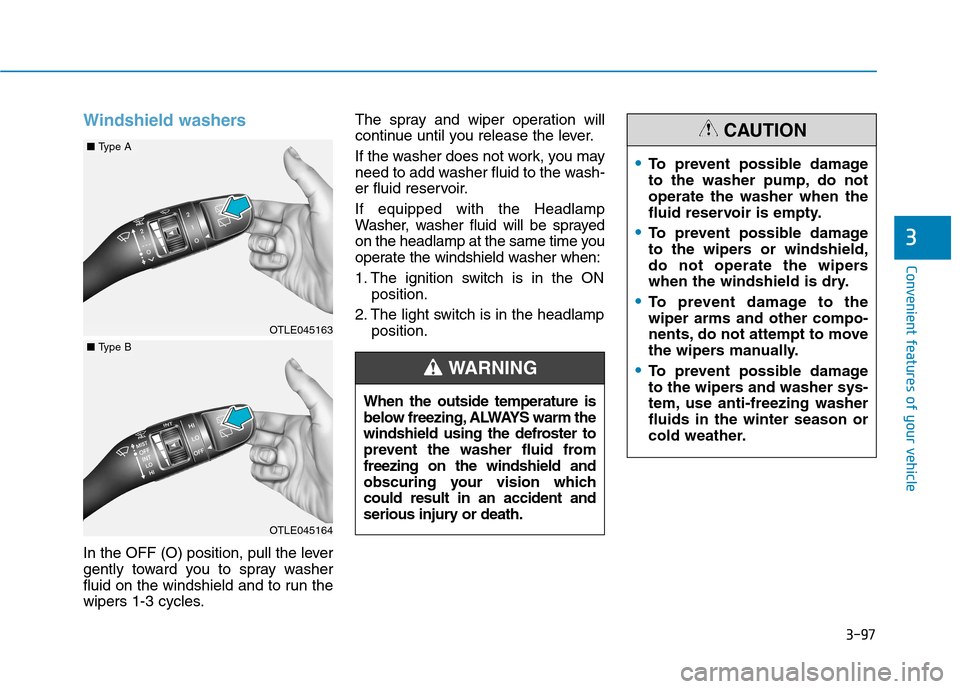
In the OFF (O) position, pull the lever
gently toward you to spray washer
fluid on the windshield and to run the
wipers 1-3 cycles.The spray and wiper operation will
continue until you release the lever.
If the washer does not work, you may
need to add washer fluid to the wash-
er fluid reservoir. If equipped with the Headlamp
Washer, washer fluid will be sprayed
on the headlamp at the same time you
operate the windshield washer when:
1. The ignition switch is in the ON
position.
2. The light switch is in the headlamp position.
When the outside temperature is
below freezing, ALWAYS warm the
windshield using the defroster to
prevent the washer fluid fromfreezing on the windshield and
obscuring your vision whichcould result in an accident and
serious injury or death.
WARNING
To prevent possible damage
to the washer pump, do notoperate the washer when the
fluid reservoir is empty.
To prevent possible damage
to the wipers or windshield,
do not operate the wipers
when the windshield is dry.
To prevent damage to the wiper arms and other compo-
nents, do not attempt to move
the wipers manually.
To prevent possible damage
to the wipers and washer sys-
tem, use anti-freezing washerfluids in the winter season or
cold weather.
CAUTION
OTLE045163
OTLE045164
■ Type A
■Type B
Page 223 of 523
4-2
Multimedia System
Information
If you install an aftermarket HID headlamp, your vehicle’s audio and
electronic devices may malfunction.
Prevent chemicals such as perfume, cosmetic oil, sun cream, hand clean-
er, and air freshener from contacting
the interior parts because they may
cause damage or discoloration.
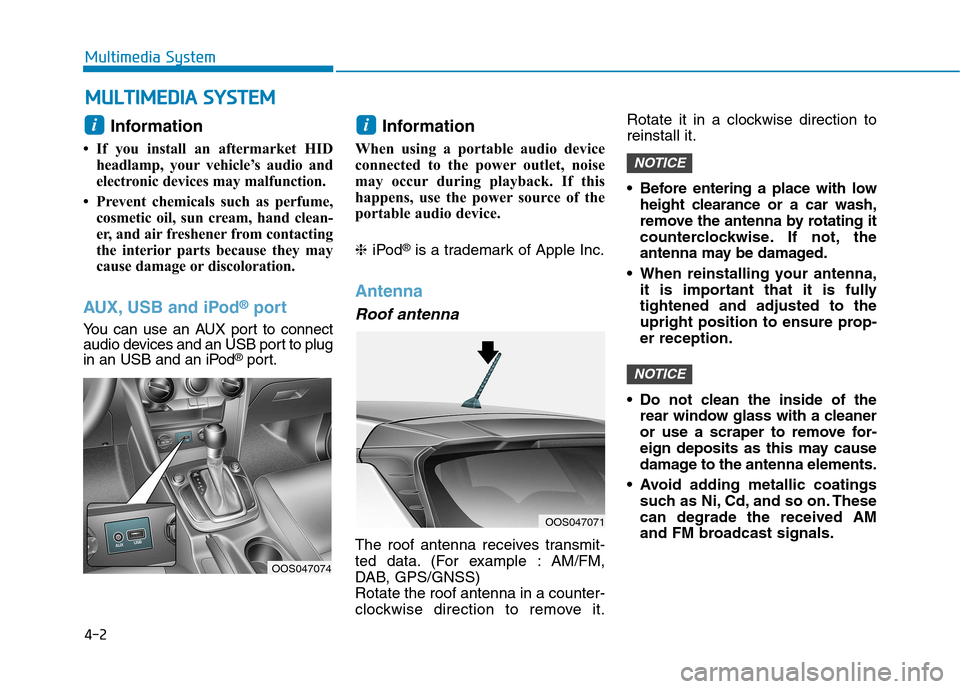
AUX, USB and iPod ®
port
You can use an AUX port to connect
audio devices and an USB port to plug
in an USB and an iPod ®
port. Information
When using a portable audio device
connected to the power outlet, noise
may occur during playback. If this
happens, use the power source of the
portable audio device. ❈ iPod ®
is a trademark of Apple Inc.
Antenna
Roof antenna
The roof antenna receives transmit-
ted data. (For example : AM/FM,
DAB, GPS/GNSS)Rotate the roof antenna in a counter-
clockwise direction to remove it. Rotate it in a clockwise direction toreinstall it.
Before entering a place with low
height clearance or a car wash,
remove the antenna by rotating it
counterclockwise. If not, the
antenna may be damaged.
When reinstalling your antenna, it is important that it is fullytightened and adjusted to the
upright position to ensure prop-er reception.
Do not clean the inside of the rear window glass with a cleaner
or use a scraper to remove for-
eign deposits as this may cause
damage to the antenna elements.
Avoid adding metallic coatings such as Ni, Cd, and so on. Thesecan degrade the received AM
and FM broadcast signals.
NOTICE
NOTICE
ii
MM UULLTT IIMM EEDD IIAA SS YY SSTT EEMM
OOS047071
OOS047074
Page 336 of 523
5-82
Driving your vehicle
The vehicle is driven on a steepincline.
The steering wheel is turned sud- denly.
Limitations of the System
The LKA system may operate pre-
maturely even if the vehicle does not
depart from the intended lane, OR,
the LKA system may not assist your
steering or warn you if the vehicle
leaves the intended lane under the
following circumstances:
When the lane and road condi- tions are poor
It is difficult to distinguish the lanemarking from the road surface or
the lane marking is faded or not
clearly marked.
It is difficult to distinguish the color of the lane marker from the road.
There are markings on the road surface that look like a lane marker
that is inadvertently being detected
by the camera.
The lane marker is merged or divided. (e.g. tollgate) The lane number increases or
decreases or the lane marker are
crossing complicatedly.
There are more than two lane markers on the road in front of you.
The lane marker is very thick or thin.
The lanes ahead are not visible due to rain, snow, water on theroad, damaged or stained road
surface, or other factors.
The shadow is on the lane marker by a median strip, trees, etc.
The lanes are incomplete or the area is in a construction zone.
There are crosswalk signs or other symbols on the road.
The lane marker in a tunnel is stained with oil, etc.
The lane suddenly disappears such as at the intersection. When external condition is inter-vened
The brightness outside changes
suddenly such as when entering or
exiting a tunnel, or when passing
under a bridge.
The brightness outside is too low such as when the headlamps are
not on at night or the vehicle isgoing through a tunnel.
There is a boundary structure in the roadway such as a concrete
barrier, guardrail and reflector post
that is inadvertently being detected
by the camera.
When light coming from a street light or an oncoming vehicle is
reflected on a wet road surfacesuch as a puddle in the road.
The field of view in front is obstructed by sun glare.
There is not enough distance between you and the vehicle in
front to be able to detect the lane
marker or the vehicle ahead is driv-
ing on the lane marker.
Page 351 of 523
5-97
Driving your vehicle
5
Information
The ESC system (if equipped) must be
turned OFF before rocking the vehi-
cle.
If you are still stuck after rocking
the vehicle a few times, have the
vehicle pulled out by a tow vehicle
to avoid engine overheating, pos-
sible damage to the transmission,
and tire damage. See "Towing" in
chapter 6.Smooth cornering
Avoid braking or gear changing in
corners, especially when roads are
wet. Ideally, corners should always
be taken under gentle acceleration.
Driving at night
Night driving presents more hazards
than driving in the daylight. Here are
some important tips to remember:
Slow down and keep more dis- tance between you and other vehi-
cles, as it may be more difficult tosee at night, especially in areas
where there may not be any street
lights.
Adjust your mirrors to reduce the glare from other drivers' head-
lamps.
Keep your headlamps clean and properly aimed. Dirty or improperly
aimed headlamps will make it
much more difficult to see at night.
Avoid staring directly at the head- lamps of oncoming vehicles. You
could be temporarily blinded, and it
will take several seconds for your
eyes to readjust to the darkness.
Driving in the rain
Rain and wet roads can make driving
dangerous. Here are a few things to
consider when driving in the rain or
on slick pavement:
Slow down and allow extra follow-ing distance. A heavy rainfall
makes it harder to see and increas-es the distance needed to stop
your vehicle.
Turn OFF your Cruise Control. (if equipped)
Replace your windshield wiper blades when they show signs ofstreaking or missing areas on thewindshield.
Be sure your tires have enough tread. If your tires do not have
enough tread, making a quick stop
on wet pavement can cause a skid
and possibly lead to an accident.
See "Tire Tread" in chapter 7 .
Turn on your headlamps to make it easier for others to see you.
Driving too fast through large pud- dles can affect your brakes. If you
must go through puddles, try to
drive through them slowly.
NOTICE
i
Page 414 of 523
7
Tires and wheels ..................................................7-36Tire care ............................................................................7-36
Recommended cold tire inflation pressures.............7-37
Check tire inflation pressure........................................7-38
Tire rotation .....................................................................7-38
Wheel alignment and tire balance ..............................7-39
Tire replacement .............................................................7-40
Wheel replacement .........................................................7-41
Tire traction ......................................................................7-41
Tire maintenance ............................................................7-41
Tire sidewall labeling ......................................................7-41
Low aspect ratio tires ....................................................7-45
Fuses ......................................................................7-46 Instrument panel fuse replacement ...........................7-47
Engine compartment panel fuse replacement.........7-48
Fuse/Relay panel description ......................................7-50 Light bulbs.............................................................7-63
Headlamp, Low beam assist - Static,
position lamp, turn signal lamp and
daytime running light bulb replacement ...................7-64
Front fog lamp .................................................................7-68
Headlamp and front fog lamp aiming (for Europe) ..7-68
Side repeater lamp replacement .................................7-74
Rear combination lamp bulb replacement ................7-74
High mounted stop lamp replacement .......................7-76
License plate light bulb replacement .........................7-76
Interior light bulb replacement ....................................7-77
Appearance care ..................................................7-78 Exterior care ....................................................................7-78
Interior care......................................................................7-82
Emission control system .....................................7-85 Crankcase emission control system ...........................7-85
Evaporative emission control system.........................7-85
Exhaust emission control system ...............................7-86
Page 418 of 523
7-6
Maintenance
While operating your vehicle:
Note any changes in the sound ofthe exhaust or any smell of exhaust
fumes in the vehicle.
Check for vibrations in the steering wheel. Notice if there is any
increased steering effort or loose-
ness in the steering wheel, or
change in its straight-ahead position.
Notice if your vehicle constantly turns slightly or “pulls” to one side when
traveling on smooth, level road.
When stopping, listen and check for unusual sounds, pulling to one side,
increased brake pedal travel or
“hard-to-push” brake pedal.
If any slipping or changes in the operation of your transmission
occurs, check the transmission fluid
level.
Check the dual clutch transmission P (Park) function.
Check the parking brake.
Check for fluid leaks under your vehicle (water dripping from the air
conditioning system during or after
use is normal).
At least monthly:
Check coolant level in the enginecoolant reservoir.
Check the operation of all exterior lights, including the stoplights, turn
signals and hazard warning flashers.
Check the inflation pressures of all tires including the spare for tires
that are worn, show uneven wear,or are damaged.
Check for loose wheel lug nuts.
At least twice a year: (i.e., every Spring and Autumn)
Check radiator, heater and air condi- tioning hoses for leaks or damage.
Check windshield washer spray and wiper operation. Clean wiper
blades with a clean cloth damp-
ened with washer fluid.
Check headlamp alignment.
Check muffler, exhaust pipes, shields and clamps.
Check the seat belts for wear and function.
At least once a year:
Clean body and door drain holes.
Lubricate door hinges and hoodhinges.
Lubricate door and hood locks and latches.
Lubricate door rubber weather strips.
Check the air conditioning system.
Inspect and lubricate dual clutch transmission linkage and controls.
Clean the battery and terminals.
Check the brake fluid level.
Page 459 of 523
7-47
7
Maintenance
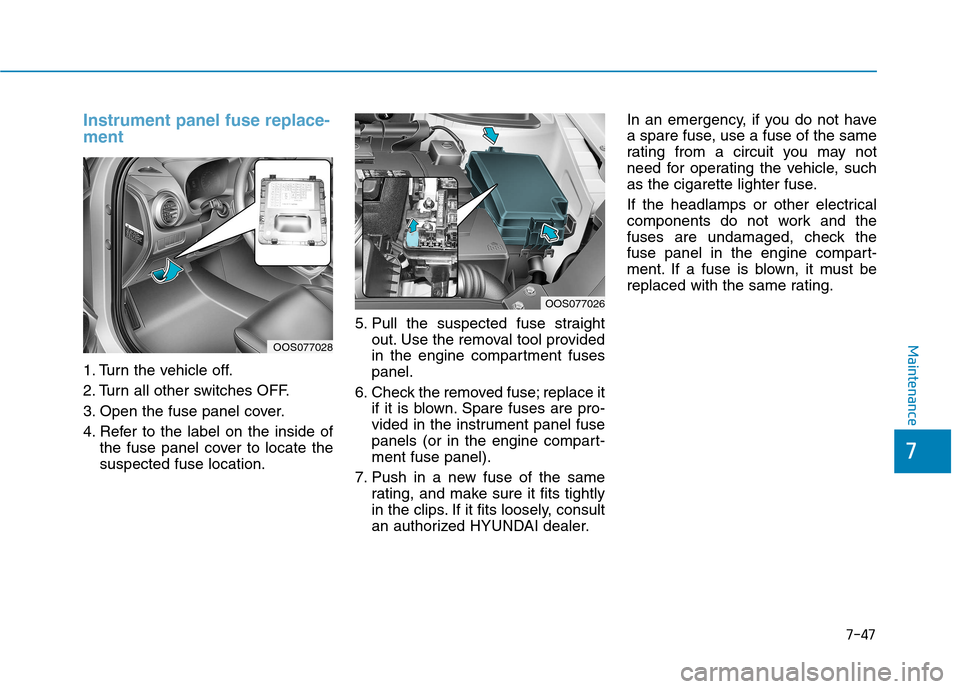
Instrument panel fuse replace- ment
1. Turn the vehicle off.
2. Turn all other switches OFF.
3. Open the fuse panel cover.
4. Refer to the label on the inside ofthe fuse panel cover to locate the suspected fuse location. 5. Pull the suspected fuse straight
out. Use the removal tool provided
in the engine compartment fusespanel.
6. Check the removed fuse; replace it if it is blown. Spare fuses are pro-
vided in the instrument panel fuse
panels (or in the engine compart-ment fuse panel).
7. Push in a new fuse of the same rating, and make sure it fits tightly
in the clips. If it fits loosely, consult
an authorized HYUNDAI dealer. In an emergency, if you do not have
a spare fuse, use a fuse of the same
rating from a circuit you may not
need for operating the vehicle, such
as the cigarette lighter fuse.
If the headlamps or other electrical
components do not work and the
fuses are undamaged, check the
fuse panel in the engine compart-
ment. If a fuse is blown, it must be
replaced with the same rating.
OOS077028
OOS077026