door lock Hyundai Kona 2018 Owner's Guide
[x] Cancel search | Manufacturer: HYUNDAI, Model Year: 2018, Model line: Kona, Model: Hyundai Kona 2018Pages: 523, PDF Size: 33.6 MB
Page 109 of 523
3-26
Convenient features of your vehicle
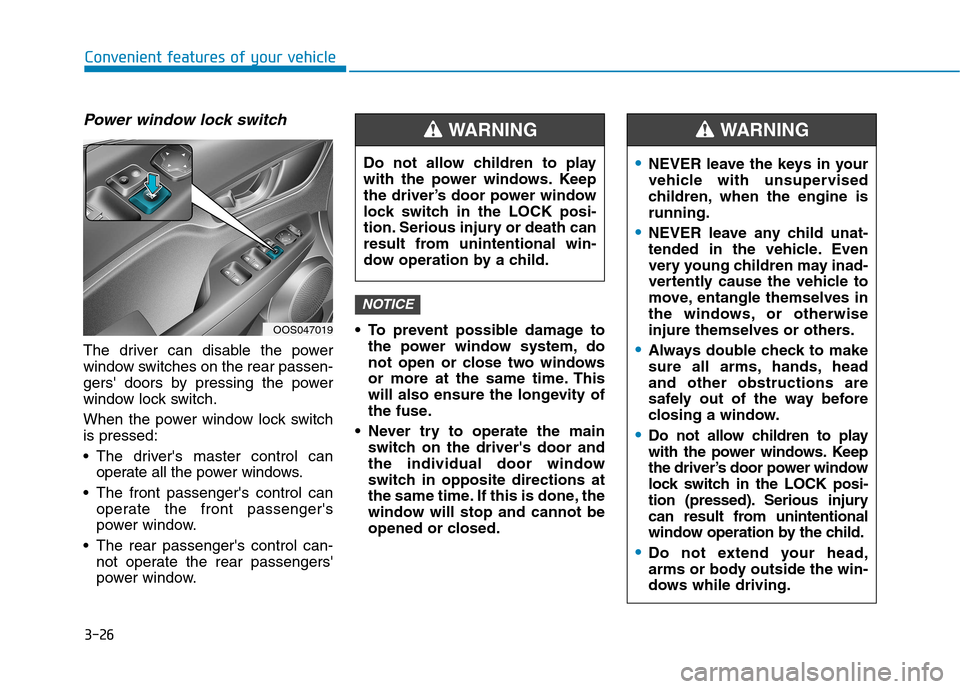
Power window lock switch
The driver can disable the power
window switches on the rear passen-
gers' doors by pressing the power
window lock switch.
When the power window lock switch is pressed:
The driver's master control canoperate all the power windows.
The front passenger's control can operate the front passenger's
power window.
The rear passenger's control can- not operate the rear passengers'
power window. To prevent possible damage to
the power window system, do
not open or close two windows
or more at the same time. This
will also ensure the longevity of
the fuse.
Never try to operate the main switch on the driver's door and
the individual door window
switch in opposite directions at
the same time. If this is done, the
window will stop and cannot be
opened or closed.
NOTICE
Do not allow children to play
with the power windows. Keep
the driver’s door power window
lock switch in the LOCK posi-
tion. Serious injury or death can
result from unintentional win-
dow operation by a child.
WARNING
OOS047019
NEVER leave the keys in your
vehicle with unsupervised
children, when the engine isrunning.
NEVER leave any child unat-
tended in the vehicle. Even
very young children may inad-
vertently cause the vehicle to
move, entangle themselves in
the windows, or otherwise
injure themselves or others.
Always double check to make
sure all arms, hands, headand other obstructions are
safely out of the way before
closing a window.
Do not allow children to play
with the power windows. Keep
the driver’s door power window
lock switch in the LOCK posi-
tion (pressed). Serious injury
can result from unintentional
window operation by the child.
Do not extend your head,
arms or body outside the win-
dows while driving.
WARNING
Page 110 of 523
3-27
Convenient features of your vehicle
3
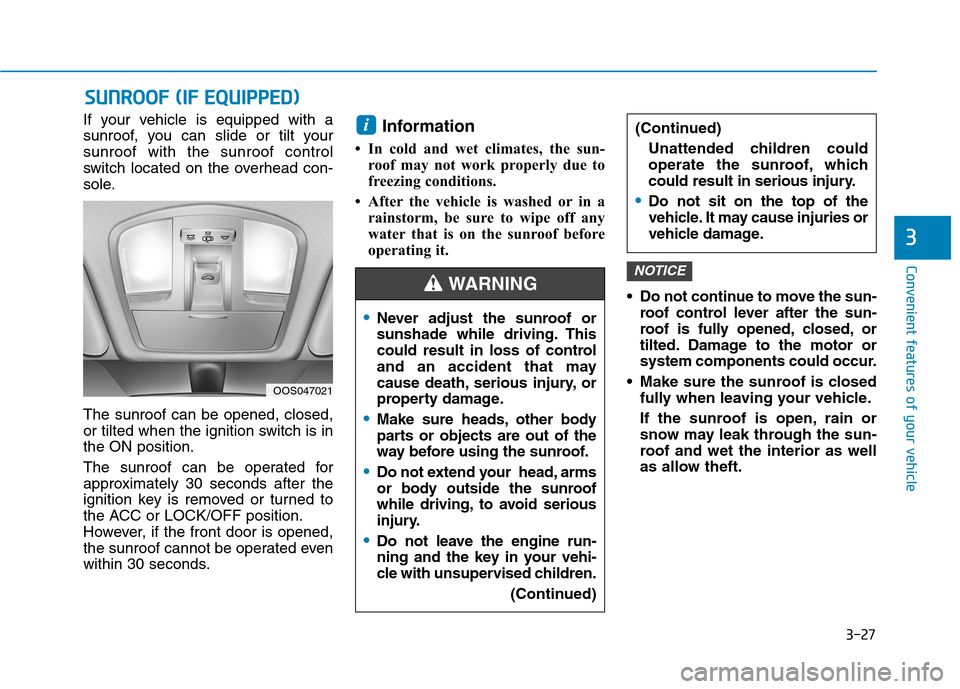
If your vehicle is equipped with a
sunroof, you can slide or tilt yoursunroof with the sunroof control
switch located on the overhead con-
sole. The sunroof can be opened, closed,
or tilted when the ignition switch is inthe ON position.
The sunroof can be operated for
approximately 30 seconds after the
ignition key is removed or turned to
the ACC or LOCK/OFF position.
However, if the front door is opened,
the sunroof cannot be operated even
within 30 seconds.Information
In cold and wet climates, the sun- roof may not work properly due to
freezing conditions.
After the vehicle is washed or in a rainstorm, be sure to wipe off any
water that is on the sunroof before
operating it.
Do not continue to move the sun-roof control lever after the sun-
roof is fully opened, closed, or
tilted. Damage to the motor or
system components could occur.
Make sure the sunroof is closed fully when leaving your vehicle.
If the sunroof is open, rain or
snow may leak through the sun-
roof and wet the interior as well
as allow theft.
NOTICE
i
SSUU NNRROO OO FF (( IIFF EE QQ UUIIPP PP EEDD ))
OOS047021
Never adjust the sunroof or
sunshade while driving. This
could result in loss of control
and an accident that may
cause death, serious injury, or
property damage.
Make sure heads, other body
parts or objects are out of the
way before using the sunroof.
Do not extend your head, arms
or body outside the sunroof
while driving, to avoid serious
injury.
Do not leave the engine run-
ning and the key in your vehi-
cle with unsupervised children.
(Continued)
(Continued)Unattended children could
operate the sunroof, which
could result in serious injury.
Do not sit on the top of the
vehicle. It may cause injuries or
vehicle damage.
WARNING
Page 115 of 523
3-32
Convenient features of your vehicle
3. Lower the hood halfway (liftedapproximately 30cm from the
closed position) and push down to
securely lock in place. Then double
check to be sure the hood is secure.
If the hood can be raised slightly, it is
not securely locked. Open it again
and close it with more force.
Tailgate
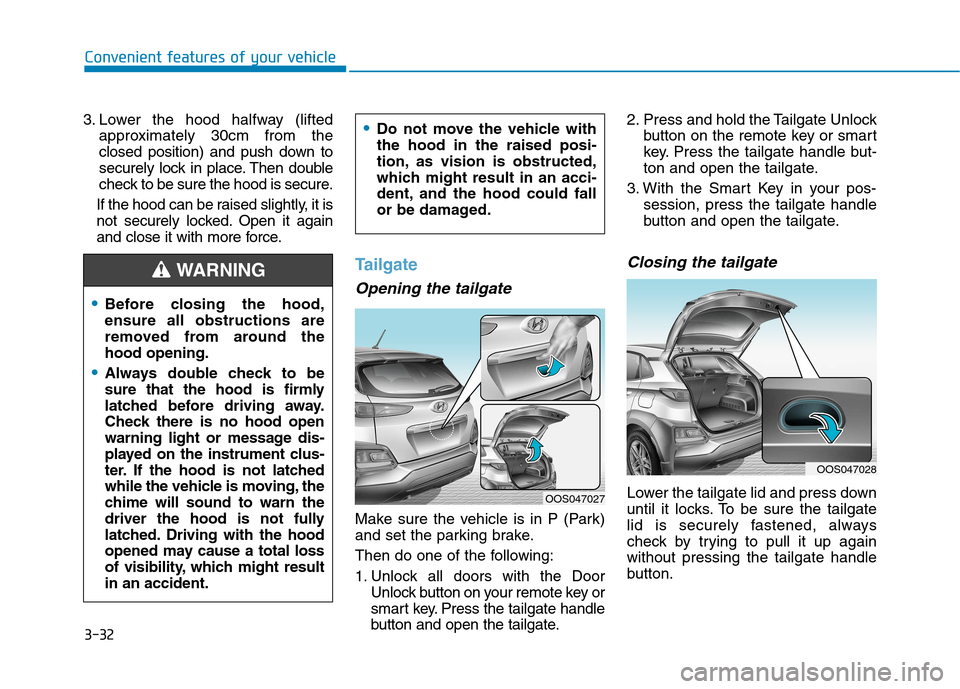
Opening the tailgate
Make sure the vehicle is in P (Park)
and set the parking brake.
Then do one of the following:
1. Unlock all doors with the Door Unlock button on your remote key or
smart key. Press the tailgate handle
button and open the tailgate. 2. Press and hold the Tailgate Unlock
button on the remote key or smart
key. Press the tailgate handle but-
ton and open the tailgate.
3. With the Smart Key in your pos- session, press the tailgate handle
button and open the tailgate.
Closing the tailgate
Lower the tailgate lid and press down
until it locks. To be sure the tailgate
lid is securely fastened, always
check by trying to pull it up againwithout pressing the tailgate handle
button.
Before closing the hood, ensure all obstructions are
removed from around thehood opening.
Always double check to be
sure that the hood is firmly
latched before driving away.
Check there is no hood open
warning light or message dis-
played on the instrument clus-
ter. If the hood is not latched
while the vehicle is moving, the
chime will sound to warn the
driver the hood is not fully
latched. Driving with the hood
opened may cause a total loss
of visibility, which might resultin an accident.
Do not move the vehicle with the hood in the raised posi-
tion, as vision is obstructed,
which might result in an acci-
dent, and the hood could fall
or be damaged.
WARNING
OOS047027
OOS047028
Page 117 of 523
3-34
Convenient features of your vehicle
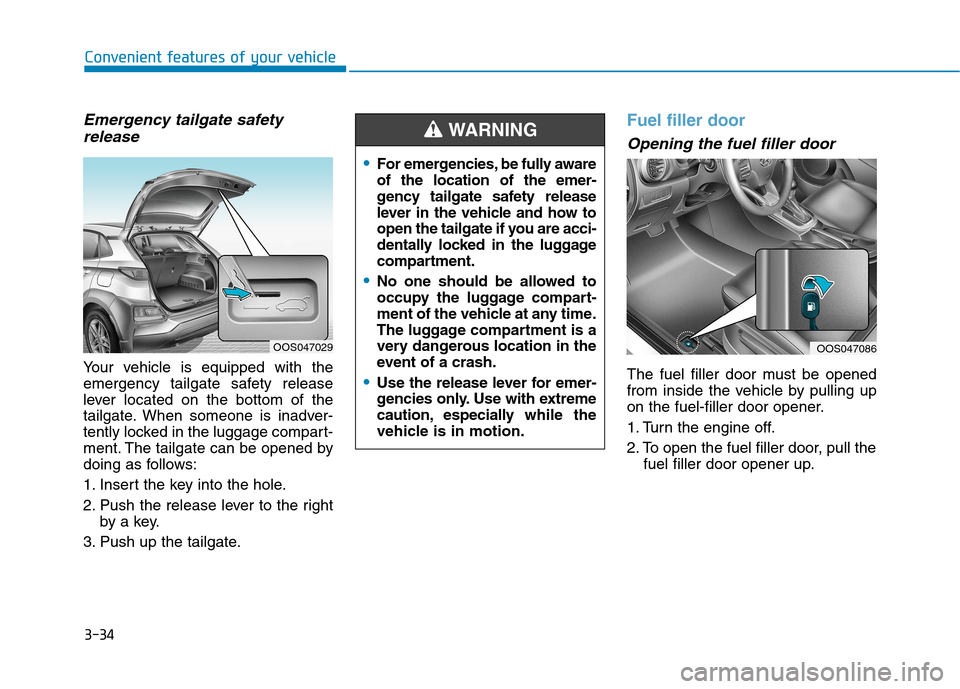
Emergency tailgate safetyrelease
Your vehicle is equipped with the
emergency tailgate safety release
lever located on the bottom of the
tailgate. When someone is inadver-
tently locked in the luggage compart-
ment. The tailgate can be opened by
doing as follows:
1. Insert the key into the hole.
2. Push the release lever to the right by a key.
3. Push up the tailgate.
Fuel filler door
Opening the fuel filler door
The fuel filler door must be opened
from inside the vehicle by pulling up
on the fuel-filler door opener.
1. Turn the engine off.
2. To open the fuel filler door, pull the fuel filler door opener up.
OOS047086OOS047029
For emergencies, be fully aware of the location of the emer-
gency tailgate safety release
lever in the vehicle and how to
open the tailgate if you are acci-
dentally locked in the luggage
compartment.
No one should be allowed to
occupy the luggage compart-
ment of the vehicle at any time.
The luggage compartment is a
very dangerous location in the
event of a crash.
Use the release lever for emer-
gencies only. Use with extreme
caution, especially while the
vehicle is in motion.
WARNING
Page 118 of 523
3-35
Convenient features of your vehicle
3
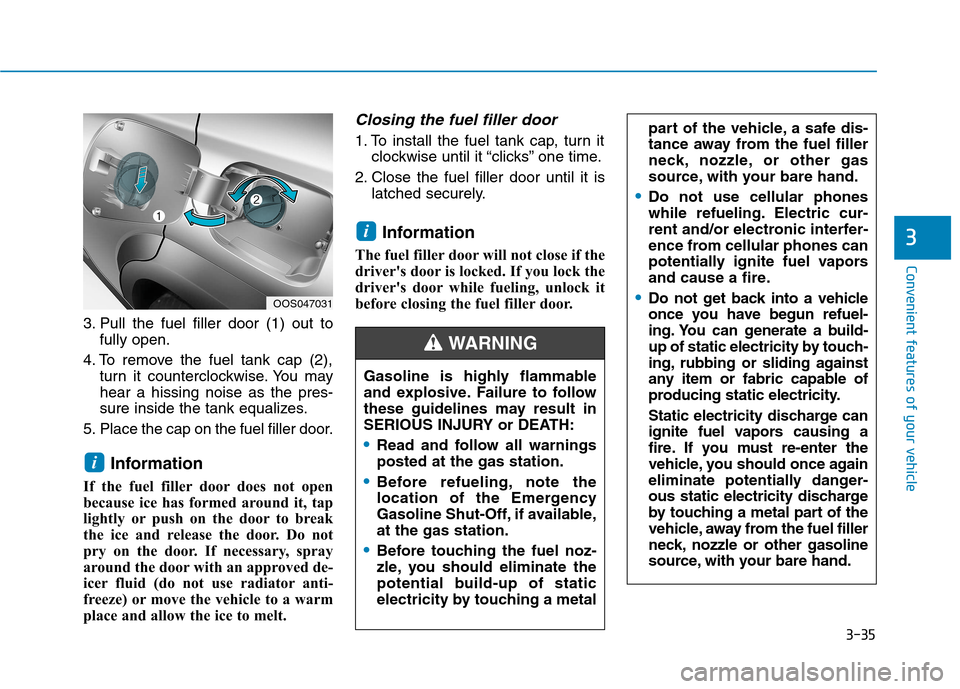
3. Pull the fuel filler door (1) out tofully open.
4. To remove the fuel tank cap (2), turn it counterclockwise. You may hear a hissing noise as the pres-
sure inside the tank equalizes.
5. Place the cap on the fuel filler door.
Information
If the fuel filler door does not open
because ice has formed around it, tap
lightly or push on the door to break
the ice and release the door. Do not
pry on the door. If necessary, spray
around the door with an approved de-
icer fluid (do not use radiator anti-
freeze) or move the vehicle to a warm
place and allow the ice to melt.
Closing the fuel filler door
1. To install the fuel tank cap, turn it clockwise until it “clicks” one time.
2. Close the fuel filler door until it is latched securely.
Information
The fuel filler door will not close if the
driver's door is locked. If you lock the
driver's door while fueling, unlock it
before closing the fuel filler door.
i
i
part of the vehicle, a safe dis-
tance away from the fuel filler
neck, nozzle, or other gas
source, with your bare hand.
Do not use cellular phones
while refueling. Electric cur-
rent and/or electronic interfer-
ence from cellular phones can
potentially ignite fuel vapors
and cause a fire.
Do not get back into a vehicle
once you have begun refuel-
ing. You can generate a build-
up of static electricity by touch-
ing, rubbing or sliding against
any item or fabric capable of
producing static electricity.
Static electricity discharge can
ignite fuel vapors causing a
fire. If you must re-enter the
vehicle, you should once again
eliminate potentially danger-
ous static electricity discharge
by touching a metal part of the
vehicle, away from the fuel filler
neck, nozzle or other gasoline
source, with your bare hand.OOS047031
Gasoline is highly flammable
and explosive. Failure to follow
these guidelines may result in
SERIOUS INJURY or DEATH:
Read and follow all warnings posted at the gas station.
Before refueling, note the
location of the Emergency
Gasoline Shut-Off, if available,at the gas station.
Before touching the fuel noz-
zle, you should eliminate the
potential build-up of static
electricity by touching a metal
WARNING
Page 141 of 523
3-58
Convenient features of your vehicle
Press START button while turn-ing wheel (for smart key sys-
tem)
This warning message is displayed if
the steering wheel does not unlock
normally when the Engine Start/Stop
button is pressed.
You should press the Engine Start/Stop
button while turning the steering wheel
right and left.
Steering wheel not locked (for smart key system)
This warning message is displayed if
the steering wheel is not locked while
the Engine Start/Stop button changesto the OFF position.
Check Steering Wheel LockSystem (for smart key system)
This warning message is displayed if
the steering wheel does not lock nor-
mally while the Engine Start/Stop but-ton changes to the OFF position.
Press brake pedal to start engine(for smart key system and dual
clutch transmission)
This warning message is displayed if
the Engine Start/Stop button changes
to the ACC position twice by pressing
the button repeatedly without depress-
ing the brake pedal.
You can start the vehicle by depressing
the brake pedal.
Press clutch pedal to start engine (for smart key system
and manual transmission)
This warning message is displayed if
the Engine Start/Stop button is in the
ACC position twice by pressing the
button repeatedly without depressingthe clutch pedal.
Depress the clutch pedal to start the
engine.
Key not in vehicle(for smart key system)
This warning message is displayed if
the smart key is not in the vehicle
when you open or close door in the
ACC position or ON position. The
warning sound is heard when you
close door without a smart key in
vehicle.
When attempting to start the vehicle
always have the smart key with you.
Key not detected (for smart key system)
This warning message is displayed if
the smart key is not detected when you
press the Engine Start/Stop button.
Page 152 of 523
3-69
Convenient features of your vehicle
3
Forward Collision Warning- Late/Normal/Early
To adjust the initial warning alert time
for Forward Collision-AvoidanceAssist (FCA) system.
For more information, refer to
"Forward Collision-Avoidance
Assist (FCA) system" in chapter 5.
Blind-Spot Collision Warning (BCW) sound
To activate or deactivate the Blind-
Spot Collision Warning (BCW) sound.
For more information, refer to "
Blind-Spot Collision Warning
(BCW) system" in chapter 5.
Blind-Spot Collision Warning (BCW)
To activate or deactivate the Blind-
Spot Collision Warning (BCW) sys-tem.
For more information, refer to
"Blind-Spot Collision Warning
(BCW) system" in chapter 5. 3. Door
- Disable: The auto door lock opera-
tion will be canceled.
- Enable on Speed: All doors will be automatically locked when the vehi-
cle speed exceeds 15km/h(9.3mph).
- Enable on Shift: All doors will be automatically locked if the dual
clutch transmission shift lever is
shifted from the P (Park) position to
the R (Reverse), N (Neutral), or D
(Drive) position.
- Disable: The auto door unlock oper- ation will be canceled.
- Vehicle Off: All doors will be auto- matically unlocked when the
Engine Star/Stop button is set to
the OFF position. (if equipped with
smart key) - On Key Out: All doors will be auto-
matically unlocked when the igni-
tion key is removed from the igni-
tion switch. (if equipped with remote
key)
- On Shift to P: All doors will be auto- matically unlocked if the dual clutch
transmission shift lever is shifted to
the P (Park) position.
- Driver Door Unlock: All doors will be automatically unlocked when the
driver’s door is opened.
To activate or deactivate the horn
feedback.
If the horn feedback is activated,
after locking the door by pressing the
lock button on the remote key, and
pressing it again within 4 seconds,
the horn feedback sound will operateonce to indicate that all doors are
locked. (if equipped with remote key)
Page 153 of 523
3-70
Convenient features of your vehicle
4. Lights
- Off: The one touch turn signal func-tion will be deactivated.
- 3, 5, 7 Flashes: The turn signal indi- cator will blink 3, 5, or 7 times when
the turn signal lever is moved slightly.
For more information, refer to
"Light" in this chapter.
To activate or deactivate the head-
lamp delay function.
For more information, refer to
"Light" in this chapter 5. Sound
- Softer/Louder
To adjust the Park Assist System
volume.
To activate or deactivate the wel- come sound.
6. Convenience
Welcome mirror
To activate or deactivate the wel- come mirror function. When all the doors (and tailgate) are
closed and locked, the outside mirror
will unfold if any of the below is per-
formed.
- When the door unlock button is pressed on the remote key or
smart key.
- When the button of the outside door handle is pressed with the
smart key in possession.
To activate or deactivate the Wiper/
Light mode.
When activated, the LCD display
shows the selected Wiper/Light
mode whenever you changed the
mode.
Auto Rear Wiper (reverse)
To activate or deactivate the rear
wiper while the vehicle is in reversewith the front wiper ON.
Gear Position Pop-up
To activate or deactivate the gear
position pop-up.
When activated, the gear position
will be displayed on the LCD display.
(if equipped with dual clutch trans-mission)
Icy Road Warning
To activate or deactivate the Icy
Road Warning function.
Page 164 of 523
3-81
Convenient features of your vehicle
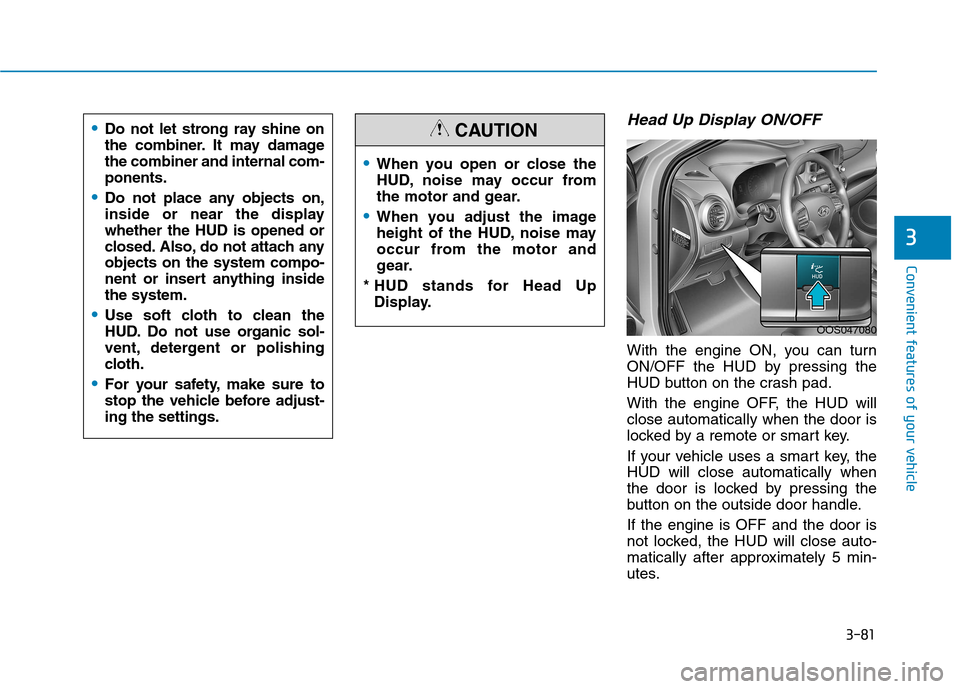
Head Up Display ON/OFF
With the engine ON, you can turn
ON/OFF the HUD by pressing the
HUD button on the crash pad.
With the engine OFF, the HUD will close automatically when the door is
locked by a remote or smart key.
If your vehicle uses a smart key, the HUD will close automatically when
the door is locked by pressing the
button on the outside door handle. If the engine is OFF and the door is
not locked, the HUD will close auto-
matically after approximately 5 min-
utes.
3
When you open or close the
HUD, noise may occur from
the motor and gear.
When you adjust the image
height of the HUD, noise may
occur from the motor and
gear.
* HUD stands for Head Up Display.
CAUTION
OOS047080
Do not let strong ray shine on
the combiner. It may damagethe combiner and internal com-ponents.
Do not place any objects on,
inside or near the displaywhether the HUD is opened or
closed. Also, do not attach anyobjects on the system compo-
nent or insert anything insidethe system.
Use soft cloth to clean the
HUD. Do not use organic sol-
vent, detergent or polishing
cloth.
For your safety, make sure to
stop the vehicle before adjust-ing the settings.
Page 173 of 523
3-90
Convenient features of your vehicle
Battery saver function
The purpose of this feature is to pre-
vent the battery from being dis-
charged. The system automatically
turns off the position lamp when the
driver turns the engine off and opens
the driver-side door.
With this feature, the position lamps
will turn off automatically if the driver
parks on the side of road at night.
If necessary, to keep the lamps on
when the engine is turned off, perform
the following:
1) Open the driver-side door.
2) Turn the position lamps OFF andON again using the light switch on
the steering column.
Headlamp delay function
(if equipped)
If you place the ignition switch to the
ACC or OFF position with the head-lamps ON, the headlamps (and/or
position lamps) remain on for about 5
minutes. However, with the engine off if
the driver’s door is opened and closed,the headlamps (and/or position lamps)
are turned off after 15 seconds. The headlamps (and/or position
lamps) can be turned off by pressing
the lock button on the remote key or
smart key twice or turning the light
switch to the OFF or AUTO position.
However, if you turn the light switch
to the AUTO position when it is dark
outside, the headlamps will not be
turned off.
You can activate or deactivate the
Headlamp Delay function from theUser Settings mode on the LCD dis-
play. For more details, refer to
"LCD Display" in this chapter. If the driver gets out of the vehicle
through other doors (except dri-
ver's door), the battery saver func-tion does not operate and the
headlamp delay function does not
turn off automatically. Therefore, It
causes the battery to be dis-
charged. In this case, make sure to
turn off the lamp before getting out
of the vehicle.
NOTICE