warning Hyundai Kona 2018 Workshop Manual
[x] Cancel search | Manufacturer: HYUNDAI, Model Year: 2018, Model line: Kona, Model: Hyundai Kona 2018Pages: 523, PDF Size: 33.6 MB
Page 84 of 523
Convenient features of your vehicle
Accessing your vehicle .........................................3-3Remote key .........................................................................3-3
Smart key ............................................................................3-6
Immobilizer system .........................................................3-10
Door locks .............................................................3-11 Operating door locks from outside the vehicle .....3-11
Operating door locks from inside the vehicle ........3-12
Deadlocks ..........................................................................3-14
Auto door lock/unlock features ................................3-15
Child-protector rear door locks ..................................3-15
Theft-alarm system.............................................3-16
Steering wheel......................................................3-17 Electric power steering (EPS) ......................................3-17
Tilt steering / Telescopic steering ..............................3-17
Heated steering wheel ...................................................3-18
Horn ....................................................................................3-19
Mirrors ...................................................................3-19 Inside rearview mirror....................................................3-19
Outside rearview mirror ................................................3-20
Windows ................................................................3-23 Power windows ................................................................3-23
Sunroof..................................................................3-27 Sunroof opening and closing .......................................3-28
Sliding the sunroof .........................................................3-28
Tilting the sunroof ..........................................................3-29 Sunshade ...........................................................................3-29
Resetting the sunroof ....................................................3-30
Sunroof open warning ...................................................3-30
Exterior features .................................................3-31 Hood ...................................................................................3-31
Tailgate...............................................................................3-32
Fuel filler door .................................................................3-34
Instrument cluster................................................3-37 Instrument cluster control ............................................3-38
Gauges and meters .........................................................3-38
Icy road warning light ..................................................3-41
Transmission shift indicator .........................................3-42
Warning and indicator lights ........................................3-44
LCD display messages ..................................................3-57
LCD display (cluster type B,C) ...........................3-64 LCD display control.........................................................3-64
LCD display modes ..........................................................3-65
Trip computer and service reminder
(for cluster type A) .............................................3-72 Trip computer ...................................................................3-72
Service reminder .............................................................3-75
Trip computer (type B, type C) ..........................3-77 Trip modes ........................................................................3-77
Head up display (HUD) ......................................3-80
3
Page 85 of 523
Lighting..................................................................3-83Exterior lights ..................................................................3-83
Low Beam Assist-Static light ......................................3-92
Welcome system ............................................................3-92
Interior lights ....................................................................3-93
Wipers and washers ............................................3-95 Windshield wipers ..........................................................3-96
Windshield washers .......................................................3-97
Rear window wiper and washer switch ...................3-98
Driver assist system ............................................3-99 Rear view monitor...........................................................3-99
Parking Distance Warning (Reverse) system .........3-100
Parking Distance Warning (Reverse/Forward)
system..............................................................................3-104
Defroster .............................................................3-107 Rear window defroster ...............................................3-107
Manual climate control system........................3-108 Heating and air conditioning......................................3-109
System operation ..........................................................3-112
System maintenance ....................................................3-114
Automatic climate control system ...................3-116 Automatic heating and air conditioning ..................3-117
Manual heating and air conditioning .......................3-117
System operation ..........................................................3-120
System maintenance ....................................................3-122
Windshield defrosting and defogging ............3-124 Manual climate control system .................................3-124
Automatic climate control system ............................3-125
Auto defogging system
(only for automatic climate control system) .........3-126
Climate control additional features.................3-127 Cluster ionizer ................................................................3-127
Automatic ventilation ..................................................3-127
Sunroof inside air recirculation.................................3-127
Storage compartment ........................................3-128 Center console storage ...............................................3-128
Glove box ....................................................................... 3-128
Sunglass holder ............................................................3-129
Multi box ........................................................................3-129
Luggage tray .................................................................3-130
To increase luggage space .........................................3-130
Interior features ...............................................3-131 Cup holder.......................................................................3-131
Sunvisor ...........................................................................3-132
Power outlet .................................................................3-132
Wireless cellular phone charging system ..............3-133
Clock .................................................................................3-135
Clothes hanger .............................................................3-135
Floor mat anchor(s) ....................................................3-136
Luggage net (holder) ...................................................3-136
Cargo area cover .........................................................3-137
Exterior features ...............................................3-138 Roof rack .......................................................................3-138
3
Page 86 of 523
3-3
Convenient features of your vehicle
3
Remote key (if equipped)
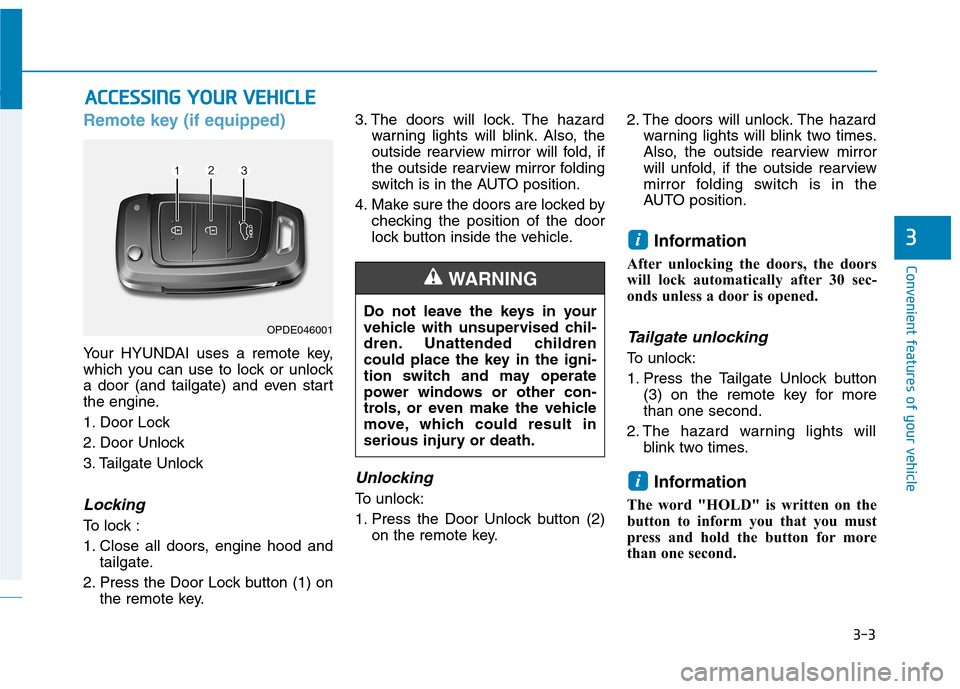
Your HYUNDAI uses a remote key,
which you can use to lock or unlock
a door (and tailgate) and even start
the engine.
1. Door Lock
2. Door Unlock
3. Tailgate Unlock
Locking
To lock :
1. Close all doors, engine hood andtailgate.
2. Press the Door Lock button (1) on the remote key. 3. The doors will lock. The hazard
warning lights will blink. Also, the
outside rearview mirror will fold, if
the outside rearview mirror folding
switch is in the AUTO position.
4. Make sure the doors are locked by checking the position of the door
lock button inside the vehicle.
Unlocking
To unlock:
1. Press the Door Unlock button (2)on the remote key. 2. The doors will unlock. The hazard
warning lights will blink two times.
Also, the outside rearview mirror
will unfold, if the outside rearview
mirror folding switch is in the
AUTO position.
Information
After unlocking the doors, the doors
will lock automatically after 30 sec-
onds unless a door is opened.
Tailgate unlocking
To unlock:
1. Press the Tailgate Unlock button (3) on the remote key for more than one second.
2. The hazard warning lights will blink two times.
Information
The word "HOLD" is written on the
button to inform you that you must
press and hold the button for more
than one second.
i
i
AA CCCCEE SSSSIINN GG YY OO UURR VV EEHH IICC LLEE
Do not leave the keys in your
vehicle with unsupervised chil-
dren. Unattended children
could place the key in the igni-
tion switch and may operate
power windows or other con-
trols, or even make the vehicle
move, which could result in
serious injury or death.
WARNING
OPDE046001
Page 89 of 523
3-6
Convenient features of your vehicle
Smart key (if equipped)
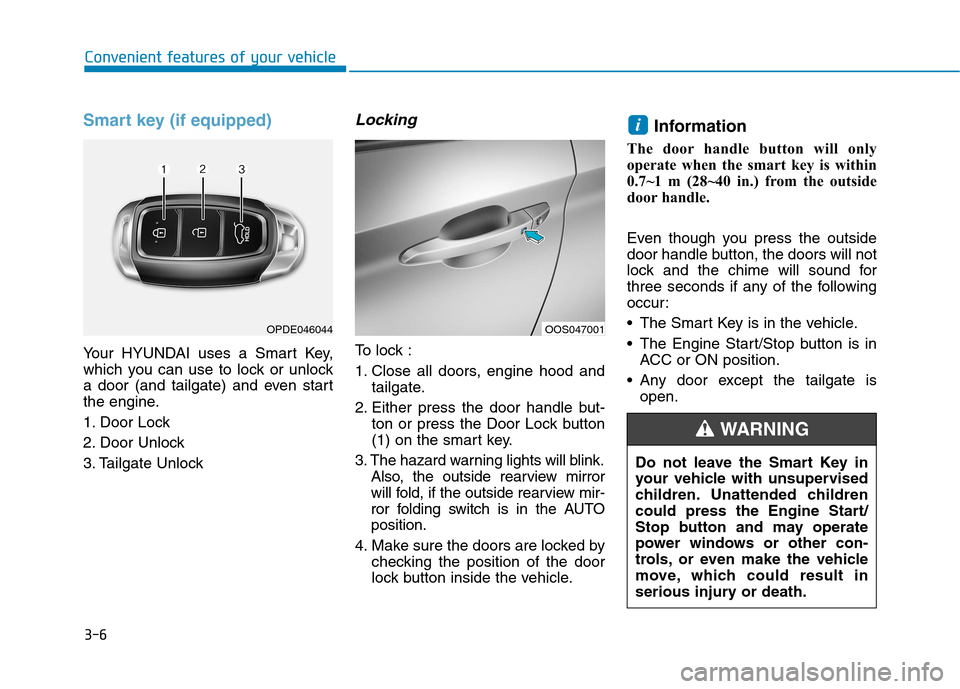
Your HYUNDAI uses a Smart Key,
which you can use to lock or unlock
a door (and tailgate) and even start
the engine.
1. Door Lock
2. Door Unlock
3. Tailgate Unlock
Locking
To lock :
1. Close all doors, engine hood andtailgate.
2. Either press the door handle but- ton or press the Door Lock button
(1) on the smart key.
3. The hazard warning lights will blink. Also, the outside rearview mirror
will fold, if the outside rearview mir-
ror folding switch is in the AUTOposition.
4. Make sure the doors are locked by checking the position of the door
lock button inside the vehicle. Information
The door handle button will only
operate when the smart key is within
0.7~1 m (28~40 in.) from the outside
door handle.
Even though you press the outside
door handle button, the doors will not
lock and the chime will sound for
three seconds if any of the following
occur:
The Smart Key is in the vehicle.
The Engine Start/Stop button is in ACC or ON position.
Any door except the tailgate is open.
i
OPDE046044OOS047001
Do not leave the Smart Key in
your vehicle with unsupervised
children. Unattended children
could press the Engine Start/
Stop button and may operate
power windows or other con-
trols, or even make the vehicle
move, which could result in
serious injury or death.
WARNING
Page 90 of 523
3-7
Convenient features of your vehicle
3
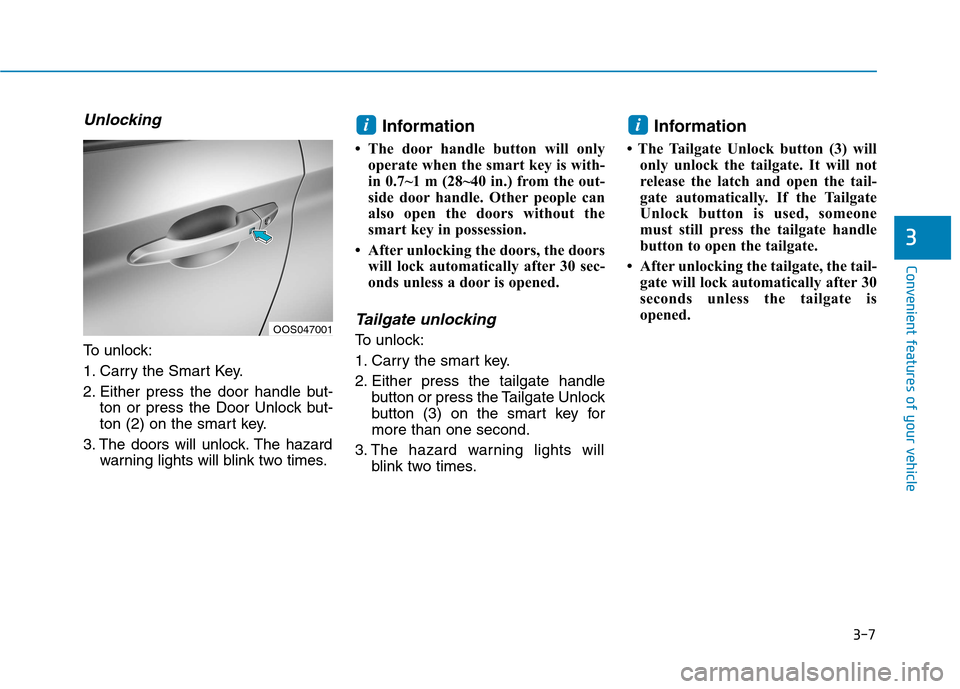
Unlocking
To unlock:
1. Carry the Smart Key.
2. Either press the door handle but-ton or press the Door Unlock but-
ton (2) on the smart key.
3. The doors will unlock. The hazard warning lights will blink two times. Information
The door handle button will only operate when the smart key is with-
in 0.7~1 m (28~40 in.) from the out-
side door handle. Other people can
also open the doors without the
smart key in possession.
After unlocking the doors, the doors will lock automatically after 30 sec-
onds unless a door is opened.
Tailgate unlocking
To unlock:
1. Carry the smart key.
2. Either press the tailgate handle button or press the Tailgate Unlock
button (3) on the smart key formore than one second.
3. The hazard warning lights will blink two times. Information
The Tailgate Unlock button (3) will only unlock the tailgate. It will not
release the latch and open the tail-
gate automatically. If the Tailgate
Unlock button is used, someone
must still press the tailgate handle
button to open the tailgate.
After unlocking the tailgate, the tail- gate will lock automatically after 30
seconds unless the tailgate is
opened.
ii
OOS047001
Page 93 of 523
3-10
Convenient features of your vehicle
If you suspect your smart key might
have sustained some damage, or
you feel your smart key is not work-
ing correctly, it is recommended that
you contact an authorized HYUNDAI
dealer.Information An inappropriately disposedbattery can be harmful to the
environment and human
health. Dispose of the battery
according to your local law(s)
or regulations.Immobilizer system (if equipped)
The immobilizer system protects your
vehicle from theft. If an improperly
coded key (or other device) is used,
the engine’s fuel system is disabled.
When the ignition switch is placed in
the ON position, the immobilizer sys-
tem indicator should come on briefly,
then go off. If the indicator starts to
blink, the system does not recognize
the coding of the key.
Place the ignition switch to the LOCK/OFF position, then place the
ignition switch to the ON positionagain.
The system may not recognize your
key’s coding if another immobilizer
key or other metal object (i.e., key
chain) is near the key. The engine
may not start because the metal may
interrupt the transponder signal from
transmitting normally. If the system repeatedly does not
recognize the coding of the key, it is
recommended that you contact your
HYUNDAI dealer. Do not attempt to alter this system or
add other devices to it. Electrical
problems could result that may make
your vehicle inoperable.
The transponder in your key is an
important part of the immobilizer
system. It is designed to give
years of trouble-free service, how-
ever you should avoid exposure to
moisture, static electricity and
rough handling. Immobilizer sys-
tem malfunction could occur.
NOTICE
iIn order to prevent theft of your
vehicle, do not leave spare keys
anywhere in your vehicle. Your
immobilizer password is a cus-
tomer unique password andshould be kept confidential.
WARNING
Page 96 of 523
3-13
Convenient features of your vehicle
3
With the door handle
Front door
If the inner door handle is pulled when
the door is locked, the door will unlockand open.
Rear door
If the inner door handle is pulled once
when the door is locked, the door will
unlock. If the inner door handle is pulled once
more, the door will open.
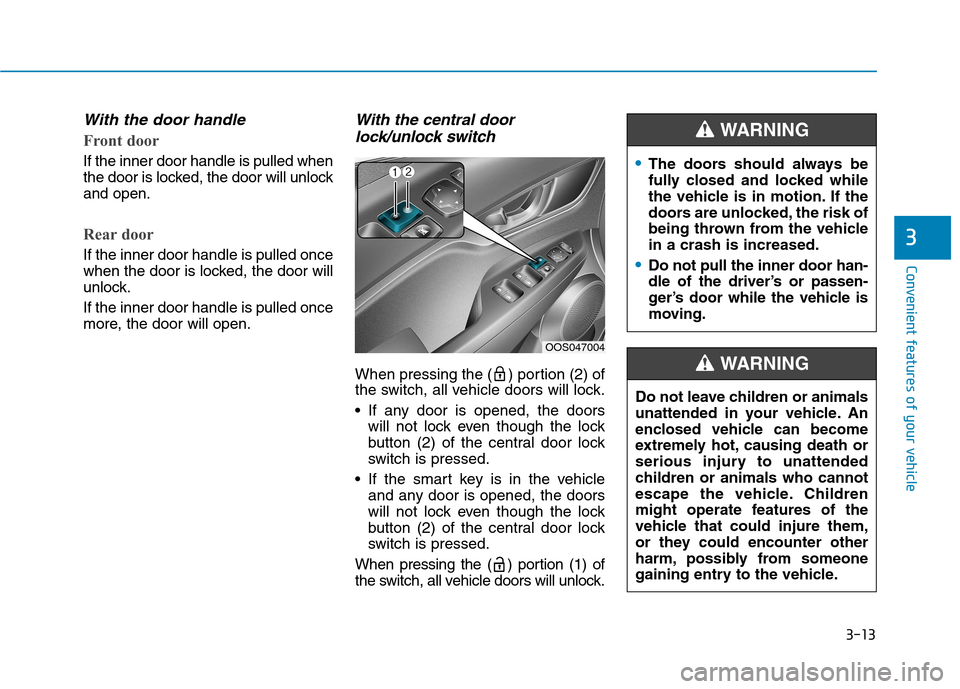
With the central doorlock/unlock switch
When pressing the ( ) portion (2) of
the switch, all vehicle doors will lock.
If any door is opened, the doors will not lock even though the lock
button (2) of the central door lock
switch is pressed.
If the smart key is in the vehicle and any door is opened, the doors
will not lock even though the lock
button (2) of the central door lock
switch is pressed.
When pressing the ( ) portion (1) of
the switch, all vehicle doors will unlock.
OOS047004
The doors should always be
fully closed and locked while
the vehicle is in motion. If the
doors are unlocked, the risk of
being thrown from the vehiclein a crash is increased.
Do not pull the inner door han-
dle of the driver’s or passen-
ger’s door while the vehicle is
moving.
WARNING
Do not leave children or animals
unattended in your vehicle. An
enclosed vehicle can become
extremely hot, causing death or
serious injury to unattended
children or animals who cannot
escape the vehicle. Children
might operate features of the
vehicle that could injure them,
or they could encounter other
harm, possibly from someone
gaining entry to the vehicle.
WARNING
Page 97 of 523
3-14
Convenient features of your vehicle
Deadlocks (if equipped)
Some vehicles are equipped with a
deadlock system. Deadlocks preventopening of a door from either inside
or outside the vehicle once the dead-
locks have been activated providing
an additional measure of vehicle
security.
To lock the vehicle using the dead-
lock function, the doors must be
locked by using the remote key or
smart key. To unlock the vehicle, the
transmitter or smart key must beused again.
Leaving your vehicle unlockedincreases the potential risk to
you or others from someone
hiding in your vehicle.
To secure your vehicle, while
depressing the brake, move the
shift lever to the P (Park) posi-
tion (for
dual clutch transmis-
sion) or first g ear or R (Reverse,
for manual transaxle), engage
the parking brake, and place the
ignition switch in the LOCK/OFF
position, close all windows,
lock all doors, and always take
the key with you.WARNING
Do not lock the doors with the
remote key or the smart key with
anybody left in the vehicle. The
passenger in the vehicle cannot
unlock the doors with the door
lock button. For example, if the
door is locked with the remote
key, the passenger in the vehicle
cannot unlock the door without
the transmitter.
WARNING
Opening a door when something
is approaching may cause dam-
age or injury. Be careful when
opening doors and watch for
vehicles, motorcycles, bicycles
or pedestrians approaching the
vehicle in the path of the door.
WARNING
If you stay in the vehicle for a long time while the weather is
very hot or cold, there are risks
of injuries or danger to life. Do
not lock the vehicle from the out-side when someone is in the
vehicle.
WARNING
Page 98 of 523
3-15
Convenient features of your vehicle
3
Auto door lock/unlock features
Impact sensing door unlocksystem (if equipped)
All doors will be automatically
unlocked when an impact causes the
air bags to deploy.
Speed sensing door lock system(if equipped)
All doors will be automatically locked
when vehicle speed exceeds 15km/h (9 mph).
You can activate or deactivate the
Auto Door Lock/Unlock features fromthe User Settings mode on the LCD
display. For more details, refer to
"LCD Display" in this chapter.
Child-protector rear door locks
The child safety lock is provided to
help prevent children seated in therear from accidentally opening the
rear doors. The rear door safety locks
should be used whenever children
are in the vehicle.
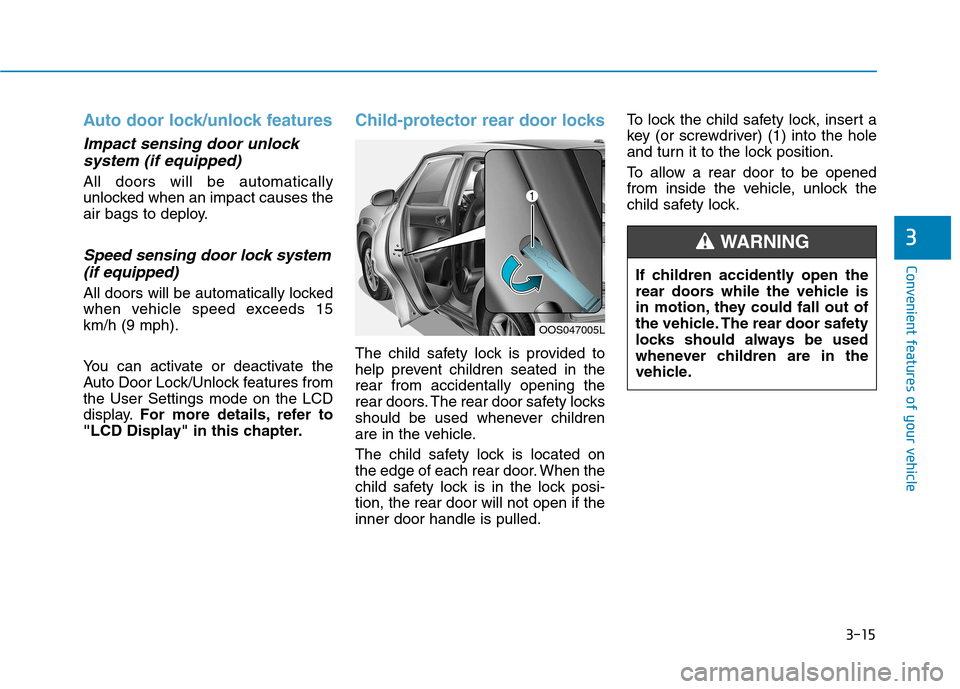
The child safety lock is located on
the edge of each rear door. When the
child safety lock is in the lock posi-tion, the rear door will not open if theinner door handle is pulled. To lock the child safety lock, insert a
key (or screwdriver) (1) into the hole
and turn it to the lock position.
To allow a rear door to be opened
from inside the vehicle, unlock the
child safety lock.
OOS047005L
If children accidently open the
rear doors while the vehicle is
in motion, they could fall out of
the vehicle. The rear door safety
locks should always be used
whenever children are in the
vehicle.
WARNING
Page 99 of 523
3-16
Convenient features of your vehicle
This system helps to protect your
vehicle and valuables. The horn will
sound and the hazard warning lights
will blink continuously if any of the
following occur:
- A door is opened without using theremote key or smart key.
- The tailgate is opened without using the remote key or smart key.
- The engine hood is opened.
The alarm continues for 30 seconds,
then the system resets. To turn off
the alarm, unlock the doors with the
remote key or smart key.
The Theft Alarm System automati-
cally sets 30 seconds after you lock
the doors and the tailgate. For the
system to activate, you must lock thedoors and the tailgate from outside
the vehicle with the remote key or
smart key or by pressing the buttonon the outside of the door handles
with the smart key in your posses-sion.
The hazard warning lights will blink and the chime will sound once to
indicate the system is armed. Once the security system is set, open-
ing any door, the tailgate, or the hood
without using the remote key or smart
key will cause the alarm to activate.
The Theft Alarm System will not set if
the hood, the tailgate, or any door is
not fully closed. If the system will not
set, check the hood, the tailgate, orthe doors are fully closed. Do not attempt to alter this system or
add other devices to it.
Information
Do not lock the doors until all pas- sengers have left the vehicle. If the
remaining passenger leaves the
vehicle when the system is armed,
the alarm will be activated.
If the vehicle is not disarmed with the remote key or smart key, open
the doors by using the mechanical
key and place the ignition switch in
the ON position (for remote key) or
start the engine (for smart key) and
wait for 30 seconds.
When the system is disarmed but a door or tailgate is not opened within 30
seconds, the system will be rearmed. Information
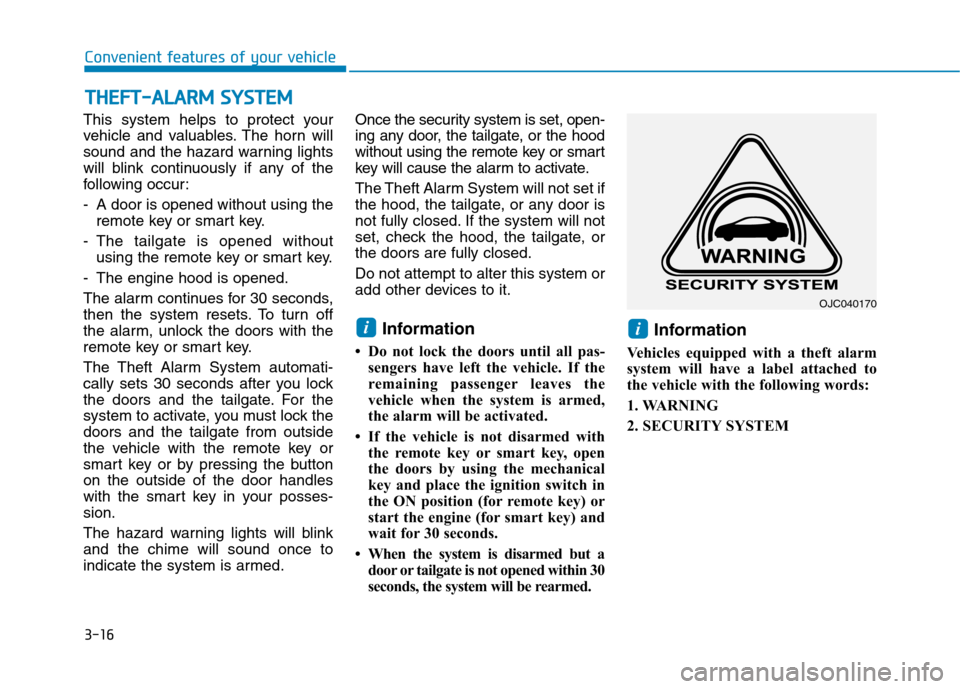
Vehicles equipped with a theft alarm
system will have a label attached to
the vehicle with the following words:
1. WARNING
2. SECURITY SYSTEM
ii
TT HH EEFFTT --AA LLAA RRMM SS YY SSTT EEMM
OJC040170