instrument cluster Hyundai Kona 2018 Owner's Manual
[x] Cancel search | Manufacturer: HYUNDAI, Model Year: 2018, Model line: Kona, Model: Hyundai Kona 2018Pages: 523, PDF Size: 33.6 MB
Page 17 of 523
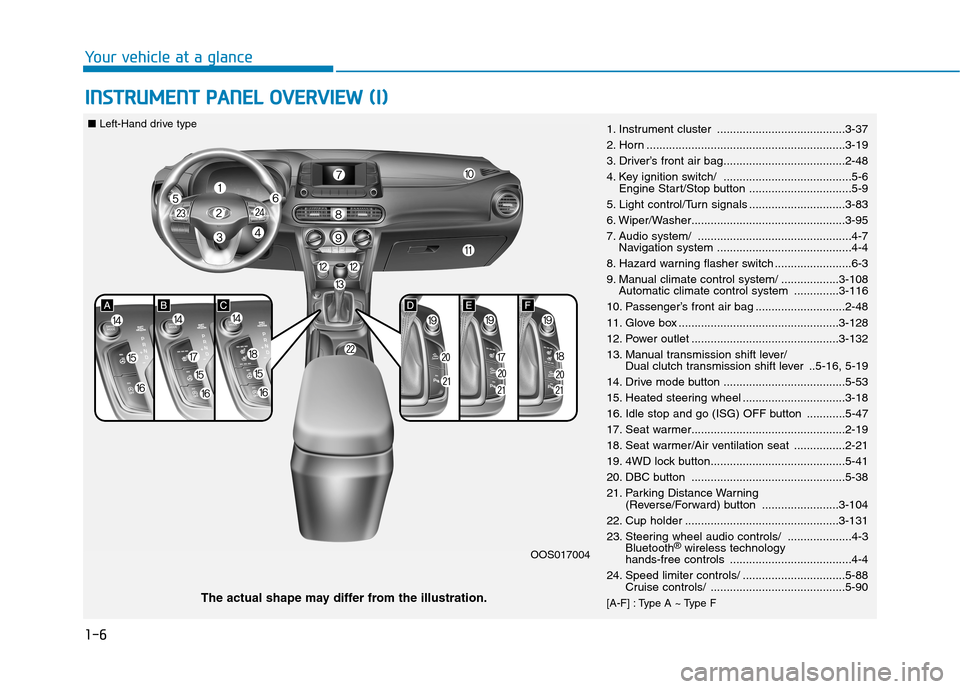
1-6
Your vehicle at a glanceI
I NN SSTT RR UU MM EENN TT PP AA NN EELL OO VVEERR VV IIEE WW (( II))
1. Instrument cluster ........................................3-37
2. Horn ..............................................................3-19
3. Driver’s front air bag......................................2-48
4. Key ignition switch/ ........................................5-6
Engine Start/Stop button ................................5-9
5. Light control/Turn signals ..............................3-83
6. Wiper/Washer................................................3-95
7. Audio system/ ................................................4-7 Navigation system ..........................................4-4
8. Hazard warning flasher switch ........................6-3
9. Manual climate control system/ ..................3-108 Automatic climate control system ..............3-116
10. Passenger’s front air bag ............................2-48
11. Glove box ..................................................3-128
12. Power outlet ..............................................3-132
13. Manual transmission shift lever/ Dual clutch transmission shift lever ..5-16, 5-19
14. Drive mode button ......................................5-53
15. Heated steering wheel ................................3-18
16. Idle stop and go (ISG) OFF button ............5-47
17. Seat warmer................................................2-19
18. Seat warmer/Air ventilation seat ................2-21
19. 4WD lock button..........................................5-41
20. DBC button ................................................5-38
21. Parking Distance Warning (Reverse/Forward) button ........................3-104
22. Cup holder ................................................3-131
23. Steering wheel audio controls/ ....................4-3 Bluetooth ®
wireless technology
hands-free controls ......................................4-4
24. Speed limiter controls/ ................................5-88 Cruise controls/ ..........................................5-90
[A-F] : Type A ~ Type F
The actual shape may differ from the illustration. OOS017004
■
Left-Hand drive type
Page 18 of 523
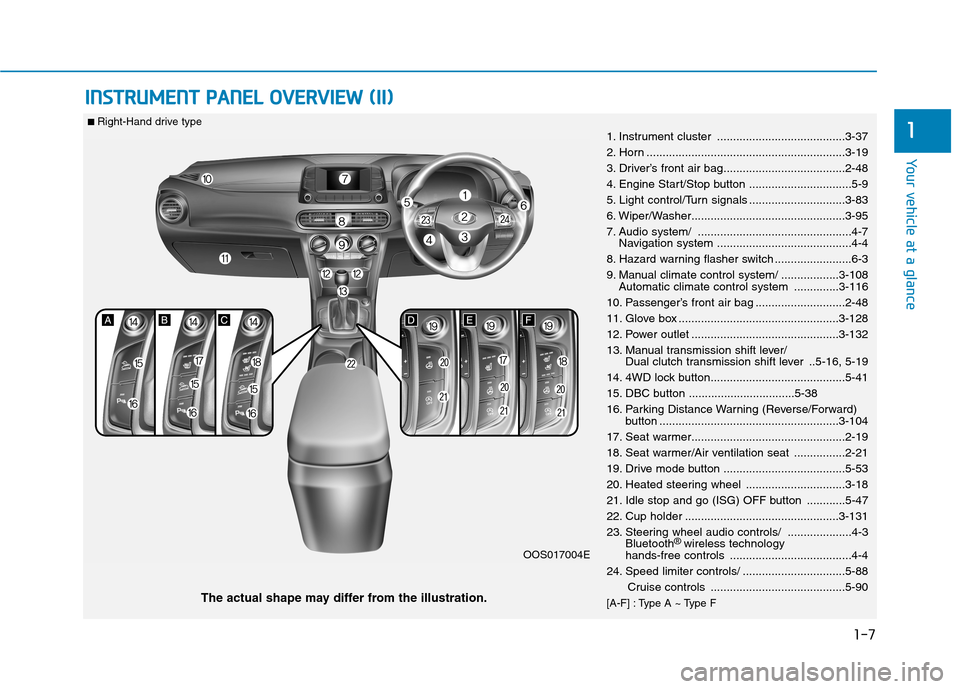
1-7
Your vehicle at a glance
IINN SSTT RR UU MM EENN TT PP AA NN EELL OO VVEERR VV IIEE WW (( IIII))
11. Instrument cluster ........................................3-37
2. Horn ..............................................................3-19
3. Driver’s front air bag......................................2-48
4. Engine Start/Stop button ................................5-9
5. Light control/Turn signals ..............................3-83
6. Wiper/Washer................................................3-95
7. Audio system/ ................................................4-7
Navigation system ..........................................4-4
8. Hazard warning flasher switch ........................6-3
9. Manual climate control system/ ..................3-108 Automatic climate control system ..............3-116
10. Passenger’s front air bag ............................2-48
11. Glove box ..................................................3-128
12. Power outlet ..............................................3-132
13. Manual transmission shift lever/ Dual clutch transmission shift lever ..5-16, 5-19
14. 4WD lock button..........................................5-41
15. DBC button .................................5-38
16. Parking Distance Warning (Reverse/Forward) button ........................................................3-104
17. Seat warmer................................................2-19
18. Seat warmer/Air ventilation seat ................2-21
19. Drive mode button ......................................5-53
20. Heated steering wheel ...............................3-18
21. Idle stop and go (ISG) OFF button ............5-47
22. Cup holder ................................................3-131
23. Steering wheel audio controls/ ....................4-3 Bluetooth ®
wireless technology
hands-free controls ......................................4-4
24. Speed limiter controls/ ................................5-88
Cruise controls ..........................................5-90
[A-F] : Type A ~ Type F
The actual shape may differ from the illustration. OOS017004E
■
Right-Hand drive type
Page 42 of 523
2-23
Safety system of your vehicle
2
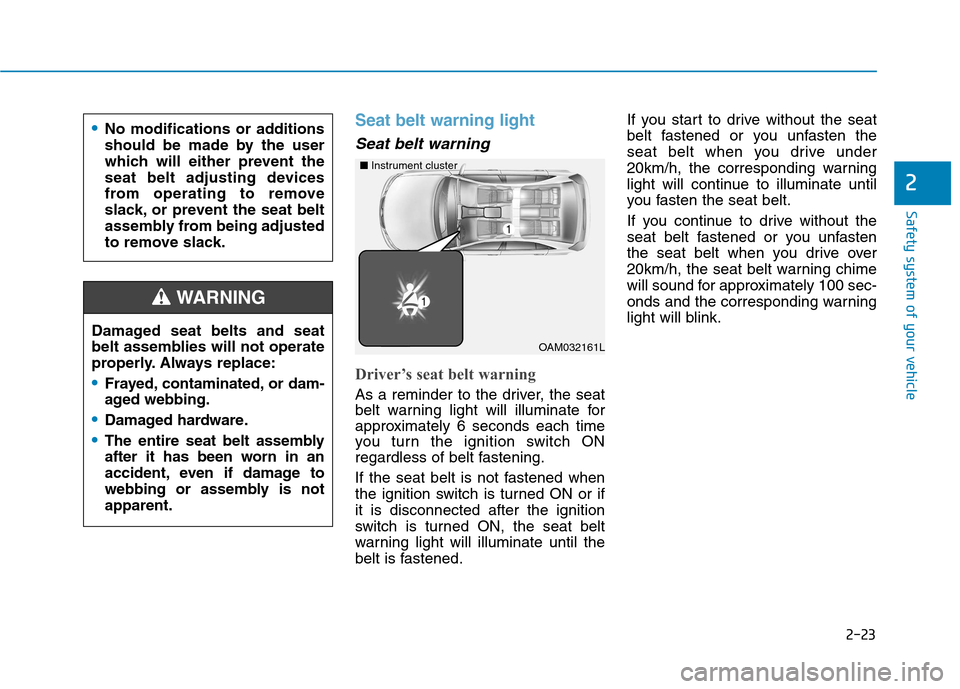
Seat belt warning light
Seat belt warning
Driver’s seat belt warning
As a reminder to the driver, the seat
belt warning light will illuminate for
approximately 6 seconds each time
you turn the ignition switch ON
regardless of belt fastening.
If the seat belt is not fastened when
the ignition switch is turned ON or ifit is disconnected after the ignition
switch is turned ON, the seat belt
warning light will illuminate until the
belt is fastened.If you start to drive without the seat
belt fastened or you unfasten the
seat belt when you drive under
20km/h, the corresponding warning
light will continue to illuminate until
you fasten the seat belt.
If you continue to drive without the
seat belt fastened or you unfasten
the seat belt when you drive over
20km/h, the seat belt warning chime
will sound for approximately 100 sec-
onds and the corresponding warning
light will blink.
Damaged seat belts and seat
belt assemblies will not operate
properly. Always replace:Frayed, contaminated, or dam-
aged webbing.
Damaged hardware.
The entire seat belt assembly
after it has been worn in an
accident, even if damage to
webbing or assembly is notapparent.
WARNING
No modifications or additions
should be made by the user
which will either prevent the
seat belt adjusting devices
from operating to remove
slack, or prevent the seat belt
assembly from being adjusted
to remove slack.
OAM032161L
■
Instrument cluster
Page 48 of 523
2-29
Safety system of your vehicle
2
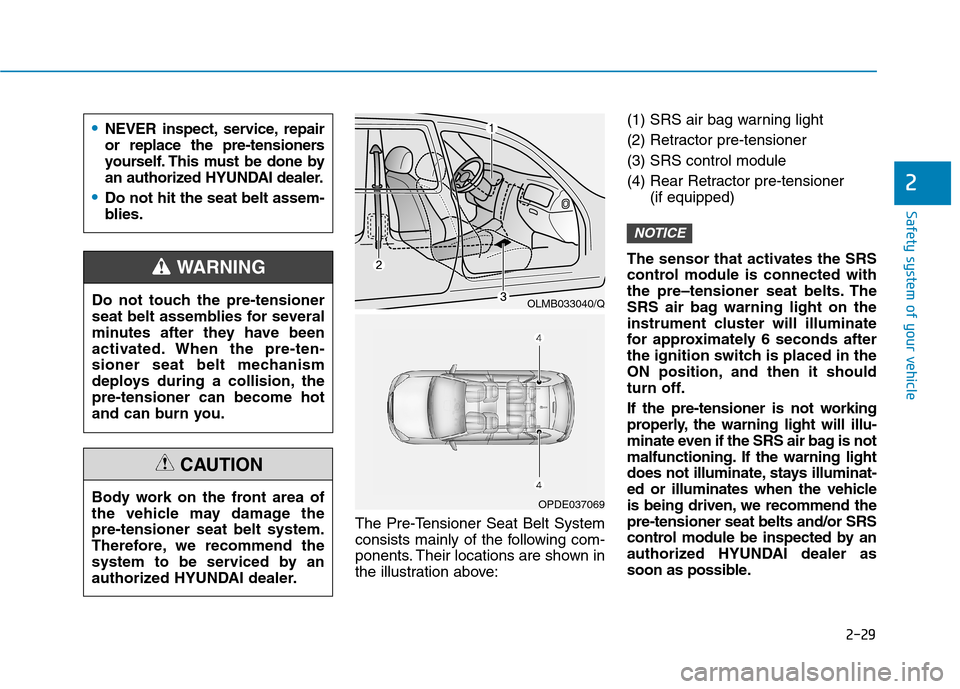
The Pre-Tensioner Seat Belt System
consists mainly of the following com-
ponents. Their locations are shown in
the illustration above:(1) SRS air bag warning light
(2) Retractor pre-tensioner (3) SRS control module
(4) Rear Retractor pre-tensioner
(if equipped)
The sensor that activates the SRS
control module is connected with
the pre–tensioner seat belts. The
SRS air bag warning light on the
instrument cluster will illuminate
for approximately 6 seconds after
the ignition switch is placed in the
ON position, and then it should
turn off.
If the pre-tensioner is not working
properly, the warning light will illu-
minate even if the SRS air bag is not
malfunctioning. If the warning light
does not illuminate, stays illuminat-
ed or illuminates when the vehicle
is being driven, we recommend thepre-tensioner seat belts and/or SRS
control module be inspected by an
authorized HYUNDAI dealer as
soon as possible.
NOTICE
Do not touch the pre-tensioner
seat belt assemblies for several
minutes after they have been
activated. When the pre-ten-
sioner seat belt mechanism
deploys during a collision, thepre-tensioner can become hot
and can burn you.
WARNING
Body work on the front area of
the vehicle may damage thepre-tensioner seat belt system.
Therefore, we recommend the
system to be serviced by an
authorized HYUNDAI dealer.
CAUTION
OLMB033040/Q
OPDE037069
NEVER inspect, service, repair
or replace the pre-tensioners
yourself. This must be done by
an authorized HYUNDAI dealer.
Do not hit the seat belt assem-
blies.
Page 69 of 523
2-50
Safety system of your vehicle
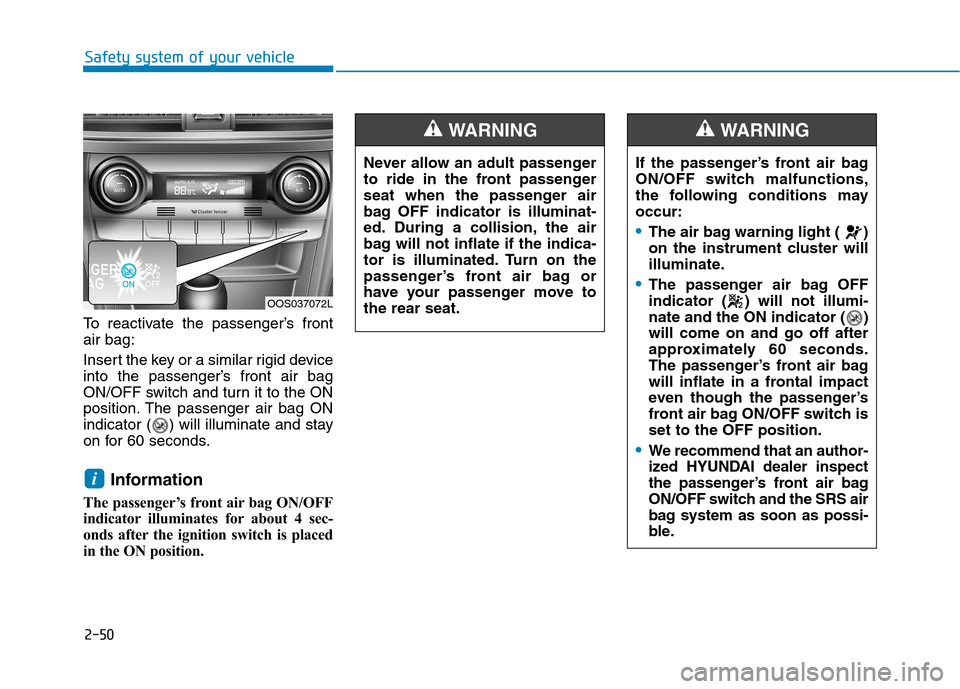
To reactivate the passenger’s front air bag:
Insert the key or a similar rigid device
into the passenger’s front air bag
ON/OFF switch and turn it to the ON
position. The passenger air bag ON
indicator ( ) will illuminate and stay
on for 60 seconds.Information
The passenger’s front air bag ON/OFF
indicator illuminates for about 4 sec-
onds after the ignition switch is placed
in the ON position.
i
Never allow an adult passenger
to ride in the front passenger
seat when the passenger air
bag OFF indicator is illuminat-
ed. During a collision, the air
bag will not inflate if the indica-
tor is illuminated. Turn on the
passenger’s front air bag or
have your passenger move tothe rear seat.
WARNING
If the passenger’s front air bag
ON/OFF switch malfunctions,
the following conditions mayoccur:
The air bag warning light ( )
on the instrument cluster will
illuminate.
The passenger air bag OFF
indicator ( ) will not illumi-
nate and the ON indicator ( )will come on and go off after
approximately 60 seconds.
The passenger’s front air bag
will inflate in a frontal impact
even though the passenger’s
front air bag ON/OFF switch isset to the OFF position.
We recommend that an author-
ized HYUNDAI dealer inspect
the passenger’s front air bag
ON/OFF switch and the SRS air
bag system as soon as possi-
ble.
WARNING
OOS037072L
Page 76 of 523
2-57
Safety system of your vehicle
2
What to expect after an air bag inflates
After a frontal or side air bag inflates,
it will deflate very quickly. Air bag
inflation will not prevent the driverfrom seeing out of the windshield or
being able to steer. Curtain air bags
may remain partially inflated for
some time after they deploy.
Noise and smoke from inflatingair bag
When the air bags inflate, they make
a loud noise and may produce smoke
and powder in the air inside of the
vehicle. This is normal and is a result
of the ignition of the air bag inflator.
After the air bag inflates, you may feel
substantial discomfort in breathing
because of the contact of your chestwith both the seat belt and the air
bag, as well as from breathing the
smoke and powder. The powder may
aggravate asthma for some people. If
you experience breathing problems
after an air bag deployment, seek
medical attention immediately.
Though the smoke and powder are
nontoxic, they may cause irritation to
the skin, eyes, nose, throat, etc. If this
is the case, wash and rinse with cold
water immediately and seek medicalattention if the symptoms persist.
After an air bag inflates, take
the following precautions:
Open your windows and doors
as soon as possible after
impact to reduce prolonged
exposure to the smoke and
powder released by the inflat-
ing air bag.
Do not touch the air bag stor-
age area’s internal compo-
nents immediately after an air
bag has inflated. The partsthat come into contact with an
inflating air bag may be veryhot.
Always wash exposed skin
areas thoroughly with coldwater and mild soap.
We recommend that an author-
ized HYUNDAI dealer replace
the air bag immediately after
deployment. Air bags are
designed to be used only once.
WARNING
To prevent objects from becom-
ing dangerous projectiles when
the passenger's air bag inflates:
Do not install or place any
objects (drink holder, CD hold-
er, stickers, etc.) on the front
passenger's panel above the
glove box where the passen-
ger's air bag is located.
Do not install a container of liquid air freshener near the
instrument cluster or on the
instrument panel surface.
WARNING
Page 84 of 523
Convenient features of your vehicle
Accessing your vehicle .........................................3-3Remote key .........................................................................3-3
Smart key ............................................................................3-6
Immobilizer system .........................................................3-10
Door locks .............................................................3-11 Operating door locks from outside the vehicle .....3-11
Operating door locks from inside the vehicle ........3-12
Deadlocks ..........................................................................3-14
Auto door lock/unlock features ................................3-15
Child-protector rear door locks ..................................3-15
Theft-alarm system.............................................3-16
Steering wheel......................................................3-17 Electric power steering (EPS) ......................................3-17
Tilt steering / Telescopic steering ..............................3-17
Heated steering wheel ...................................................3-18
Horn ....................................................................................3-19
Mirrors ...................................................................3-19 Inside rearview mirror....................................................3-19
Outside rearview mirror ................................................3-20
Windows ................................................................3-23 Power windows ................................................................3-23
Sunroof..................................................................3-27 Sunroof opening and closing .......................................3-28
Sliding the sunroof .........................................................3-28
Tilting the sunroof ..........................................................3-29 Sunshade ...........................................................................3-29
Resetting the sunroof ....................................................3-30
Sunroof open warning ...................................................3-30
Exterior features .................................................3-31 Hood ...................................................................................3-31
Tailgate...............................................................................3-32
Fuel filler door .................................................................3-34
Instrument cluster................................................3-37 Instrument cluster control ............................................3-38
Gauges and meters .........................................................3-38
Icy road warning light ..................................................3-41
Transmission shift indicator .........................................3-42
Warning and indicator lights ........................................3-44
LCD display messages ..................................................3-57
LCD display (cluster type B,C) ...........................3-64 LCD display control.........................................................3-64
LCD display modes ..........................................................3-65
Trip computer and service reminder
(for cluster type A) .............................................3-72 Trip computer ...................................................................3-72
Service reminder .............................................................3-75
Trip computer (type B, type C) ..........................3-77 Trip modes ........................................................................3-77
Head up display (HUD) ......................................3-80
3
Page 121 of 523
3-38
Convenient features of your vehicle
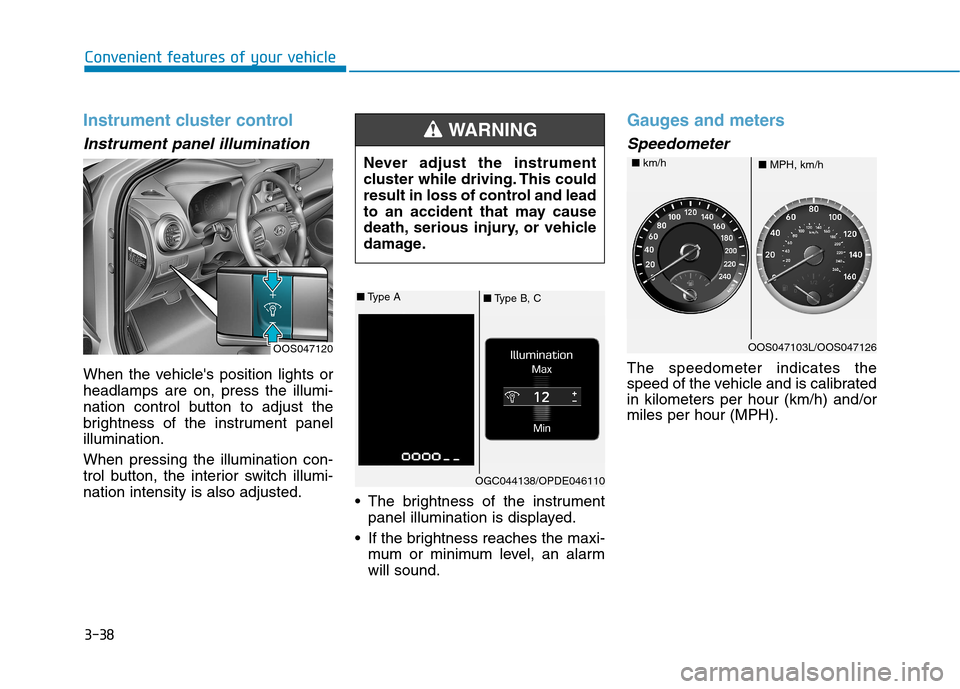
Instrument cluster control
Instrument panel illumination
When the vehicle's position lights or headlamps are on, press the illumi-
nation control button to adjust the
brightness of the instrument panelillumination. When pressing the illumination con-
trol button, the interior switch illumi-nation intensity is also adjusted. The brightness of the instrument
panel illumination is displayed.
If the brightness reaches the maxi- mum or minimum level, an alarmwill sound.
Gauges and meters
Speedometer
The speedometer indicates the
speed of the vehicle and is calibratedin kilometers per hour (km/h) and/ormiles per hour (MPH).
OOS047120 Never adjust the instrument
cluster while driving. This could
result in loss of control and lead
to an accident that may cause
death, serious injury, or vehicle
damage.
WARNING
■
Type B, C
■
Type A
OGC044138/OPDE046110
OOS047103L/OOS047126
■ MPH, km/h
■
km/h
Page 123 of 523
3-40
Convenient features of your vehicle
Information
The fuel tank capacity is given in chapter 8.
The fuel gauge is supplemented by a low fuel warning light, which will
illuminate when the fuel tank is
nearly empty.
On inclines or curves, the fuel gauge pointer may fluctuate or the low fuel
warning light may come on earlier
than usual due to the movement of
fuel in the tank.
Avoid driving with an extremely
low fuel level. Running out of fuelcould cause the engine to misfire
damaging the catalytic converter.Outside temperature gauge
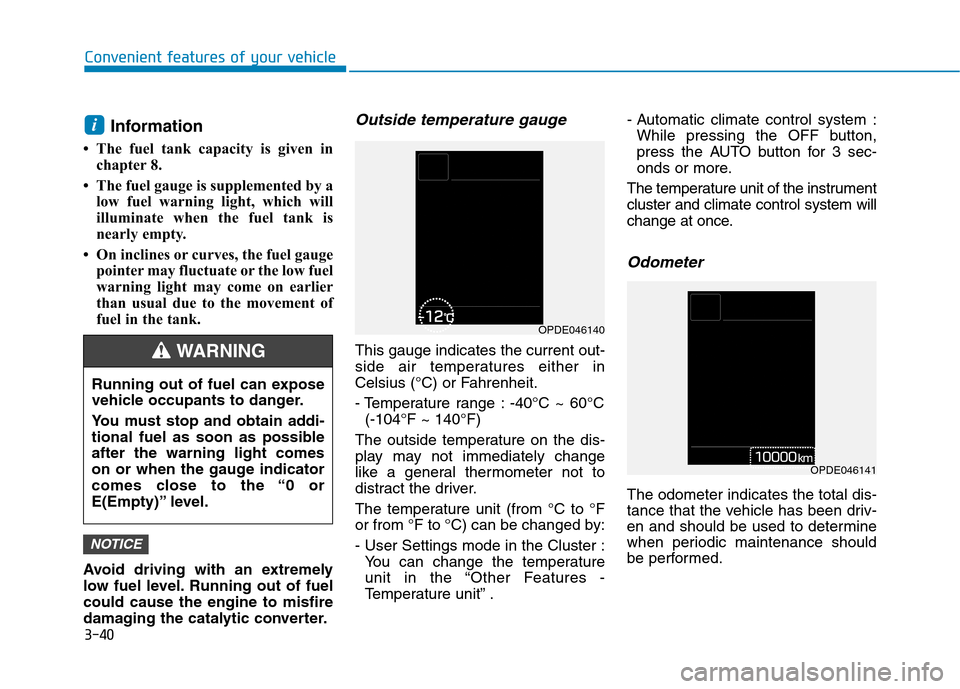
This gauge indicates the current out-
side air temperatures either in
Celsius (°C) or Fahrenheit.
- Temperature range : -40°C ~ 60°C (-104°F ~ 140°F)
The outside temperature on the dis-
play may not immediately change
like a general thermometer not to
distract the driver.
The temperature unit (from °C to °F
or from °F to °C) can be changed by:
- User Settings mode in the Cluster : You can change the temperature
unit in the “Other Features -
Temperature unit” . - Automatic climate control system :
While pressing the OFF button,
press the AUTO button for 3 sec-
onds or more.
The temperature unit of the instrumentcluster and climate control system will
change at once.
Odometer
The odometer indicates the total dis-
tance that the vehicle has been driv-
en and should be used to determine
when periodic maintenance should
be performed.
NOTICE
i
Running out of fuel can expose
vehicle occupants to danger.
You must stop and obtain addi-
tional fuel as soon as possibleafter the warning light comes
on or when the gauge indicator
comes close to the “0 or
E(Empty)” level.
WARNING
OPDE046140
OPDE046141
Page 143 of 523
3-60
Convenient features of your vehicle
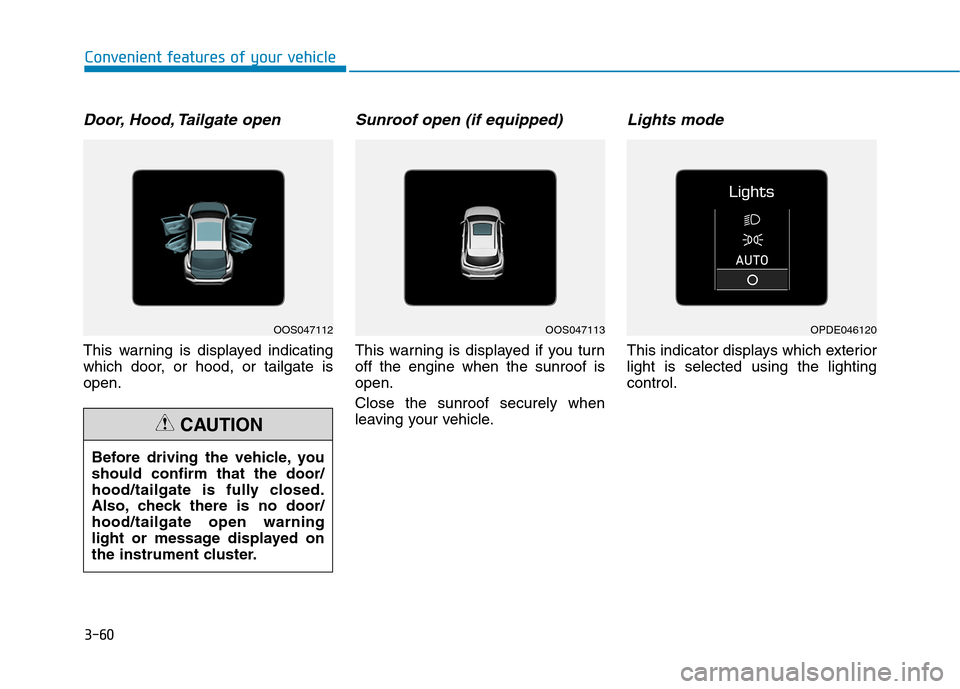
Door, Hood, Tailgate open
This warning is displayed indicating
which door, or hood, or tailgate isopen.
Sunroof open (if equipped)
This warning is displayed if you turnoff the engine when the sunroof isopen. Close the sunroof securely when
leaving your vehicle.
Lights mode
This indicator displays which exteriorlight is selected using the lightingcontrol.
Before driving the vehicle, youshould confirm that the door/
hood/tailgate is fully closed.
Also, check there is no door/hood/tailgate open warning
light or message displayed on
the instrument cluster.
CAUTION
OOS047112OOS047113OPDE046120