navigation system Hyundai Kona 2019 Owner's Manual - RHD (UK, Australia)
[x] Cancel search | Manufacturer: HYUNDAI, Model Year: 2019, Model line: Kona, Model: Hyundai Kona 2019Pages: 526, PDF Size: 15.68 MB
Page 16 of 526
1-5
Your vehicle at a glance
1
I
IN
N S
ST
T R
R U
U M
M E
EN
N T
T
P
P A
A N
N E
EL
L
O
O V
VE
ER
R V
V I
IE
E W
W
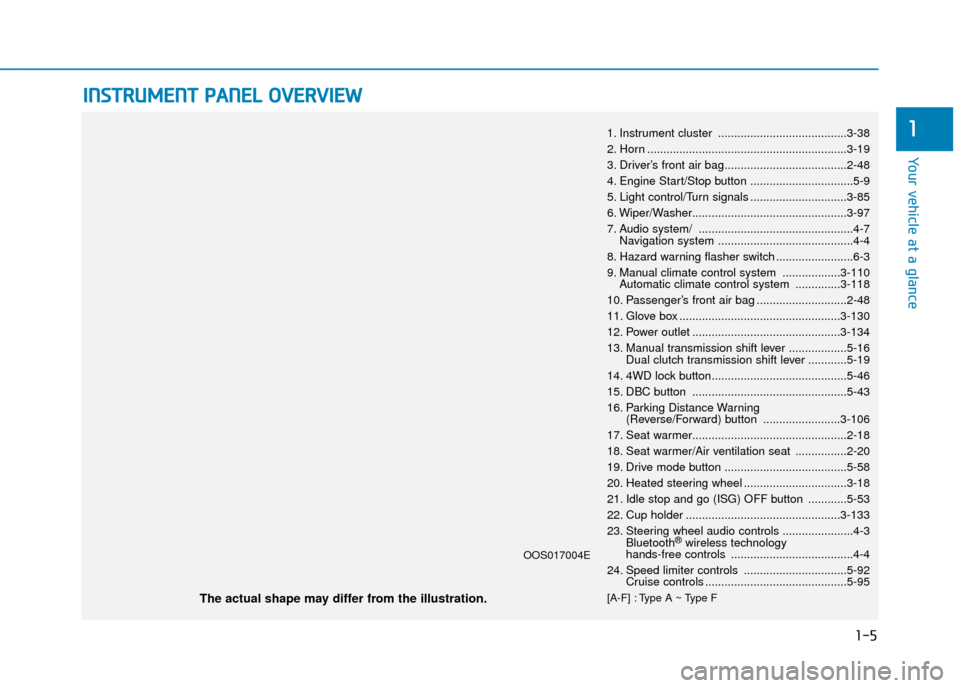
1. Instrument cluster ........................................3-38
2. Horn ..............................................................3-19
3. Driver’s front air bag......................................2-48
4. Engine Start/Stop button ................................5-9
5. Light control/Turn signals ..............................3-85
6. Wiper/Washer................................................3-97
7. Audio system/ ................................................4-7
Navigation system ..........................................4-4
8. Hazard warning flasher switch ........................6-3
9. Manual climate control system ..................3-110 Automatic climate control system ..............3-118
10. Passenger’s front air bag ............................2-48
11. Glove box ..................................................3-130
12. Power outlet ..............................................3-134
13. Manual transmission shift lever ..................5-16 Dual clutch transmission shift lever ............5-19
14. 4WD lock button..........................................5-46
15. DBC button ................................................5-43
16. Parking Distance Warning (Reverse/Forward) button ........................3-106
17. Seat warmer................................................2-18
18. Seat warmer/Air ventilation seat ................2-20
19. Drive mode button ......................................5-58
20. Heated steering wheel ................................3-18
21. Idle stop and go (ISG) OFF button ............5-53
22. Cup holder ................................................3-133
23. Steering wheel audio controls ......................4-3 Bluetooth
®wireless technology
hands-free controls ......................................4-4
24. Speed limiter controls ................................5-92 Cruise controls ............................................5-95
[A-F] : Type A ~ Type FThe actual shape may differ from the illustration.
OOS017004E
Page 149 of 526
3-67
Convenient features of your vehicle
3
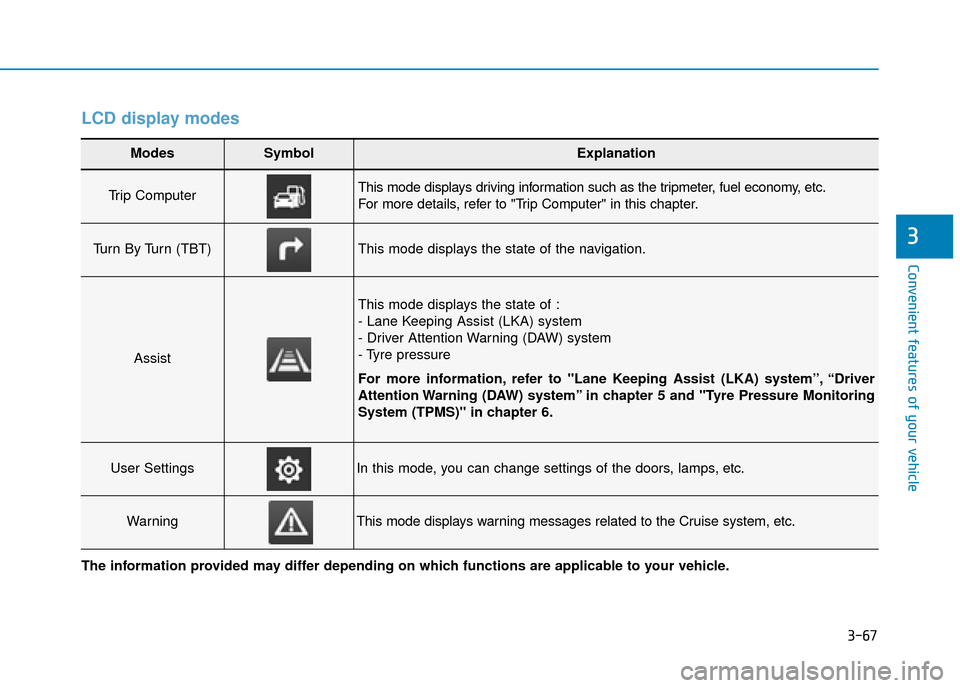
LCD display modes
Modes SymbolExplanation
Trip Computer This mode displays driving information such as the tripmeter, fuel economy, etc.
For more details, refer to "Trip Computer" in this chapter.
Turn By Turn (TBT)This mode displays the state of the navigation.
Assist
This mode displays the state of :
- Lane Keeping Assist (LKA) system
- Driver Attention Warning (DAW) system
- Tyre pressure
For more information, refer to "Lane Keeping Assist (LKA) system”, “Driver
Attention Warning (DAW) system” in chapter 5 and "Tyre Pressure Monitoring
System (TPMS)" in chapter 6.
User SettingsIn this mode, you can change settings of the doors, lamps, etc.
WarningThis mode displays warning messages related to the Cruise system, etc.
The information provided may differ depending on which functions are applicable to your vehicle.
Page 150 of 526
3-68
Convenient features of your vehicle
Shift to P to edit settings /Engage parking brake to editsettings
This warning message illuminates if
you try to select an item from the
User Settings mode whilst driving.
- Manual transmission
For your safety, change the User
Settings after engaging the parking
brake.
- Dual clutch transmission For your safety, change the User
Settings after parking the vehicle,
applying the parking brake and
moving the shift lever to P (Park).
Quick guide (Help, if equipped)
This mode provides quick guides for
the systems in the User Settings
mode.
Select an item, press and hold the
OK button.
For more details about each sys-
tem, refer to this Owner’s Manual.
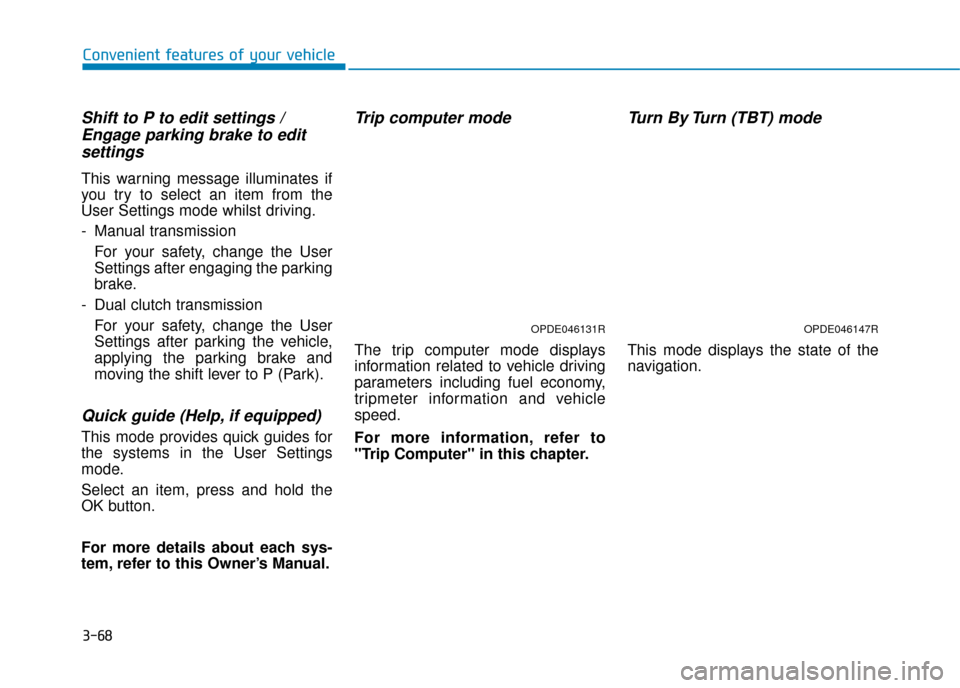
Trip computer mode
The trip computer mode displays
information related to vehicle driving
parameters including fuel economy,
tripmeter information and vehicle
speed.
For more information, refer to
"Trip Computer" in this chapter.
Turn By Turn (TBT) mode
This mode displays the state of the
navigation.
OPDE046131ROPDE046147R
Page 166 of 526
3-84
Convenient features of your vehicle
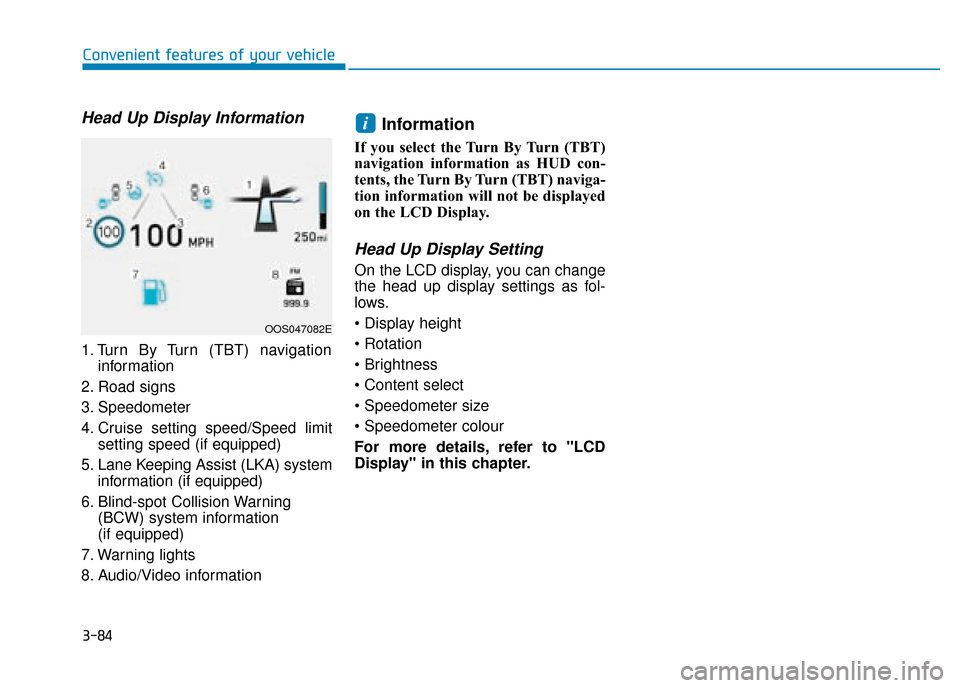
Head Up Display Information
1. Turn By Turn (TBT) navigationinformation
2. Road signs
3. Speedometer
4. Cruise setting speed/Speed limit setting speed (if equipped)
5. Lane Keeping Assist (LKA) system information (if equipped)
6. Blind-spot Collision Warning (BCW) system information
(if equipped)
7. Warning lights
8. Audio/Video information
Information
If you select the Turn By Turn (TBT)
navigation information as HUD con-
tents, the Turn By Turn (TBT) naviga-
tion information will not be displayed
on the LCD Display.
Head Up Display Setting
On the LCD display, you can change
the head up display settings as fol-
lows.
For more details, refer to "LCD
Display" in this chapter.
i
OOS047082E
Page 183 of 526
3-101
Convenient features of your vehicle
3
D
DR
RI
IV
V E
ER
R
A
A S
SS
SI
IS
S T
T
S
S Y
Y S
ST
T E
EM
M
Rear view monitor
(if equipped)
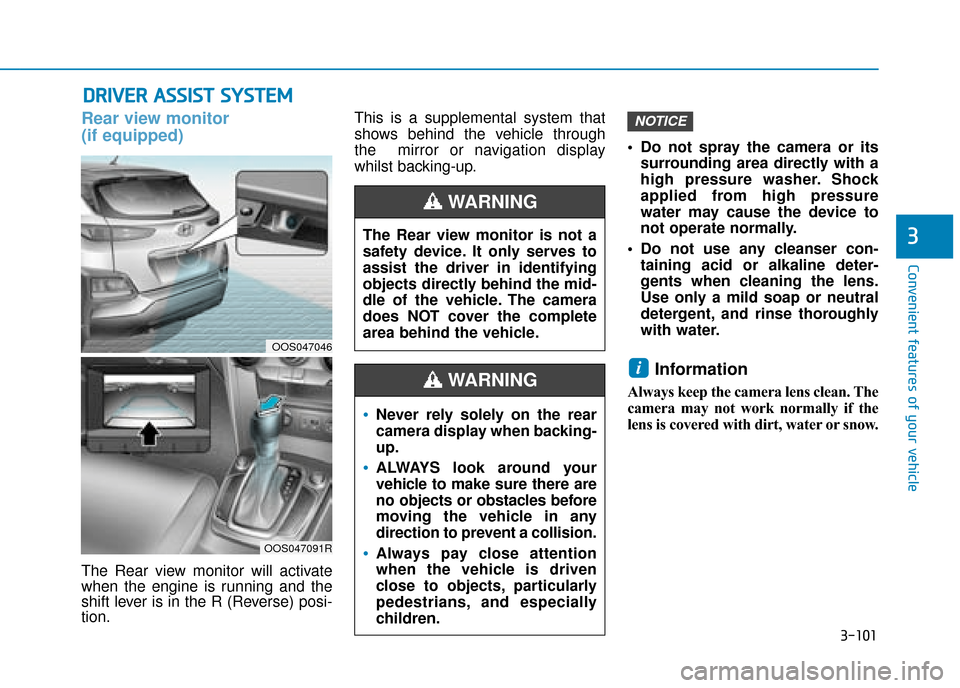
The Rear view monitor will activate
when the engine is running and the
shift lever is in the R (Reverse) posi-
tion. This is a supplemental system that
shows behind the vehicle through
the mirror or navigation display
whilst backing-up.
Do not spray the camera or its
surrounding area directly with a
high pressure washer. Shock
applied from high pressure
water may cause the device to
not operate normally.
Do not use any cleanser con- taining acid or alkaline deter-
gents when cleaning the lens.
Use only a mild soap or neutral
detergent, and rinse thoroughly
with water.
Information
Always keep the camera lens clean. The
camera may not work normally if the
lens is covered with dirt, water or snow.
i
NOTICE
The Rear view monitor is not a
safety device. It only serves to
assist the driver in identifying
objects directly behind the mid-
dle of the vehicle. The camera
does NOT cover the complete
area behind the vehicle.
WARNING
Never rely solely on the rear
camera display when backing-
up.
ALWAYS look around your
vehicle to make sure there are
no objects or obstacles before
moving the vehicle in any
direction to prevent a collision.
Always pay close attention
when the vehicle is driven
close to objects, particularly
pedestrians, and especially
children.
WARNING
OOS047046
OOS047091R
Page 219 of 526
![Hyundai Kona 2019 Owners Manual - RHD (UK, Australia) 3-137
Convenient features of your vehicle
3
Clock
Vehicles with Audio system
Select the [SETUP/CLOCK ]button on
the audio system ➟Select [Date/Time].
Set time: Set the time displayed on
the audio s](/img/35/16225/w960_16225-218.png "Hyundai Kona 2019 Owners Manual - RHD (UK, Australia) 3-137
Convenient features of your vehicle
3
Clock
Vehicles with Audio system
Select the [SETUP/CLOCK ]button on
the audio system ➟Select [Date/Time].
Set time: Set the time displayed on
the audio s")
3-137
Convenient features of your vehicle
3
Clock
Vehicles with Audio system
Select the [SETUP/CLOCK ]button on
the audio system ➟Select [Date/Time].
Set time: Set the time displayed on
the audio screen.
Time format: Choose between 12- hour and 24-hour time formats.
Vehicles with Navigation system
Select the Settings menu on the
Navigation system ➟Select
[Date/Time].
GPS time: Displays time according to the received GNSS time.
24-hour: Switches to 12 hour or 24 hour.
For more details, please refer to
the separate manual that was sup-
plied with your vehicle.
Clothes hanger (if equipped)
These hangers are not designed to
hold large or heavy items. Do not hang other objects such
as hangers or hard objects
except clothes. Also, do not put
heavy, sharp or breakable
objects in the clothes pockets.
In an accident or when the cur-
tain air bag is inflated, it may
cause vehicle damage or per-
sonal injury.
WARNING
OOS047066
Do not adjust the clock whilst
driving. You may lose your steer-
ing control and cause severe
personal injury or accidents.
WARNING
OOS047065
Page 223 of 526
Multimedia System
Multimedia system .................................................4-2
AUX, USB and iPod®port ..............................................4-2
Antenna ........................................................................\
.......4-2
Steering wheel audio controls .......................................4-3
Bluetooth
®Wireless Technology hands-free ..........4-4
Audio / Video / Navigation system (AVN) ..................4-4
How vehicle radio works .................................................4-4
Audio (Without Touch Screen) ............................4-7
Feature of Your Audio .....................................................4-8
Radio........................................................................\
...........4-13
Media........................................................................\
..........4-14
Phone ........................................................................\
.........4-23
Setup ........................................................................\
..........4-31
Declaration of Conformity ..................................4-33
CE for EU ........................................................................\
..4-33
4
Page 226 of 526
Bluetooth®Wireless Technology
hands-free
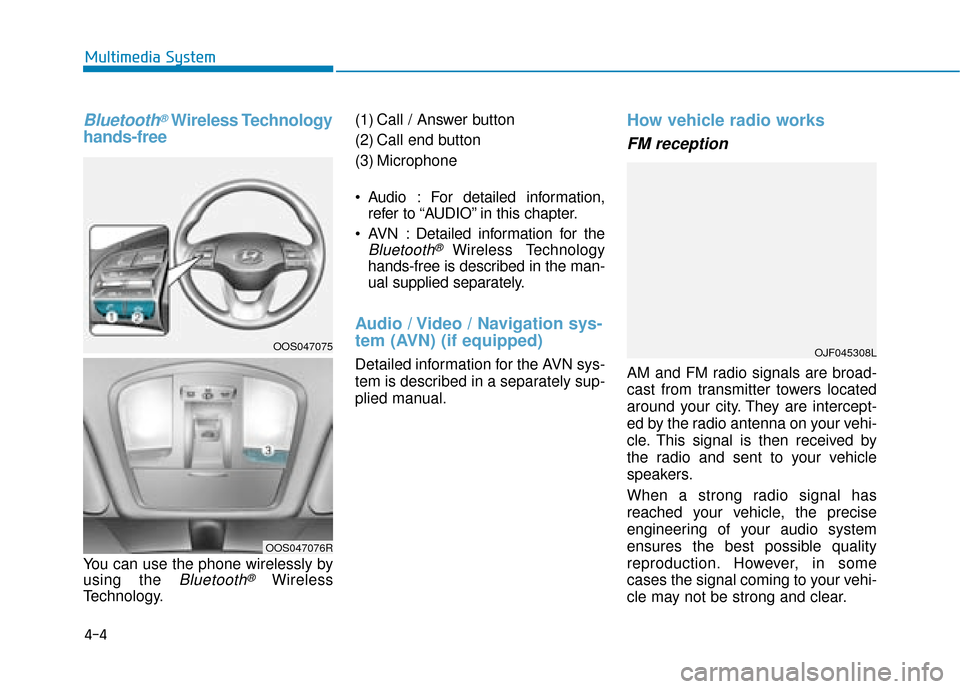
You can use the phone wirelessly by
using the
Bluetooth®Wireless
Technology. (1) Call / Answer button
(2) Call end button
(3) Microphone
Audio : For detailed information,
refer to “AUDIO” in this chapter.
AVN : Detailed information for the
Bluetooth® Wireless Technology
hands-free is described in the man-
ual supplied separately.
Audio / Video / Navigation sys-
tem (AVN) (if equipped)
Detailed information for the AVN sys-
tem is described in a separately sup-
plied manual.
How vehicle radio works
FM reception
AM and FM radio signals are broad-
cast from transmitter towers located
around your city. They are intercept-
ed by the radio antenna on your vehi-
cle. This signal is then received by
the radio and sent to your vehicle
speakers.
When a strong radio signal has
reached your vehicle, the precise
engineering of your audio system
ensures the best possible quality
reproduction. However, in some
cases the signal coming to your vehi-
cle may not be strong and clear.
OJF045308L
4-4
Multimedia System
OOS047075
OOS047076R
Page 312 of 526
![Hyundai Kona 2019 Owners Manual - RHD (UK, Australia) 5-57
Driving your vehicle
The battery sensor deactiva-
tion
[A] : Battery sensor
The battery sensor is deactivated,
when the battery is disconnected
from the negative pole for mainte-
nance purpose.
I](/img/35/16225/w960_16225-311.png "Hyundai Kona 2019 Owners Manual - RHD (UK, Australia) 5-57
Driving your vehicle
The battery sensor deactiva-
tion
[A] : Battery sensor
The battery sensor is deactivated,
when the battery is disconnected
from the negative pole for mainte-
nance purpose.
I")
5-57
Driving your vehicle
The battery sensor deactiva-
tion
[A] : Battery sensor
The battery sensor is deactivated,
when the battery is disconnected
from the negative pole for mainte-
nance purpose.
In this case, the ISG system is limit-
edly operated due to the battery sen-
sor deactivation. Thus, the driver
needs to take the following proce-
dures to reactivate the battery sen-
sor after disconnecting the battery.
Prerequisites to reactivate thebattery sensor
Keep the engine in the OFF status
for 4 hours, and attempt to restart the
engine 3 to 4 times for the battery-
sensor reactivation.
Pay extreme caution not to connect
any accessories (i.e. navigation and
black box) to the vehicle with the
engine in the OFF status. If not, the
battery sensor may not be reactivat-
ed.
Information
The ISG system may not operate in
the following situations.
- There is a malfunction with the IGS
system.
- The battery is weak.
- The brake vacuum pressure is low.
In those cases, we recommend that
you have the ISG system checked by a
HYUNDAI authorised repairer. Use only the genuine HYUNDAI
ISG battery for replacement. If
not, the ISG system may not nor-
mally operate.
Do not recharge the ISG battery with a general battery charger. If
not, it may damage or explode
the ISG battery.
Do not remove the battery cap. If not, the battery electrolyte,
which is harmful to the human
body, may leak out.
NOTICE
i5OOS057015R