format HYUNDAI KONA 2022 Owners Manual
[x] Cancel search | Manufacturer: HYUNDAI, Model Year: 2022, Model line: KONA, Model: HYUNDAI KONA 2022Pages: 579, PDF Size: 35.31 MB
Page 256 of 579

Convenient features
5-122
USB
Supported audio formats
Audio file specification
- WAVeform audio format
- MPEG1/2/2.5 Audio Layer3
- Windows Media Audio Ver 7.X/8.X
Bit rates
- MPEG1 (Layer3):
32/40/48/56/64/80/96/112/128/160
/192/224/256/320 kbps
- MPEG2 (Layer3):
8/16/24/32/40/48/56/64/80/96/112
/128/144/160 kbps
- MPEG2.5 (Layer3):
8/16/24/32/40/48/56/64/80/96/112
/128/144/160 kbps
- WMA (High Range):
48/64/80/96/128/160/192 kbps
Bits Per Sample
- WAV (PCM(Stereo)): 24 bit
- WAV (IMA ADPCM): 4 bit
- WAV (MS ADPCM): 4 bit
Sampling frequency
- MPEG1: 44100/48000/32000 Hz
- MPEG2: 22050/24000/16000 Hz
- MPEG2.5: 11025/12000/8000 Hz
- WMA: 32000/44100/48000 Hz
- WAV: 44100/48000 Hz
Maximum length of folder/file names
(Based on Unicode): 40 English or
Korean characters
Supported characters for folder/
file names (Unicode support): 2,604
Korean characters, 94 alphanumeric
characters, 4,888 Chinese characters
in common use, 986 special
characters
Maximum number of folders: 1,000
Maximum number of files: 5,000
NOTICE
Files that are not in a supported
format may not be recognised or
played, or information about them,
such as the file name, may not be
displayed properly.
Only files with .mp3/.wma/.wav
extensions can be recognised by the
system. If the file is not in supported
format, change the file format by
using the latest encoding software.
The device will not support files
locked by DRM (Digital Rights
Management).
For MP3/WMA compression files and
WAV file, differences in sound quality
will occur depending on the bitrate.
(Music files with a higher bitrate
have a better sound quality.)
Japanese or Simplified Chinese
characters in folder or file names
may not be displayed properly.
Page 257 of 579
05
5-123
Supported USB storage devices
Byte/Sector: 64 kbyte or less
Format system: FAT12/16/32
(recommended), exFAT/NTFS
NOTICE
Operation is guaranteed only for a
metal cover type USB storage device
with a plug type connector.
-USB storage devices with a plastic
plug may not be recognised.
-USB storage devices in memory
card types, such as CF card or SD
cards, may not be recognised.
USB hard disk drives may not be
recognised.
When you use a large capacity USB
storage device with multiple logical
drives, only files stored on the first
drive will be recognised.
If an application program is loaded
on a USB storage device, the
corresponding media files may not
play.
Use USB 2.0 devices for better
compatibility.
Bluetooth
Bluetooth Power Class 2: -6 to 4 dBm
Aerial power: Max 3 mW
Frequency range: 2400 to 2483.5 MHz
Bluetooth patch RAM software
version: 1
Other trademarks and trade names are
those of their respective owners.
The Bluetooth®
word mark and
logos are registered
trademarks owned
by Bluetooth SIG,
Inc. and any use
of such marks by
HYUNDAI is under
licence.
Page 259 of 579

6
Idle Stop and Go (ISG) system ....................................................................... 6-54
Activating the ISG ...................................................................................................... 6-54
Deactivating the ISG ................................................................................................. 6-54
Condition of ISG system operation .......................................................................... 6-56
ISG Indication ............................................................................................................. 6-57
ISG malfunction ......................................................................................................... 6-58
The battery sensor deactivation ............................................................................... 6-59
Drive mode integrated control system ..........................................................6-60
Special driving conditions .............................................................................. 6-63
Hazardous driving conditions .................................................................................. 6-63
Rocking the vehicle ................................................................................................... 6-63
Smooth cornering ..................................................................................................... 6-64
Driving at night .......................................................................................................... 6-64
Driving in the rain ...................................................................................................... 6-64
Driving in flooded areas ............................................................................................ 6-65
Highway driving ........................................................................................................ 6-65
Reducing the risk of a rollover .................................................................................. 6-65
Winter driving ..................................................................................................6-66
Snow or icy conditions .............................................................................................. 6-66
Winter precautions .................................................................................................... 6-68
Vehicle load limit............................................................................................. 6-70
The Loading Information Label ..................................................................................6-71
Trailer Towing .................................................................................................. 6-75
Page 261 of 579
Driving your vehicle
6-4
Before entering the vehicle
Be sure all windows, outside mirror(s),
and outside lights are clean and
unobstructed.
Remove frost, snow, or ice.
Visually check the tires for uneven
wear and damage.
Check under the vehicle for any sign
of leaks.
Be sure there are no obstacles behind
you if you intend to back up.
Before starting
Make sure the hood, the liftgate, and
the doors are securely closed and
locked.
Adjust the position of the seat and
steering wheel.
Adjust the inside and side view
mirrors.
Verify all the lights work.
Fasten your seat belt. Check that all
passengers have fastened their seat
belts.
Check the gauges and indicators
in the instrument panel and the
messages on the instrument display
when the ignition switch is in the ON
position.
Check that any items you are carrying
are stored properly or fastened down
securely.
WARNING
To reduce the risk of SERIOUS INJURY or
DEATH, take the following precautions:
ALWAYS wear your seat belt. All
passengers must be properly belted
whenever the vehicle is moving.
For more information, refer to “Seat
Belts” section in chapter 3.
Always drive defensively. Assume
other drivers or pedestrians may be
careless and make mistakes.
Stay focused on the task of driving.
Driver distraction can cause
accidents.
Leave plenty of space between you
and the vehicle in front of you.
WARNING
NEVER drink or take drugs and drive.
Drinking or taking drugs and driving
is dangerous and may result in an
accident and SERIOUS INJURY or
DEATH.
Drunk driving is the number one
contributor to the highway death
toll each year. Even a small amount
of alcohol will affect your reflexes,
perceptions and judgment. Just
one drink can reduce your ability to
respond to changing conditions and
emergencies and your reaction time
gets worse with each additional drink.
Driving while under the influence
of drugs is as dangerous or more
dangerous than driving under the
influence of alcohol.
You are much more likely to have a
serious accident if you drink or take
drugs and drive. If you are drinking or
taking drugs, don’t drive. Do not ride
with a driver who has been drinking
or taking drugs. Choose a designated
driver or call a taxi.
BEFORE DRIVING
Page 264 of 579
06
6-7
Starting the engine
WARNING
Always wear appropriate shoes when
operating your vehicle. Unsuitable
shoes, such as high heels, ski boots,
sandals, flip-flops, etc., may interfere
with your ability to use the brake,
accelerator and clutch pedals.
Do not start the vehicle with the
accelerator pedal depressed. The
vehicle can move which can lead to
an accident.
Wait until the engine rpm is normal.
The vehicle may suddenly move if
the brake pedal is released when the
rpm is high.
1. Make sure the parking brake is
applied.
2. Make sure the shift lever is in P (Park).
3. Depress the brake pedal.
4. Turn the ignition switch to the START
position. Hold the key (maximum of
10 seconds) until the engine starts and
release it.
Information
NOTICE
To prevent damage to the vehicle:
Do not hold the ignition key in the
START position for more than 10
seconds. Wait 5 to 10 seconds before
trying again.
Do not turn the ignition switch to
the START position with the engine
running. It may damage the starter.
If traffic and road conditions permit,
you may put the shift lever in the N
(Neutral) position while the vehicle
is still moving and turn the ignition
switch to the START position in an
attempt to restart the engine.
Do not push or tow your vehicle to
start the engine.
Page 267 of 579
Driving your vehicle
6-10
Starting the engine
WARNING
Always wear appropriate shoes when
operating your vehicle. Unsuitable
shoes, such as high heels, ski boots,
sandals, flipflops, etc., may interfere
with your ability to use the brake and
accelerator pedals.
Do not start the vehicle with the
accelerator pedal depressed.
The vehicle can move which can lead
to an accident.
Wait until the engine rpm is normal.
The vehicle may suddenly move if
the brake pedal is released when the
rpm is high.
Information
1. Always carry the smart key with you.
2. Make sure the parking brake is
applied.
3. Make sure the shift lever is in P(Park).
4. Depress the brake pedal.
5. Press the Engine Start/Stop button.
Information
Page 268 of 579
06
6-11
NOTICE
To prevent damage to the vehicle:
If the engine stalls while you are in
motion, do not attempt to shift the
gear to the P (Park) position.
If traffic and road conditions permit,
you may put the gear in N (Neutral)
while the vehicle is still moving and
press the Engine Start/Stop button in
an attempt to restart the engine.
Do not push or tow your vehicle to
start the vehicle.
NOTICE
To prevent damage to the vehicle:
Do not press the Engine Start/Stop
button for more than 10 seconds except
when the stop lamp fuse is blown.
When the stop lamp fuse is blown,
you cannot normally start the engine.
Replace the fuse with a new one. If you
are not able to replace the fuse, you
can start the engine by pressing and
holding the Engine Start/Stop button
for 10 seconds with the Engine Start/
Stop button in the ACC position.
For your safety always depress the
brake pedal before starting the vehicle.
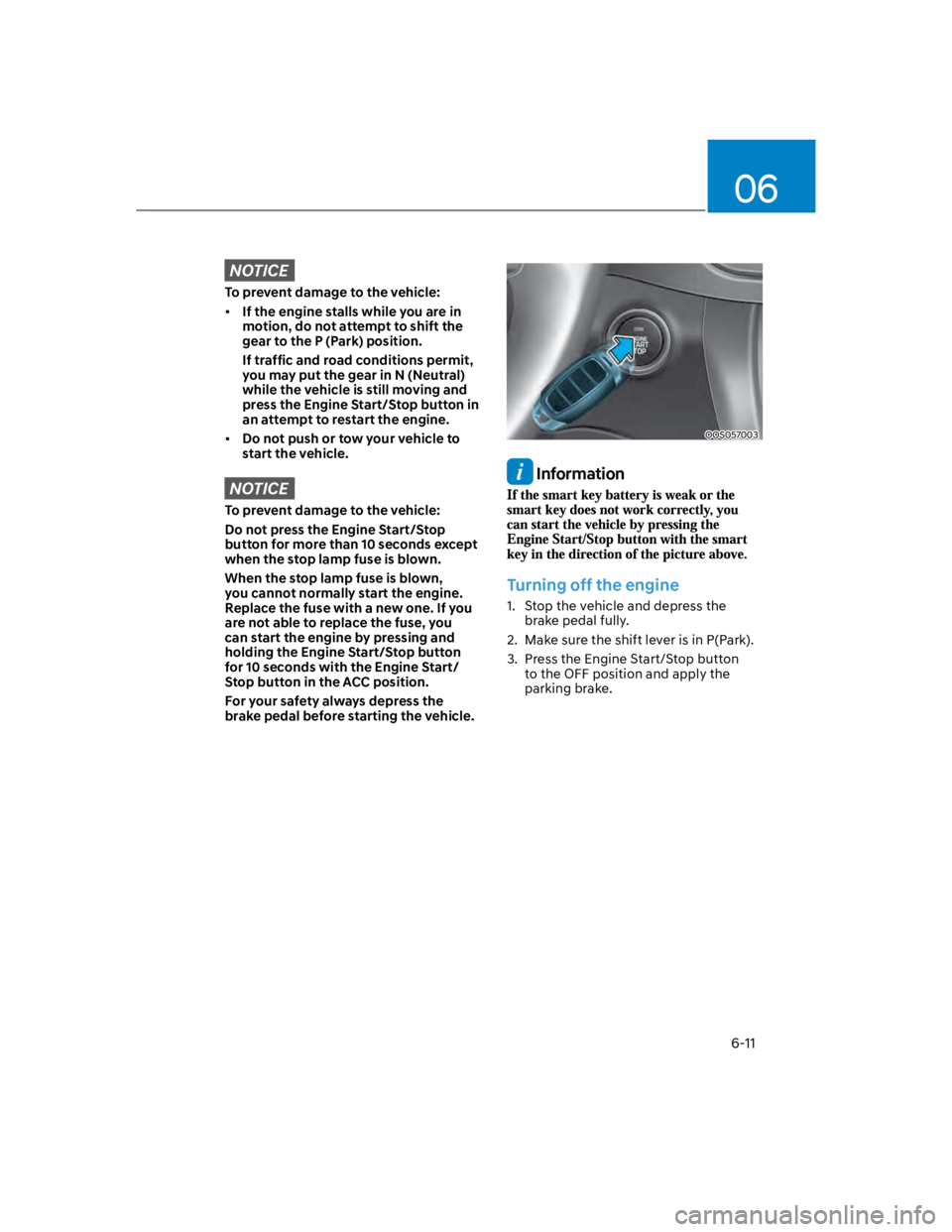
OOS057003
Information
Turning off the engine
1. Stop the vehicle and depress the
brake pedal fully.
2. Make sure the shift lever is in P(Park).
3. Press the Engine Start/Stop button
to the OFF position and apply the
parking brake.
Page 272 of 579
06
6-15
N (Neutral)
The wheels and transmission are not
engaged.
Use N (Neutral) if you need to restart a
stalled engine, or if it is necessary to stop
with the engine ON. Shift into P (Park)
if you need to leave your vehicle for any
reason.
Always depress the brake pedal when
you are shifting from N (Neutral) to
another gear.
WARNING
Do not shift into gear unless your foot is
firmly on the brake pedal. Shifting into
gear when the engine is running at high
speed can cause the vehicle to move
very rapidly. You could lose control of
the vehicle and hit people or objects.
D (Drive)
This is the normal forward driving
position. The transmission will
automatically shift to the optimal gear
ratio, providing better fuel efficiency and
a smoother ride.
For extra power when passing another
vehicle or driving uphill, depress the
accelerator further until you feel the
transmission downshift to a lower gear.
The DRIVE MODE switch, located on the
shift lever console, allows the driver to
switch from NORMAL mode to SPORT
mode.
For more details, refer to "Drive Mode
Integrated Control System" later in this
chapter.
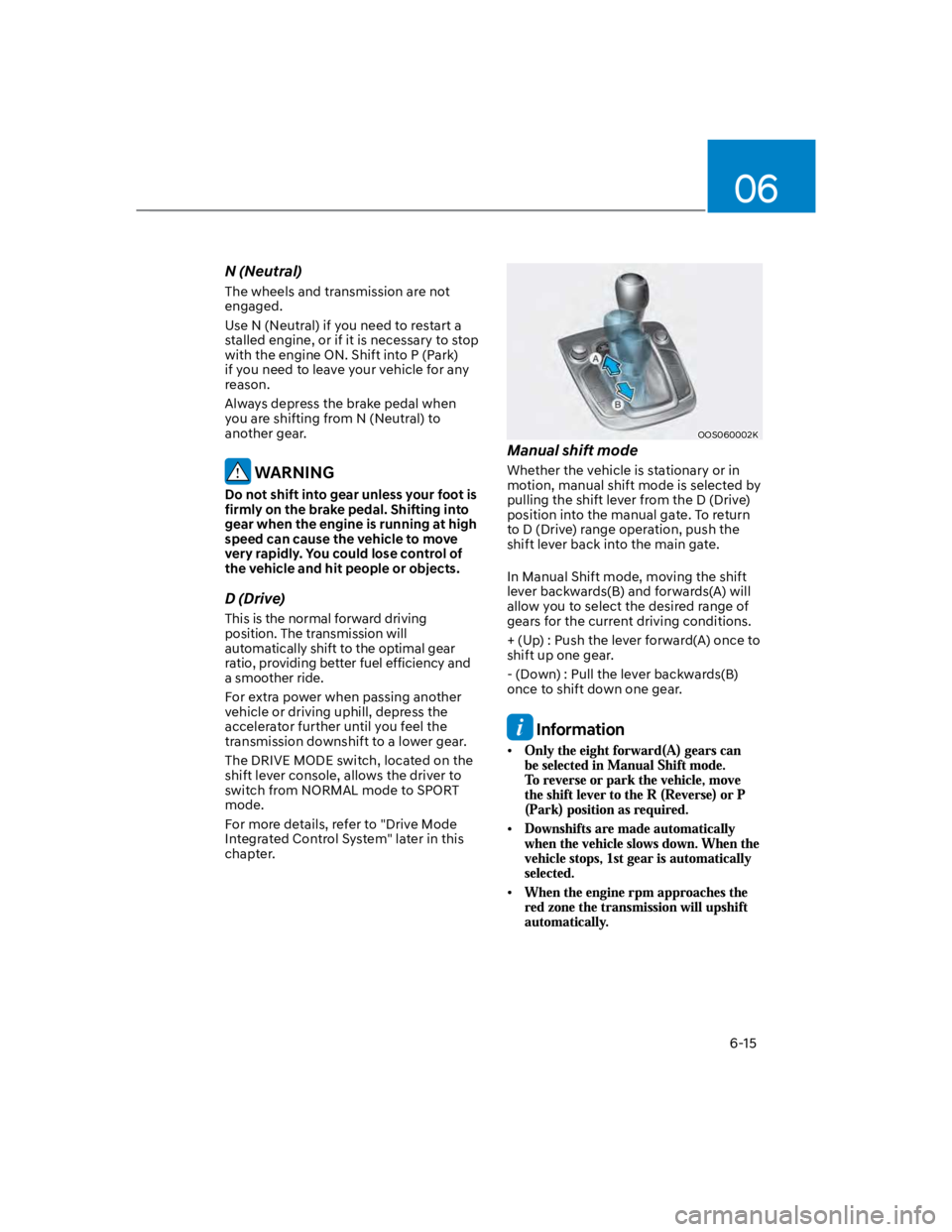
OOS060002K
Manual shift mode
Whether the vehicle is stationary or in
motion, manual shift mode is selected by
pulling the shift lever from the D (Drive)
position into the manual gate. To return
to D (Drive) range operation, push the
shift lever back into the main gate.
In Manual Shift mode, moving the shift
lever backwards(B) and forwards(A) will
allow you to select the desired range of
gears for the current driving conditions.
+ (Up) : Push the lever forward(A) once to
shift up one gear.
- (Down) : Pull the lever backwards(B)
once to shift down one gear.
Information
Page 280 of 579
06
6-23
This is the normal driving position. The
transmission will automatically shift
through a 7-gear sequence, providing the
best fuel economy and power.
For extra power when passing another
vehicle or driving uphill, depress the
accelerator fully. The transmission will
automatically downshift to the next
lower gear (or gears, as appropriate).
The DRIVE MODE switch, located on the
shift lever console, allows the driver to
switch from NORMAL mode to SPORT
mode.
For more details, refer to “Drive Mode
Integrated Control System” later in this
chapter.
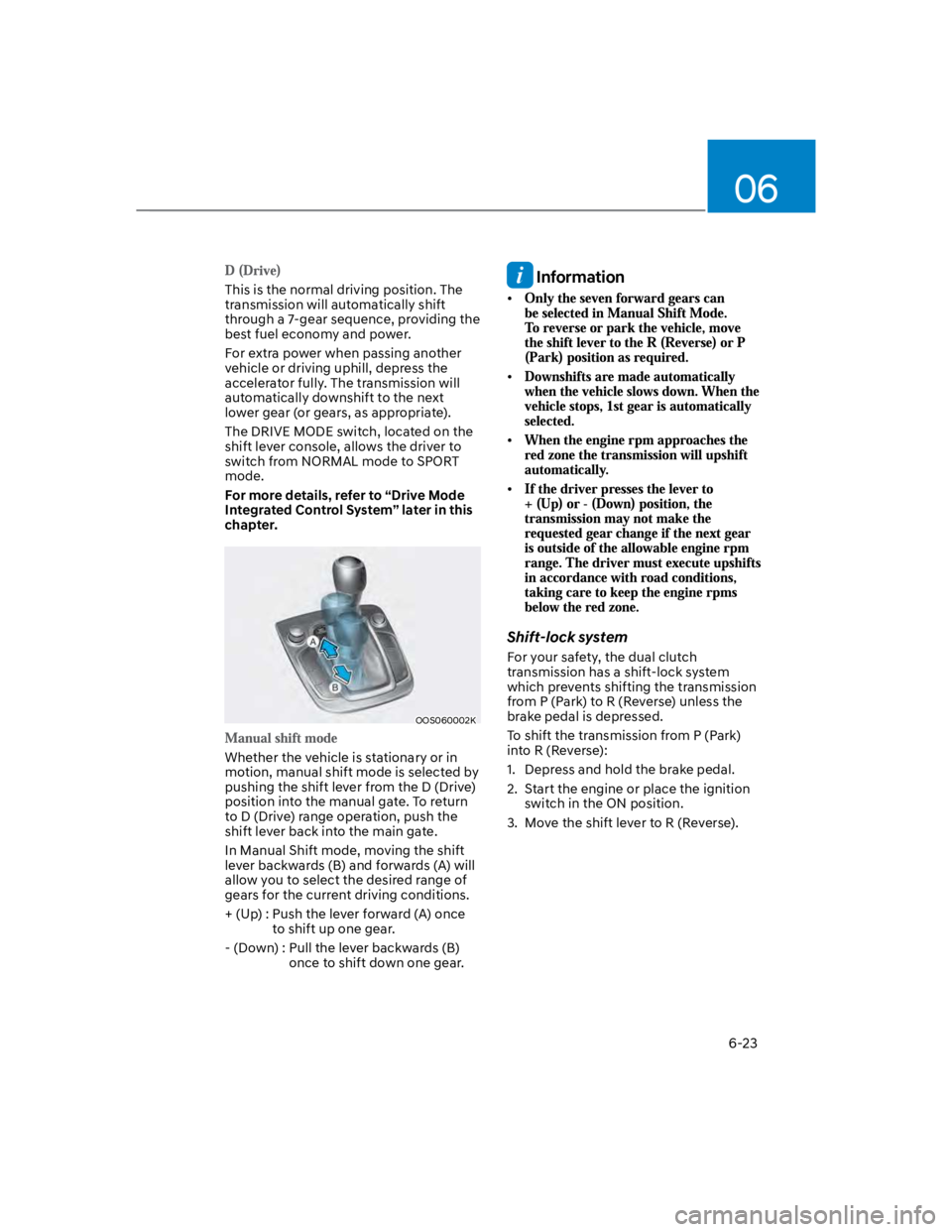
OOS060002K
Whether the vehicle is stationary or in
motion, manual shift mode is selected by
pushing the shift lever from the D (Drive)
position into the manual gate. To return
to D (Drive) range operation, push the
shift lever back into the main gate.
In Manual Shift mode, moving the shift
lever backwards (B) and forwards (A) will
allow you to select the desired range of
gears for the current driving conditions.
+ (Up) : Push the lever forward (A) once
to shift up one gear.
- (Down) : Pull the lever backwards (B)
once to shift down one gear.
Information
Shift-lock system
For your safety, the dual clutch
transmission has a shift-lock system
which prevents shifting the transmission
from P (Park) to R (Reverse) unless the
brake pedal is depressed.
To shift the transmission from P (Park)
into R (Reverse):
1. Depress and hold the brake pedal.
2. Start the engine or place the ignition
switch in the ON position.
3. Move the shift lever to R (Reverse).
Page 283 of 579
Driving your vehicle
6-26
Power-assist brakes
Your vehicle has power-assisted brakes
that adjust automatically through normal
usage.
If the engine is not running or is turned
off while driving, the power assist for
the brakes will not work. You can still
stop your vehicle by applying greater
force to the brake pedal than typical.
The stopping distance, however, will be
longer than with power brakes.
When the engine is not running, the
reserve brake power is partially depleted
each time the brake pedal is applied.
Do not pump the brake pedal when the
power assist has been interrupted.
WARNING
Take the following precautions:
Do not drive with your foot resting
on the brake pedal. This will create
abnormal high brake temperatures,
excessive brake lining and pad wear,
and increased stopping distances.
When descending down a long or
steep hill, use the paddle shifter
and manually downshift to a
lower gear in order to control your
speed without using the brake
pedal excessively. Applying the
brakes continuously will cause
the brakes to overheat and could
result in a temporary loss of braking
performance.
Wet brakes may impair the vehicle's
ability to safely slow down; the
vehicle may also pull to one side
when the brakes are applied.
Applying the brakes lightly will
indicate whether they have been
affected in this way. Always test your
brakes in this fashion after driving
through deep water. To dry the
brakes, lightly tap the brake pedal to
heat up the brakes while maintaining
a safe forward speed until brake
performance returns to normal.
Avoid driving at high speeds until the
brakes function correctly.
Disc brakes wear indicator
When your brake pads are worn and new
pads are required, you will hear a high
pitched warning sound from your front
or rear brakes. You may hear this sound
come and go or it may occur whenever
you depress the brake pedal.
Note that some driving conditions or
climates may cause a brake squeal
when you first apply (or lightly apply)
the brakes. This is normal and does not
indicate a problem with your brakes.
NOTICE
To avoid costly brake repairs, do not
continue to drive with worn brake pads.
Information
BRAKING SYSTEM