ESP HYUNDAI KONA 2022 User Guide
[x] Cancel search | Manufacturer: HYUNDAI, Model Year: 2022, Model line: KONA, Model: HYUNDAI KONA 2022Pages: 579, PDF Size: 35.31 MB
Page 78 of 579

03
3-47
During a moderate to severe frontal
collision, sensors will detect the
vehicle’s rapid deceleration. If the rate of
deceleration is high enough, the control
unit will inflate the front air bags, at the
time and with the force needed.
The front air bags help protect the driver
and front passenger by responding to
frontal impacts in which seat belts alone
cannot provide adequate restraint. When
needed, the side air bags help provide
protection in the event of a side impact
or rollover by supporting the side upper
body area.
Air bags are activated (able to
inflate if necessary) only when the
Engine Start/Stop button is in the
ON or START position, and it can be
activated within about 3 minutes after
the engine is turned off.
Air bags inflate in the event of certain
frontal or side collisions to help
protect the occupants from serious
physical injury.
There is no single speed at which the
air bags will inflate. Generally, air bags
are designed to inflate based upon the
severity of a collision and its direction.
These two factors determine whether
the sensors produce an electronic
deployment/inflation signal.
The front air bags will completely
inflate and deflate in an instant. It is
virtually impossible for you to see the
air bags inflate during an accident. It is
much more likely that you will simply
see the deflated air bags hanging out
of their storage compartments after
the collision.
In addition to inflating in serious side
collisions, vehicles equipped with a
rollover sensor, side and/or curtain air
bags will inflate if the sensing system
detects a rollover.
When a rollover is detected, curtain
air bags will remain inflated longer to
help provide protection from ejection,
especially when used in conjunction
with the seat belts. (if equipped with a
rollover sensor)
To help provide protection, the air
bags must inflate rapidly. The speed
of air bag inflation is a consequence
of extremely short time in which
to inflate the air bag between the
occupant and the vehicle structures
before the occupant impacts those
structures. This speed of inflation
reduces the risk of serious or
lifethreatening injuries and is thus a
necessary part of air bag design.
However, the rapid air bag inflation
can also cause injuries which can
include facial abrasions, bruises and
broken bones because the inflation
speed also causes the air bags to
expand with a great deal of force.
There are even circumstances under
which contact with the air bag can
cause fatal injuries, especially if the
occupant is positioned excessively
close to the air bag.
You can take steps to reduce the risk
of being injured by an inflating air bag.
The greatest risk is sitting too close to
the air bag. An air bag needs about 10
in. (25 cm) of space to inflate. NHTSA
recommends that drivers allow at least
10 in. (25 cm) between the center of the
steering wheel and the chest.
Page 117 of 579
Instrument cluster
4-24
Door, Hood, Liftgate open indicator
OOS040004K
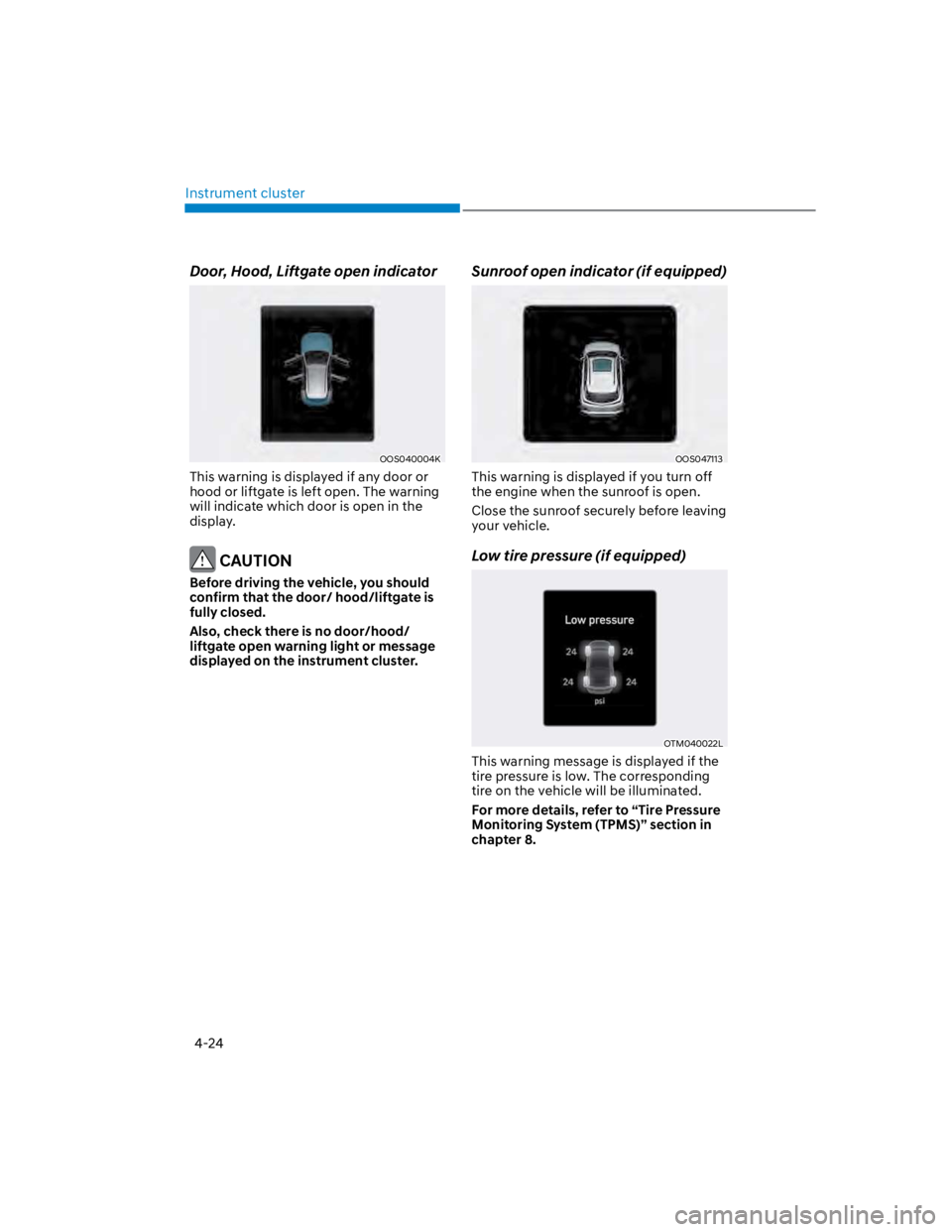
This warning is displayed if any door or
hood or liftgate is left open. The warning
will indicate which door is open in the
display.
CAUTION
Before driving the vehicle, you should
confirm that the door/ hood/liftgate is
fully closed.
Also, check there is no door/hood/
liftgate open warning light or message
displayed on the instrument cluster.
Sunroof open indicator (if equipped)
OOS047113
This warning is displayed if you turn off
the engine when the sunroof is open.
Close the sunroof securely before leaving
your vehicle.
Low tire pressure (if equipped)
OTM040022L
This warning message is displayed if the
tire pressure is low. The corresponding
tire on the vehicle will be illuminated.
For more details, refer to “Tire Pressure
Monitoring System (TPMS)” section in
chapter 8.
Page 119 of 579

Instrument cluster
4-26
Engine overheated / Engine has
overheated (if equipped)
This message is displayed when the
engine coolant temperature is above
248°F (120°C). This means that the
engine is overheated and may be
damaged.
If your vehicle is overheated, refer to
“Overheating” section in chapter 8.
Check exhaust system (if equipped)
This message is displayed if there is a
problem with the GPF system. At this
time, the GPF warning light will also
blink. If this occurs, have the GPF system
checked by an authorized HYUNDAI
dealer.
GPF : Gasoline Particulate Filter
For more details, refer to “Warning
lights” in this chapter.
Check headlight (if equipped)
This warning message is displayed if the
headlamps are not operating properly.
A corresponding bulb may need to be
replaced.
Make sure to replace the burned out
bulb with a new one of the same wattage
rating.
Check turn signal (if equipped)
This message is displayed if the turn
signal lamps are not operating properly.
A lamp may need to be replaced.
Make sure to replace the burned out
bulb with a new one of the same wattage
rating.
Check headlamp LED (if equipped)
This message is displayed if there is a
problem with the LED headlamp. Have
the vehicle inspected by an authorized
HYUNDAI dealer.
Page 140 of 579
Convenient features
5-6
When the remote key does not work
correctly, open and close the door
with the mechanical key. If you have
a problem with the remote key, it is
recommended that you contact an
authorized HYUNDAI dealer.
If the remote key is in close proximity to
your mobile phone, the signal could be
blocked by your mobile phone’s normal
operational signals.
This is especially important when the
phone is active such as making and
receiving calls, text messaging, and/ or
sending/receiving emails.
Avoid placing the remote key and your
mobile phone in the same location and
always try to maintain an adequate
distance between the two devices.
Information
1.
2.
3.
NOTICE
Keep the remote key away from
electromagnetic materials that block
electromagnetic waves to the key
surface.
Battery replacement
OOSH059003L
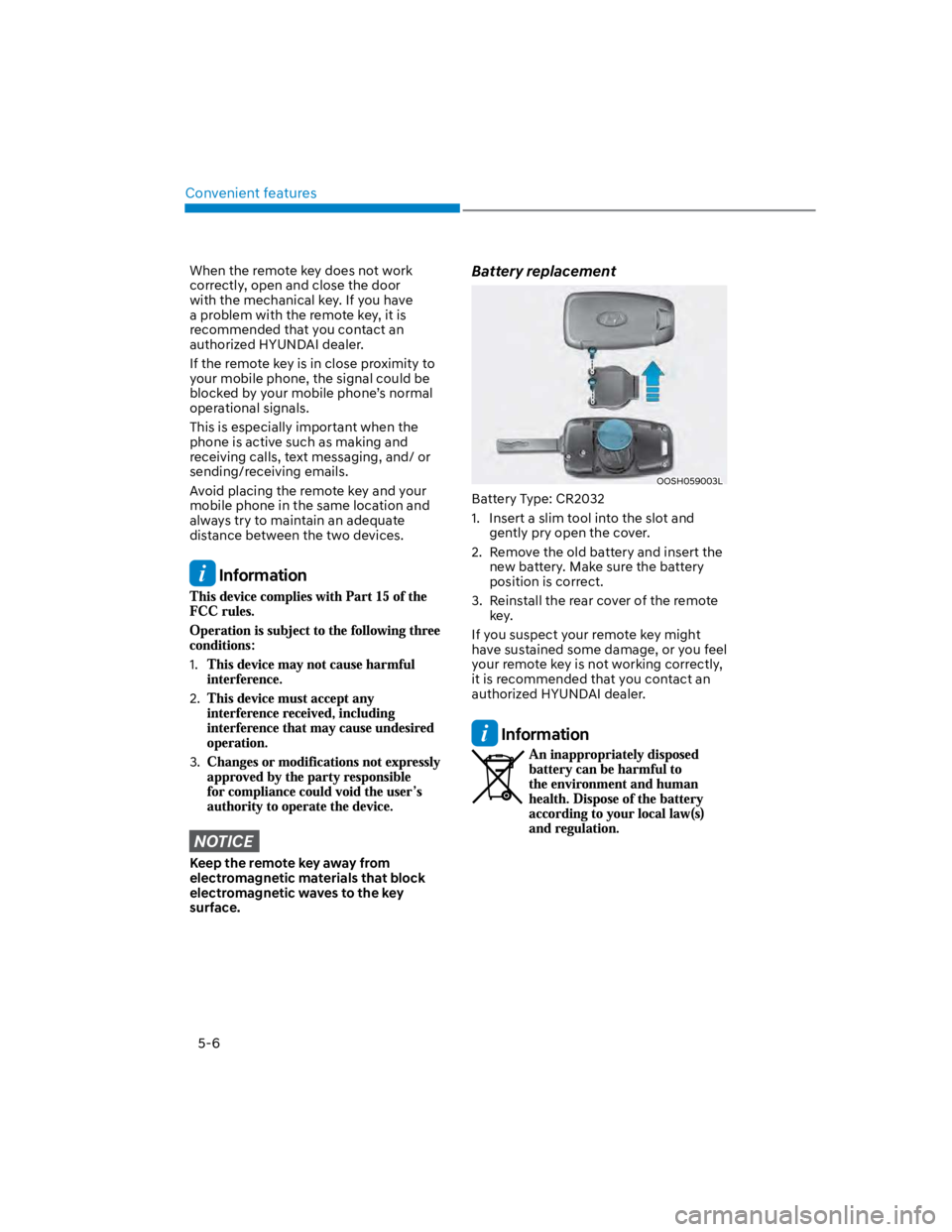
Battery Type: CR2032
1. Insert a slim tool into the slot and
gently pry open the cover.
2. Remove the old battery and insert the
new battery. Make sure the battery
position is correct.
3. Reinstall the rear cover of the remote
key.
If you suspect your remote key might
have sustained some damage, or you feel
your remote key is not working correctly,
it is recommended that you contact an
authorized HYUNDAI dealer.
Information
Page 156 of 579

Convenient features
5-22
CAUTION
Do not leave the registered digital
key (smartphone) and card key in
your vehicle. Please carry around
your keys all the times.
If you happen to lose your digital
key (smartphone) or card key
registered as a main user’s key, you
should immediately delete the key
on the vehicle’s key menu. For more
information, refer to the Digital Key
Deletion in this chapter.
If you registered your digital key
(smartphone) or card key in the
vehicle, a message appears on the
instrument cluster and let you know
the key is registered.
(Message: Digital key(s) active.)
If you buy a used vehicle, you should
confirm the message and delete the
registered smartphone key and card
key. In this case, you should carry
your smart key.
If you keep place the NFC card
of the digital key on the interior
authentication pad (wireless
charger) while driving, it may cause a
malfunction of the NFC card.
You should remove your NFC card
of the digital key on the interior
authentication pad after turning on
the engine.
Hyundai digital key app may not
work properly when the NFC or
Bluetooth communication between
smartphone and car is not good.
If the remote control operation
is executed where the mobile
connection is weak, Bluetooth
connection is poor due to lots of
Bluetooth devices or there is an
object such as metal or concrete, it
might be delayed or the operable
distance might decrease. Especially,
you should not cover the smartphone
with your hand or place other
devices which can cause frequency
interference. It may result in poor
performance.
If the remote control function is not
activated, please use NFC function to
lock or unlock the doors
You should be careful not to
press the remote control button
on the digital key (smartphone)
accidentally.
If the digital key (smartphone) is
discharged or defective or you
cannot use the digital key since the
vehicle battery is discharged, use the
inside door lock button to lock all of
the doors.
CAUTION
Hyundai digital key app on the
smartphone and card key may not
work if any of the following occurs:
-Hyundai digital key app on the
smartphone is deleted. (Required
to reinstall the app)
-Account log in information of
Hyundai digital key app is expired.
(Required to re-log in)
-When you try to log in to another
smartphone instead of the
registered smartphone with same
user account.
-Smartphone rooting or app
hacking is detected.
-Smartphone battery or the vehicle
battery is discharged.
-Smartphone’s screen is off or
locked.
-NFC or Bluetooth is turned off on
the smartphone settings.
-Smartphone’s mobile network
setting is off or airplane mode is
activated.
-A credit card is overlapped in the
back of your smartphone or metal
or thick case is used.
-Use the card key with insert it
into the wallet or card holder or
overlapping with other cards.
Page 182 of 579

Convenient features
5-48
FCC (USA) and ISED (Canada)
This device complies with FCC rules
part 15 and Innovation, Science, and
Economic Development Canada RSS-
210. Operation is subject to the following
two conditions: (1) This device may not
cause harmful interference, and (2) This
device must accept any interference that
may be received including interference
that may cause undesired operation.
WARNING: The transmitter has been
tested and complies with FCC and
ISED rules. Changes or modifications
not expressly approved by the party
responsible for compliance could void
the user’s authority to operate the
device.
This equipment complies with FCC
and ISED radiation exposure limits set
forth for an uncontrolled environment.
End Users must follow the specific
operating instructions for satisfying RF
exposure compliance. This transmitter
must be at least 20cm from the user and
must not be co-located or operating in
conjunction with any other antenna or
transmitter.
FCC (Htats-Unis) et ISED (Canada)
Cet appareil est conforme aux
règlements de la FCC, section 15, et
au CNR-210 d’Innovation, Sciences et
Dhveloppement économique Canada. Le
fonctionnement est assujetti aux deux
conditions suivantes : (1) cet appareil ne
doit pas causer d’interférences nuisibles
et (2) cet appareil doit accepter toute
interférence reçue, y compris celle qui
pourrait entraîner un dysfonctionnement.
MISE EN GARDE : L’émetteur a subi des
tests et est conforme aux règlements
de la FCC et d’ISDE. Les changements
ou modifications non approuvés
explicitement par la partie responsable
de la conformité pourraient rendre
caduque l’autorisation de l’utilisateur de
se servir du dispositif.
Cet appareil est conforme aux limites
d’exposition aux radiations de la FCC et
d’ISDE établies pour un environnement
non contrôlé. Les utilisateurs finaux
doivent respecter les instructions
d’utilisation spécifiques pour satisfaire
aux exigences de conformité aux
expositions de RF.
L’émetteur doit se trouver à 20 cm au
minimum de l’utilisateur et ne doit pas
être situé au même endroit que tout
autre émetteur ou antenne ni fonctionner
avec un autre émetteur ou antenne.
La operación de este equipo está sujeta
a las siguientes dos condiciones: (1) es
posible que este equipo o dispositivo
pueda no causar interferencia dañina, y
(2) este dispositivo o dispositivos deben
aceptar cualquier interferencia, que
incluye la interferencia que puede causar
su operación no deseada.
Page 198 of 579
Convenient features
5-64
Emergency liftgate safety release
OOS050008K
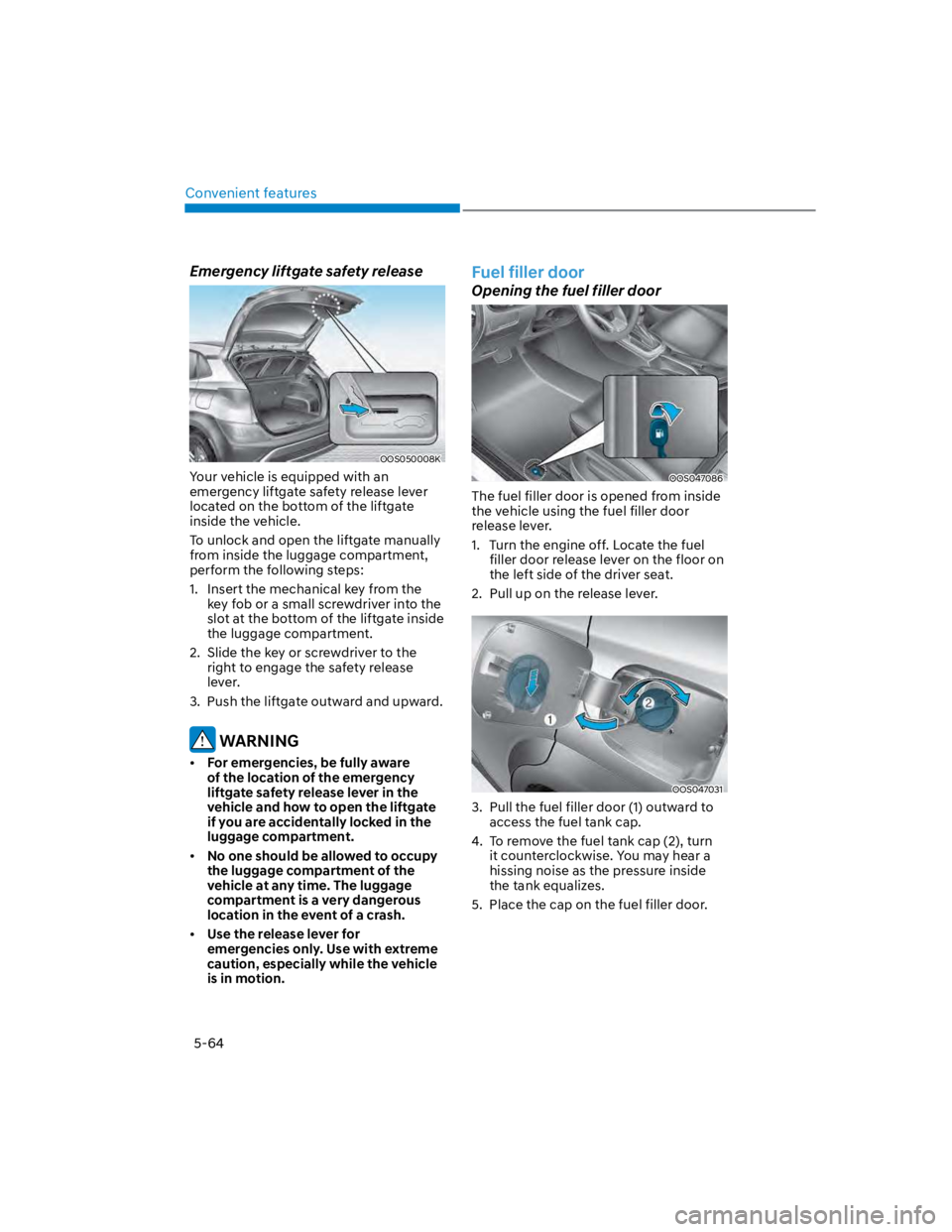
Your vehicle is equipped with an
emergency liftgate safety release lever
located on the bottom of the liftgate
inside the vehicle.
To unlock and open the liftgate manually
from inside the luggage compartment,
perform the following steps:
1. Insert the mechanical key from the
key fob or a small screwdriver into the
slot at the bottom of the liftgate inside
the luggage compartment.
2. Slide the key or screwdriver to the
right to engage the safety release
lever.
3. Push the liftgate outward and upward.
WARNING
For emergencies, be fully aware
of the location of the emergency
liftgate safety release lever in the
vehicle and how to open the liftgate
if you are accidentally locked in the
luggage compartment.
No one should be allowed to occupy
the luggage compartment of the
vehicle at any time. The luggage
compartment is a very dangerous
location in the event of a crash.
Use the release lever for
emergencies only. Use with extreme
caution, especially while the vehicle
is in motion.
Fuel filler door
Opening the fuel filler door
OOS047086
The fuel filler door is opened from inside
the vehicle using the fuel filler door
release lever.
1. Turn the engine off. Locate the fuel
filler door release lever on the floor on
the left side of the driver seat.
2. Pull up on the release lever.
OOS047031
3. Pull the fuel filler door (1) outward to
access the fuel tank cap.
4. To remove the fuel tank cap (2), turn
it counterclockwise. You may hear a
hissing noise as the pressure inside
the tank equalizes.
5. Place the cap on the fuel filler door.
Page 199 of 579

05
5-65
Information
Closing the fuel filler door
1. To install the fuel tank cap, turn it
clockwise until it “clicks” one time.
2. Close the fuel filler door until it is
latched securely.
WARNING
Gasoline is highly flammable and
explosive. Failure to follow these
guidelines may result in SERIOUS
INJURY or DEATH:
Read and follow all warnings posted
at the gas station.
Before refueling, note the location
of the Emergency Fuel Shut-Off, if
available, at the gas station.
Before touching the fuel nozzle, you
should eliminate the potential build-
up of static electricity by touching
a metal part of the vehicle, a safe
distance away from the fuel filler
neck, nozzle, or other gas source,
with your bare hand.
Do not use cellular phones while
refueling. Electric current and/or
electronic interference from cellular
phones can potentially ignite fuel
vapors and cause a fire.
Do not get back into a vehicle
once you have begun refueling.
You can generate a buildup of
static electricity by touching,
rubbing or sliding against any item
or fabric capable of producing
static electricity. Static electricity
discharge can ignite fuel vapors
causing a fire. If you must re-enter
the vehicle, you should once again
eliminate potentially dangerous
static electricity discharge by
touching a metal part of the vehicle,
away from the fuel filler neck, nozzle
or other fuel source, with your bare
hand.
When using an approved portable
fuel container, be sure to place the
container on the ground prior to
refueling. Static electricity discharge
from the container can ignite fuel
vapors causing a fire.
Once refueling has begun, contact
between your bare hand and the
vehicle should be maintained until
the filling is complete.
Use only approved portable plastic
fuel containers designed to carry and
store fuel.
When refueling, always shift the
gear to the P (Park) position, set
the parking brake, and press the
Engine Start/Stop button to the
OFF position. Sparks produced by
electrical components related to the
engine can ignite fuel vapors causing
a fire.
Do not use matches or a lighter and
do not smoke or leave a lit cigarette
in your vehicle while at a gas station,
especially during refueling.
Page 201 of 579
05
5-67
Exterior lights
Lighting control
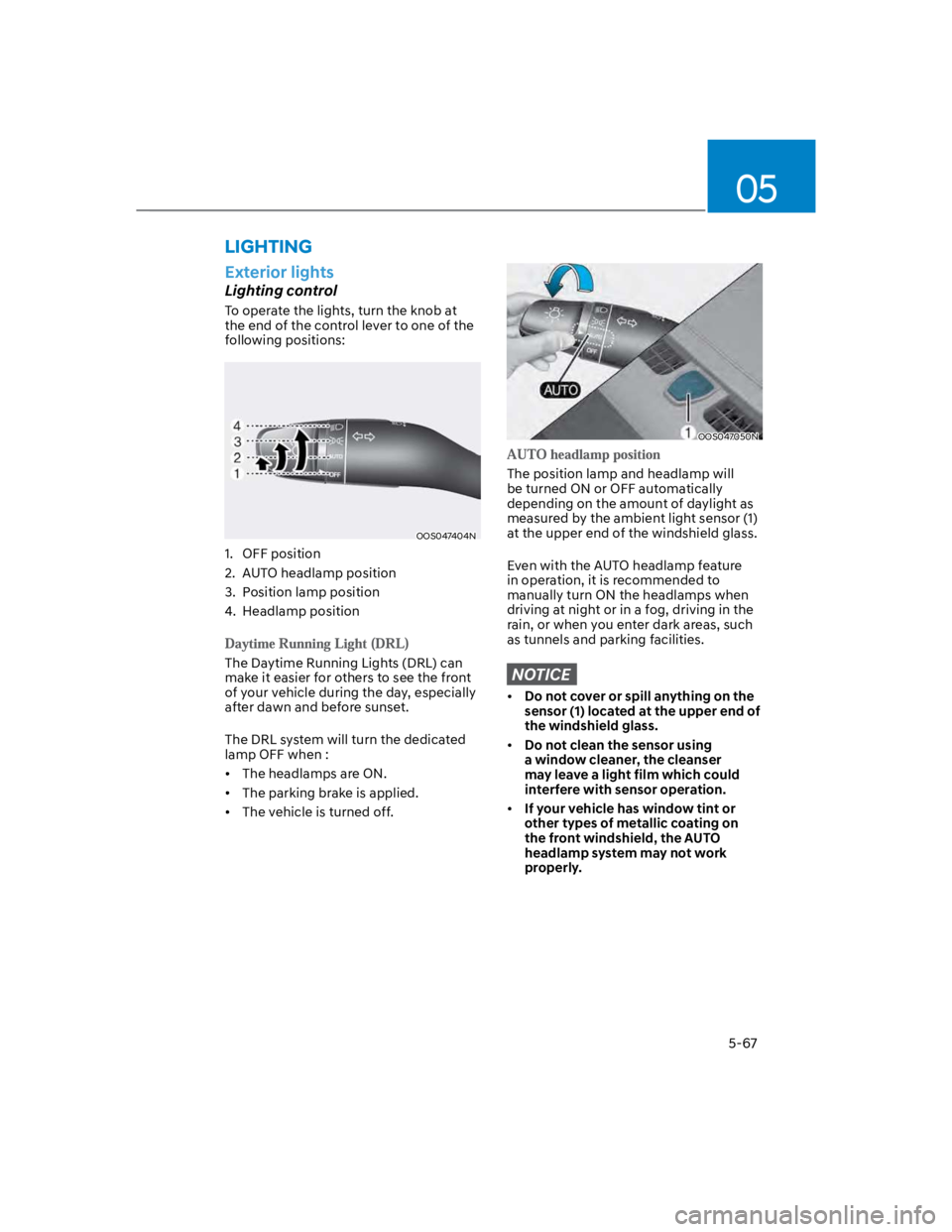
To operate the lights, turn the knob at
the end of the control lever to one of the
following positions:
OOS047404N
1. OFF position
2. AUTO headlamp position
3. Position lamp position
4. Headlamp position
The Daytime Running Lights (DRL) can
make it easier for others to see the front
of your vehicle during the day, especially
after dawn and before sunset.
The DRL system will turn the dedicated
lamp OFF when :
The headlamps are ON.
The parking brake is applied.
The vehicle is turned off.
OOS047050N
The position lamp and headlamp will
be turned ON or OFF automatically
depending on the amount of daylight as
measured by the ambient light sensor (1)
at the upper end of the windshield glass.
Even with the AUTO headlamp feature
in operation, it is recommended to
manually turn ON the headlamps when
driving at night or in a fog, driving in the
rain, or when you enter dark areas, such
as tunnels and parking facilities.
NOTICE
Do not cover or spill anything on the
sensor (1) located at the upper end of
the windshield glass.
Do not clean the sensor using
a window cleaner, the cleanser
may leave a light film which could
interfere with sensor operation.
If your vehicle has window tint or
other types of metallic coating on
the front windshield, the AUTO
headlamp system may not work
properly.
LIGHTING
Page 210 of 579

Convenient features
5-76
When it is affected by an external
condition
When there is a similar shaped lamp
with the vehicle front vehicle’s
lamps.
When the headlamp is not repaired
or replaced at an authorized dealer.
When headlamp aiming is not
properly adjusted.
When driving on a narrow winding
road or rough road.
When driving downhill or uphill.
When only part of the vehicle in
front is visible on a crossroad or on a
corner.
When there is a traffic light,
reflecting sign, flashing sign or
mirror.
When the road conditions are bad
such as being wet or covered with
snow.
When a vehicle suddenly appears
from around a corner.
When the vehicle is tilted from a flat
tire or being towed.
When the front visibility is poor
When the light from the on-coming
or vehicle in front is not detected
because of exhaust fume, smoke,
fog, snow, Heavy rain, dust, etc.
When the front window is covered
with foreign matter.
WARNING
Do not disassemble a front view
camera temporarily for tinted
window or attaching any types
of coatings and accessories. If
you disassemble the camera and
assemble it again, take your vehicle
to an authorized HYUNDAI dealer
and have the function checked to
need a calibration.
When you replace or reinstall the
windshield glass, front view camera,
we recommend that you take your
vehicle to an authorized HYUNDAI
dealer and have the function
checked.
Be careful that water doesn’t get into
High Beam Assist unit and do not
remove or damage related parts of
High Beam Assist.
Do not place objects on the crash
pad that reflect light such as mirrors,
white paper, etc. The function may
malfunction if sunlight is reflected.
At times, High Beam Assist may
not work properly. The function is
for your convenience only. It is the
responsibility of the driver for safe
driving practices and always check
the road conditions for your safety.
When the function does not operate
normally, change the lamp position
manually between the high beam
and low beam.