ESP HYUNDAI KONA 2022 Owner's Manual
[x] Cancel search | Manufacturer: HYUNDAI, Model Year: 2022, Model line: KONA, Model: HYUNDAI KONA 2022Pages: 579, PDF Size: 35.31 MB
Page 232 of 579
Convenient features
5-98
WINDSHIELD DEFROSTING AND DEFOGGING
WARNING
Windshield heating
Do not use the position during
cooling operation in extremely humid
weather. The difference between the
temperature of the outside air and that
of the windshield could cause the outer
surface of the windshield to fog up,
causing loss of visibility could cause
an accident resulting in serious injury
or death. In this case, set the mode
selection button to the position
and fan speed control knob to a lower
speed.
For maximum defrost performance,
set the temperature control to the
highest temperature setting and
the fan speed control to the highest
setting.
If warm air to the floor is desired while
defrosting or defogging, set the mode
to the floor-defrost position.
Before driving, clear all snow and ice
from the windshield, rear window,
side view mirrors, and all side
windows.
Clear all snow and ice from the
hood and air inlet in the cowl grill
to improve heater and defroster
efficiency and to reduce the
probability of fogging up the inside of
the windshield.
NOTICE
If the engine temperature is still cold
after starting, then a brief engine warm
up period may be required for the
vented air flow to become warm or hot.
Manual climate control system
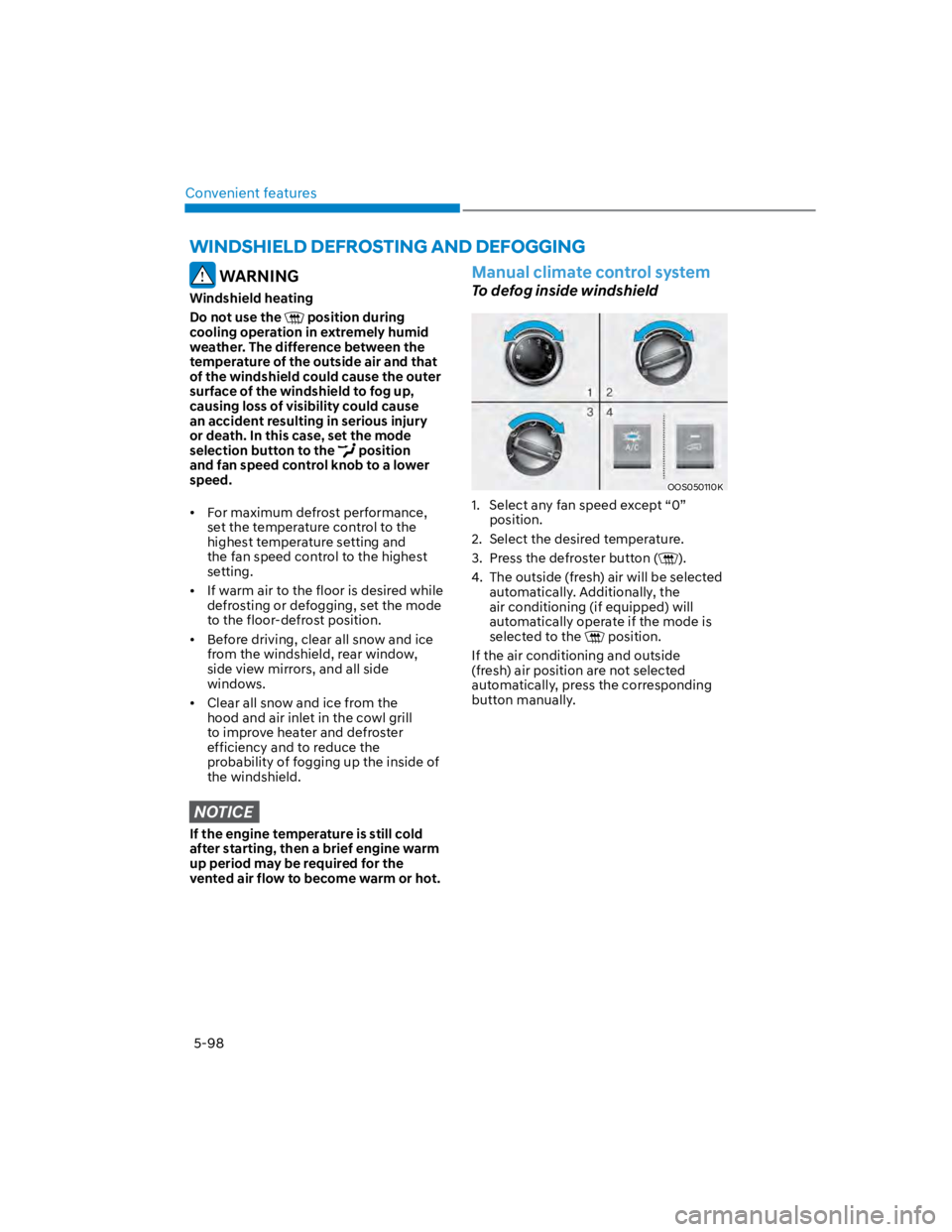
To defog inside windshield
OOS050110K
1. Select any fan speed except “0”
position.
2. Select the desired temperature.
3. Press the defroster button ().
4. The outside (fresh) air will be selected
automatically. Additionally, the
air conditioning (if equipped) will
automatically operate if the mode is
selected to the position.
If the air conditioning and outside
(fresh) air position are not selected
automatically, press the corresponding
button manually.
Page 233 of 579
05
5-99
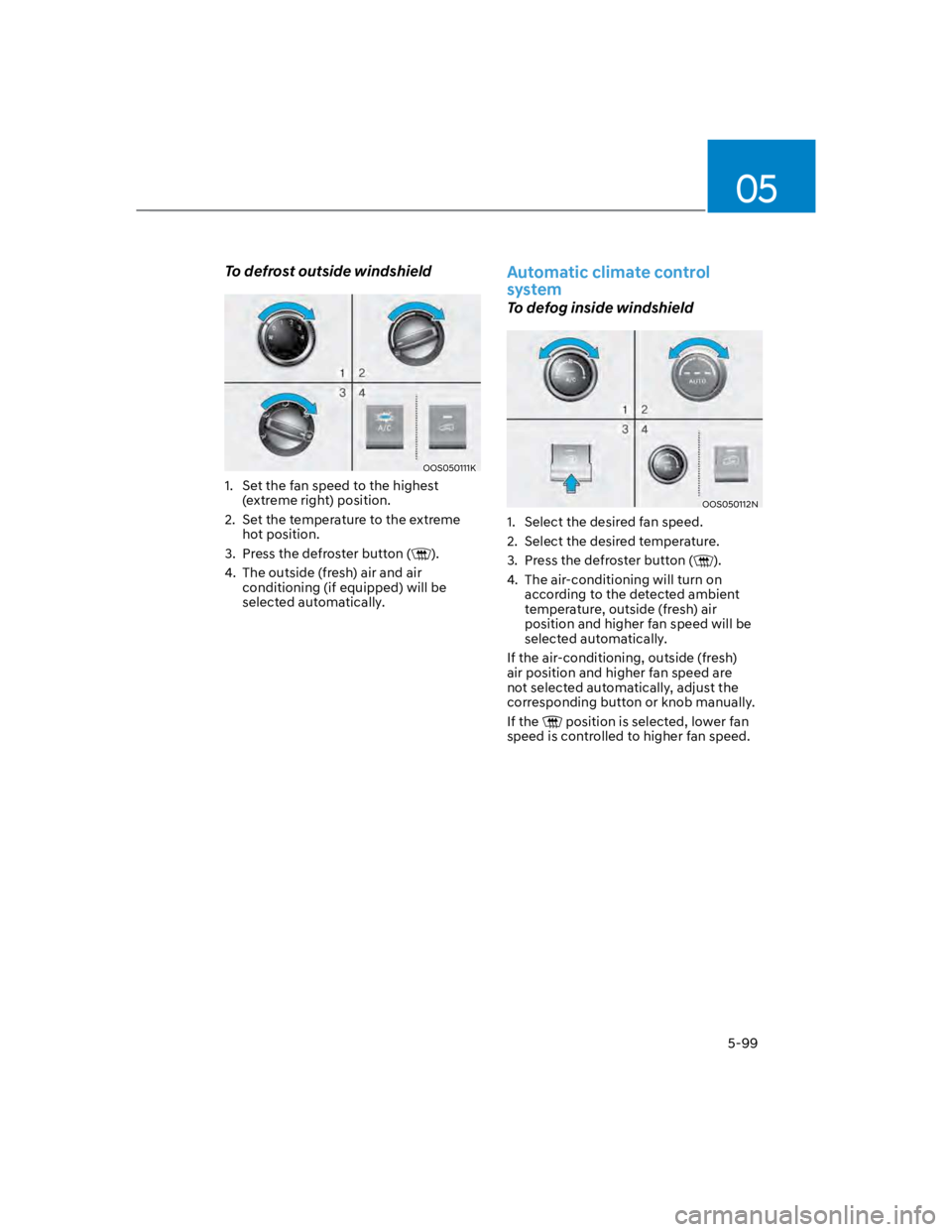
To defrost outside windshield
OOS050111K
1. Set the fan speed to the highest
(extreme right) position.
2. Set the temperature to the extreme
hot position.
3. Press the defroster button ().
4. The outside (fresh) air and air
conditioning (if equipped) will be
selected automatically.
Automatic climate control
system
To defog inside windshield
OOS050112N
1. Select the desired fan speed.
2. Select the desired temperature.
3. Press the defroster button ().
4. The air-conditioning will turn on
according to the detected ambient
temperature, outside (fresh) air
position and higher fan speed will be
selected automatically.
If the air-conditioning, outside (fresh)
air position and higher fan speed are
not selected automatically, adjust the
corresponding button or knob manually.
If the position is selected, lower fan
speed is controlled to higher fan speed.
Page 249 of 579
05
5-115
EXTERIOR FEATURES
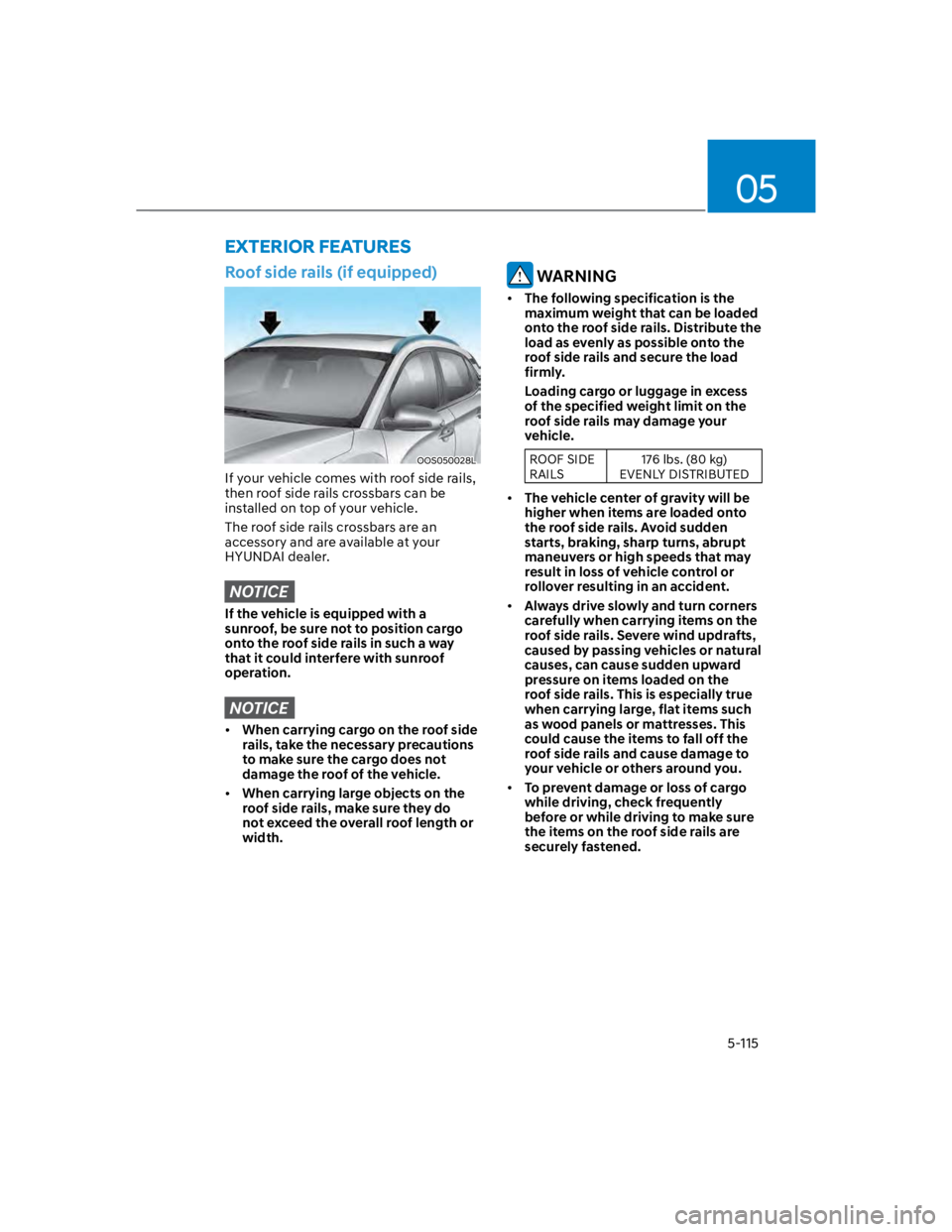
Roof side rails (if equipped)
OOS050028L
If your vehicle comes with roof side rails,
then roof side rails crossbars can be
installed on top of your vehicle.
The roof side rails crossbars are an
accessory and are available at your
HYUNDAI dealer.
NOTICE
If the vehicle is equipped with a
sunroof, be sure not to position cargo
onto the roof side rails in such a way
that it could interfere with sunroof
operation.
NOTICE
When carrying cargo on the roof side
rails, take the necessary precautions
to make sure the cargo does not
damage the roof of the vehicle.
When carrying large objects on the
roof side rails, make sure they do
not exceed the overall roof length or
width.
WARNING
The following specification is the
maximum weight that can be loaded
onto the roof side rails. Distribute the
load as evenly as possible onto the
roof side rails and secure the load
firmly.
Loading cargo or luggage in excess
of the specified weight limit on the
roof side rails may damage your
vehicle.
ROOF SIDE
RAILS
176 lbs. (80 kg)
EVENLY DISTRIBUTED
The vehicle center of gravity will be
higher when items are loaded onto
the roof side rails. Avoid sudden
starts, braking, sharp turns, abrupt
maneuvers or high speeds that may
result in loss of vehicle control or
rollover resulting in an accident.
Always drive slowly and turn corners
carefully when carrying items on the
roof side rails. Severe wind updrafts,
caused by passing vehicles or natural
causes, can cause sudden upward
pressure on items loaded on the
roof side rails. This is especially true
when carrying large, flat items such
as wood panels or mattresses. This
could cause the items to fall off the
roof side rails and cause damage to
your vehicle or others around you.
To prevent damage or loss of cargo
while driving, check frequently
before or while driving to make sure
the items on the roof side rails are
securely fastened.
Page 255 of 579
05
5-121
Using a cellular phone or a twoway
radio
When a cellular phone is used inside
the vehicle, noise may be produced
from the audio system. This does not
mean that something is wrong with the
audio equipment. In such a case, use
the cellular phone at a place as far as
possible from the audio equipment.
NOTICE
When using a communication system
such as a cellular phone or a radio set
inside the vehicle, a separate external
antenna must be fitted. When a cellular
phone or a radio set is used with an
internal antenna alone, it may interfere
with the vehicle’s electrical system and
adversely affect safe operation of the
vehicle.
WARNING
Do not use a cellular phone while
driving. Stop at a safe location to use a
cellular phone.
iPod®
iPod® is a registered trademark of Apple
Inc.
Bluetooth® Wireless Technology
The Bluetooth® word mark and logos
are registered trademarks owned by
Bluetooth SIG, Inc. and any use of such
marks by HYUNDAI is under license.
Other trademarks and trade names are
those of their respective owners.
A Bluetooth® Wireless Technology
enabled cell phone is required to use
Bluetooth® Wireless Technology.
Page 257 of 579
05
5-123
Supported USB storage devices
Byte/Sector: 64 kbyte or less
Format system: FAT12/16/32
(recommended), exFAT/NTFS
NOTICE
Operation is guaranteed only for a
metal cover type USB storage device
with a plug type connector.
-USB storage devices with a plastic
plug may not be recognised.
-USB storage devices in memory
card types, such as CF card or SD
cards, may not be recognised.
USB hard disk drives may not be
recognised.
When you use a large capacity USB
storage device with multiple logical
drives, only files stored on the first
drive will be recognised.
If an application program is loaded
on a USB storage device, the
corresponding media files may not
play.
Use USB 2.0 devices for better
compatibility.
Bluetooth
Bluetooth Power Class 2: -6 to 4 dBm
Aerial power: Max 3 mW
Frequency range: 2400 to 2483.5 MHz
Bluetooth patch RAM software
version: 1
Other trademarks and trade names are
those of their respective owners.
The Bluetooth®
word mark and
logos are registered
trademarks owned
by Bluetooth SIG,
Inc. and any use
of such marks by
HYUNDAI is under
licence.
Page 261 of 579
Driving your vehicle
6-4
Before entering the vehicle
Be sure all windows, outside mirror(s),
and outside lights are clean and
unobstructed.
Remove frost, snow, or ice.
Visually check the tires for uneven
wear and damage.
Check under the vehicle for any sign
of leaks.
Be sure there are no obstacles behind
you if you intend to back up.
Before starting
Make sure the hood, the liftgate, and
the doors are securely closed and
locked.
Adjust the position of the seat and
steering wheel.
Adjust the inside and side view
mirrors.
Verify all the lights work.
Fasten your seat belt. Check that all
passengers have fastened their seat
belts.
Check the gauges and indicators
in the instrument panel and the
messages on the instrument display
when the ignition switch is in the ON
position.
Check that any items you are carrying
are stored properly or fastened down
securely.
WARNING
To reduce the risk of SERIOUS INJURY or
DEATH, take the following precautions:
ALWAYS wear your seat belt. All
passengers must be properly belted
whenever the vehicle is moving.
For more information, refer to “Seat
Belts” section in chapter 3.
Always drive defensively. Assume
other drivers or pedestrians may be
careless and make mistakes.
Stay focused on the task of driving.
Driver distraction can cause
accidents.
Leave plenty of space between you
and the vehicle in front of you.
WARNING
NEVER drink or take drugs and drive.
Drinking or taking drugs and driving
is dangerous and may result in an
accident and SERIOUS INJURY or
DEATH.
Drunk driving is the number one
contributor to the highway death
toll each year. Even a small amount
of alcohol will affect your reflexes,
perceptions and judgment. Just
one drink can reduce your ability to
respond to changing conditions and
emergencies and your reaction time
gets worse with each additional drink.
Driving while under the influence
of drugs is as dangerous or more
dangerous than driving under the
influence of alcohol.
You are much more likely to have a
serious accident if you drink or take
drugs and drive. If you are drinking or
taking drugs, don’t drive. Do not ride
with a driver who has been drinking
or taking drugs. Choose a designated
driver or call a taxi.
BEFORE DRIVING
Page 271 of 579

Driving your vehicle
6-14
The indicator in the instrument cluster
displays the shift lever position when the
ignition switch is in the ON position.
WARNING
To reduce the risk of serious injury or
death:
ALWAYS check the surrounding
areas near your vehicle for people,
especially children, before shifting a
vehicle into D (Drive) or R (Reverse).
Before leaving the driver’s seat,
always make sure the shift lever
is in the P (Park) position, then set
the parking brake, and place the
ignition switch in the LOCK/OFF
position. Unexpected and sudden
vehicle movement can occur if these
precautions are not followed.
Do not use engine braking (shifting
from a high gear to lower gear)
rapidly on slippery roads. The vehicle
may slip causing an accident.
P (Park)
Always come to a complete stop before
shifting into P (Park).
To shift from P (Park), you must depress
firmly on the brake pedal and make sure
your foot is off the accelerator pedal.
If you have done all of the above and
still cannot shift the lever out of P
(Park), see "Shift-Lock Release" in this
chapter.
The shift lever must be in P (Park) before
turning the engine off.
WARNING
Shifting into P (Park) while the
vehicle is in motion may cause you to
lose control of the vehicle.
After the vehicle has stopped, always
make sure the shift lever is in P
(Park), apply the parking brake, and
turn the engine off.
When parking on an incline, shift
the gear to P (Park) and apply the
parking brake to prevent the vehicle
from rolling downhill.
Do not use the P (Park) position in
place of the parking brake.
R (Reverse)
Use this position to drive the vehicle
backward.
NOTICE
Always come to a complete stop before
shifting into or out of R (Reverse); you
may damage the transmission if you
shift into R (Reverse) while the vehicle is
in motion.
Page 274 of 579

06
6-17
Good driving practices
Never move the shift lever from P
(Park) or N (Neutral) to any other
position with the accelerator pedal
depressed.
Never move the shift lever into P
(Park) when the vehicle is in motion.
Be sure the vehicle is completely
stopped before you attempt to shift
into R (Reverse) or D (Drive).
Do not move the shift lever to N
(Neutral) when driving. Doing so
may result in an accident because
of a loss of engine braking and the
transmission could be damaged.
Driving uphill or downhill, always shift
to D (Drive) when driving forward or to
R (Reverse) when driving backwards,
and check the gear position indicated
on the cluster before driving. If you
drive in the opposite direction of the
selected gear, the engine will turn
off and a serious accident might be
occurred due to the degraded brake
performance.
Do not drive with your foot resting
on the brake pedal. Even light, but
consistent pedal pressure can result
in the brakes overheating, brake wear
and possibly even brake failure.
Depressing both accelerator
and brake pedals at the same
time can trigger logic for engine
power reduction to assure vehicle
deceleration. Vehicle acceleration
will resume after the brake pedal is
released.
When driving in Manual Shift mode,
slow down before shifting to a lower
gear. Otherwise, the lower gear may
not be engaged if the engine rpms are
outside of the allowable range.
Always apply the parking brake when
leaving the vehicle. Do not depend on
placing the transmission in P (Park) to
keep the vehicle from moving.
Exercise extreme caution when
driving on a slippery surface. Be
especially careful when braking,
accelerating or shifting gears. On a
slippery surface, an abrupt change
in vehicle speed can cause the drive
wheels to lose traction and may cause
loss of vehicle control resulting in an
accident.
Optimum vehicle performance and
economy is obtained by smoothly
depressing and releasing the
accelerator.
WARNING
To reduce the risk of SERIOUS INJURY
or DEATH:
ALWAYS wear your seatbelt. In a
collision, an unbelted occupant
is significantly more likely to be
seriously injured or killed than a
properly belted occupant.
Avoid high speeds when cornering or
turning.
Do not make quick steering wheel
movements, such as sharp lane
changes or fast, sharp turns.
The risk of rollover is greatly
increased if you lose control of your
vehicle at highway speeds.
Loss of control often occurs if two or
more wheels drop off the roadway
and the driver over steers to reenter
the roadway.
In the event your vehicle leaves
the roadway, do not steer sharply.
Instead, slow down before pulling
back into the travel lanes.
HYUNDAI recommends you follow all
posted speed limits.
Page 276 of 579

06
6-19
The dual clutch transmission can be
thought of as an automatically shifting
manual transmission. It gives the
driving feel of a manual transmission,
yet provides the ease of a fully
automatic transmission.
When D (Drive) is selected, the
transmission will automatically
shift through the gears similar to a
conventional automatic transmission.
Unlike a traditional automatic
transmission, the gear shifting can
sometimes be felt and heard as the
actuators engage the clutches and the
gears are selected.
The dual clutch transmission
incorporates a dry-type dual clutch
mechanism, which allows for better
acceleration performance and
increased fuel efficiency while driving.
But it differs from a conventional
automatic transmission because
it does not incorporate a torque
converter. Instead, the transition from
one gear to the next is managed by
clutch slip, especially at lower speeds.
As a result, shifts are sometimes more
noticeable, and a light vibration can
be felt as the transmission shaft speed
is matched with the engine shaft
speed. This is a normal condition of
the dual clutch transmission.
The dry-type clutch transfers torque
more directly and provides a direct-
drive feeling which may feel different
from a conventional automatic
transmission. This may be more
noticeable when launching the vehicle
from a stop or when traveling at low,
stop-and-go vehicle speeds.
When rapidly accelerating from a
lower vehicle speed, the engine
rpm may increase dramatically as a
result of clutch slip as the dual clutch
transmission selects the correct gear.
This is a normal condition.
When accelerating from a stop on
an incline, press the accelerator
smoothly and gradually to avoid any
shudder feeling or jerkiness.
When traveling at a lower vehicle
speed, if you release the accelerator
pedal quickly, you may feel engine
braking before the transmission
changes gears. This engine braking
feeling is similar to operating a
manual transmission at low speed.
When driving downhill, you may
wish to move the gear shift lever to
Manual Shift mode and downshift to
a lower gear in order to control your
speed without using the brake pedal
excessively.
When you turn the engine on and off,
you may hear clicking sounds as the
system goes through a self-test. This
is a normal sound for the dual clutch
transmission.
During the first 1000 miles (1,500km),
you may feel that the vehicle may not
be smooth when accelerating at low
speed. During this break-in period, the
shift quality and performance of your
new vehicle is continuously optimized.
Page 277 of 579
Driving your vehicle
6-20
WARNING
To reduce the risk of serious injury or
death:
ALWAYS check the surrounding
areas near your vehicle for people,
especially children, before shifting a
vehicle into D (Drive) or R (Reverse).
Before leaving the driver’s seat,
always make sure the shift button
is in the P (Park) position, then set
the parking brake, and place the
ignition switch in the LOCK/OFF
position. Unexpected and sudden
vehicle movement can occur if these
precautions are not followed.
Do not use aggressive engine braking
(shifting from a higher gear to a
lower gear) on slippery roads. This
could cause the tires to slip and may
result in an accident.
NOTICE
Always come to a complete stop
before shifting into D (Drive) or R
(Reverse).
Do not put the shift lever in N
(Neutral) while driving.
WARNING
Due to transmission failure, you may
not continue to drive and the position
indicator and the position indicator (D,
P) on the instrument cluster will blink.
Contact authorized HYUNDAI dealer
and have the system checked.
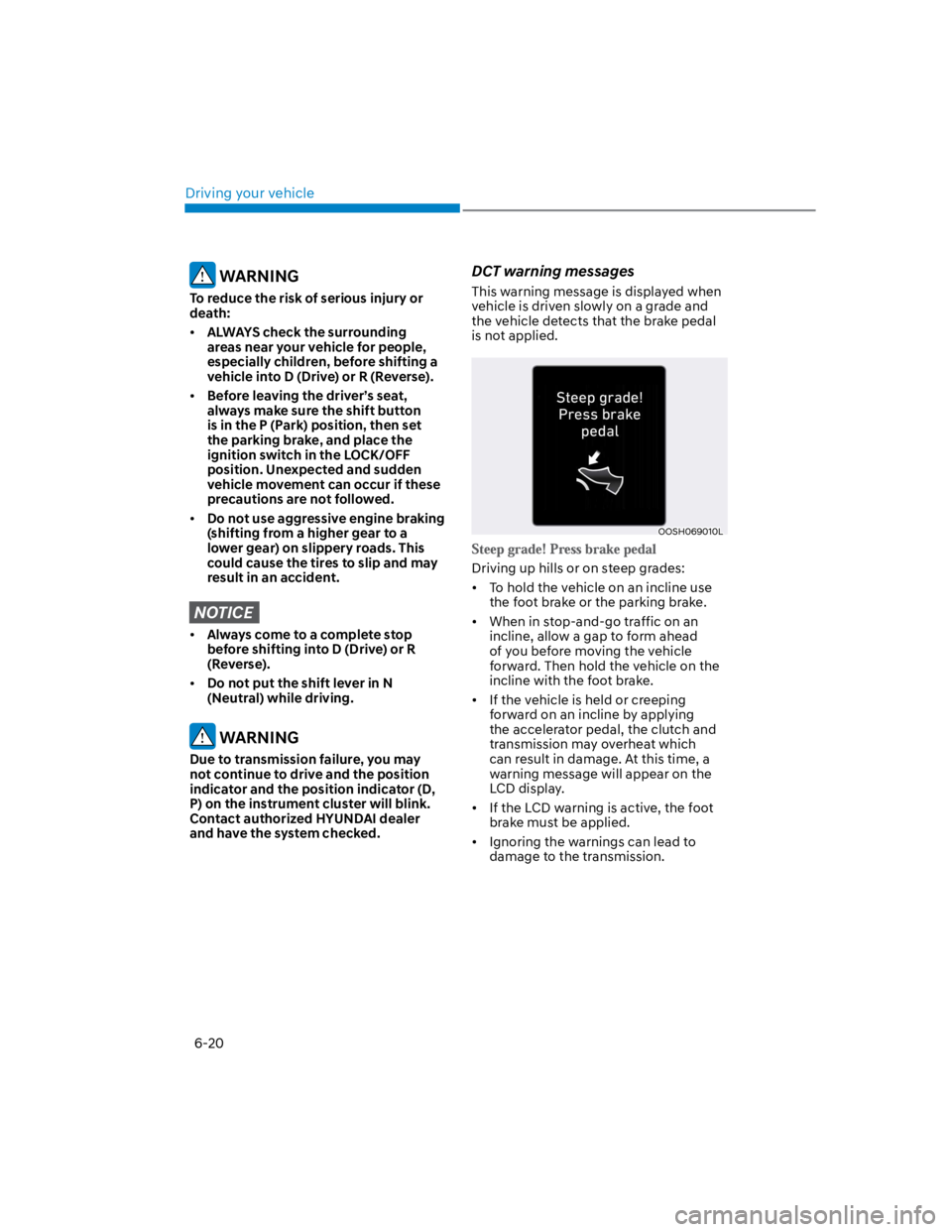
DCT warning messages
This warning message is displayed when
vehicle is driven slowly on a grade and
the vehicle detects that the brake pedal
is not applied.
OOSH069010L
Driving up hills or on steep grades:
To hold the vehicle on an incline use
the foot brake or the parking brake.
When in stop-and-go traffic on an
incline, allow a gap to form ahead
of you before moving the vehicle
forward. Then hold the vehicle on the
incline with the foot brake.
If the vehicle is held or creeping
forward on an incline by applying
the accelerator pedal, the clutch and
transmission may overheat which
can result in damage. At this time, a
warning message will appear on the
LCD display.
If the LCD warning is active, the foot
brake must be applied.
Ignoring the warnings can lead to
damage to the transmission.