charge HYUNDAI KONA 2022 User Guide
[x] Cancel search | Manufacturer: HYUNDAI, Model Year: 2022, Model line: KONA, Model: HYUNDAI KONA 2022Pages: 579, PDF Size: 35.31 MB
Page 156 of 579
Convenient features
5-22
CAUTION
Do not leave the registered digital
key (smartphone) and card key in
your vehicle. Please carry around
your keys all the times.
If you happen to lose your digital
key (smartphone) or card key
registered as a main user’s key, you
should immediately delete the key
on the vehicle’s key menu. For more
information, refer to the Digital Key
Deletion in this chapter.
If you registered your digital key
(smartphone) or card key in the
vehicle, a message appears on the
instrument cluster and let you know
the key is registered.
(Message: Digital key(s) active.)
If you buy a used vehicle, you should
confirm the message and delete the
registered smartphone key and card
key. In this case, you should carry
your smart key.
If you keep place the NFC card
of the digital key on the interior
authentication pad (wireless
charger) while driving, it may cause a
malfunction of the NFC card.
You should remove your NFC card
of the digital key on the interior
authentication pad after turning on
the engine.
Hyundai digital key app may not
work properly when the NFC or
Bluetooth communication between
smartphone and car is not good.
If the remote control operation
is executed where the mobile
connection is weak, Bluetooth
connection is poor due to lots of
Bluetooth devices or there is an
object such as metal or concrete, it
might be delayed or the operable
distance might decrease. Especially,
you should not cover the smartphone
with your hand or place other
devices which can cause frequency
interference. It may result in poor
performance.
If the remote control function is not
activated, please use NFC function to
lock or unlock the doors
You should be careful not to
press the remote control button
on the digital key (smartphone)
accidentally.
If the digital key (smartphone) is
discharged or defective or you
cannot use the digital key since the
vehicle battery is discharged, use the
inside door lock button to lock all of
the doors.
CAUTION
Hyundai digital key app on the
smartphone and card key may not
work if any of the following occurs:
-Hyundai digital key app on the
smartphone is deleted. (Required
to reinstall the app)
-Account log in information of
Hyundai digital key app is expired.
(Required to re-log in)
-When you try to log in to another
smartphone instead of the
registered smartphone with same
user account.
-Smartphone rooting or app
hacking is detected.
-Smartphone battery or the vehicle
battery is discharged.
-Smartphone’s screen is off or
locked.
-NFC or Bluetooth is turned off on
the smartphone settings.
-Smartphone’s mobile network
setting is off or airplane mode is
activated.
-A credit card is overlapped in the
back of your smartphone or metal
or thick case is used.
-Use the card key with insert it
into the wallet or card holder or
overlapping with other cards.
Page 158 of 579
![HYUNDAI KONA 2022 User Guide Convenient features
5-24
3. Register the NFC card key on the
User’s Settings menu after turning on
the vehicle.
With Navigation screen : From the
infotainment screen menu, go to
[Setup] - [Veh](/img/35/41169/w960_41169-157.png "HYUNDAI KONA 2022 User Guide Convenient features
5-24
3. Register the NFC card key on the
User’s Settings menu after turning on
the vehicle.
With Navigation screen : From the
infotainment screen menu, go to
[Setup] - [Veh")
Convenient features
5-24
3. Register the NFC card key on the
User’s Settings menu after turning on
the vehicle.
With Navigation screen : From the
infotainment screen menu, go to
[Setup] - [Vehicle] - [Digital Key] -
[Card Key] then select the [Save] from
submenu.
Without navigation screen : From
cluster menu, go to [Digital Key] -
[Card Key] and select [Save].
The [Save] button will be disabled if
the digital key (Card key) is already
saved.
Please refer to “Digital Key Delete” in
this manual and follow the digital key
delete procedure in your car before
Digital key save.
4. Place the NFC card key onto the
interior authentication pad (wireless
charger). The saving process will
begin automatically.
5. If the key is enrolled, the message
will be displayed on the infotainment
screen or instrument cluster.
Once the card key registration mode
is activated, the process should be
completed within 5 minutes. After
then, you should reactivate once
again for registration.
For the digital key(card key) saving,
the smart key(fob) must be exist inside
of vehicle.
Once a Card key is registered, it
cannot be reuse onto another vehicle.
You should have the smart key to delete
the digital key (card key) so please carry
around the key.
1. Get on the vehicle with the smart key.
2. Delete the NFC card key on the User’s
Settings menu after turning on the
engine.
With Navigation screen : From the
infotainment screen menu, go to
[Setup] - [Vehicle] - [Digital Key] -
[Card Key] then select the [Delete]
from submenu.
Without navigation screen : From
cluster menu, go to [Digital Key] -
[Card Key] and select [Delete].
If there is no saved digital key(card key),
[Delete] menu will not be activated.
To delete the saved digital key (card
key), the smart key must be exist
inside the vehicle.
The deleted digital key (card key) can
be re-registered before registering a
new digital key (card key).
If you try to register a new digital key
(card key), the previously registered
digital key (card key) cannot be used
again.
Page 160 of 579
Convenient features
5-26
After placing your registered card key
onto the interior authentication pad
(wireless charger), step on the brake and
press the Engine Start/Stop button.
WARNING
If you do not place the digital key
(card key) onto the center of the
interior authentication pad (wireless
charger) exactly, the card key may
not be recognized. If the engine is
not turned on, adjust and place the
key again.
If you overlap and use the key
with NFC-enabled cards such as
transportation card or credit card,
the card key may not be recognized.
If the digital key (card key) does not
work, please detach the key around
4 inches (0.1 m) from the handle
authentication pad and retry to
contact.
The card key may be damaged due to
impact. It would not work properly if
the key is damaged. You should buy a
new card and register again.
For more information, refer to the
Engine Start/Stop button in chapter 6.
If you do not want to use the digital key
(smartphone and card key), you can
disable the function temporarily. You
should have the smart key when you
change the settings
With Navigation screen :
From the infotainment screen menu,
go to [Setup] - [Vehicle] - [Digital Key]
- [Enable Digital Keys] (deselect)
Without navigation screen :
From cluster menu, go to [Digital Key]
- [Enable Digital Keys] (deselect)
Information
CAUTION
If you uncheck Enable digital keys, it is
impossible to lock or unlock the doors
or start up the vehicle with digital keys
such as smartphone and card key. If
you check Enable digital keys again, the
registered digital keys(smartphone and
card key) are available. Even though
you stop the digital key function, the
registered keys (smartphone and card
key) are not deleted.
Page 161 of 579
05
5-27
Personalized profile and vehicle
settings
Connect the registered digital key with
personalized profile. Then in case you
lock or unlock the door with the digital
key NFC function or unlock the door
remotely by digital key application
Bluetooth connection, the vehicle
will play the personalized user profile
settings. Profile connection and
personalization are available for Driver 1
and Driver 2.
Profile link
(Smartphone) on the infotainment
system menu.
2. Unlock and place your smartphone on
the wireless charger according to a
message and it automatically starts to
interwork.
3. It begins the profile link with a
message.
4. If you select Link, the registered
phone number’s digital key and the
user’s profile are linked.
5. The interconnection process is
completed with a message.
Profile unlink
1. Select Digital Key information on
infotainment Vehicle Settings menu. It
is possible to unlink only if the profile
is interconnected.
2. Profile unlink is completed with a
message.
Information
PRECAUTION for vehicle profile link and
unlink
When you link or unlink the profile of
digital key, you should be careful of the
following.
Profile link is possible to use with the
digital key. (Infotainment Vehicle
Digital Keys)
Profile link information remains even
when you set the digital key function
disable.
Only the smart phone with digital key
app enables you to link your profile.
(Impossible to link with NFC card)
Profile link works only when the
smart phone and the digital key are
registered to the vehicle. The smart
phone with another vehicle’s digital
key cannot link profile.
If you remove the smart phone
from the wireless charger before
completing the profile link, it does not
work.
To unlink the profile, the smart phone
does not need to be on the wireless
charger.
Page 194 of 579
Convenient features
5-60
Resetting the sunroof
In some circumstances resetting the
sunroof operation may need to be
performed. Some instances where
resetting the sunroof may be required
include:
- When the 12-volt battery is either
disconnected or discharged
- When the sunroof fuse is replaced
- If the sunroof one-touch AUTO OPEN/
CLOSE operation is not functioning
properly
Sunroof resetting procedure:
1. It is recommended to perform the
reset procedure with the vehicle
engine running. Start the vehicle in P
(Park).
2. Make sure the sunroof glass is in the
fully closed position. If the sunroof
glass is open, push the switch forward
until the sunroof glass is fully closed.
3. Release the switch when the sunroof
glass is fully closed.
4. Push the switch forward until the
sunroof glass moves slightly. Then
release the switch.
5. Once again push and hold the sunroof
switch forward until the sunroof glass
slides open and close. Do not release
the switch until the operation is
completed. If you release the switch
during operation, start the procedure
again from step 2.
Information
Sunroof Open Warning
(if equipped)
If the driver turns off the engine when
the sunroof is not fully closed, the
warning chime will sound for several
seconds and the sunroof open warning
will appear on the LCD display.
Close the sunroof securely when leaving
your vehicle.
CAUTION
Make sure the sunroof is closed fully
when leaving your vehicle.
If the sunroof is left open, rain or snow
may wet the interior of the vehicle.
Also, leaving the sunroof open when the
vehicle is unattended may invite theft.
Page 199 of 579
05
5-65
Information
Closing the fuel filler door
1. To install the fuel tank cap, turn it
clockwise until it “clicks” one time.
2. Close the fuel filler door until it is
latched securely.
WARNING
Gasoline is highly flammable and
explosive. Failure to follow these
guidelines may result in SERIOUS
INJURY or DEATH:
Read and follow all warnings posted
at the gas station.
Before refueling, note the location
of the Emergency Fuel Shut-Off, if
available, at the gas station.
Before touching the fuel nozzle, you
should eliminate the potential build-
up of static electricity by touching
a metal part of the vehicle, a safe
distance away from the fuel filler
neck, nozzle, or other gas source,
with your bare hand.
Do not use cellular phones while
refueling. Electric current and/or
electronic interference from cellular
phones can potentially ignite fuel
vapors and cause a fire.
Do not get back into a vehicle
once you have begun refueling.
You can generate a buildup of
static electricity by touching,
rubbing or sliding against any item
or fabric capable of producing
static electricity. Static electricity
discharge can ignite fuel vapors
causing a fire. If you must re-enter
the vehicle, you should once again
eliminate potentially dangerous
static electricity discharge by
touching a metal part of the vehicle,
away from the fuel filler neck, nozzle
or other fuel source, with your bare
hand.
When using an approved portable
fuel container, be sure to place the
container on the ground prior to
refueling. Static electricity discharge
from the container can ignite fuel
vapors causing a fire.
Once refueling has begun, contact
between your bare hand and the
vehicle should be maintained until
the filling is complete.
Use only approved portable plastic
fuel containers designed to carry and
store fuel.
When refueling, always shift the
gear to the P (Park) position, set
the parking brake, and press the
Engine Start/Stop button to the
OFF position. Sparks produced by
electrical components related to the
engine can ignite fuel vapors causing
a fire.
Do not use matches or a lighter and
do not smoke or leave a lit cigarette
in your vehicle while at a gas station,
especially during refueling.
Page 204 of 579

Convenient features
5-70
Battery saver function
The purpose of this feature is to prevent
the battery from being discharged.
The system automatically turns off the
position lamp when the driver turns the
vehicle off and opens the driver-side
door.
With this feature, the position lamps will
turn off automatically if the driver parks
on the side of road at night.
If necessary, to keep the lamps on when
the vehicle is turned off, perform the
following:
(1) Open the driver-side door.
(2) Turn the position lamps OFF and ON
again using the headlamp switch on
the steering column.
Headlamp delay function
(if equipped)
If the key is removed from the ignition
switch or placed in the ACC position
or the LOCK/OFF position with the
headlamps ON, the headlamps (and/
or parking lamps) remain on for about
5 minutes. However, if the driver’s door
is opened and closed, the headlights
are turned off after 15 seconds. Also,
with the engine off if the driver’s door is
opened and closed, the headlamps (and/
or parking lamps) are turned off after 15
seconds.
The headlamps (and/or parking lamps)
can be turned off by pressing the lock
button on the remote key or smart key
twice or turning the headlamp switch to
the OFF or AUTO position.
You can activate or deactivate the
Headlamp Delay function from the User
Settings Mode in the LCD display.
For more information, refer to the “LCD
Display” section in this chapter.
NOTICE
If the driver exits the vehicle through
another door besides the driver
door, the battery saver function
does not operate and the headlamp
delay function does not turn OFF
automatically.
This may cause the battery to
discharge. To avoid battery discharge,
turn OFF the headlamps manually from
the headlamp switch before exiting the
vehicle.
Page 205 of 579
05
5-71
Interior lights
WARNING
Do not use the interior lights when
driving in the dark. The interior lights
may obscure your view and cause an
accident.
NOTICE
Do not use the interior lights for
extended periods when the vehicle is
turned off or the battery will discharge.
Interior lamp AUTO cut
The interior lamps will automatically go
off approximately 20 minutes after the
vehicle is turned off and the doors are
closed. If a door is opened, the lamp
will go off 40 minutes after the vehicle
is turned off. If the doors are locked by
the smart key and the vehicle enters the
armed stage of the theft alarm system,
the lamps will go off five seconds later.
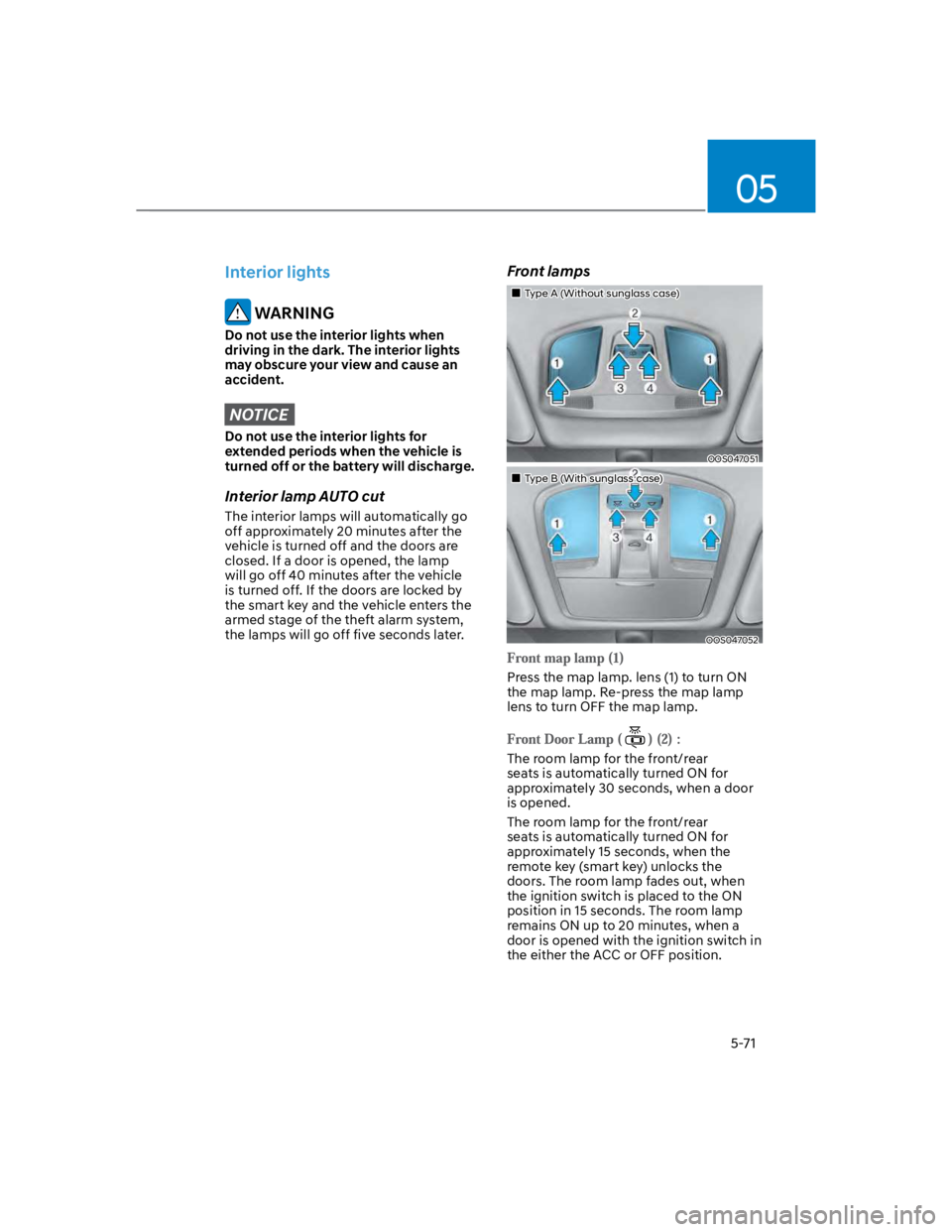
Front lamps
Type A (Without sunglass case)
OOS047051
Type B (With sunglass case)
OOS047052
Press the map lamp. lens (1) to turn ON
the map lamp. Re-press the map lamp
lens to turn OFF the map lamp.
The room lamp for the front/rear
seats is automatically turned ON for
approximately 30 seconds, when a door
is opened.
The room lamp for the front/rear
seats is automatically turned ON for
approximately 15 seconds, when the
remote key (smart key) unlocks the
doors. The room lamp fades out, when
the ignition switch is placed to the ON
position in 15 seconds. The room lamp
remains ON up to 20 minutes, when a
door is opened with the ignition switch in
the either the ACC or OFF position.
Page 206 of 579
Convenient features
5-72
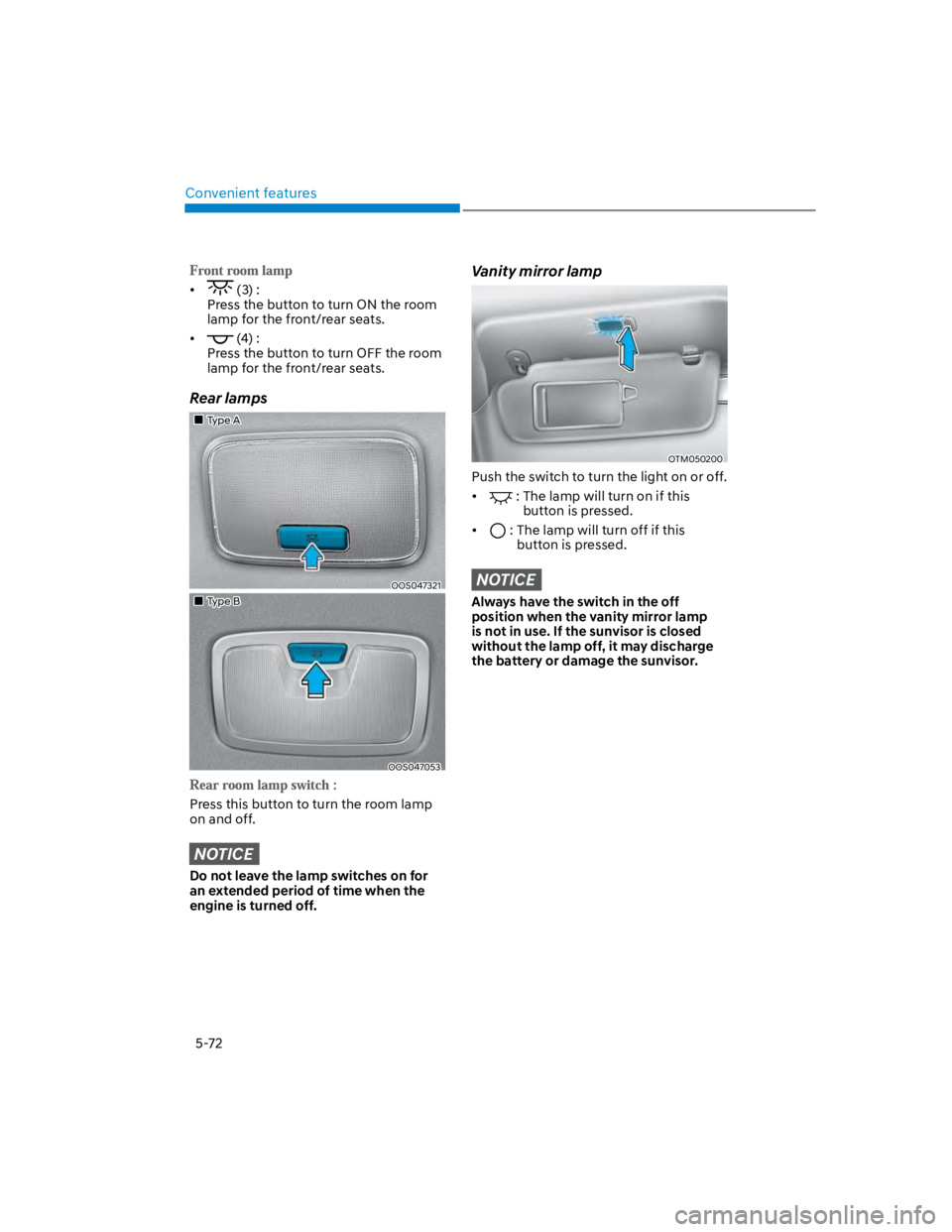
(3) :
Press the button to turn ON the room
lamp for the front/rear seats.
(4) :
Press the button to turn OFF the room
lamp for the front/rear seats.
Rear lamps
Type A
OOS047321
Type B
OOS047053
Press this button to turn the room lamp
on and off.
NOTICE
Do not leave the lamp switches on for
an extended period of time when the
engine is turned off.
Vanity mirror lamp
OTM050200
Push the switch to turn the light on or off.
: The lamp will turn on if this
button is pressed.
: The lamp will turn off if this
button is pressed.
NOTICE
Always have the switch in the off
position when the vanity mirror lamp
is not in use. If the sunvisor is closed
without the lamp off, it may discharge
the battery or damage the sunvisor.
Page 217 of 579
05
5-83
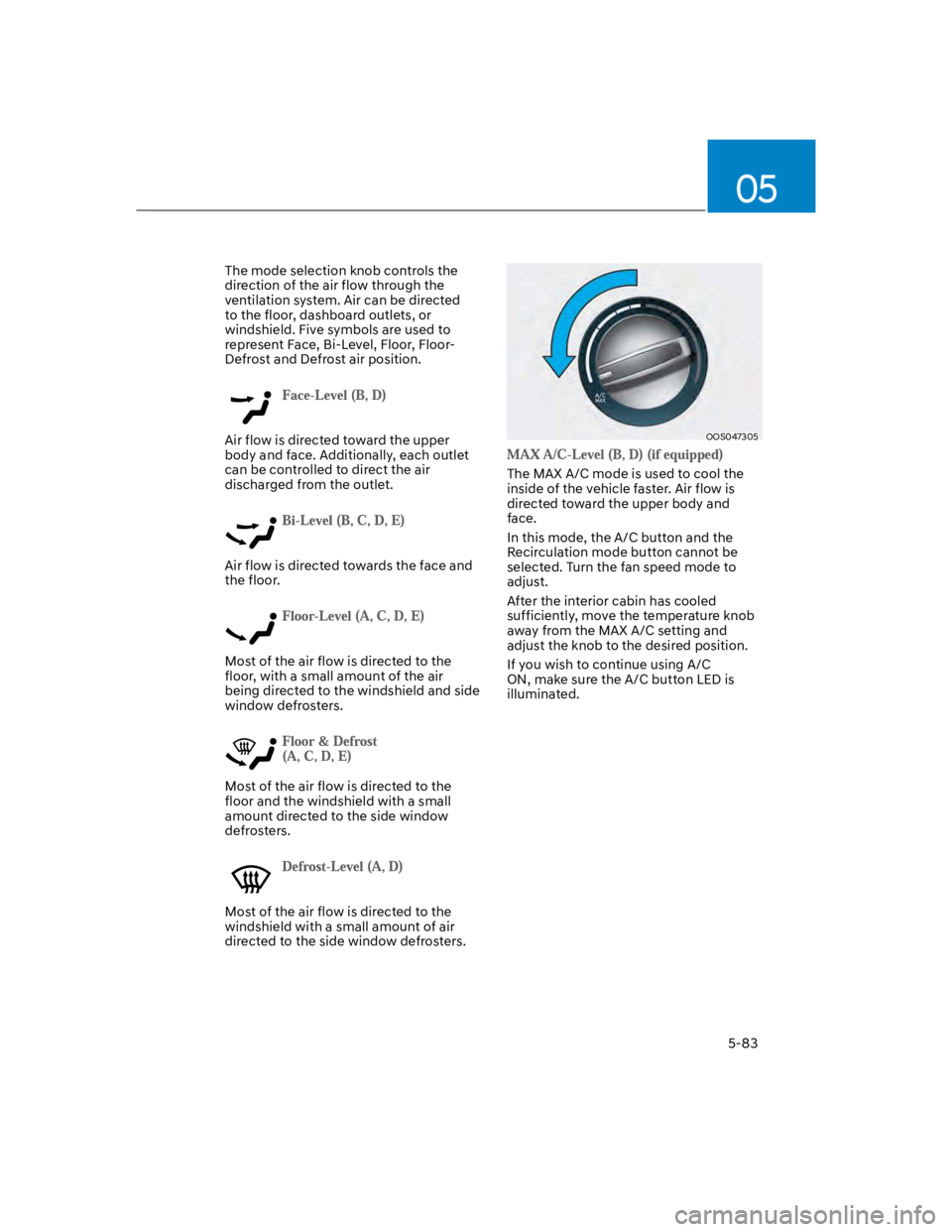
The mode selection knob controls the
direction of the air flow through the
ventilation system. Air can be directed
to the floor, dashboard outlets, or
windshield. Five symbols are used to
represent Face, Bi-Level, Floor, Floor-
Defrost and Defrost air position.
Air flow is directed toward the upper
body and face. Additionally, each outlet
can be controlled to direct the air
discharged from the outlet.
Air flow is directed towards the face and
the floor.
Most of the air flow is directed to the
floor, with a small amount of the air
being directed to the windshield and side
window defrosters.
Most of the air flow is directed to the
floor and the windshield with a small
amount directed to the side window
defrosters.
Most of the air flow is directed to the
windshield with a small amount of air
directed to the side window defrosters.
OOS047305
The MAX A/C mode is used to cool the
inside of the vehicle faster. Air flow is
directed toward the upper body and
face.
In this mode, the A/C button and the
Recirculation mode button cannot be
selected. Turn the fan speed mode to
adjust.
After the interior cabin has cooled
sufficiently, move the temperature knob
away from the MAX A/C setting and
adjust the knob to the desired position.
If you wish to continue using A/C
ON, make sure the A/C button LED is
illuminated.