user setting HYUNDAI KONA 2022 User Guide
[x] Cancel search | Manufacturer: HYUNDAI, Model Year: 2022, Model line: KONA, Model: HYUNDAI KONA 2022Pages: 579, PDF Size: 35.31 MB
Page 156 of 579
Convenient features
5-22
CAUTION
Do not leave the registered digital
key (smartphone) and card key in
your vehicle. Please carry around
your keys all the times.
If you happen to lose your digital
key (smartphone) or card key
registered as a main user’s key, you
should immediately delete the key
on the vehicle’s key menu. For more
information, refer to the Digital Key
Deletion in this chapter.
If you registered your digital key
(smartphone) or card key in the
vehicle, a message appears on the
instrument cluster and let you know
the key is registered.
(Message: Digital key(s) active.)
If you buy a used vehicle, you should
confirm the message and delete the
registered smartphone key and card
key. In this case, you should carry
your smart key.
If you keep place the NFC card
of the digital key on the interior
authentication pad (wireless
charger) while driving, it may cause a
malfunction of the NFC card.
You should remove your NFC card
of the digital key on the interior
authentication pad after turning on
the engine.
Hyundai digital key app may not
work properly when the NFC or
Bluetooth communication between
smartphone and car is not good.
If the remote control operation
is executed where the mobile
connection is weak, Bluetooth
connection is poor due to lots of
Bluetooth devices or there is an
object such as metal or concrete, it
might be delayed or the operable
distance might decrease. Especially,
you should not cover the smartphone
with your hand or place other
devices which can cause frequency
interference. It may result in poor
performance.
If the remote control function is not
activated, please use NFC function to
lock or unlock the doors
You should be careful not to
press the remote control button
on the digital key (smartphone)
accidentally.
If the digital key (smartphone) is
discharged or defective or you
cannot use the digital key since the
vehicle battery is discharged, use the
inside door lock button to lock all of
the doors.
CAUTION
Hyundai digital key app on the
smartphone and card key may not
work if any of the following occurs:
-Hyundai digital key app on the
smartphone is deleted. (Required
to reinstall the app)
-Account log in information of
Hyundai digital key app is expired.
(Required to re-log in)
-When you try to log in to another
smartphone instead of the
registered smartphone with same
user account.
-Smartphone rooting or app
hacking is detected.
-Smartphone battery or the vehicle
battery is discharged.
-Smartphone’s screen is off or
locked.
-NFC or Bluetooth is turned off on
the smartphone settings.
-Smartphone’s mobile network
setting is off or airplane mode is
activated.
-A credit card is overlapped in the
back of your smartphone or metal
or thick case is used.
-Use the card key with insert it
into the wallet or card holder or
overlapping with other cards.
Page 157 of 579

05
5-23
-If you use a smart phone cover that
uses wireless communication or is
made of metal, the digital key NFC
function may not work properly.
Remove the smart phone cover
before using the digital key NFC
function.
The vehicle may not be controlled by
the smartphone if any of the following
occurs:
-Basic and necessary functions of
the smartphone manufacturer are
operating. (General call, urgent
call, audio or NFC payment)
-Wireless earphone is operating.
(General call, urgent call or audio)
-The digital key app function such
as basic setting or app launching
is limited by prior policy according
to the manufacturer while using a
smartphone produced by domestic
and foreign manufactures.
If you change the smartphone
number, you should modify the user
account information on the HYUNDAI
customer web site to use the digital
key app.
If the vehicle owner changes
the smartphone device, the new
smartphone should be registered in
the car after deleting the registered
digital key(smartphone).
If a sharer changes or reset the
smartphone, the key should be re-
shared from owner.
Some of the old smartphone may
not work properly. Please check the
available smartphone models with
your dealer.
NFC antenna position on the
smartphone can be confirmed
on each smartphone’s manual or
contact to customer service center
of the smartphone manufacture.
Digital key (Card key)
1. Install Hyundai digital key app in
main user’s smartphone and register
the digital key (smartphone). Please
refer to the registration method of the
digital key (smartphone).
2. Using the [Pair Card Key] menu on
the digital key application, you can
activate the Card Key registration
mode.
NFC authentication : enter the NFC
authentication menu and contact
the smartphone on the outside door
handle.
Bluetooth authentication : enter the
Bluetooth authentication menu and
press the [OK] button for activation.
If you activate the registration mode,
you should complete the Card saving
process within 5 minutes.
If you have not registered the digital
key (smartphone), please register the
digital key (card key) with two smart
keys.
Page 158 of 579
![HYUNDAI KONA 2022 User Guide Convenient features
5-24
3. Register the NFC card key on the
User’s Settings menu after turning on
the vehicle.
With Navigation screen : From the
infotainment screen menu, go to
[Setup] - [Veh](/img/35/41169/w960_41169-157.png "HYUNDAI KONA 2022 User Guide Convenient features
5-24
3. Register the NFC card key on the
User’s Settings menu after turning on
the vehicle.
With Navigation screen : From the
infotainment screen menu, go to
[Setup] - [Veh")
Convenient features
5-24
3. Register the NFC card key on the
User’s Settings menu after turning on
the vehicle.
With Navigation screen : From the
infotainment screen menu, go to
[Setup] - [Vehicle] - [Digital Key] -
[Card Key] then select the [Save] from
submenu.
Without navigation screen : From
cluster menu, go to [Digital Key] -
[Card Key] and select [Save].
The [Save] button will be disabled if
the digital key (Card key) is already
saved.
Please refer to “Digital Key Delete” in
this manual and follow the digital key
delete procedure in your car before
Digital key save.
4. Place the NFC card key onto the
interior authentication pad (wireless
charger). The saving process will
begin automatically.
5. If the key is enrolled, the message
will be displayed on the infotainment
screen or instrument cluster.
Once the card key registration mode
is activated, the process should be
completed within 5 minutes. After
then, you should reactivate once
again for registration.
For the digital key(card key) saving,
the smart key(fob) must be exist inside
of vehicle.
Once a Card key is registered, it
cannot be reuse onto another vehicle.
You should have the smart key to delete
the digital key (card key) so please carry
around the key.
1. Get on the vehicle with the smart key.
2. Delete the NFC card key on the User’s
Settings menu after turning on the
engine.
With Navigation screen : From the
infotainment screen menu, go to
[Setup] - [Vehicle] - [Digital Key] -
[Card Key] then select the [Delete]
from submenu.
Without navigation screen : From
cluster menu, go to [Digital Key] -
[Card Key] and select [Delete].
If there is no saved digital key(card key),
[Delete] menu will not be activated.
To delete the saved digital key (card
key), the smart key must be exist
inside the vehicle.
The deleted digital key (card key) can
be re-registered before registering a
new digital key (card key).
If you try to register a new digital key
(card key), the previously registered
digital key (card key) cannot be used
again.
Page 161 of 579
05
5-27
Personalized profile and vehicle
settings
Connect the registered digital key with
personalized profile. Then in case you
lock or unlock the door with the digital
key NFC function or unlock the door
remotely by digital key application
Bluetooth connection, the vehicle
will play the personalized user profile
settings. Profile connection and
personalization are available for Driver 1
and Driver 2.
Profile link
(Smartphone) on the infotainment
system menu.
2. Unlock and place your smartphone on
the wireless charger according to a
message and it automatically starts to
interwork.
3. It begins the profile link with a
message.
4. If you select Link, the registered
phone number’s digital key and the
user’s profile are linked.
5. The interconnection process is
completed with a message.
Profile unlink
1. Select Digital Key information on
infotainment Vehicle Settings menu. It
is possible to unlink only if the profile
is interconnected.
2. Profile unlink is completed with a
message.
Information
PRECAUTION for vehicle profile link and
unlink
When you link or unlink the profile of
digital key, you should be careful of the
following.
Profile link is possible to use with the
digital key. (Infotainment Vehicle
Digital Keys)
Profile link information remains even
when you set the digital key function
disable.
Only the smart phone with digital key
app enables you to link your profile.
(Impossible to link with NFC card)
Profile link works only when the
smart phone and the digital key are
registered to the vehicle. The smart
phone with another vehicle’s digital
key cannot link profile.
If you remove the smart phone
from the wireless charger before
completing the profile link, it does not
work.
To unlink the profile, the smart phone
does not need to be on the wireless
charger.
Page 203 of 579
05
5-69
Turn signals and lane change signals
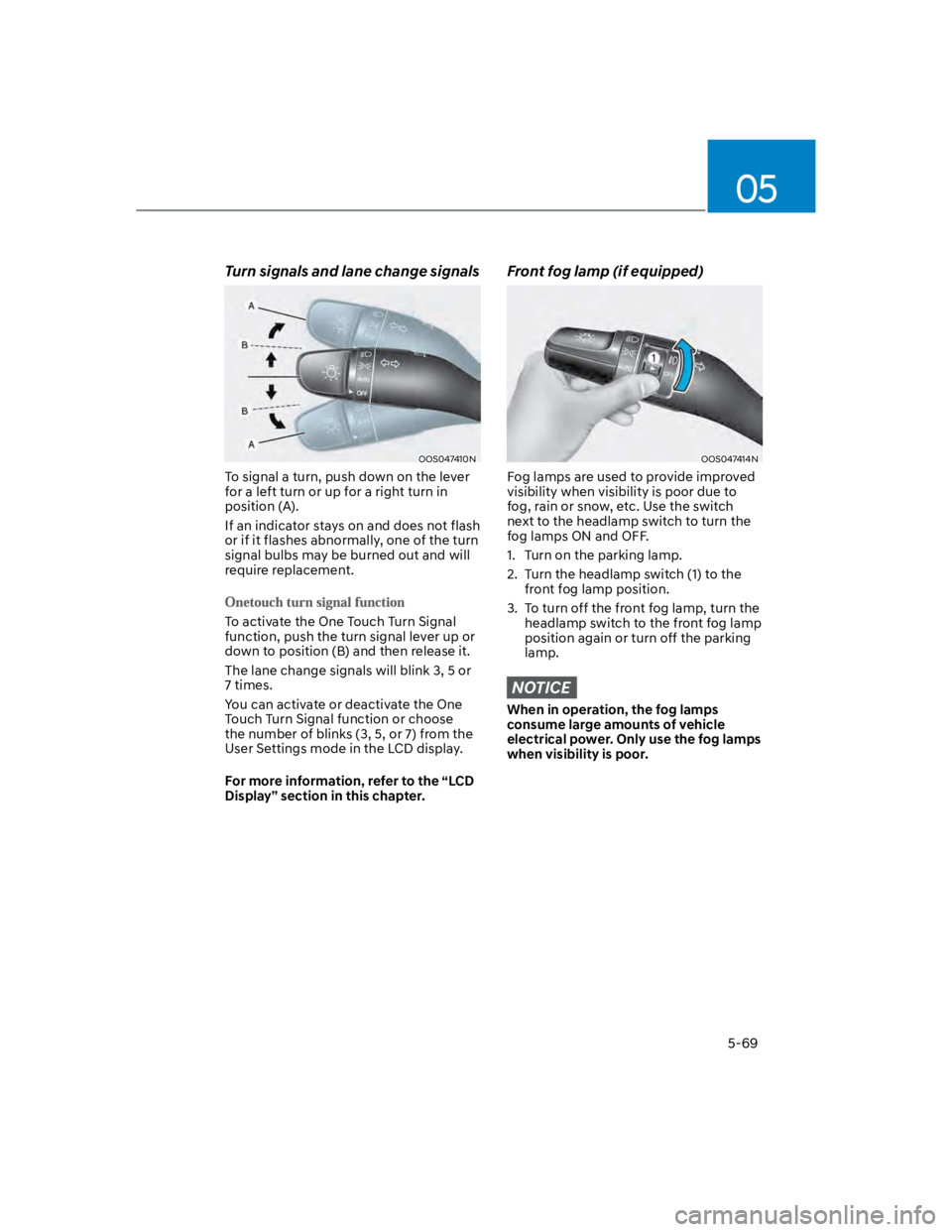
OOS047410N
To signal a turn, push down on the lever
for a left turn or up for a right turn in
position (A).
If an indicator stays on and does not flash
or if it flashes abnormally, one of the turn
signal bulbs may be burned out and will
require replacement.
To activate the One Touch Turn Signal
function, push the turn signal lever up or
down to position (B) and then release it.
The lane change signals will blink 3, 5 or
7 times.
You can activate or deactivate the One
Touch Turn Signal function or choose
the number of blinks (3, 5, or 7) from the
User Settings mode in the LCD display.
For more information, refer to the “LCD
Display” section in this chapter.
Front fog lamp (if equipped)
OOS047414N
Fog lamps are used to provide improved
visibility when visibility is poor due to
fog, rain or snow, etc. Use the switch
next to the headlamp switch to turn the
fog lamps ON and OFF.
1. Turn on the parking lamp.
2. Turn the headlamp switch (1) to the
front fog lamp position.
3. To turn off the front fog lamp, turn the
headlamp switch to the front fog lamp
position again or turn off the parking
lamp.
NOTICE
When in operation, the fog lamps
consume large amounts of vehicle
electrical power. Only use the fog lamps
when visibility is poor.
Page 204 of 579

Convenient features
5-70
Battery saver function
The purpose of this feature is to prevent
the battery from being discharged.
The system automatically turns off the
position lamp when the driver turns the
vehicle off and opens the driver-side
door.
With this feature, the position lamps will
turn off automatically if the driver parks
on the side of road at night.
If necessary, to keep the lamps on when
the vehicle is turned off, perform the
following:
(1) Open the driver-side door.
(2) Turn the position lamps OFF and ON
again using the headlamp switch on
the steering column.
Headlamp delay function
(if equipped)
If the key is removed from the ignition
switch or placed in the ACC position
or the LOCK/OFF position with the
headlamps ON, the headlamps (and/
or parking lamps) remain on for about
5 minutes. However, if the driver’s door
is opened and closed, the headlights
are turned off after 15 seconds. Also,
with the engine off if the driver’s door is
opened and closed, the headlamps (and/
or parking lamps) are turned off after 15
seconds.
The headlamps (and/or parking lamps)
can be turned off by pressing the lock
button on the remote key or smart key
twice or turning the headlamp switch to
the OFF or AUTO position.
You can activate or deactivate the
Headlamp Delay function from the User
Settings Mode in the LCD display.
For more information, refer to the “LCD
Display” section in this chapter.
NOTICE
If the driver exits the vehicle through
another door besides the driver
door, the battery saver function
does not operate and the headlamp
delay function does not turn OFF
automatically.
This may cause the battery to
discharge. To avoid battery discharge,
turn OFF the headlamps manually from
the headlamp switch before exiting the
vehicle.
Page 463 of 579
08
8-13
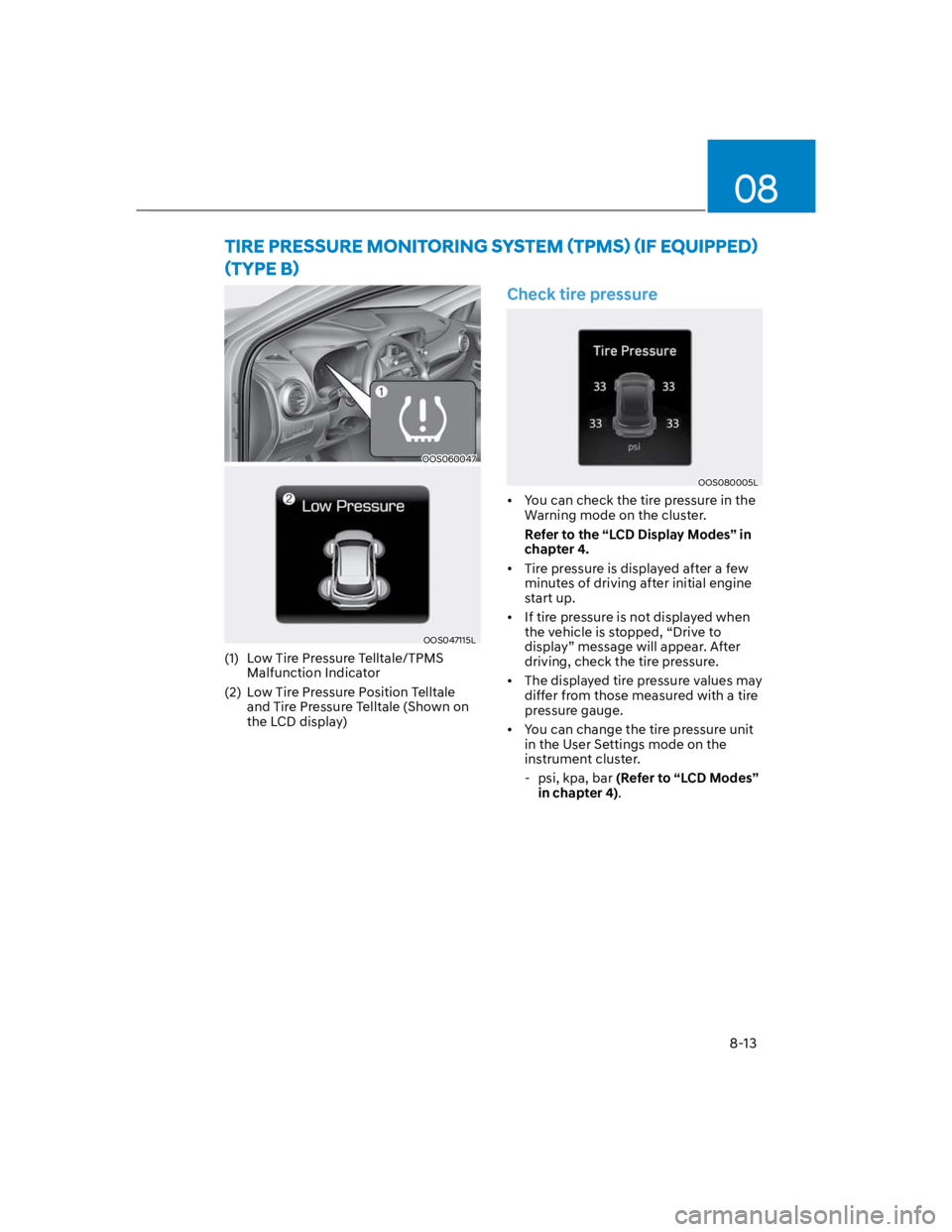
OOS060047
OOS047115L
(1) Low Tire Pressure Telltale/TPMS
Malfunction Indicator
(2) Low Tire Pressure Position Telltale
and Tire Pressure Telltale (Shown on
the LCD display)
Check tire pressure
OOS080005L
You can check the tire pressure in the
Warning mode on the cluster.
Refer to the “LCD Display Modes” in
chapter 4.
Tire pressure is displayed after a few
minutes of driving after initial engine
start up.
If tire pressure is not displayed when
the vehicle is stopped, “Drive to
display” message will appear. After
driving, check the tire pressure.
The displayed tire pressure values may
differ from those measured with a tire
pressure gauge.
You can change the tire pressure unit
in the User Settings mode on the
instrument cluster.
- psi, kpa, bar (Refer to “LCD Modes”
in chapter 4).
Page 574 of 579

Index
I-8
Interior features.................................................................................................. 5-107
Cargo Area Cover ........................................................................................... 5-114
Clock .............................................................................................................. 5-112
Clothes Hanger ............................................................................................... 5-112
Cup holder ...................................................................................................... 5-107
Floor mat anchor(s) ........................................................................................ 5-113
Luggage net holder......................................................................................... 5-114
Power outlet.................................................................................................... 5-108
Sunvisor.......................................................................................................... 5-108
USB charger ................................................................................................... 5-109
Wireless smart phone charging system .......................................................... 5-110
Interior overview (I) .............................................................................................. 2-6
Interior overview (II) ............................................................................................. 2-7
J
Jump starting.......................................................................................................... 8-4
L
Lane Following Assist (LFA) ............................................................................. 7-88
Lane Following Assist malfunction and limitation .......................................... 7-91
Lane Following Assist operation...................................................................... 7-89
Lane Following Assist settings......................................................................... 7-88
Lane Keeping Assist (LKA) ............................................................................... 7-29
Lane Keeping Assist malfunction and limitations............................................ 7-33
Lane Keeping Assist operation......................................................................... 7-31
Lane Keeping Assist settings ........................................................................... 7-29
LCD display......................................................................................................... 4-28
LCD display control ......................................................................................... 4-28
Trip computer (Type A).................................................................................... 4-38
Trip computer (Type B).................................................................................... 4-40
User settings mode ........................................................................................... 4-32
View modes ...................................................................................................... 4-29