Navigation HYUNDAI KONA 2022 Owner's Manual
[x] Cancel search | Manufacturer: HYUNDAI, Model Year: 2022, Model line: KONA, Model: HYUNDAI KONA 2022Pages: 579, PDF Size: 35.31 MB
Page 418 of 579
![HYUNDAI KONA 2022 Owners Manual Driver assistance system
7-86
OJX1070282L
[1] : Driving route, [2] : Branch line,
[3] : Curved road section, [4] : Main road
If there is no destination set on the
navigation, Highway Curve Zone Auto](/img/35/41169/w960_41169-417.png "HYUNDAI KONA 2022 Owners Manual Driver assistance system
7-86
OJX1070282L
[1] : Driving route, [2] : Branch line,
[3] : Curved road section, [4] : Main road
If there is no destination set on the
navigation, Highway Curve Zone Auto")
Driver assistance system
7-86
OJX1070282L
[1] : Driving route, [2] : Branch line,
[3] : Curved road section, [4] : Main road
If there is no destination set on the
navigation, Highway Curve Zone Auto
Slowdown function will operate based
on the curve information on the main
road.
Even if you depart from the main road,
Highway Curve Zone Auto Slowdown
function may temporarily operate
due to navigation information of the
highway curve section.
WARNING
Navigation-based Smart Cruise
Control is not a substitute for safe
driving practices, but a convenience
function. Always have your eyes on
the road, and it is the responsibility
of the driver to avoid violating traffic
laws.
The navigation’s speed limit
information may differ from the
actual speed limit information on the
road. It is the driver's responsibility
to check the speed limit on the
actual driving road or lane.
Navigation-based Smart Cruise
Control will automatically be
cancelled when you leave the
highway main road. Always pay
attention to road and driving
conditions while driving.
Navigation-based Smart Cruise
Control may not operate due to the
existence of leading vehicles and
the driving conditions of the vehicle.
Always pay attention to road and
driving conditions while driving.
When you are towing a trailer or
another vehicle, we recommend
that Navigation-based Smart Cruise
Control is turned off due to safety
reasons.
Page 419 of 579

07
7-87
After you pass through a tollgate on
a highway, Navigation-based Smart
Cruise Control will operate based on
the first lane. If you enter one of the
other lanes, Navigation-based Smart
Cruise Control may not operate
properly.
The vehicle will accelerate if the
driver depresses the accelerator
pedal while Navigation-based Smart
Cruise Control is operating, and
the function will not decelerate the
vehicle. However, if the accelerator
pedal is depressed insufficiently, the
vehicle may decelerate.
If the driver accelerates and
releases the accelerator pedal while
Navigation-based Smart Cruise
Control is operating, the vehicle may
not decelerate sufficiently or may
rapidly decelerate to a safe speed.
If the curve is too large or too small,
Navigation-based Smart Cruise
Control may not operate.
Information
Information
1.
2.
3.
Information
Page 428 of 579
Driver assistance system
7-96
Highway Driving Assist standby
When Smart Cruise Control is
temporarily canceled while Highway
Driving Assist is operating, Highway
Driving Assist will be in the standby state.
At this time, Lane Following Assist will
operate normally.
Highway Driving Assist
malfunction and limitation
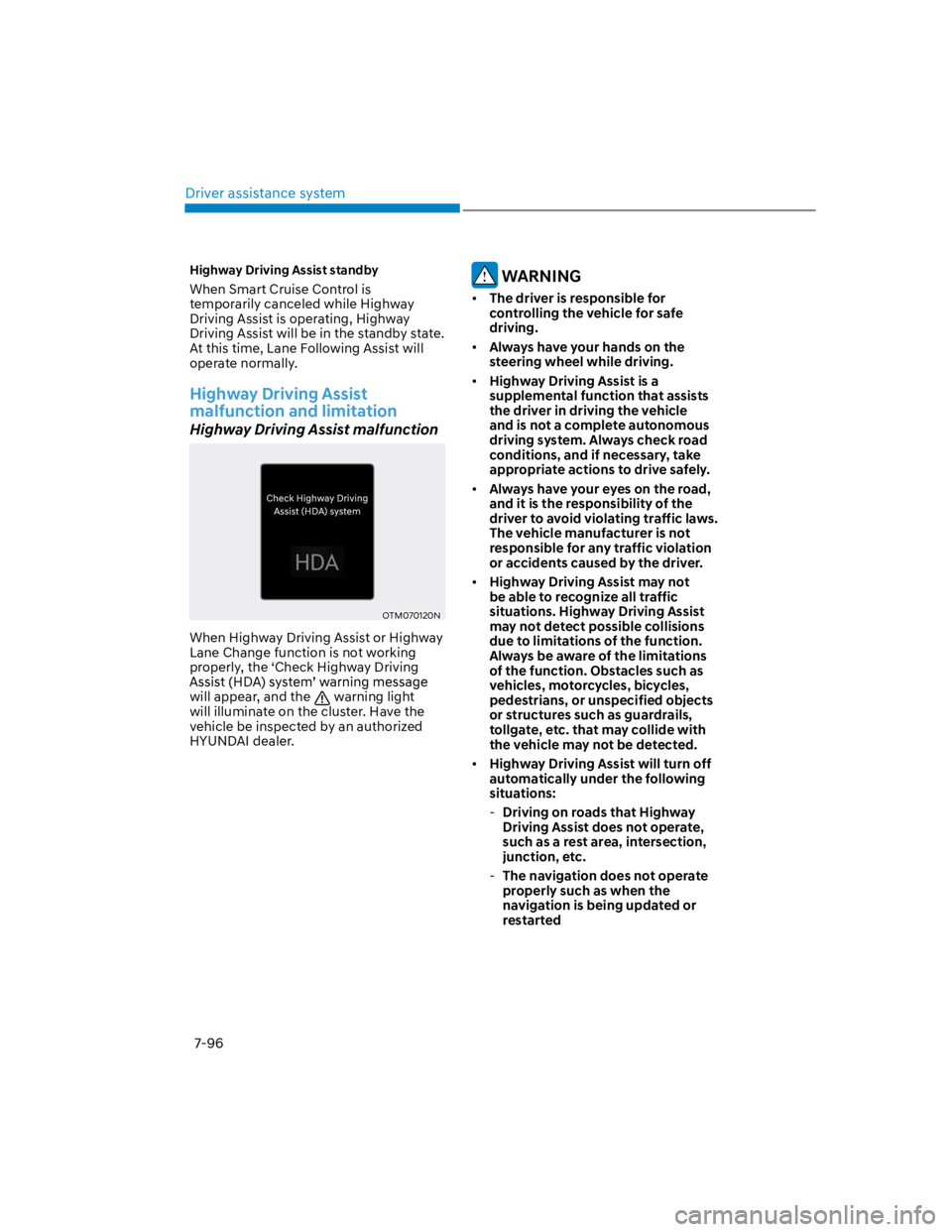
Highway Driving Assist malfunction
OTM070120N
When Highway Driving Assist or Highway
Lane Change function is not working
properly, the ‘Check Highway Driving
will appear, and the warning light
will illuminate on the cluster. Have the
vehicle be inspected by an authorized
HYUNDAI dealer.
WARNING
The driver is responsible for
controlling the vehicle for safe
driving.
Always have your hands on the
steering wheel while driving.
Highway Driving Assist is a
supplemental function that assists
the driver in driving the vehicle
and is not a complete autonomous
driving system. Always check road
conditions, and if necessary, take
appropriate actions to drive safely.
Always have your eyes on the road,
and it is the responsibility of the
driver to avoid violating traffic laws.
The vehicle manufacturer is not
responsible for any traffic violation
or accidents caused by the driver.
Highway Driving Assist may not
be able to recognize all traffic
situations. Highway Driving Assist
may not detect possible collisions
due to limitations of the function.
Always be aware of the limitations
of the function. Obstacles such as
vehicles, motorcycles, bicycles,
pedestrians, or unspecified objects
or structures such as guardrails,
tollgate, etc. that may collide with
the vehicle may not be detected.
Highway Driving Assist will turn off
automatically under the following
situations:
-Driving on roads that Highway
Driving Assist does not operate,
such as a rest area, intersection,
junction, etc.
-The navigation does not operate
properly such as when the
navigation is being updated or
restarted
Page 429 of 579

07
7-97
Highway Driving Assist may
inadvertently operate or turn off
depending on road conditions
(navigation information) and
surroundings.
Lane Following Assist function may
be temporarily disabled when the
front view camera cannot detect
lanes properly or the hands-off
warning is on.
You may not hear the warning sound
of Highway Driving Assist if the
surrounding is noisy.
If the vehicle is driven at high speed
above a certain speed at a curve,
your vehicle may drive to one side or
may depart from the driving lane.
When you are towing a trailer or
another vehicle, we recommend that
Highway Driving Assist is turned off
due to safety reasons.
The hands–off warning message
may appear early or late depending
on how the steering wheel is held or
road conditions. Always have your
hands on the steering wheel while
driving.
For your safety, please read the
owner's manual before using the
Highway Driving Assist.
Highway Driving Assist will not
operate when the engine is started,
or when the detecting sensors or
navigation is being initialized.
Limitations of Highway Driving
Assist
Highway Driving Assist may not operate
normally, or may not operate under the
following circumstances:
The map information and the
actual road is different because the
navigation is not updated
The map information and the actual
road is different because of real-time
GPS data or map information error
The infotainment system is overloaded
by simultaneously performing
functions such as route search, video
playback, voice recognition, etc.
GPS signals are blocked in areas such
as a tunnel
The driver goes off course or the
route to the destination is changed or
canceled by resetting the navigation
The vehicle enters a service station or
rest area
Android Auto or Car Play is operating
The navigation cannot detect the
current vehicle position (ex: elevated
roads including overpass adjacent to
general roads or nearby roads exist in
a parallel way)
Information
Page 460 of 579
Emergency situations
8-10
Low tire pressure telltale
When the tire pressure monitoring
system warning indicator is illuminated
and warning message displayed on the
cluster LCD display, one or more of your
tires is significantly under-inflated.
If the telltale illuminates, immediately
reduce your speed, avoid hard cornering
and anticipate increased stopping
distances. You should stop and check
your tires as soon as possible. Inflate the
tires to the proper pressure as indicated
on the vehicle’s placard or tire inflation
pressure label located on the driver’s side
center pillar outer panel. If you cannot
reach a service station or if the tire
cannot hold the newly added air, replace
the low pressure tire with the spare tire.
Then the Low Tire Pressure telltale may
flash for approximately one minute and
then remain continuously illuminated
after restarting and about 10 minutes of
continuous driving before you have the
low pressure tire repaired and replaced
on the vehicle.
CAUTION
In winter or cold weather, the low tire
pressure telltale may be illuminated if
the tire pressure was adjusted to the
recommended tire inflation pressure
in warm weather. It does not mean
your TPMS is malfunctioning because
the decreased temperature leads to a
proportional lowering of tire pressure.
When you drive your vehicle from a
warm area to a cold area or from a cold
area to a warm area, or the outside
temperature is greatly higher or lower,
you should check the tire inflation
pressure and adjust the tires to the
recommended tire inflation pressure.
WARNING
Low pressure damage
Significantly low tire pressure makes
the vehicle unstable and can contribute
to loss of vehicle control and increased
braking distances.
Continued driving on low pressure tires
can cause the tires to overheat and fail.
TPMS (Tire Pressure
Monitoring System)
malfunction indicator
The TPMS malfunction indicator
will illuminate after it blinks for
approximately one minute when there
is a problem with the Tire Pressure
Monitoring System. If the system is able
to correctly detect an under inflation
warning at the same time as system
failure then it will illuminate the TPMS
malfunction indicator.
Have the system checked by an
authorized HYUNDAI dealer as soon as
possible to determine the cause of the
problem.
CAUTION
The TPMS malfunction indicator
may be illuminated if the vehicle is
moving around electric power supply
cables or radios transmitter such as
at police stations, government and
public offices, broadcasting stations,
military installations, airports, or
transmitting towers, etc. This can
interfere with normal operation of
the Tire Pressure Monitoring System
(TPMS).
The TPMS malfunction indicator may
illuminate if snow chains or some
separately purchased devices such
as notebook computers, mobile
charger, remote starter, navigation
etc. are used in the vehicle. This can
interfere with normal operation of
the Tire Pressure Monitoring System
(TPMS).
Page 466 of 579
Emergency situations
8-16
TPMS malfunction
indicator
The TPMS Malfunction Indicator
will illuminate after it blinks for
approximately one minute when there
is a problem with the Tire Pressure
Monitoring System.
Have the system checked by an
authorized HYUNDAI dealer as soon as
possible.
NOTICE
If there is a malfunction with the
TPMS, the individual tire pressures
in the cluster LCD display will not be
available. Have the system checked by
an authorized HYUNDAI dealer as soon
as possible.
NOTICE
The TPMS Malfunction Indicator may
illuminate after blinking for one minute
if the vehicle is near electric power
supply cables or radio transmitters
such as police stations, government
and public offices, broadcasting
stations, military installations, airports,
transmitting towers, etc.
Additionally, the TPMS Malfunction
Indicator may illuminate if snow chains
are used or electronic devices such as
computers, chargers, remote starters,
navigation, etc. This may interfere with
normal operation of the TPMS.
Changing a tire with TPMS
If you have a flat tire, the Low Tire
Pressure and Position telltales will come
on. Have the flat tire repaired by an
authorized HYUNDAI dealer as soon as
possible or replace the flat tire with the
spare tire.
NOTICE
It is recommended that you do not
use a puncture-repairing agent not
approved by HYUNDAI dealer or the
equivalent specified for your vehicle to
repair and/or inflate a low pressure tire.
Tire sealant not approved by HYUNDAI
dealer or the equivalent specified for
your vehicle may damage the tire
pressure sensor.
The spare tire (if equipped) does not
come with a tire pressure monitoring
sensor. When the low pressure tire or
the flat tire is replaced with the spare
tire, the Low Tire Pressure Telltale will
remain on. Also, the TPMS Malfunction
Indicator will illuminate after blinking
for one minute if the vehicle is driven
at speed above 15.5 mph (25 km/h) for
approximately 10 minutes.
Once the original wheel equipped with
a tire pressure monitoring sensor is
reinflated to the recommended pressure
and reinstalled on the vehicle, the
Low Tire Pressure Telltale and TPMS
Malfunction Indicator will go off within a
few minutes of driving.
Page 536 of 579
Maintenance
9-50
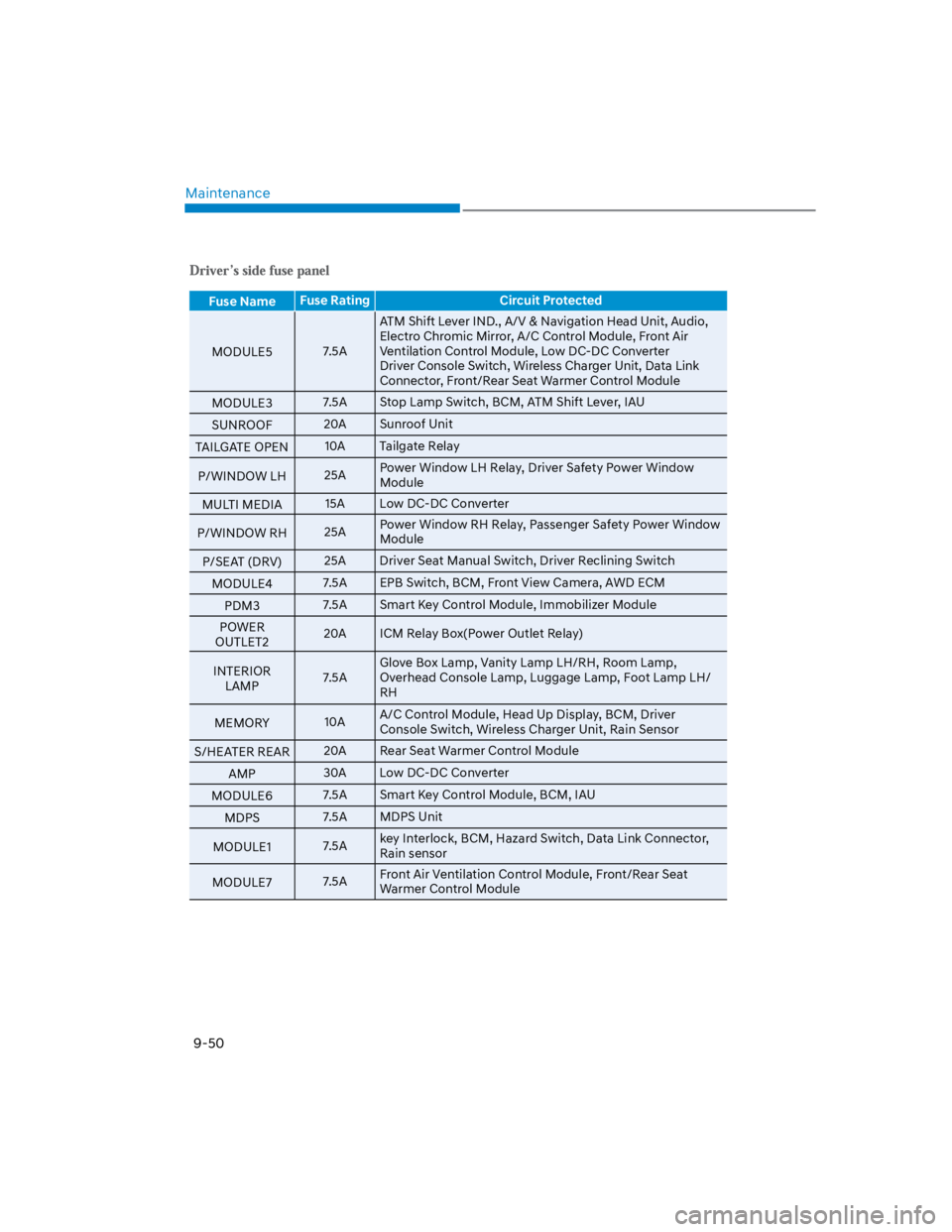
Fuse NameFuse Rating Circuit Protected
MODULE57.5A
ATM Shift Lever IND., A/V & Navigation Head Unit, Audio,
Electro Chromic Mirror, A/C Control Module, Front Air
Ventilation Control Module, Low DC-DC Converter
Driver Console Switch, Wireless Charger Unit, Data Link
Connector, Front/Rear Seat Warmer Control Module
MODULE37.5A Stop Lamp Switch, BCM, ATM Shift Lever, IAU
SUNROOF20A Sunroof Unit
TAILGATE OPEN10A Tailgate Relay
P/WINDOW LH25APower Window LH Relay, Driver Safety Power Window
Module
MULTI MEDIA15A Low DC-DC Converter
P/WINDOW RH25APower Window RH Relay, Passenger Safety Power Window
Module
P/SEAT (DRV)25A Driver Seat Manual Switch, Driver Reclining Switch
MODULE47.5A EPB Switch, BCM, Front View Camera, AWD ECM
PDM37.5A Smart Key Control Module, Immobilizer Module
POWER
OUTLET220A ICM Relay Box(Power Outlet Relay)
INTERIOR
LAMP7.5A
Glove Box Lamp, Vanity Lamp LH/RH, Room Lamp,
Overhead Console Lamp, Luggage Lamp, Foot Lamp LH/
RH
MEMORY10AA/C Control Module, Head Up Display, BCM, Driver
Console Switch, Wireless Charger Unit, Rain Sensor
S/HEATER REAR20A Rear Seat Warmer Control Module
AMP30A Low DC-DC Converter
MODULE67.5A Smart Key Control Module, BCM, IAU
MDPS7.5A MDPS Unit
MODULE17.5Akey Interlock, BCM, Hazard Switch, Data Link Connector,
Rain sensor
MODULE77.5AFront Air Ventilation Control Module, Front/Rear Seat
Warmer Control Module
Page 573 of 579

I
I-7
Ignition switch ....................................................................................................... 6-5
Key ignition switch ............................................................................................ 6-5
Key ignition switch positions ............................................................................. 6-6
Starting the engine.............................................................................................. 6-7
Important safety precautions.................................................................................. 3-2
Air bag hazards................................................................................................... 3-2
Always wear your seat belt ................................................................................ 3-2
Control your speed ............................................................................................. 3-2
Driver distraction................................................................................................ 3-2
Keep your vehicle in safe condition ................................................................... 3-2
Restrain all children ........................................................................................... 3-2
In case of an emergency while driving .................................................................. 8-2
If the engine stalls at a crossroad or crossing ..................................................... 8-2
If the engine stalls while driving ........................................................................ 8-2
If you have a flat tire while driving .................................................................... 8-3
Infotainment system........................................................................................... 5-116
Antenna .......................................................................................................... 5-116
Audio / Video / Navigation system (AVN) ................................................... 5-118
Bluetooth® Wireless Technology .................................................................... 5-118
How vehicle radio works................................................................................ 5-119
Steering wheel remote controls ...................................................................... 5-117
USB and iPod® port ....................................................................................... 5-116
Voice recognition............................................................................................ 5-118
Infotainment System specifications .................................................................. 5-122
Bluetooth ........................................................................................................ 5-123
USB ................................................................................................................ 5-122
Instrument cluster .................................................................................................. 4-4
Gauges and meters ............................................................................................. 4-5
Instrument cluster control................................................................................... 4-5
LCD display messages ..................................................................................... 4-22
Transmission shift indicator ............................................................................... 4-9
Warning and indicator lights ............................................................................ 4-10
Intelligent variable transmission .......................................................................... 6-13
Good driving practices ..................................................................................... 6-17
Intelligent variable transmission operation ...................................................... 6-13
Parking ............................................................................................................. 6-16
Page 575 of 579

I
I-9
Light bulbs ........................................................................................................... 9-58
Front fog lamp .................................................................................................. 9-62
Headlamp, position lamp, turn signal lamp, Daytime Running Light (DRL)
replacement ...................................................................................................... 9-59
High mounted stop lamp replacement.............................................................. 9-65
Interior Light Bulb Replacement...................................................................... 9-66
License Plate Light Bulb Replacement ........................................................... 9-66
Rear combination lamp bulb replacement........................................................ 9-63
Side repeater lamp replacement ....................................................................... 9-63
Lighting ............................................................................................................... 5-67
Exterior lights ................................................................................................... 5-67
Interior lights .................................................................................................... 5-71
Luggage compartment lamp ............................................................................. 5-73
Welcome System .............................................................................................. 5-73
M
Maintenance services............................................................................................. 9-4
Owner maintenance precautions ........................................................................ 9-4
Owner’s responsibility ....................................................................................... 9-4
Manual climate control system ............................................................................ 5-81
Heating and air conditioning ............................................................................ 5-82
System maintenance ......................................................................................... 5-87
System operation .............................................................................................. 5-85
Mirrors ................................................................................................................. 5-39
Inside rearview mirror ...................................................................................... 5-39
Side View mirrors............................................................................................. 5-50
N
Navigation-Based Smart Cruise Control (NSCC) .............................................. 7-81
Limitations of Navigation-based Smart Cruise Control .................................. 7-84
Navigation-based Smart Cruise Control operation .......................................... 7-82
Navigation-based Smart Cruise Control settings ............................................. 7-81
O
Owner maintenance ............................................................................................... 9-5
Owner maintenance schedule ............................................................................. 9-6