Windshield HYUNDAI KONA 2022 Owner's Manual
[x] Cancel search | Manufacturer: HYUNDAI, Model Year: 2022, Model line: KONA, Model: HYUNDAI KONA 2022Pages: 579, PDF Size: 35.31 MB
Page 228 of 579
Convenient features
5-94
Fan speed control (2)
The fan speed can be set as desired by
turning the fan speed control knob.
More air is delivered with higher fan
speeds.
Pressing the OFF button turns off the fan.
NOTICE
For better sound quality, fan speed may
automatically slow down for a couple
of minutes when you activate voice
recognition or hands free.
Air conditioning (4)
Push the A/C button to manually turn the
system on (indicator light will illuminate)
and off.
OFF mode (5)
Push the OFF button to turn the climate
control system off. You can still operate
the mode and air intake buttons as
long as the ignition switch is in the ON
position.
System operation
Ventilation
1. Set the mode to the position.
2. Set the air intake control to the
outside (fresh) air position.
3. Set the temperature control to the
desired position.
4. Set the fan speed control to the
desired speed.
Heating
1. Set the mode to the position.
2. Set the air intake control to the
outside (fresh) air position.
3. Set the temperature control to the
desired position.
4. Set the fan speed control to the
desired speed.
5. If dehumidified heating is desired,
turn the air conditioning system on.
If the windshield fogs up, set the mode
to the or position.
To help keep dust or unpleasant fumes
from entering the vehicle through the
ventilation system, temporarily set the
air intake control to the recirculated
air position. Be sure to return the
control to the fresh air position when
the irritation has passed to keep fresh
air in the vehicle. This will help keep
the driver alert and comfortable.
To prevent interior fog on the
windshield, set the air intake control
to the fresh air position and fan speed
to the desired position, turn on the air
conditioning system, and adjust the
temperature control to the desired
temperature.
Page 230 of 579
Convenient features
5-96
If the vehicle has been parked in
direct sunlight during hot weather,
open the windows for a short time
to let the hot air inside the vehicle
escape.
After sufficient cooling has been
achieved, switch back from the
recirculated air to the fresh outside air
position.
To help reduce moisture inside of
the windows on rainy or humid
days, decrease the humidity inside
the vehicle by operating the air
conditioning system with the windows
and sunroof closed.
Use the air conditioning system every
month for a few minutes to ensure
maximum system performance.
If you operate the air conditioner
excessively, the difference between
the temperature of the outside air and
that of the windshield could cause
the outer surface of the windshield to
fog up, causing loss of visibility. In this
case, set the mode selection button to
the position and set the fan speed
control knob to the lowest speed
setting.
System maintenance
Cabin air filter
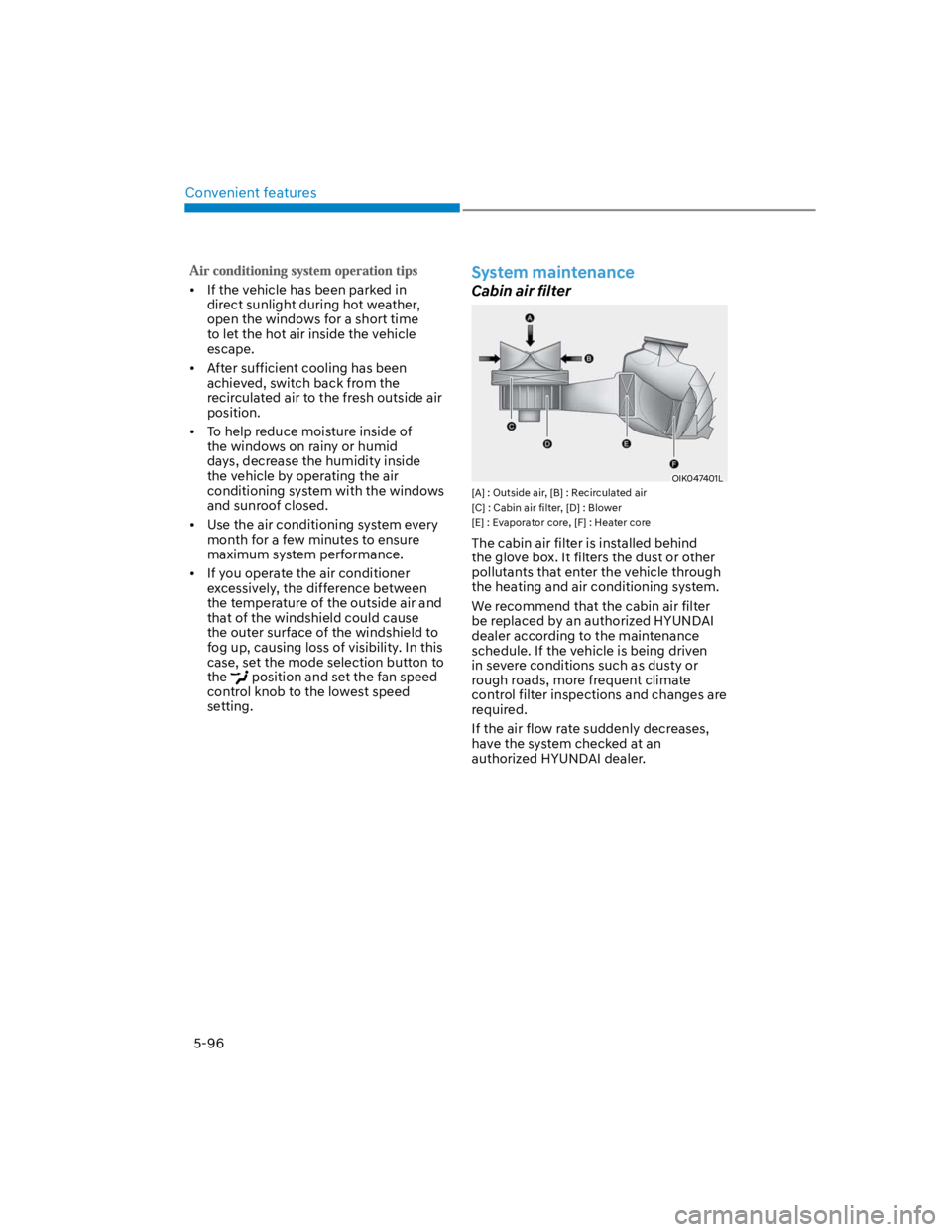
OIK047401L
[A] : Outside air, [B] : Recirculated air
[C] : Cabin air filter, [D] : Blower
[E] : Evaporator core, [F] : Heater core
The cabin air filter is installed behind
the glove box. It filters the dust or other
pollutants that enter the vehicle through
the heating and air conditioning system.
We recommend that the cabin air filter
be replaced by an authorized HYUNDAI
dealer according to the maintenance
schedule. If the vehicle is being driven
in severe conditions such as dusty or
rough roads, more frequent climate
control filter inspections and changes are
required.
If the air flow rate suddenly decreases,
have the system checked at an
authorized HYUNDAI dealer.
Page 232 of 579
Convenient features
5-98
WINDSHIELD DEFROSTING AND DEFOGGING
WARNING
Windshield heating
Do not use the position during
cooling operation in extremely humid
weather. The difference between the
temperature of the outside air and that
of the windshield could cause the outer
surface of the windshield to fog up,
causing loss of visibility could cause
an accident resulting in serious injury
or death. In this case, set the mode
selection button to the position
and fan speed control knob to a lower
speed.
For maximum defrost performance,
set the temperature control to the
highest temperature setting and
the fan speed control to the highest
setting.
If warm air to the floor is desired while
defrosting or defogging, set the mode
to the floor-defrost position.
Before driving, clear all snow and ice
from the windshield, rear window,
side view mirrors, and all side
windows.
Clear all snow and ice from the
hood and air inlet in the cowl grill
to improve heater and defroster
efficiency and to reduce the
probability of fogging up the inside of
the windshield.
NOTICE
If the engine temperature is still cold
after starting, then a brief engine warm
up period may be required for the
vented air flow to become warm or hot.
Manual climate control system
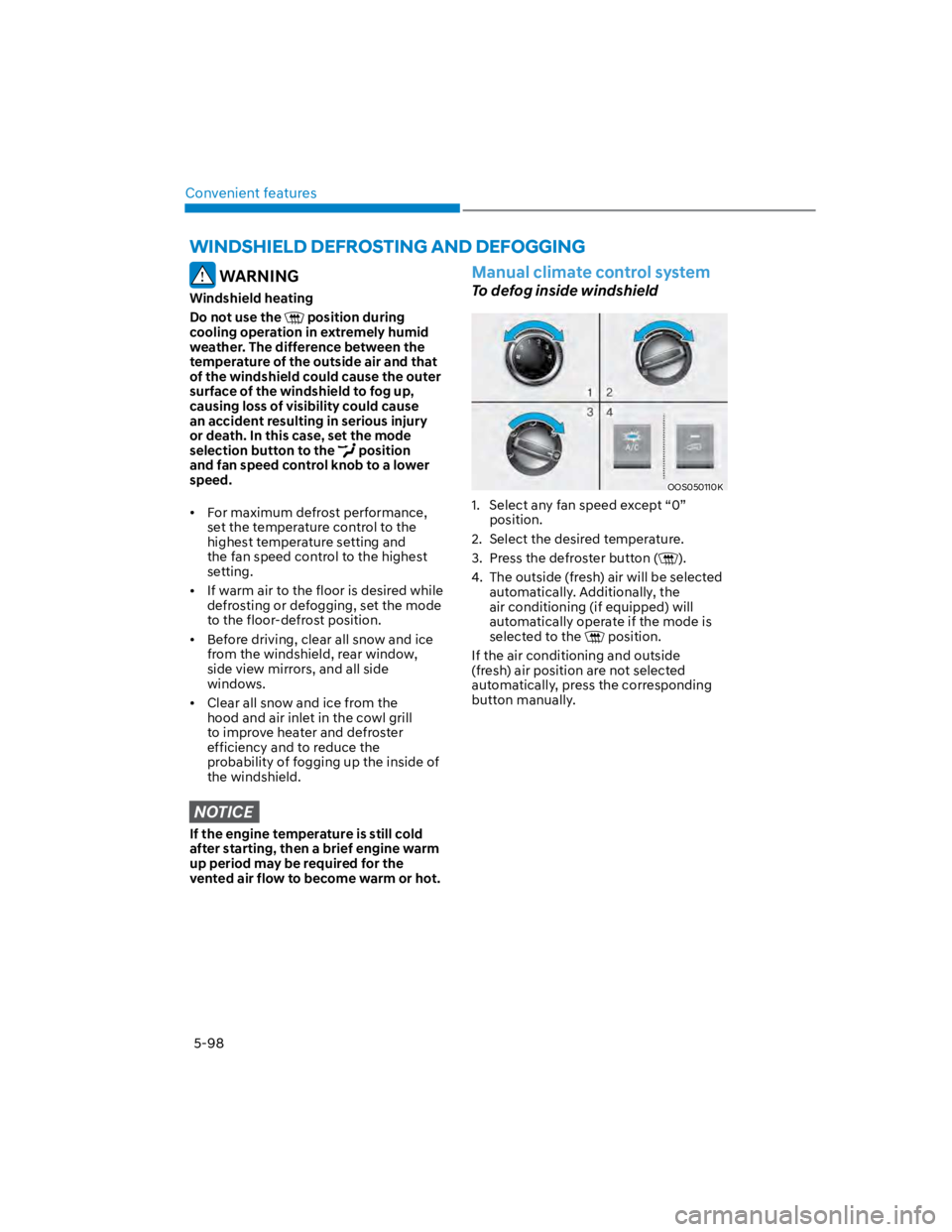
To defog inside windshield
OOS050110K
1. Select any fan speed except “0”
position.
2. Select the desired temperature.
3. Press the defroster button ().
4. The outside (fresh) air will be selected
automatically. Additionally, the
air conditioning (if equipped) will
automatically operate if the mode is
selected to the position.
If the air conditioning and outside
(fresh) air position are not selected
automatically, press the corresponding
button manually.
Page 233 of 579
05
5-99
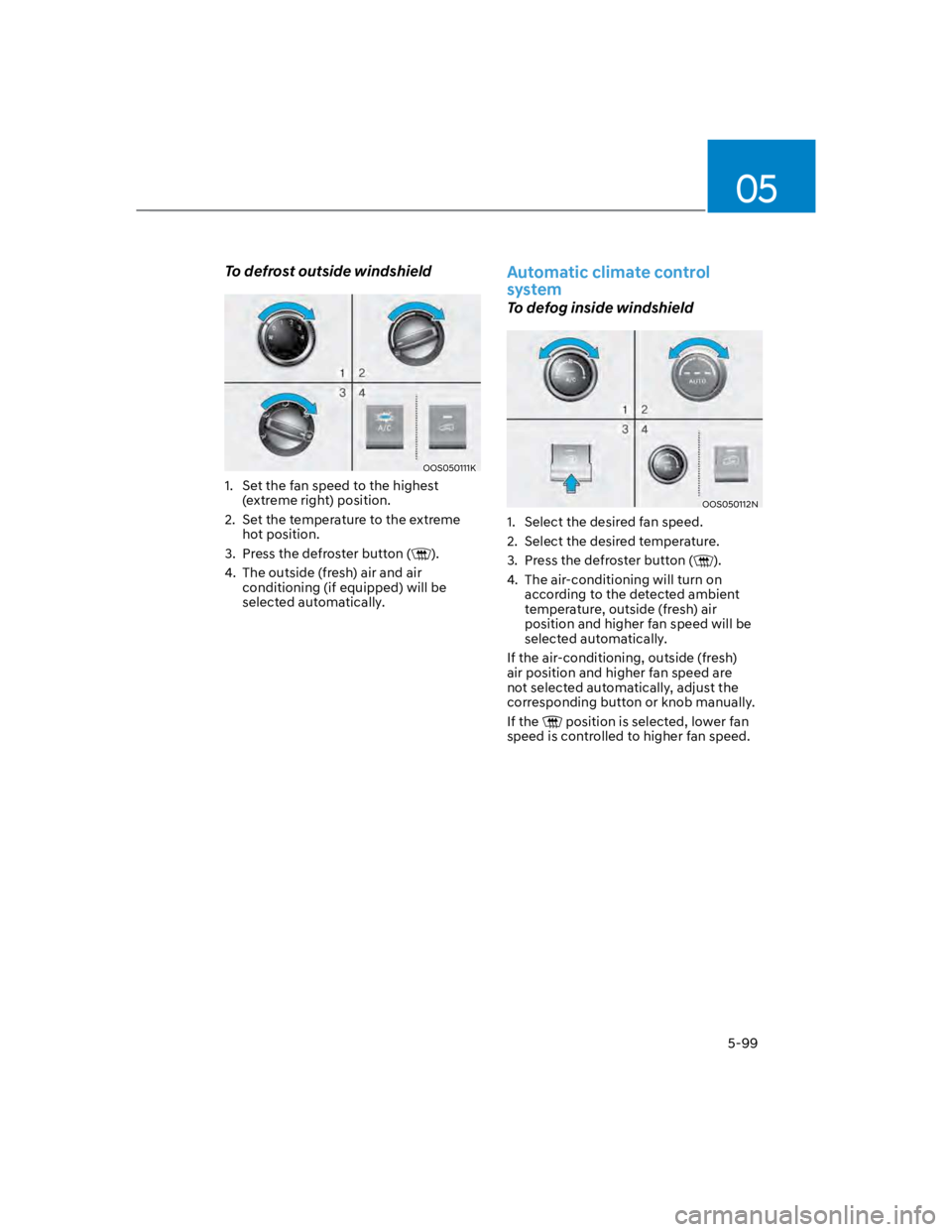
To defrost outside windshield
OOS050111K
1. Set the fan speed to the highest
(extreme right) position.
2. Set the temperature to the extreme
hot position.
3. Press the defroster button ().
4. The outside (fresh) air and air
conditioning (if equipped) will be
selected automatically.
Automatic climate control
system
To defog inside windshield
OOS050112N
1. Select the desired fan speed.
2. Select the desired temperature.
3. Press the defroster button ().
4. The air-conditioning will turn on
according to the detected ambient
temperature, outside (fresh) air
position and higher fan speed will be
selected automatically.
If the air-conditioning, outside (fresh)
air position and higher fan speed are
not selected automatically, adjust the
corresponding button or knob manually.
If the position is selected, lower fan
speed is controlled to higher fan speed.
Page 234 of 579
Convenient features
5-100
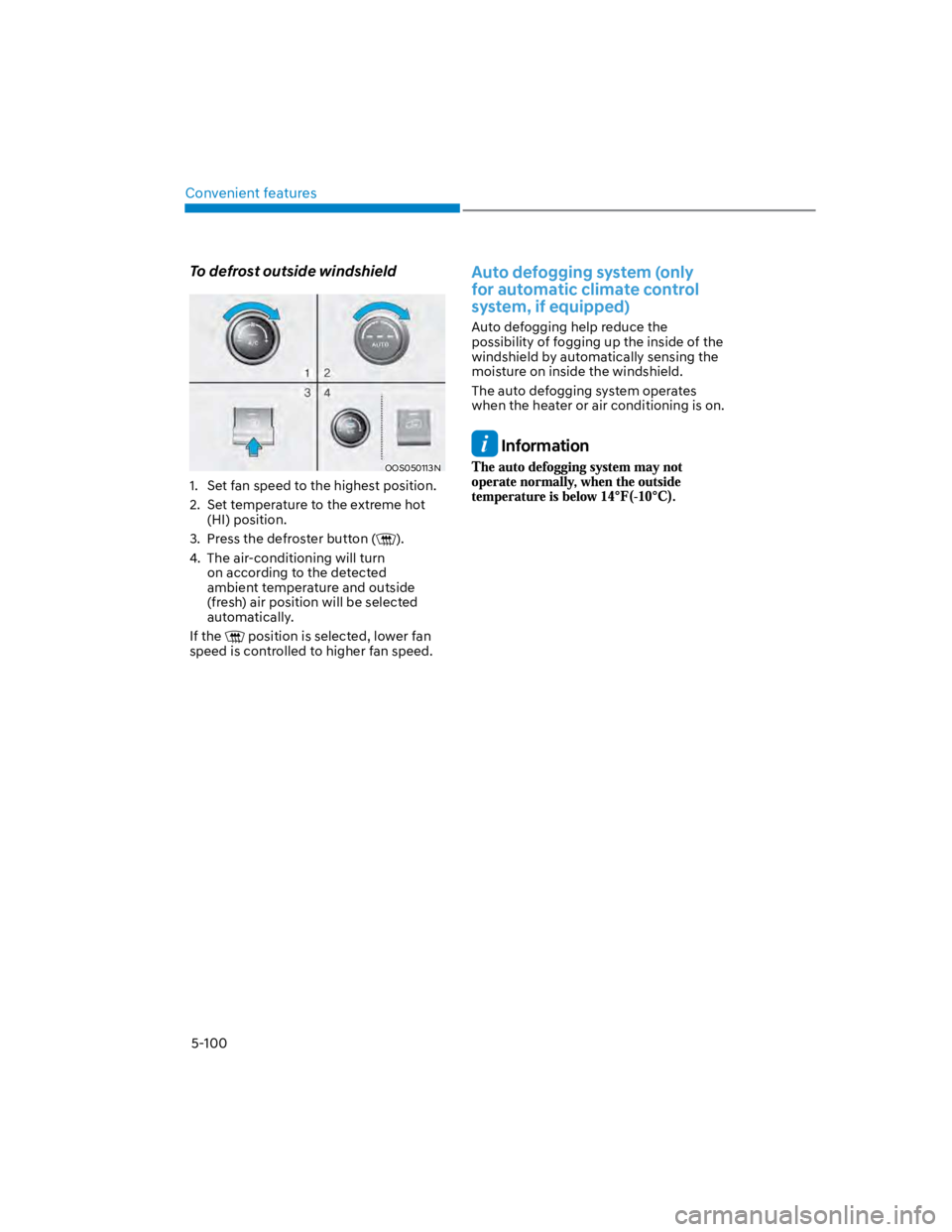
To defrost outside windshield
OOS050113N
1. Set fan speed to the highest position.
2. Set temperature to the extreme hot
(HI) position.
3. Press the defroster button ().
4. The air-conditioning will turn
on according to the detected
ambient temperature and outside
(fresh) air position will be selected
automatically.
If the position is selected, lower fan
speed is controlled to higher fan speed.
Auto defogging system (only
for automatic climate control
system, if equipped)
Auto defogging help reduce the
possibility of fogging up the inside of the
windshield by automatically sensing the
moisture on inside the windshield.
The auto defogging system operates
when the heater or air conditioning is on.
Information
Page 235 of 579
05
5-101
When the Auto Defogging
System operates, the
indicator will illuminate.
If a high amount of humidity is detected
in the vehicle, the Auto Defogging
System will be enabled. The following
steps will be performed automatically:
Step 1) The air intake control will change
to Fresh mode.
Step 2) The A/C button will turn ON.
Step 3) The mode will be changed to
defrost to direct airflow to the
windshield.
Step 4) The fan speed will be set to MAX.
If the air conditioning is off or
recirculated air position is manually
selected while Auto Defogging System is
ON, the Auto Defogging System Indicator
will blink 3 times to signal that the
manual operation has been canceled.
Press the front windshield defroster
button for 3 seconds when the ignition
switch is in the ON position. When the
Auto Defogging System is canceled, the
ADS OFF symbol will blink 3 times and
ADS OFF will be displayed on the climate
control information screen.
When the Auto Defogging System is
reset, the ADS OFF symbol will blink 6
times without a signal.
Information
NOTICE
Do not remove the sensor cover located
on the upper end of the windshield
glass.
Damage to system parts could occur
and may not be covered by your vehicle
warranty.
Page 260 of 579

06
6-3
WARNING
Carbon monoxide (CO) gas is toxic. Breathing CO can cause unconsciousness and
death.
Engine exhaust contains carbon monoxide which cannot be seen or smelled.
Do not inhale engine exhaust.
If at any time you smell engine exhaust inside the vehicle, open the windows
immediately. Exposure to CO can cause unconsciousness and death by asphyxiation.
Be sure the exhaust system does not leak.
The exhaust system should be checked whenever the vehicle is raised to change the
oil or for any other purpose. If you hear a change in the sound of the exhaust or if you
drive over something that strikes the underneath side of the vehicle, have the exhaust
system be checked as soon as possible by an authorized HYUNDAI dealer.
Do not run the engine in an enclosed area.
Letting the engine idle in your garage, even with the garage door open, is a hazardous
practice. Run the engine only long enough to start the engine and to move the vehicle
out of the garage.
Avoid idling the engine for prolonged periods with people inside the vehicle.
If it is necessary to idle the engine for a prolonged period with people inside the
vehicle, be sure to do so only in an open area with the air intake set at “Fresh” and fan
control set to high so fresh air is drawn into the interior.
Keep the air intakes clear.
To assure proper operation of the ventilation system, keep the ventilation air intakes
located in front of the windshield clear of snow, ice, leaves, or other obstructions.
If you must drive with the liftgate open:
Close all windows.
Open instrument panel air vents.
Set the air intake control at “Fresh”, the air flow control at “Floor” or “Face”, and the fan
control set to high.
WARNING
CALIFORNIA PROPOSITION 65 WARNING
Engine exhaust and a wide variety of automobile components including
components found in the interior furnishings in a vehicle, contain or emit harmful
chemicals known to the State of California to cause cancer and birth defects and
reproductive harm. In addition, certain fluids contained in vehicles and certain
products of components contain or emit chemicals known to the State of California
to cause cancer and birth defects or other reproductive harm.
Page 313 of 579
Driving your vehicle
6-56
Condition of ISG system
operation
The driver’s seatbelt is fastened
The driver’s door and hood are closed
The brake vacuum pressure is
adequate
The battery sensor is activated and
the battery is sufficiently charged
Outside temperature is not too low or
too high
The vehicle is driven over a constant
speed and stops
The climate control system satisfies
the conditions
The vehicle is sufficiently warmed up
The vehicle is not on a steep road
grade
The steering wheel is not at a sharp
angle
The vehicle is not at a high elevation
The front windshield defroster is off
You have not selected Manual shift
mode
When sufficient time has elapsed after
shifting to R (Reverse) was released
The brake vacuum pressure is low.
You have exceeded the maximum
engine off time
The air conditioning is ON with the fan
speed set to the highest position.
Fogging of the windows could occur
and the air conditioning is on.
The battery is not within optimal
operating conditions.
The cooling and heating performance
of the climate control system is
unsatisfactory.
When you press the ISG OFF button
with the engine automatically stopped
Your vehicle is moving after standstill.
You press the accelerator and the
brake pedal at the same time.
The driver safety belt becomes
unfastened or the driver door is ajar
conditions.
The green AUTO STOP indicator ()
on the instrument cluster will blink for 5
seconds.
NOTICE
If the ISG system does not meet that
operation condition, the ISG system is
deactivated.
Page 321 of 579

Driving your vehicle
6-64
NOTICE
If you are still stuck after rocking the
vehicle a few times, have the vehicle
pulled out by a tow vehicle to avoid
engine overheating, possible damage to
the transmission, and tire damage. See
“Towing” section in chapter 8.
Smooth cornering
Avoid braking or gear changing in
corners, especially when roads are wet.
Ideally, corners should always be taken
under gentle acceleration.
Driving at night
Night driving presents more hazards than
driving in the daylight. Here are some
important tips to remember:
Slow down and keep more distance
between you and other vehicles, as it
may be more difficult to see at night,
especially in areas where there may
not be any street lights.
Adjust your mirrors to reduce the glare
from other drivers’ headlamps.
Keep your headlamps clean and
properly aimed. Dirty or improperly
aimed headlamps will make it much
more difficult to see at night.
Avoid staring directly at the
headlamps of oncoming vehicles. You
could be temporarily blinded, and it
will take several seconds for your eyes
to readjust to the darkness.
Driving in the rain
Rain and wet roads can make driving
dangerous. Here are a few things to
consider when driving in the rain or on
slick pavement:
Slow down and allow extra following
distance. A heavy rainfall makes
it harder to see and increases the
distance needed to stop your vehicle.
Turn OFF your Cruise Control. (if
equipped)
Replace your windshield wiper blades
when they show signs of streaking or
missing areas on the windshield.
Be sure your tires have enough tread.
If your tires do not have enough tread,
making a quick stop on wet pavement
can cause a skid and possibly lead to
an accident. See “Tire replacement”
in chapter 9.
Turn on your headlamps to make it
easier for others to see you.
Driving too fast through large puddles
can affect your brakes. If you must go
through puddles, try to drive through
them slowly.
If you believe your brakes may be wet,
apply them lightly while driving until
normal braking operation returns.
Hydroplaning
If the road is wet enough and you are
going fast enough, your vehicle may
have little or no contact with the road
surface and actually ride on the water.
The best advice is SLOW DOWN when
the road is wet.
The risk of hydroplaning increases as
the depth of tire tread decreases, refer
to “Tire Tread” section in chapter 9.
Page 334 of 579
Driver assistance system
7-2
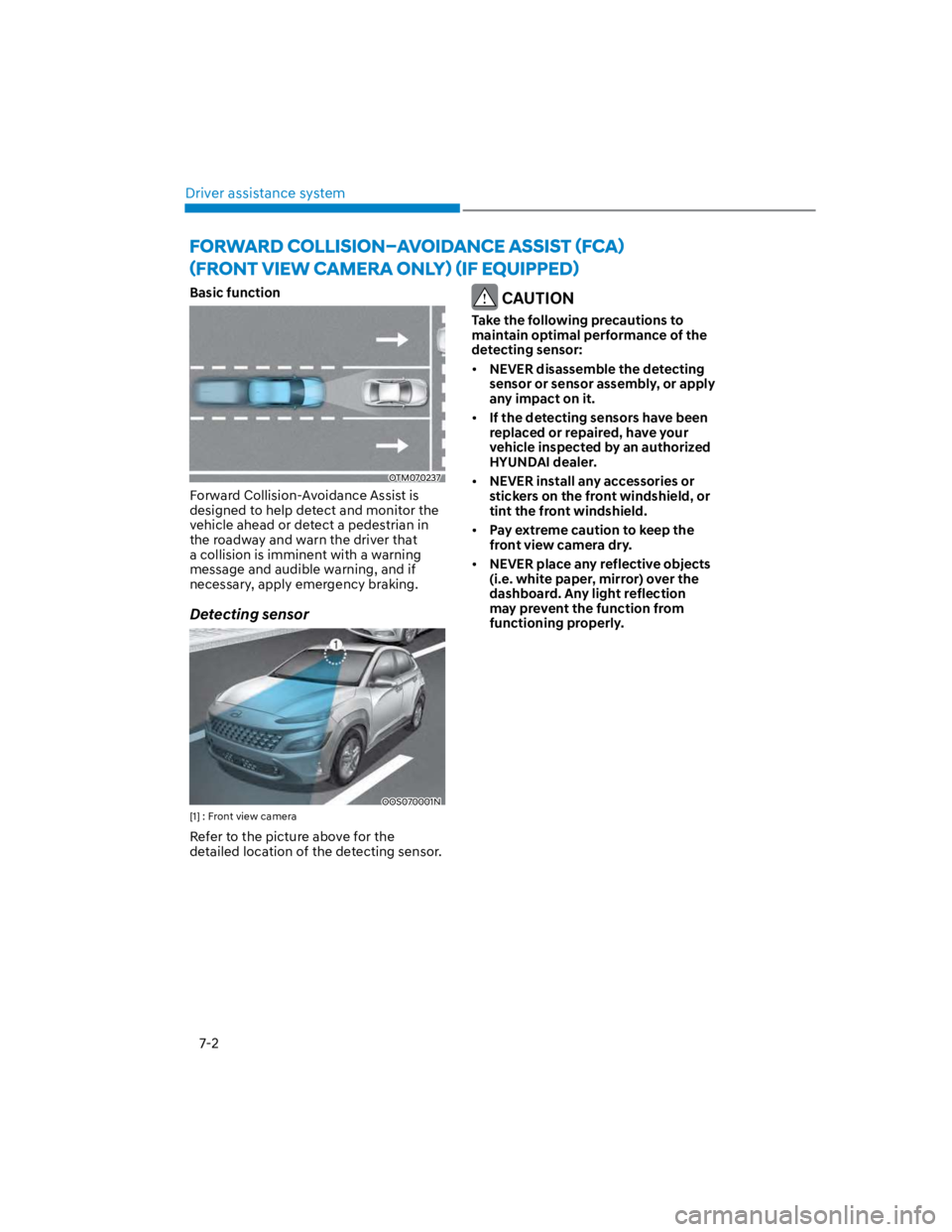
Basic function
OTM070237
Forward Collision-Avoidance Assist is
designed to help detect and monitor the
vehicle ahead or detect a pedestrian in
the roadway and warn the driver that
a collision is imminent with a warning
message and audible warning, and if
necessary, apply emergency braking.
Detecting sensor
OOS070001N
[1] : Front view camera
Refer to the picture above for the
detailed location of the detecting sensor.
CAUTION
Take the following precautions to
maintain optimal performance of the
detecting sensor:
NEVER disassemble the detecting
sensor or sensor assembly, or apply
any impact on it.
If the detecting sensors have been
replaced or repaired, have your
vehicle inspected by an authorized
HYUNDAI dealer.
NEVER install any accessories or
stickers on the front windshield, or
tint the front windshield.
Pay extreme caution to keep the
front view camera dry.
NEVER place any reflective objects
(i.e. white paper, mirror) over the
dashboard. Any light reflection
may prevent the function from
functioning properly.