lights HYUNDAI KONA 2022 Service Manual
[x] Cancel search | Manufacturer: HYUNDAI, Model Year: 2022, Model line: KONA, Model: HYUNDAI KONA 2022Pages: 579, PDF Size: 35.31 MB
Page 353 of 579
07
7-21
Forward Collision-Avoidance
Assist malfunction and
limitations
Forward Collision-Avoidance Assist
malfunction
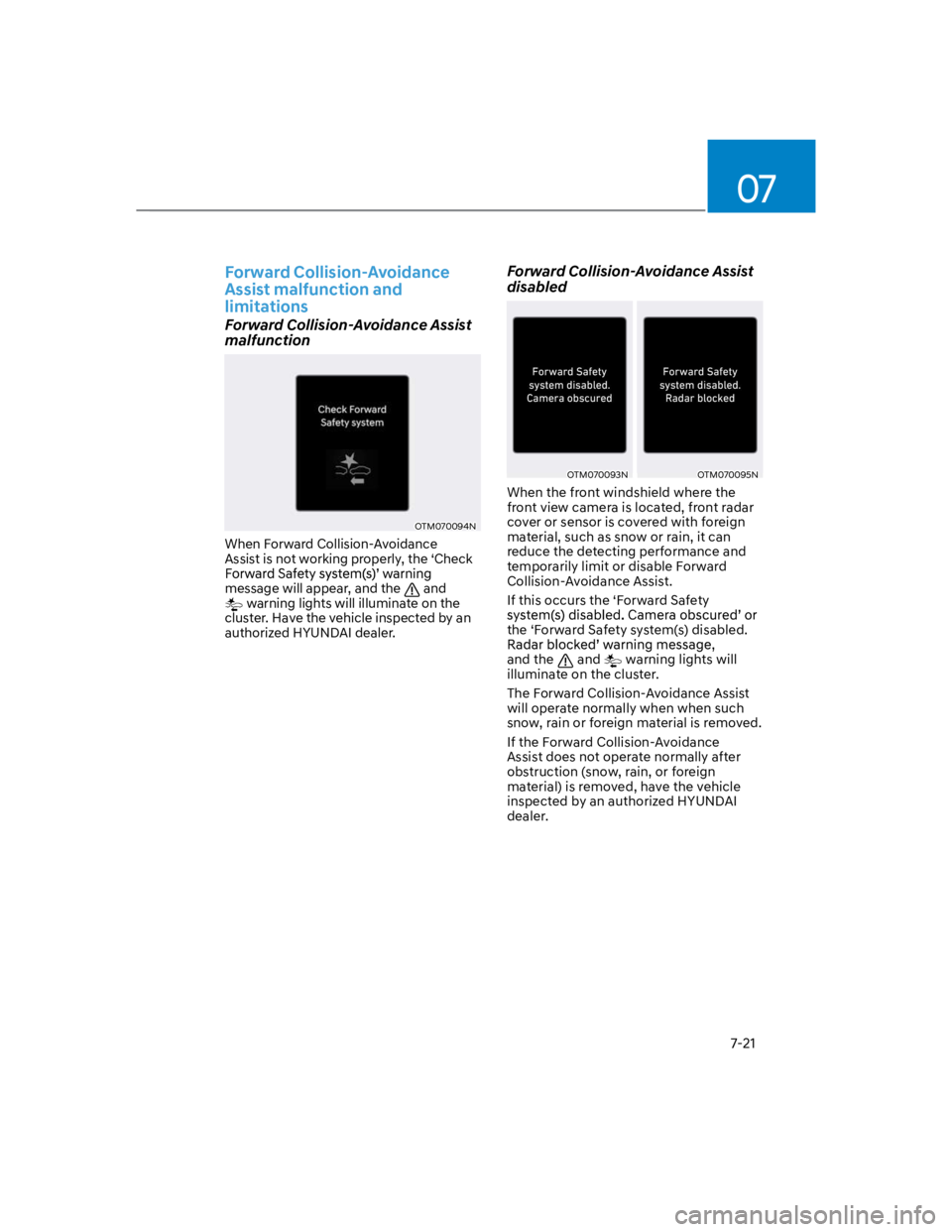
OTM070094N
When Forward Collision-Avoidance
Assist is not working properly, the ‘Check
message will appear, and the and
warning lights will illuminate on the
cluster. Have the vehicle inspected by an
authorized HYUNDAI dealer.
Forward Collision-Avoidance Assist
disabled
OTM070093NOTM070095N
When the front windshield where the
front view camera is located, front radar
cover or sensor is covered with foreign
material, such as snow or rain, it can
reduce the detecting performance and
temporarily limit or disable Forward
Collision-Avoidance Assist.
If this occurs the ‘Forward Safety
the ‘Forward Safety system(s) disabled.
and the and warning lights will
illuminate on the cluster.
The Forward Collision-Avoidance Assist
will operate normally when when such
snow, rain or foreign material is removed.
If the Forward Collision-Avoidance
Assist does not operate normally after
obstruction (snow, rain, or foreign
material) is removed, have the vehicle
inspected by an authorized HYUNDAI
dealer.
Page 354 of 579

Driver assistance system
7-22
WARNING
Even though the warning message or
warning light does not appear on the
cluster, Forward Collision-Avoidance
Assist may not properly operate.
Forward Collision-Avoidance Assist
may not properly operate in an
area (e.g. open terrain), where any
substance are not detected after
turning ON the engine.
Limitations of Forward Collision-
Avoidance Assist
Forward Collision-Avoidance Assist may
not operate normally, or it may operate
unexpectedly under the following
circumstances:
The detecting sensor or the
surroundings are contaminated or
damaged
The temperature around the front
view camera is high or low
The camera lens is contaminated due
to tinted, filmed or coated windshield,
damaged glass, or sticky foreign
material (sticker, bug, etc.) on the
glass
Moisture is not removed or frozen on
the windshield
Washer fluid is continuously sprayed,
or the wiper is on
Driving in heavy rain or snow, or thick
fog
The field of view of the front view
camera is obstructed by sun glare
Street light or light from an oncoming
vehicle is reflected on the wet road
surface, such as a puddle on the road
An object is placed on the dashboard
Your vehicle is being towed
The surrounding is very bright
The surrounding is very dark, such as
in a tunnel, etc.
The brightness changes suddenly, for
example when entering or exiting a
tunnel
The brightness outside is low, and the
headlamps are not on or are not bright
Driving through steam, smoke or
shadow
Only part of the vehicle, pedestrian or
cyclist is detected
The vehicle in front is a bus, heavy
truck, truck with a unusually shaped
luggage, trailer, etc.
The vehicle in front has no tail lights,
tail lights are located unusually, etc.
The brightness outside is low, and the
tail lamps are not on or are not bright
The rear of the front vehicle is small
or the vehicle does not look normal,
such as when the vehicle is tilted,
overturned, or the side of the vehicle
is visible, etc.
low or high
A vehicle, pedestrian or cyclist
suddenly cuts in front
The bumper around the front radar is
impacted, damaged or the front radar
is out of position
The temperature around the front
radar is high or low
Page 356 of 579
Driver assistance system
7-24
The pedestrian or cyclist is wearing
clothing that easily blends into the
background, making it difficult to
detect
The pedestrian or cyclist is difficult to
distinguish from the similar shaped
structure in the surroundings
You are driving by a pedestrian,
cyclist, traffic sign, structure, etc. near
the intersection
Driving in a parking lot
Driving through a tollgate,
construction area, unpaved road,
partial paved road, uneven road,
speed bumps, etc.
Driving on an incline road, curved
road, etc.
Driving through a roadside with trees
or streetlights
The adverse road conditions cause
excessive vehicle vibrations while
driving
Your vehicle height is low or high
due to heavy loads, abnormal tire
pressure, etc.
Driving through a narrow road where
trees or grass are overgrown
There is interference by
electromagnetic waves, such as
driving in an area with strong radio
waves or electrical noise
WARNING
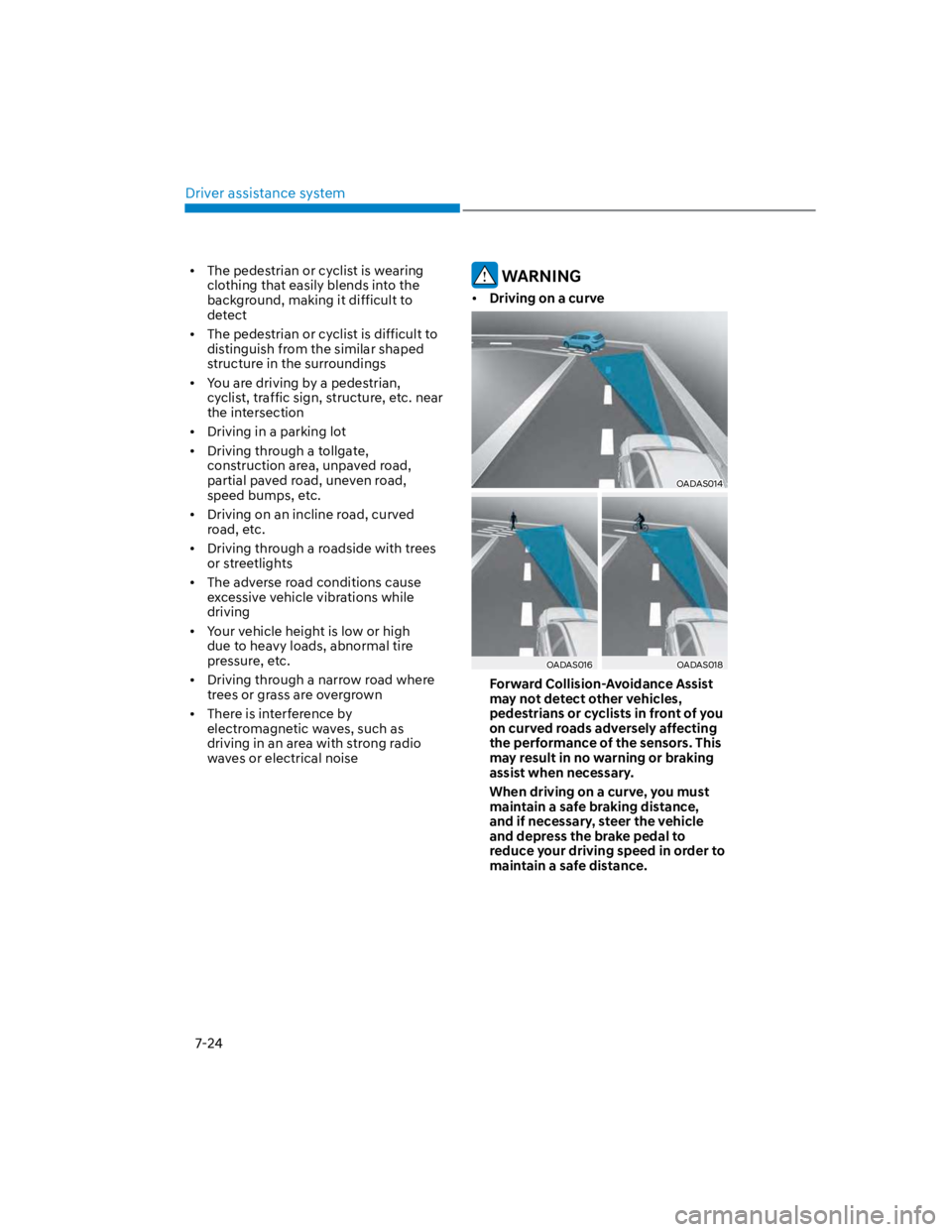
Driving on a curve
OADAS014
OADAS016OADAS018
Forward Collision-Avoidance Assist
may not detect other vehicles,
pedestrians or cyclists in front of you
on curved roads adversely affecting
the performance of the sensors. This
may result in no warning or braking
assist when necessary.
When driving on a curve, you must
maintain a safe braking distance,
and if necessary, steer the vehicle
and depress the brake pedal to
reduce your driving speed in order to
maintain a safe distance.
Page 408 of 579

Driver assistance system
7-76
Only part of the vehicle is detected
The vehicle in front has no tail lights,
tail lights are located unusually, etc.
The brightness outside is low, and the
tail lamps are not on or are not bright
The rear of the front vehicle is small
or does not look normal (i.e. tilted,
overturned, etc.)
low or high
A vehicle suddenly cuts in front
Your vehicle is being towed
Driving through a tunnel or iron bridge
Driving near areas containing metal
substances, such as a construction
zone, railroad, etc.
A material is near that reflects very
well on the front radar, such as a
guardrail, nearby vehicle, etc.
The bumper around the front radar is
impacted, damaged or the front radar
is out of position
The temperature around the front
radar is high or low
Driving in large areas where there are
few vehicles or structures (i.e. desert,
meadow, suburb, etc.)
The vehicle in front is made of
material that does not reflect on the
front radar
Driving near a highway (or motorway)
interchange or tollgate
Driving on a slippery surface due to
snow, water puddle, ice, etc.
Driving on a curved road
The vehicle in front is detected late
The vehicle in front is suddenly
blocked by a obstacle
The vehicle in front suddenly changes
lane or suddenly reduces speed
The vehicle in front is bent out of
shape
slow
With a vehicle in front, your vehicle
changes lane at low speed
The vehicle in front is covered with
snow
Unstable driving
You are on a roundabout and the
vehicle in front is not detected
You are continuously driving in a circle
Driving in a parking lot
Driving through a construction area,
unpaved road, partial paved road,
uneven road, speed bumps, etc.
Driving on an incline road, curved
road, etc.
Driving through a roadside with trees
or streetlights
The adverse road conditions cause
excessive vehicle vibrations while
driving
Your vehicle height is low or high
due to heavy loads, abnormal tire
pressure, etc.
Driving through a narrow road where
trees or grass are overgrown
There is interference by
electromagnetic waves, such as
driving in an area with strong radio
waves or electrical noise
Page 452 of 579
Emergency situations
8-2
HAZARD WARNING
FLASHER
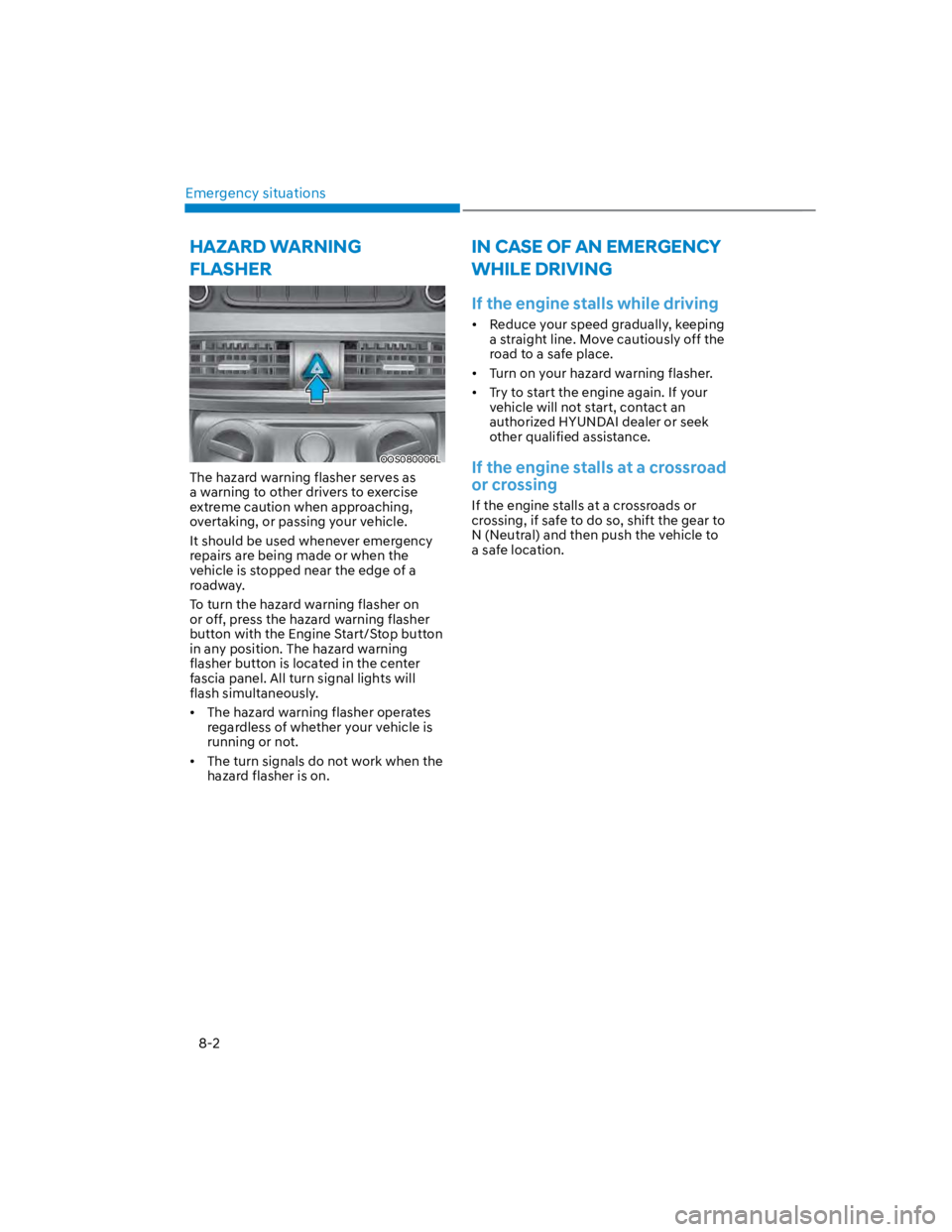
OOS080006L
The hazard warning flasher serves as
a warning to other drivers to exercise
extreme caution when approaching,
overtaking, or passing your vehicle.
It should be used whenever emergency
repairs are being made or when the
vehicle is stopped near the edge of a
roadway.
To turn the hazard warning flasher on
or off, press the hazard warning flasher
button with the Engine Start/Stop button
in any position. The hazard warning
flasher button is located in the center
fascia panel. All turn signal lights will
flash simultaneously.
The hazard warning flasher operates
regardless of whether your vehicle is
running or not.
The turn signals do not work when the
hazard flasher is on.
IN CASE OF AN EMERGENCY
WHILE DRIVING
If the engine stalls while driving
Reduce your speed gradually, keeping
a straight line. Move cautiously off the
road to a safe place.
Turn on your hazard warning flasher.
Try to start the engine again. If your
vehicle will not start, contact an
authorized HYUNDAI dealer or seek
other qualified assistance.
If the engine stalls at a crossroad
or crossing
If the engine stalls at a crossroads or
crossing, if safe to do so, shift the gear to
N (Neutral) and then push the vehicle to
a safe location.
Page 455 of 579
08
8-5
Jump starting procedure
Information
1. Position the vehicles close enough
that the jumper cables will reach, but
do not allow the vehicles to touch.
2. Avoid fans or any moving parts in the
engine compartment at all times, even
when the vehicles are turned off.
3. Turn off all electrical devices such as
radios, lights, air conditioning, etc.
Put the vehicles in P (Park) and set the
parking brake. Turn both vehicles OFF.
4. Open the engine hood.
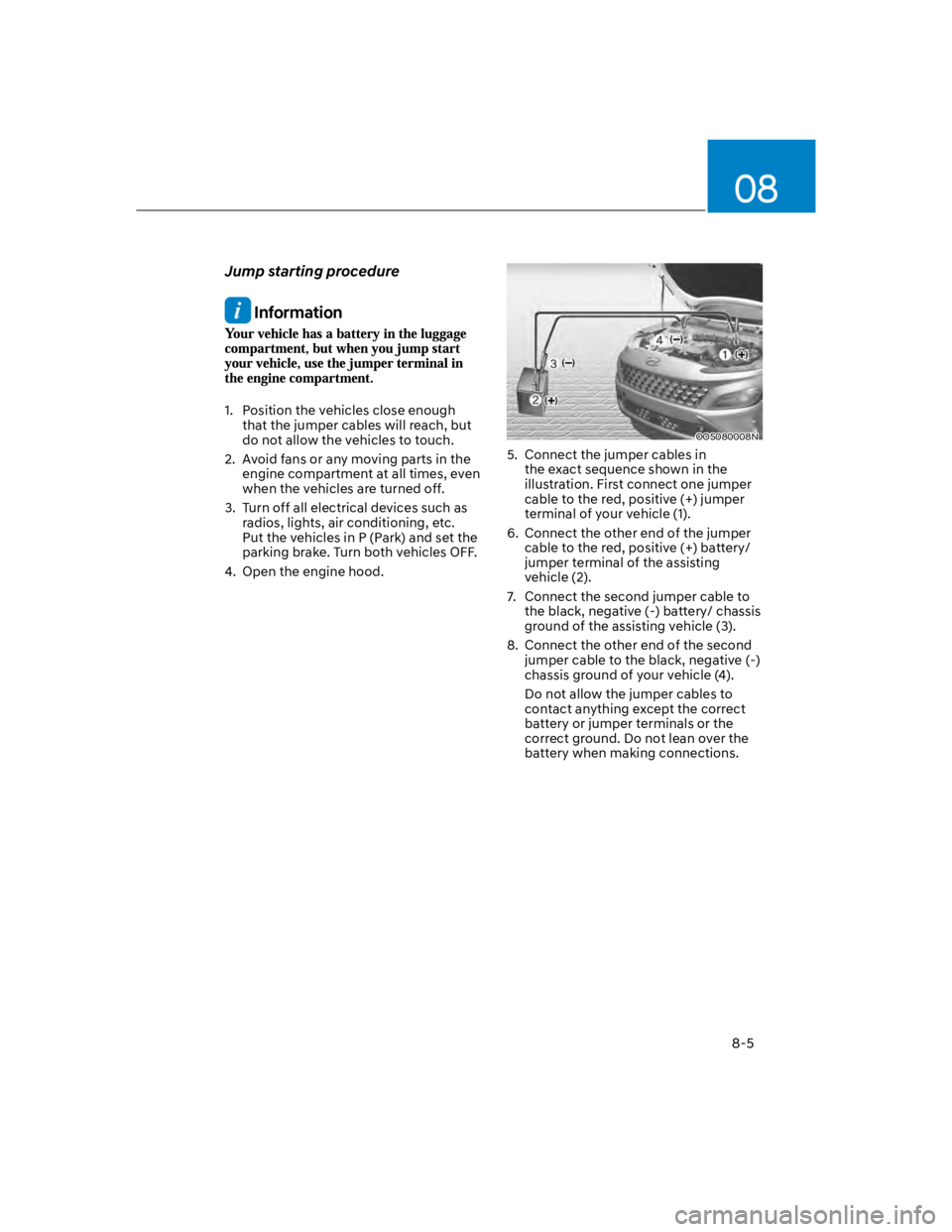
OOS080008N
5. Connect the jumper cables in
the exact sequence shown in the
illustration. First connect one jumper
cable to the red, positive (+) jumper
terminal of your vehicle (1).
6. Connect the other end of the jumper
cable to the red, positive (+) battery/
jumper terminal of the assisting
vehicle (2).
7. Connect the second jumper cable to
the black, negative (-) battery/ chassis
ground of the assisting vehicle (3).
8. Connect the other end of the second
jumper cable to the black, negative (-)
chassis ground of your vehicle (4).
Do not allow the jumper cables to
contact anything except the correct
battery or jumper terminals or the
correct ground. Do not lean over the
battery when making connections.
Page 492 of 579

Maintenance
9-6
Owner maintenance schedule
When you stop for fuel:
Check the coolant level in the engine
coolant reservoir or the water-cooled
intercooler coolant reservoir.
Check the windshield washer fluid
level.
Check for low or under-inflated tires.
WARNING
Be careful when checking your coolant
level when the engine is hot. This may
result in coolant being blown out of the
opening and cause serious burns and
other injuries.
While operating your vehicle:
Note any changes in the sound of the
exhaust or any smell of exhaust fumes
in the vehicle.
Check for vibrations in the steering
wheel. Notice if there is any increased
steering effort or looseness in the
steering wheel, or change in its
straight-ahead position.
Notice if your vehicle constantly turns
slightly or “pulls” to one side when
traveling on smooth, level road.
When stopping, listen and check for
unusual sounds, pulling to one side,
increased brake pedal travel or “hard-
to-push” brake pedal.
If any slipping or changes in the
operation of your transmission occurs,
check the transmission fluid level.
Check the automatic transmission P
(Park) function.
Check the parking brake.
Check for fluid leaks under your
vehicle (water dripping from the air
conditioning system during or after
use is normal).
At least monthly:
Check coolant level in the engine
coolant reservoir.
Check the operation of all exterior
lights, including the stoplights, turn
signals and hazard warning flashers.
Check the inflation pressures of all
tires including the spare for tires that
are worn, show uneven wear, or are
damaged.
Check for loose wheel lug nuts.
At least twice a year: (i.e., every
Spring and Autumn)
Check radiator, heater and air
conditioning hoses for leaks or
damage.
Check windshield washer spray and
wiper operation. Clean wiper blades
with a clean cloth dampened with
washer fluid.
Check headlamp alignment.
Check muffler, exhaust pipes, shields
and clamps.
Check the seat belts for wear and
function.
At least once a year:
Clean body and door drain holes.
Lubricate door hinges and hood
hinges.
Lubricate door and hood locks and
latches.
Lubricate door rubber weather strips.
Check the air conditioning system.
Inspect and lubricate automatic
transmission linkage and controls.
Clean the battery and terminals.
Check the brake fluid level.
Page 531 of 579
![HYUNDAI KONA 2022 Service Manual 09
9-45
FUSES
OLF074075
A
Blade type
Cartridge type
Multi fuse
A
A
B
B
B
B
A
[A] : Normal, [B] : Blown
A vehicle’s electrical system is protected
from electrical overload damage by
fuses.
This veh](/img/35/41169/w960_41169-530.png "HYUNDAI KONA 2022 Service Manual 09
9-45
FUSES
OLF074075
A
Blade type
Cartridge type
Multi fuse
A
A
B
B
B
B
A
[A] : Normal, [B] : Blown
A vehicle’s electrical system is protected
from electrical overload damage by
fuses.
This veh")
09
9-45
FUSES
OLF074075
A
Blade type
Cartridge type
Multi fuse
A
A
B
B
B
B
A
[A] : Normal, [B] : Blown
A vehicle’s electrical system is protected
from electrical overload damage by
fuses.
This vehicle has 5 fuse panels, one
located in the driver’s side panel bolster,
the other in the engine compartment.
If any of your vehicle’s lights,
accessories, or controls do not work,
check the appropriate circuit fuse. If a
fuse has blown, the element inside the
fuse will be melted or broken.
If the electrical system does not work,
first check the driver’s side fuse panel.
Before replacing a blown fuse, turn the
engine and all switches off, and then
disconnect the negative battery cable.
Always replace a blown fuse with one of
the same rating.
If the replacement fuse blows, this
indicates an electrical problem.
Avoid using the system involved. We
recommend that you immediately
consult an authorized HYUNDAI dealer.
WARNING
NEVER replace a fuse with anything but
another fuse of the same rating.
A higher capacity fuse could cause
damage and possibly cause a fire.
Do not install a wire or aluminum
foil instead of the proper fuse -
even as a temporary repair. It may
cause extensive wiring damage and
possibly a fire.
NOTICE
Do not use a screwdriver or any other
metal object to remove fuses because
it may cause a short circuit and damage
the system.
Page 553 of 579
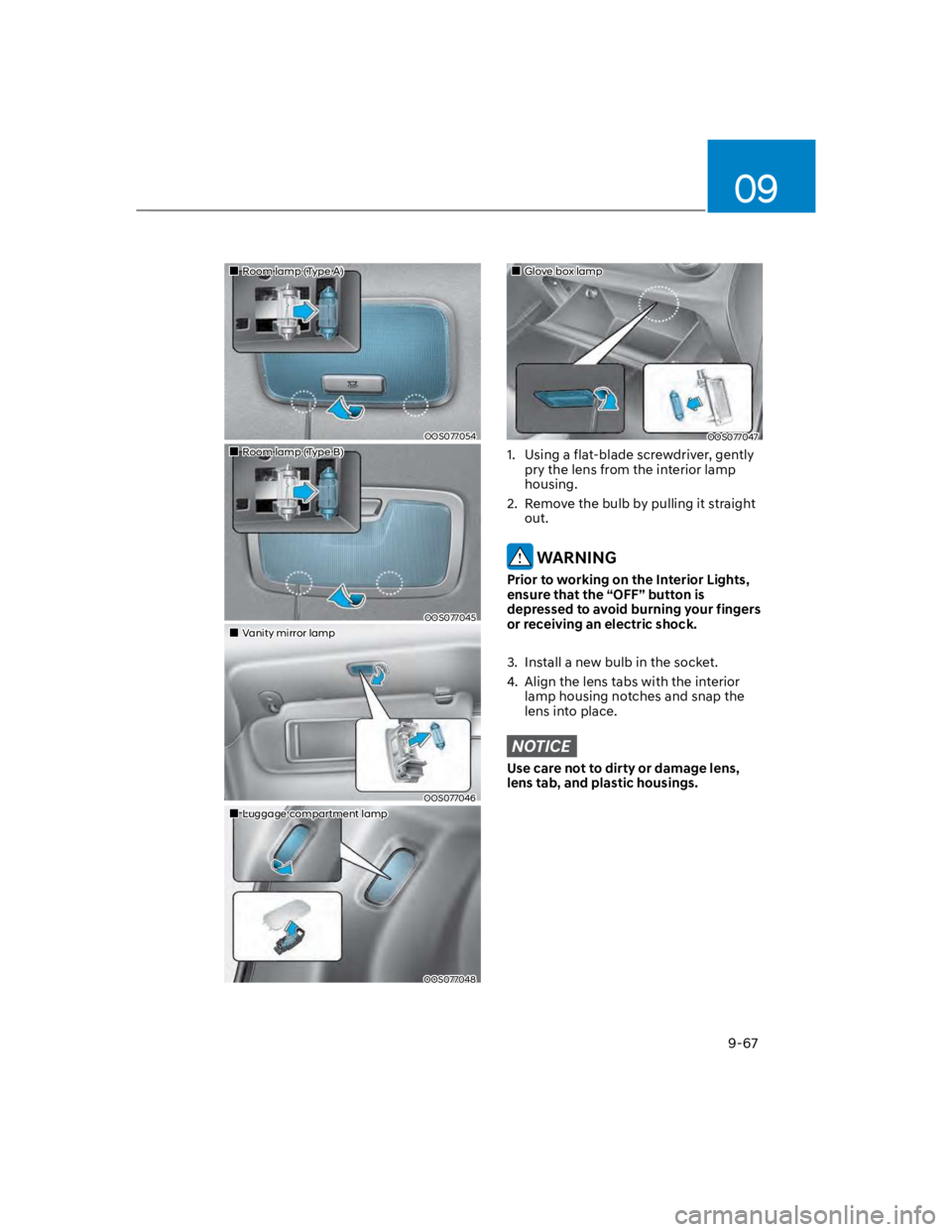
09
9-67
Room lamp (Type A)
OOS077054
Room lamp (Type B)
OOS077045
Vanity mirror lamp
OOS077046
Luggage compartment lamp
OOS077048
Glove box lamp
OOS077047
1. Using a flat-blade screwdriver, gently
pry the lens from the interior lamp
housing.
2. Remove the bulb by pulling it straight
out.
WARNING
Prior to working on the Interior Lights,
ensure that the “OFF” button is
depressed to avoid burning your fingers
or receiving an electric shock.
3. Install a new bulb in the socket.
4. Align the lens tabs with the interior
lamp housing notches and snap the
lens into place.
NOTICE
Use care not to dirty or damage lens,
lens tab, and plastic housings.
Page 573 of 579

I
I-7
Ignition switch ....................................................................................................... 6-5
Key ignition switch ............................................................................................ 6-5
Key ignition switch positions ............................................................................. 6-6
Starting the engine.............................................................................................. 6-7
Important safety precautions.................................................................................. 3-2
Air bag hazards................................................................................................... 3-2
Always wear your seat belt ................................................................................ 3-2
Control your speed ............................................................................................. 3-2
Driver distraction................................................................................................ 3-2
Keep your vehicle in safe condition ................................................................... 3-2
Restrain all children ........................................................................................... 3-2
In case of an emergency while driving .................................................................. 8-2
If the engine stalls at a crossroad or crossing ..................................................... 8-2
If the engine stalls while driving ........................................................................ 8-2
If you have a flat tire while driving .................................................................... 8-3
Infotainment system........................................................................................... 5-116
Antenna .......................................................................................................... 5-116
Audio / Video / Navigation system (AVN) ................................................... 5-118
Bluetooth® Wireless Technology .................................................................... 5-118
How vehicle radio works................................................................................ 5-119
Steering wheel remote controls ...................................................................... 5-117
USB and iPod® port ....................................................................................... 5-116
Voice recognition............................................................................................ 5-118
Infotainment System specifications .................................................................. 5-122
Bluetooth ........................................................................................................ 5-123
USB ................................................................................................................ 5-122
Instrument cluster .................................................................................................. 4-4
Gauges and meters ............................................................................................. 4-5
Instrument cluster control................................................................................... 4-5
LCD display messages ..................................................................................... 4-22
Transmission shift indicator ............................................................................... 4-9
Warning and indicator lights ............................................................................ 4-10
Intelligent variable transmission .......................................................................... 6-13
Good driving practices ..................................................................................... 6-17
Intelligent variable transmission operation ...................................................... 6-13
Parking ............................................................................................................. 6-16