warning light HYUNDAI KONA 2022 Workshop Manual
[x] Cancel search | Manufacturer: HYUNDAI, Model Year: 2022, Model line: KONA, Model: HYUNDAI KONA 2022Pages: 579, PDF Size: 35.31 MB
Page 195 of 579
05
5-61
Hood
Opening the hood
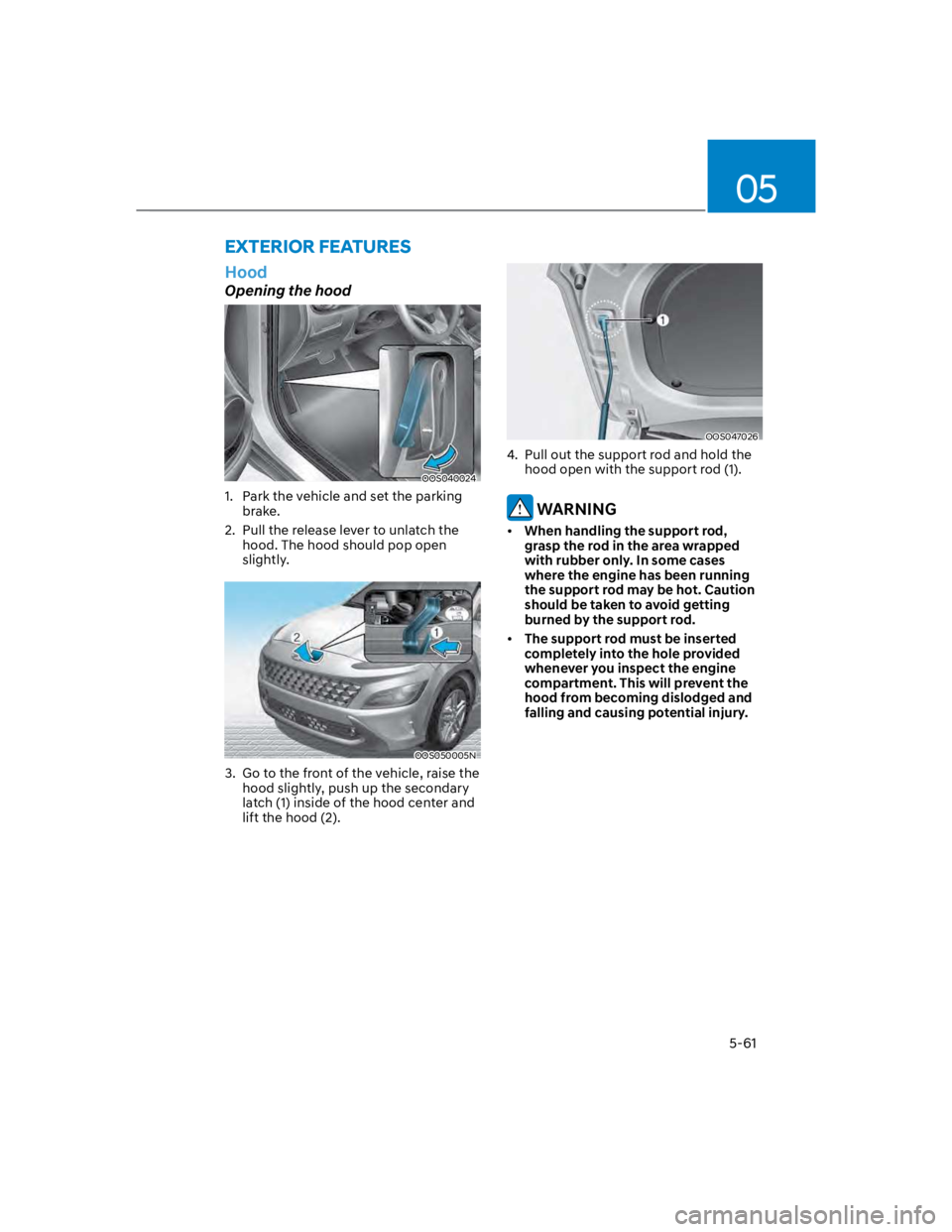
OOS040024
1. Park the vehicle and set the parking
brake.
2. Pull the release lever to unlatch the
hood. The hood should pop open
slightly.
OOS050005N
3. Go to the front of the vehicle, raise the
hood slightly, push up the secondary
latch (1) inside of the hood center and
lift the hood (2).
OOS047026
4. Pull out the support rod and hold the
hood open with the support rod (1).
WARNING
When handling the support rod,
grasp the rod in the area wrapped
with rubber only. In some cases
where the engine has been running
the support rod may be hot. Caution
should be taken to avoid getting
burned by the support rod.
The support rod must be inserted
completely into the hole provided
whenever you inspect the engine
compartment. This will prevent the
hood from becoming dislodged and
falling and causing potential injury.
EXTERIOR FEATURES
Page 196 of 579
Convenient features
5-62
Closing the hood
1. Before closing the hood, check in and
around the engine compartment to
ensure the following:
- Any tools or other loose objects
are removed from the engine room
area or hood opening area
- All glove, rags, or other
combustible material is removed
from the engine compartment
- All filler caps are tightly and
correctly installed
2. Lower the hood halfway (lifted
approximately 12 in. (30 cm) from the
closed position) and push down to
securely lock in place. Then double
check to be sure the hood is secure.
If the hood can be raised slightly, it is
not securely locked. Open it again and
close it with more force.
WARNING
Before closing the hood, ensure
all obstructions are removed from
around the hood opening.
Always double check to be sure that
the hood is firmly latched before
driving away. Check there is no
hood open warning light or message
displayed on the instrument cluster.
Driving with the hood opened may
cause a total loss of visibility, which
might result in an accident.
Do not move the vehicle with the
hood in the raised position, as vision
is obstructed, which might result in
an accident, and the hood could fall
or be damaged.
Liftgate
Opening the liftgate
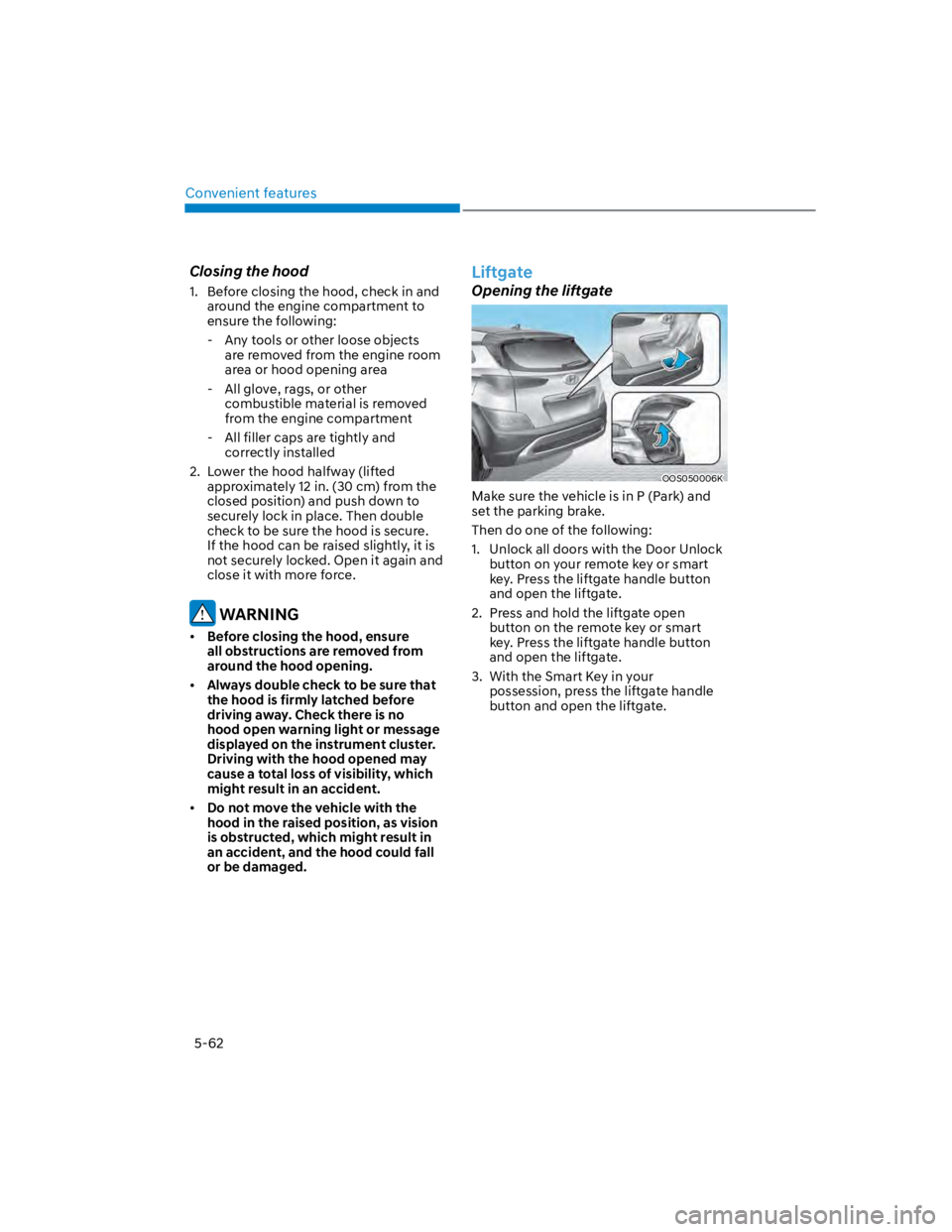
OOS050006K
Make sure the vehicle is in P (Park) and
set the parking brake.
Then do one of the following:
1. Unlock all doors with the Door Unlock
button on your remote key or smart
key. Press the liftgate handle button
and open the liftgate.
2. Press and hold the liftgate open
button on the remote key or smart
key. Press the liftgate handle button
and open the liftgate.
3. With the Smart Key in your
possession, press the liftgate handle
button and open the liftgate.
Page 199 of 579

05
5-65
Information
Closing the fuel filler door
1. To install the fuel tank cap, turn it
clockwise until it “clicks” one time.
2. Close the fuel filler door until it is
latched securely.
WARNING
Gasoline is highly flammable and
explosive. Failure to follow these
guidelines may result in SERIOUS
INJURY or DEATH:
Read and follow all warnings posted
at the gas station.
Before refueling, note the location
of the Emergency Fuel Shut-Off, if
available, at the gas station.
Before touching the fuel nozzle, you
should eliminate the potential build-
up of static electricity by touching
a metal part of the vehicle, a safe
distance away from the fuel filler
neck, nozzle, or other gas source,
with your bare hand.
Do not use cellular phones while
refueling. Electric current and/or
electronic interference from cellular
phones can potentially ignite fuel
vapors and cause a fire.
Do not get back into a vehicle
once you have begun refueling.
You can generate a buildup of
static electricity by touching,
rubbing or sliding against any item
or fabric capable of producing
static electricity. Static electricity
discharge can ignite fuel vapors
causing a fire. If you must re-enter
the vehicle, you should once again
eliminate potentially dangerous
static electricity discharge by
touching a metal part of the vehicle,
away from the fuel filler neck, nozzle
or other fuel source, with your bare
hand.
When using an approved portable
fuel container, be sure to place the
container on the ground prior to
refueling. Static electricity discharge
from the container can ignite fuel
vapors causing a fire.
Once refueling has begun, contact
between your bare hand and the
vehicle should be maintained until
the filling is complete.
Use only approved portable plastic
fuel containers designed to carry and
store fuel.
When refueling, always shift the
gear to the P (Park) position, set
the parking brake, and press the
Engine Start/Stop button to the
OFF position. Sparks produced by
electrical components related to the
engine can ignite fuel vapors causing
a fire.
Do not use matches or a lighter and
do not smoke or leave a lit cigarette
in your vehicle while at a gas station,
especially during refueling.
Page 202 of 579
Convenient features
5-68
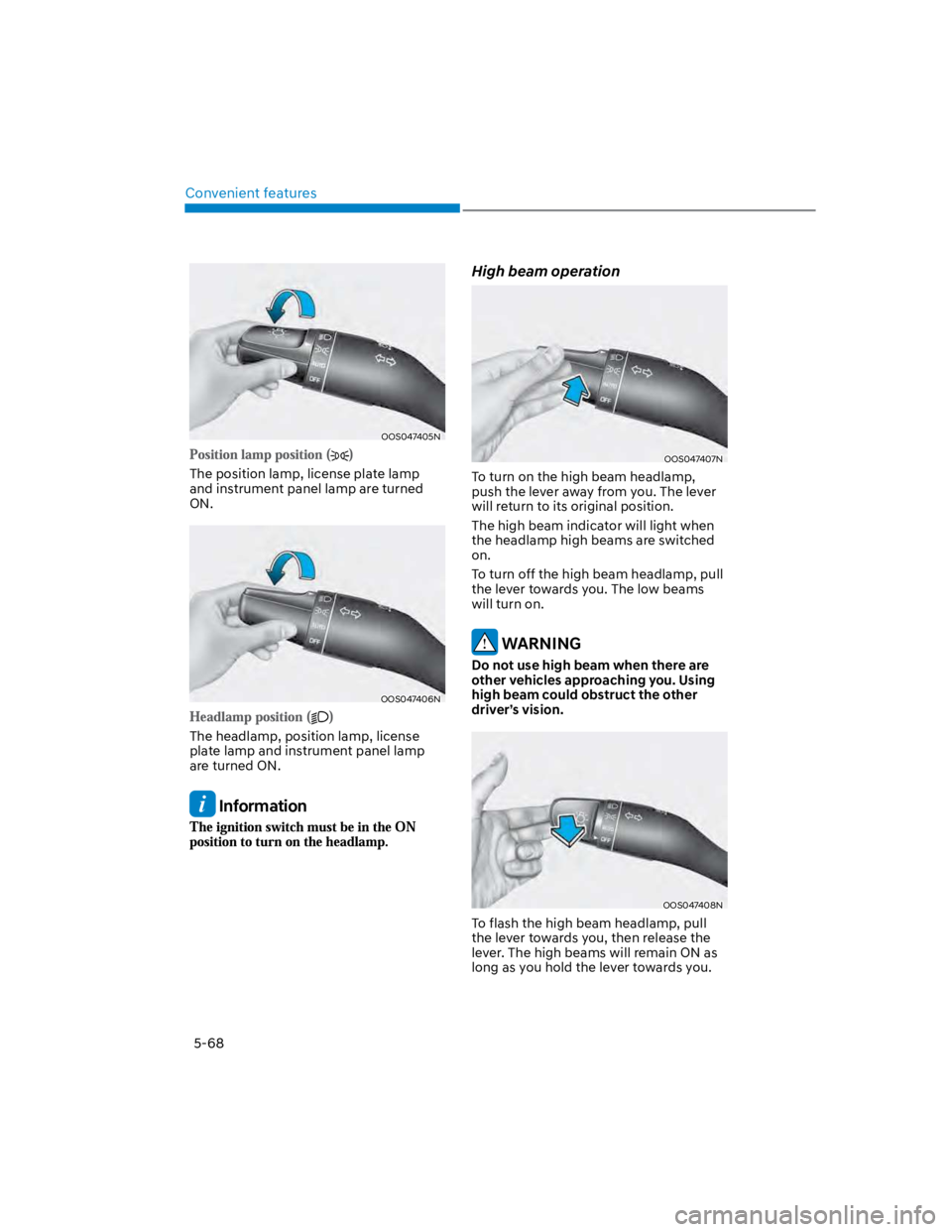
OOS047405N
The position lamp, license plate lamp
and instrument panel lamp are turned
ON.
OOS047406N
The headlamp, position lamp, license
plate lamp and instrument panel lamp
are turned ON.
Information
High beam operation
OOS047407N
To turn on the high beam headlamp,
push the lever away from you. The lever
will return to its original position.
The high beam indicator will light when
the headlamp high beams are switched
on.
To turn off the high beam headlamp, pull
the lever towards you. The low beams
will turn on.
WARNING
Do not use high beam when there are
other vehicles approaching you. Using
high beam could obstruct the other
driver’s vision.
OOS047408N
To flash the high beam headlamp, pull
the lever towards you, then release the
lever. The high beams will remain ON as
long as you hold the lever towards you.
Page 205 of 579
05
5-71
Interior lights
WARNING
Do not use the interior lights when
driving in the dark. The interior lights
may obscure your view and cause an
accident.
NOTICE
Do not use the interior lights for
extended periods when the vehicle is
turned off or the battery will discharge.
Interior lamp AUTO cut
The interior lamps will automatically go
off approximately 20 minutes after the
vehicle is turned off and the doors are
closed. If a door is opened, the lamp
will go off 40 minutes after the vehicle
is turned off. If the doors are locked by
the smart key and the vehicle enters the
armed stage of the theft alarm system,
the lamps will go off five seconds later.
Front lamps
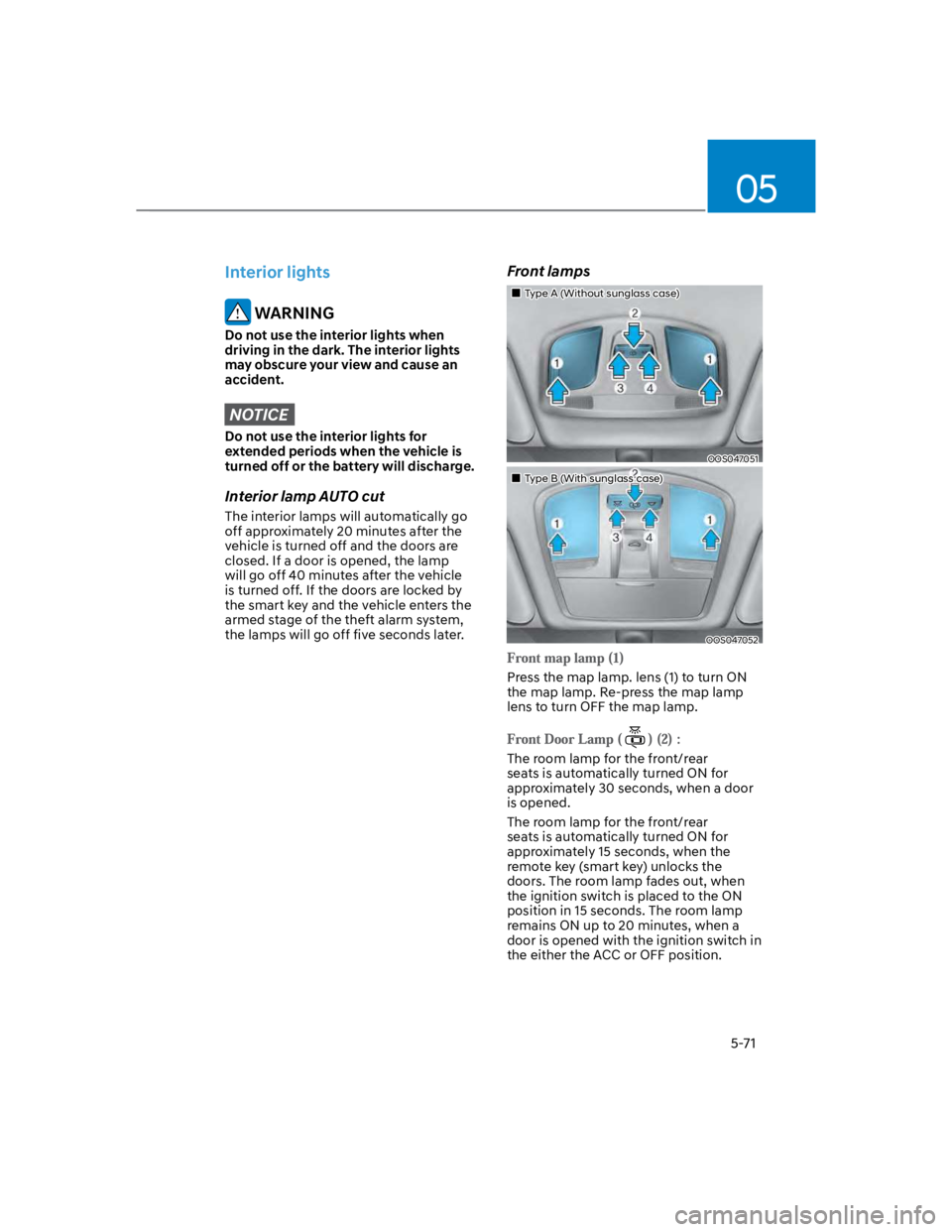
Type A (Without sunglass case)
OOS047051
Type B (With sunglass case)
OOS047052
Press the map lamp. lens (1) to turn ON
the map lamp. Re-press the map lamp
lens to turn OFF the map lamp.
The room lamp for the front/rear
seats is automatically turned ON for
approximately 30 seconds, when a door
is opened.
The room lamp for the front/rear
seats is automatically turned ON for
approximately 15 seconds, when the
remote key (smart key) unlocks the
doors. The room lamp fades out, when
the ignition switch is placed to the ON
position in 15 seconds. The room lamp
remains ON up to 20 minutes, when a
door is opened with the ignition switch in
the either the ACC or OFF position.
Page 209 of 579
05
5-75
Operating condition
1. Place the lamp switch in the AUTO
position.
2. Turn on the high beam by pushing the
lever away from you.
3. High Beam Assist () indicator will
illuminate.
4. High Beam Assist will turn on when
vehicle speed is above 25mph (40
km/h).
1) If the lamp switch is pushed away
when High Beam Assist is operating,
High Beam Assist will turn off
and the high beam will be on
continuously.
2) If the lamp switch is pulled towards
you when the high beam is off, the
high beam will turn on without High
Beam Assist canceled. When you let
go of the lamp switch, the lever will
move to the middle and the high
beam will turn off.
3) If the lamp switch is pulled towards
you when the high beam is on by
High Beam Assist, the low beam
will be on and High Beam Assist will
turn off.
4) If the lamp switch is placed to the
headlamp position, High Beam
Assist will turn off and the low
beam will be on continuously.
When High Beam Assist is operating,
high beam switches to low beam if
any of the following conditions occur:
- When the headlamp of an
oncoming vehicle is detected.
- When the tail lamp of a vehicle in
front is detected.
- When the headlamp or tail lamp of a
motorcycle or a bicycle is detected.
- When the surrounding ambient light
is bright enough that high beams
are not required.
- When streetlights or other lights are
detected.
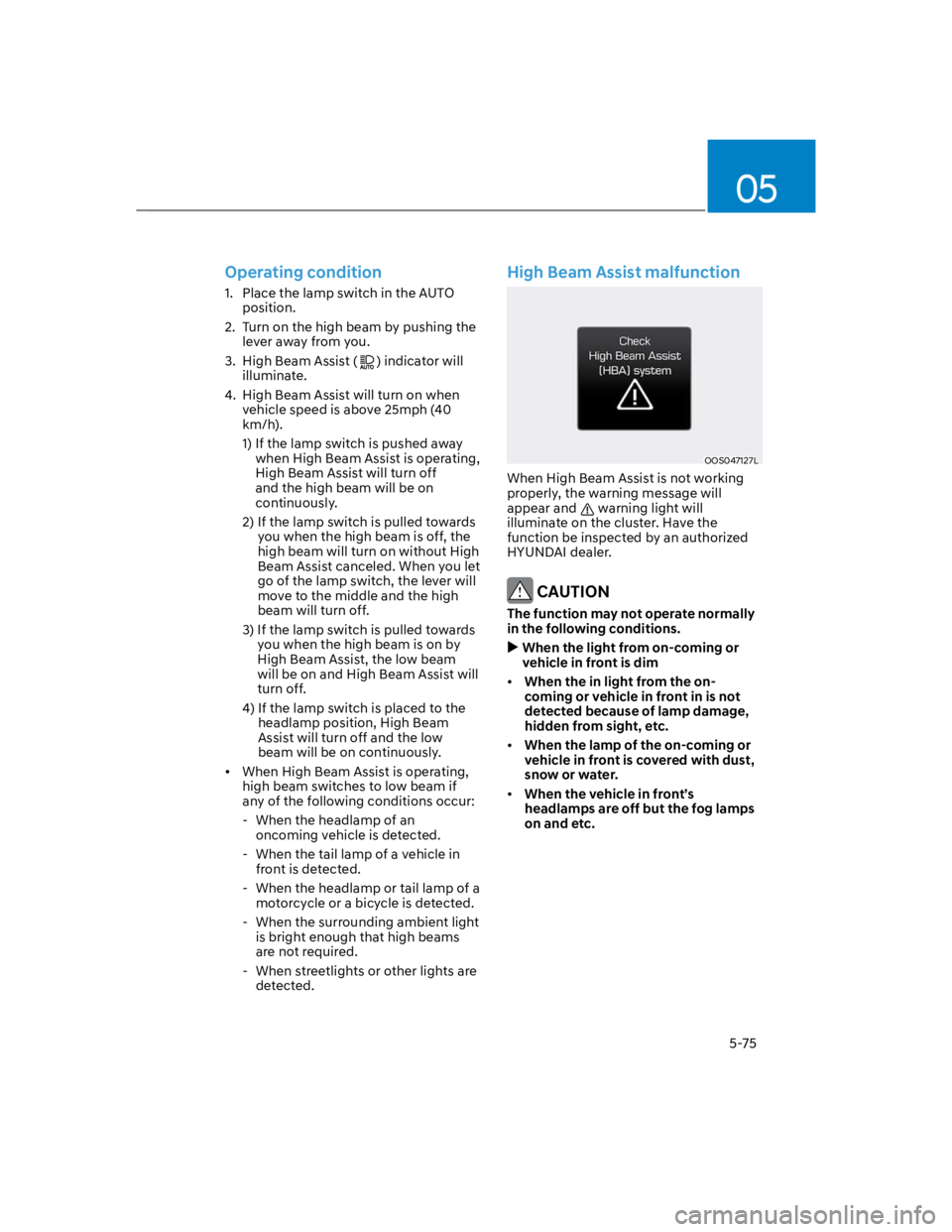
High Beam Assist malfunction
OOS047127L
When High Beam Assist is not working
properly, the warning message will
appear and warning light will
illuminate on the cluster. Have the
function be inspected by an authorized
HYUNDAI dealer.
CAUTION
The function may not operate normally
in the following conditions.
When the light from on-coming or
vehicle in front is dim
When the in light from the on-
coming or vehicle in front in is not
detected because of lamp damage,
hidden from sight, etc.
When the lamp of the on-coming or
vehicle in front is covered with dust,
snow or water.
When the vehicle in front’s
headlamps are off but the fog lamps
on and etc.
Page 210 of 579

Convenient features
5-76
When it is affected by an external
condition
When there is a similar shaped lamp
with the vehicle front vehicle’s
lamps.
When the headlamp is not repaired
or replaced at an authorized dealer.
When headlamp aiming is not
properly adjusted.
When driving on a narrow winding
road or rough road.
When driving downhill or uphill.
When only part of the vehicle in
front is visible on a crossroad or on a
corner.
When there is a traffic light,
reflecting sign, flashing sign or
mirror.
When the road conditions are bad
such as being wet or covered with
snow.
When a vehicle suddenly appears
from around a corner.
When the vehicle is tilted from a flat
tire or being towed.
When the front visibility is poor
When the light from the on-coming
or vehicle in front is not detected
because of exhaust fume, smoke,
fog, snow, Heavy rain, dust, etc.
When the front window is covered
with foreign matter.
WARNING
Do not disassemble a front view
camera temporarily for tinted
window or attaching any types
of coatings and accessories. If
you disassemble the camera and
assemble it again, take your vehicle
to an authorized HYUNDAI dealer
and have the function checked to
need a calibration.
When you replace or reinstall the
windshield glass, front view camera,
we recommend that you take your
vehicle to an authorized HYUNDAI
dealer and have the function
checked.
Be careful that water doesn’t get into
High Beam Assist unit and do not
remove or damage related parts of
High Beam Assist.
Do not place objects on the crash
pad that reflect light such as mirrors,
white paper, etc. The function may
malfunction if sunlight is reflected.
At times, High Beam Assist may
not work properly. The function is
for your convenience only. It is the
responsibility of the driver for safe
driving practices and always check
the road conditions for your safety.
When the function does not operate
normally, change the lamp position
manually between the high beam
and low beam.
Page 212 of 579
Convenient features
5-78
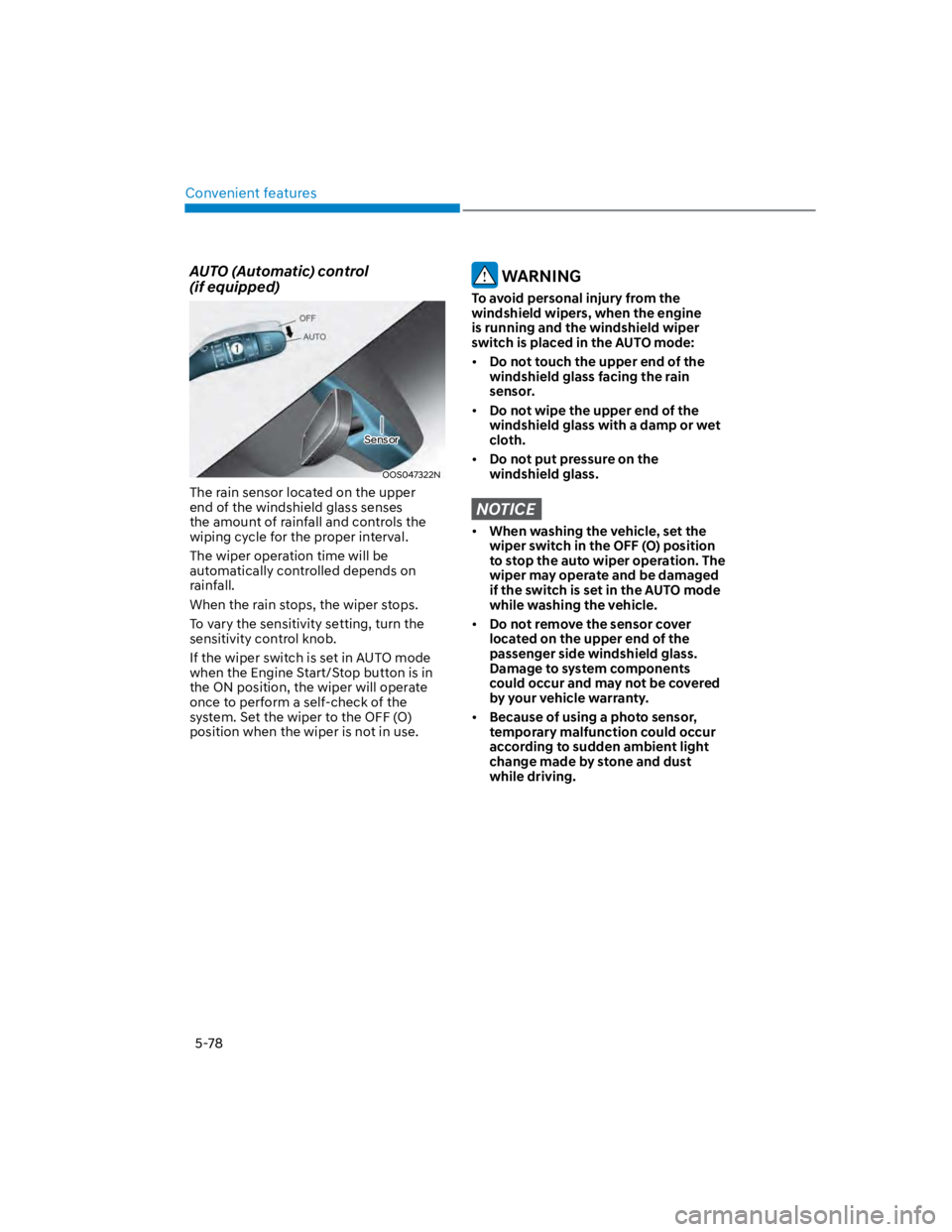
AUTO (Automatic) control
(if equipped)
OOS047322N
The rain sensor located on the upper
end of the windshield glass senses
the amount of rainfall and controls the
wiping cycle for the proper interval.
The wiper operation time will be
automatically controlled depends on
rainfall.
When the rain stops, the wiper stops.
To vary the sensitivity setting, turn the
sensitivity control knob.
If the wiper switch is set in AUTO mode
when the Engine Start/Stop button is in
the ON position, the wiper will operate
once to perform a self-check of the
system. Set the wiper to the OFF (O)
position when the wiper is not in use.
WARNING
To avoid personal injury from the
windshield wipers, when the engine
is running and the windshield wiper
switch is placed in the AUTO mode:
Do not touch the upper end of the
windshield glass facing the rain
sensor.
Do not wipe the upper end of the
windshield glass with a damp or wet
cloth.
Do not put pressure on the
windshield glass.
NOTICE
When washing the vehicle, set the
wiper switch in the OFF (O) position
to stop the auto wiper operation. The
wiper may operate and be damaged
if the switch is set in the AUTO mode
while washing the vehicle.
Do not remove the sensor cover
located on the upper end of the
passenger side windshield glass.
Damage to system components
could occur and may not be covered
by your vehicle warranty.
Because of using a photo sensor,
temporary malfunction could occur
according to sudden ambient light
change made by stone and dust
while driving.
Sensor
Page 219 of 579
05
5-85
WARNING
Continued use of the climate control
system operation in Recirculation
mode for a prolonged period of
time may cause drowsiness to the
occupants in the cabin. This may lead
to loss of vehicle control which may
lead to an accident.
Continued use of the climate control
system operation in Recirculation
mode with the A/C OFF may allow
humidity to increase inside the
cabin. This may cause condensation
to accumulate on the windshield and
obscure visibility.
Do not sleep in your vehicle or
remain parked in your vehicle with
the windows up and either the
heater or the air conditioning ON for
prolonged periods of time. Doing so
may increase the levels of carbon
dioxide in the cabin which may lead
to serious injury or death.
Fan speed control (1)
Turn the knob to the right to increase
the fan speed and airflow. Turn the knob
to the left to decrease fan speed and
airflow.
Setting the fan speed control knob to the
“0” position turns off the fan.
NOTICE
Operating the fan speed when the
ignition switch is in the ON position
could cause the battery to discharge.
Operate the fan speed when the engine
is running.
Air conditioning A/C (5)
Push the A/C button to turn the system
on (indicator light will illuminate) and off.
System operation
Ventilation
1. Set the mode to the position.
2. Set the air intake control to the
outside (fresh) air position.
3. Set the temperature control to the
desired position.
4. Set the fan speed control to the
desired speed.
Heating
1. Set the mode to the position.
2. Set the air intake control to the
outside (fresh) air position.
3. Set the temperature control to the
desired position.
4. Set the fan speed control to the
desired speed.
5. If dehumidified heating is desired,
turn the air conditioning system (if
equipped) on.
If the windshield fogs up, set the mode
to the or position.
To help keep dust or unpleasant fumes
from entering the vehicle through the
ventilation system, temporarily set the
air intake control to the recirculated
air position. Be sure to return the
control to the fresh air position when
the irritation has passed to keep fresh
air in the vehicle. This will help keep
the driver alert and comfortable.
To prevent interior fog on the
windshield, set the air intake control
to the fresh air position and fan speed
to the desired position, turn on the air
conditioning system, and adjust the
temperature control to the desired
temperature.
Page 238 of 579
Convenient features
5-104
WARNING
Never store cigarette lighters, propane
cylinders, or other flammable/explosive
materials in the vehicle. These items
may catch fire and/or explode if the
vehicle is exposed to hot temperatures
for extended periods.
WARNING
ALWAYS keep the storage compartment
covers closed securely while driving.
Items inside your vehicle are moving as
fast as the vehicle. If you have to stop
or turn quickly, or if there is a crash, the
items may fly out of the compartment
and may cause an injury if they strike
the driver or a passenger.
NOTICE
To avoid possible theft, do not leave
valuables in the storage compartments.
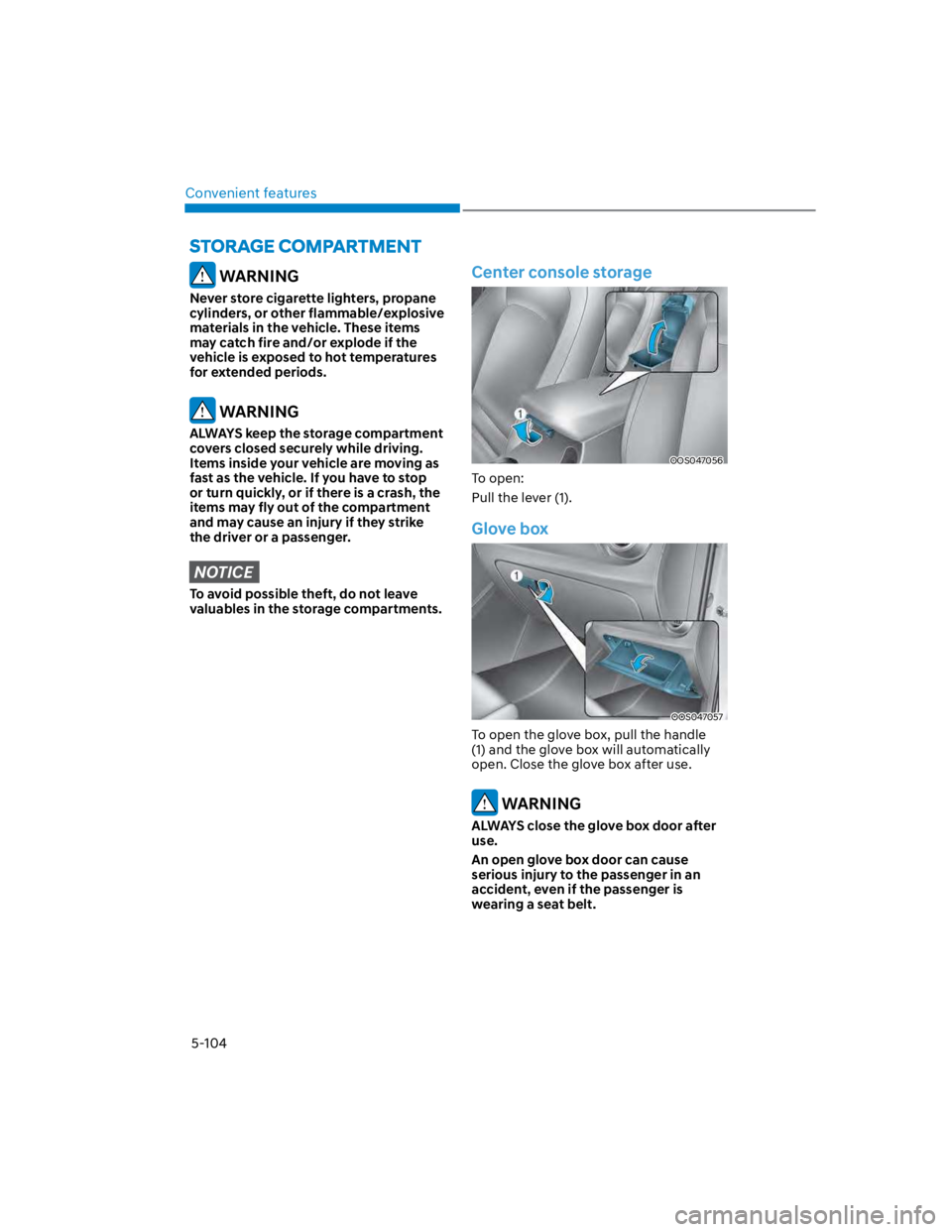
Center console storage
OOS047056
To open:
Pull the lever (1).
Glove box
OOS047057
To open the glove box, pull the handle
(1) and the glove box will automatically
open. Close the glove box after use.
WARNING
ALWAYS close the glove box door after
use.
An open glove box door can cause
serious injury to the passenger in an
accident, even if the passenger is
wearing a seat belt.