RELEASE HYUNDAI KONA 2022 Repair Manual
[x] Cancel search | Manufacturer: HYUNDAI, Model Year: 2022, Model line: KONA, Model: HYUNDAI KONA 2022Pages: 579, PDF Size: 35.31 MB
Page 292 of 579
06
6-35
WARNING
Depress the accelerator pedal slowly
when you start the vehicle.
For your safety, cancel Auto Hold
when you drive downhill, back up the
vehicle or park the vehicle.
NOTICE
If there is a malfunction with the
driver's door or engine hood open
detection system, Auto Hold may not
work properly.
Contact an authorized HYUNDAI dealer.
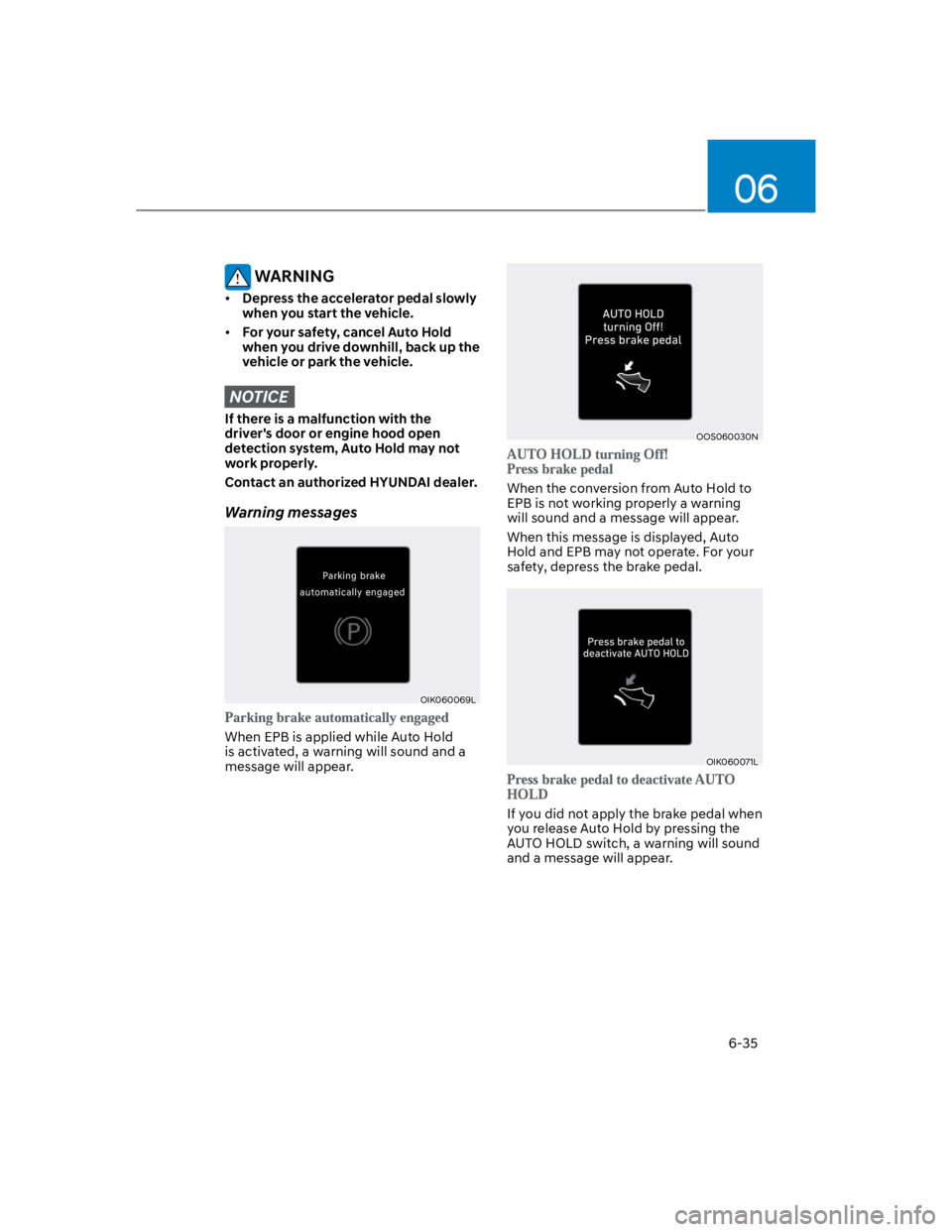
Warning messages
OIK060069L
When EPB is applied while Auto Hold
is activated, a warning will sound and a
message will appear.
OOS060030N
When the conversion from Auto Hold to
EPB is not working properly a warning
will sound and a message will appear.
When this message is displayed, Auto
Hold and EPB may not operate. For your
safety, depress the brake pedal.
OIK060071L
If you did not apply the brake pedal when
you release Auto Hold by pressing the
AUTO HOLD switch, a warning will sound
and a message will appear.
Page 298 of 579
06
6-41
To cancel VSM operation, press the ESC
OFF button. ESC OFF () indicator light
will illuminate.
To turn on VSM, press the ESC OFF
button again. The ESC OFF indicator light
will go out.
WARNING
If the ESC () indicator light or EPS
() warning light stays illuminated
or blinks, your vehicle may have a
malfunction with the VSM system.
When the warning light illuminates
have the vehicle be checked by an
authorized HYUNDAI dealer as soon as
possible.
NOTICE
Driving with wheels and tires with
different sizes may cause the VSM
system to malfunction. Before replacing
tires, make sure all four tires and wheels
are the same size. Never drive the
vehicle with different sized tires and
wheels installed.
Hill-Start Assist Control (HAC)
Hill-Start Assist Control helps prevent
the vehicle from rolling backwards
when starting a vehicle from a stop on
a hill. The system operates the brakes
automatically for approximately 2
seconds and releases the brake after 5
seconds or when the accelerator pedal is
depressed.
WARNING
Always be ready to depress the
accelerator pedal when starting off
an incline. Hill-Start Assist Control
activates only for approximately 2
seconds.
Information
Page 308 of 579
06
6-51
Emergency precautions
Tires
Do not use a tire and wheel package
with a different size and type from the
one originally installed on your vehicle.
It can affect the safety and performance
of your vehicle, which could lead to
steering failure or rollover causing
serious injury.
When replacing the tires, be sure to
equip all four tires with the tire and wheel
of the same size, type, tread, brand and
load-carrying capacity. If you equip your
vehicle with any tire/wheel combination
not recommended by HYUNDAI for off-
road driving, you should not use these
tires for highway driving.
WARNING
Never start or run the engine while a
full-time AWD vehicle is raised on a
jack. The vehicle can slip or roll off of a
jack causing serious injury or death to
you or those nearby.
Towing
4WD vehicles must be towed with
a wheel lift and dollies or flatbed
equipment with all the wheels off the
ground. For more details, refer to
"Towing" section in chapter 8.
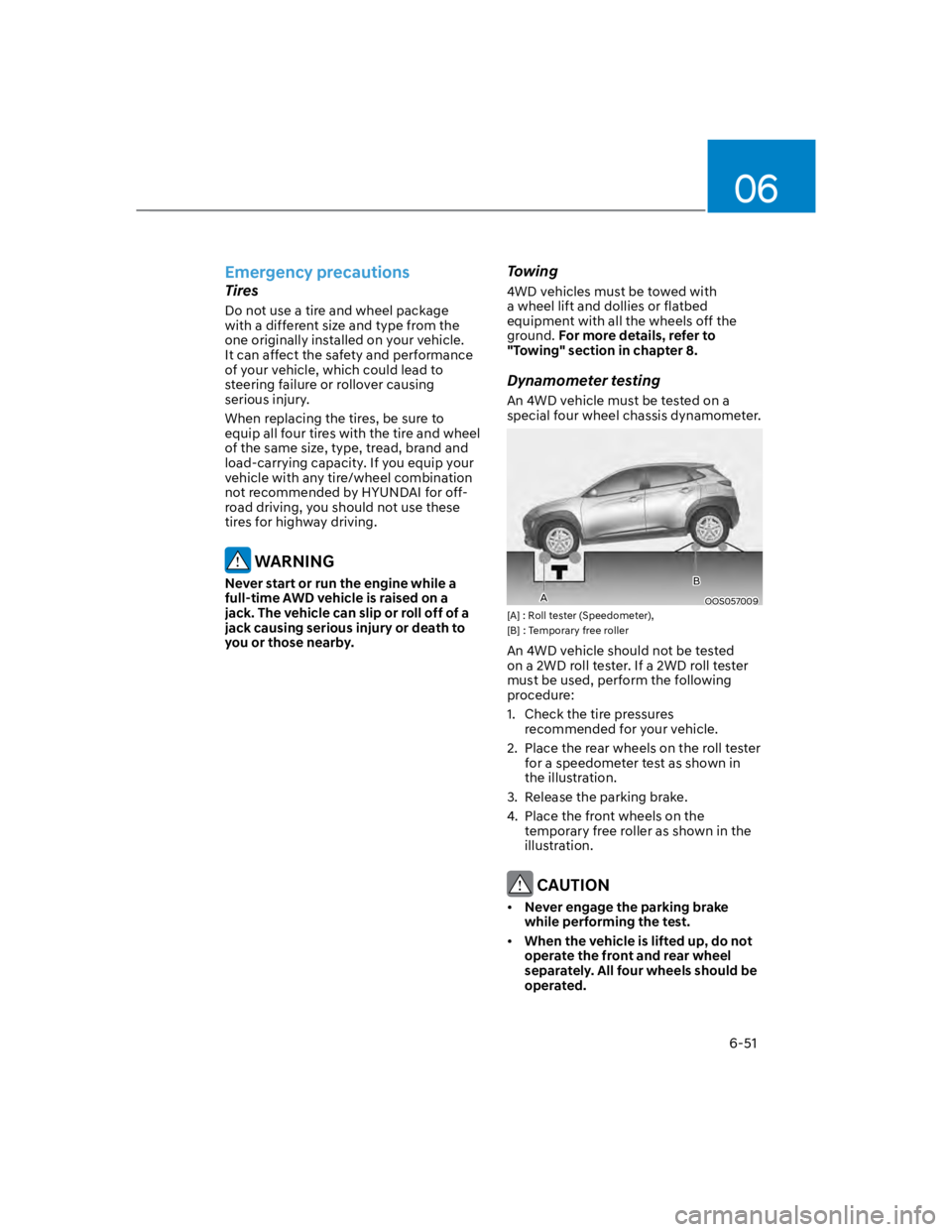
Dynamometer testing
An 4WD vehicle must be tested on a
special four wheel chassis dynamometer.
OOS057009
[A] : Roll tester (Speedometer),
[B] : Temporary free roller
An 4WD vehicle should not be tested
on a 2WD roll tester. If a 2WD roll tester
must be used, perform the following
procedure:
1. Check the tire pressures
recommended for your vehicle.
2. Place the rear wheels on the roll tester
for a speedometer test as shown in
the illustration.
3. Release the parking brake.
4. Place the front wheels on the
temporary free roller as shown in the
illustration.
CAUTION
Never engage the parking brake
while performing the test.
When the vehicle is lifted up, do not
operate the front and rear wheel
separately. All four wheels should be
operated.
A
B
Page 312 of 579
06
6-55
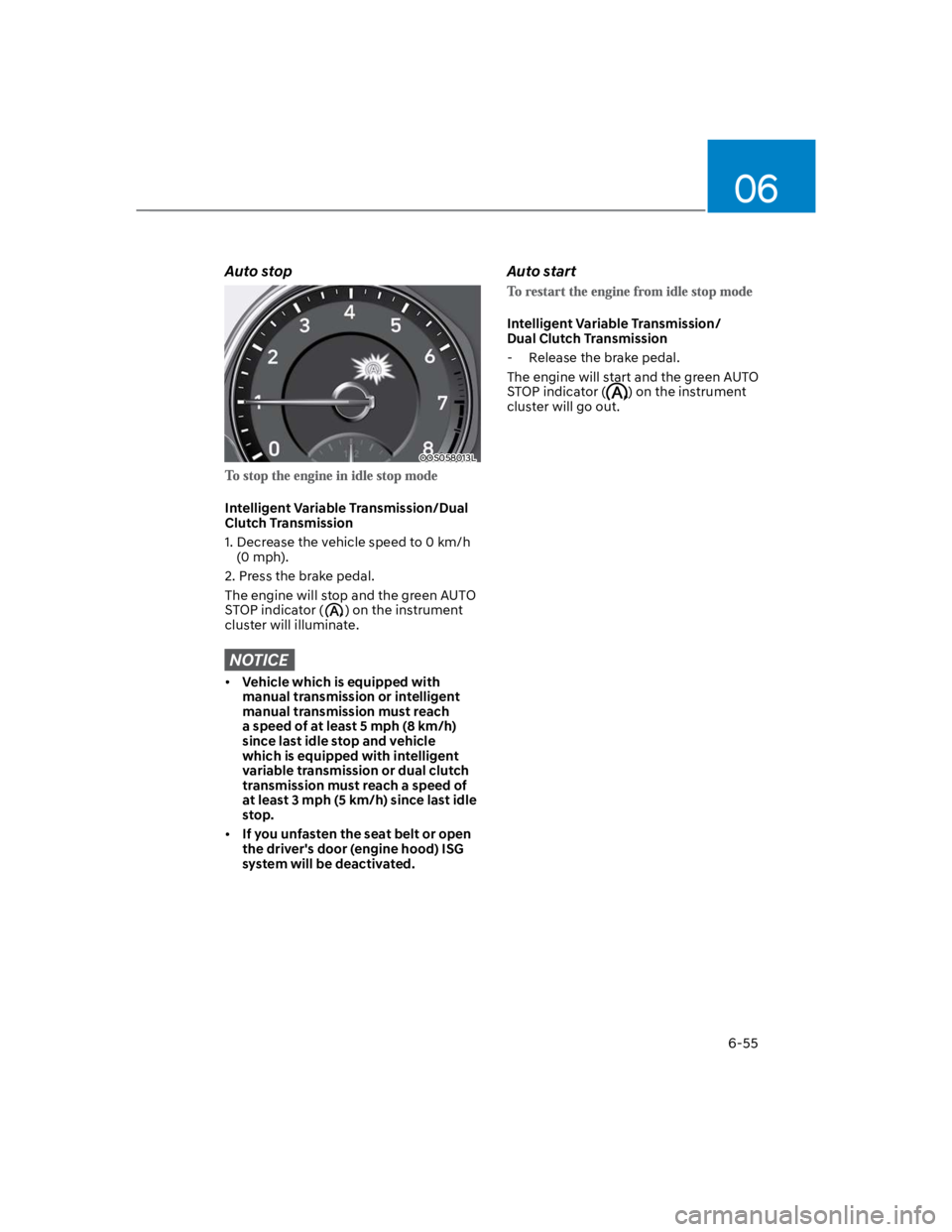
Auto stop
OOS058013L
Intelligent Variable Transmission/Dual
Clutch Transmission
1. Decrease the vehicle speed to 0 km/h
(0 mph).
2. Press the brake pedal.
The engine will stop and the green AUTO
STOP indicator () on the instrument
cluster will illuminate.
NOTICE
Vehicle which is equipped with
manual transmission or intelligent
manual transmission must reach
a speed of at least 5 mph (8 km/h)
since last idle stop and vehicle
which is equipped with intelligent
variable transmission or dual clutch
transmission must reach a speed of
at least 3 mph (5 km/h) since last idle
stop.
If you unfasten the seat belt or open
the driver's door (engine hood) ISG
system will be deactivated.
Auto start
Intelligent Variable Transmission/
Dual Clutch Transmission
- Release the brake pedal.
The engine will start and the green AUTO
STOP indicator () on the instrument
cluster will go out.
Page 313 of 579
Driving your vehicle
6-56
Condition of ISG system
operation
The driver’s seatbelt is fastened
The driver’s door and hood are closed
The brake vacuum pressure is
adequate
The battery sensor is activated and
the battery is sufficiently charged
Outside temperature is not too low or
too high
The vehicle is driven over a constant
speed and stops
The climate control system satisfies
the conditions
The vehicle is sufficiently warmed up
The vehicle is not on a steep road
grade
The steering wheel is not at a sharp
angle
The vehicle is not at a high elevation
The front windshield defroster is off
You have not selected Manual shift
mode
When sufficient time has elapsed after
shifting to R (Reverse) was released
The brake vacuum pressure is low.
You have exceeded the maximum
engine off time
The air conditioning is ON with the fan
speed set to the highest position.
Fogging of the windows could occur
and the air conditioning is on.
The battery is not within optimal
operating conditions.
The cooling and heating performance
of the climate control system is
unsatisfactory.
When you press the ISG OFF button
with the engine automatically stopped
Your vehicle is moving after standstill.
You press the accelerator and the
brake pedal at the same time.
The driver safety belt becomes
unfastened or the driver door is ajar
conditions.
The green AUTO STOP indicator ()
on the instrument cluster will blink for 5
seconds.
NOTICE
If the ISG system does not meet that
operation condition, the ISG system is
deactivated.
Page 318 of 579

06
6-61
SMART mode
SMART mode selects the proper
driving mode among NORMAL,
ECO and SPORT by judging
the driver's driving habits (i.e.
mild or dynamic) from the
brake pedal depression or the
steering wheel operation.
Rotate the DRIVE MODE knob to
activate SMART mode. When SMART
mode is activated, the indicator
illuminates on the instrument cluster.
The vehicle starts in SMART mode,
when the engine was turned OFF in
SMART mode.
SMART mode automatically controls
gear shifting patterns, engine torque,
in accordance with the driver's driving
habits.
Information
The driving mode automatically
changes to ECO mode after a certain
period of time, when you gently
depress the accelerator pedal (Your
driving is categorized to be mild.).
The driving mode automatically
changes from SMART ECO mode to
SMART NORMAL mode after a certain
period of time, when you sharply or
repetitively depress the accelerator
pedal.
The driving mode automatically
changes to SMART NORMAL mode
with the same driving patterns, when
the vehicle starts to drive on an
upward slope of a certain angle. The
driving mode automatically returns to
SMART ECO mode, when the vehicle
enters a leveled road.
The driving mode automatically
changes to SMART SPORT, when
you abruptly accelerate the vehicle
or repetitively operate the steering
wheel (Your driving is categorized
to be sporty.). In this mode, your
vehicle drives in a lower gear for
abrupt accelerating/decelerating
and increases the engine brake
performance.
You may still sense the engine brake
performance, even when you release
the accelerator pedal in SMART
SPORT mode. It is because your
vehicle remains to be in a lower gear
over a certain period of time for next
acceleration. Thus, it is a normal
driving situation, not indicating any
malfunction.
The driving mode automatically
changes to SMART SPORT mode
only in harsh driving situations. In
most of the normal driving situations,
the driving mode sets to be either
in SMART ECO mode or in SMART
NORMAL mode.
Page 320 of 579
06
6-63
SPECIAL DRIVING CONDITIONS
Hazardous driving conditions
When hazardous driving elements
are encountered such as water, snow,
ice, mud and sand, take the following
precautions:
Drive cautiously and maintain a longer
braking distance.
Avoid abrupt braking or steering.
When your vehicle is stuck in
snow, mud, or sand, use second
gear. Accelerate slowly to avoid
unnecessary wheel spin.
Put sand, rock salt, tire chains or other
non-slip materials under the wheels to
provide additional traction while the
vehicle becomes stuck in ice, snow,
or mud.
WARNING
Downshifting with an automatic
transmission while driving on slippery
surfaces can cause an accident. The
sudden change in tire speed could
cause the tires to skid. Be careful when
downshifting on slippery surfaces.
Rocking the vehicle
If it is necessary to rock the vehicle to
free it from snow, sand, or mud, first turn
the steering wheel right and left to clear
the area around your front wheels. Then,
shift back and forth between R (Reverse)
and a forward gear.
Try to avoid spinning the wheels, and do
not race the engine.
To prevent transmission wear, wait until
the wheels stop spinning before shifting
gears. Release the accelerator pedal
while shifting, and press lightly on the
accelerator pedal while the transmission
is in gear. Slowly spinning the wheels in
forward and reverse directions causes a
rocking motion that may free the vehicle.
WARNING
If the vehicle is stuck and excessive
wheel spin occurs, the temperature
in the tires can increase very quickly.
If the tires become damaged, a tire
blow out or tire explosion can occur.
This condition is dangerous - you and
others may be injured. Do not attempt
this procedure if people or objects are
anywhere near the vehicle.
If you attempt to free the vehicle, the
vehicle can overheat quickly, possibly
causing an engine compartment fire
or other damage. Try to avoid spinning
the wheels as much as possible to
prevent overheating of either the tires
or the engine. DO NOT allow the vehicle
to spin the wheels above 35 mph (56
km/h).
Information
Page 326 of 579

06
6-69
Check spark plugs and ignition system
Inspect the spark plugs, as specified in
chapter 9. If necessary, replace them.
Also check all ignition wirings and
components for any cracks, wear-out,
and damage.
To prevent locks from freezing
To prevent the locks from being frozen,
spray approved de-icing fluid or glycerin
into key holes. When a lock opening is
already covered with ice, spray approved
de-icing fluid over the ice to remove it.
When an internal part of a lock freezes,
try to thaw it with a heated key. Carefully
use the heated key to avoid an injury.
Use approved window washer anti-
freeze solution in system
To prevent the window washer from
being frozen, add authorized window
washer anti-freeze solution, as specified
on the window washer container.
Window washer anti-freeze solution is
available from an authorized HYUNDAI
dealer, and most vehicle accessory
outlets. Do not use engine coolant or
other types of anti-freeze solution, to
prevent any damage to the vehicle paint.
Do not let your parking brake freeze
Under some conditions your parking
brake can freeze in the engaged position.
This is most likely to happen when there
is an accumulation of snow or ice around
or near the rear brakes or if the brakes
are wet. When there is the risk that your
parking brake may freeze, temporarily
apply it with the gear in P (Park). Also,
block the rear wheels in advance, so the
vehicle may not roll. Then, release the
parking brake.
Do not let ice and snow accumulate
underneath
Under some conditions, snow and ice
can build up under the fenders and
interfere with the steering. When driving
in such conditions during the severe
winter, you should check underneath
the vehicle on a regular basis, to ensure
that the front wheels and the steering
components is unblocked.
Carry emergency equipment
In accordance with weather conditions,
you should carry appropriate emergency
equipment, while driving. Some of the
items you may want to carry include tire
chains, tow straps or chains, flashlight,
emergency flares, sand, shovel, jumper
cables, window scraper, gloves, ground
cloth, coveralls, blanket, etc.
Do not place objects or materials in the
engine compartment
Putting objects or materials in the engine
compartment may cause an engine
failure or combustion, because they may
block the engine cooling. Such damage
will not be covered by the manufacturer’s
warranty.
Page 392 of 579
Driver assistance system
7-60
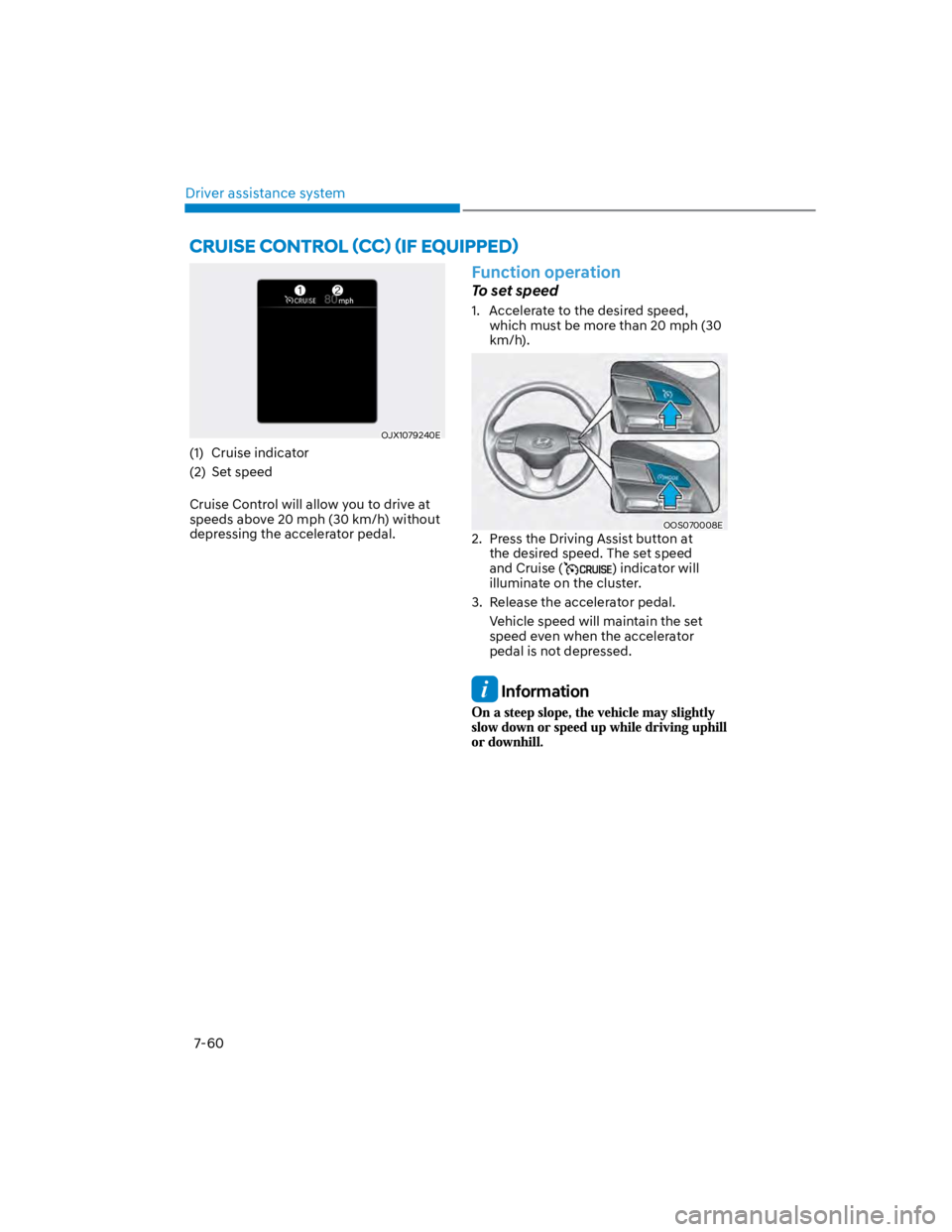
OJX1079240E
(1) Cruise indicator
(2) Set speed
Cruise Control will allow you to drive at
speeds above 20 mph (30 km/h) without
depressing the accelerator pedal.
Function operation
To set speed
1. Accelerate to the desired speed,
which must be more than 20 mph (30
km/h).
OOS070008E
2. Press the Driving Assist button at
the desired speed. The set speed
and Cruise () indicator will
illuminate on the cluster.
3. Release the accelerator pedal.
Vehicle speed will maintain the set
speed even when the accelerator
pedal is not depressed.
Information
Page 393 of 579
07
7-61
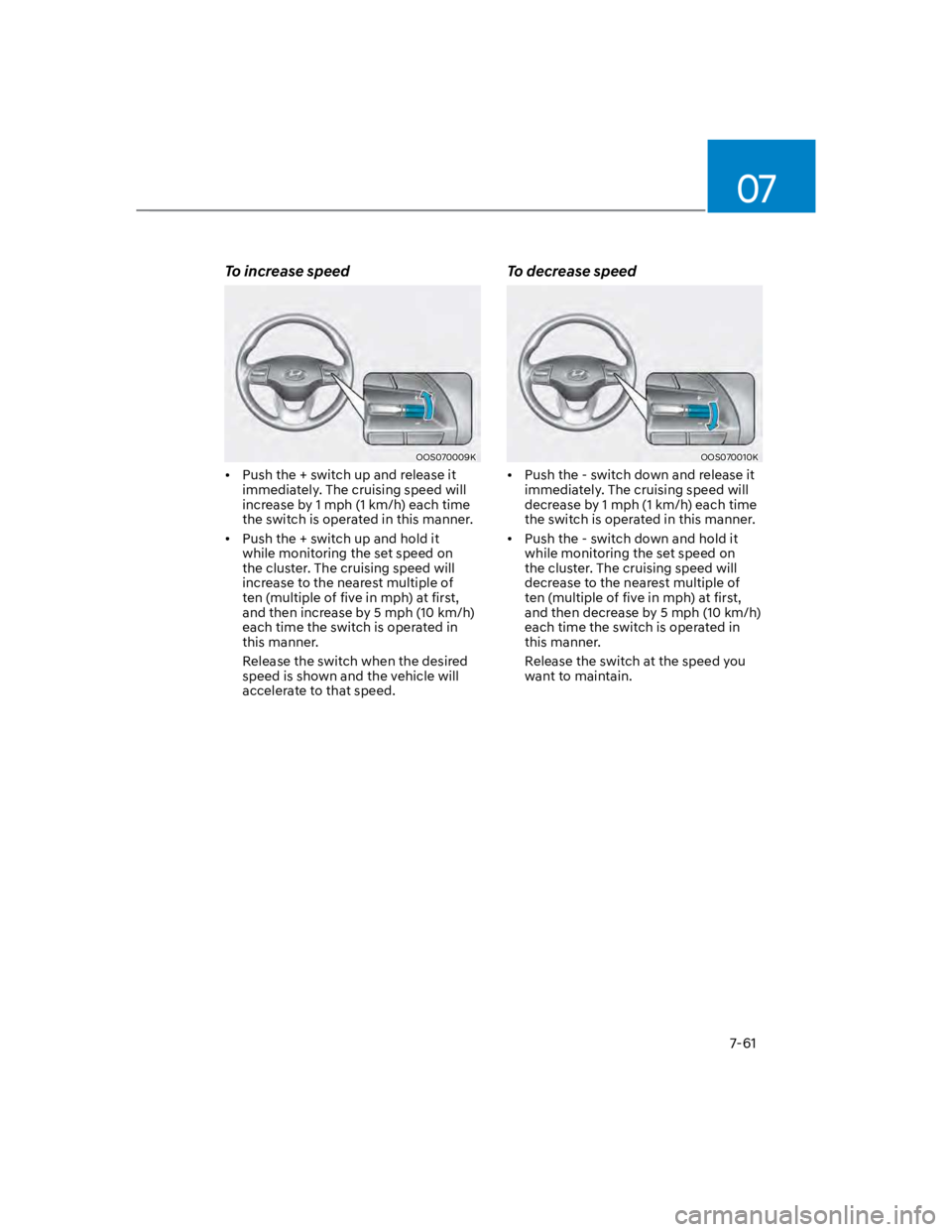
To increase speed
OOS070009K
Push the + switch up and release it
immediately. The cruising speed will
increase by 1 mph (1 km/h) each time
the switch is operated in this manner.
Push the + switch up and hold it
while monitoring the set speed on
the cluster. The cruising speed will
increase to the nearest multiple of
ten (multiple of five in mph) at first,
and then increase by 5 mph (10 km/h)
each time the switch is operated in
this manner.
Release the switch when the desired
speed is shown and the vehicle will
accelerate to that speed.
To decrease speed
OOS070010K
Push the - switch down and release it
immediately. The cruising speed will
decrease by 1 mph (1 km/h) each time
the switch is operated in this manner.
Push the - switch down and hold it
while monitoring the set speed on
the cluster. The cruising speed will
decrease to the nearest multiple of
ten (multiple of five in mph) at first,
and then decrease by 5 mph (10 km/h)
each time the switch is operated in
this manner.
Release the switch at the speed you
want to maintain.