Turn on horn HYUNDAI KONA 2022 Owners Manual
[x] Cancel search | Manufacturer: HYUNDAI, Model Year: 2022, Model line: KONA, Model: HYUNDAI KONA 2022Pages: 579, PDF Size: 35.31 MB
Page 20 of 579

2-7
02
The actual shape may differ from the illustration.
OOS010004N
1. Instrument cluster .................................. 4-4
2. Horn ....................................................... 5-38
3. Driver’s front air bag ............................. 3-43
4. Engine Start/Stop button ....................... 6-8
5. Light control/Turn signals .................... 5-67
6. Wiper/Washer ........................................ 5-77
7. Infotainment system ............................5-116
8. Hazard warning flasher switch .............. 8-2
9. Manual climate control system ............5-81
Automatic climate control system ...... 5-89
10. Passenger’s front air bag ..................... 3-43
11. Glove box .............................................5-104
12. USB Charger........................................5-109
13. Power outlet .........................................5-108
14. Dual clutch transmission shift lever ..... 6-18
Intelligent variable transmission shift
lever ........................................................ 6-13
15. Drive mode button ...............................6-60
16. Heated steering wheel ......................... 5-38
17. Idle stop and go (ISG) OFF button ....... 6-54
18. Seat warmer/Air ventilation seat .......... 3-17
19. 4WD lock button ...................................6-46
20. Parking Safety button………….. .............. 7-113
21. Cup holder ........................................... 5-107
22. Steering wheel audio controls/ ........... 5-117
Bluetooth® wireless technology
hands-free controls ..............................5-118
23. Driving Assist button/ .......................... 7-65
Lane Driving Assist button/ ..................7-30
Vehicle Distance button ....................... 7-65
Page 145 of 579
05
5-11
Remotely starting vehicle
You can start the vehicle using the
Remote Start button on the smart key.
To start the vehicle remotely:
1. Press the door lock button on the
smart key within 32 feet (10 m) from
the vehicle.
2. Press the Remote Start button for
more than 2 seconds within 4 seconds
after pressing the door lock button.
3. The hazard warning lights will blink
and the engine will start.
4. To turn off the remote start function,
press the Remote Start button once.
Information
Panic button
Press and hold the Panic button (4) for
more than one second. The horn sounds
and hazard warning lights blink for about
30 seconds. To cancel the panic mode,
press any button on the Smart Key.
Start-up
You can start the vehicle without
inserting the key.
For more details, refer to the “Engine
Start/Stop Button” section in chapter 6.
Information
NOTICE
To prevent damaging the smart key:
Keep the smart key in a cool,
dry place to avoid damage or
malfunction. Exposure to moisture
or high temperature may cause
the internal circuit of the smart key
to malfunction which may not be
covered under warranty.
Avoid dropping or throwing the
smart key.
Protect the smart key from extreme
temperatures.
Page 169 of 579

05
5-35
This system helps to protect your vehicle
and valuables. The horn will sound and
the hazard warning lights will blink
continuously if any of the following
occur:
- A door is opened without using the
smart key.
- The liftgate is opened without using
the smart key.
- The engine hood is opened.
The alarm continues for 30 seconds, then
the system resets. To turn off the alarm,
unlock the doors with the smart key.
The Theft Alarm System automatically
sets 30 seconds after you lock the
doors and the liftgate. For the system to
activate, you must lock the doors and
the liftgate from outside the vehicle with
the smart key or by touching the touch
sensor on the outside of the door handle
with the smart key in your possession.
The hazard warning lights will blink and
the chime will sound once to indicate the
system is armed.
Once the security system is set, opening
any door, the liftgate, or the hood
without using the smart key will cause
the alarm to activate.
The Theft Alarm System will not set if the
hood, the liftgate, or any door is not fully
closed. If the system will not set, check
the hood, the liftgate, or the doors are
fully closed.
Do not attempt to alter this system or
add other devices to it.
Information
Page 172 of 579
Convenient features
5-38
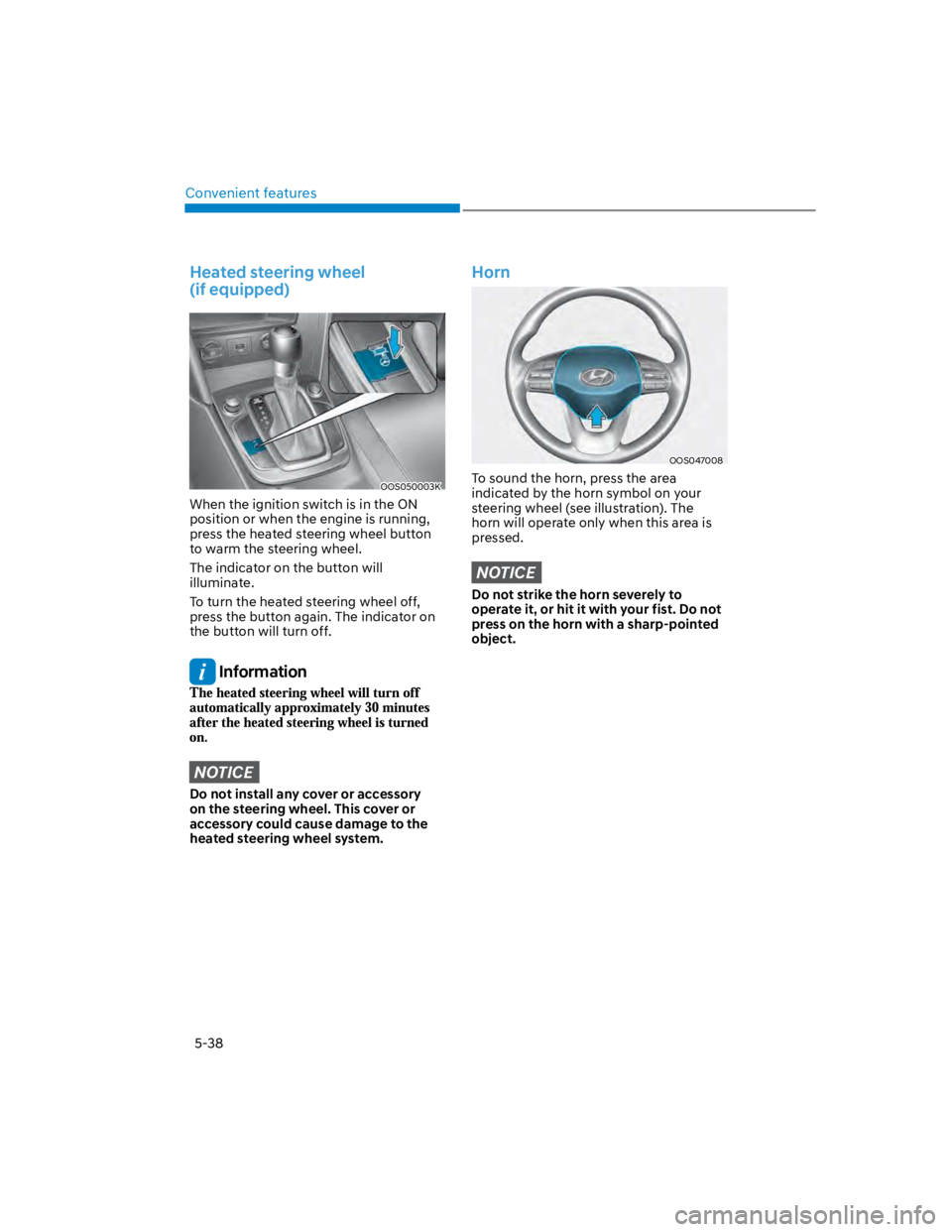
Heated steering wheel
(if equipped)
OOS050003K
When the ignition switch is in the ON
position or when the engine is running,
press the heated steering wheel button
to warm the steering wheel.
The indicator on the button will
illuminate.
To turn the heated steering wheel off,
press the button again. The indicator on
the button will turn off.
Information
NOTICE
Do not install any cover or accessory
on the steering wheel. This cover or
accessory could cause damage to the
heated steering wheel system.
Horn
OOS047008
To sound the horn, press the area
indicated by the horn symbol on your
steering wheel (see illustration). The
horn will operate only when this area is
pressed.
NOTICE
Do not strike the horn severely to
operate it, or hit it with your fist. Do not
press on the horn with a sharp-pointed
object.