Wireless HYUNDAI KONA 2022 Owners Manual
[x] Cancel search | Manufacturer: HYUNDAI, Model Year: 2022, Model line: KONA, Model: HYUNDAI KONA 2022Pages: 579, PDF Size: 35.31 MB
Page 20 of 579

2-7
02
The actual shape may differ from the illustration.
OOS010004N
1. Instrument cluster .................................. 4-4
2. Horn ....................................................... 5-38
3. Driver’s front air bag ............................. 3-43
4. Engine Start/Stop button ....................... 6-8
5. Light control/Turn signals .................... 5-67
6. Wiper/Washer ........................................ 5-77
7. Infotainment system ............................5-116
8. Hazard warning flasher switch .............. 8-2
9. Manual climate control system ............5-81
Automatic climate control system ...... 5-89
10. Passenger’s front air bag ..................... 3-43
11. Glove box .............................................5-104
12. USB Charger........................................5-109
13. Power outlet .........................................5-108
14. Dual clutch transmission shift lever ..... 6-18
Intelligent variable transmission shift
lever ........................................................ 6-13
15. Drive mode button ...............................6-60
16. Heated steering wheel ......................... 5-38
17. Idle stop and go (ISG) OFF button ....... 6-54
18. Seat warmer/Air ventilation seat .......... 3-17
19. 4WD lock button ...................................6-46
20. Parking Safety button………….. .............. 7-113
21. Cup holder ........................................... 5-107
22. Steering wheel audio controls/ ........... 5-117
Bluetooth® wireless technology
hands-free controls ..............................5-118
23. Driving Assist button/ .......................... 7-65
Lane Driving Assist button/ ..................7-30
Vehicle Distance button ....................... 7-65
Page 130 of 579
04
4-37
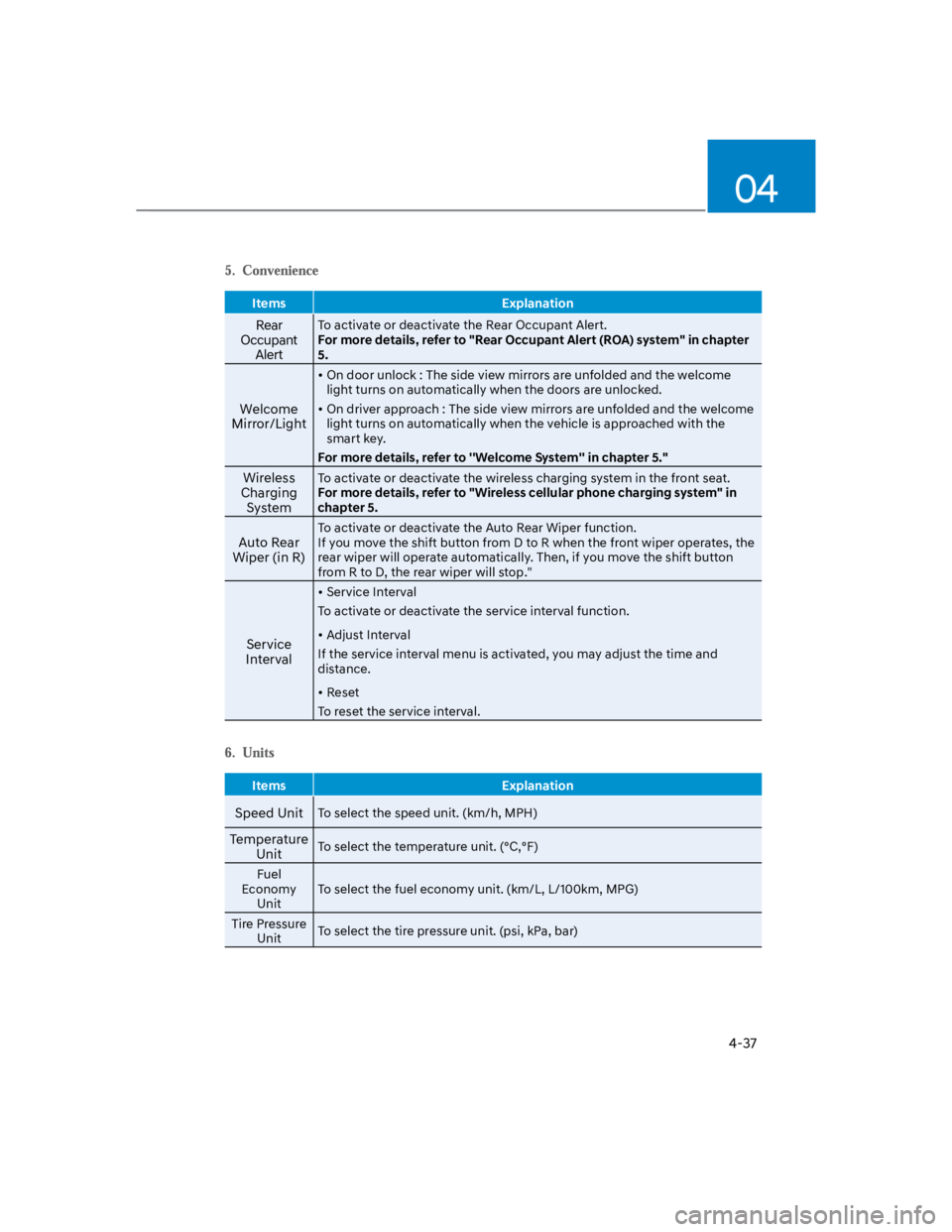
Items Explanation
Rear
Occupant
Alert
To activate or deactivate the Rear Occupant Alert.
For more details, refer to "Rear Occupant Alert (ROA) system" in chapter
5.
Welcome
Mirror/Light
On door unlock : The side view mirrors are unfolded and the welcome
light turns on automatically when the doors are unlocked.
On driver approach : The side view mirrors are unfolded and the welcome
light turns on automatically when the vehicle is approached with the
smart key.
For more details, refer to ''Welcome System'' in chapter 5."
Wireless
Charging
System
To activate or deactivate the wireless charging system in the front seat.
For more details, refer to "Wireless cellular phone charging system" in
chapter 5.
Auto Rear
Wiper (in R)
To activate or deactivate the Auto Rear Wiper function.
If you move the shift button from D to R when the front wiper operates, the
rear wiper will operate automatically. Then, if you move the shift button
from R to D, the rear wiper will stop."
Service
Interval
Service Interval
To activate or deactivate the service interval function.
Adjust Interval
If the service interval menu is activated, you may adjust the time and
distance.
Reset
To reset the service interval.
Items Explanation
Speed UnitTo select the speed unit. (km/h, MPH)
Temperature
UnitTo select the temperature unit. (°C,°F)
Fuel
Economy
Unit
To select the fuel economy unit. (km/L, L/100km, MPG)
Tire Pressure
UnitTo select the tire pressure unit. (psi, kPa, bar)
Page 137 of 579
5
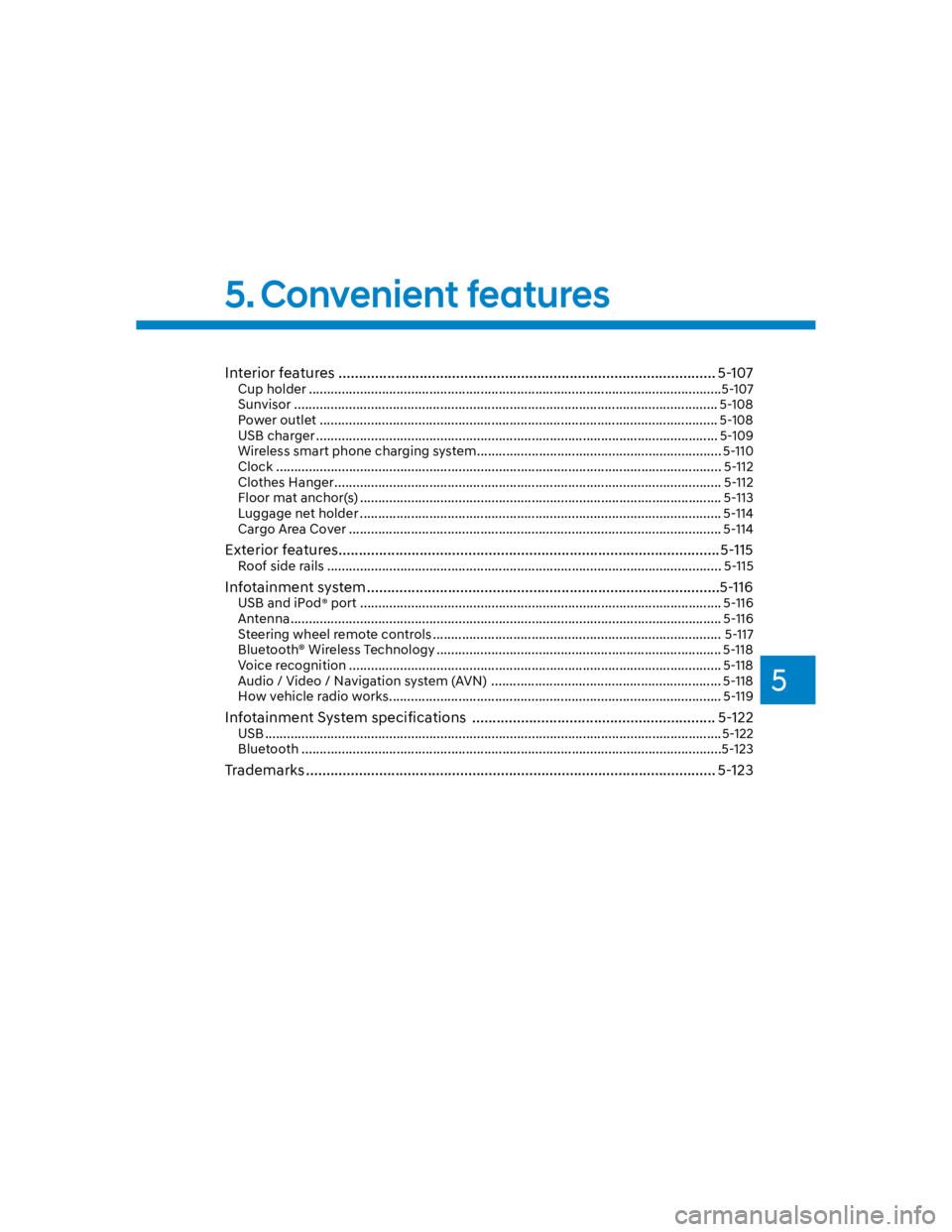
Interior features ............................................................................................. 5-107
Cup holder .................................................................................................................5-107
Sunvisor .................................................................................................................... 5-108
Power outlet ............................................................................................................. 5-108
USB charger .............................................................................................................. 5-109
Wireless smart phone charging system ................................................................... 5-110
Clock .......................................................................................................................... 5-112
Clothes Hanger .......................................................................................................... 5-112
Floor mat anchor(s) ................................................................................................... 5-113
Luggage net holder ................................................................................................... 5-114
Cargo Area Cover ...................................................................................................... 5-114
Exterior features ..............................................................................................5-115
Roof side rails ............................................................................................................ 5-115
Infotainment system .......................................................................................5-116
USB and iPod® port ................................................................................................... 5-116
Antenna ...................................................................................................................... 5-116
Steering wheel remote controls ............................................................................... 5-117
Bluetooth® Wireless Technology .............................................................................. 5-118
Voice recognition ...................................................................................................... 5-118
Audio / Video / Navigation system (AVN) ............................................................... 5-118
How vehicle radio works ........................................................................................... 5-119
Infotainment System specifications ............................................................ 5-122
USB .............................................................................................................................5-122
Bluetooth ...................................................................................................................5-123
Trademarks ..................................................................................................... 5-123
5. Convenient features
Page 150 of 579
Convenient features
5-16
Digital key (smartphone)
1. Turn the vehicle on with the Smart key
and make sure to keep the smart key
inside the vehicle during digital key
registration.
2. Register your Digital key from the
vehicle user setting menu as follows.
With Navigation screen :
From the infotainment screen menu,
go to [Setup] - [Vehicle] - [Digital Key]
- [Smart Phone Key] then select the
[Save] from submenu.
Without navigation screen :
From cluster menu, go to [Digital Key]
- [Smart Phone Key] and select [Save].
Information
3. Select the vehicle to save on your
Digital key application and activate
the save mode.
Save mode is available only on
the vehicle owner’s Digital key
application.
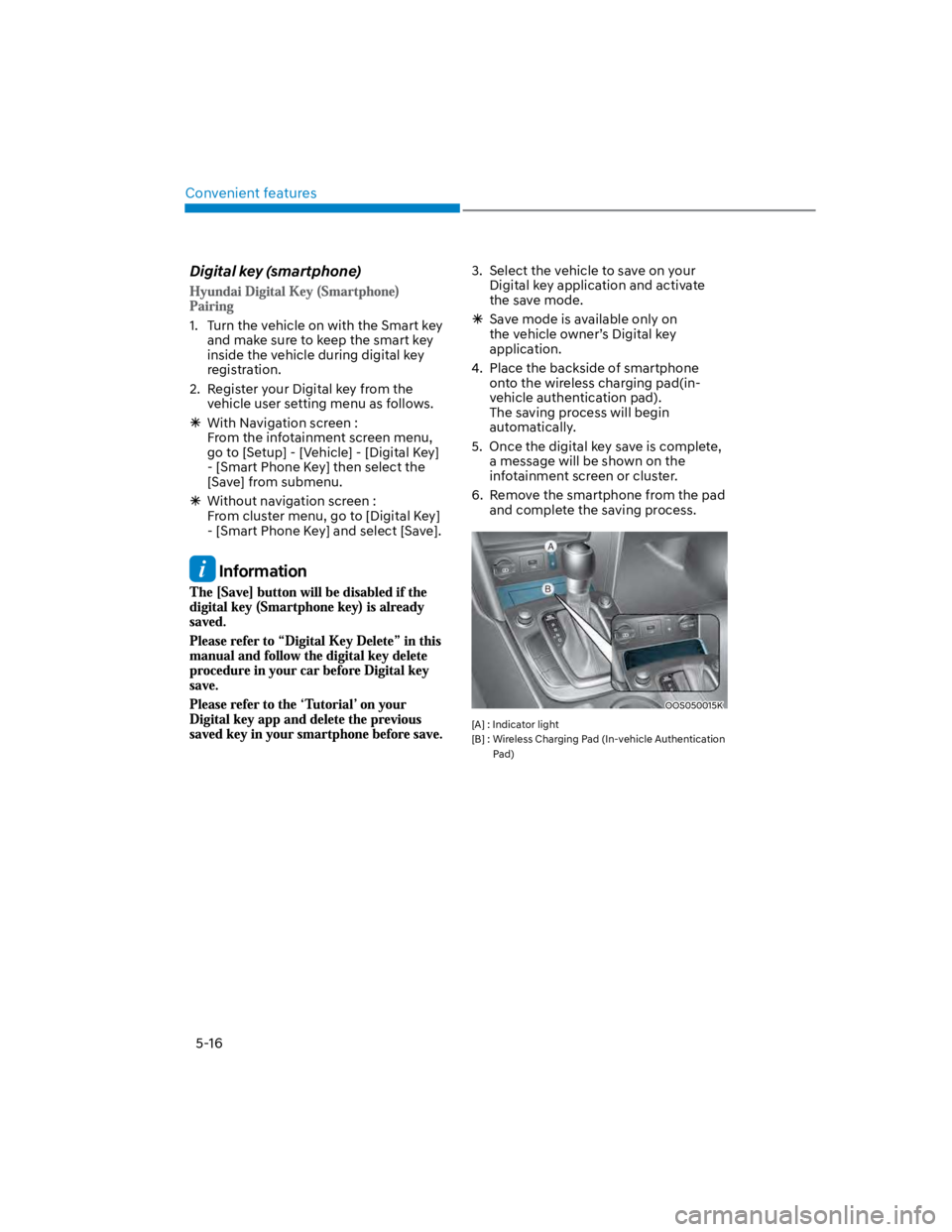
4. Place the backside of smartphone
onto the wireless charging pad(in-
vehicle authentication pad).
The saving process will begin
automatically.
5. Once the digital key save is complete,
a message will be shown on the
infotainment screen or cluster.
6. Remove the smartphone from the pad
and complete the saving process.
OOS050015K
[A] : Indicator light
[B] : Wireless Charging Pad (In-vehicle Authentication
Pad)
Page 152 of 579
Convenient features
5-18
You can manage multiple digital keys
from the Digital key app. From the list of
digital keys you own, select the vehicle
you want to make your priority vehicle.
For more information, please refer to
the ‘Tutorial’ on your Digital key app.
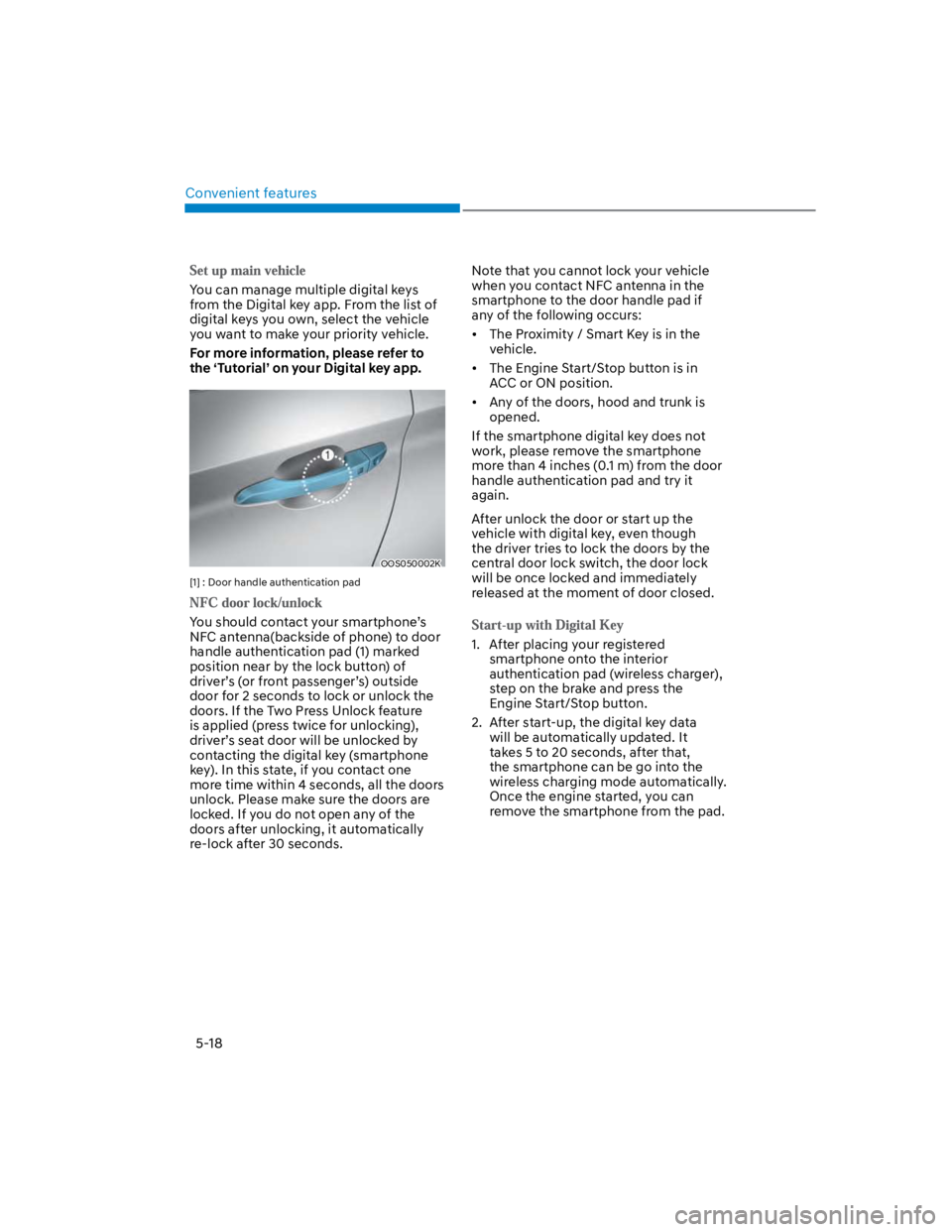
OOS050002K
[1] : Door handle authentication pad
You should contact your smartphone’s
NFC antenna(backside of phone) to door
handle authentication pad (1) marked
position near by the lock button) of
driver’s (or front passenger’s) outside
door for 2 seconds to lock or unlock the
doors. If the Two Press Unlock feature
is applied (press twice for unlocking),
driver’s seat door will be unlocked by
contacting the digital key (smartphone
key). In this state, if you contact one
more time within 4 seconds, all the doors
unlock. Please make sure the doors are
locked. If you do not open any of the
doors after unlocking, it automatically
re-lock after 30 seconds.
Note that you cannot lock your vehicle
when you contact NFC antenna in the
smartphone to the door handle pad if
any of the following occurs:
The Proximity / Smart Key is in the
vehicle.
The Engine Start/Stop button is in
ACC or ON position.
Any of the doors, hood and trunk is
opened.
If the smartphone digital key does not
work, please remove the smartphone
more than 4 inches (0.1 m) from the door
handle authentication pad and try it
again.
After unlock the door or start up the
vehicle with digital key, even though
the driver tries to lock the doors by the
central door lock switch, the door lock
will be once locked and immediately
released at the moment of door closed.
1. After placing your registered
smartphone onto the interior
authentication pad (wireless charger),
step on the brake and press the
Engine Start/Stop button.
2. After start-up, the digital key data
will be automatically updated. It
takes 5 to 20 seconds, after that,
the smartphone can be go into the
wireless charging mode automatically.
Once the engine started, you can
remove the smartphone from the pad.
Page 153 of 579
![HYUNDAI KONA 2022 Owners Manual 05
5-19
OOS050015K
[A] : Indicator light
[B] : Wireless Charging Pad (In-vehicle Authentication
Pad)
Information
CAUTION
The engine can be turned on if the
registered smartphone or card key is](/img/35/41169/w960_41169-152.png "HYUNDAI KONA 2022 Owners Manual 05
5-19
OOS050015K
[A] : Indicator light
[B] : Wireless Charging Pad (In-vehicle Authentication
Pad)
Information
CAUTION
The engine can be turned on if the
registered smartphone or card key is")
05
5-19
OOS050015K
[A] : Indicator light
[B] : Wireless Charging Pad (In-vehicle Authentication
Pad)
Information
CAUTION
The engine can be turned on if the
registered smartphone or card key is
placed on the interior authentication
pad (wireless charger). Do not leave
unsupervised children or people who
are not aware of the system since it
can result in serious injury or death.
Always have the registered digital key
(smartphone) or card key with you to
prevent vehicle theft when leaving the
vehicle.
For more information, refer to the
Engine Start/Stop button in chapter 6.
Page 155 of 579

05
5-21
Remote Start with Digital Key
When the shift button of your vehicle
is in P (Park) and all of the doors
including trunk and hood is locked
and the vehicle is off, press the Door
Lock button in the Hyundai Digital
Key app then press the Remote Start
button within 4 seconds.
You can confirm the engine is on if the
hazard warning lights blinks two times
and the chime sounds.
If you want to turn off the engine,
press Remote Engine Stop. Air
Conditioner / Heating system
maintains the same status as when
you last used the vehicle.
Unless you put the registered digital
key(smartphone) on the interior
authentication pad (wireless charger)
when the remote start function is on,
the engine will turn off.
If you do not get on the vehicle within
10 minutes after the engine turns on,
the vehicle will turn off.
For more information, refer to the Engine
Start/Stop button in chapter 6.
Vehicle information Display
The digital key application displays
the vehicle information such as
driving or door conditions through the
communication with the vehicle.
How to check : Select the vehicle
what you want to check and touch
the vehicle image, then vehicle
information display page will be
shown.
Contents : accumulated odometer,
latest fuel economy, driving range,
fuel remaining, tire pressure, doors
lock/unlock status and last data
updated time.
Displayed vehicle date could be
differed from the current vehicle
condition.
For more information, please refer to
the ‘Tutorial’ on your Digital key app.
If you change your smartphone or delete
the Hyundai Digital Key App, please refer
to the following to set up your Digital
Key:
Smartphone Change/ Reset
If you change or reset the smartphone,
the registered digital key in your previous
smartphone may not be used. Please
refer to following procedure to use the
digital key.
1. Install the digital key application and
log in.
2. If you are the owner, retry the Digital
key save process.
3. If you are the sharer, need to re-share
the key from owner.
App delete & reinstall/ Delete App data
You can re-download the digital key
from server in these cases as follow
procedure.
1. Reinstall the application and log in.
2. Input the PIN number for user
verification.
3. If PIN is correct, digital key data
will be re-downloaded to your
smartphone and you can use it
without any further registration or
sharing.
Smartphone operability with Digital Key
The digital key application may not
be available to old type smartphones.
Please check the available smartphone
models with your dealer. NFC antenna
position on the smartphone can be
confirmed on each smartphone’s manual
or contact to customer service center of
the smartphone manufacture.
Page 156 of 579

Convenient features
5-22
CAUTION
Do not leave the registered digital
key (smartphone) and card key in
your vehicle. Please carry around
your keys all the times.
If you happen to lose your digital
key (smartphone) or card key
registered as a main user’s key, you
should immediately delete the key
on the vehicle’s key menu. For more
information, refer to the Digital Key
Deletion in this chapter.
If you registered your digital key
(smartphone) or card key in the
vehicle, a message appears on the
instrument cluster and let you know
the key is registered.
(Message: Digital key(s) active.)
If you buy a used vehicle, you should
confirm the message and delete the
registered smartphone key and card
key. In this case, you should carry
your smart key.
If you keep place the NFC card
of the digital key on the interior
authentication pad (wireless
charger) while driving, it may cause a
malfunction of the NFC card.
You should remove your NFC card
of the digital key on the interior
authentication pad after turning on
the engine.
Hyundai digital key app may not
work properly when the NFC or
Bluetooth communication between
smartphone and car is not good.
If the remote control operation
is executed where the mobile
connection is weak, Bluetooth
connection is poor due to lots of
Bluetooth devices or there is an
object such as metal or concrete, it
might be delayed or the operable
distance might decrease. Especially,
you should not cover the smartphone
with your hand or place other
devices which can cause frequency
interference. It may result in poor
performance.
If the remote control function is not
activated, please use NFC function to
lock or unlock the doors
You should be careful not to
press the remote control button
on the digital key (smartphone)
accidentally.
If the digital key (smartphone) is
discharged or defective or you
cannot use the digital key since the
vehicle battery is discharged, use the
inside door lock button to lock all of
the doors.
CAUTION
Hyundai digital key app on the
smartphone and card key may not
work if any of the following occurs:
-Hyundai digital key app on the
smartphone is deleted. (Required
to reinstall the app)
-Account log in information of
Hyundai digital key app is expired.
(Required to re-log in)
-When you try to log in to another
smartphone instead of the
registered smartphone with same
user account.
-Smartphone rooting or app
hacking is detected.
-Smartphone battery or the vehicle
battery is discharged.
-Smartphone’s screen is off or
locked.
-NFC or Bluetooth is turned off on
the smartphone settings.
-Smartphone’s mobile network
setting is off or airplane mode is
activated.
-A credit card is overlapped in the
back of your smartphone or metal
or thick case is used.
-Use the card key with insert it
into the wallet or card holder or
overlapping with other cards.
Page 157 of 579

05
5-23
-If you use a smart phone cover that
uses wireless communication or is
made of metal, the digital key NFC
function may not work properly.
Remove the smart phone cover
before using the digital key NFC
function.
The vehicle may not be controlled by
the smartphone if any of the following
occurs:
-Basic and necessary functions of
the smartphone manufacturer are
operating. (General call, urgent
call, audio or NFC payment)
-Wireless earphone is operating.
(General call, urgent call or audio)
-The digital key app function such
as basic setting or app launching
is limited by prior policy according
to the manufacturer while using a
smartphone produced by domestic
and foreign manufactures.
If you change the smartphone
number, you should modify the user
account information on the HYUNDAI
customer web site to use the digital
key app.
If the vehicle owner changes
the smartphone device, the new
smartphone should be registered in
the car after deleting the registered
digital key(smartphone).
If a sharer changes or reset the
smartphone, the key should be re-
shared from owner.
Some of the old smartphone may
not work properly. Please check the
available smartphone models with
your dealer.
NFC antenna position on the
smartphone can be confirmed
on each smartphone’s manual or
contact to customer service center
of the smartphone manufacture.
Digital key (Card key)
1. Install Hyundai digital key app in
main user’s smartphone and register
the digital key (smartphone). Please
refer to the registration method of the
digital key (smartphone).
2. Using the [Pair Card Key] menu on
the digital key application, you can
activate the Card Key registration
mode.
NFC authentication : enter the NFC
authentication menu and contact
the smartphone on the outside door
handle.
Bluetooth authentication : enter the
Bluetooth authentication menu and
press the [OK] button for activation.
If you activate the registration mode,
you should complete the Card saving
process within 5 minutes.
If you have not registered the digital
key (smartphone), please register the
digital key (card key) with two smart
keys.
Page 158 of 579
![HYUNDAI KONA 2022 Owners Manual Convenient features
5-24
3. Register the NFC card key on the
User’s Settings menu after turning on
the vehicle.
With Navigation screen : From the
infotainment screen menu, go to
[Setup] - [Veh](/img/35/41169/w960_41169-157.png "HYUNDAI KONA 2022 Owners Manual Convenient features
5-24
3. Register the NFC card key on the
User’s Settings menu after turning on
the vehicle.
With Navigation screen : From the
infotainment screen menu, go to
[Setup] - [Veh")
Convenient features
5-24
3. Register the NFC card key on the
User’s Settings menu after turning on
the vehicle.
With Navigation screen : From the
infotainment screen menu, go to
[Setup] - [Vehicle] - [Digital Key] -
[Card Key] then select the [Save] from
submenu.
Without navigation screen : From
cluster menu, go to [Digital Key] -
[Card Key] and select [Save].
The [Save] button will be disabled if
the digital key (Card key) is already
saved.
Please refer to “Digital Key Delete” in
this manual and follow the digital key
delete procedure in your car before
Digital key save.
4. Place the NFC card key onto the
interior authentication pad (wireless
charger). The saving process will
begin automatically.
5. If the key is enrolled, the message
will be displayed on the infotainment
screen or instrument cluster.
Once the card key registration mode
is activated, the process should be
completed within 5 minutes. After
then, you should reactivate once
again for registration.
For the digital key(card key) saving,
the smart key(fob) must be exist inside
of vehicle.
Once a Card key is registered, it
cannot be reuse onto another vehicle.
You should have the smart key to delete
the digital key (card key) so please carry
around the key.
1. Get on the vehicle with the smart key.
2. Delete the NFC card key on the User’s
Settings menu after turning on the
engine.
With Navigation screen : From the
infotainment screen menu, go to
[Setup] - [Vehicle] - [Digital Key] -
[Card Key] then select the [Delete]
from submenu.
Without navigation screen : From
cluster menu, go to [Digital Key] -
[Card Key] and select [Delete].
If there is no saved digital key(card key),
[Delete] menu will not be activated.
To delete the saved digital key (card
key), the smart key must be exist
inside the vehicle.
The deleted digital key (card key) can
be re-registered before registering a
new digital key (card key).
If you try to register a new digital key
(card key), the previously registered
digital key (card key) cannot be used
again.