brake HYUNDAI KONA EV 2021 User Guide
[x] Cancel search | Manufacturer: HYUNDAI, Model Year: 2021, Model line: KONA EV, Model: HYUNDAI KONA EV 2021Pages: 478, PDF Size: 32.83 MB
Page 140 of 478
3-56
Convenient features of your vehicle
Parking Brake & Brake
Fluid Warning Light
This warning light illuminates:
When the POWER button is in the
ON position.
- It illuminates for approximately 3
seconds.
- It remains on if the parking brake
is applied.
When the parking brake is applied.
When the brake fluid level in the
reservoir is low.
- If the warning light remains illumi-
nated when the parking brake is
released, check under the hood
to see if the fluid level in the brake
fluid reservoir is low.
If the brake fluid level in the reser-
voir is low:
1. Drive carefully to the nearest safe
location and stop your vehicle.
2. With the vehicle turned off, check
the brake fluid level immediately
and add fluid as required (For more
details, refer to "Brake Fluid" in
chapter 7). After adding brake fluid,
check all brake components for fluid
leaks. If a brake fluid leak is found,
or if the warning light remains on, or
if the brakes do not operate proper-
ly, do not drive the vehicle. Have the
vehicle inspected by an authorized
HYUNDAI dealer.
Dual-diagonal braking system
Your vehicle is equipped with dual-
diagonal braking systems. This
means you still have braking on two
wheels even if one of the dual sys-
tems should fail.
With only one of the dual systems
working, more than normal pedal
travel and greater pedal pressure is
required to stop the vehicle.Also, the vehicle will not stop in as
short a distance with only a portion
of the brake system working.
Parking Brake & Brake Fluid
Warning Light
Driving the vehicle with a warn-
ing light ON is dangerous. If the
Parking Brake & Brake Fluid
Warning Light illuminates with
the parking brake released, it
indicates that the brake fluid
level is low.
If this occurs, have your vehicle
inspected by an authorized
HYUNDAI dealer.
WARNING
Page 141 of 478
3-57
Convenient features of your vehicle
3
Anti-lock Brake System
(ABS) Warning Light
This warning light illuminates:
When the POWER button is in the
ON position.
- It illuminates for approximately 3
seconds and then goes off.
When there is a malfunction with
the ABS (The normal braking sys-
tem will still be operational without
the assistance of the anti-lock
brake system).
If this occurs, have your vehicle
inspected by an authorized HYUNDAI
dealer.
Electronic
Brake Force
Distribution
(EBD) System Warning Light
When the ABS Warning and Parking
Brake Warning lamps are on simulta-
neously, it may indicate a problem
with the Electronic Brake Force
Distribution system.
If this occurs, have your vehicle
inspected by an authorized HYUNDAI
dealer.
Information - Electronic
Brake Force Distribution
(EBD) System Warning Light
When the ABS Warning Light is on or
both ABS and Parking Brake & Brake
Fluid Warning Lights are on, the
speedometer, odometer, or tripmeter
may not work. Also, the EPS Warning
Light may illuminate and the steering
effort may increase or decrease.
If this occurs, have your vehicle
inspected by an authorized HYUNDAI
dealer.i
Electronic Brake Force
Distribution (EBD) System
Warning Light
When both ABS and Parking
Brake & Brake Fluid Warning
Lights are on, the brake system
will not work normally and you
may experience an unexpected
and dangerous situation during
sudden braking.
If this occurs, avoid high speed
driving and abrupt braking.
Have your vehicle inspected by
an authorized HYUNDAI dealer.
WARNING
Page 143 of 478
3-59
Convenient features of your vehicle
3
This warning light remains ON
after blinking for approximately 60
seconds, or repeatedly blinks ON
and OFF in 3 second intervals:
When there is a malfunction with the
TPMS.
If this occurs, have your vehicle
inspected by an authorized HYUNDAI
dealer.
For more details, refer to "Tire
Pressure Monitoring System
(TPMS)" in chapter 6.
Electronic Parking
Brake (EPB) Warning
Light
This warning light illuminates:
When the POWER button is in the
ON position.
- It illuminates for approximately 3
seconds and then goes off.
When there is a malfunction with
the EPB.
If this occurs, have the vehicle
inspected by an authorized
HYUNDAI dealer.
Information
The Electronic Parking Brake (EPB)
Warning Light may illuminate when
the Electronic Stability control (ESC)
Indicator Light comes on to indicate
that the ESC is not working properly
(This does not indicate malfunction of
the EPB).
AUTO HOLD Indicator
Light
This indicator light illuminates:
[White] When you activate the auto
hold system by pressing the AUTO
HOLD switch.
[Green] When you stop the vehicle
completely by depressing the
brake pedal with the auto hold sys-
tem activated.
[Yellow] When there is a malfunc-
tion with the auto hold system.
If this occurs, have the vehicle
inspected by an authorized
HYUNDAI dealer.
For more details, refer to "Auto
Hold" in chapter 5.
iSafe Stopping
The TPMS cannot alert you to
severe and sudden tire damage
caused by external factors.
If you notice any vehicle insta-
bility, immediately take your
foot off the accelerator pedal,
apply the brakes gradually with
light force, and slowly move to
a safe position on the side of
the road.
WARNING
E EP
PB
B
Page 149 of 478
3-65
Convenient features of your vehicle
3
LCD Display Messages
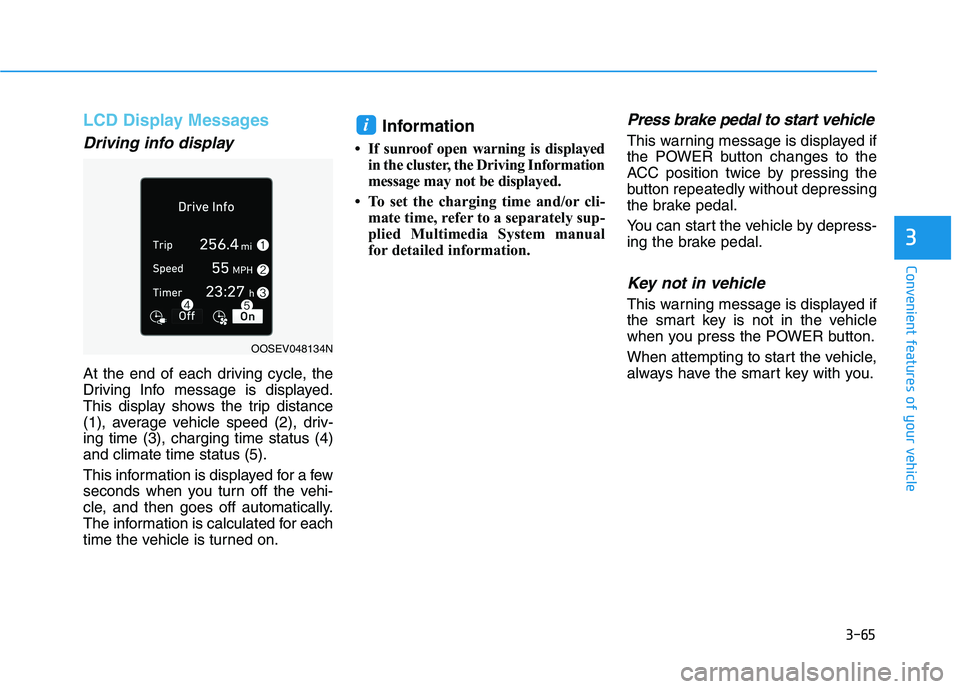
Driving info display
At the end of each driving cycle, the
Driving Info message is displayed.
This display shows the trip distance
(1), average vehicle speed (2), driv-
ing time (3), charging time status (4)
and climate time status (5).
This information is displayed for a few
seconds when you turn off the vehi-
cle, and then goes off automatically.
The information is calculated for each
time the vehicle is turned on.
Information
• If sunroof open warning is displayed
in the cluster, the Driving Information
message may not be displayed.
• To set the charging time and/or cli-
mate time, refer to a separately sup-
plied Multimedia System manual
for detailed information.
Press brake pedal to start vehicle
This warning message is displayed if
the POWER button changes to the
ACC position twice by pressing the
button repeatedly without depressing
the brake pedal.
You can start the vehicle by depress-
ing the brake pedal.
Key not in vehicle
This warning message is displayed if
the smart key is not in the vehicle
when you press the POWER button.
When attempting to start the vehicle,
always have the smart key with you.
i
OOSEV048134N
Page 150 of 478
3-66
Convenient features of your vehicle
Key not detected
This warning message is displayed if
the smart key is not detected when
you press the POWER button.
Press POWER button again
This message is displayed if you
were unable to start the vehicle when
the POWER button was pressed.
If this occurs, attempt to start the
vehicle by pressing the POWER but-
ton again.
If the warning message appears
each time you press the POWER
button, have your vehicle inspected
by an authorized HYUNDAI dealer.
Press POWER button with key
This warning message is displayed if
you press the POWER button while
the warning message "Key not
detected" is displayed.
Check BRAKE SWITCH fuse
This warning message is displayed if
the brake switch fuse is disconnected.
You need to replace the fuse with a
new one before starting the vehicle.
If that is not possible, you can start the
vehicle by pressing the POWER but-
ton for 10 seconds in the ACC posi-
tion.
Shift to P to start vehicle
This warning message is displayed if
you try to start the vehicle without
shifting to the P (Park) position.
Shift to P
This warning message is displayed if
you try to turn off the vehicle with the
gear in the N (Neutral) position.
At this time, the POWER button
changes to the ACC position (If you
press the POWER button once more,
it will turn to the ON position).
Low Key Battery
This warning message is displayed if
the battery of the smart key is dis-
charged while changing the POWER
button to the OFF position.
Battery discharging due to
external electrical devices
This message is displayed if the bat-
tery voltage is weak due to any non-
factory electrical accessories (ex.
dashboard camera) while parking.
Be careful that the battery is not dis-
charged.
If the warning message appears after
removing the non-factory electrical
accessories, have the vehicle inspect-
ed by an authorized HYUNDAI dealer.
Page 153 of 478
3-69
Convenient features of your vehicle
3
Check turn signal
This warning message is displayed if
the turn signal lamps are not operat-
ing properly. A lamp may need to be
replaced.
Make sure to replace the burned out
bulb with a new one of the same
wattage rating.
Check brake light
This warning message is displayed if
the stop lamps are not operating
properly. A lamp may need to be
replaced.
Make sure to replace the burned out
bulb with a new one of the same
wattage rating.
Check cornering lamp
(if equipped)
This warning message is displayed if
the cornering lamps are not operat-
ing properly. A lamp may need to be
replaced.
Make sure to replace the burned out
bulb with a new one of the same
wattage rating.
Check High Beam Assist (HBA)
system (if equipped)
This warning message is displayed if
there is a problem with High Beam
Assist system. Have the vehicle
inspected by an authorized HYUNDAI
dealer.
For more details, refer to "High
Beam Assist (HBA)" in chapter 3.
Check headlight LED (if equipped)
This warning message is displayed if
there is a problem with the LED
headlight. Have the vehicle inspected
by an authorized HYUNDAI dealer.
Check Forward Collision
Avoidance Assist system
This warning message is displayed if
there is a problem with Forward
Collision-Avoidance Assist system.
Have the vehicle inspected by an
authorized HYUNDAI dealer.
For more details, refer to "Forward
Collision-Avoidance Assist (FCA)"
in chapter 5.
Check Blind-Spot Collision
Warning (BCW) system
This warning message is displayed if
there is a problem with the Blind-
Spot Collision Warning system. Have
the vehicle inspected by an author-
ized HYUNDAI dealer.
For more details, refer to "Blind-
Spot Collision Warning/Rear Cross-
Traffic Collision Warning (RCCW)
System in chapter 5.
Page 157 of 478
3-73
Convenient features of your vehicle
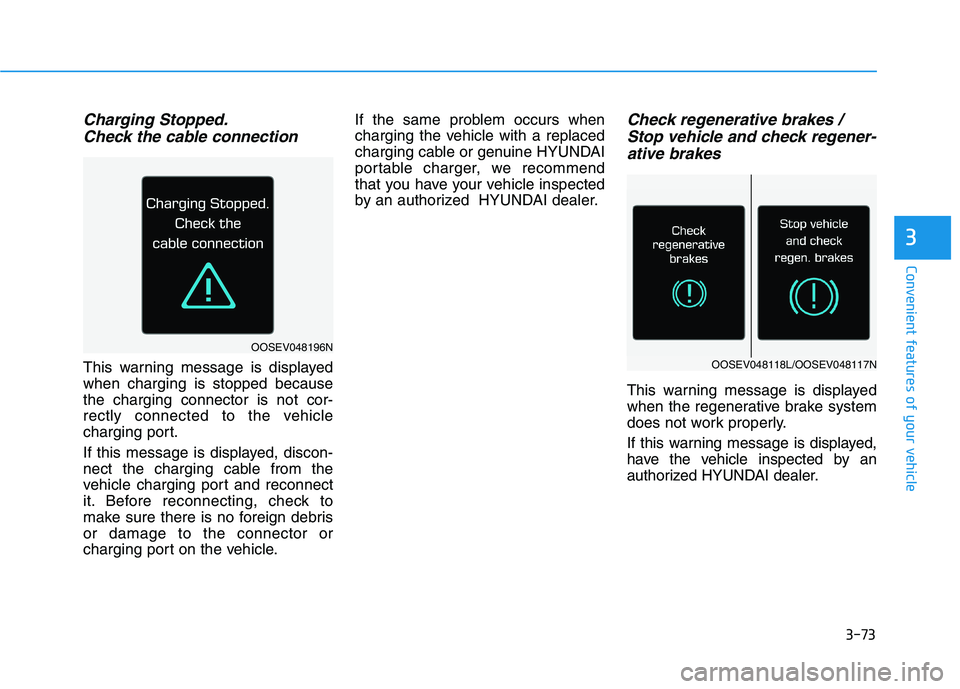
Charging Stopped.
Check the cable connection
This warning message is displayed
when charging is stopped because
the charging connector is not cor-
rectly connected to the vehicle
charging port.
If this message is displayed, discon-
nect the charging cable from the
vehicle charging port and reconnect
it. Before reconnecting, check to
make sure there is no foreign debris
or damage to the connector or
charging port on the vehicle.If the same problem occurs when
charging the vehicle with a replaced
charging cable or genuine HYUNDAI
portable charger, we recommend
that you have your vehicle inspected
by an authorized HYUNDAI dealer.
Check regenerative brakes /
Stop vehicle and check regener-
ative brakes
This warning message is displayed
when the regenerative brake system
does not work properly.
If this warning message is displayed,
have the vehicle inspected by an
authorized HYUNDAI dealer.
3
OOSEV048196N
OOSEV048118L/OOSEV048117N
Page 166 of 478
3-82
Convenient features of your vehicle
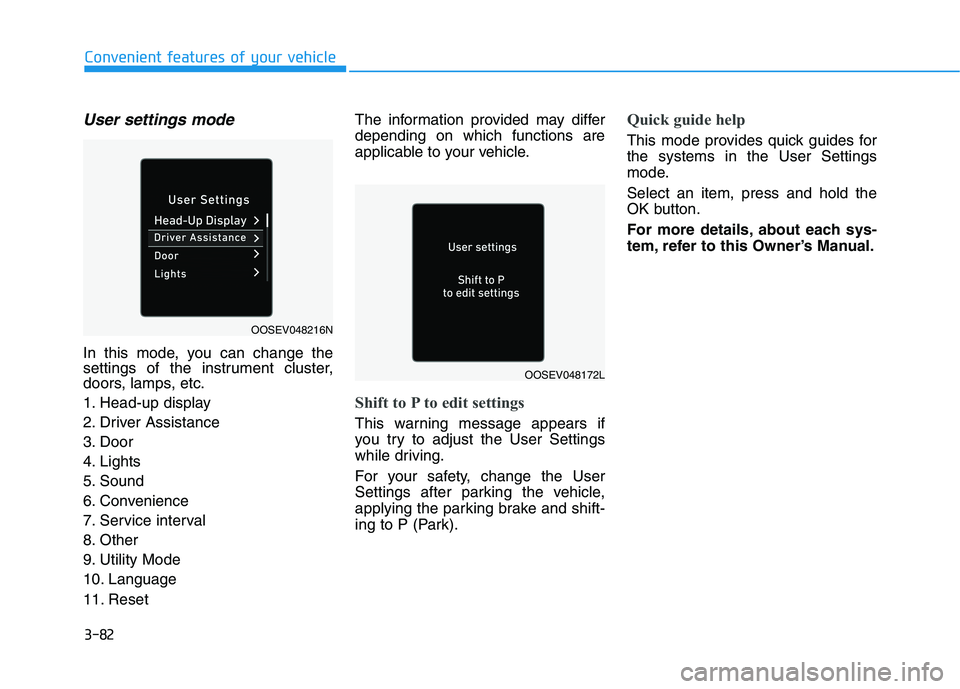
User settings mode
In this mode, you can change the
settings of the instrument cluster,
doors, lamps, etc.
1. Head-up display
2. Driver Assistance
3. Door
4. Lights
5. Sound
6. Convenience
7. Service interval
8. Other
9. Utility Mode
10. Language
11. ResetThe information provided may differ
depending on which functions are
applicable to your vehicle.
Shift to P to edit settings
This warning message appears if
you try to adjust the User Settings
while driving.
For your safety, change the User
Settings after parking the vehicle,
applying the parking brake and shift-
ing to P (Park).
Quick guide help
This mode provides quick guides for
the systems in the User Settings
mode.
Select an item, press and hold the
OK button.
For more details, about each sys-
tem, refer to this Owner’s Manual.
OOSEV048216N
OOSEV048172L
Page 183 of 478
3-99
Convenient features of your vehicle
3
L LI
IG
GH
HT
TI
IN
NG
G
Exterior Lights
Lighting control
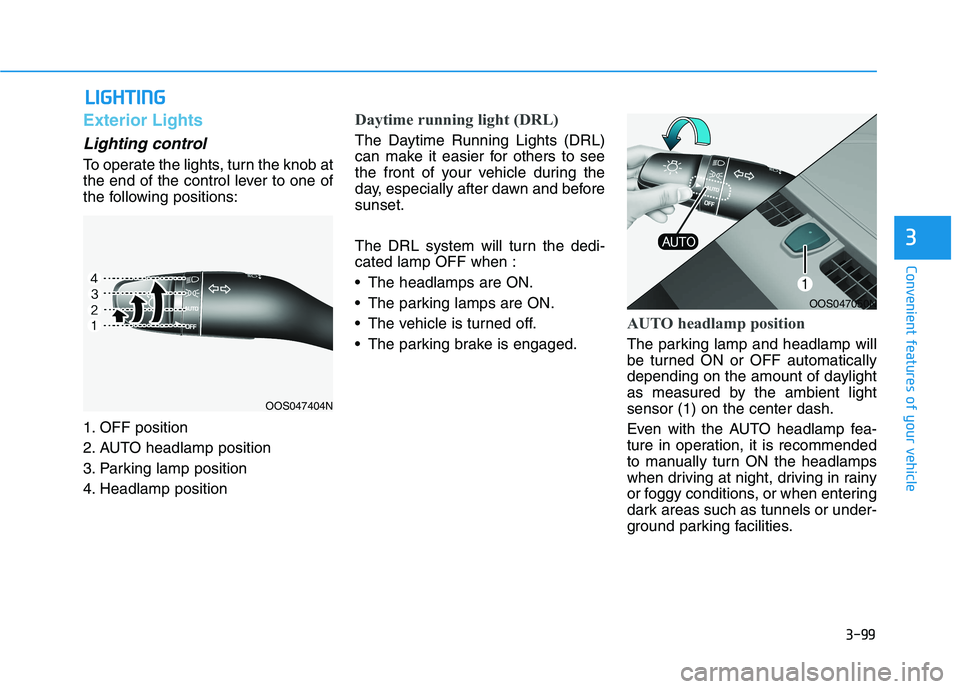
To operate the lights, turn the knob at
the end of the control lever to one of
the following positions:
1. OFF position
2. AUTO headlamp position
3. Parking lamp position
4. Headlamp position
Daytime running light (DRL)
The Daytime Running Lights (DRL)
can make it easier for others to see
the front of your vehicle during the
day, especially after dawn and before
sunset.
The DRL system will turn the dedi-
cated lamp OFF when :
The headlamps are ON.
The parking lamps are ON.
The vehicle is turned off.
The parking brake is engaged.
AUTO headlamp position
The parking lamp and headlamp will
be turned ON or OFF automatically
depending on the amount of daylight
as measured by the ambient light
sensor (1) on the center dash.
Even with the AUTO headlamp fea-
ture in operation, it is recommended
to manually turn ON the headlamps
when driving at night, driving in rainy
or foggy conditions, or when entering
dark areas such as tunnels or under-
ground parking facilities.
OOS047404N
OOS047050N
Page 201 of 478
3-117
Convenient features of your vehicle
3
Conditions Where Reverse
Parking Distance Warning sys-
tem May Not Operate
Reverse Parking Distance
Warning system may not oper-
ate normally when any of the
following occur:
The sensor is covered with dirt or
debris such as snow or ice, or the
sensor cover is blocked.
Reverse Parking Distance
Warning system may experi-
ence a malfunction when the
following occurs:
Driving on uneven road surfaces
such as unpaved roads, gravel,
bumps, or gradient.
Objects generating excessive noise
such as vehicle horns, loud motor-
cycle engines, or truck air brakes
can interfere with the sensor.
Heavy rain or water spray is present.
Wireless transmitters or mobile
phones are present near the sensor.
The sensor is covered with snow.
Any non-factory equipment or acces-
sories have been installed, or if the
vehicle bumper height or sensor
installation has been modified.
Detecting range may decrease
when:
Outside air temperature is extreme-
ly hot or cold.
The following objects may not
be recognized by the sensor:
Sharp or slim objects such as
ropes, chains or small poles.
Objects, which tend to absorb sen-
sor frequency such as clothes,
spongy material or snow.
Undetectable objects smaller than
40 inches (1 m) and narrower than
6 inches (14 cm) in diameter.