AUX HYUNDAI KONA EV 2021 Owners Manual
[x] Cancel search | Manufacturer: HYUNDAI, Model Year: 2021, Model line: KONA EV, Model: HYUNDAI KONA EV 2021Pages: 478, PDF Size: 32.83 MB
Page 15 of 478
1-6
Your vehicle at a glance
E EV
V
D
DR
RI
IV
VE
E
M
MO
OT
TO
OR
R
C
CO
OM
MP
PA
AR
RT
TM
ME
EN
NT
T
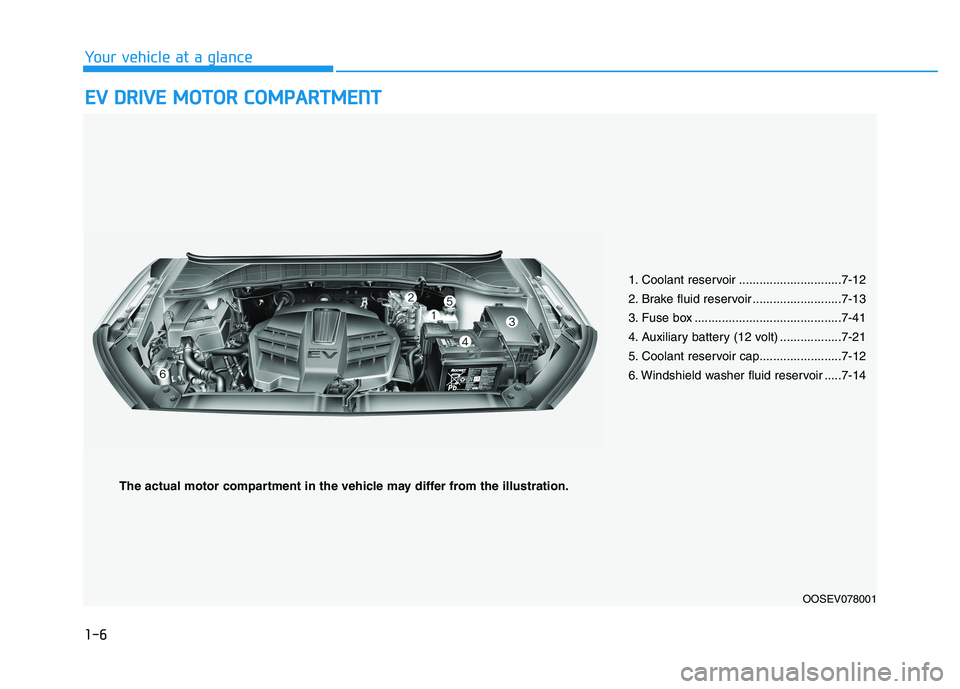
1. Coolant reservoir ..............................7-12
2. Brake fluid reservoir ..........................7-13
3. Fuse box ...........................................7-41
4. Auxiliary battery (12 volt) ..................7-21
5. Coolant reservoir cap........................7-12
6. Windshield washer fluid reservoir .....7-14
OOSEV078001
The actual motor compartment in the vehicle may differ from the illustration.
Page 95 of 478
3-11
Convenient features of your vehicle
3
Operating Door Locks from
Inside the Vehicle
With the door lock button
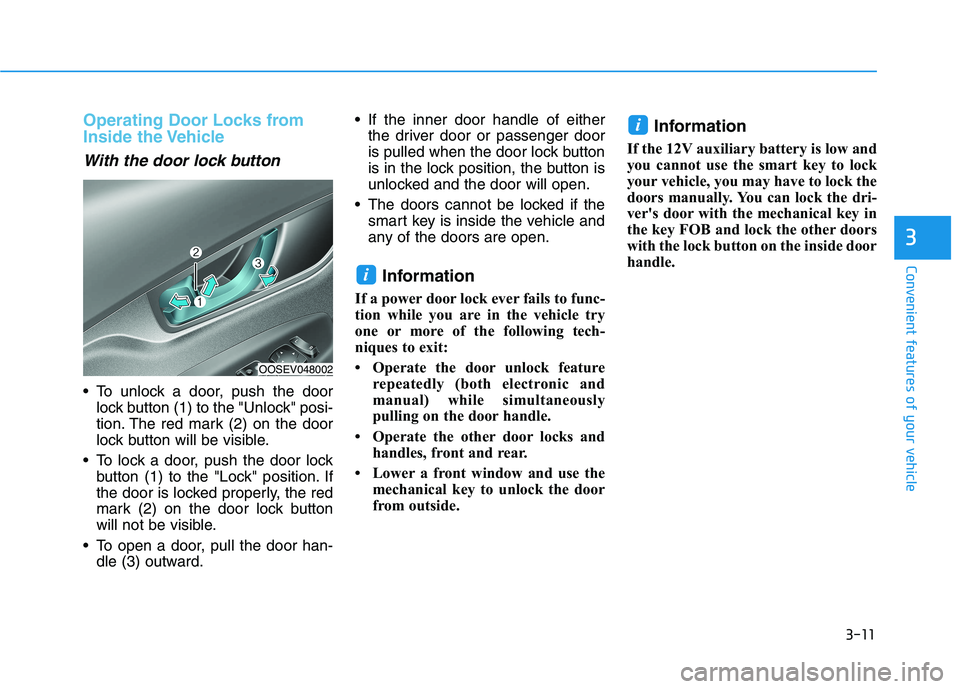
To unlock a door, push the door
lock button (1) to the "Unlock" posi-
tion. The red mark (2) on the door
lock button will be visible.
To lock a door, push the door lock
button (1) to the "Lock" position. If
the door is locked properly, the red
mark (2) on the door lock button
will not be visible.
To open a door, pull the door han-
dle (3) outward. If the inner door handle of either
the driver door or passenger door
is pulled when the door lock button
is in the lock position, the button is
unlocked and the door will open.
The doors cannot be locked if the
smart key is inside the vehicle and
any of the doors are open.
Information
If a power door lock ever fails to func-
tion while you are in the vehicle try
one or more of the following tech-
niques to exit:
• Operate the door unlock feature
repeatedly (both electronic and
manual) while simultaneously
pulling on the door handle.
• Operate the other door locks and
handles, front and rear.
• Lower a front window and use the
mechanical key to unlock the door
from outside.
Information
If the 12V auxiliary battery is low and
you cannot use the smart key to lock
your vehicle, you may have to lock the
doors manually. You can lock the dri-
ver's door with the mechanical key in
the key FOB and lock the other doors
with the lock button on the inside door
handle.
i
i
OOSEV048002
Page 142 of 478
3-58
Convenient features of your vehicle
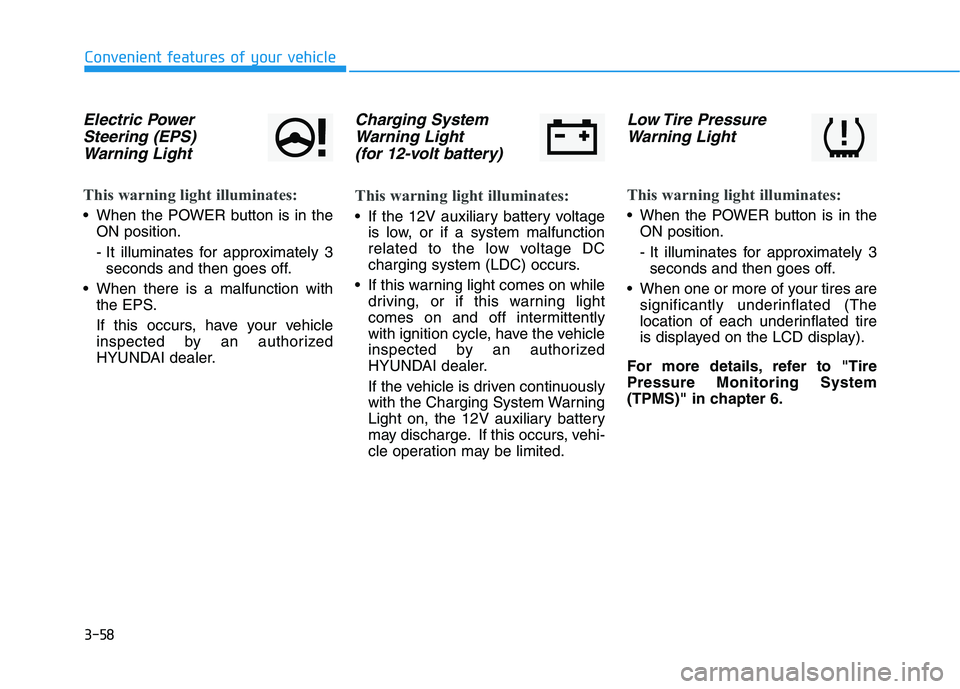
Electric Power
Steering (EPS)
Warning Light
This warning light illuminates:
When the POWER button is in the
ON position.
- It illuminates for approximately 3
seconds and then goes off.
When there is a malfunction with
the EPS.
If this occurs, have your vehicle
inspected by an authorized
HYUNDAI dealer.
Charging System
Warning Light
(for 12-volt battery)
This warning light illuminates:
If the 12V auxiliary battery voltage
is low, or if a system malfunction
related to the low voltage DC
charging system (LDC) occurs.
If this warning light comes on while
driving, or if this warning light
comes on and off intermittently
with ignition cycle, have the vehicle
inspected by an authorized
HYUNDAI dealer.
If the vehicle is driven continuously
with the Charging System Warning
Light on, the 12V auxiliary battery
may discharge. If this occurs, vehi-
cle operation may be limited.
Low Tire Pressure
Warning Light
This warning light illuminates:
When the POWER button is in the
ON position.
- It illuminates for approximately 3
seconds and then goes off.
When one or more of your tires are
significantly underinflated (The
location of each underinflated tire
is displayed on the LCD display).
For more details, refer to "Tire
Pressure Monitoring System
(TPMS)" in chapter 6.
Page 174 of 478
3-90
Convenient features of your vehicle
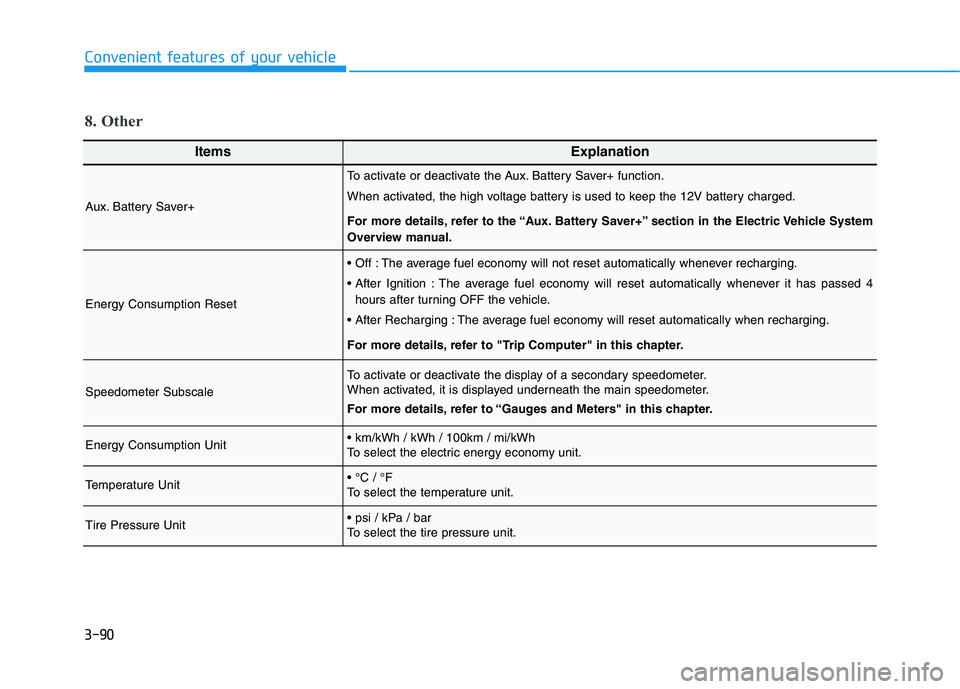
ItemsExplanation
Aux. Battery Saver+
To activate or deactivate the Aux. Battery Saver+ function.
When activated, the high voltage battery is used to keep the 12V battery charged.
For more details, refer to the “Aux. Battery Saver+” section in the Electric Vehicle System
Overview manual.
Energy Consumption Reset
The average fuel economy will not reset automatically whenever recharging.
The average fuel economy will reset automatically whenever it has passed 4
hours after turning OFF the vehicle.
The average fuel economy will reset automatically when recharging.
For more details, refer to "Trip Computer" in this chapter.
Speedometer Subscale
To activate or deactivate the display of a secondary speedometer.
When activated, it is displayed underneath the main speedometer.
For more details, refer to “Gauges and Meters" in this chapter.
Energy Consumption Unit
To select the electric energy economy unit.
Temperature Unit
To select the temperature unit.
Tire Pressure Unit
To select the tire pressure unit.
8. Other
Page 360 of 478
What to do in an emergency
6
Hazard Warning Flasher .......................................6-2
In Case of an Emergency While Driving.............6-2
If the Vehicle Stalls While Driving .................................6-2
If the Vehicle Stalls at a Crossroad or Crossing .......6-2
If you Have a Flat Tire While Driving ..........................6-3
If the Vehicle Will Not Start .................................6-3
Confirm the EV Battery SOC Level ...............................6-3
Jump Starting (12V Auxiliary Battery) ...............6-4
Tire Pressure Monitoring System (TPMS).........6-7
Check Tire Pressure .........................................................6-7
Tire Pressure Monitoring System .................................6-8
Low Tire Pressure Telltale ..............................................6-9
Low Tire Pressure LCD Display with
Position Indicator...............................................................6-9
TPMS Malfunction Indicator ........................................6-10
Changing a Tire with TPMS..........................................6-11
If you Have a Flat Tire
(With Tire Mobility Kit) .......................................6-13
Introduction ......................................................................6-13
Components of the Tire Mobility Kit .........................6-15
Using the Tire Mobility Kit............................................6-16
Checking the Tire Inflation Pressure .........................6-18
Towing ...................................................................6-20
Towing Service .................................................................6-20
Flat Towing is Not Recommended ..............................6-21
Removable Towing Hook ...............................................6-21
Emergency Towing..........................................................6-22
Page 362 of 478
6-3
What to do in an emergency
If you Have a Flat Tire While
Driving
If a tire goes flat while you are driving:
Take your foot off the accelerator
pedal and let the vehicle slow down
while driving straight ahead. Do not
apply the brakes immediately to
slow down the vehicle, but use the
paddle shifter (left side lever) to
increase regenerative braking con-
trol. Do not attempt to pull off the
road suddenly as this may cause
loss of vehicle control. When the
vehicle has slowed to such a speed
that it is safe to do so, brake care-
fully and pull off the road. Drive off
the road as far as possible and park
on firm, level ground. If you are on
a divided highway, do not park in
the median area between the two
traffic lanes.
When the vehicle is stopped, press
the hazard warning flasher button,
shift to P(Park), apply the parking
brake, and place the POWER but-
ton in the OFF position. Have all passengers get out of the
vehicle. Be sure they all get out on
the side of the vehicle that is away
from traffic.
Follow the instructions provided
later in this chapter.
Confirm the EV Battery SOC
Level
Confirm that the vehicle is in P
(Park). The vehicle can only be
started when the gear is in P
(Park).
Confirm the State of Charge (SOC)
percentage level on the charge
gauge or in the head unit display.
Inspect the 12V auxiliary battery
connections in the EV motor com-
partment to make sure they are
clean and tight.
Turn on the headlamps. If the
headlamps are not illuminating
properly, the 12V auxiliary battery
voltage may be low.
Do not push or pull the vehicle to
start it. This could cause damage to
your vehicle. See instructions for
"Jump Starting" provided in this
chapter.
6
I IF
F
T
TH
HE
E
V
VE
EH
HI
IC
CL
LE
E
W
WI
IL
LL
L
N
NO
OT
T
S ST
TA
AR
RT
T
Page 383 of 478
7
Maintenance
7
Maintenance
EV Drive Motor Compartment ..............................7-3
Maintenance Services ...........................................7-4
Owner's Responsibility .....................................................7-4
Owner Maintenance Precautions..................................7-4
Owner Maintenance ..............................................7-5
Owner Maintenance Schedule .......................................7-5
Scheduled Maintenance Services........................7-7
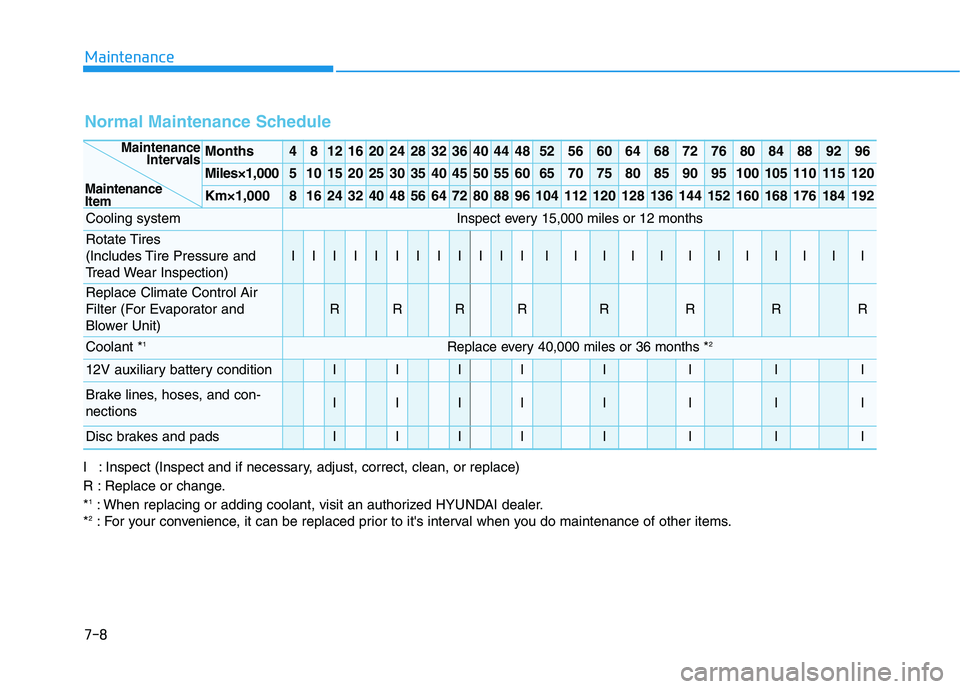
Normal Maintenance Schedule ......................................7-8
Maintenance Under Severe Usage Conditions ........7-10
Severe Driving Conditions .............................................7-10
Explanation of Scheduled Maintenance Items ..7-11
Coolant...................................................................7-12
Brake Fluid ............................................................7-13
Checking the Brake Fluid Level ...................................7-13
Washer Fluid .........................................................7-14
Checking the Washer Fluid Level................................7-14
Climate Control Air Filter ....................................7-15
Filter Inspection ...............................................................7-15
Wiper Blades.........................................................7-17
Blade Inspection ..............................................................7-17
Blade Replacement .........................................................7-17
12V Auxiliary Battery ..........................................7-21
For Best Battery Service ..............................................7-22
Battery Recharging ........................................................7-22
Reset Features.................................................................7-23
Tires and Wheels .................................................7-24
Tire Care ............................................................................7-24
Recommended Cold Tire Inflation Pressures ...........7-25
Check Tire Inflation Pressure ......................................7-26
Tire Rotation.....................................................................7-27
Wheel Alignment and Tire Balance ............................7-28
Tire Replacement ............................................................7-28
Wheel Replacement ........................................................7-29
Tire Traction .....................................................................7-29
Tire Maintenance ............................................................7-29
Tire Sidewall Labeling ....................................................7-29
Tire Terminology and Definitions................................7-33
All Season Tires ...............................................................7-37
Summer Tires ...................................................................7-37
Snow Tires ........................................................................7-37
Radial-Ply Tires ...............................................................7-37
7
Page 385 of 478
7-3
7
Maintenance
E EV
V
D
DR
RI
IV
VE
E
M
MO
OT
TO
OR
R
C
CO
OM
MP
PA
AR
RT
TM
ME
EN
NT
T
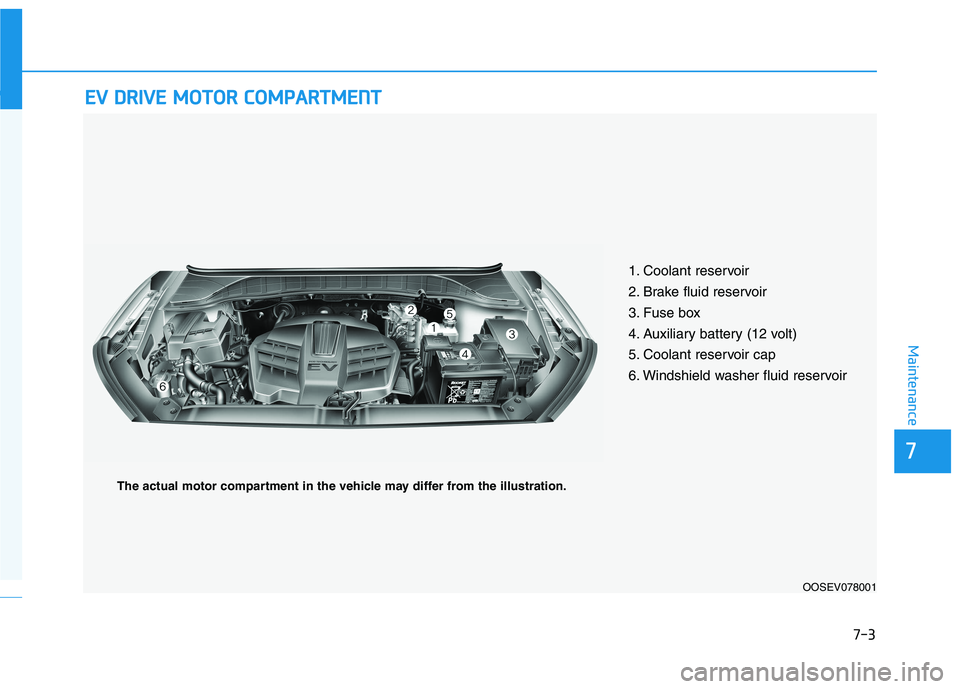
1. Coolant reservoir
2. Brake fluid reservoir
3. Fuse box
4. Auxiliary battery (12 volt)
5. Coolant reservoir cap
6. Windshield washer fluid reservoir
OOSEV078001
The actual motor compartment in the vehicle may differ from the illustration.
Page 390 of 478
7-8
Maintenance
Normal Maintenance Schedule
Months4812162024283236404448525660646872768084889296
Miles×1,0005101520253035404550556065707580859095100105110115120
Km×1,00081624324048566472808896104112120128136144152160168176184192
Cooling systemInspect every 15,000 miles or 12 months
Rotate Tires
(Includes Tire Pressure and
Tread Wear Inspection)
IIIIIIIIIIIIIIIIIIIIIIII
Replace Climate Control Air
Filter (For Evaporator and
Blower Unit)
RRRRRRRR
Coolant*1Replace every 40,000 miles or 36 months *2
12V auxiliary battery conditionIIIIIIII
Brake lines, hoses, and con-
nectionsIIIIIIII
Disc brakes and padsIIIIIIII
Maintenance
Intervals
Maintenance
Item
I : Inspect (Inspect and if necessary, adjust, correct, clean, or replace)
R : Replace or change.
*
1: When replacing or adding coolant, visit an authorized HYUNDAI dealer.
*2: For your convenience, it can be replaced prior to it's interval when you do maintenance of other items.
Page 466 of 478
I-2
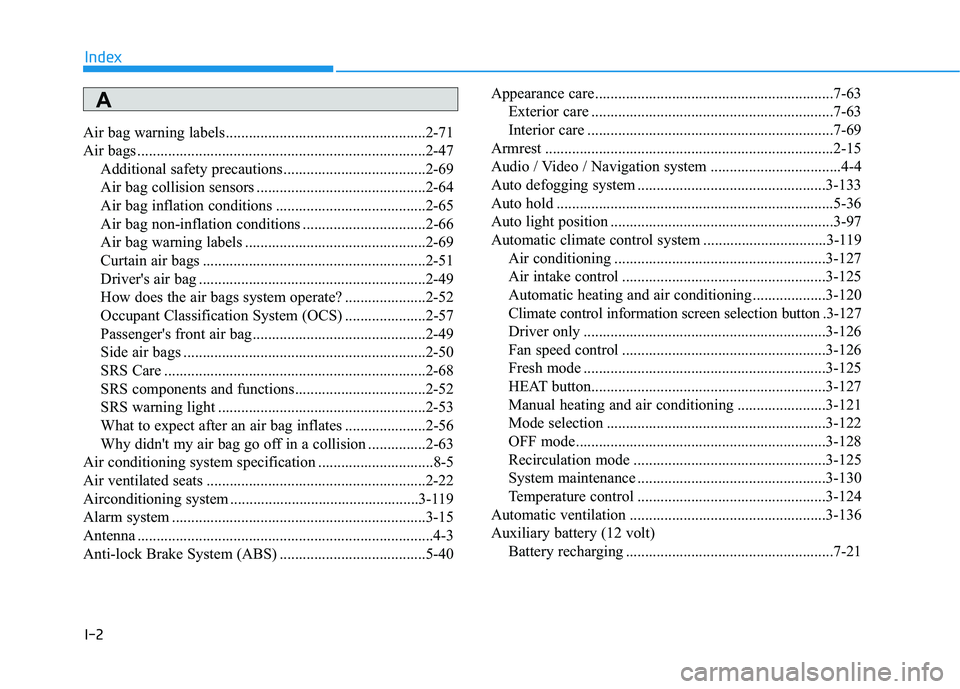
Air bag warning labels ....................................................2-71
Air bags ...........................................................................2-47
Additional safety precautions .....................................2-69
Air bag collision sensors ............................................2-64
Air bag inflation conditions .......................................2-65
Air bag non-inflation conditions ................................2-66
Air bag warning labels ...............................................2-69
Curtain air bags ..........................................................2-51
Driver's air bag ...........................................................2-49
How does the air bags system operate? .....................2-52
Occupant Classification System (OCS) .....................2-57
Passenger's front air bag.............................................2-49
Side air bags ...............................................................2-50
SRS Care ....................................................................2-68
SRS components and functions..................................2-52
SRS warning light ......................................................2-53
What to expect after an air bag inflates .....................2-56
Why didn't my air bag go off in a collision ...............2-63
Air conditioning system specification ..............................8-5
Air ventilated seats .........................................................2-22
Airconditioning system .................................................3-119
Alarm system ..................................................................3-15
Antenna .............................................................................4-3
Anti-lock Brake System (ABS) ......................................5-40Appearance care..............................................................7-63
Exterior care ...............................................................7-63
Interior care ................................................................7-69
Armrest ...........................................................................2-15
Audio / Video / Navigation system ..................................4-4
Auto defogging system .................................................3-133
Auto hold ........................................................................5-36
Auto light position ..........................................................3-97
Automatic climate control system ................................3-119
Air conditioning .......................................................3-127
Air intake control .....................................................3-125
Automatic heating and air conditioning ...................3-120
Climate control information screen selection button .3-127
Driver only ...............................................................3-126
Fan speed control .....................................................3-126
Fresh mode ...............................................................3-125
HEAT button.............................................................3-127
Manual heating and air conditioning .......................3-121
Mode selection .........................................................3-122
OFF mode.................................................................3-128
Recirculation mode ..................................................3-125
System maintenance .................................................3-130
Temperature control .................................................3-124
Automatic ventilation ...................................................3-136
Auxiliary battery (12 volt)
Battery recharging ......................................................7-21
Index
A