ECO mode HYUNDAI KONA EV 2022 User Guide
[x] Cancel search | Manufacturer: HYUNDAI, Model Year: 2022, Model line: KONA EV, Model: HYUNDAI KONA EV 2022Pages: 548, PDF Size: 49.14 MB
Page 64 of 548
01
1-59
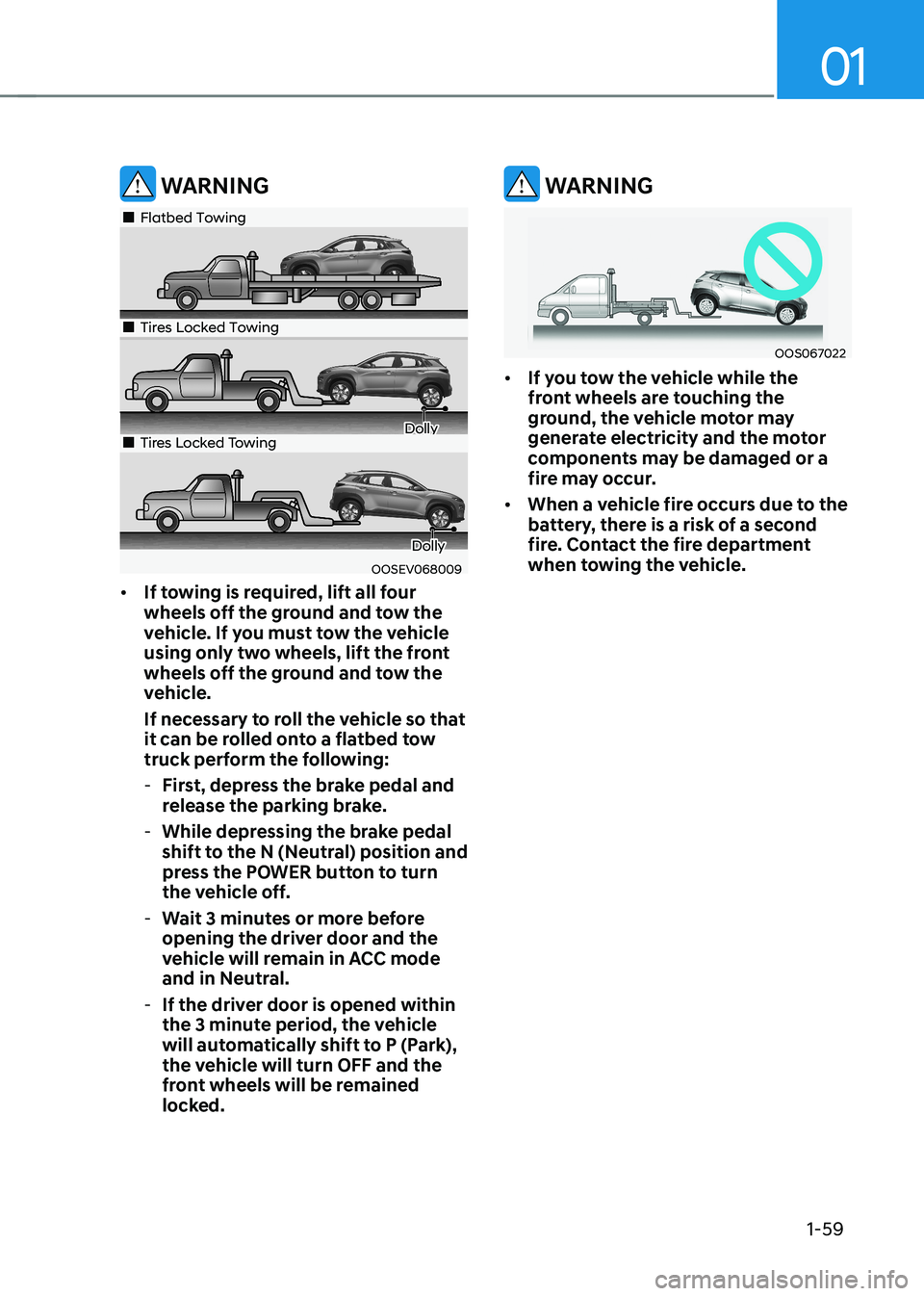
WARNING
OOSEV068009
„„Flatbed Towing
„„Tires Locked Towing
Dolly„„Tires Locked Towing
Dolly
• If towing is required, lift all four
wheels off the ground and tow the
vehicle. If you must tow the vehicle
using only two wheels, lift the front
wheels off the ground and tow the
vehicle.
If necessary to roll the vehicle so that
it can be rolled onto a flatbed tow
truck perform the following:
- First, depress the brake pedal and
release the parking brake.
- While depressing the brake pedal
shift to the N (Neutral) position and
press the POWER button to turn
the vehicle off.
- Wait 3 minutes or more before
opening the driver door and the
vehicle will remain in ACC mode
and in Neutral.
- If the driver door is opened within
the 3 minute period, the vehicle
will automatically shift to P (Park),
the vehicle will turn OFF and the
front wheels will be remained
locked.
WARNING
OOS067022
• If you tow the vehicle while the
front wheels are touching the
ground, the vehicle motor may
generate electricity and the motor
components may be damaged or a
fire may occur.
• When a vehicle fire occurs due to the
battery, there is a risk of a second
fire. Contact the fire department
when towing the vehicle.
Page 78 of 548
02
2-13
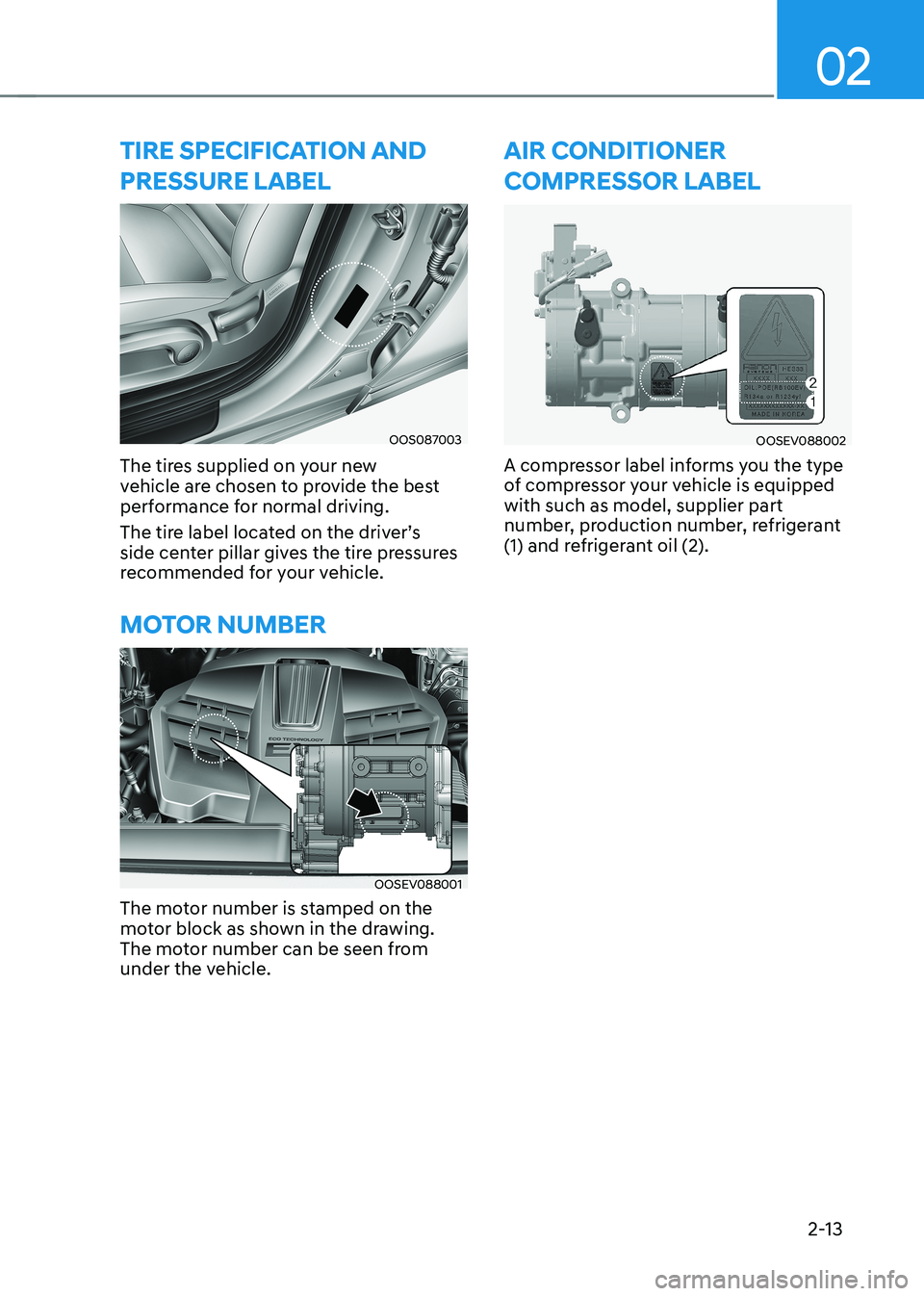
tire speciFication anD pressure LaBeL
OOS087003
The tires supplied on your new
vehicle are chosen to provide the best
performance for normal driving.
The tire label located on the driver’s
side center pillar gives the tire pressures
recommended for your vehicle.
Motor nuMBer
OOSEV088001
The motor number is stamped on the
motor block as shown in the drawing.
The motor number can be seen from
under the vehicle.
air conDitioner
coMpressor LaBeL
OOSEV088002
A compressor label informs you the type
of compressor your vehicle is equipped with such as model, supplier part
number, production number, refrigerant
(1) and refrigerant oil (2).
Page 97 of 548
Safety system
3-18
NOTICE
To prevent damage to the seat warmers
and seats: • Never use a solvent such as paint
thinner, benzene, alcohol or gasoline
to clean the seats.
• Do not place heavy or sharp objects
on seats equipped with seat
warmers.
• Do not change the seat cover. It may
damage the seat warmer.
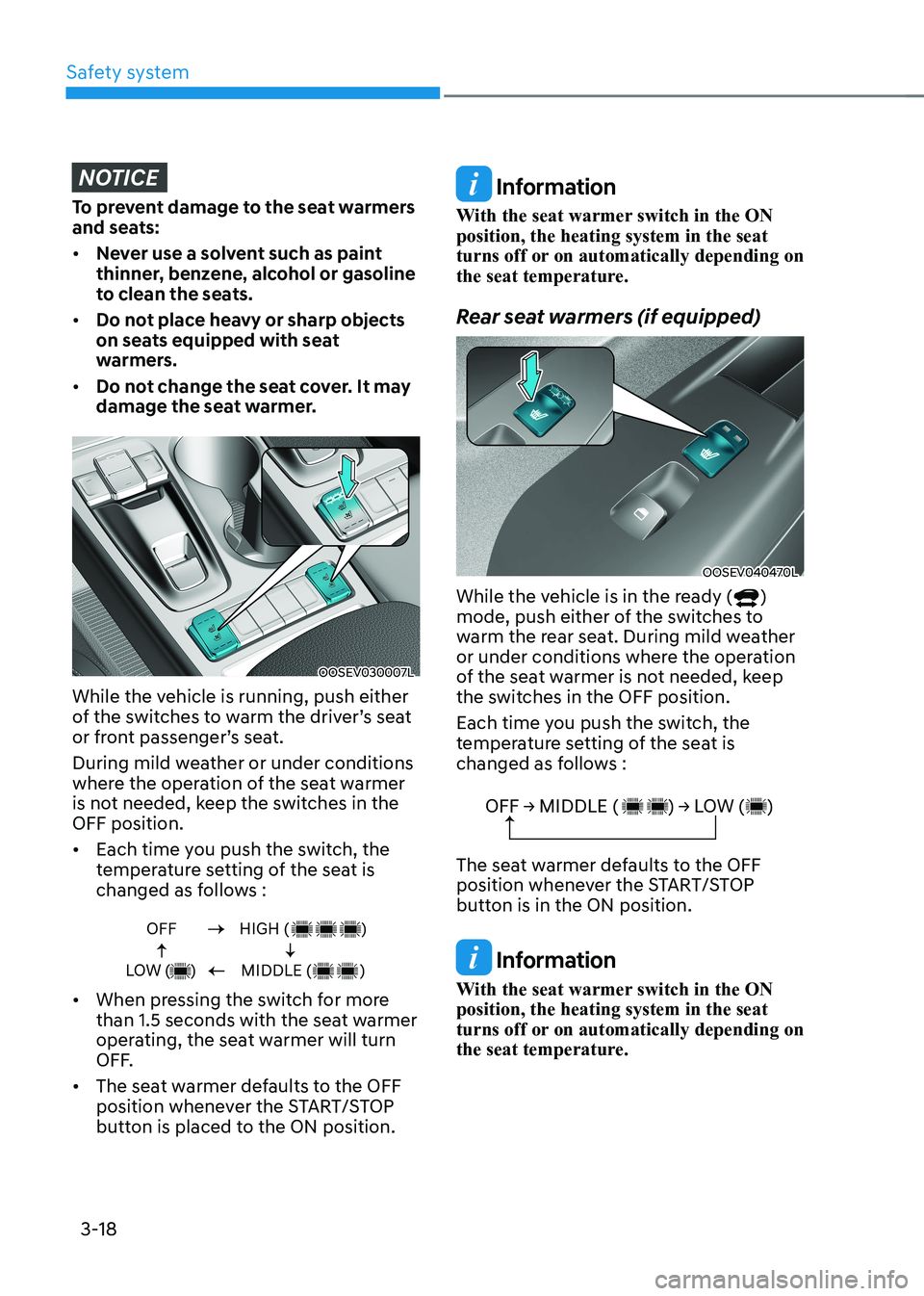
OOSEV030007L
While the vehicle is running, push either
of the switches to warm the driver’s seat
or front passenger’s seat.
During mild weather or under conditions
where the operation of the seat warmer
is not needed, keep the switches in the OFF position. • Each time you push the switch, the
temperature setting of the seat is
changed as follows :
OFF
LOW ( )HIGH ( )
MIDDLE ( )
• When pressing the switch for more
than 1.5 seconds with the seat warmer
operating, the seat warmer will turn
OFF.
• The seat warmer defaults to the OFF
position whenever the START/STOP
button is placed to the ON position.
Information
With the seat warmer switch in the ON position, the heating system in the seat
turns off or on automatically depending on
the seat temperature.
Rear seat warmers (if equipped)
OOSEV040470L
While the vehicle is in the ready (
)
mode, push either of the switches to
warm the rear seat. During mild weather
or under conditions where the operation
of the seat warmer is not needed, keep
the switches in the OFF position.
Each time you push the switch, the
temperature setting of the seat is
changed as follows :
OFF → MIDDLE ( ) → LOW ( )
The seat warmer defaults to the OFF
position whenever the START/STOP
button is in the ON position.
Information
With the seat warmer switch in the ON position, the heating system in the seat
turns off or on automatically depending on
the seat temperature.
Page 120 of 548
03
3-41
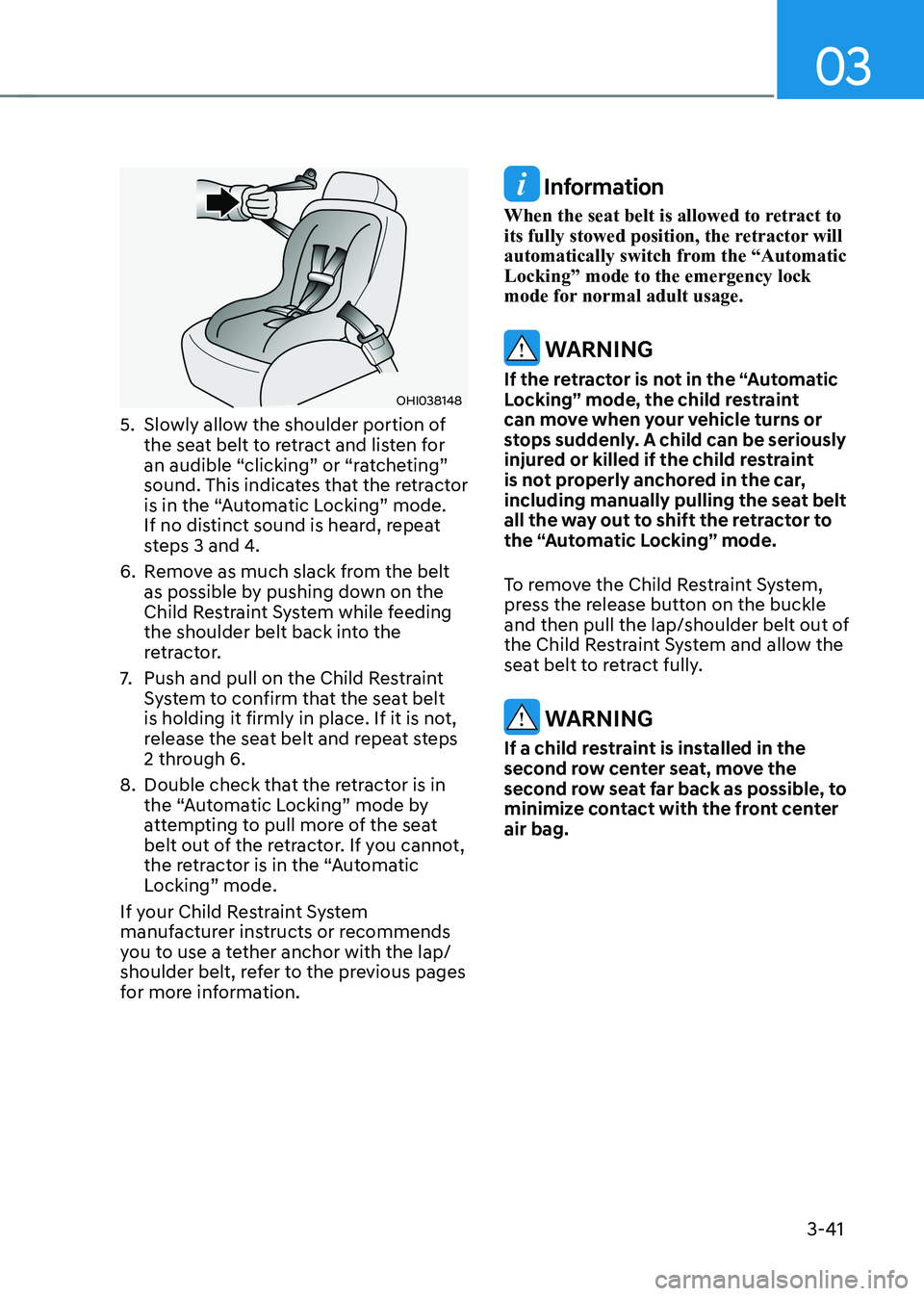
OHI038148
5. Slowly allow the shoulder portion of the seat belt to retract and listen for
an audible “clicking” or “ratcheting”
sound. This indicates that the retractor
is in the “Automatic Locking” mode.
If no distinct sound is heard, repeat
steps 3 and 4.
6. Remove as much slack from the belt as possible by pushing down on the
Child Restraint System while feeding
the shoulder belt back into the
retractor.
7. Push and pull on the Child Restraint
System to confirm that the seat belt
is holding it firmly in place. If it is not,
release the seat belt and repeat steps
2 through 6.
8. Double check that the retractor is in the “Automatic Locking” mode by
attempting to pull more of the seat
belt out of the retractor. If you cannot,
the retractor is in the “Automatic
Locking” mode.
If your Child Restraint System
manufacturer instructs or recommends
you to use a tether anchor with the lap/
shoulder belt, refer to the previous pages
for more information.
Information
When the seat belt is allowed to retract to
its fully stowed position, the retractor will
automatically switch from the “Automatic Locking” mode to the emergency lock
mode for normal adult usage.
WARNING
If the retractor is not in the “Automatic
Locking” mode, the child restraint
can move when your vehicle turns or
stops suddenly. A child can be seriously
injured or killed if the child restraint
is not properly anchored in the car,
including manually pulling the seat belt
all the way out to shift the retractor to
the “Automatic Locking” mode.
To remove the Child Restraint System,
press the release button on the buckle
and then pull the lap/shoulder belt out of
the Child Restraint System and allow the
seat belt to retract fully.
WARNING
If a child restraint is installed in the
second row center seat, move the
second row seat far back as possible, to
minimize contact with the front center air bag.
Page 123 of 548
Safety system
3-44
Where are the air bags?
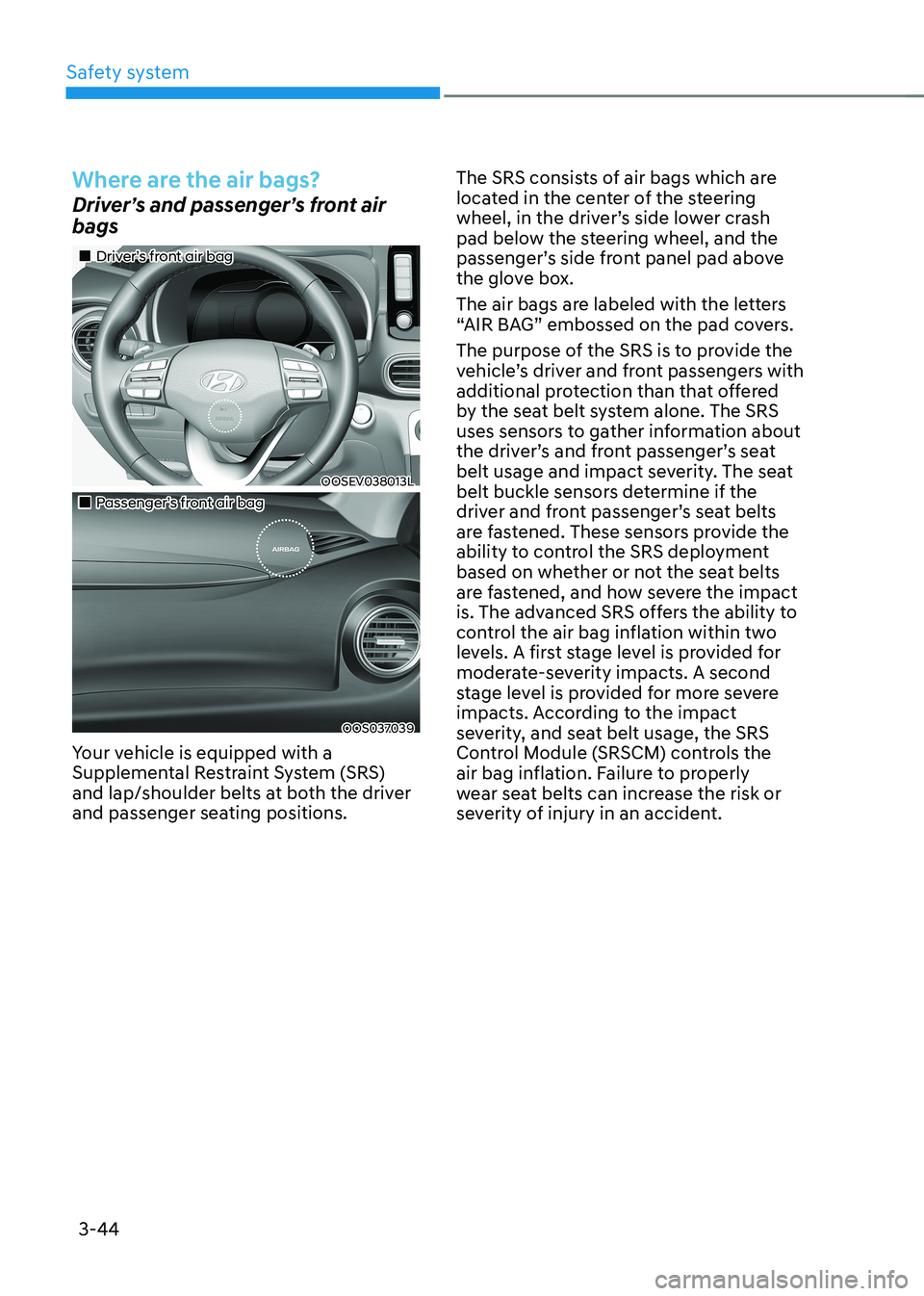
Driver’s and passenger’s front air bags
„„Driver’s front air bag
OOSEV038013L
„„Passenger’s front air bag
OOS037039
Your vehicle is equipped with a
Supplemental Restraint System (SRS)
and lap/shoulder belts at both the driver
and passenger seating positions. The SRS consists of air bags which are
located in the center of the steering
wheel, in the driver’s side lower crash
pad below the steering wheel, and the
passenger’s side front panel pad above
the glove box.
The air bags are labeled with the letters
“AIR BAG” embossed on the pad covers.
The purpose of the SRS is to provide the
vehicle’s driver and front passengers with
additional protection than that offered
by the seat belt system alone. The SRS
uses sensors to gather information about
the driver’s and front passenger’s seat
belt usage and impact severity. The seat
belt buckle sensors determine if the
driver and front passenger’s seat belts
are fastened. These sensors provide the
ability to control the SRS deployment
based on whether or not the seat belts
are fastened, and how severe the impact
is. The advanced SRS offers the ability to
control the air bag inflation within two
levels. A first stage level is provided for
moderate-severity impacts. A second
stage level is provided for more severe
impacts. According to the impact
severity, and seat belt usage, the SRS
Control Module (SRSCM) controls the
air bag inflation. Failure to properly
wear seat belts can increase the risk or
severity of injury in an accident.
Page 127 of 548
Safety system
3-48
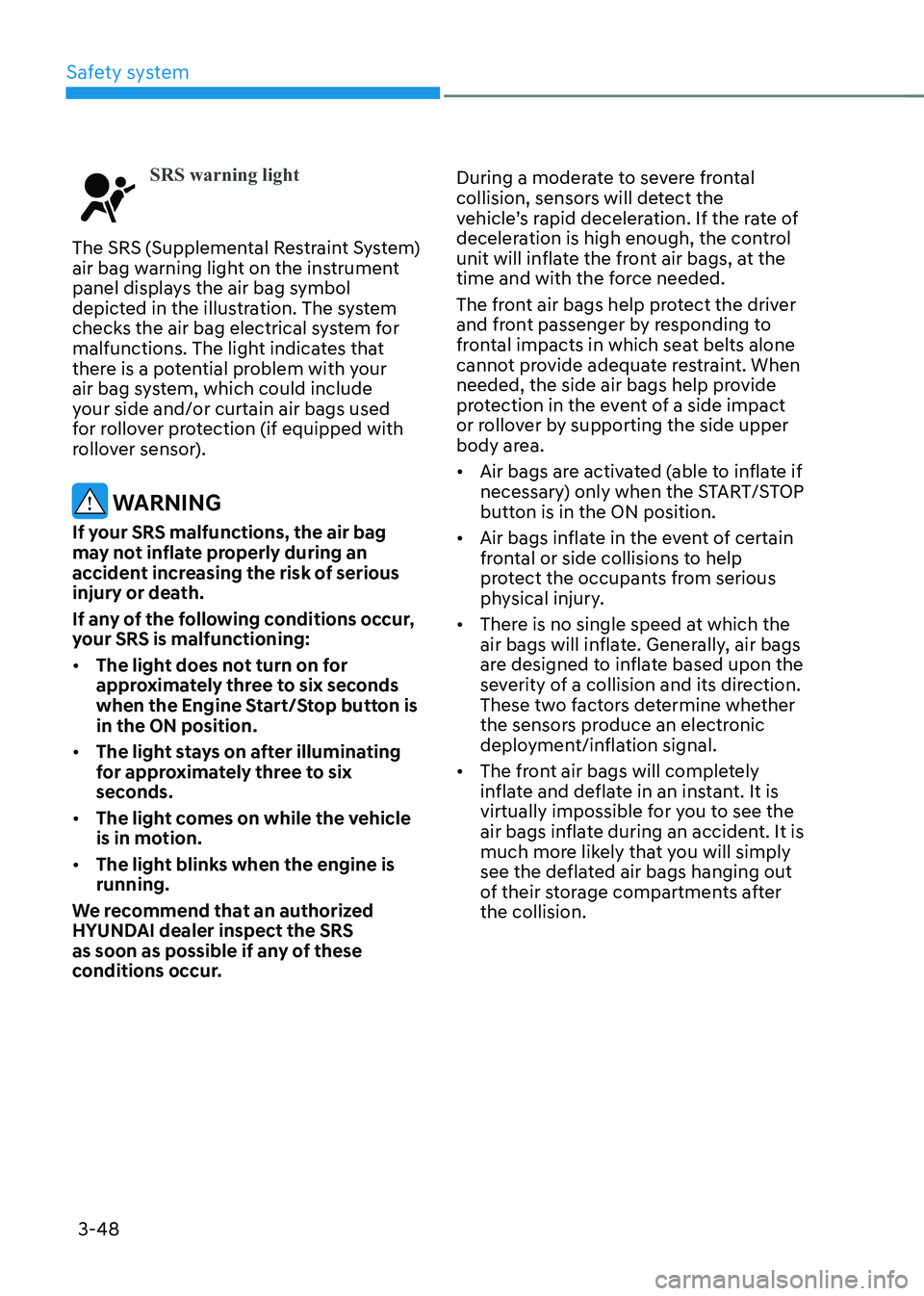
SRS warning light
The SRS (Supplemental Restraint System)
air bag warning light on the instrument
panel displays the air bag symbol
depicted in the illustration. The system
checks the air bag electrical system for
malfunctions. The light indicates that
there is a potential problem with your
air bag system, which could include
your side and/or curtain air bags used
for rollover protection (if equipped with
rollover sensor).
WARNING
If your SRS malfunctions, the air bag
may not inflate properly during an
accident increasing the risk of serious
injury or death.
If any of the following conditions occur,
your SRS is malfunctioning: • The light does not turn on for
approximately three to six seconds
when the Engine Start/Stop button is in the ON position.
• The light stays on after illuminating
for approximately three to six
seconds.
• The light comes on while the vehicle
is in motion.
• The light blinks when the engine is running.
We recommend that an authorized
HYUNDAI dealer inspect the SRS
as soon as possible if any of these
conditions occur. During a moderate to severe frontal
collision, sensors will detect the
vehicle’s rapid deceleration. If the rate of
deceleration is high enough, the control
unit will inflate the front air bags, at the
time and with the force needed.
The front air bags help protect the driver
and front passenger by responding to
frontal impacts in which seat belts alone
cannot provide adequate restraint. When
needed, the side air bags help provide
protection in the event of a side impact
or rollover by supporting the side upper
body area. •
Air bags are activated (able to inflate if
necessary) only when the START/STOP
button is in the ON position.
• Air bags inflate in the event of certain
frontal or side collisions to help
protect the occupants from serious
physical injury.
• There is no single speed at which the
air bags will inflate. Generally, air bags
are designed to inflate based upon the
severity of a collision and its direction.
These two factors determine whether
the sensors produce an electronic
deployment/inflation signal.
• The front air bags will completely
inflate and deflate in an instant. It is
virtually impossible for you to see the
air bags inflate during an accident. It is
much more likely that you will simply
see the deflated air bags hanging out
of their storage compartments after the collision.
Page 147 of 548
Instrument cluster
4-4
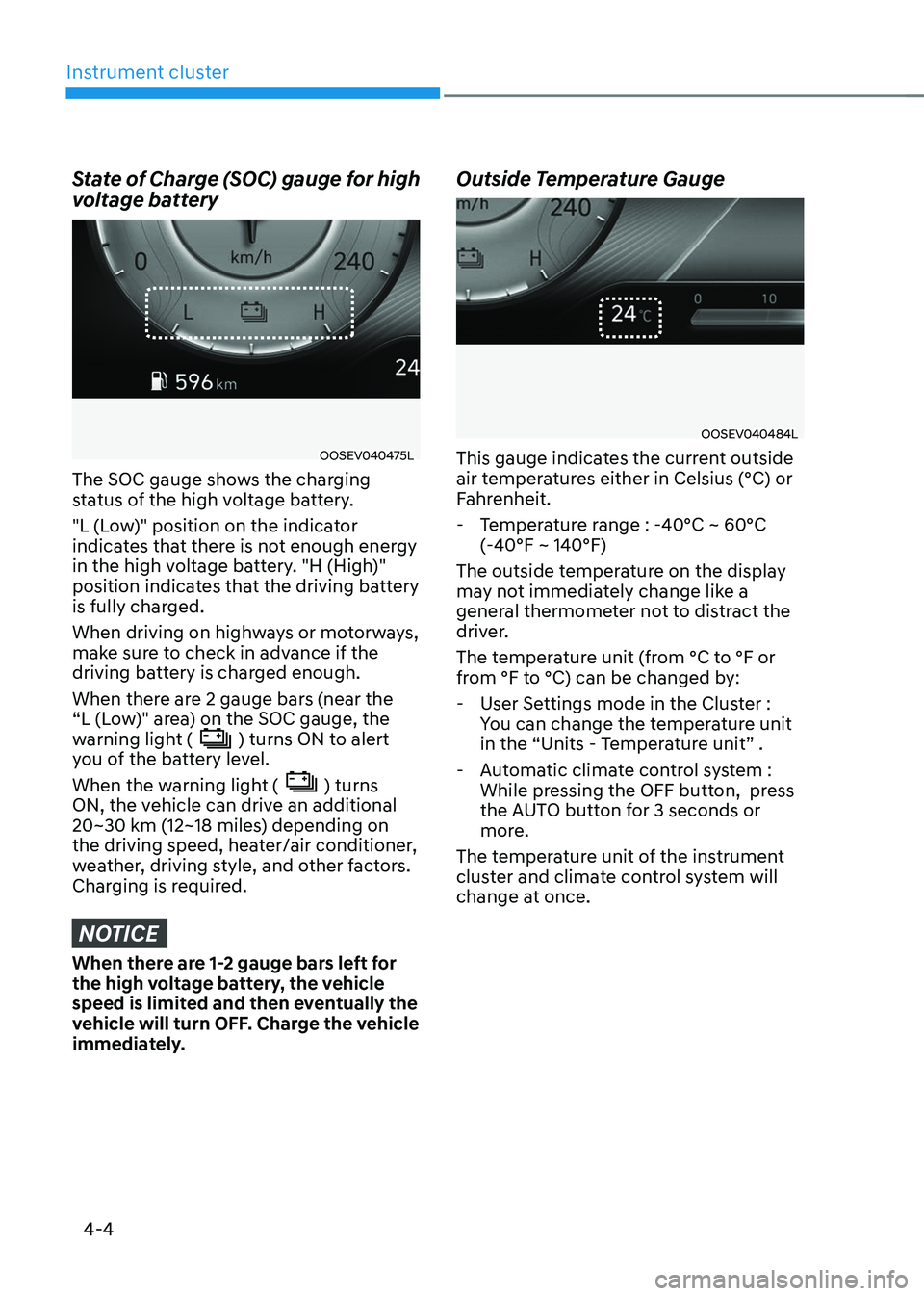
State of Charge (SOC) gauge for high
voltage battery
OOSEV040475L
The SOC gauge shows the charging
status of the high voltage battery.
"L (Low)" position on the indicator
indicates that there is not enough energy
in the high voltage battery. "H (High)"
position indicates that the driving battery
is fully charged.
When driving on highways or motorways,
make sure to check in advance if the
driving battery is charged enough.
When there are 2 gauge bars (near the
“L (Low)" area) on the SOC gauge, the
warning light (
) turns ON to alert
you of the battery level.
When the warning light (
) turns
ON, the vehicle can drive an additional
20~30 km (12~18 miles) depending on
the driving speed, heater/air conditioner,
weather, driving style, and other factors.
Charging is required.
NOTICE
When there are 1-2 gauge bars left for
the high voltage battery, the vehicle
speed is limited and then eventually the
vehicle will turn OFF. Charge the vehicle
immediately. Outside Temperature Gauge
OOSEV040484L
This gauge indicates the current outside
air temperatures either in Celsius (°C) or
Fahrenheit.
- Temperature range : -40°C ~ 60°C (-40°F ~ 140°F)
The outside temperature on the display
may not immediately change like a
general thermometer not to distract the
driver.
The temperature unit (from °C to °F or
from °F to °C) can be changed by: - User Settings mode in the Cluster : You can change the temperature unit
in the “Units - Temperature unit” .
- Automatic climate control system : While pressing the OFF button, press
the AUTO button for 3 seconds or
more.
The temperature unit of the instrument
cluster and climate control system will
change at once.
Page 158 of 548
04
4-15
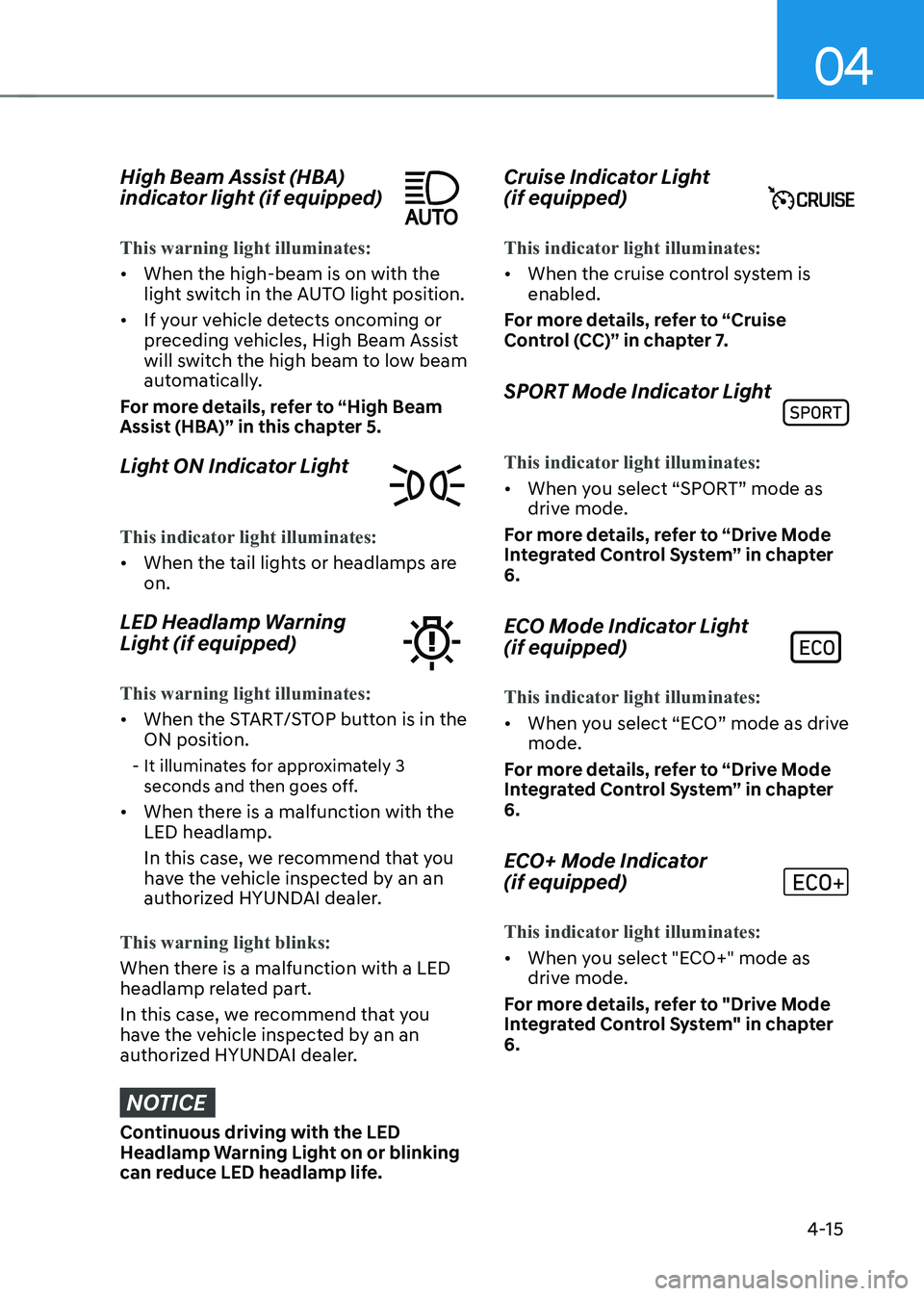
High Beam Assist (HBA)
indicator light (if equipped)
This warning light illuminates:
• When the high-beam is on with the
light switch in the AUTO light position.
• If your vehicle detects oncoming or
preceding vehicles, High Beam Assist
will switch the high beam to low beam
automatically.
For more details, refer to “High Beam
Assist (HBA)” in this chapter 5.
Light ON Indicator Light
This indicator light illuminates:
• When the tail lights or headlamps are on.
LED Headlamp Warning
Light (if equipped)
This warning light illuminates:
• When the START/STOP button is in the ON position.
- It illuminates for approximately 3 seconds and then goes off.
• When there is a malfunction with the LED headlamp.
In this case, we recommend that you
have the vehicle inspected by an an
authorized HYUNDAI dealer.
This warning light blinks:
When there is a malfunction with a LED
headlamp related part.
In this case, we recommend that you
have the vehicle inspected by an an
authorized HYUNDAI dealer.
NOTICE
Continuous driving with the LED
Headlamp Warning Light on or blinking
can reduce LED headlamp life. Cruise Indicator Light (if equipped)
This indicator light illuminates:
•
When the cruise control system is enabled.
For more details, refer to “Cruise
Control (CC)” in chapter 7.
SPORT Mode Indicator Light
This indicator light illuminates:
• When you select “SPORT” mode as
drive mode.
For more details, refer to “Drive Mode
Integrated Control System” in chapter 6.
ECO Mode Indicator Light (if equipped)
This indicator light illuminates:
• When you select “ECO” mode as drive mode.
For more details, refer to “Drive Mode
Integrated Control System” in chapter 6.
ECO+ Mode Indicator (if equipped)
This indicator light illuminates:
• When you select "ECO+" mode as
drive mode.
For more details, refer to "Drive Mode
Integrated Control System" in chapter 6.
Page 171 of 548
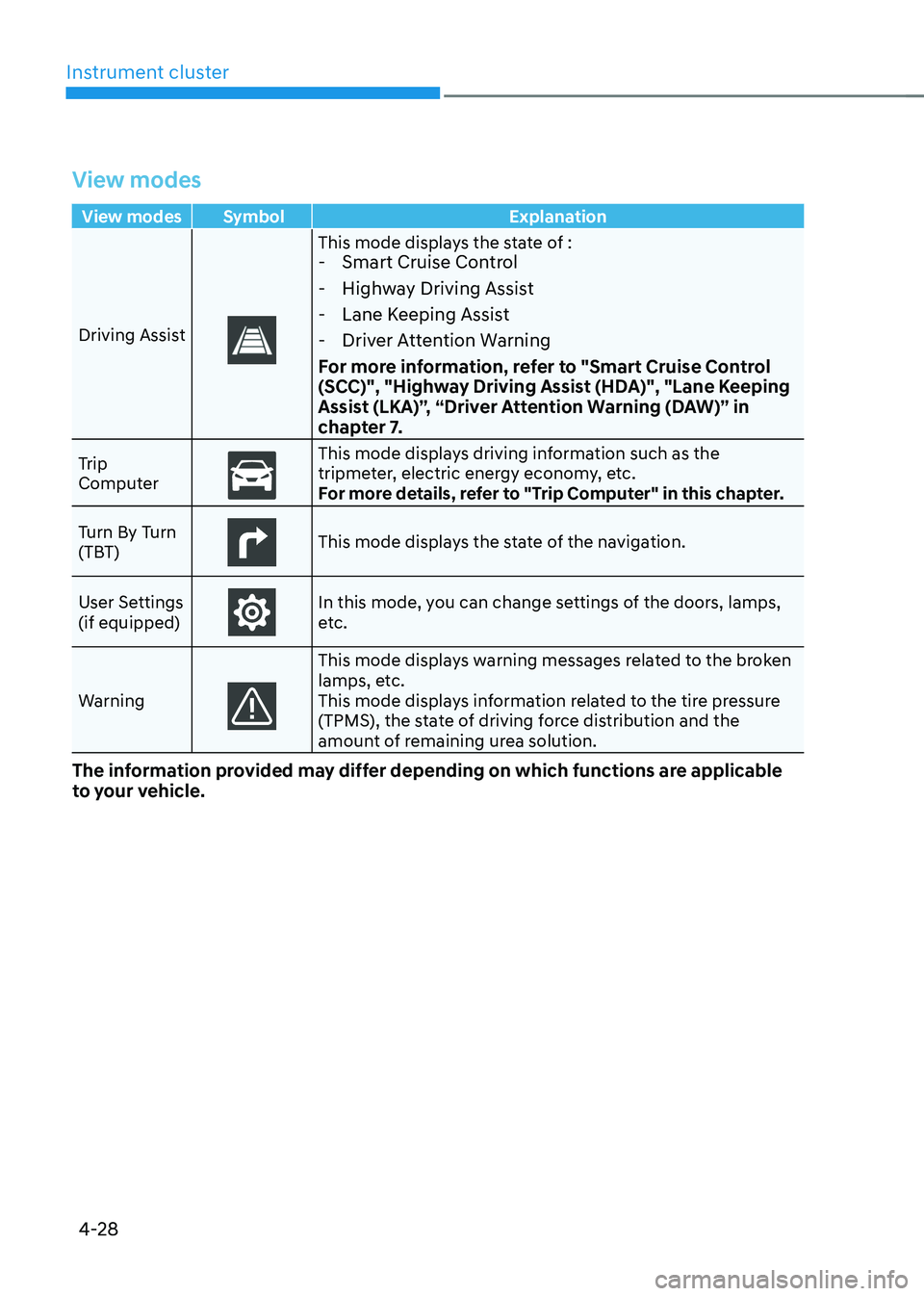
Instrument cluster
4-28
View modes
View modes Symbol Explanation
Driving Assist
This mode displays the state of : - Smart Cruise Control
- Highway Driving Assist
- Lane Keeping Assist
- Driver Attention Warning
For more information, refer to "Smart Cruise Control
(SCC)", "Highway Driving Assist (HDA)", "Lane Keeping
Assist (LKA)”, “Driver Attention Warning (DAW)” in
chapter 7.
Trip
Computer
This mode displays driving information such as the
tripmeter, electric energy economy, etc.
For more details, refer to "Trip Computer" in this chapter.
Turn By Turn
(TBT)
This mode displays the state of the navigation.
User Settings (if equipped)
In this mode, you can change settings of the doors, lamps,
etc.
Warning
This mode displays warning messages related to the broken
lamps, etc.
This mode displays information related to the tire pressure
(TPMS), the state of driving force distribution and the
amount of remaining urea solution.
The information provided may differ depending on which functions are applicable
to your vehicle.
Page 174 of 548
04
4-31
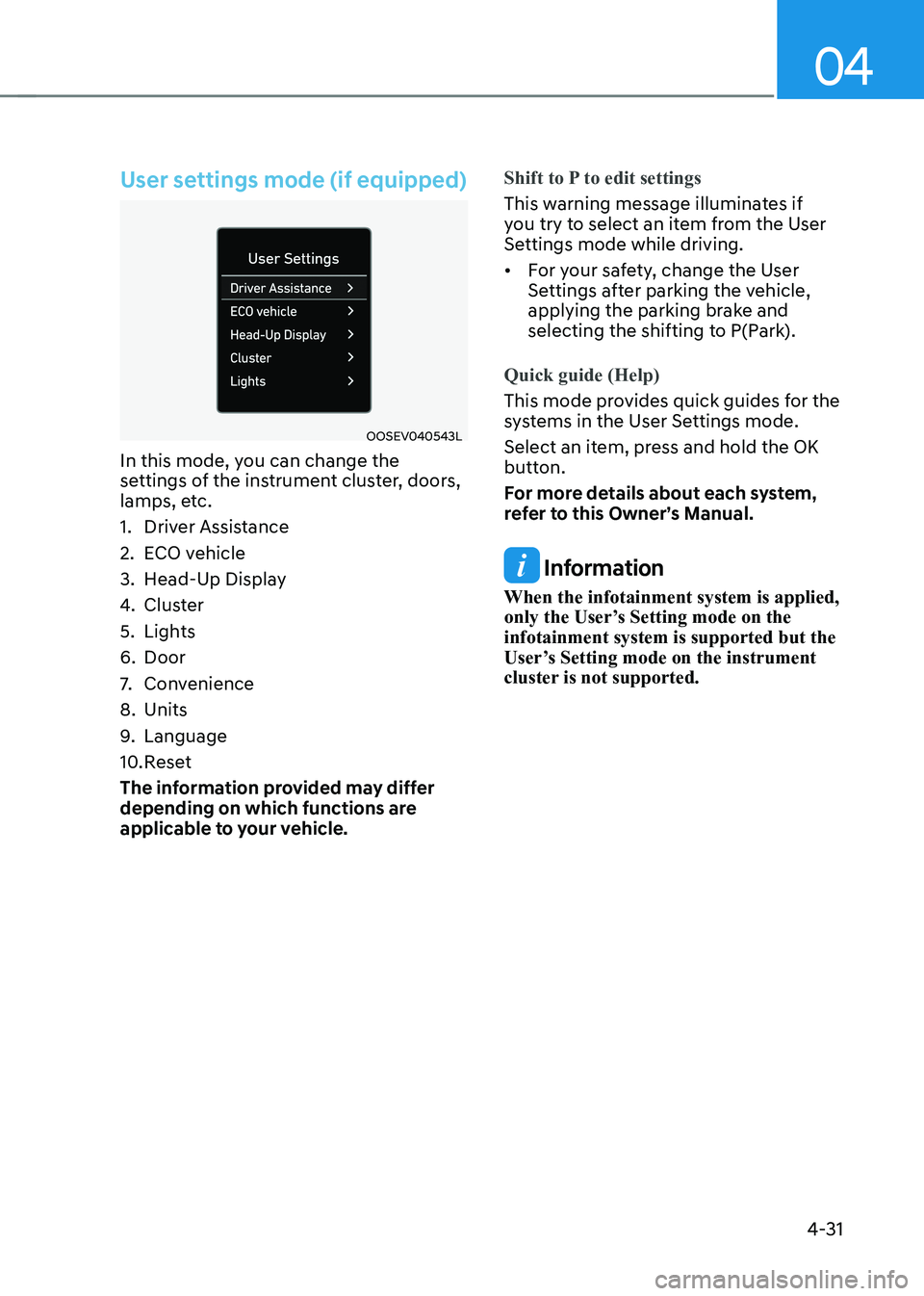
User settings mode (if equipped)
OOSEV040543L
In this mode, you can change the
settings of the instrument cluster, doors,
lamps, etc.
1. Driver Assistance
2. ECO vehicle
3. Head-Up Display
4. Cluster
5. Lights
6. Door
7. Convenience
8. Units
9. Language
10. Reset
The information provided may differ
depending on which functions are
applicable to your vehicle.
Shift to P to edit settings
This warning message illuminates if
you try to select an item from the User
Settings mode while driving. • For your safety, change the User
Settings after parking the vehicle,
applying the parking brake and
selecting the shifting to P(Park).
Quick guide (Help)
This mode provides quick guides for the
systems in the User Settings mode.
Select an item, press and hold the OK
button.
For more details about each system,
refer to this Owner’s Manual.
Information
When the infotainment system is applied,
only the User’s Setting mode on the infotainment system is supported but the
User’s Setting mode on the instrument
cluster is not supported.