audio HYUNDAI KONA EV 2022 User Guide
[x] Cancel search | Manufacturer: HYUNDAI, Model Year: 2022, Model line: KONA EV, Model: HYUNDAI KONA EV 2022Pages: 548, PDF Size: 49.14 MB
Page 280 of 548
Convenient features
5-96
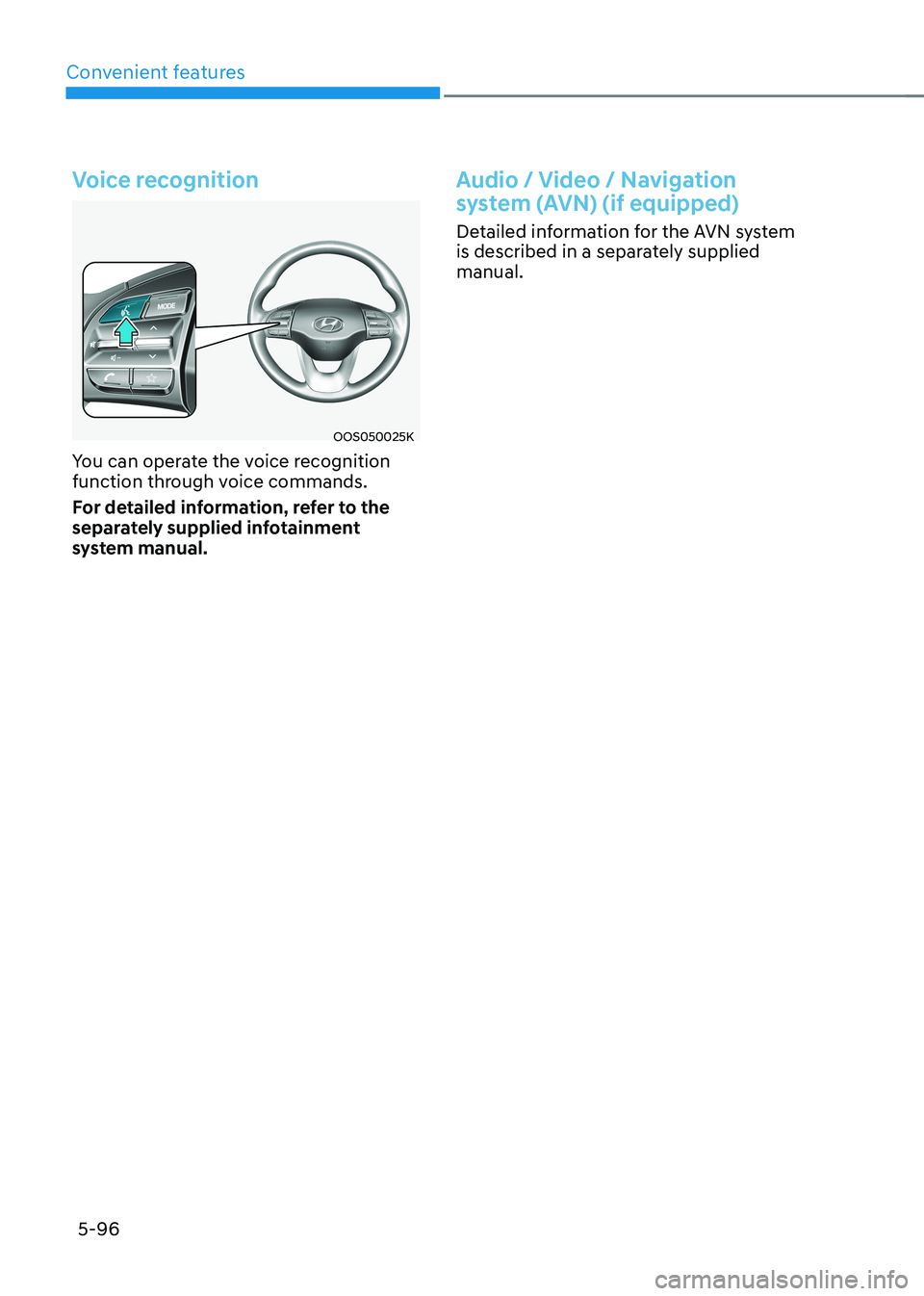
Voice recognition
OOS050025K
You can operate the voice recognition
function through voice commands.
For detailed information, refer to the
separately supplied infotainment
system manual.
Audio / Video / Navigation
system (AVN) (if equipped)
Detailed information for the AVN system
is described in a separately supplied manual.
Page 319 of 548
06
6-39
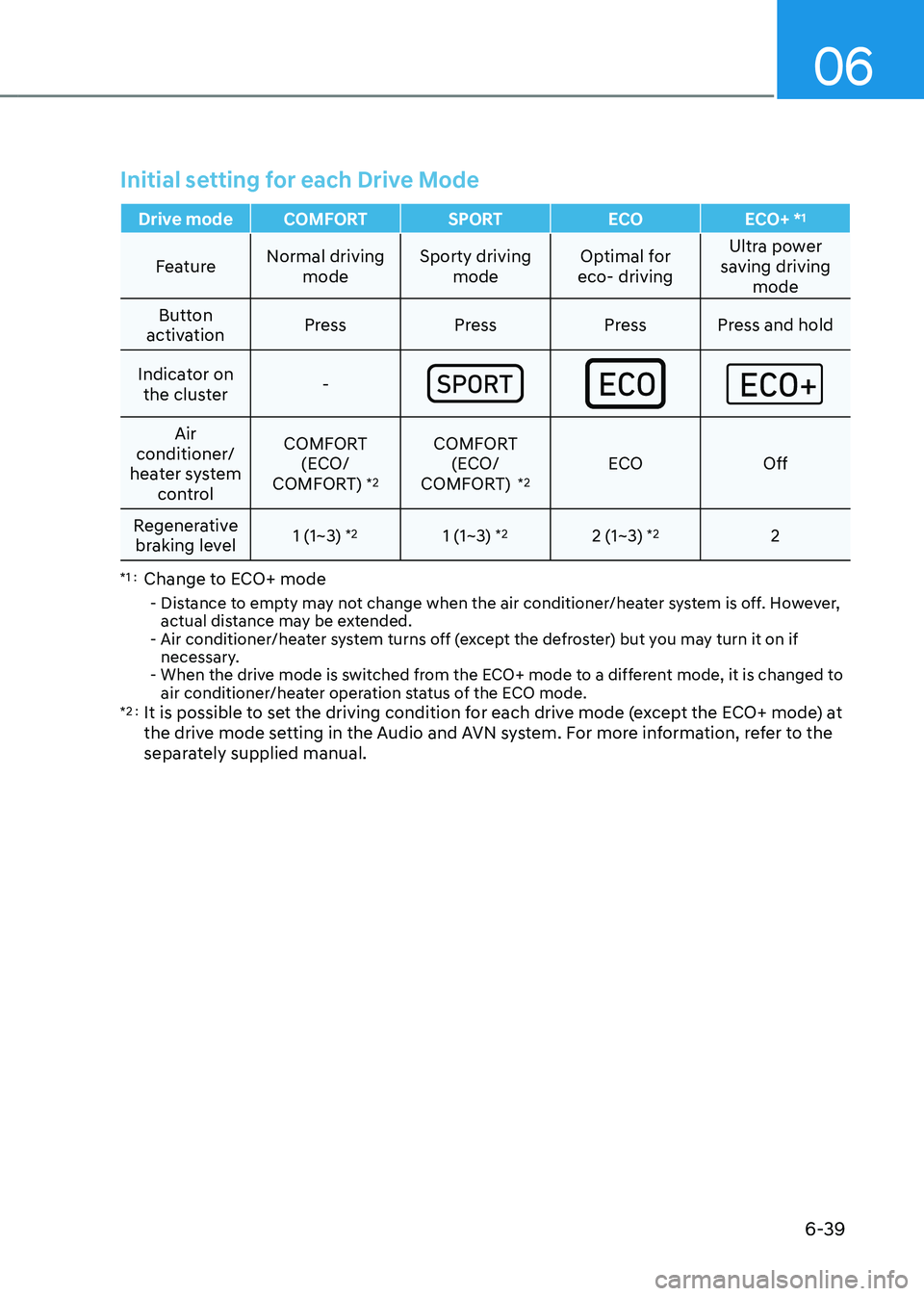
Initial setting for each Drive Mode
Drive mode COMFORT SPORTECOECO+ *1
Feature
Normal driving
mode Sporty driving
mode Optimal for
eco- driving Ultra power
saving driving mode
Button
activation Press Press Press Press and hold
Indicator on the cluster -
Air
conditioner/
heater system control COMFORT
(ECO/
COMFORT) *2COMFORT
(ECO/
COMFORT) *2ECO
Off
Regenerative braking level 1 (1~3)
*2
1 (1~3) *2
2 (1~3) *2
2
*1 : Change to ECO+ mode
- Distance to empty may not change when the air conditioner/heater system is off. However, actual distance may be extended.
- Air conditioner/heater system turns off (except the defroster) but you may turn it on if necessary.
- When the drive mode is switched from the ECO+ mode to a different mode, it is changed to
air conditioner/heater operation status of the ECO mode.
*2 : It is possible to set the driving condition for each drive mode (except the ECO+ mode) at
the drive mode setting in the Audio and AVN system. For more information, refer to the
separately supplied manual.
Page 495 of 548
09
9-19
• Wear eye protection when checking
the battery during charging.
• The battery must be removed from
the vehicle and placed in a well
ventilated area.
• Watch the battery during charging,
and stop or reduce the charging
rate if the battery cells begin boiling
violently.
• The negative battery cable must
be removed first and installed last
when the battery is disconnected.
Disconnect the battery charger in the
following order:
(1) Turn off the battery charger main
switch.
(2) Unhook the negative clamp from the negative battery terminal.
(3) Unhook the positive clamp from the positive battery terminal.
• Always use a genuine HYUNDAI
approved battery or the equivalent
specified for your vehicle when you
replace the battery. By jump starting
After a jump start from a good battery,
drive the vehicle for 20-30 minutes
before it is shutoff. The vehicle may
not restart if you shut it off before the
battery had a chance to adequately
recharge. See “Jump Starting” in chapter
8 for more information on jump starting
procedures.
Information
An inappropriately disposed of battery can be harmful to the
environment and human health.
Dispose of the battery according to your
local law(s) or regulations.
Reset items
The following items may need to be reset
after the battery has been discharged or
the battery has been disconnected. • Auto up/down window
• Sunroof
• Trip computer
• Climate control system
• Clock
• Audio system
Page 510 of 548
Maintenance
9-34
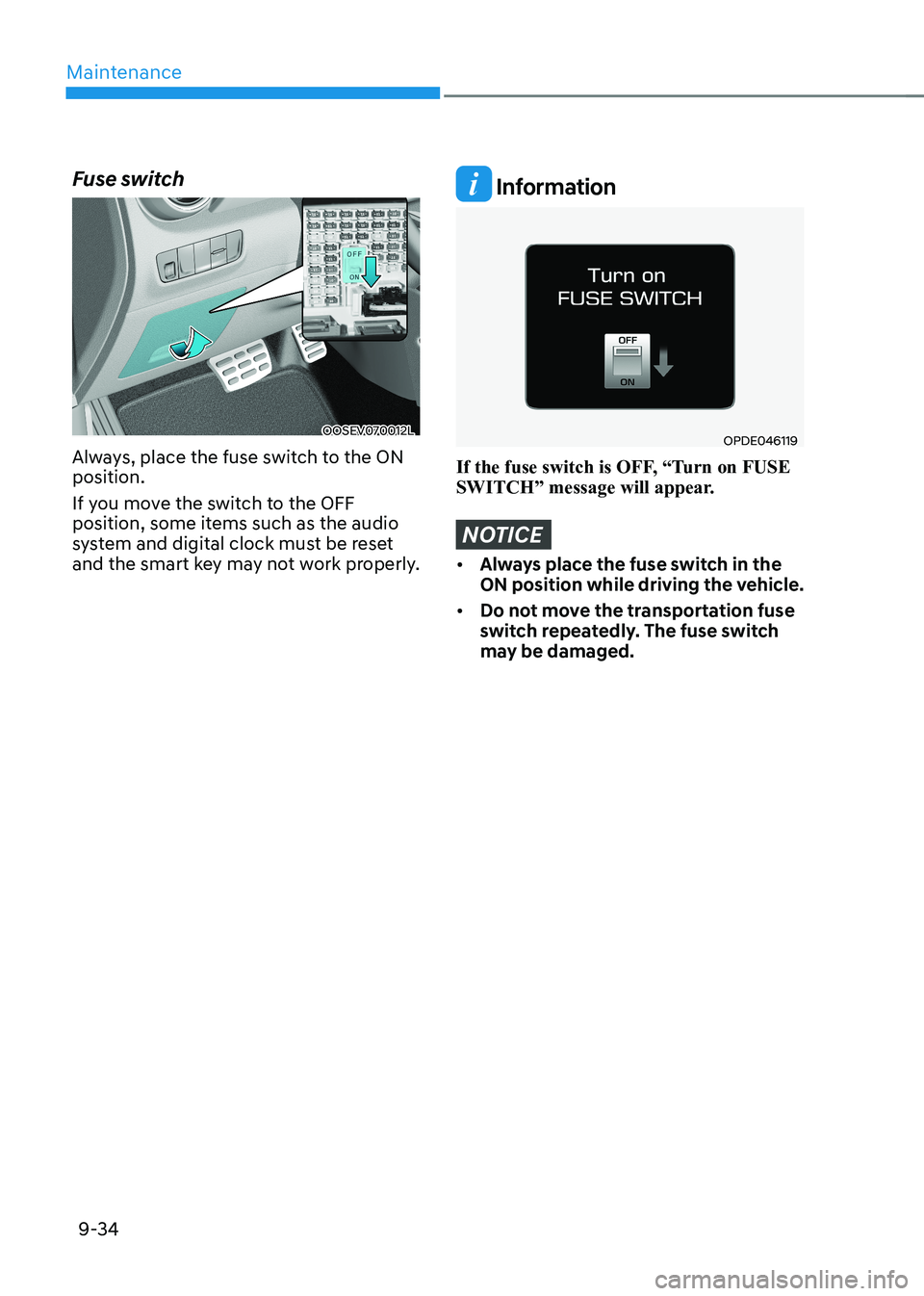
Fuse switch
OOSEV070012L
Always, place the fuse switch to the ON position.
If you move the switch to the OFF
position, some items such as the audio
system and digital clock must be reset
and the smart key may not work properly.
Information
OPDE046119
If the fuse switch is OFF, “Turn on FUSE
SWITCH” message will appear.
NOTICE
• Always place the fuse switch in the
ON position while driving the vehicle.
• Do not move the transportation fuse
switch repeatedly. The fuse switch
may be damaged.
Page 513 of 548
09
9-37
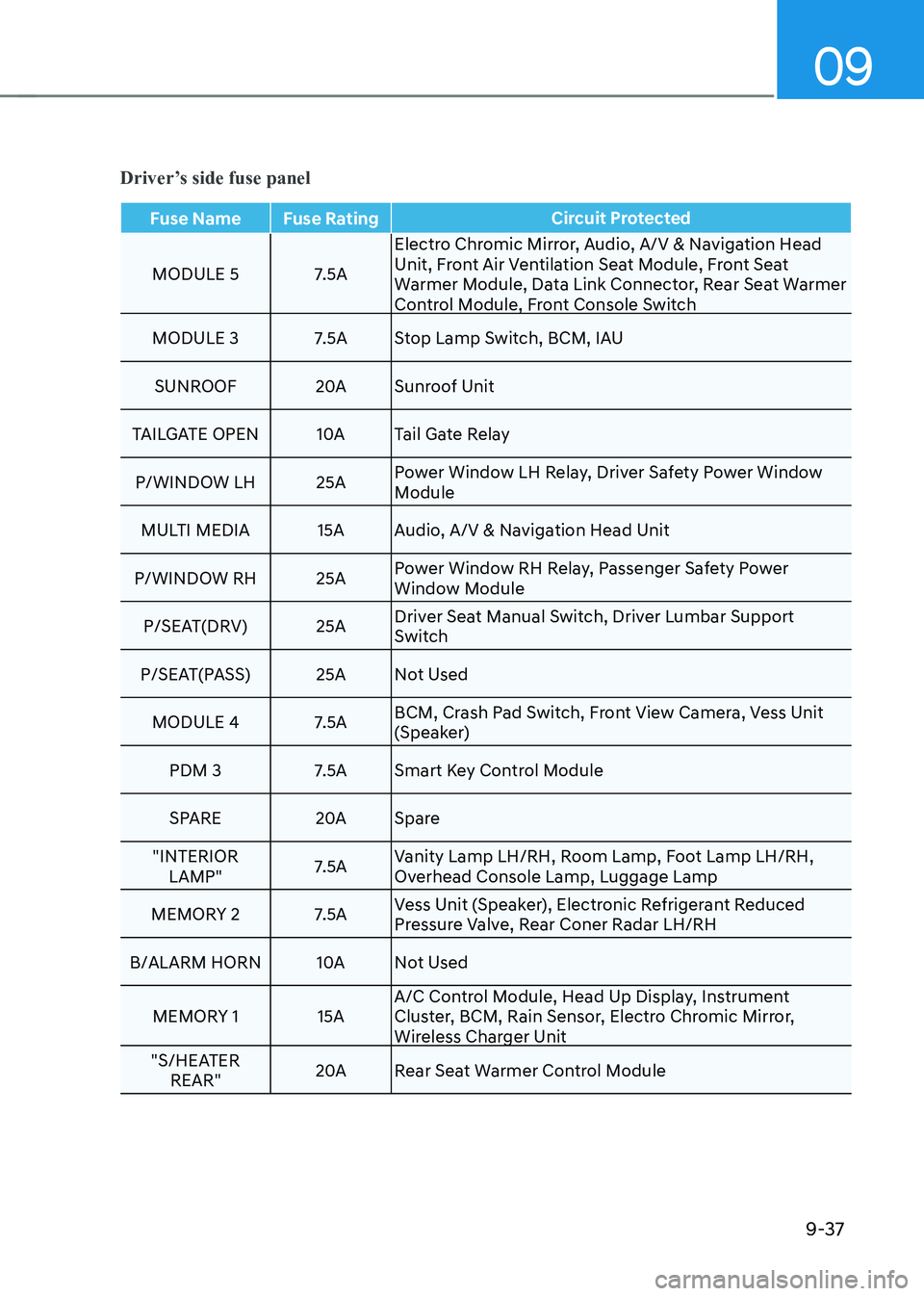
Driver’s side fuse panel
Fuse Name Fuse RatingCircuit Protected
MODULE 5 7.5AElectro Chromic Mirror, Audio, A/V & Navigation Head
Unit, Front Air Ventilation Seat Module, Front Seat
Warmer Module, Data Link Connector, Rear Seat Warmer
Control Module, Front Console Switch
MODULE 3 7.5A Stop Lamp Switch, BCM, IAU
SUNROOF 20ASunroof Unit
TAILGATE OpEN 10ATail Gate Relay
p/WINDOW LH 25A power Window LH Relay, Driver Safety power Window
Module
MULTI MEDIA 15A Audio, A/V & Navigation Head Unit
p/WINDOW RH 25A power Window RH Relay, passenger Safety power
Window Module
p/SEAT(DRV) 25A Driver Seat Manual Switch, Driver Lumbar Support
Switch
p/SEAT(pASS) 25A Not Used
MODULE 4 7.5A BCM, Crash pad Switch, Front View Camera, Vess Unit
(Speaker)
pDM 3 7.5A Smart Key Control Module
SpARE 20ASpare
"INTERIOR LAMp" 7.5AVanity Lamp LH/RH, Room Lamp, Foot Lamp LH/RH,
Overhead Console Lamp, Luggage Lamp
MEMORY 2 7.5A Vess Unit (Speaker), Electronic Refrigerant Reduced
pressure Valve, Rear Coner Radar LH/RH
B/ALARM HORN 10ANot Used
MEMORY 1 15A A/C Control Module, Head Up Display, Instrument
Cluster, BCM, Rain Sensor, Electro Chromic Mirror,
Wireless Charger Unit
"S/HEATER REAR" 20A
Rear Seat Warmer Control Module
Page 515 of 548
09
9-39
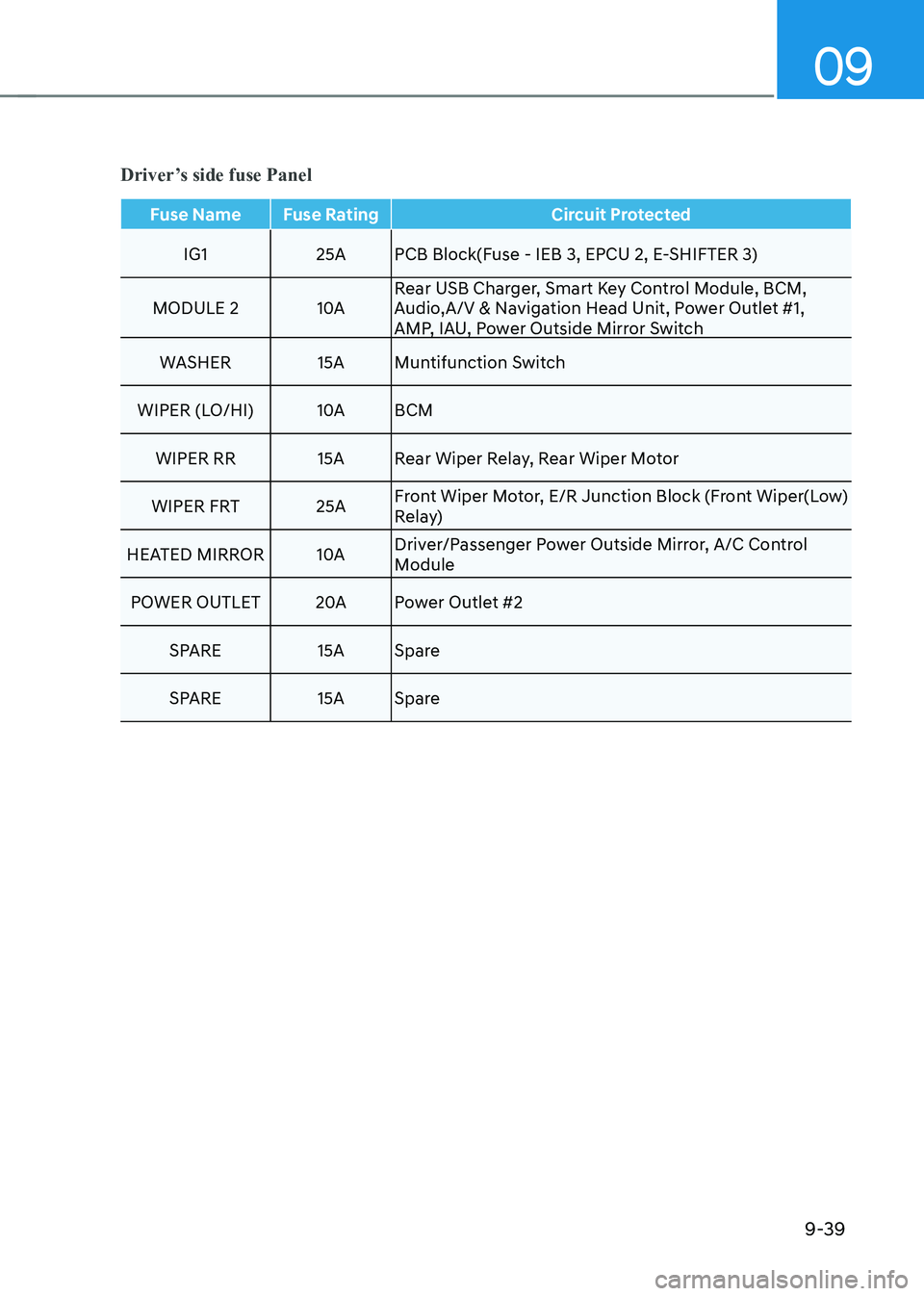
Fuse Name Fuse RatingCircuit Protected
IG1 25A pCB Block(Fuse - IEB 3, EpCU 2, E-SHIFTER 3)
MODULE 2 10ARear USB Charger, Smart Key Control Module, BCM,
Audio,A/V & Navigation Head Unit, power Outlet #1,
AMp, IAU, power Outside Mirror Switch
WASHER 15A Muntifunction Switch
WIpER (LO/HI) 10ABCM
WIpER RR 15A Rear Wiper Relay, Rear Wiper Motor
WIpER FRT 25A Front Wiper Motor, E/R Junction Block (Front Wiper(Low)
Relay)
HEATED MIRROR 10ADriver/passenger power Outside Mirror, A/C Control
Module
pOWER OUTLET 20Apower Outlet #2
SpARE 15A Spare
SpARE 15A Spare
Driver’s side fuse Panel
Page 541 of 548
Index
I-6
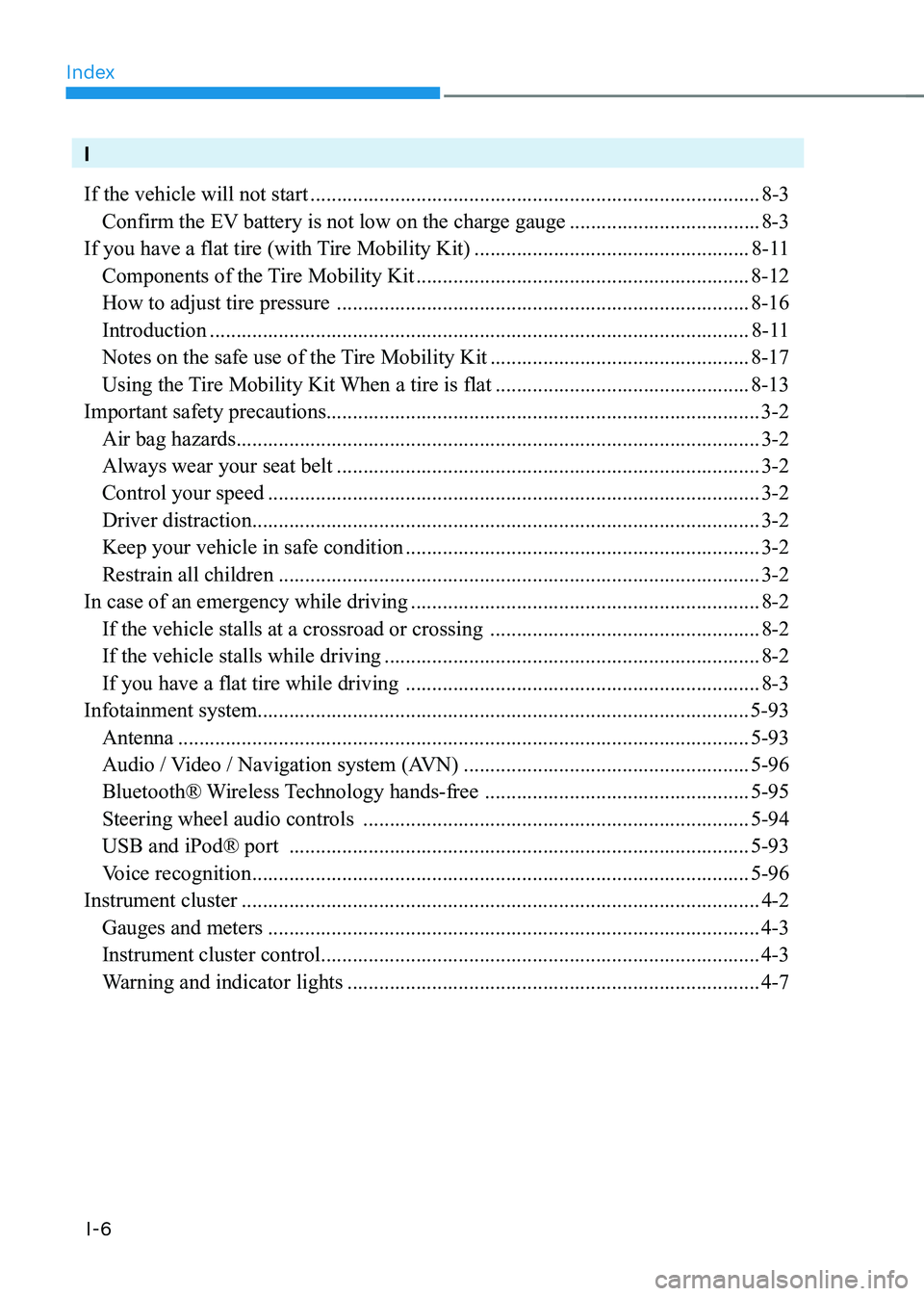
I If the vehicle will not start ..................................................................................... 8-3
Confirm the EV battery is not low on the charge gauge ....................................8-3
If you have a flat tire (with Tire Mobility Kit) ....................................................8-11
Components of the Tire Mobility Kit ............................................................... 8-12
How to adjust tire pressure .............................................................................. 8-16
Introduction ...................................................................................................... 8-11
Notes on the safe use of the Tire Mobility Kit .................................................8-17
Using the Tire Mobility Kit When a tire is flat ................................................8-13
Important safety precautions.................................................................................. 3-2
Air bag hazards ................................................................................................... 3-2
Always wear your seat belt ................................................................................ 3-2
Control your speed ............................................................................................. 3-2
Driver distraction ................................................................................................ 3-2
Keep your vehicle in safe condition ................................................................... 3-2
Restrain all children ........................................................................................... 3-2
In case of an emergency while driving .................................................................. 8-2
If the vehicle stalls at a crossroad or crossing ...................................................8-2
If the vehicle stalls while driving ....................................................................... 8-2
If you have a flat tire while driving ................................................................... 8-3
Infotainment system............................................................................................. 5-93 Antenna ............................................................................................................ 5-93
Audio / Video / Navigation system (AVN) ......................................................5-96
Bluetooth® Wireless Technology hands-free ..................................................5-95
Steering wheel audio controls ......................................................................... 5-94
USB and iPod® port ....................................................................................... 5-93
Voice recognition .............................................................................................. 5-96
Instrument cluster .................................................................................................. 4-2
Gauges and meters ............................................................................................. 4-3
Instrument cluster control ................................................................................... 4-3
Warning and indicator lights .............................................................................. 4-7