mirror HYUNDAI KONA EV 2022 User Guide
[x] Cancel search | Manufacturer: HYUNDAI, Model Year: 2022, Model line: KONA EV, Model: HYUNDAI KONA EV 2022Pages: 548, PDF Size: 49.14 MB
Page 205 of 548
05
5-21
Automatic-Dimming Night Vision Safety™
(NVS®) Mirror (if equipped)
The NVS® Mirror automatically helps
reduce glare by monitoring light levels in
the front and the rear of the vehicle. Any
object that obstructs either light sensor
will degrade the automatic dimming
control feature.
For more information regarding NVS®
mirrors and other applications, please
refer to the Gentex website:
www.gentex.com
Your mirror will automatically dim
upon detecting glare from the vehicles
traveling behind you.
The mirror defaults to the ON position
each time the vehicle is started.
Integrated HomeLink® Wireless Control System
The HomeLink® Wireless Control System
provides a convenient way to replace
up to three hand held radio-frequency
transmitters used to activate compatible
devices such as gate operators, garage
door openers, entry door locks, security
systems, and home lighting.
NOTICE
HomeLink® operates while the ignition
switch is in the ACC or ON position
for safety reasons. It is to prevent
unintentional security problems from
happening when the vehicle is parked
outside the garage.
WARNING
Before programming HomeLink® to a
garage door opener or gate operator,
make sure people and objects are out
of the way of the device to prevent
potential harm or damage. Do not
use the HomeLink® with any garage
door opener that lacks the safety
stop and reverse features required
by U.S. federal safety standards (this
includes any garage door opener model
manufactured before April 1, 1982).
A garage door that cannot detect an
object - signaling the door to stop and
reverse - does not meet current U.S.
federal safety standards. Using a garage
door opener without these features
increases the risk of serious injury or
death.
For more information, contact
HomeLink® at www.homelink.com, or
call Home-Link customer support at
1-800-355-3515.
It is also recommended that a new
battery be replaced in the handheld
transmitter of the device being trained
to HomeLink® for quicker training and
accurate transmission of the radio
frequency.
1. Programming HomeLink ®
The following steps show how to
program HomeLink. If you have any
questions or are having difficulty
programming your HomeLink buttons,
refer to the HomeLink website or call the
HomeLink customer support toll-free
number. Do this, before going back to
the dealer who sold you the car.
Page 208 of 548
Convenient features
5-24
3) Two-Way Communication
Programming (For select garage door
openers)
If your garage door opener has the
'myQ' logo on its side, your opener
likely has Two-Way Communication
capability. HomeLink has the capability
to establish Two-Way Communication
with your garage door opener. HomeLink
can receive and display "closing"
or "opening" status messages from
compatible garage door openers. At
any time, Home-Link can also recall
and display the last recorded status
communicated by the garage door
opener to indicate your garage door being "closed" or "opened".
To check if your garage door opener is
compatible with this feature, refer to
www.homelink.com/compatible/ Two-
way-Communication. If your garage
door opener has this functionality, AND
the Two-Way Communication indicators
(4), (6) in the mirror appear while the
garage door is opening/closing, then
no further steps are needed. Two-Way
Communication Programming is already
complete.
However, if your garage door opener
has this functionality, AND the Two-
Way Communication indicators (4), (6)
in the mirror DO NOT appear while the
garage door is opening/closing, use
the following instructions to enable this
functionality. 1. In your vehicle, press and hold the
programmed HomeLink button for 2
seconds, then release. Confirm that
the garage door is moving. AFTER it
stops, you will have one minute to
complete the following steps:
à A ladder and/or second person may
simplify the following steps.
2. On your garage door opener in your garage, locate the "Learn" button
(usually near where the hanging
antenna wire is attached to the garage
door opener). If there is difficulty
locating this button, reference the
device's owner's manual.
3. Press and release the "Learn" button.
4. A light on your garage door opener
may flash, and your Two-Way
Communication indicators (4), (6) in
your vehicle may flash, confirming
completion of the process.
5. Return to the vehicle and firmly press and release the programmed
HomeLink button to activate
your garage door. The Two-Way
Communication indicators (4), (6)
flash in orange when the door is
moving. Do not make any additional
button presses until AFTER the garage
door has come to a complete stop.
6. Your Two-Way Communication programming is now complete.
Information
If your garage door opener has Two-
Way Communication functionality,
it is possible for HomeLink to stop
functioning the garage door shortly
after initial programming, IF the Two-
Way Communication Programming
wasn’t properly completed. This
usually happens after the first 10 times
a programmed HomeLink button is
pressed. If you experience this, completing
the "Programming a New HomeLink
Button" and "Two-Way Communication
Programming" will restore door operation.
Page 210 of 548
Convenient features
5-26
•
If the indicator (4) flashes in Orange,
it indicates that the garage door is "Closing".
• The indicator (4) turns solid green
once the garage door has closed.
• If the indicator (6) flashes in Orange,
it indicates that the garage door is "Opening".
• The indicator (6) turns solid green
once the garage door has fully opened.
• If the indicator (4) or (6) does not
turn to green, it indicates that the
last status of garage door was not
received properly. The HomeLink
mirror tries to receive the last known
status of the garage door for a few seconds.
3) Recalling Garage Door Status
HomeLink mirror with Two-Way
Communication provides a way to view
the last stored message from the garage
door opener. In order to recall the last
known status of the last activated device,
press the buttons "1 and 2" OR "2 and 3"
simultaneously. • If the indicator (4) appears solid
Green, it indicates that the last
activated device was "closed"
properly.
• If the indicator (6) appears solid
Green, it indicates that the last
activated device was "open" properly.
3. Erasing HomeLink ®
Buttons
1) Erasing and Reprogramming a Single
HomeLink® Button:
1. Press and hold the desired HomeLink button you want to re-program. DO
NOT release the button.
2. The HomeLink indicator light (7) will illuminate solid green. Release the
button as soon as the HomeLink
indicator light (7) begins to flash
orange, usually about 20 seconds.
3. Proceed with the steps in the "Programming a New HomeLink
Button" section.
Information
If you do not complete the re-
programming of a new device to the
button, it will revert to the previously
stored programming.
Page 214 of 548
Convenient features
5-30
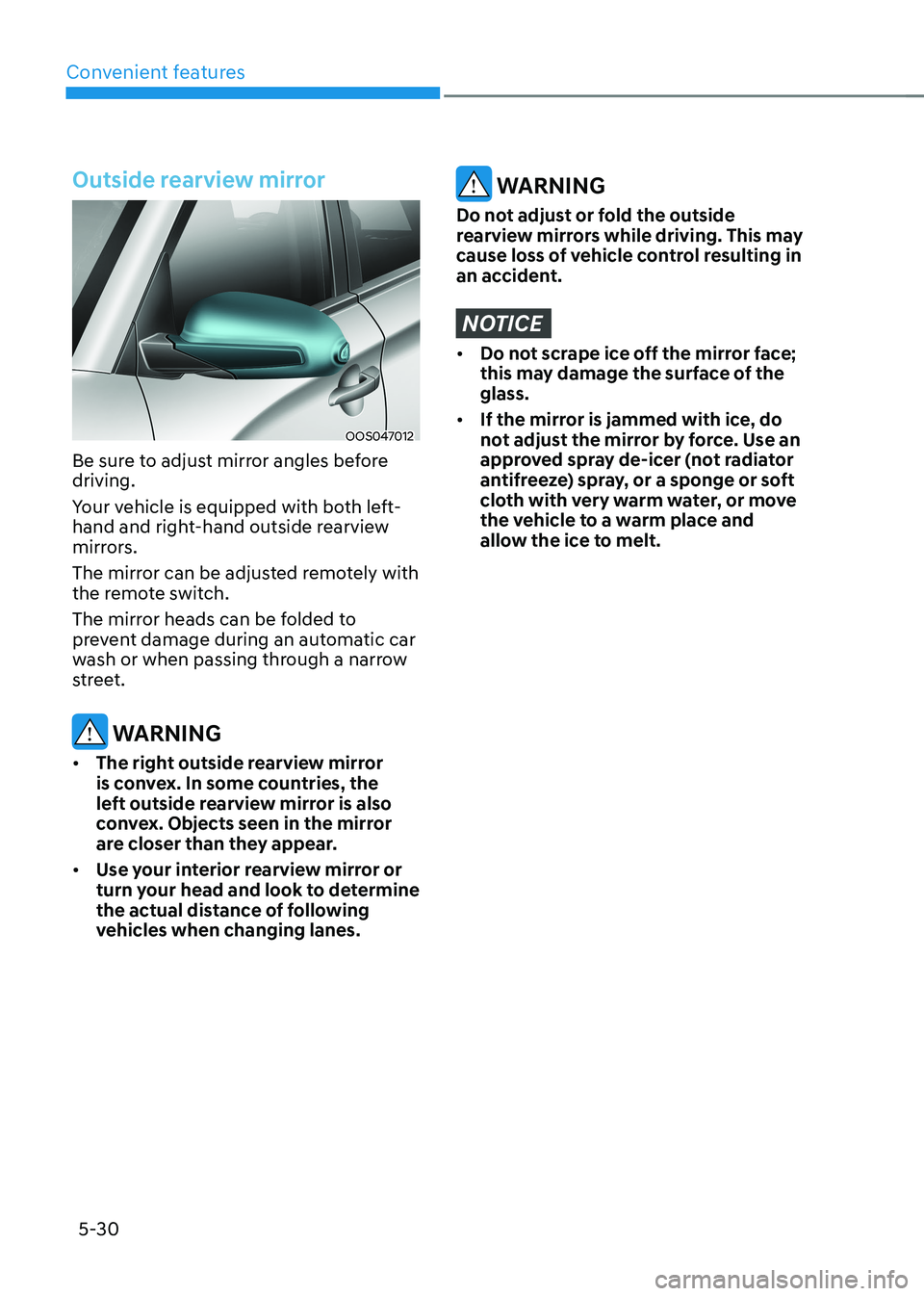
Outside rearview mirror
OOS047012
Be sure to adjust mirror angles before driving.
Your vehicle is equipped with both left-
hand and right-hand outside rearview
mirrors.
The mirror can be adjusted remotely with
the remote switch.
The mirror heads can be folded to
prevent damage during an automatic car
wash or when passing through a narrow
street.
WARNING
• The right outside rearview mirror
is convex. In some countries, the
left outside rearview mirror is also
convex. Objects seen in the mirror
are closer than they appear.
• Use your interior rearview mirror or
turn your head and look to determine
the actual distance of following
vehicles when changing lanes.
WARNING
Do not adjust or fold the outside
rearview mirrors while driving. This may
cause loss of vehicle control resulting in
an accident.
NOTICE
• Do not scrape ice off the mirror face;
this may damage the surface of the glass.
• If the mirror is jammed with ice, do
not adjust the mirror by force. Use an
approved spray de-icer (not radiator
antifreeze) spray, or a sponge or soft
cloth with very warm water, or move
the vehicle to a warm place and
allow the ice to melt.
Page 215 of 548
05
5-31
Adjusting the rearview mirrors
OOSEV040007L
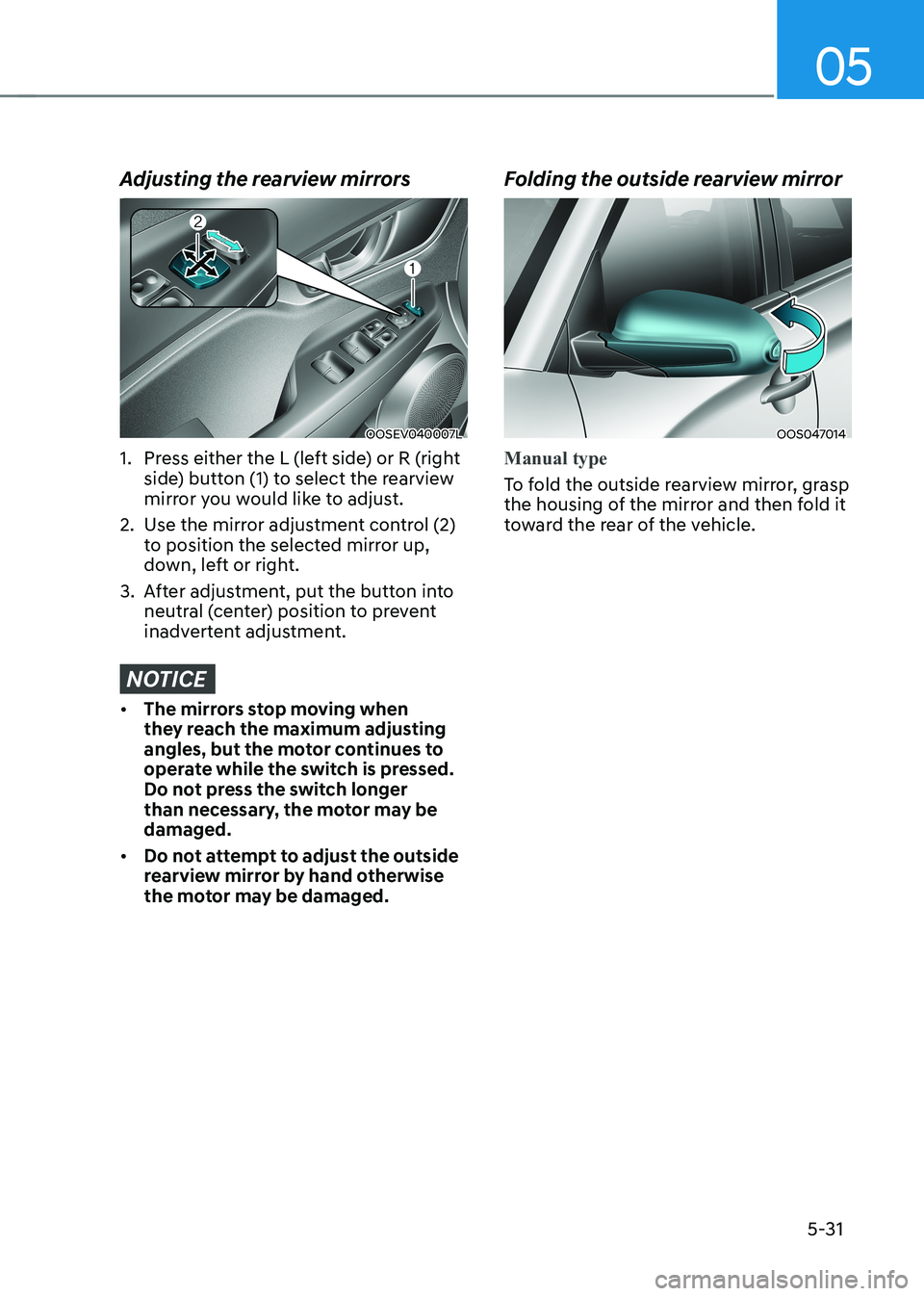
1. Press either the L (left side) or R (right side) button (1) to select the rearview
mirror you would like to adjust.
2. Use the mirror adjustment control (2) to position the selected mirror up,
down, left or right.
3. After adjustment, put the button into neutral (center) position to prevent
inadvertent adjustment.
NOTICE
• The mirrors stop moving when
they reach the maximum adjusting
angles, but the motor continues to
operate while the switch is pressed.
Do not press the switch longer
than necessary, the motor may be damaged.
• Do not attempt to adjust the outside
rearview mirror by hand otherwise
the motor may be damaged. Folding the outside rearview mirror
OOS047014
Manual type
To fold the outside rearview mirror, grasp
the housing of the mirror and then fold it
toward the rear of the vehicle.
Page 216 of 548
Convenient features
5-32
OOS047015
Electric type (if equipped)
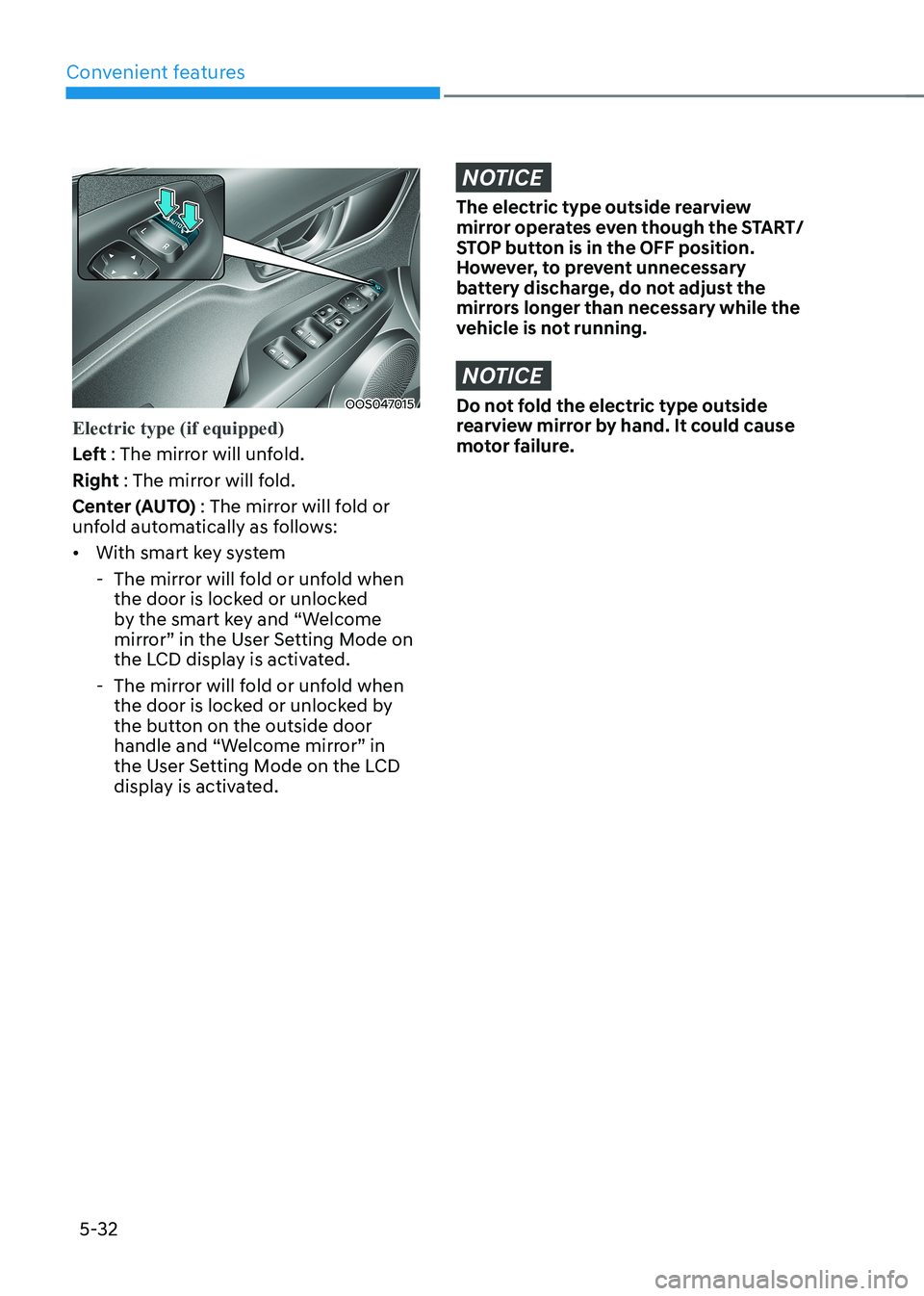
Left : The mirror will unfold.
Right : The mirror will fold.
Center (AUTO) : The mirror will fold or
unfold automatically as follows: • With smart key system
- The mirror will fold or unfold when the door is locked or unlocked
by the smart key and “Welcome
mirror” in the User Setting Mode on
the LCD display is activated.
- The mirror will fold or unfold when the door is locked or unlocked by
the button on the outside door
handle and “Welcome mirror” in
the User Setting Mode on the LCD
display is activated.
NOTICE
The electric type outside rearview
mirror operates even though the START/
STOP button is in the OFF position.
However, to prevent unnecessary
battery discharge, do not adjust the
mirrors longer than necessary while the
vehicle is not running.
NOTICE
Do not fold the electric type outside
rearview mirror by hand. It could cause
motor failure.
Page 238 of 548
Convenient features
5-54
Luggage compartment lamp
OOSEV040025L
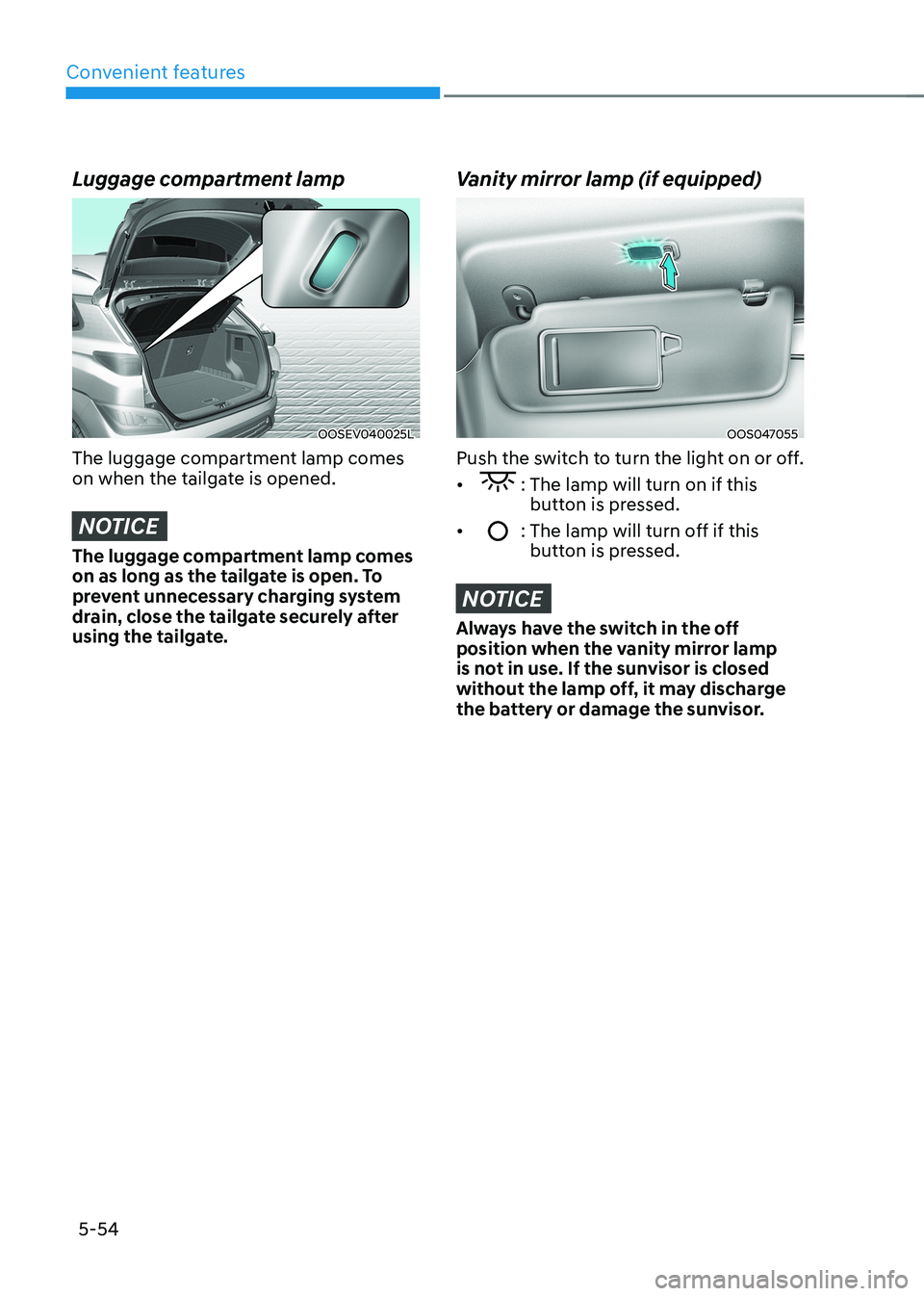
The luggage compartment lamp comes
on when the tailgate is opened.
NOTICE
The luggage compartment lamp comes
on as long as the tailgate is open. To
prevent unnecessary charging system
drain, close the tailgate securely after
using the tailgate.
Vanity mirror lamp (if equipped)
OOS047055
Push the switch to turn the light on or off. •
: The lamp will turn on if this button is pressed.
•
: The lamp will turn off if this button is pressed.
NOTICE
Always have the switch in the off
position when the vanity mirror lamp
is not in use. If the sunvisor is closed
without the lamp off, it may discharge
the battery or damage the sunvisor.
Page 241 of 548
05
5-57
Limitations of High Beam Assist
High Beam Assist may not work properly
in the following situations: •
Light from a vehicle is not detected
because of lamp damage, or because
it is hidden from sight, etc.
• Headlamp of a vehicle is covered with
dust, snow or water.
• A vehicle’s headlamps are off but the
fog lamps are on and etc.
• There is a lamp that has a similar
shape as a vehicle’s lamp.
• Headlamps have been damaged or
not repaired properly.
• Headlamps are not aimed properly.
• Driving on a narrow curved road,
rough road, uphill or downhill.
• Vehicle in front is partially visible on a
crossroad or curved road.
• There is a traffic light, reflecting sign,
flashing sign or mirror ahead.
• There is a temporary reflector or flash
ahead (construction area).
• The road conditions are bad such as
being wet, iced or covered with snow.
• A vehicle suddenly appears from a
curve.
• The vehicle is tilted from a flat tire or
is being towed.
• Light from a vehicle is not detected
because of exhaust fume, smoke, fog,
snow, etc.
NOTICE
For more details on the limitations
of the front view camera, refer to
“Forward Collision-Avoidance Assist
(FCA)” section in chapter 7.
WARNING
• At times, High Beam Assist may
not work properly. The system is
for your convenience only. It is the
responsibility of the driver for safe
driving practices and always check
the road conditions for your safety.
• When High Beam Assist does
not operate normally, change the headlamp position manually
between high beam and low beam.
Page 260 of 548
Convenient features
5 -76
WARNING
Windshield heating
Do not use the (
) or () position
during cooling operation in extremely
humid weather. The difference between
the temperature of the outside air and
that of the windshield could cause the
outer surface of the windshield to fog
up, causing loss of visibility. In this case,
set the mode selection knob or button
to the (
) position and fan speed
control knob or button to lower speed. • For maximum windshield defrosting,
set the temperature control knob to
the highest temperature setting and
the fan control knob to the highest fan
speed. Select the front defrost button
on the climate control display.
• If warm air to the floor is desired while
defrosting or defogging, set the mode
to the floor-defrost position.
• Before driving, clear all snow and ice
from the windshield, rear window,
outside rear view mirrors, and all side
windows.
• Clear all snow and ice from the
hood and air inlet in the cowl grill
to improve heater and defroster
efficiency and to reduce the
probability of fogging up inside of the windshield.
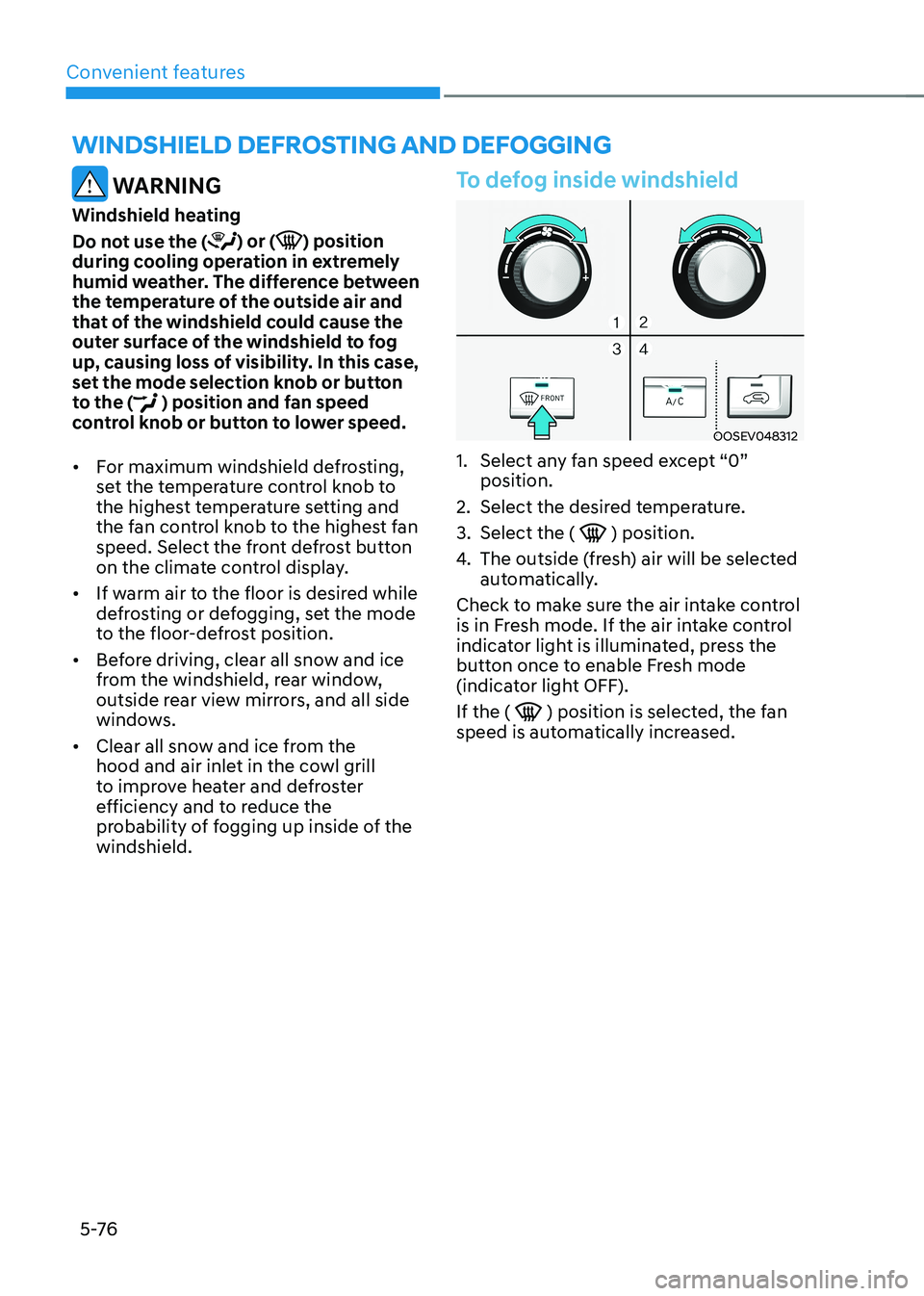
To defog inside windshield
OOSEV048312
1. Select any fan speed except “0” position.
2. Select the desired temperature.
3. Select the (
) position.
4. The outside (fresh) air will be selected
automatically.
Check to make sure the air intake control
is in Fresh mode. If the air intake control
indicator light is illuminated, press the
button once to enable Fresh mode
(indicator light OFF). If the (
) position is selected, the fan
speed is automatically increased.
winDshielD DeFrosting AnD DeFogging
Page 266 of 548
Convenient features
5-82
Sunglasses holder (if equipped)
OOSEV040029L
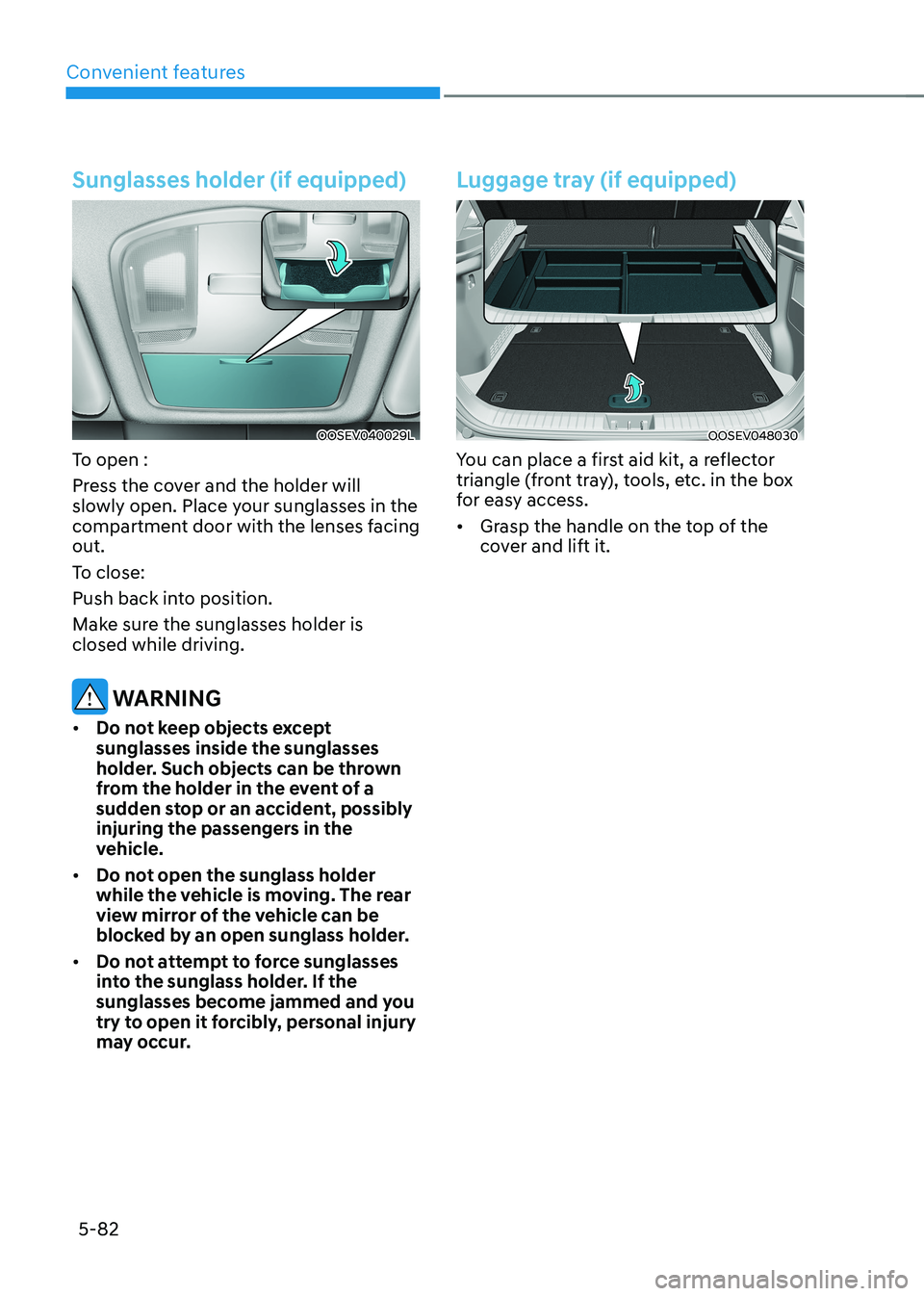
To open :
Press the cover and the holder will
slowly open. Place your sunglasses in the
compartment door with the lenses facing out.
To close:
Push back into position.
Make sure the sunglasses holder is closed while driving.
WARNING
• Do not keep objects except sunglasses inside the sunglasses
holder. Such objects can be thrown
from the holder in the event of a
sudden stop or an accident, possibly
injuring the passengers in the
vehicle.
• Do not open the sunglass holder
while the vehicle is moving. The rear
view mirror of the vehicle can be
blocked by an open sunglass holder.
• Do not attempt to force sunglasses
into the sunglass holder. If the
sunglasses become jammed and you
try to open it forcibly, personal injury
may occur.
Luggage tray (if equipped)
OOSEV048030
You can place a first aid kit, a reflector
triangle (front tray), tools, etc. in the box
for easy access. • Grasp the handle on the top of the
cover and lift it.