wheel HYUNDAI KONA EV 2022 Owner's Manual
[x] Cancel search | Manufacturer: HYUNDAI, Model Year: 2022, Model line: KONA EV, Model: HYUNDAI KONA EV 2022Pages: 548, PDF Size: 49.14 MB
Page 163 of 548
Instrument cluster
4-20
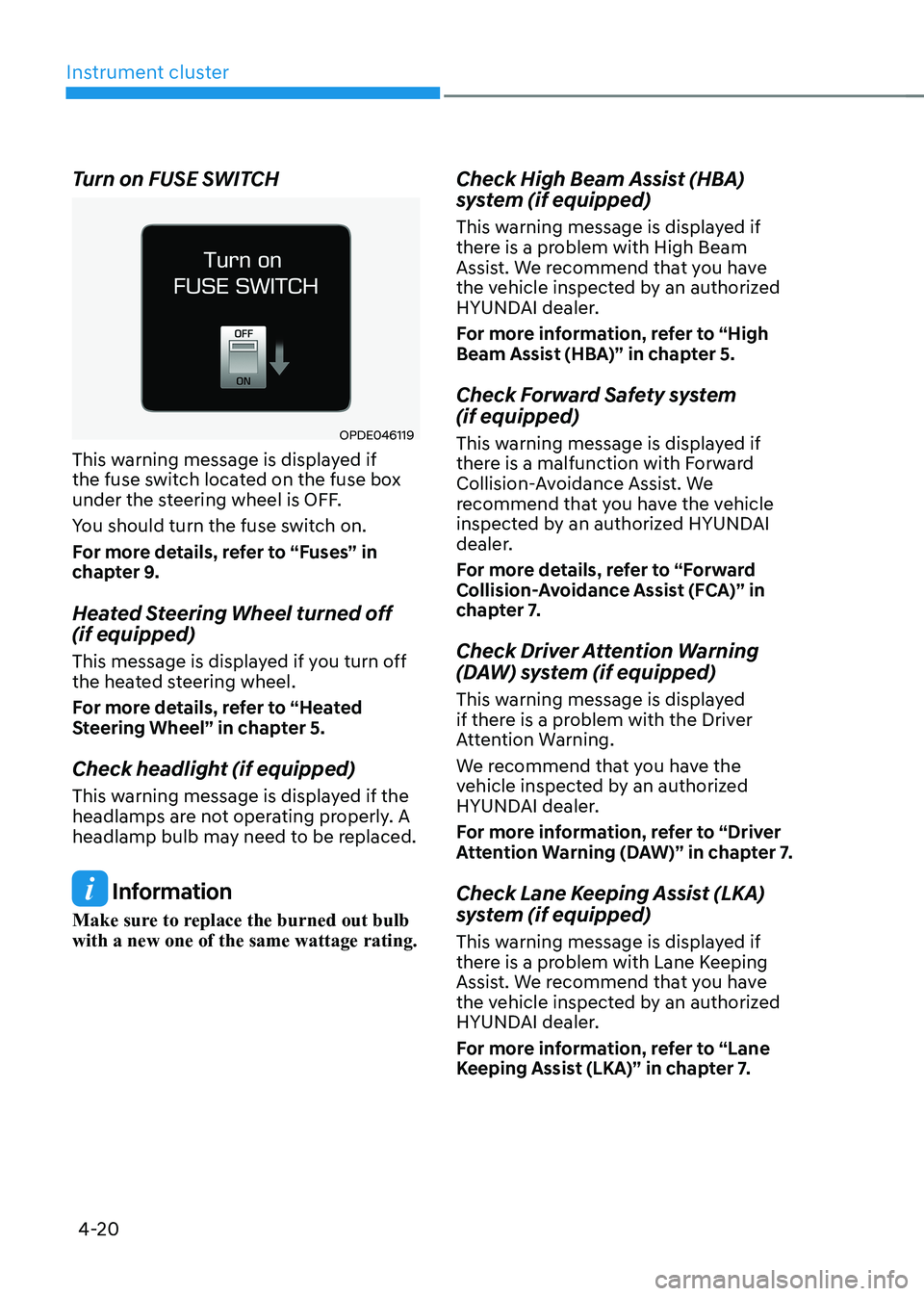
Turn on FUSE SWITCH
OPDE046119
This warning message is displayed if
the fuse switch located on the fuse box
under the steering wheel is OFF.
You should turn the fuse switch on.
For more details, refer to “Fuses” in
chapter 9.
Heated Steering Wheel turned off (if equipped)
This message is displayed if you turn off
the heated steering wheel.
For more details, refer to “Heated
Steering Wheel” in chapter 5.
Check headlight (if equipped)
This warning message is displayed if the
headlamps are not operating properly. A
headlamp bulb may need to be replaced.
Information
Make sure to replace the burned out bulb with a new one of the same wattage rating. Check High Beam Assist (HBA)
system (if equipped)
This warning message is displayed if
there is a problem with High Beam
Assist. We recommend that you have
the vehicle inspected by an authorized
HYUNDAI dealer.
For more information, refer to “High
Beam Assist (HBA)” in chapter 5.
Check Forward Safety system (if equipped)
This warning message is displayed if
there is a malfunction with Forward
Collision-Avoidance Assist. We
recommend that you have the vehicle
inspected by an authorized HYUNDAI
dealer.
For more details, refer to “Forward
Collision-Avoidance Assist (FCA)” in
chapter 7.
Check Driver Attention Warning
(DAW) system (if equipped)
This warning message is displayed
if there is a problem with the Driver
Attention Warning.
We recommend that you have the
vehicle inspected by an authorized
HYUNDAI dealer.
For more information, refer to “Driver
Attention Warning (DAW)” in chapter 7.
Check Lane Keeping Assist (LKA)
system (if equipped)
This warning message is displayed if
there is a problem with Lane Keeping
Assist. We recommend that you have
the vehicle inspected by an authorized
HYUNDAI dealer.
For more information, refer to “Lane
Keeping Assist (LKA)” in chapter 7.
Page 182 of 548
04
4-39
trIp computer
The trip computer is a microcomputer-
controlled driver information system that
displays information related to driving.
Information
Some driving information stored in the
trip computer resets if the battery is disconnected.
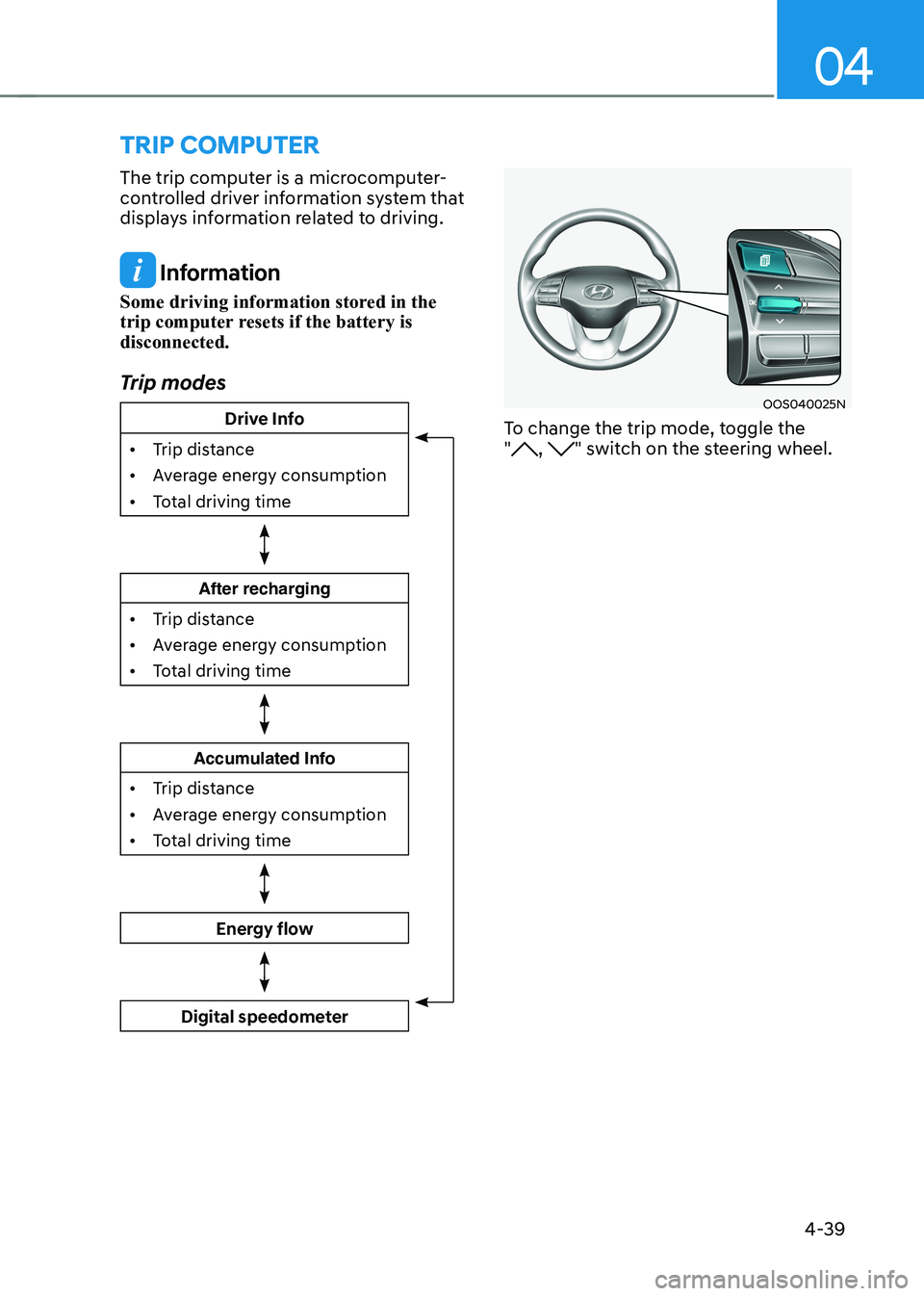
Trip modes
Drive Info
• Trip distance
• Average energy consumption
• Total driving time
After recharging
• Trip distance
• Average energy consumption
• Total driving time
Accumulated Info
• Trip distance
• Average energy consumption
• Total driving time
Energy flow
Digital speedometer
OOS040025N
To change the trip mode, toggle the "
, " switch on the steering wheel.
Page 183 of 548
Instrument cluster
4-40
Drive Info
OOSEV040515L
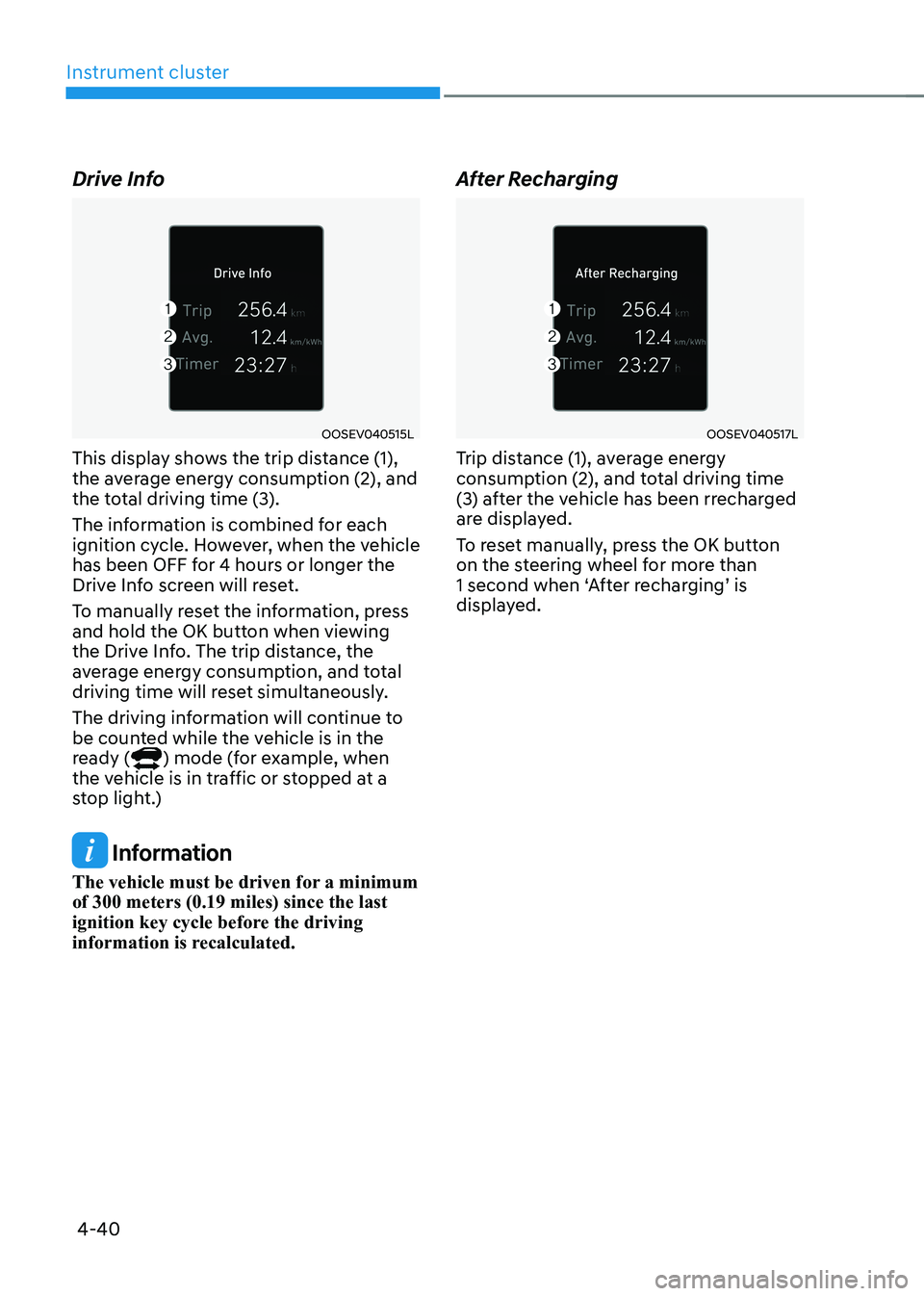
This display shows the trip distance (1),
the average energy consumption (2), and
the total driving time (3).
The information is combined for each
ignition cycle. However, when the vehicle
has been OFF for 4 hours or longer the
Drive Info screen will reset.
To manually reset the information, press
and hold the OK button when viewing
the Drive Info. The trip distance, the
average energy consumption, and total
driving time will reset simultaneously.
The driving information will continue to
be counted while the vehicle is in the
ready (
) mode (for example, when
the vehicle is in traffic or stopped at a
stop light.)
Information
The vehicle must be driven for a minimum of 300 meters (0.19 miles) since the last
ignition key cycle before the driving
information is recalculated. After Recharging
OOSEV040517L
Trip distance (1), average energy
consumption (2), and total driving time
(3) after the vehicle has been rrecharged
are displayed.
To reset manually, press the OK button
on the steering wheel for more than
1 second when ‘After recharging’ is
displayed.
Page 185 of 548
5
Accessing your vehicle ..................................................................................... 5-4
Smart key .................................................................................................................... 5-4
Immobilizer system ...................................................................................................... 5-9
Door locks .................................................................................................................. 5-10
Operating door locks from outside the vehicle........................................................ 5-10
Operating door locks from inside the vehicle ...........................................................5-11
Auto door lock/unlock features..................................................................................5-13
Child-protector rear door locks ................................................................................. 5-14
Rear Occupant Alert (ROA) ....................................................................................... 5-14
Theft-alarm system .......................................................................................... 5-15
Steering wheel ................................................................................................. 5-16
Electric power steering (EPS) .................................................................................... 5-16
Tilt steering/Telescopic steering ................................................................................ 5-17
Heated steering wheel ............................................................................................... 5-18
Horn............................................................................................................................. 5-18
Mirrors .............................................................................................................. 5-19
Inside rearview mirror ................................................................................................ 5-19
Outside rearview mirror ............................................................................................. 5-30
Windows .......................................................................................................... 5-33
Power windows .......................................................................................................... 5-33
Sunroof ............................................................................................................. 5-37
Sunroof opening and closing .................................................................................... 5-38
Sliding the sunroof ..................................................................................................... 5-38
Tilting the sunroof ...................................................................................................... 5-39
Sunshade .................................................................................................................... 5-39
Resetting the sunroof ................................................................................................ 5-39
Sunroof open warning .............................................................................................. 5-40
Exterior features ............................................................................................... 5-41
Hood ............................................................................................................................ 5-41
Tailgate ........................................................................................................................ 5-43
Charging door ............................................................................................................. 5-45
Head Up Display (HUD) .................................................................................. 5-46
Precautions while using the head up display ..........................................................5-46
Head Up Display ON/OFF .......................................................................................... 5-47
Head Up Display Information .................................................................................... 5-47
Head Up Display Setting ............................................................................................ 5-47
5. Convenient features
Page 187 of 548
5
Interior features .............................................................................................. 5-84
Cup holder ................................................................................................................. 5-84
Sunvisor ...................................................................................................................... 5-85
Power outlet ............................................................................................................... 5-85
USB charger ............................................................................................................... 5-86
Wireless cellular phone charging system .................................................................5-87
Clock .......................................................................................................................... 5-89
Clothes hanger .......................................................................................................... 5-89
Floor mat anchor(s) ................................................................................................... 5-90
Luggage net (holder) .................................................................................................. 5-91
Cargo area cover ........................................................................................................ 5-91
Exterior features .............................................................................................. 5-92
Roof rack ..................................................................................................................... 5-92
Infotainment system ....................................................................................... 5-93
USB and iPod ® port ....................................................................................................5-93
Antenna ....................................................................................................................... 5-93
Steering wheel audio controls ................................................................................. 5-94
Bluetooth ® Wireless Technology hands-free ........................................................... 5-95
Voice recognition ...................................................................................................... 5-96
Audio / Video / Navigation system (AVN) ................................................................5-96
5. Convenient features
Page 200 of 548
Convenient features
5-16
steering wheel
Electric power steering (EPS)
The system assists you with steering
the vehicle. If the vehicle is off or if
the power steering system becomes
inoperative, the vehicle may still be
steered, but it will require increased
steering effort.
Also, the steering effort becomes heavier
as the vehicle’s speed increases and
becomes lighter as the vehicle’s speed
decreases for better control of the
steering wheel.
Should you notice any change in the
effort required to steer during normal
vehicle operation, we recommend that
the system be checked by an authorized
HYUNDAI dealer.
NOTICE
• If the Electric Power Steering System
does not operate normally, the
warning light (
) will illuminate
or blink on the instrument cluster.
The steering wheel may become
difficult to control or operate. We
recommend to contact an authorized
HYUNDAI dealer to have the system
checked as soon as possible.
• When abnormality is detected in
the electric power steering system,
to prevent a deadly accident, the
steering assist function will stop. At
this time, the warning light turns on
or blinks on the cluster. The steering
wheel may become difficult to
control or operate. Have your vehicle
checked immediately, after moving
the vehicle to a safe zone.
Information
The following symptoms may occur during normal vehicle operation: • The steering effort may be high
immediately after placing the START/
STOP button in the ON position. This happens as the system performs
the EPS system diagnostics. When
the diagnostics are completed, the
steering wheel will return to its normal condition.
• When the battery voltage is low, you
might have to put more steering effort.
However, it is a temporary condition so
that it will return to normal condition
after charging the battery.
• A click noise may be heard from the
EPS relay after the START/STOP
button is placed in the ON or OFF position.
• Motor noise may be heard when the
vehicle is at a stop or at a low driving speed.
• When you operate the steering wheel
in low temperatures, abnormal noise
may occur. If the temperature rises, the
noise will disappear. This is a normal condition.
• When the vehicle is stationary, if you turn the steering wheel all the way
to the left or right continuously, the
steering wheel effort increases. This
is not a system malfunction. As time passes, the steering wheel effort will
return to its normal condition.
Page 201 of 548
05
5-17
Tilt steering/Telescopic steering
WARNING
Never adjust the steering wheel while
driving. You may lose steering control
and cause severe personal injury, death
or accidents.
Information
After adjustment, sometimes the lock-
release lever may not lock the steering wheel.
It is not a malfunction. This occurs when
two gears are not engaged correctly. In this case, adjust the steering wheel again and then lock the steering wheel.OOS047006
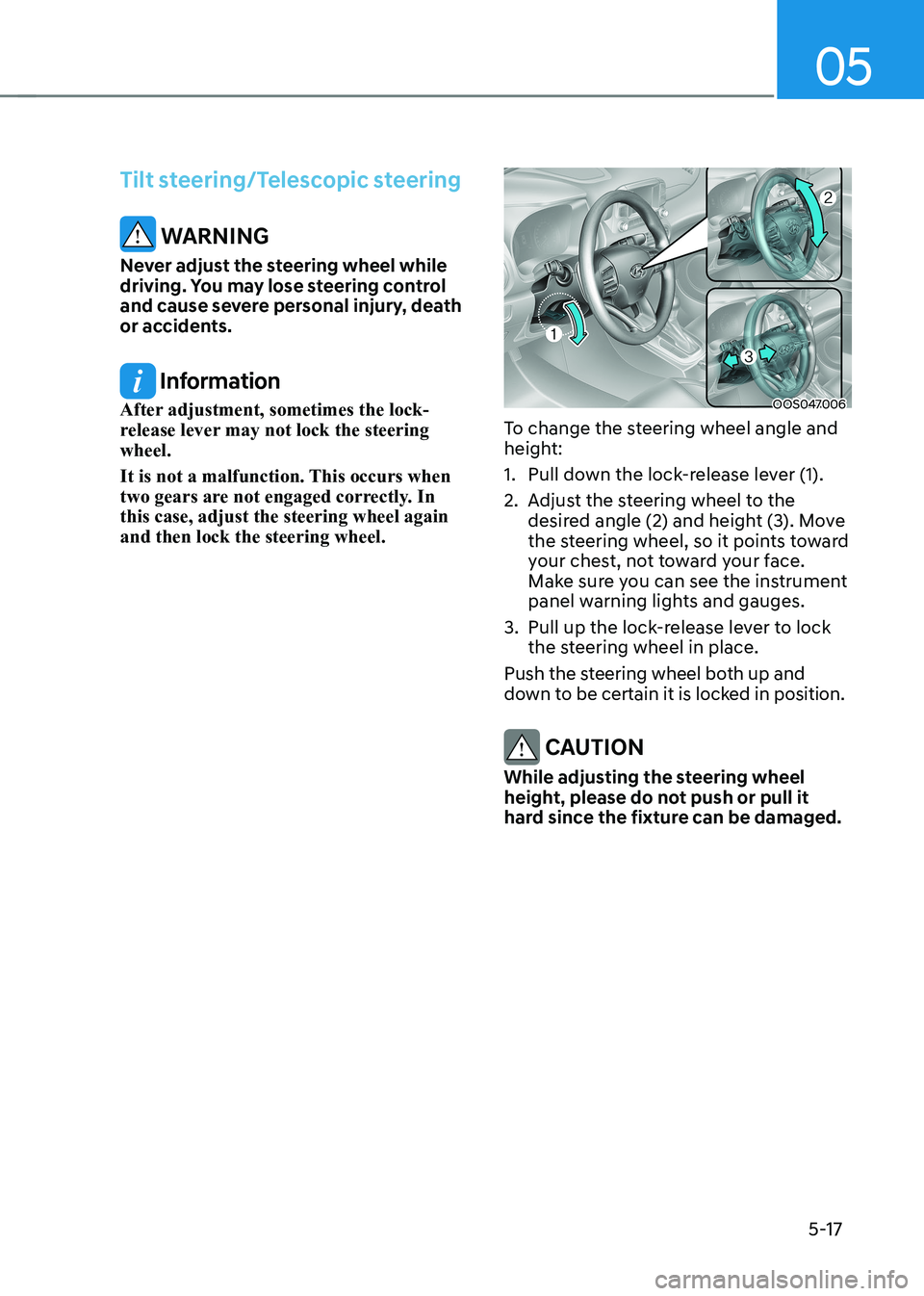
To change the steering wheel angle and
height:
1. Pull down the lock-release lever (1).
2. Adjust the steering wheel to the desired angle (2) and height (3). Move
the steering wheel, so it points toward
your chest, not toward your face.
Make sure you can see the instrument
panel warning lights and gauges.
3. Pull up the lock-release lever to lock the steering wheel in place.
Push the steering wheel both up and
down to be certain it is locked in position.
CAUTION
While adjusting the steering wheel
height, please do not push or pull it
hard since the fixture can be damaged.
Page 202 of 548
Convenient features
5-18
Heated steering wheel (if equipped)
OOSEV040004L
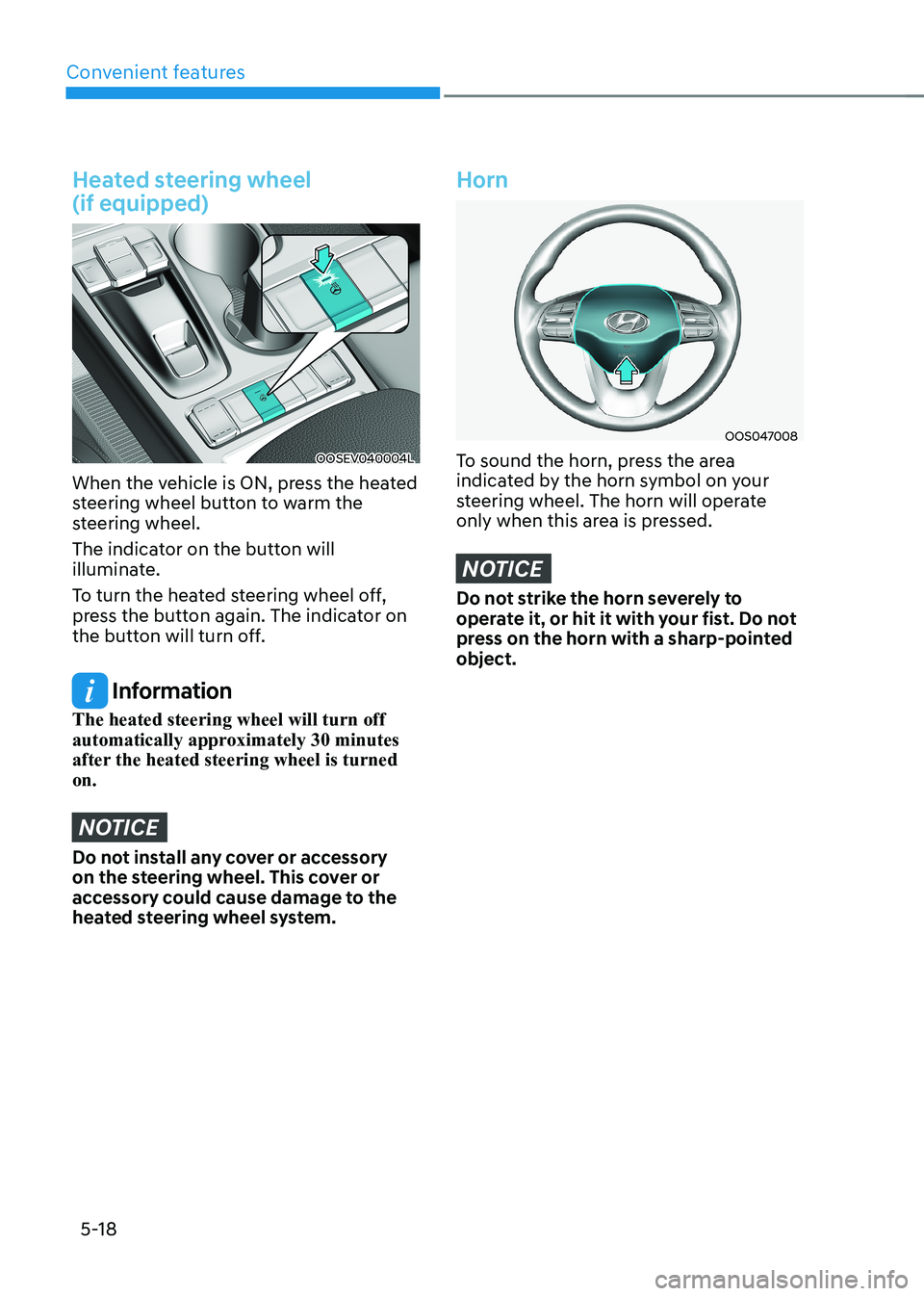
When the vehicle is ON, press the heated
steering wheel button to warm the
steering wheel.
The indicator on the button will
illuminate.
To turn the heated steering wheel off,
press the button again. The indicator on
the button will turn off.
Information
The heated steering wheel will turn off
automatically approximately 30 minutes
after the heated steering wheel is turned on.
NOTICE
Do not install any cover or accessory
on the steering wheel. This cover or
accessory could cause damage to the
heated steering wheel system.
Horn
OOS047008
To sound the horn, press the area
indicated by the horn symbol on your
steering wheel. The horn will operate
only when this area is pressed.
NOTICE
Do not strike the horn severely to
operate it, or hit it with your fist. Do not
press on the horn with a sharp-pointed object.
Page 278 of 548
Convenient features
5-94
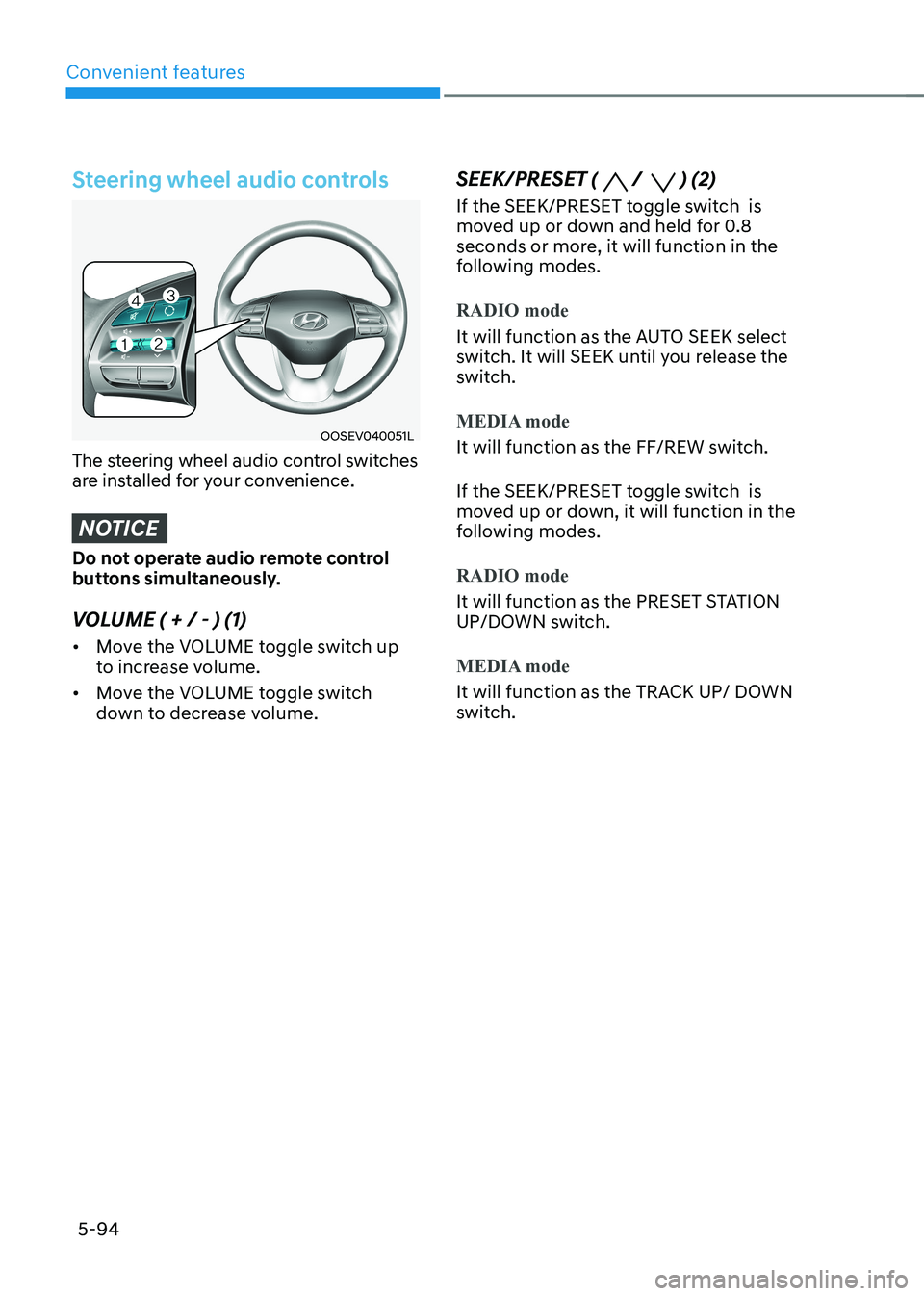
Steering wheel audio controls
OOSEV040051L
The steering wheel audio control switches
are installed for your convenience.
NOTICE
Do not operate audio remote control
buttons simultaneously.
VOLUME ( + / - ) (1) • Move the VOLUME toggle switch up
to increase volume.
• Move the VOLUME toggle switch
down to decrease volume. SEEK/PRESET (
/ ) (2)
If the SEEK/PRESET toggle switch is
moved up or down and held for 0.8
seconds or more, it will function in the
following modes.
RADIO mode
It will function as the AUTO SEEK select
switch. It will SEEK until you release the
switch.
MEDIA mode
It will function as the FF/REW switch.
If the SEEK/PRESET toggle switch is
moved up or down, it will function in the
following modes.
RADIO mode
It will function as the PRESET STATION
UP/DOWN switch.
MEDIA mode
It will function as the TRACK UP/ DOWN
switch.
Page 283 of 548
06
6-3
Before entering the vehicle
• Be sure all windows, outside mirror(s),
and outside lights are clean and
unobstructed.
• Remove frost, snow, or ice.
• Visually check the tires for uneven
wear and damage.
• Check under the vehicle for any sign
of leaks.
• Be sure there are no obstacles behind
you if you intend to back up.
Before starting
• Make sure the hood, the tailgate, and
the doors are securely closed and
locked.
• Adjust the position of the seat and
steering wheel.
• Adjust the inside and outside rearview
mirrors.
• Verify all the lights work.
• Fasten your seat belt. Check that all
passengers have fastened their seat belt.
• Check the gauges and indicators
in the instrument panel and the
messages on the instrument display
when the START/STOP button is in the ON position.
• Check that any items you are carrying
are stored properly or fastened down
securely.
WARNING
To reduce the risk of SERIOUS INJURY or
DEATH, take the following precautions: • ALWAYS wear your seat belt. All
passengers must be properly belted
whenever the vehicle is moving.
For more information, refer to “Seat
Belts” in chapter 3.
• Always drive defensively. Assume
other drivers or pedestrians may be
careless and make mistakes.
• Stay focused on the task of driving.
Driver distraction can cause
accidents.
• Leave plenty of space between you
and the vehicle in front of you.
WARNING
NEVER drink or take drugs and drive. Drinking or taking drugs and driving
is dangerous and may result in an
accident and SERIOUS INJURY or
DEATH. Drunk driving is the number one
contributor to the highway death
toll each year. Even a small amount
of alcohol will affect your reflexes,
perceptions and judgment. Just
one drink can reduce your ability to
respond to changing conditions and
emergencies and your reaction time
gets worse with each additional drink.
Driving while under the influence
of drugs is as dangerous or more
dangerous than driving under the
influence of alcohol.
You are much more likely to have a
serious accident if you drink or take
drugs and drive. If you are drinking or
taking drugs, don’t drive. Do not ride
with a driver who has been drinking
or taking drugs. Choose a designated
driver or call a taxi.
BEFORE DRIVING