warning HYUNDAI KONA EV 2023 Owners Manual
[x] Cancel search | Manufacturer: HYUNDAI, Model Year: 2023, Model line: KONA EV, Model: HYUNDAI KONA EV 2023Pages: 548, PDF Size: 49.14 MB
Page 266 of 548
Convenient features
5-82
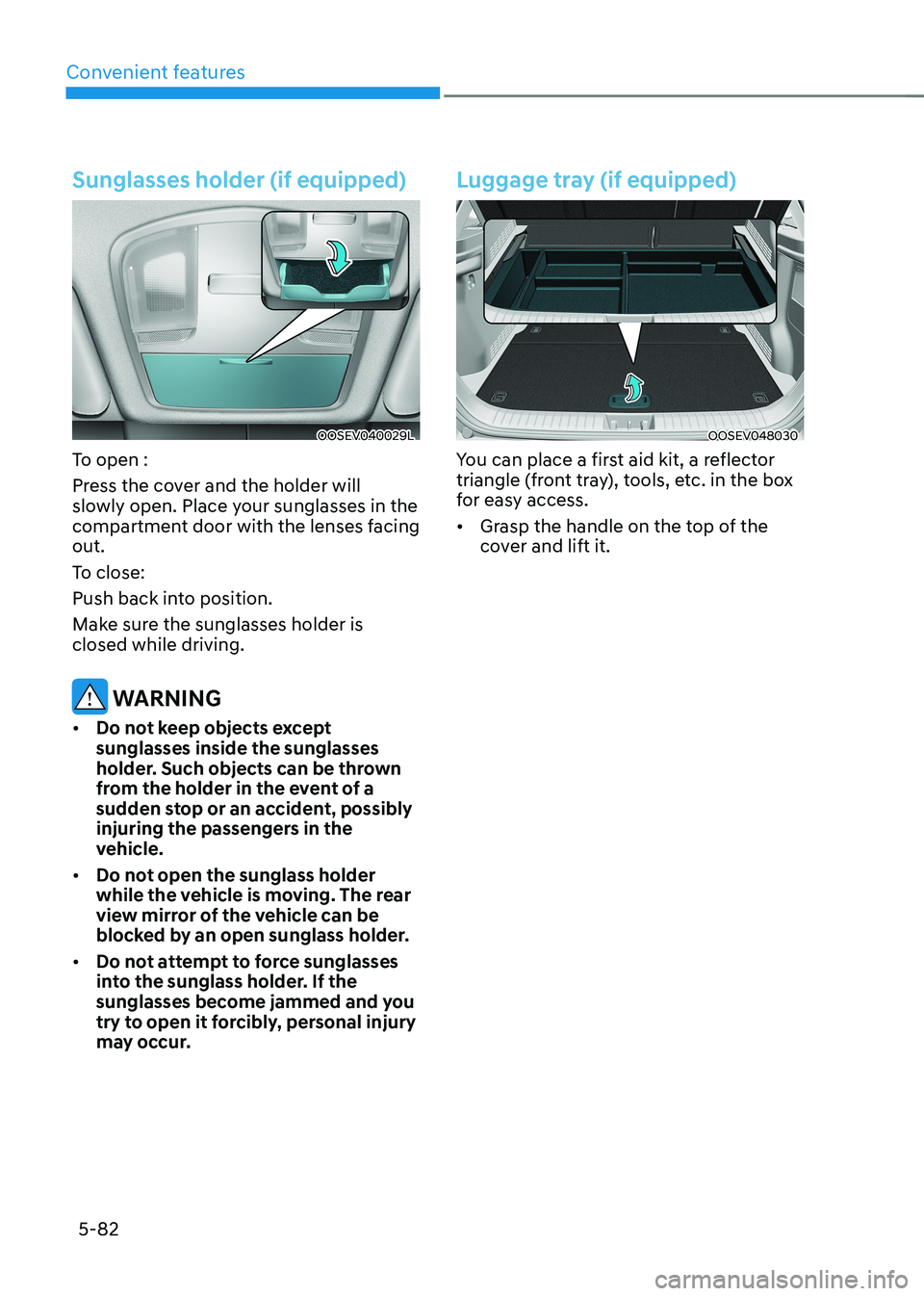
Sunglasses holder (if equipped)
OOSEV040029L
To open :
Press the cover and the holder will
slowly open. Place your sunglasses in the
compartment door with the lenses facing out.
To close:
Push back into position.
Make sure the sunglasses holder is closed while driving.
WARNING
• Do not keep objects except sunglasses inside the sunglasses
holder. Such objects can be thrown
from the holder in the event of a
sudden stop or an accident, possibly
injuring the passengers in the
vehicle.
• Do not open the sunglass holder
while the vehicle is moving. The rear
view mirror of the vehicle can be
blocked by an open sunglass holder.
• Do not attempt to force sunglasses
into the sunglass holder. If the
sunglasses become jammed and you
try to open it forcibly, personal injury
may occur.
Luggage tray (if equipped)
OOSEV048030
You can place a first aid kit, a reflector
triangle (front tray), tools, etc. in the box
for easy access. • Grasp the handle on the top of the
cover and lift it.
Page 268 of 548
Convenient features
5-84
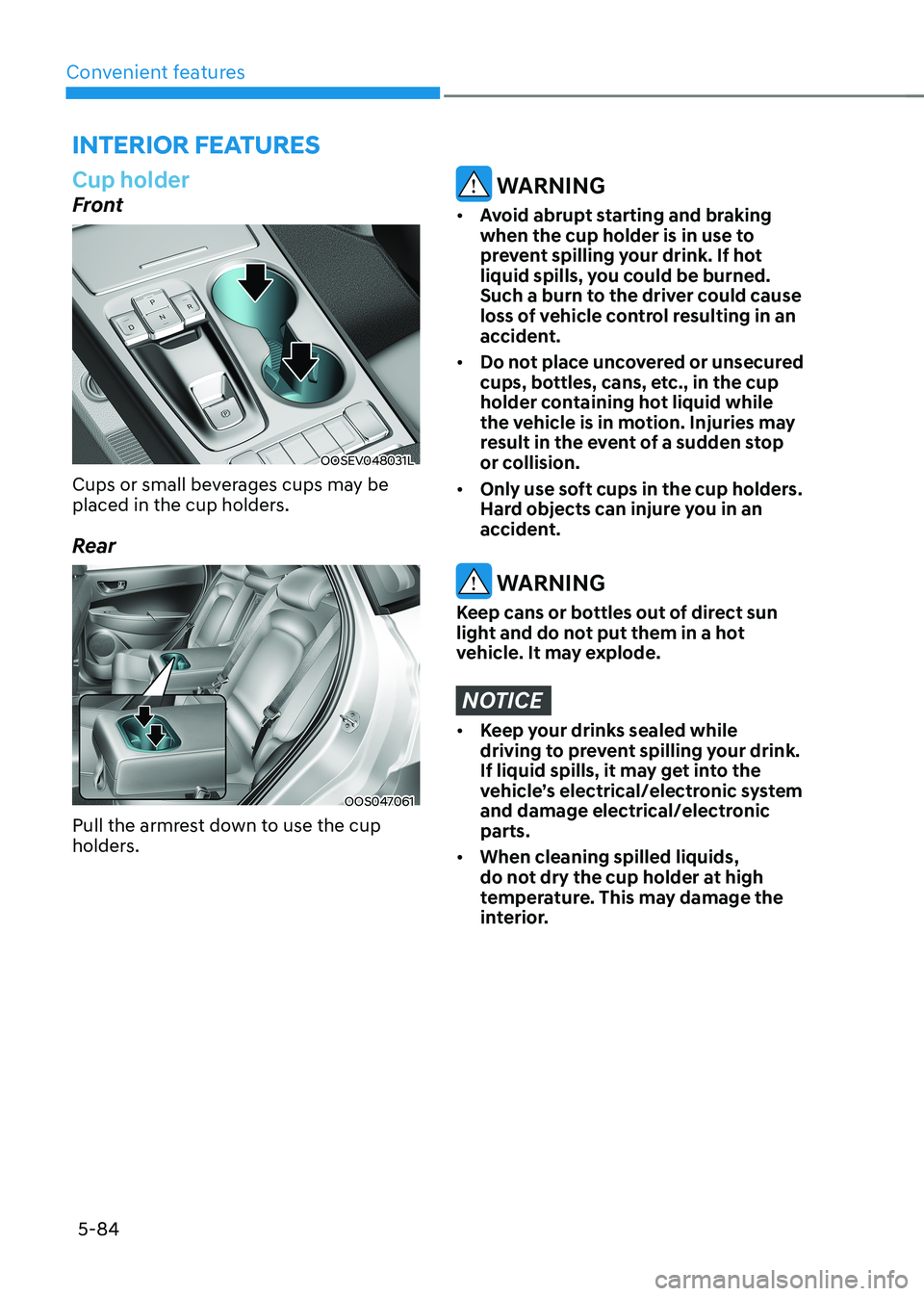
Cup holder
Front
OOSEV048031L
Cups or small beverages cups may be
placed in the cup holders.
Rear
OOS047061
Pull the armrest down to use the cup
holders.
WARNING
• Avoid abrupt starting and braking
when the cup holder is in use to
prevent spilling your drink. If hot
liquid spills, you could be burned.
Such a burn to the driver could cause
loss of vehicle control resulting in an
accident.
• Do not place uncovered or unsecured
cups, bottles, cans, etc., in the cup
holder containing hot liquid while
the vehicle is in motion. Injuries may
result in the event of a sudden stop
or collision.
• Only use soft cups in the cup holders.
Hard objects can injure you in an
accident.
WARNING
Keep cans or bottles out of direct sun
light and do not put them in a hot
vehicle. It may explode.
NOTICE
• Keep your drinks sealed while
driving to prevent spilling your drink.
If liquid spills, it may get into the
vehicle’s electrical/electronic system
and damage electrical/electronic parts.
• When cleaning spilled liquids,
do not dry the cup holder at high
temperature. This may damage the
interior.
interior FeAtures
Page 269 of 548
05
5-85
Sunvisor
OTM048089
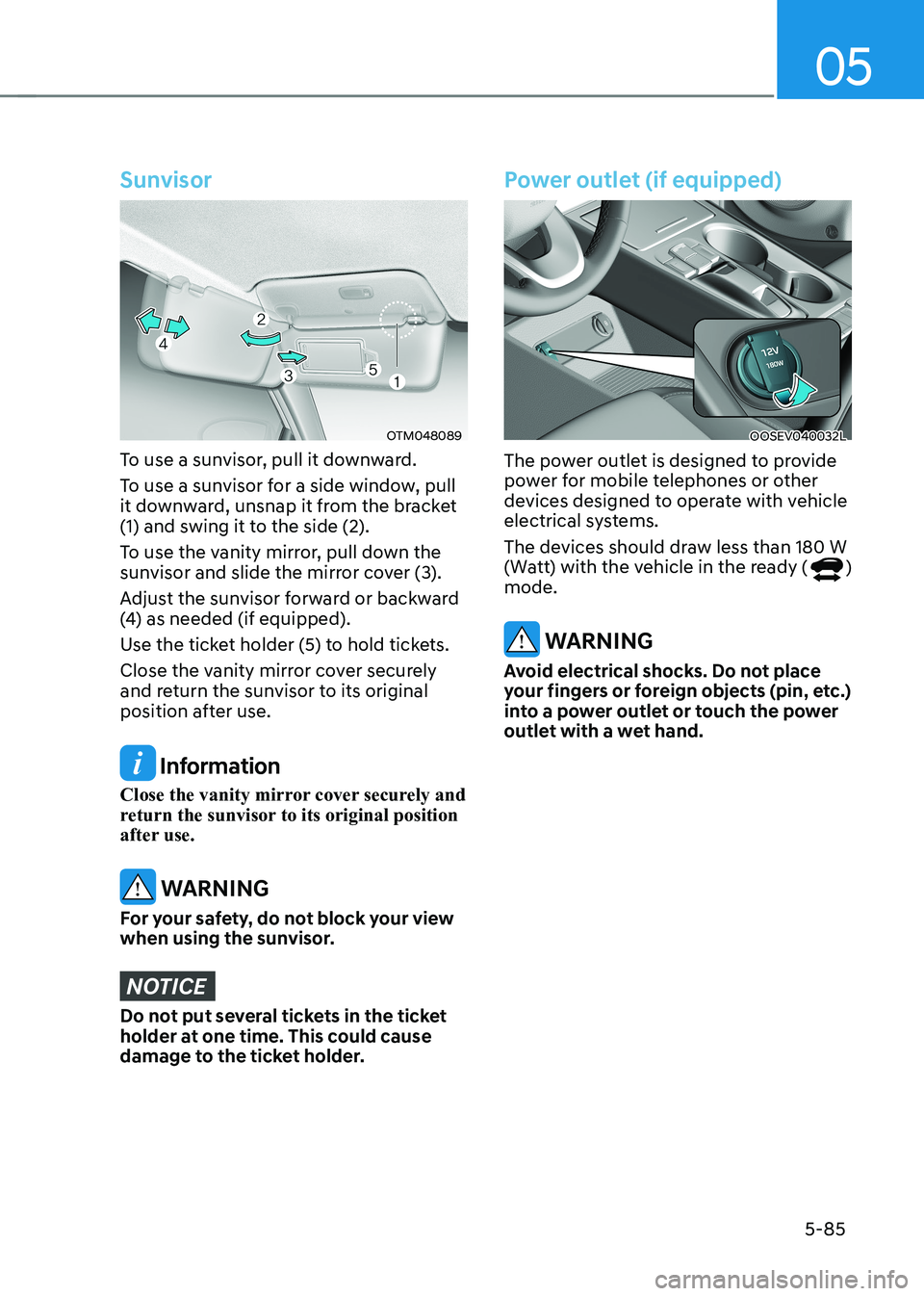
To use a sunvisor, pull it downward.
To use a sunvisor for a side window, pull
it downward, unsnap it from the bracket
(1) and swing it to the side (2).
To use the vanity mirror, pull down the
sunvisor and slide the mirror cover (3).
Adjust the sunvisor forward or backward
(4) as needed (if equipped).
Use the ticket holder (5) to hold tickets.
Close the vanity mirror cover securely
and return the sunvisor to its original
position after use.
Information
Close the vanity mirror cover securely and
return the sunvisor to its original position
after use.
WARNING
For your safety, do not block your view
when using the sunvisor.
NOTICE
Do not put several tickets in the ticket
holder at one time. This could cause
damage to the ticket holder.
Power outlet (if equipped)
OOSEV040032L
The power outlet is designed to provide
power for mobile telephones or other
devices designed to operate with vehicle
electrical systems.
The devices should draw less than 180 W
(Watt) with the vehicle in the ready (
)
mode.
WARNING
Avoid electrical shocks. Do not place
your fingers or foreign objects (pin, etc.)
into a power outlet or touch the power
outlet with a wet hand.
Page 273 of 548
05
5-89
Clock
WARNING
Do not adjust the clock while driving.
You may lose your steering control
and cause severe personal injury or
accidents.
Vehicles with Audio system
Select the Setting menu on the audio
system → Select [Date/Time].
• Set time: Set the time displayed on
the audio screen.
• Time format: Choose between 12-hour
and 24-hour time formats.
Vehicles with Navigation system
Select the Settings menu on the AVN
screen → Select [Date/Time].
• GPS time: Displays time according to
the received GNSS time.
• 24-hour: Switches to 12 hour or 24
hour.
For more details, please refer to the
separate manual that was supplied with
your vehicle.
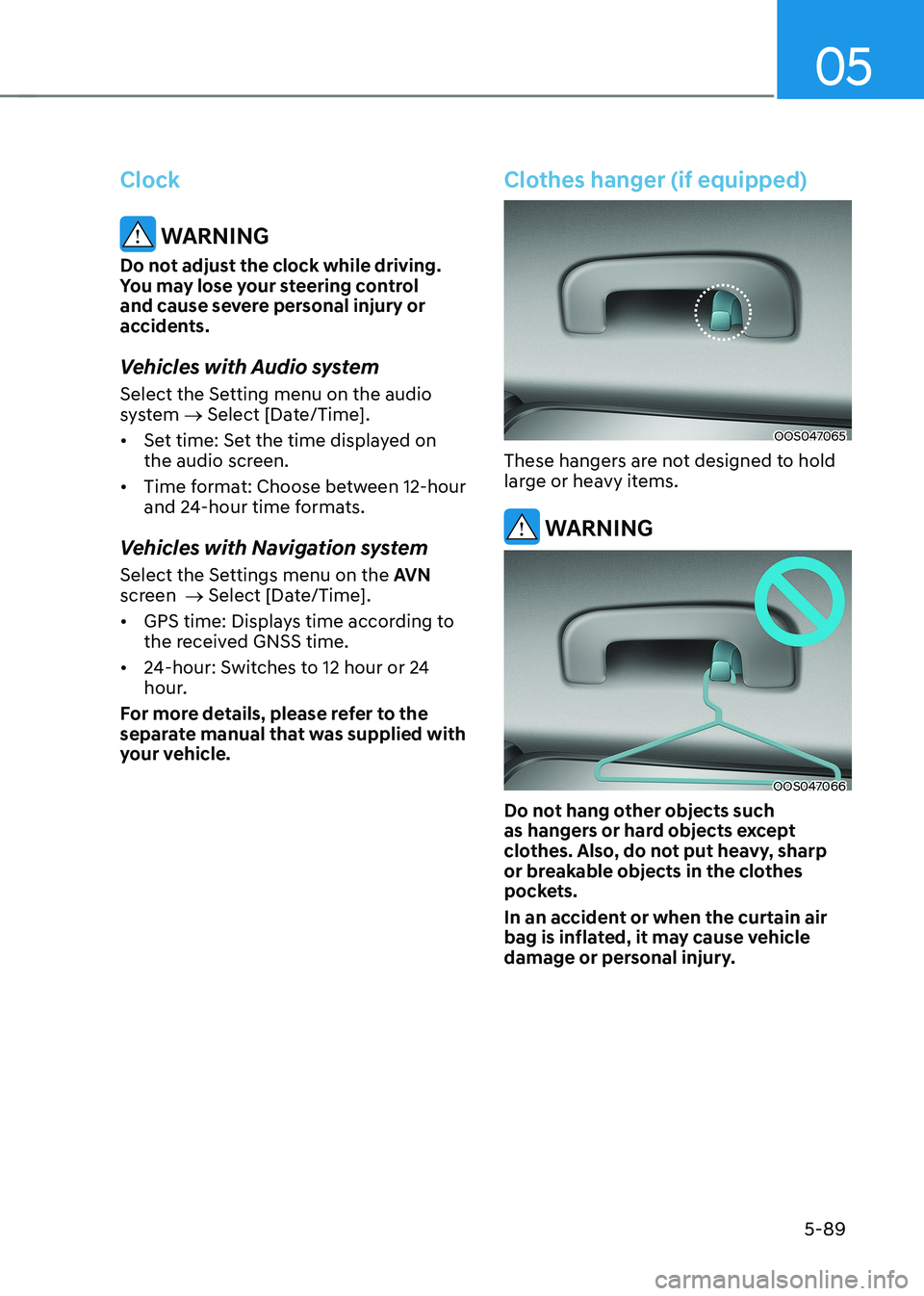
Clothes hanger (if equipped)
OOS047065
These hangers are not designed to hold
large or heavy items.
WARNING
OOS047066
Do not hang other objects such
as hangers or hard objects except
clothes. Also, do not put heavy, sharp
or breakable objects in the clothes
pockets.
In an accident or when the curtain air
bag is inflated, it may cause vehicle
damage or personal injury.
Page 274 of 548
Convenient features
5-90
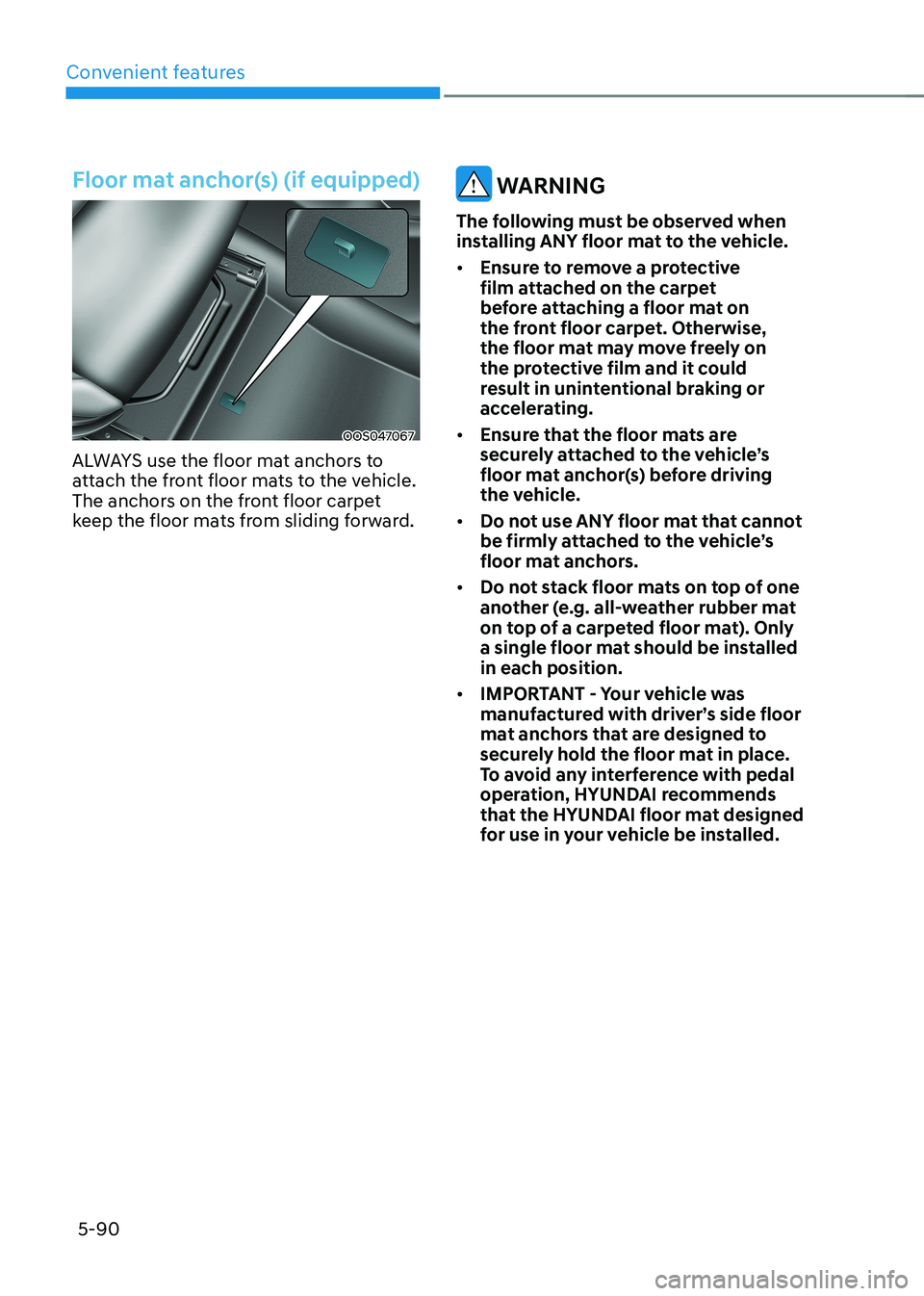
Floor mat anchor(s) (if equipped)
OOS047067
ALWAYS use the floor mat anchors to
attach the front floor mats to the vehicle.
The anchors on the front floor carpet
keep the floor mats from sliding forward.
WARNING
The following must be observed when
installing ANY floor mat to the vehicle. • Ensure to remove a protective
film attached on the carpet
before attaching a floor mat on
the front floor carpet. Otherwise,
the floor mat may move freely on
the protective film and it could
result in unintentional braking or
accelerating.
• Ensure that the floor mats are
securely attached to the vehicle’s
floor mat anchor(s) before driving
the vehicle.
• Do not use ANY floor mat that cannot
be firmly attached to the vehicle’s
floor mat anchors.
• Do not stack floor mats on top of one
another (e.g. all-weather rubber mat
on top of a carpeted floor mat). Only
a single floor mat should be installed in each position.
• IMPORTANT - Your vehicle was
manufactured with driver’s side floor
mat anchors that are designed to
securely hold the floor mat in place.
To avoid any interference with pedal
operation, HYUNDAI recommends
that the HYUNDAI floor mat designed
for use in your vehicle be installed.
Page 275 of 548
05
5-91
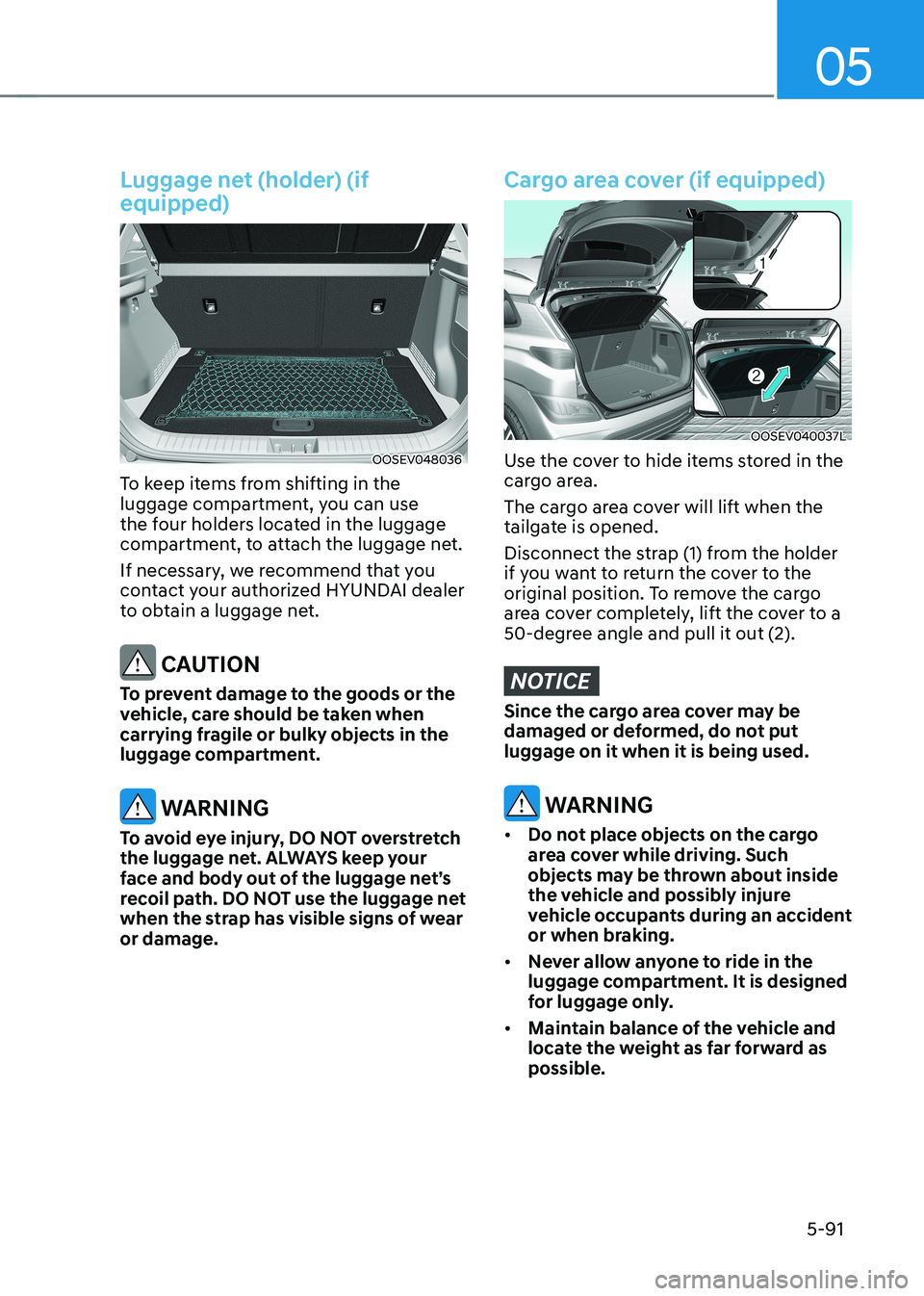
Luggage net (holder) (if equipped)
OOSEV048036
To keep items from shifting in the
luggage compartment, you can use
the four holders located in the luggage
compartment, to attach the luggage net.
If necessary, we recommend that you
contact your authorized HYUNDAI dealer
to obtain a luggage net.
CAUTION
To prevent damage to the goods or the
vehicle, care should be taken when
carrying fragile or bulky objects in the
luggage compartment.
WARNING
To avoid eye injury, DO NOT overstretch
the luggage net. ALWAYS keep your
face and body out of the luggage net’s
recoil path. DO NOT use the luggage net
when the strap has visible signs of wear or damage.
Cargo area cover (if equipped)
OOSEV040037L
Use the cover to hide items stored in the
cargo area.
The cargo area cover will lift when the
tailgate is opened.
Disconnect the strap (1) from the holder
if you want to return the cover to the
original position. To remove the cargo
area cover completely, lift the cover to a
50-degree angle and pull it out (2).
NOTICE
Since the cargo area cover may be
damaged or deformed, do not put luggage on it when it is being used.
WARNING
• Do not place objects on the cargo
area cover while driving. Such
objects may be thrown about inside
the vehicle and possibly injure
vehicle occupants during an accident
or when braking.
• Never allow anyone to ride in the
luggage compartment. It is designed
for luggage only.
• Maintain balance of the vehicle and
locate the weight as far forward as possible.
Page 276 of 548
Convenient features
5-92
eXterior FeAtures
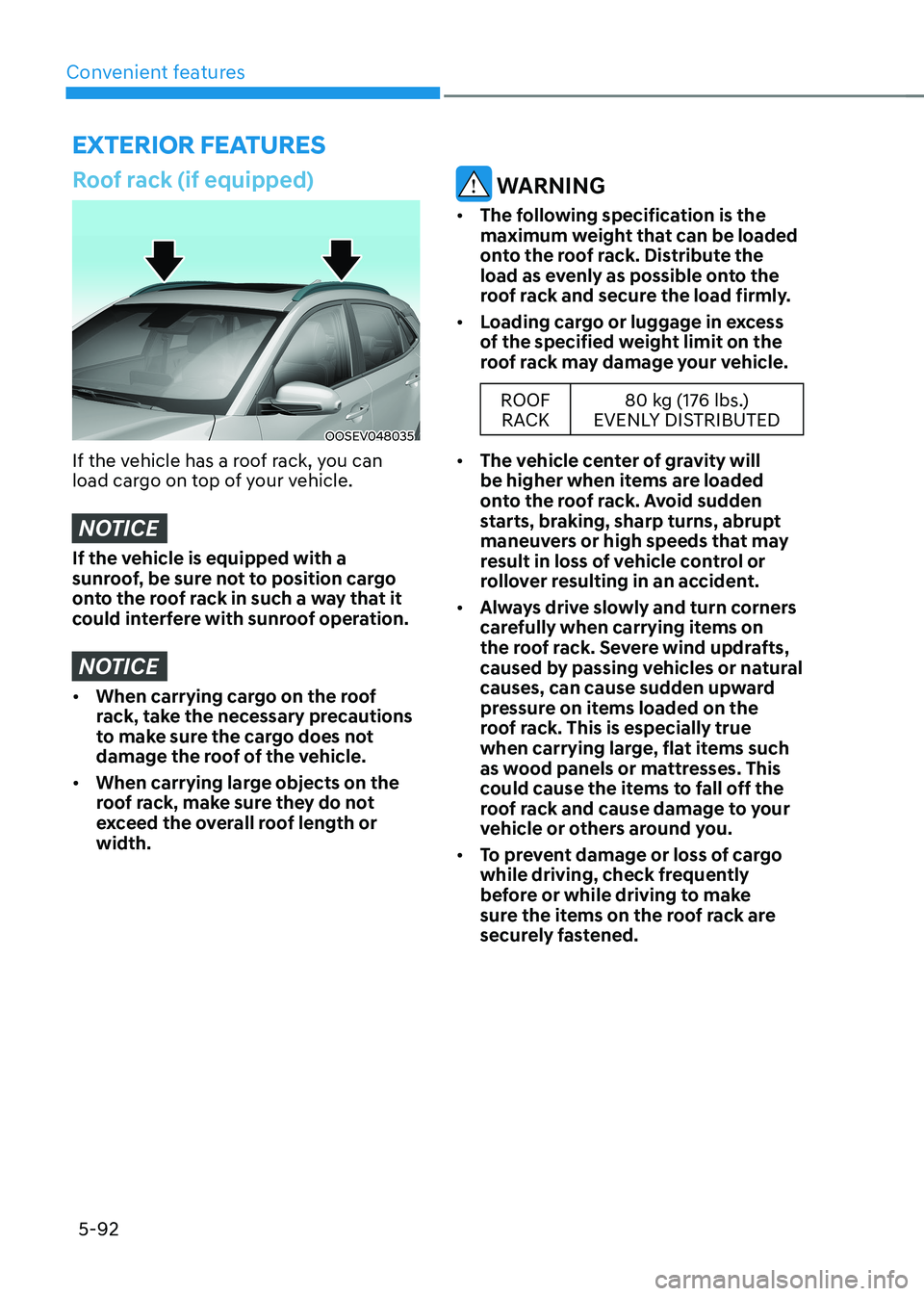
Roof rack (if equipped)
OOSEV048035
If the vehicle has a roof rack, you can
load cargo on top of your vehicle.
NOTICE
If the vehicle is equipped with a
sunroof, be sure not to position cargo
onto the roof rack in such a way that it
could interfere with sunroof operation.
NOTICE
• When carrying cargo on the roof
rack, take the necessary precautions
to make sure the cargo does not
damage the roof of the vehicle.
• When carrying large objects on the
roof rack, make sure they do not
exceed the overall roof length or width.
WARNING
• The following specification is the
maximum weight that can be loaded
onto the roof rack. Distribute the
load as evenly as possible onto the
roof rack and secure the load firmly.
• Loading cargo or luggage in excess
of the specified weight limit on the
roof rack may damage your vehicle.
ROOF
RACK 80 kg (176 lbs.)
EVENLY DISTRIBUTED
• The vehicle center of gravity will
be higher when items are loaded
onto the roof rack. Avoid sudden
starts, braking, sharp turns, abrupt
maneuvers or high speeds that may
result in loss of vehicle control or
rollover resulting in an accident.
• Always drive slowly and turn corners
carefully when carrying items on
the roof rack. Severe wind updrafts,
caused by passing vehicles or natural
causes, can cause sudden upward
pressure on items loaded on the
roof rack. This is especially true
when carrying large, flat items such
as wood panels or mattresses. This
could cause the items to fall off the
roof rack and cause damage to your
vehicle or others around you.
• To prevent damage or loss of cargo
while driving, check frequently
before or while driving to make
sure the items on the roof rack are
securely fastened.
Page 283 of 548
06
6-3
Before entering the vehicle
• Be sure all windows, outside mirror(s),
and outside lights are clean and
unobstructed.
• Remove frost, snow, or ice.
• Visually check the tires for uneven
wear and damage.
• Check under the vehicle for any sign
of leaks.
• Be sure there are no obstacles behind
you if you intend to back up.
Before starting
• Make sure the hood, the tailgate, and
the doors are securely closed and
locked.
• Adjust the position of the seat and
steering wheel.
• Adjust the inside and outside rearview
mirrors.
• Verify all the lights work.
• Fasten your seat belt. Check that all
passengers have fastened their seat belt.
• Check the gauges and indicators
in the instrument panel and the
messages on the instrument display
when the START/STOP button is in the ON position.
• Check that any items you are carrying
are stored properly or fastened down
securely.
WARNING
To reduce the risk of SERIOUS INJURY or
DEATH, take the following precautions: • ALWAYS wear your seat belt. All
passengers must be properly belted
whenever the vehicle is moving.
For more information, refer to “Seat
Belts” in chapter 3.
• Always drive defensively. Assume
other drivers or pedestrians may be
careless and make mistakes.
• Stay focused on the task of driving.
Driver distraction can cause
accidents.
• Leave plenty of space between you
and the vehicle in front of you.
WARNING
NEVER drink or take drugs and drive. Drinking or taking drugs and driving
is dangerous and may result in an
accident and SERIOUS INJURY or
DEATH. Drunk driving is the number one
contributor to the highway death
toll each year. Even a small amount
of alcohol will affect your reflexes,
perceptions and judgment. Just
one drink can reduce your ability to
respond to changing conditions and
emergencies and your reaction time
gets worse with each additional drink.
Driving while under the influence
of drugs is as dangerous or more
dangerous than driving under the
influence of alcohol.
You are much more likely to have a
serious accident if you drink or take
drugs and drive. If you are drinking or
taking drugs, don’t drive. Do not ride
with a driver who has been drinking
or taking drugs. Choose a designated
driver or call a taxi.
BEFORE DRIVING
Page 284 of 548
Driving your vehicle
6-4
WARNING
To reduce the risk of SERIOUS INJURY or
DEATH, take the following precautions: • NEVER allow children or any person
who is unfamiliar with the vehicle
to touch the START/STOP button
or related parts. Unexpected and
sudden vehicle movement can occur.
• NEVER reach through the steering
wheel for the START/STOP button or
any other control, while the vehicle
is in motion. The presence of your
hand or arm in this area may cause a
loss of vehicle control resulting in an
accident.
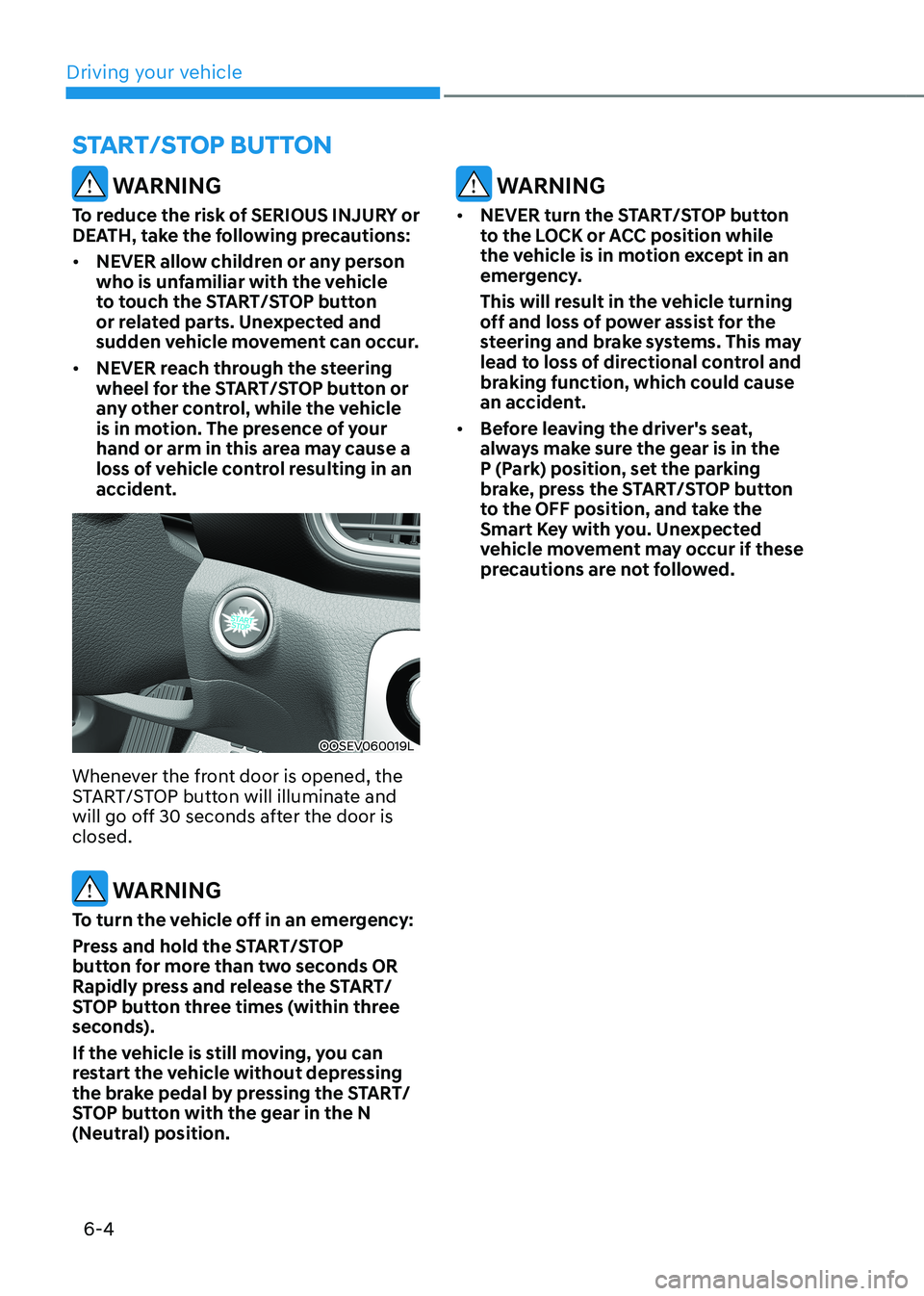
OOSEV060019L
Whenever the front door is opened, the
START/STOP button will illuminate and
will go off 30 seconds after the door is closed.
WARNING
To turn the vehicle off in an emergency:
Press and hold the START/STOP
button for more than two seconds OR
Rapidly press and release the START/
STOP button three times (within three
seconds).
If the vehicle is still moving, you can
restart the vehicle without depressing
the brake pedal by pressing the START/
STOP button with the gear in the N
(Neutral) position.
WARNING
• NEVER turn the START/STOP button
to the LOCK or ACC position while
the vehicle is in motion except in an
emergency.
This will result in the vehicle turning
off and loss of power assist for the
steering and brake systems. This may
lead to loss of directional control and
braking function, which could cause
an accident.
• Before leaving the driver's seat,
always make sure the gear is in the
P (Park) position, set the parking
brake, press the START/STOP button
to the OFF position, and take the
Smart Key with you. Unexpected
vehicle movement may occur if these
precautions are not followed.
START/STOP BuTTON
Page 285 of 548
06
6-5
START/STOP button positions
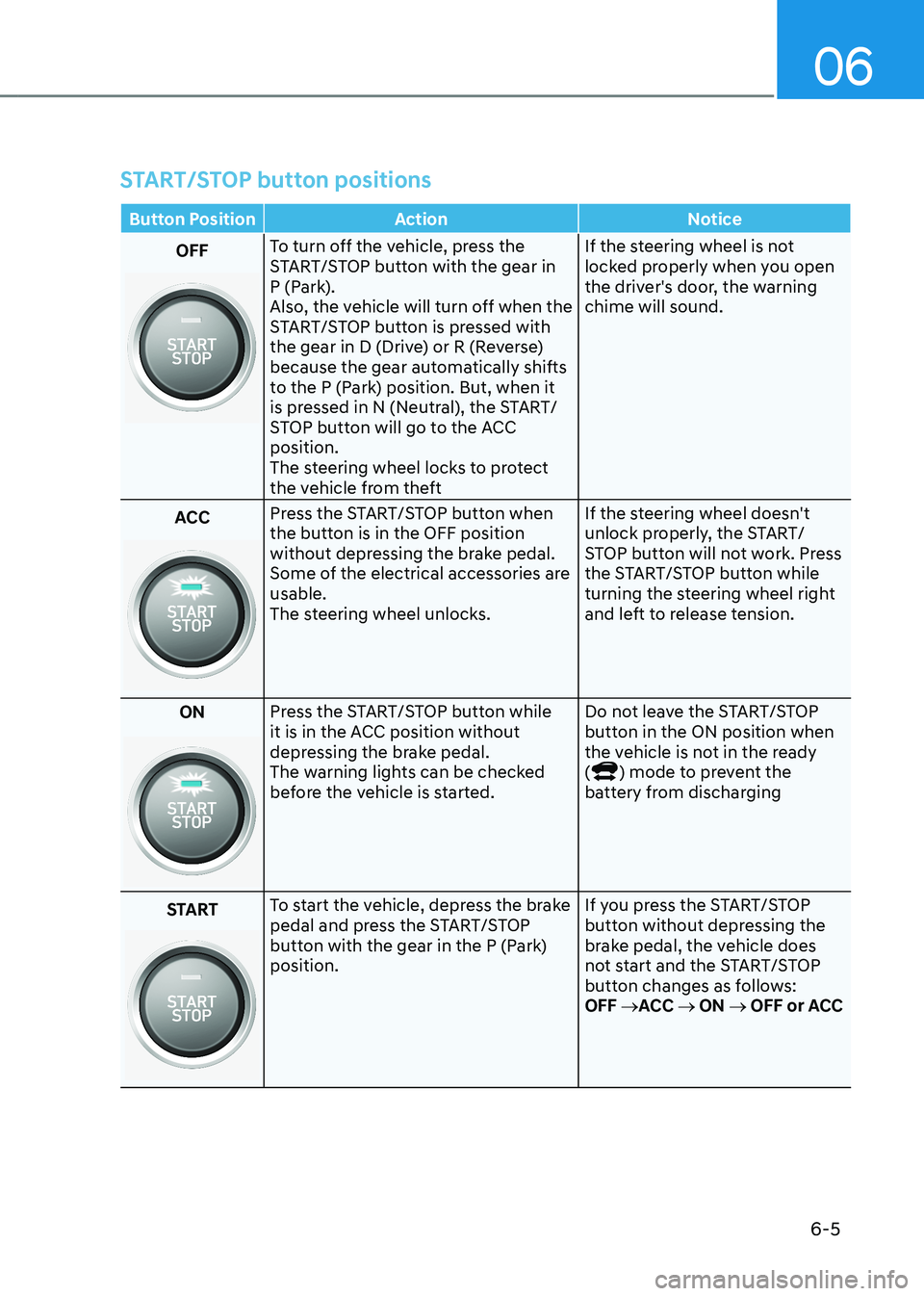
Button Position Action Notice
OFFTo turn off the vehicle, press the
START/STOP button with the gear in
P (Park).
Also, the vehicle will turn off when the
START/STOP button is pressed with
the gear in D (Drive) or R (Reverse)
because the gear automatically shifts
to the P (Park) position. But, when it
is pressed in N (Neutral), the START/
STOP button will go to the ACC position.
The steering wheel locks to protect
the vehicle from theft If the steering wheel is not
locked properly when you open
the driver's door, the warning chime will sound.
ACC Press the START/STOP button when
the button is in the OFF position
without depressing the brake pedal.
Some of the electrical accessories are usable.
The steering wheel unlocks.
If the steering wheel doesn't
unlock properly, the START/
STOP button will not work. Press
the START/STOP button while
turning the steering wheel right
and left to release tension.
ON
Press the START/STOP button while
it is in the ACC position without
depressing the brake pedal.
The warning lights can be checked
before the vehicle is started. Do not leave the START/STOP
button in the ON position when
the vehicle is not in the ready (
) mode to prevent the
battery from discharging
START
To start the vehicle, depress the brake
pedal and press the START/STOP
button with the gear in the P (Park) position. If you press the START/STOP
button without depressing the
brake pedal, the vehicle does
not start and the START/STOP
button changes as follows:OFF
→ACC → ON → OFF or ACC