lock Hyundai Matrix 2004 Owner's Guide
[x] Cancel search | Manufacturer: HYUNDAI, Model Year: 2004, Model line: Matrix, Model: Hyundai Matrix 2004Pages: 317, PDF Size: 5.12 MB
Page 68 of 317
FEATURES OF YOUR HYUNDAI
1- 60 B730A01FC-GAT Operation Tips
o To keep dust or unpleasant fumes from
entering the car through the ventilation sys- tem, temporarily set the air intake control at"Recirculation". Be sure to return the controlto "Fresh" when the irritation has passed tokeep fresh air in the vehicle. This will helpkeep the driver alert and comfortable.
o Air for the heating/cooling system is drawn in through the grilles just ahead of the wind-shield. Care should be taken that these arenot blocked by leaves, snow, ice or otherobstructions.
o To prevent interior fog on the windshield, set the air intake control to the fresh air(
) position and fan speed to the desired
position.
To remove interior fog on the windshield;
o Set the air flow control to the defrost (
)
position. (The A/C will turn on automatically and "Fresh" mode will be activated.)
o Set the temperature control to the desired position.
o Set the fan speed control between "1" and "4" position.
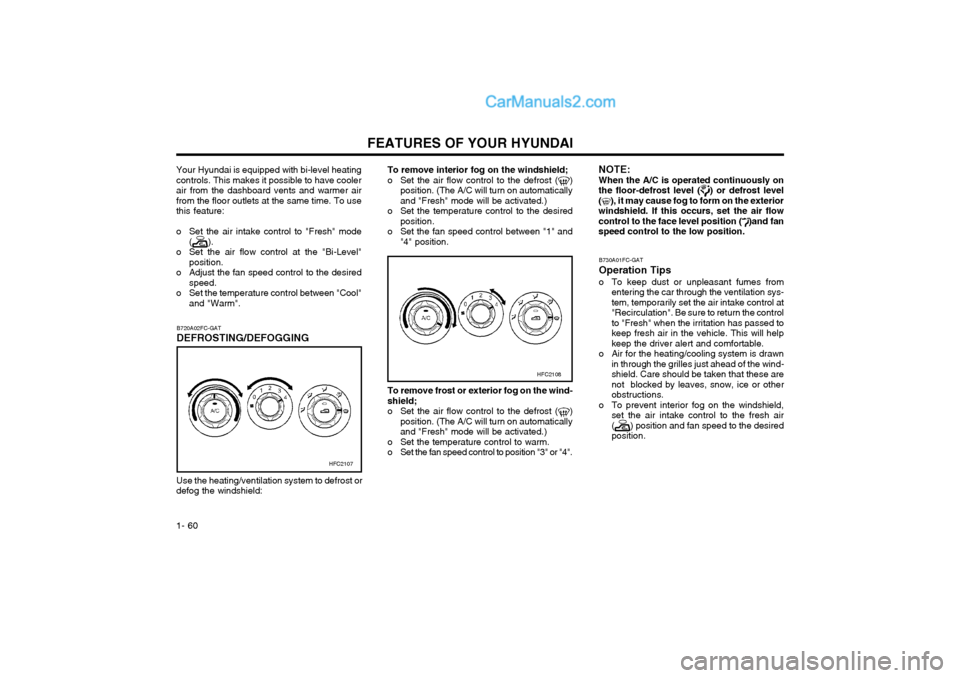
HFC2108
To remove frost or exterior fog on the wind- shield;
o Set the air flow control to the defrost (
)
position. (The A/C will turn on automatically and "Fresh" mode will be activated.)
o Set the temperature control to warm.
o Set the fan speed control to position "3" or "4".
NOTE: When the A/C is operated continuously onthe floor-defrost level (
) or defrost level
(), it may cause fog to form on the exterior
windshield. If this occurs, set the air flow control to the face level position (
)and fan
speed control to the low position.
Your Hyundai is equipped with bi-level heating controls. This makes it possible to have coolerair from the dashboard vents and warmer airfrom the floor outlets at the same time. To usethis feature:
o Set the air intake control to "Fresh" mode
(
).
o Set the air flow control at the "Bi-Level" position.
o Adjust the fan speed control to the desired speed.
o Set the temperature control between "Cool" and "Warm".
Use the heating/ventilation system to defrost or defog the windshield: B720A02FC-GAT DEFROSTING/DEFOGGING
HFC2107
Page 72 of 317
FEATURES OF YOUR HYUNDAI
1- 64 B750B02Y-AAT Using a cellular phone or a two-way radio When a cellular phone is used inside the ve- hicle, noise may be produced from the audioequipment. This does not mean that somethingis wrong with the audio equipment. In such acase, use the cellular phone at a place as far aspossible from the audio equipment. CAUTION: When using a communication system suchas a cellular phone or a radio inside thevehicle, a separate external antenna mustbe fitted. When a cellular phone or a radioset is used with an internal antenna alone, itmay interfere with the vehicle's electricalsystem and adversely affect safe operationof the vehicle. WARNING: Don't use a cellular phone when you aredriving, you must stop at a safe place to usea cellular phone.
SSAR014A
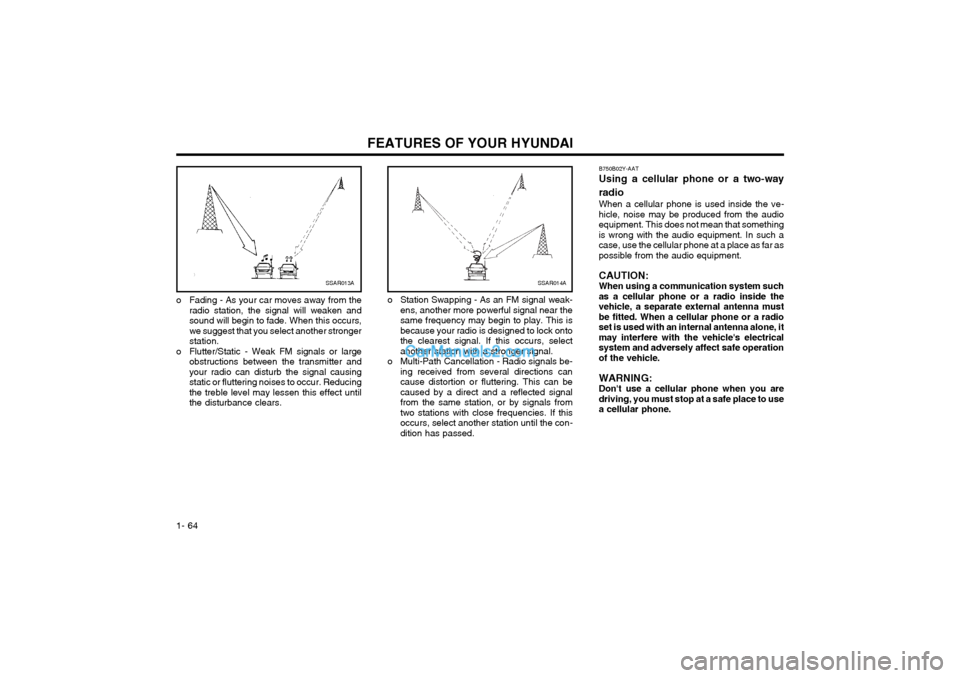
o Station Swapping - As an FM signal weak- ens, another more powerful signal near the same frequency may begin to play. This isbecause your radio is designed to lock ontothe clearest signal. If this occurs, selectanother station with a stronger signal.
o Multi-Path Cancellation - Radio signals be- ing received from several directions cancause distortion or fluttering. This can becaused by a direct and a reflected signalfrom the same station, or by signals fromtwo stations with close frequencies. If thisoccurs, select another station until the con-dition has passed.SSAR013A
o Fading - As your car moves away from the radio station, the signal will weaken and sound will begin to fade. When this occurs,we suggest that you select another strongerstation.
o Flutter/Static - Weak FM signals or large obstructions between the transmitter andyour radio can disturb the signal causingstatic or fluttering noises to occur. Reducingthe treble level may lessen this effect untilthe disturbance clears.
Page 74 of 317
FEATURES OF YOUR HYUNDAI
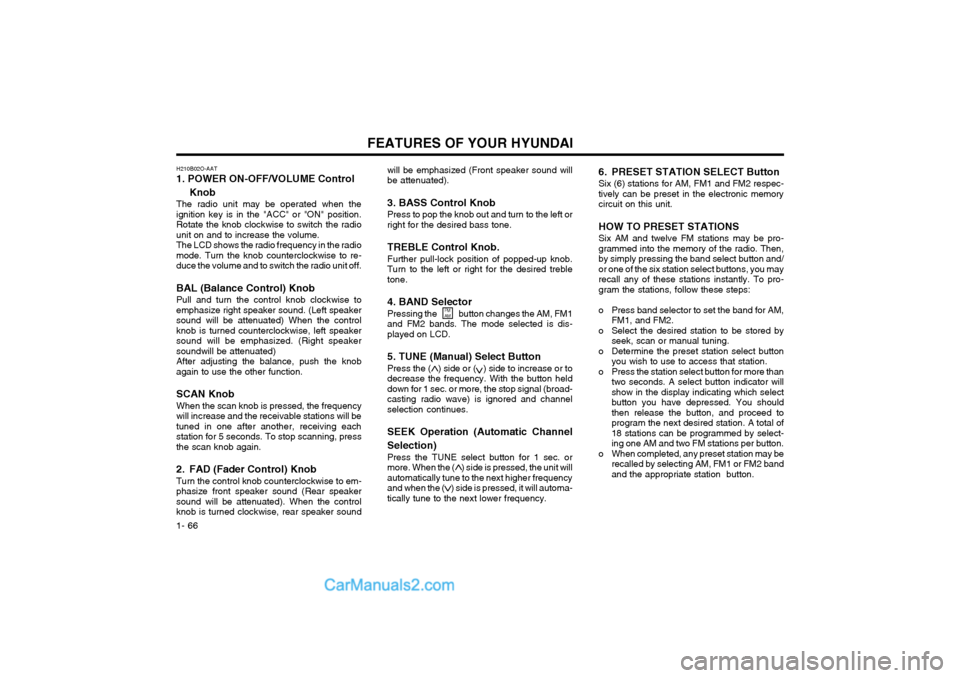
1- 66 will be emphasized (Front speaker sound will be attenuated). 3. BASS Control Knob Press to pop the knob out and turn to the left or right for the desired bass tone. TREBLE Control Knob. Further pull-lock position of popped-up knob. Turn to the left or right for the desired trebletone. 4. BAND Selector Pressing the button changes the AM, FM1 and FM2 bands. The mode selected is dis-played on LCD.
5. TUNE (Manual) Select Button Press the ( ) side or ( ) side to increase or to decrease the frequency. With the button helddown for 1 sec. or more, the stop signal (broad-casting radio wave) is ignored and channelselection continues. SEEK Operation (Automatic Channel Selection) Press the TUNE select button for 1 sec. or more. When the ( ) side is pressed, the unit willautomatically tune to the next higher frequencyand when the ( ) side is pressed, it will automa-tically tune to the next lower frequency.
6. PRESET STATION SELECT Button Six (6) stations for AM, FM1 and FM2 respec- tively can be preset in the electronic memorycircuit on this unit. HOW TO PRESET STATIONS Six AM and twelve FM stations may be pro- grammed into the memory of the radio. Then,by simply pressing the band select button and/or one of the six station select buttons, you mayrecall any of these stations instantly. To pro-gram the stations, follow these steps:
o Press band selector to set the band for AM,
FM1, and FM2.
o Select the desired station to be stored by seek, scan or manual tuning.
o Determine the preset station select button you wish to use to access that station.
o Press the station select button for more than two seconds. A select button indicator will show in the display indicating which selectbutton you have depressed. You shouldthen release the button, and proceed toprogram the next desired station. A total of18 stations can be programmed by select-ing one AM and two FM stations per button.
o When completed, any preset station may be recalled by selecting AM, FM1 or FM2 bandand the appropriate station button.
FM AM
H210B02O-AAT 1. POWER ON-OFF/VOLUME Control
Knob
The radio unit may be operated when the ignition key is in the "ACC" or "ON" position.Rotate the knob clockwise to switch the radiounit on and to increase the volume.The LCD shows the radio frequency in the radiomode. Turn the knob counterclockwise to re-duce the volume and to switch the radio unit off. BAL (Balance Control) Knob Pull and turn the control knob clockwise to emphasize right speaker sound. (Left speakersound will be attenuated) When the controlknob is turned counterclockwise, left speakersound will be emphasized. (Right speakersoundwill be attenuated)After adjusting the balance, push the knobagain to use the other function. SCAN Knob When the scan knob is pressed, the frequency will increase and the receivable stations will betuned in one after another, receiving eachstation for 5 seconds. To stop scanning, pressthe scan knob again.
2. FAD (Fader Control) Knob Turn the control knob counterclockwise to em- phasize front speaker sound (Rear speakersound will be attenuated). When the controlknob is turned clockwise, rear speaker sound
Page 76 of 317
FEATURES OF YOUR HYUNDAI
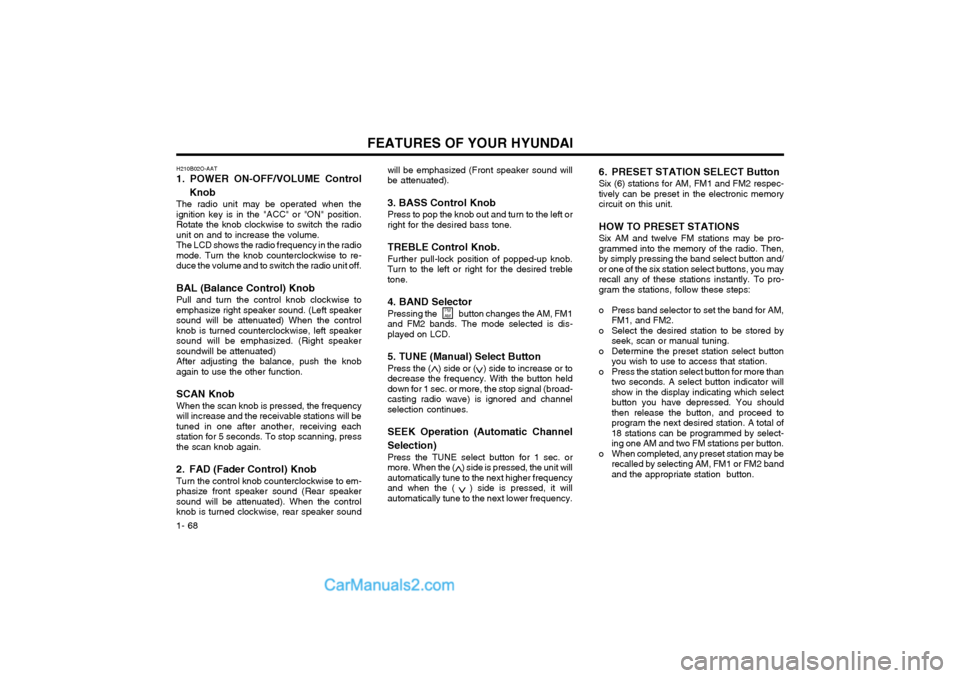
1- 68 will be emphasized (Front speaker sound will be attenuated). 3. BASS Control Knob Press to pop the knob out and turn to the left or right for the desired bass tone. TREBLE Control Knob. Further pull-lock position of popped-up knob. Turn to the left or right for the desired trebletone. 4. BAND Selector Pressing the button changes the AM, FM1 and FM2 bands. The mode selected is dis-played on LCD.
5. TUNE (Manual) Select Button Press the ( ) side or ( ) side to increase or to decrease the frequency. With the button helddown for 1 sec. or more, the stop signal (broad-casting radio wave) is ignored and channelselection continues. SEEK Operation (Automatic Channel Selection) Press the TUNE select button for 1 sec. or more. When the ( ) side is pressed, the unit willautomatically tune to the next higher frequencyand when the ( ) side is pressed, it willautomatically tune to the next lower frequency.
6. PRESET STATION SELECT Button Six (6) stations for AM, FM1 and FM2 respec- tively can be preset in the electronic memorycircuit on this unit. HOW TO PRESET STATIONS Six AM and twelve FM stations may be pro- grammed into the memory of the radio. Then,by simply pressing the band select button and/or one of the six station select buttons, you mayrecall any of these stations instantly. To pro-gram the stations, follow these steps:
o Press band selector to set the band for AM,
FM1, and FM2.
o Select the desired station to be stored by seek, scan or manual tuning.
o Determine the preset station select button you wish to use to access that station.
o Press the station select button for more than two seconds. A select button indicator will show in the display indicating which selectbutton you have depressed. You shouldthen release the button, and proceed toprogram the next desired station. A total of18 stations can be programmed by select-ing one AM and two FM stations per button.
o When completed, any preset station may be recalled by selecting AM, FM1 or FM2 bandand the appropriate station button.
FM
AM
H210B02O-AAT 1. POWER ON-OFF/VOLUME Control
Knob
The radio unit may be operated when the ignition key is in the "ACC" or "ON" position.Rotate the knob clockwise to switch the radiounit on and to increase the volume.The LCD shows the radio frequency in the radiomode. Turn the knob counterclockwise to re-duce the volume and to switch the radio unit off. BAL (Balance Control) Knob Pull and turn the control knob clockwise to emphasize right speaker sound. (Left speakersound will be attenuated) When the controlknob is turned counterclockwise, left speakersound will be emphasized. (Right speakersoundwill be attenuated)After adjusting the balance, push the knobagain to use the other function. SCAN Knob When the scan knob is pressed, the frequency will increase and the receivable stations will betuned in one after another, receiving eachstation for 5 seconds. To stop scanning, pressthe scan knob again.
2. FAD (Fader Control) Knob Turn the control knob counterclockwise to em- phasize front speaker sound (Rear speakersound will be attenuated). When the controlknob is turned clockwise, rear speaker sound
Page 80 of 317
FEATURES OF YOUR HYUNDAI
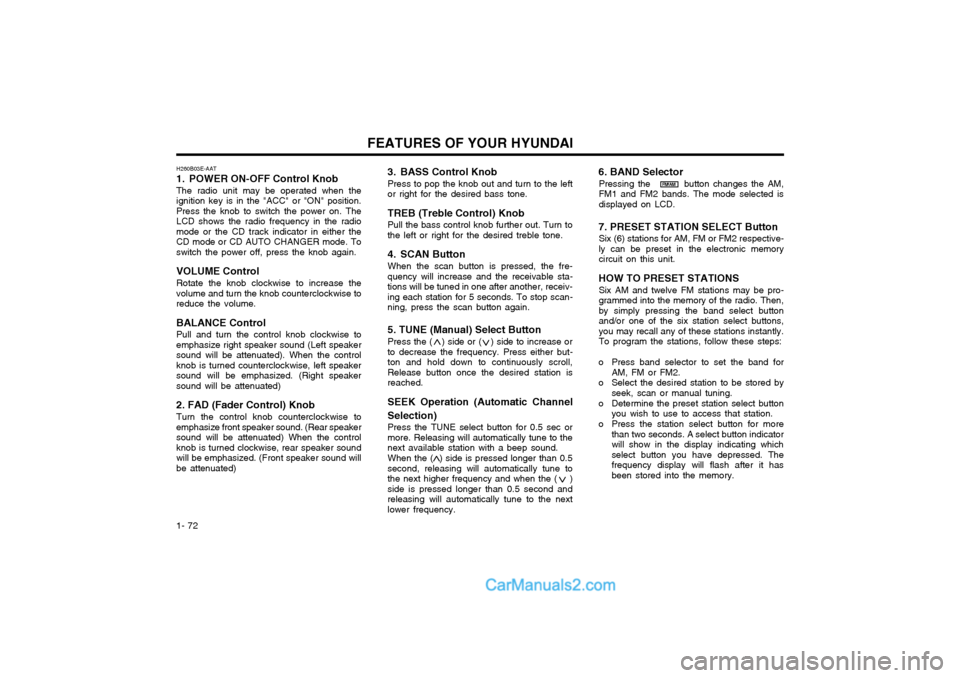
1- 72 3. BASS Control Knob Press to pop the knob out and turn to the left or right for the desired bass tone. TREB (Treble Control) Knob Pull the bass control knob further out. Turn to the left or right for the desired treble tone.
4. SCAN Button When the scan button is pressed, the fre- quency will increase and the receivable sta-tions will be tuned in one after another, receiv-ing each station for 5 seconds. To stop scan-ning, press the scan button again. 5. TUNE (Manual) Select Button Press the ( ) side or ( ) side to increase or to decrease the frequency. Press either but-ton and hold down to continuously scroll,Release button once the desired station isreached. SEEK Operation (Automatic Channel Selection) Press the TUNE select button for 0.5 sec or more. Releasing will automatically tune to thenext available station with a beep sound. When the ( ) side is pressed longer than 0.5 second, releasing will automatically tune tothe next higher frequency and when the ( )side is pressed longer than 0.5 second andreleasing will automatically tune to the nextlower frequency.
6. BAND Selector
Pressing the button changes the AM,FM1 and FM2 bands. The mode selected isdisplayed on LCD.
7. PRESET STATION SELECT Button Six (6) stations for AM, FM or FM2 respective-ly can be preset in the electronic memorycircuit on this unit.
HOW TO PRESET STATIONS Six AM and twelve FM stations may be pro-grammed into the memory of the radio. Then,by simply pressing the band select buttonand/or one of the six station select buttons,you may recall any of these stations instantly.To program the stations, follow these steps:
o Press band selector to set the band for AM, FM or FM2.
o Select the desired station to be stored by seek, scan or manual tuning.
o Determine the preset station select button you wish to use to access that station.
o Press the station select button for more than two seconds. A select button indicatorwill show in the display indicating whichselect button you have depressed. Thefrequency display will flash after it hasbeen stored into the memory.
H260B03E-AAT
1. POWER ON-OFF Control Knob The radio unit may be operated when the ignition key is in the "ACC" or "ON" position.Press the knob to switch the power on. TheLCD shows the radio frequency in the radiomode or the CD track indicator in either theCD mode or CD AUTO CHANGER mode. Toswitch the power off, press the knob again. VOLUME Control Rotate the knob clockwise to increase the volume and turn the knob counterclockwise toreduce the volume. BALANCE Control Pull and turn the control knob clockwise to emphasize right speaker sound (Left speakersound will be attenuated). When the controlknob is turned counterclockwise, left speakersound will be emphasized. (Right speakersound will be attenuated) 2. FAD (Fader Control) Knob Turn the control knob counterclockwise to emphasize front speaker sound. (Rear speakersound will be attenuated) When the controlknob is turned clockwise, rear speaker soundwill be emphasized. (Front speaker sound willbe attenuated)
FM/AM
Page 87 of 317
FEATURES OF YOUR HYUNDAI 1- 79
H290B03E-GAT
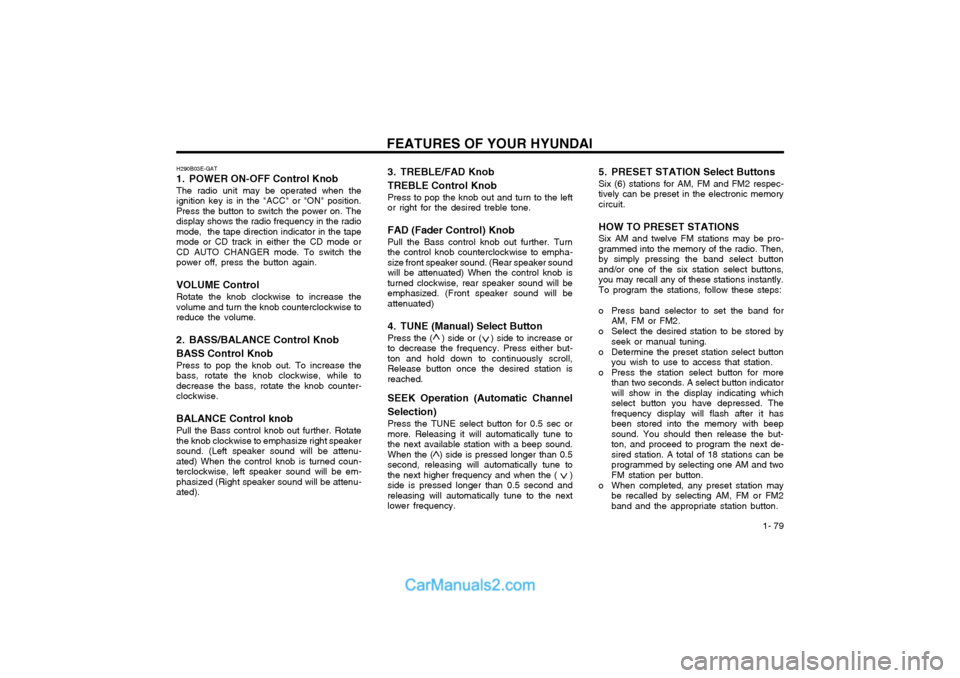
1. POWER ON-OFF Control Knob
The radio unit may be operated when the ignition key is in the "ACC" or "ON" position.Press the button to switch the power on. Thedisplay shows the radio frequency in the radiomode, the tape direction indicator in the tapemode or CD track in either the CD mode orCD AUTO CHANGER mode. To switch thepower off, press the button again.
VOLUME Control Rotate the knob clockwise to increase thevolume and turn the knob counterclockwise toreduce the volume.
2. BASS/BALANCE Control Knob BASS Control Knob Press to pop the knob out. To increase the bass, rotate the knob clockwise, while todecrease the bass, rotate the knob counter-clockwise.
BALANCE Control knob Pull the Bass control knob out further. Rotatethe knob clockwise to emphasize right speakersound. (Left speaker sound will be attenu-ated) When the control knob is turned coun-terclockwise, left speaker sound will be em-phasized (Right speaker sound will be attenu-ated). 3. TREBLE/FAD Knob TREBLE Control Knob
Press to pop the knob out and turn to the left or right for the desired treble tone.
FAD (Fader Control) Knob Pull the Bass control knob out further. Turnthe control knob counterclockwise to empha-size front speaker sound. (Rear speaker soundwill be attenuated) When the control knob isturned clockwise, rear speaker sound will beemphasized. (Front speaker sound will beattenuated)
4. TUNE (Manual) Select Button Press the ( ) side or ( ) side to increase orto decrease the frequency. Press either but-ton and hold down to continuously scroll,Release button once the desired station isreached.
SEEK Operation (Automatic Channel Selection) Press the TUNE select button for 0.5 sec or more. Releasing it will automatically tune tothe next available station with a beep sound.When the ( ) side is pressed longer than 0.5second, releasing will automatically tune tothe next higher frequency and when the ( )side is pressed longer than 0.5 second andreleasing will automatically tune to the nextlower frequency. 5. PRESET STATION Select Buttons Six (6) stations for AM, FM and FM2 respec- tively can be preset in the electronic memorycircuit. HOW TO PRESET STATIONS Six AM and twelve FM stations may be pro- grammed into the memory of the radio. Then,by simply pressing the band select buttonand/or one of the six station select buttons,you may recall any of these stations instantly.To program the stations, follow these steps:
o Press band selector to set the band for
AM, FM or FM2.
o Select the desired station to be stored by seek or manual tuning.
o Determine the preset station select button you wish to use to access that station.
o Press the station select button for more than two seconds. A select button indicator will show in the display indicating whichselect button you have depressed. Thefrequency display will flash after it hasbeen stored into the memory with beepsound. You should then release the but-ton, and proceed to program the next de-sired station. A total of 18 stations can beprogrammed by selecting one AM and twoFM station per button.
o When completed, any preset station may be recalled by selecting AM, FM or FM2band and the appropriate station button.
Page 98 of 317
FEATURES OF YOUR HYUNDAI
1- 90
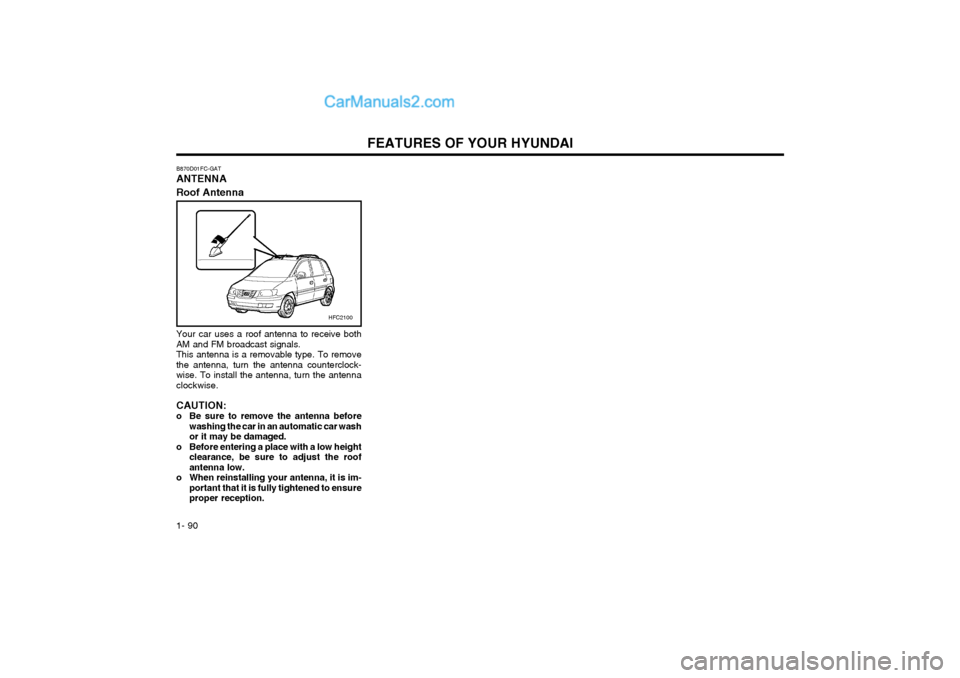
B870D01FC-GAT ANTENNA Roof Antenna
Your car uses a roof antenna to receive both AM and FM broadcast signals.This antenna is a removable type. To removethe antenna, turn the antenna counterclock-wise. To install the antenna, turn the antennaclockwise. CAUTION:
o Be sure to remove the antenna before
washing the car in an automatic car washor it may be damaged.
o Before entering a place with a low height clearance, be sure to adjust the roofantenna low.
o When reinstalling your antenna, it is im- portant that it is fully tightened to ensureproper reception.
HFC2100
Page 100 of 317
DRIVING YOUR HYUNDAI
2- 2
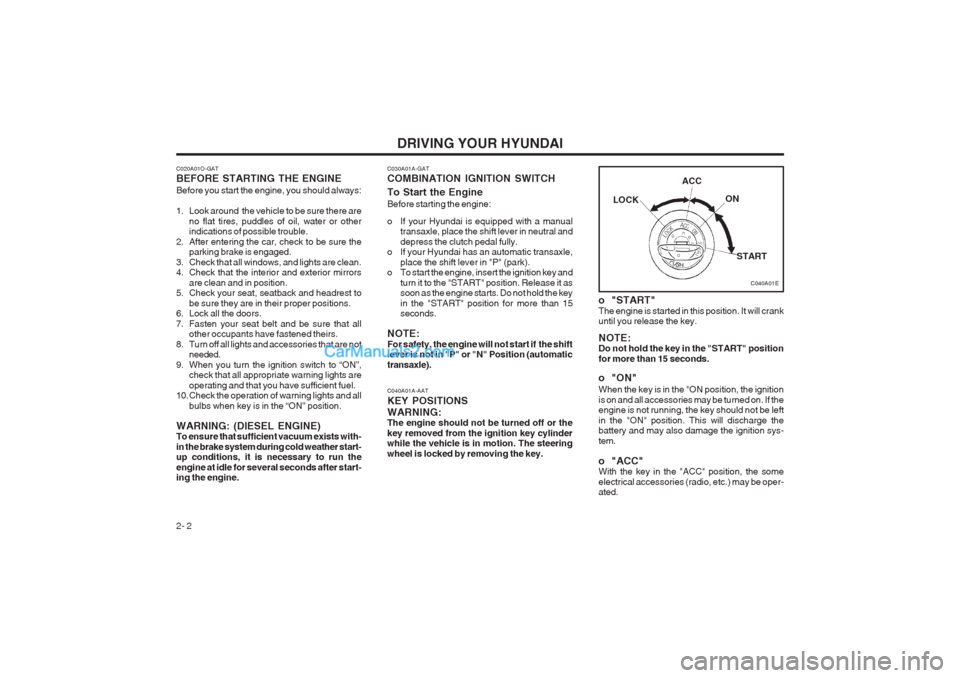
C040A01A-AAT KEY POSITIONSWARNING: The engine should not be turned off or the key removed from the ignition key cylinder while the vehicle is in motion. The steering wheel is locked by removing the key.
C040A01E
LOCK
ACC
ON
START
o "START" The engine is started in this position. It will crank until you release the key. NOTE: Do not hold the key in the "START" position for more than 15 seconds.
o "ON" When the key is in the "ON position, the ignition is on and all accessories may be turned on. If the engine is not running, the key should not be left in the "ON" position. This will discharge the battery and may also damage the ignition sys- tem.
o "ACC" With the key in the "ACC" position, the some electrical accessories (radio, etc.) may be oper- ated.
C020A01O-GAT BEFORE STARTING THE ENGINE Before you start the engine, you should always:
1. Look around the vehicle to be sure there are
no flat tires, puddles of oil, water or other indications of possible trouble.
2. After entering the car, check to be sure the parking brake is engaged.
3. Check that all windows, and lights are clean.
4. Check that the interior and exterior mirrors are clean and in position.
5. Check your seat, seatback and headrest to
be sure they are in their proper positions.
6. Lock all the doors.
7. Fasten your seat belt and be sure that all other occupants have fastened theirs.
8. Turn off all lights and accessories that are not needed.
9. When you turn the ignition switch to “ON”, check that all appropriate warning lights areoperating and that you have sufficient fuel.
10. Check the operation of warning lights and all
bulbs when key is in the “ON” position.
WARNING: (DIESEL ENGINE) To ensure that sufficient vacuum exists with- in the brake system during cold weather start- up conditions, it is necessary to run the engine at idle for several seconds after start- ing the engine.
C030A01A-GAT COMBINATION IGNITION SWITCH To Start the Engine Before starting the engine:
o If your Hyundai is equipped with a manual transaxle, place the shift lever in neutral and depress the clutch pedal fully.
o If your Hyundai has an automatic transaxle,
place the shift lever in "P" (park).
o To start the engine, insert the ignition key and
turn it to the "START" position. Release it as soon as the engine starts. Do not hold the key in the "START" position for more than 15 seconds.
NOTE: For safety, the engine will not start if the shift lever is not in "P" or "N" Position (automatic transaxle).
Page 101 of 317
DRIVING YOUR HYUNDAI 2- 3
C070C01E
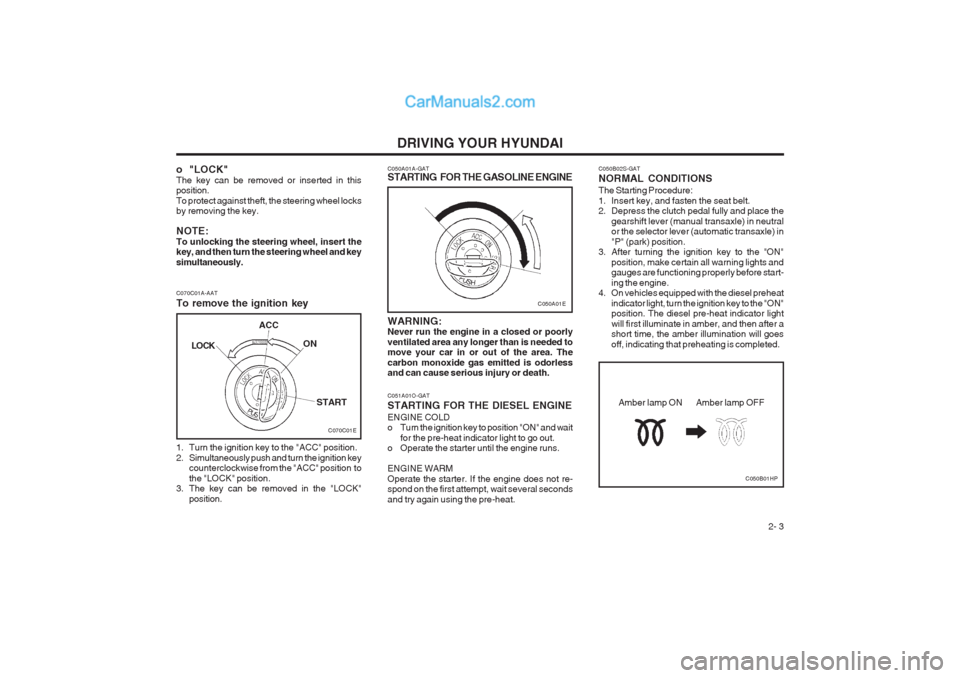
C070C01A-AAT To remove the ignition key
1. Turn the ignition key to the "ACC" position.
2. Simultaneously push and turn the ignition key
counterclockwise from the "ACC" position tothe "LOCK" position.
3. The key can be removed in the "LOCK"
position.LOCK
ACC
ON
START
C050A01E
C050A01A-GAT
STARTING FOR THE GASOLINE ENGINE WARNING: Never run the engine in a closed or poorly ventilated area any longer than is needed to move your car in or out of the area. The carbon monoxide gas emitted is odorless and can cause serious injury or death. C051A01O-GAT STARTING FOR THE DIESEL ENGINE ENGINE COLD
o Turn the ignition key to position "ON" and wait
for the pre-heat indicator light to go out.
o Operate the starter until the engine runs. ENGINE WARM Operate the starter. If the engine does not re- spond on the first attempt, wait several seconds and try again using the pre-heat.
o "LOCK" The key can be removed or inserted in this position. To protect against theft, the steering wheel locks by removing the key. NOTE: To unlocking the steering wheel, insert the key, and then turn the steering wheel and key simultaneously. C050B02S-GAT NORMAL CONDITIONS The Starting Procedure:
1. Insert key, and fasten the seat belt.
2. Depress the clutch pedal fully and place the
gearshift lever (manual transaxle) in neutralor the selector lever (automatic transaxle) in "P" (park) position.
3. After turning the ignition key to the "ON"
position, make certain all warning lights and gauges are functioning properly before start- ing the engine.
4. On vehicles equipped with the diesel preheat
indicator light, turn the ignition key to the "ON" position. The diesel pre-heat indicator light will first illuminate in amber, and then after a short time, the amber illumination will goes off, indicating that preheating is completed.
C050B01HP
Amber lamp ON Amber lamp OFF
Page 102 of 317
DRIVING YOUR HYUNDAI
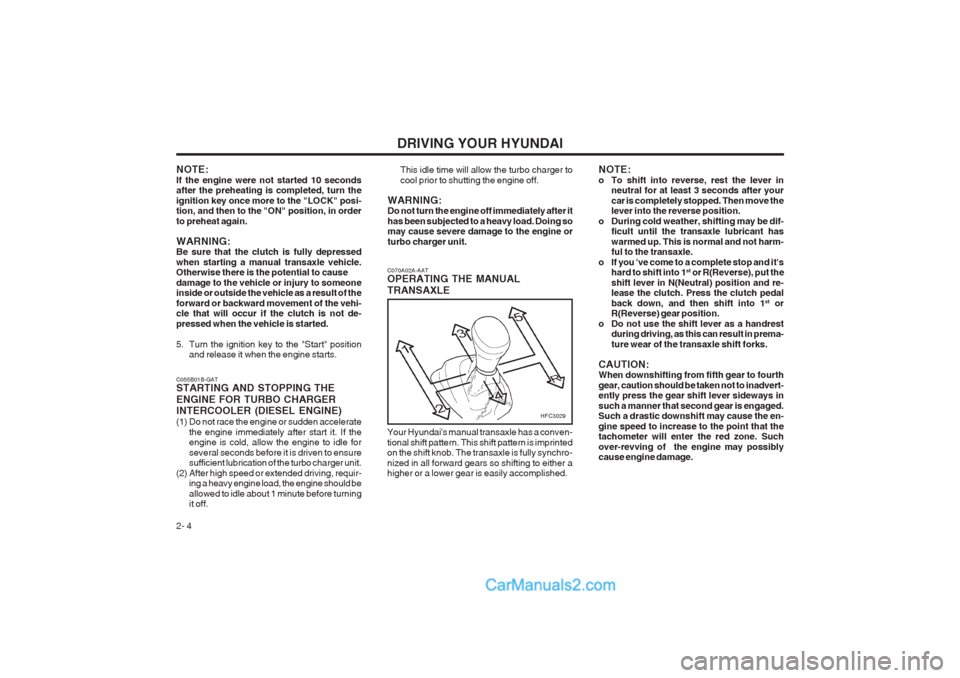
2- 4 C070A02A-AAT OPERATING THE MANUAL TRANSAXLE
HFC3029
Your Hyundai's manual transaxle has a conven- tional shift pattern. This shift pattern is imprinted on the shift knob. The transaxle is fully synchro- nized in all forward gears so shifting to either a higher or a lower gear is easily accomplished.
C055B01B-GAT STARTING AND STOPPING THE ENGINE FOR TURBO CHARGER INTERCOOLER (DIESEL ENGINE)
(1) Do not race the engine or sudden accelerate
the engine immediately after start it. If the engine is cold, allow the engine to idle for several seconds before it is driven to ensure sufficient lubrication of the turbo charger unit.
(2) After high speed or extended driving, requir- ing a heavy engine load, the engine should be allowed to idle about 1 minute before turning it off.
NOTE: If the engine were not started 10 seconds after the preheating is completed, turn the ignition key once more to the "LOCK" posi- tion, and then to the "ON" position, in order to preheat again. WARNING: Be sure that the clutch is fully depressed when starting a manual transaxle vehicle. Otherwise there is the potential to cause damage to the vehicle or injury to someone inside or outside the vehicle as a result of the forward or backward movement of the vehi- cle that will occur if the clutch is not de- pressed when the vehicle is started.
5. Turn the ignition key to the "Start" position
and release it when the engine starts. This idle time will allow the turbo charger to cool prior to shutting the engine off.
WARNING: Do not turn the engine off immediately after it has been subjected to a heavy load. Doing so may cause severe damage to the engine or turbo charger unit. NOTE:
o To shift into reverse, rest the lever in
neutral for at least 3 seconds after yourcar is completely stopped. Then move the lever into the reverse position.
o During cold weather, shifting may be dif- ficult until the transaxle lubricant has warmed up. This is normal and not harm- ful to the transaxle.
o If you 've come to a complete stop and it's hard to shift into 1 st
or R(Reverse), put the
shift lever in N(Neutral) position and re-lease the clutch. Press the clutch pedal back down, and then shift into 1 st
or
R(Reverse) gear position.
o Do not use the shift lever as a handrest during driving, as this can result in prema-ture wear of the transaxle shift forks.
CAUTION: When downshifting from fifth gear to fourth gear, caution should be taken not to inadvert- ently press the gear shift lever sideways in such a manner that second gear is engaged. Such a drastic downshift may cause the en- gine speed to increase to the point that the tachometer will enter the red zone. Such over-revving of the engine may possibly cause engine damage.